


Conversational AI is a set of technologies that enables machines to understand, process, and generate human language in multi-turn exchanges. It combines natural language processing, large language models, speech-to-text, and text-to-speech to create interactions that feel natural rather than scripted. VideoSDK extends this capability into real-time voice through its AI Voice Agent SDK, letting developers build production-grade conversational agents that connect to web, mobile, and telephony channels. Start with the architecture overview below, then explore the build guidance to see how the pieces fit together in practice.
The shift from rigid menu-driven bots to fluid, human-like digital assistants happened fast. Developers who once spent weeks wiring keyword-matching logic into support widgets now orchestrate pipelines that transcribe speech, reason over context, and generate fluent responses in real time. Understanding what conversational AI is, how its components interact, and where the production pitfalls live has become essential knowledge for anyone building customer-facing or internal tools in 2026.
This guide breaks down the full conversational AI stack for developers and product teams. You will learn the core components, the end-to-end processing flow, how AI-driven agents differ from traditional chatbots, practical build guidance, and the challenges that separate prototypes from production systems.
What is Conversational AI?
Conversational AI is defined as a branch of artificial intelligence focused on enabling computers to engage in human-like dialogue across text and voice channels. It works by combining natural language processing for comprehension, large language models for response generation, and dialogue management for maintaining context across multiple turns.
Unlike a simple question-answer bot that matches keywords to canned responses, a conversational AI system interprets intent, tracks conversation state, retrieves relevant information, and produces contextually appropriate replies. The technology spans chatbots in messaging apps, voice assistants on smart speakers, virtual agents in contact centers, and AI-driven support flows embedded directly into web and mobile applications.
For developers, the key distinction is that conversational AI systems are generative and adaptive. They handle unexpected phrasing, follow-up questions, topic shifts, and out-of-scope queries without requiring a pre-written rule for every possible input. This flexibility comes from the underlying machine learning models, particularly large language models, which generalize across language patterns rather than memorizing fixed paths.
VideoSDK provides conversational AI infrastructure through its AI Voice Agent SDK, which connects LLMs, speech-to-text, and text-to-speech providers into real-time voice sessions. This lets developers build agents that hold live phone conversations, web-based voice chats, and multi-platform voice interactions without managing the underlying media transport layer.
Core Components of Conversational AI
A production conversational AI system is not a single model. It is a pipeline of specialized components, each handling a distinct stage of the conversation lifecycle. Understanding these components is the foundation for making informed architecture decisions.
Natural Language Understanding (NLU)
Natural Language Understanding is the comprehension layer. It takes raw user input, whether typed text or transcribed speech, and extracts structured meaning from it. The two primary tasks are intent detection and entity extraction.
Intent detection classifies what the user wants to do. If someone types "I need to reset my password," the NLU layer identifies the intent as something like "passwordreset" rather than "accountcreation." Entity extraction pulls out specific data points from the utterance, such as an email address, a date, a product name, or a confirmation number. Together, intent and entity extraction convert unstructured language into a structured signal the downstream system can act on.
Modern NLU has evolved from dedicated classification models to large language models that perform comprehension as part of their general language capability. However, many production systems still use specialized NLU models for high-accuracy intent classification in domains where precision matters more than flexibility, such as banking or healthcare.
Dialogue Management
Dialogue management is the orchestration layer that keeps a conversation coherent across multiple turns. It handles three responsibilities: state tracking, turn management, and response selection.
State tracking maintains a record of what has been said, what information has been collected, and where the conversation currently stands. If a user asks about a flight booking and then follows up with "what about the return leg?" the dialogue manager uses conversation state to understand that "return leg" refers to the previously mentioned booking, not a new query.
Turn management decides when the system should speak, when it should wait for user input, and how to handle interruptions or overlapping speech in voice scenarios. Response selection determines what the system says next, whether that involves asking a clarifying question, retrieving information, confirming an action, or handing off to a human agent.
VideoSDK's Conversational Graph addresses dialogue management with a deterministic, graph-based approach. Instead of relying on the LLM to decide conversation flow, developers define nodes, transitions, and state as a directed graph. The LLM handles natural language generation while the graph enforces business rules and step ordering.
Natural Language Generation (NLG) and Large Language Models (LLM)
Natural Language Generation is the output layer. It converts the system's internal decision, whether a retrieved answer, a confirmation, or a clarifying question, into fluent human language.
Large language models have largely replaced template-based NLG systems. An LLM generates responses by predicting the most likely next tokens given the conversation context, producing text that reads naturally and adapts to the user's tone and phrasing. The quality of generation depends on the model, the prompt, and the context window provided.
Prompt engineering plays a central role here. The system prompt defines the agent's persona, constraints, available tools, and behavioral guidelines. In production systems, retrieval-augmented generation injects relevant documents or database records into the prompt context so the model can ground its responses in accurate, up-to-date information rather than relying solely on its training data.
How Conversational AI Works: End-to-End Flow
A conversational AI request moves through a multi-stage pipeline, and understanding that pipeline is essential for debugging latency, accuracy, and user experience issues.
The process begins when a user speaks or types input. In voice scenarios, audio is captured and sent to an automatic speech recognition engine, also known as speech-to-text, which transcribes the audio into text. In text-based scenarios, the input enters the pipeline directly.
The transcribed text passes to the NLU layer for intent detection and entity extraction. The dialogue manager receives the structured output, updates conversation state, and determines the next action. If the system needs external information, it queries a knowledge base, database, or API using retrieval-augmented generation techniques.
The dialogue manager then passes the assembled context to the LLM, which generates a natural language response. For voice agents, the response text is sent to a text-to-speech engine that synthesizes audio, which is played back to the user. The entire cycle repeats for each turn in the conversation.
Here is how the end-to-end flow looks architecturally:
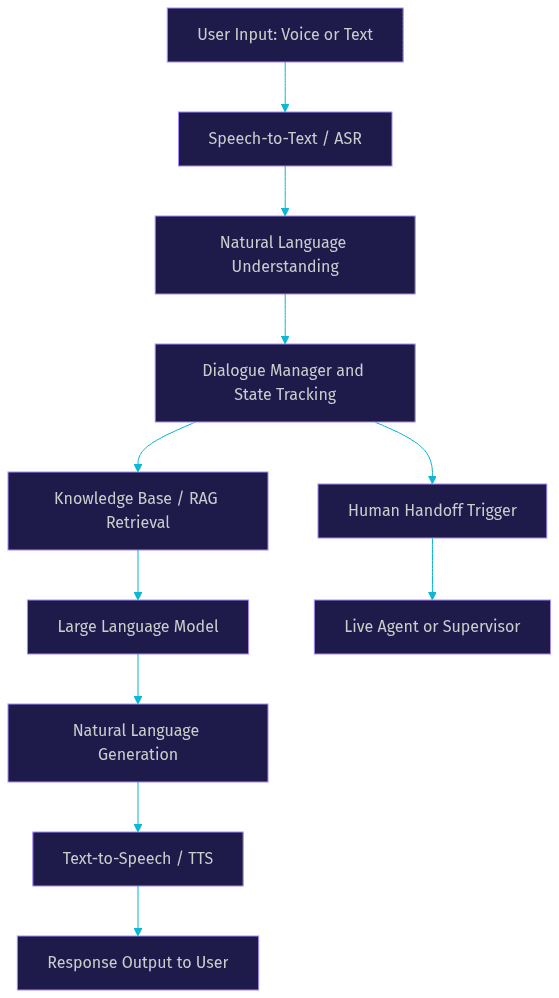
In a VideoSDK AI Voice Agent deployment, this entire pipeline runs inside an Agent Worker, a Python process that manages the session lifecycle within a VideoSDK Room. The user connects via web, mobile, or phone, and the agent processes speech in real time with sub-second response targets. The VideoSDK Agent SDK handles the media transport, turn detection, and voice activity detection, while developers configure the STT, LLM, and TTS providers that form the cognitive pipeline.
Conversational AI vs. Traditional Chatbots
Traditional chatbots and conversational AI agents occupy different points on a spectrum, and knowing where one ends and the other begins prevents architecture mistakes.
Traditional chatbots are rule-based systems. They follow decision trees, match keywords to predefined responses, and require developers to anticipate every possible user input. If a user phrases something slightly differently from what the bot expects, the conversation breaks. These systems work for narrow, well-defined tasks like answering FAQs or routing to a department, but they cannot handle follow-up questions, context shifts, or unexpected inputs gracefully.
Conversational AI agents are model-based systems. They use NLU and LLMs to interpret intent from any phrasing, maintain context across turns, and generate responses that adapt to the conversation. A user can rephrase, interrupt, change topics, or ask clarifying questions, and the agent adjusts without requiring a new rule for each variation.
The practical difference shows up in maintenance. A rule-based bot needs constant updates as new query patterns emerge. A conversational AI agent generalizes across language patterns, reducing the need for manual rule maintenance while introducing new considerations around model behavior, latency, and response consistency.
Key Use Cases
Conversational AI has moved well beyond experimental pilots. In 2026, production deployments span customer-facing and internal scenarios across industries.
Customer Support
Customer support is the most mature use case. Conversational AI agents handle tier-one support queries around the clock, deflecting tickets that do not require human intervention. They answer questions about billing, order status, account access, and product troubleshooting using knowledge base retrieval. When a query exceeds the agent's scope, the system hands off to a human agent with full conversation context attached, so the customer does not repeat themselves.
Sales and Lead Qualification
Conversational AI drives personalized sales interactions by qualifying leads through natural dialogue. An agent can ask discovery questions, recommend products based on stated needs, schedule demos, and route high-intent prospects to sales representatives. Unlike static web forms, a conversational interface adapts its questions based on previous answers, creating a more engaging experience that often produces higher conversion rates.
Internal Tools
Organizations deploy conversational AI internally for HR assistants, IT help desks, and knowledge retrieval from internal documentation. Employees ask questions about benefits policies, request time off, troubleshoot VPN issues, or search internal wikis through a conversational interface. This reduces the burden on shared services teams and gives employees faster access to information buried in document repositories.
Voice-First Experiences
Voice-first applications represent the fastest-growing segment. Smart speakers, in-car assistants, phone-based AI agents, and voice-enabled mobile apps all rely on conversational AI to process spoken input and generate spoken responses. VideoSDK's telephony and SIP integration enables developers to build AI agents that answer inbound phone calls or make outbound calls, bridging traditional phone networks with WebRTC-based AI pipelines.
Building a Conversational AI Solution: Practical Guidance
Building a production conversational AI system requires decisions across scope, platform, data, integration, and operations. Here is a practical walkthrough of each stage.
Define the Conversation Scope
Before choosing a model or platform, identify the specific intents your agent must handle and the success criteria for each. A support agent for a fintech app might handle five intents: balance inquiry, transaction dispute, card freeze, password reset, and human handoff. Define what a successful interaction looks like for each intent, what information the agent must collect, and where the conversation should escalate to a human.
Scope definition prevents the most common failure mode in conversational AI projects: trying to build an agent that handles everything. Narrow scope with high accuracy beats broad scope with unreliable responses every time.
Choose the Right Platform and Model
Platform selection depends on your deployment constraints, latency requirements, and integration needs. Cloud-based LLM providers like OpenAI, Google Gemini, and Anthropic Claude offer fast iteration and strong general-purpose performance. Open-source models like Meta's Llama family provide control and privacy for on-premise deployments but require infrastructure investment.
For voice agents, the STT and TTS layers matter as much as the LLM. Deepgram and OpenAI Whisper are common STT choices for low-latency transcription. ElevenLabs, Cartesia, and OpenAI TTS are popular for natural-sounding speech synthesis. VideoSDK's Agent SDK integrates with these providers through a plugin architecture, so you can swap components without rewriting your pipeline.
For structured conversations where business rules must control flow, VideoSDK's Conversational Graph lets you define the conversation as a directed graph with deterministic transitions, while the LLM handles only language generation.
Data Preparation and Training
Data preparation involves collecting representative conversation samples, annotating intents and entities, and preparing context documents for retrieval-augmented generation. For a customer support agent, this means gathering your FAQ content, product documentation, policy documents, and historical support transcripts.
If you are fine-tuning a model, you need labeled examples of inputs and desired outputs for each intent. If you are using RAG, you need a well-organized knowledge base with clean, chunked documents and an effective retrieval mechanism. In both cases, data quality directly determines response quality.
Integration and Deployment
Integration connects your conversational AI engine to the channels where users interact with it. A web chatbot needs a frontend widget and a WebSocket connection to the backend. A voice agent needs audio streaming, turn detection, and a telephony bridge if it handles phone calls.
VideoSDK simplifies this stage by providing the real-time communication layer. Your agent worker connects to a VideoSDK Room, and users join that room from web, mobile, or phone. The SDK handles media transport, participant management, and session lifecycle. For phone-based agents, the SIP integration bridges traditional telephony with the WebRTC room, so the same agent can serve web users and phone callers.
Deployment options include managed cloud services like VideoSDK Agent Cloud, which handles infrastructure scaling, or self-hosted deployment using Docker or Kubernetes for organizations that need full control over data residency and compute resources.
Monitoring and Continuous Improvement
Production conversational AI requires ongoing monitoring. Track metrics like task completion rate, average handling time, human handoff rate, user satisfaction scores, and response latency. Implement feedback loops where users can rate responses or flag incorrect answers. Use these signals to identify weak intents, update knowledge base content, retrain models, and refine system prompts.
Challenges and Best Practices
Conversational AI introduces challenges that traditional software does not face. Addressing them proactively separates production systems from demos.
Data privacy is the first concern. Conversational AI systems process user speech and text, which often contains personally identifiable information. Use encrypted transport for all audio and text streams. If your use case involves healthcare or financial data, ensure your deployment meets regulatory requirements like HIPAA or PCI-DSS. On-premise deployment options give you control over data residency when cloud processing is not acceptable.
Bias mitigation requires ongoing attention. LLMs reflect patterns in their training data, which can produce biased or inappropriate responses. Define clear behavioral guidelines in your system prompt. Test your agent across diverse user demographics and query patterns. Implement content filtering and safety guardrails at the output stage.
Latency is the make-or-break factor for voice agents. Users expect responses within a second or they perceive the interaction as broken. Optimize each pipeline stage: choose a fast STT provider, use streaming rather than batch processing, select an LLM with low inference latency, and pick a TTS provider that supports streaming audio output. VideoSDK's Agent SDK includes turn detection and voice activity detection tuned for real-time voice, plus TTS caching to reduce repeated synthesis latency.
Out-of-scope queries happen in every deployment. Users will ask things your agent was not designed to handle. Build graceful fallback responses that acknowledge the limitation and offer alternatives, whether that is a human handoff, a link to documentation, or a suggestion to rephrase. Never let the agent hallucinate an answer when it does not have the information.
Future Trends
Conversational AI in 2026 is moving toward multimodal agents that process voice, text, images, and video simultaneously. An agent might analyze a photo of a damaged product while discussing a return claim over voice, or read a document on screen while answering questions about its contents.
Real-time retrieval-augmented generation is becoming standard. Instead of relying on static knowledge bases, agents query live data sources during the conversation, ensuring responses reflect the most current information available. This is particularly valuable for domains like inventory checks, flight status, or market data where accuracy depends on recency.
Enterprise integration is deepening. Agents now connect directly to data lakes, CRM systems, and internal APIs, acting as conversational interfaces to complex backend infrastructure. VideoSDK's support for function tools and MCP integration in its Agent SDK reflects this trend, letting agents call external systems as part of their conversation flow.
The line between conversational AI and general AI agents is blurring. Voice agents increasingly handle multi-step workflows, not just Q&A. They book appointments, process payments, update records, and coordinate with other agents. VideoSDK's multi-agent switching capability supports this by allowing specialized agents to hand off conversations based on topic or task complexity.
Definitions Glossary
Conversational AI: A set of technologies that enables machines to understand and generate human language in multi-turn exchanges across text and voice channels.
Natural Language Understanding (NLU): The comprehension layer that performs intent detection and entity extraction on user input, converting unstructured language into structured signals.
Dialogue Management: The orchestration layer that tracks conversation state, manages turn-taking, and determines the system's next action based on context and business rules.
Large Language Model (LLM): A machine learning model trained on vast text corpora that generates fluent natural language responses by predicting likely token sequences given context.
Retrieval-Augmented Generation (RAG): A technique that retrieves relevant documents or data from an external knowledge base and injects them into the LLM's context window to ground responses in accurate, current information.
Speech-to-Text (STT): Also called automatic speech recognition, this component transcribes spoken audio into text for processing by the NLU and dialogue management layers.
Text-to-Speech (TTS): The component that synthesizes spoken audio from text, enabling voice agents to deliver natural-sounding responses to users.
Agent Worker: In VideoSDK's architecture, the Python process that runs an AI agent's pipeline, manages its session lifecycle, and connects it to a VideoSDK Room for real-time media exchange.
Key Takeaways
- Conversational AI combines NLU, dialogue management, LLMs, STT, and TTS into a pipeline that handles multi-turn, context-aware interactions across text and voice channels.
- Unlike traditional rule-based chatbots, conversational AI agents generalize across language patterns, reducing manual maintenance while introducing new considerations around model behavior and latency.
- Production success depends on narrowing conversation scope, choosing the right STT, LLM, and TTS providers for your latency and accuracy requirements, and maintaining clean knowledge base data for RAG.
- VideoSDK's AI Voice Agent SDK provides the real-time communication layer for voice agents, with built-in turn detection, voice activity detection, telephony integration, and support for deterministic conversation flows through Conversational Graph.
- Data privacy, bias mitigation, latency optimization, and graceful handling of out-of-scope queries are the four challenges that most often determine whether a conversational AI deployment succeeds in production.
Conclusion
Understanding what conversational AI is and how its components fit together gives you the foundation to build systems that users actually want to interact with. The technology stack is mature enough for production, but the architecture decisions you make around scope, models, data, and deployment will determine your outcome. VideoSDK gives you the real-time infrastructure to ship voice agents that connect to web, mobile, and phone channels without building the media transport layer from scratch. Explore the AI Voice Agent documentation to start building, or check out the code samples for working examples. You can sign up for free at app.videosdk.live/login and join the VideoSDK Discord community to connect with other developers building conversational AI products. What are you building with VideoSDK? Drop a comment below, I would love to hear what kind of conversational AI use case you are working on.
Free $20 Balance for AI Voice Agents & Video Calls
FAQ