


Call barging is a real-time call supervision feature that allows a supervisor to join an active agent-customer call as a third participant, enabling immediate intervention to resolve escalations, assist struggling agents, or close high-stakes deals. VideoSDK's SIP and telephony integration makes this possible by bridging traditional phone networks into WebRTC-based rooms where supervisors can join live calls instantly. Learn how call barging works, when to use it, and how to implement it with modern VoIP infrastructure.
Introduction
A single customer call can define a relationship. When an agent hits a wall with an upset customer or a complex policy question, the difference between a saved account and a churned one often comes down to how fast a supervisor can step in. Call barging gives managers that ability by letting them join a live call in real time, without warning the customer or disrupting the flow.
For contact centers running on modern VoIP infrastructure, call barging is not a luxury. It is an operational necessity that reduces escalations, improves first-call resolution, and accelerates agent training. The feature sits within a broader family of real-time supervision tools that includes silent monitoring and whisper coaching, each serving a distinct purpose in the supervisor toolkit.
In this guide, you will learn exactly what call barging is, how it works step by step, how it compares to related supervision features, and what to consider when implementing it. We will also explore how AI is changing the landscape and how platforms like VideoSDK enable call barging through SIP integration and audio room architecture.
What Is Call Barging?
Call barging is defined as a real-time call supervision capability that allows a supervisor or manager to join an ongoing call between an agent and a customer as a third, audible participant. Once the supervisor barges in, all three parties can hear and speak to each other, effectively turning a two-way call into a three-way conversation.
Call barging works by leveraging the underlying telephony infrastructure to bridge an additional participant into an active call session. In traditional PBX systems, this was done through physical line bridging. In modern VoIP and WebRTC-based systems, the call is hosted in a virtual room, and the supervisor simply joins that room as a new participant with full audio access.
The key distinction between call barging and its related features lies in visibility and participation level. Call monitoring allows a supervisor to listen to a call silently without either party knowing. Whisper coaching lets the supervisor speak only to the agent while the customer hears nothing. Call barging makes the supervisor fully present to both parties. A fourth option, call takeover, has the supervisor fully replace the agent on the call.
VideoSDK provides the foundation for call barging through its telephony and SIP integration, which bridges traditional SIP telephony with WebRTC-based rooms. When a customer calls in through a SIP trunk, the call lands in a VideoSDK room. A supervisor can then join that same room as an additional participant, creating the three-way connection that defines call barging. The same architecture supports audio calling features, making it possible to build supervision workflows on top of standard real-time communication infrastructure.
How Call Barging Works: Step-by-Step Workflow
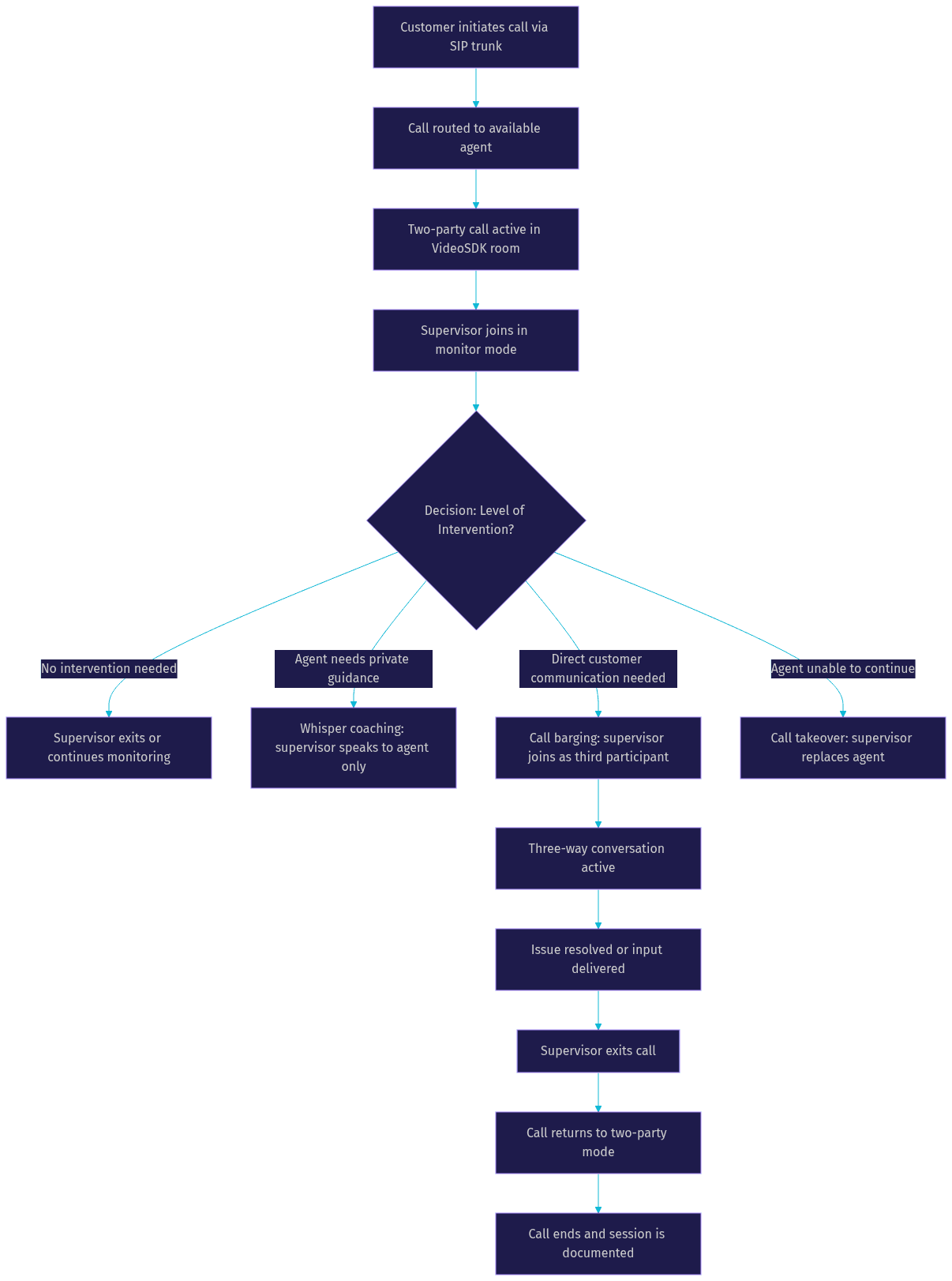
The call barging process follows a predictable lifecycle from the moment a customer connects to the moment the supervisor exits. Understanding each step helps contact center managers design better supervision workflows and helps developers build more reliable barging features into their telephony stack.
Agent-Customer Call Initiation
The process begins when a customer initiates a call through a phone number, SIP trunk, or WebRTC endpoint. The telephony platform routes the call to an available agent based on queue logic, skills-based routing, or direct dial. At this point, a two-party call session is active, and both the agent and customer can communicate normally. In a VideoSDK-based architecture, this call exists as a room with two participants.
Supervisor Monitoring
Before barging in, a supervisor typically monitors the call silently. Using call monitoring functionality, the supervisor joins the room in a listen-only mode. The agent may or may not be notified that a supervisor is listening, depending on the platform configuration. The supervisor evaluates the call quality, agent performance, and customer sentiment to decide whether intervention is necessary.
Decision Point: Monitor, Whisper, Barge, or Takeover
This is the critical junction where the supervisor chooses the appropriate level of intervention. If the call is going well, the supervisor continues monitoring or exits. If the agent needs guidance that the customer should not hear, whisper coaching is the right choice. If the situation requires direct communication with the customer, call barging is appropriate. If the agent is completely unable to continue, a full takeover may be necessary.
Barge-In Execution
When the supervisor decides to barge in, the telephony platform promotes the supervisor from a silent listener to an active participant. In technical terms, the supervisor's audio track is unmuted and mixed into the call session so that both the agent and customer can hear them. The customer is typically informed that a supervisor has joined the call, either by the agent or through an automated announcement.
Three-Way Interaction
With the supervisor now active on the call, all three parties communicate in a standard three-way conversation. The supervisor can ask the customer clarifying questions, provide the agent with real-time information, de-escalate tense situations, or offer approvals for discounts and exceptions. The agent remains on the call and continues to participate, which distinguishes barging from a full takeover.
Supervisor Exit
Once the issue is resolved or the supervisor's input is no longer needed, the supervisor leaves the call. The platform removes the supervisor's audio track from the session, returning the call to a two-party conversation between the agent and customer. The agent then continues handling the call independently.
Documentation and Review
After the call ends, the interaction is documented for quality assurance. The recording captures the moment the supervisor barged in, the duration of the three-way segment, and the outcome. This data feeds into agent performance reviews, training programs, and compliance audits.
Benefits of Call Barging
Call barging delivers measurable operational value to contact centers by giving supervisors a direct intervention tool that prevents bad outcomes in real time. The benefits extend beyond individual call rescue to broader improvements in team performance and customer experience.
Faster issue resolution is the most immediate benefit. When a customer is frustrated and the agent has exhausted their available options, a supervisor who barges in can authorize exceptions, provide specialized knowledge, or simply add authority to the conversation. This reduces the need for callbacks, transfers, and escalation tickets. According to industry research from contact center analytics firms, real-time supervisor intervention can reduce average handle time by up to 20% on complex calls.
Real-time coaching is where call barging pays long-term dividends. New agents who know a supervisor can join their calls at any time feel supported rather than abandoned. The supervisor can model de-escalation techniques, demonstrate product knowledge, and provide immediate feedback after the call ends. This accelerates the ramp-up period for new hires and builds confidence in remote agents who lack the benefit of overhearing experienced colleagues.
First-call resolution (FCR) improves because supervisors can resolve issues on the current call rather than scheduling follow-ups. When a supervisor barges in to approve a refund, explain a policy, or answer a technical question, the customer gets their answer immediately. Higher FCR rates correlate directly with improved customer satisfaction scores and reduced operational costs.
Customer satisfaction gets a boost because the customer perceives that the organization takes their issue seriously enough to involve a manager. For high-value customers or sensitive situations, the presence of a supervisor signals commitment to resolution. This is particularly important in industries like financial services, healthcare, and telecommunications where trust is a key differentiator.
Data collection for quality assurance improves because barged calls create rich training material. The recordings capture both the problem and the resolution, giving quality assurance teams concrete examples of effective supervisor interventions. These recordings become case studies for onboarding programs and reference material for agents facing similar situations.
When to Use Call Barging: Best-Practice Scenarios
Call barging is a powerful tool, but it is not the right response to every situation. Supervisors need clear guidelines on when barging in adds value and when it undermines agent confidence or customer trust. The following scenarios represent the strongest cases for call barging.
Handling upset or high-value customers is the most common trigger. When a customer is visibly angry, threatening to cancel, or disputing a significant charge, a supervisor's presence can de-escalate the situation and demonstrate organizational commitment. The supervisor can authorize resolutions that the agent may not have the authority to offer.
Assisting new or remote agents is another prime scenario. Agents in their first weeks on the job often encounter situations they have not seen before. Rather than placing the customer on hold while the agent asks a colleague, a supervisor can barge in and guide the conversation in real time. This is especially valuable for remote contact centers where agents cannot simply turn to a desk neighbor for help.
Complex product or policy questions sometimes exceed an agent's training. When a customer asks about an obscure policy exception or a niche product feature, a supervisor with deeper institutional knowledge can barge in and provide the answer without a transfer. This keeps the customer on the line and avoids the friction of being bounced between departments.
Sales calls requiring immediate manager input benefit from barging when a deal is close to closing but needs approval for a custom discount or contract term. The supervisor can join the call, confirm the terms, and close the deal in a single conversation rather than scheduling a follow-up.
Do and Don't Guidelines for Call Barging
Do:
- Barge in when a customer explicitly requests a supervisor
- Barge in when an agent is visibly struggling with a complex issue
- Barge in for high-value accounts at risk of churn
- Inform the customer that a supervisor has joined the call
- Document the reason for barging in your quality assurance system
Don't:
- Barge in on every call as a routine practice
- Barge in without listening first to understand the context
- Undermine the agent's authority in front of the customer
- Barge in on calls where whisper coaching would suffice
- Forget to exit the call once your input is no longer needed
Call Barging vs Whisper Coaching vs Call Monitoring
Supervisors have three primary real-time intervention tools at their disposal, and choosing the right one depends on the situation. Understanding the differences between call monitoring, whisper coaching, and call barging is essential for building effective supervision workflows.
Call monitoring is the least intrusive option. The supervisor joins the call silently and listens to both the agent and customer. Neither party is aware of the supervisor's presence unless the platform is configured to notify the agent. This is ideal for routine quality checks, performance evaluation, and getting a sense of how the team is handling calls without disrupting anyone.
Whisper coaching adds one-directional communication. The supervisor can speak to the agent, but the customer cannot hear the supervisor's voice. This is perfect for providing real-time guidance, correcting misinformation, or suggesting a different approach without the customer knowing that the agent is being coached. It preserves the agent's authority while giving them the support they need.
Call barging is the most visible intervention. The supervisor joins as a full participant, and all three parties can hear each other. This is appropriate when the customer needs to hear from a manager directly, when the situation requires joint problem-solving, or when the agent needs to be relieved of primary responsibility without leaving the call.
| Feature | Call Monitoring | Whisper Coaching | Call Barging | Call Takeover |
|---|---|---|---|---|
| Supervisor hears agent | Yes | Yes | Yes | Yes |
| Supervisor hears customer | Yes | Yes | Yes | Yes |
| Customer hears supervisor | No | No | Yes | Yes |
| Agent hears supervisor | No (or optional) | Yes | Yes | Yes |
| Agent remains on call | Yes | Yes | Yes | No |
| Typical use case | Quality checks | Real-time coaching | Escalation rescue | Agent unavailable |
| Compliance complexity | Low | Medium | High | High |
The decision framework for supervisors should follow a graduated approach. Start with monitoring to assess the situation. If the agent needs help that the customer should not hear, switch to whisper coaching. If the customer needs to hear from a supervisor directly, barge in. Only use takeover when the agent is truly unable to continue.
Implementation Considerations
Building call barging into a contact center stack requires careful planning across technology, security, training, and metrics. The implementation choices you make determine whether the feature becomes a reliable supervision tool or a source of compliance headaches.
Required Technology Stack
At minimum, call barging requires a VoIP platform that supports multi-party calling, a supervisor dashboard with real-time call visibility, and a signaling layer that can promote a listener to an active participant. If you are building on VideoSDK, the telephony integration handles the SIP-to-WebRTC bridging, while the REST API provides room management and participant control. The supervisor dashboard can be built using any of VideoSDK's client SDKs, with the supervisor joining the room as a participant whose audio track is initially muted and then unmuted when barging is triggered.
Security and Compliance
Call barging introduces compliance considerations because a third party is joining a conversation that the customer may not expect. Most jurisdictions require at least one party's consent for call recording, and some require all-party consent. When a supervisor barges in, the recording must capture all participants clearly. You should also implement access controls so that only authorized supervisors can monitor or barge into calls. VideoSDK supports token-based authentication and role-based access control, which lets you restrict barging capabilities to specific user roles.
Data privacy regulations like GDPR and CCPA also apply. If a supervisor barges into a call involving sensitive personal information, that interaction becomes part of the recorded data subject to retention and deletion policies. Make sure your recording storage and retention rules account for barged calls specifically.
Training Supervisors and Agents
Technology is only half the equation. Supervisors need training on barging etiquette, including how to introduce themselves to the customer, how to avoid undermining the agent, and when to exit the call. Agents need to understand that barging is a support tool, not a surveillance mechanism. Setting clear expectations about when and why supervisors will barge in helps build trust between agents and management.
Metrics to Track
To measure the effectiveness of call barging, track the following metrics: barge frequency (how often supervisors intervene), resolution time after barging (how quickly issues are resolved once a supervisor joins), agent performance on subsequent similar calls (whether the coaching effect sticks), customer satisfaction scores on barged calls, and barge-to-resolution ratio (what percentage of barged calls result in immediate resolution versus follow-up).
Future Trends: AI-Enhanced Call Barging
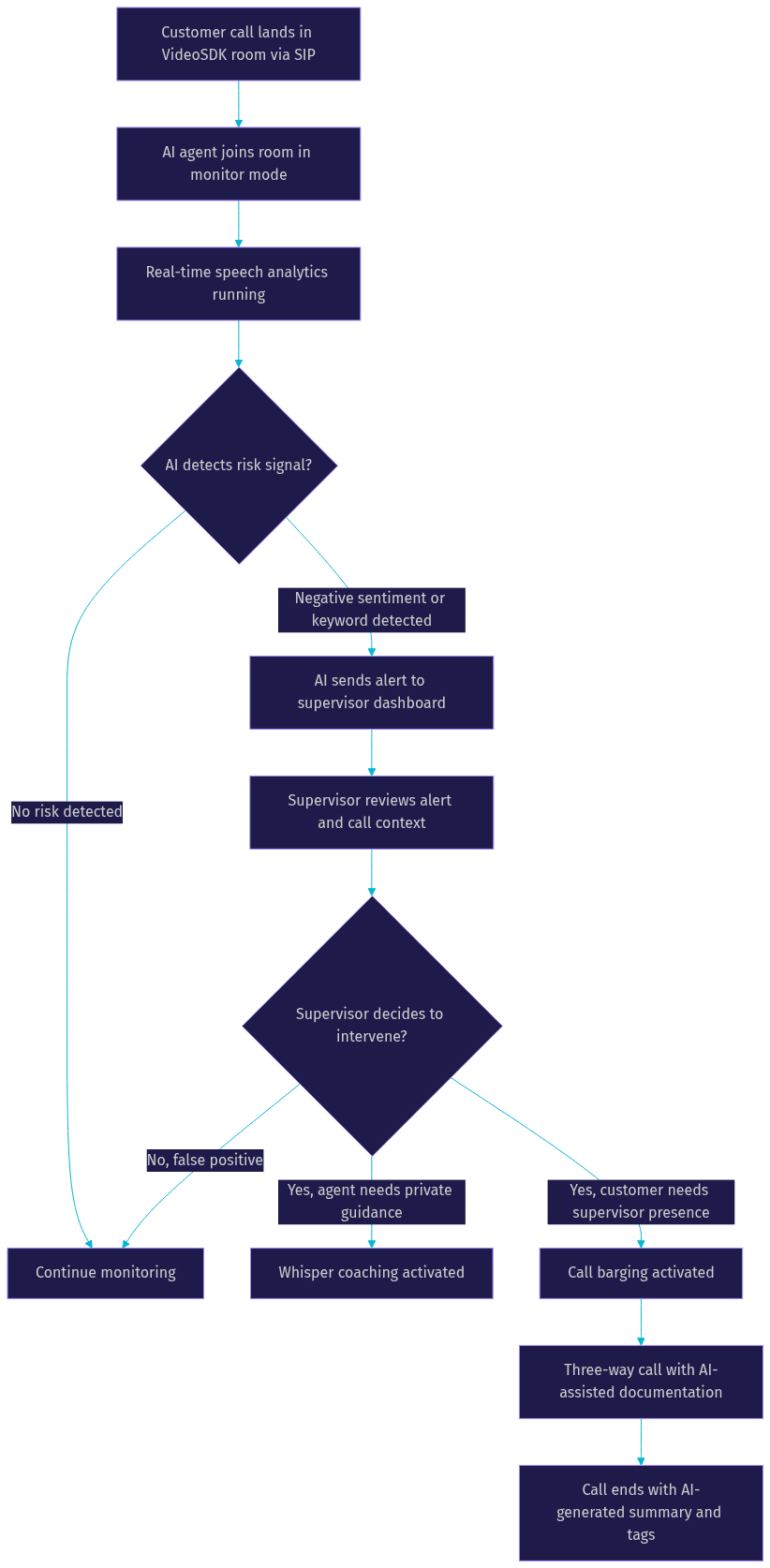
Artificial intelligence is transforming call barging from a reactive tool into a proactive one. The next generation of contact center platforms will use AI to detect when a supervisor should barge in before a human supervisor even notices the problem.
Speech analytics integration allows real-time analysis of the conversation to identify keywords, phrases, and patterns that signal trouble. If a customer says "cancel my account" or "I want to speak to a manager," the system can flag the call for immediate supervisor attention. Sentiment detection goes further by analyzing tone, pace, and word choice to gauge emotional state, alerting supervisors when a customer's frustration level crosses a threshold.
VideoSDK's AI voice agent capabilities can be integrated into this workflow. An AI agent can monitor calls in real time, perform sentiment analysis, and trigger alerts when intervention is needed. The AI does not replace the human supervisor, but it acts as an intelligent filter that surfaces the calls most likely to benefit from barging.
Automated triggers for barge-in based on keywords or tone are becoming standard in enterprise contact center platforms. Instead of a supervisor manually scanning a dashboard of active calls, the system pushes notifications to the supervisor's device when a call meets predefined criteria. This reduces the cognitive load on supervisors and ensures that the most critical calls receive attention first.
Definitions Glossary
Call Barging: A real-time call supervision feature where a supervisor joins an active agent-customer call as a third audible participant, creating a three-way conversation.Call Monitoring: A supervision mode where a supervisor silently listens to an active call without either party being aware of their presence.Whisper Coaching: A supervision mode where a supervisor can speak to the agent without the customer hearing, enabling real-time guidance during live calls.Call Takeover: A supervision mode where a supervisor fully replaces the agent on an active call, assuming primary responsibility for the customer interaction.SIP (Session Initiation Protocol): The signaling protocol used to establish, modify, and terminate real-time communication sessions, including phone calls bridged into VideoSDK rooms.First-Call Resolution (FCR): A contact center metric measuring the percentage of customer issues resolved on the first call without requiring follow-up contact.
Key Takeaways
- Call barging allows supervisors to join live agent-customer calls as a third participant, enabling real-time intervention for escalations, coaching, and complex issue resolution.
- Call barging differs from call monitoring (silent listening) and whisper coaching (private agent guidance) in that all three parties can hear and speak to each other.
- The best use cases for call barging include upset customers, new agent support, complex policy questions, and sales calls requiring manager approval.
- Implementation requires a VoIP platform with multi-party calling support, proper authentication and role-based access control, and compliance with recording and privacy regulations.
- AI is making call barging proactive by using speech analytics and sentiment detection to trigger supervisor alerts before situations escalate.
- VideoSDK's telephony and SIP integration provides the architectural foundation for building call barging features by bridging traditional phone calls into WebRTC-based rooms where supervisors can join as participants.
Conclusion
Call barging is a strategic supervision tool that turns real-time intervention into a competitive advantage for contact centers. By allowing supervisors to join live calls at the moment they are needed most, organizations can rescue at-risk accounts, accelerate agent development, and improve first-call resolution without adding operational overhead. The key is implementing barging with clear guidelines, proper compliance controls, and the right technology stack.
If you are building a contact center platform or adding supervision features to an existing telephony workflow, VideoSDK's SIP and telephony integration gives you the room-based architecture needed to support call barging, whisper coaching, and call monitoring out of the box. You can start with a free account at app.videosdk.live/login and explore the code samples to see how multi-party calling works in practice.
What are you building with VideoSDK? Drop a comment below. I would love to hear what kind of telephony or contact center use case you are working on. You can also join the VideoSDK Discord community to connect with other developers building real-time communication features.
FAQ