


A voice assistant using Python is an application that processes spoken commands, interprets them via a language model, and responds with synthesized speech. Python provides robust libraries for speech-to-text, large language model integration, and text-to-speech, making it ideal for building both offline and cloud-connected assistants. You can build one by chaining an audio input module, an AI agent pipeline, and an audio output module.
Privacy-first voice assistants are experiencing a massive surge, with a 2026 industry report showing that over 40% of developers now prefer local processing for voice applications to avoid cloud data transmission. Python has become the leading language for this shift. Its extensive ecosystem of machine learning and audio processing libraries allows developers to build highly customized, privacy-first voice assistants using Python. Whether you are building a home automation hub, an accessibility tool, or a local productivity assistant, Python provides the flexibility to run entirely offline or leverage cloud-based AI models when needed. By the end of this guide, you will understand the architecture, core libraries, and implementation steps required to build a production-ready voice assistant. We will cover everything from selecting the right speech-to-text engine to wiring up tool plugins and deploying on edge devices.
What Is a Voice Assistant Using Python?
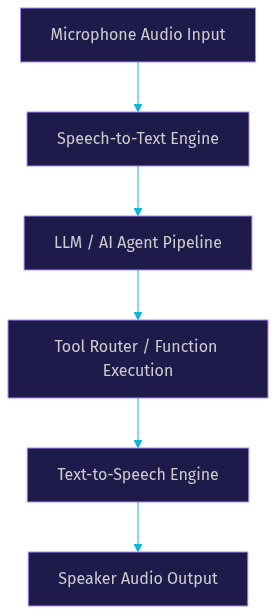
A voice assistant using Python is defined as a software application that captures audio input, converts it to text, processes the text through an AI reasoning engine, and outputs a spoken response. It works by orchestrating a pipeline of distinct components: a microphone capture mechanism, a speech-to-text (STT) engine, a large language model (LLM) or rule-based agent, an optional tool router for executing commands, and a text-to-speech (TTS) engine.
VideoSDK provides an advanced AI Agent SDK that can serve as the orchestration layer for these pipelines, handling real-time audio streaming and WebRTC transport. When building a voice assistant using Python, developers typically piece together these modular components to control latency, privacy, and functionality. The power of Python lies in its ability to glue these disparate systems together. You can use a local model for wake-word detection, send the audio to a cloud API for transcription, route the text to a local LLM for reasoning, and finally use a cloud TTS service for high-quality voice output. This flexibility is unmatched in other programming ecosystems.
Here is the standard data flow for a Python voice assistant:
Core Python Libraries & Tools
Building a voice assistant using Python requires selecting the right libraries for each stage of the audio processing pipeline. The Python ecosystem offers mature options for both offline and cloud-based processing. Your choices here will dictate the assistant's latency, accuracy, and privacy footprint.
Speech-to-Text (STT) Libraries
For offline STT, Vosk and faster-whisper are the most popular choices. Vosk is lightweight and runs efficiently on edge devices like Raspberry Pi, making it ideal for low-resource environments. Faster-whisper offers highly accurate transcription using Whisper models optimized for speed, leveraging CTranslatec for faster inference. For cloud-based STT, Deepgram and Google Speech-to-Text provide low-latency, high-accuracy transcription suitable for real-time assistants. Deepgram's Nova models are particularly noted for their speed in conversational AI. OpenWakeWord is a specialized library for detecting wake words locally without sending continuous audio to the cloud, preserving privacy and reducing bandwidth.
LLM and Agent Back-Ends
The reasoning engine is the brain of a voice assistant using Python. For local, private inference, Ollama allows developers to run models like Llama 3 directly on their hardware. This is perfect for offline assistants. If cloud processing is acceptable, the OpenAI Realtime API and Anthropic Claude provide state-of-the-art reasoning and tool-use capabilities. Frameworks like Pipecat and the VideoSDK AI Agent SDK help manage the conversation state, turn detection, and pipeline orchestration between the STT and TTS components. These frameworks handle the complex task of interrupting the assistant when a user speaks, a feature known as barge-in. Without an orchestration framework, managing conversation context and barge-in manually is highly complex.
Text-to-Speech (TTS) Engines
To generate spoken responses, pyttsx3 is a standard offline library that uses system voices. It requires no internet connection but lacks the naturalness of neural voices. EdgeTTS provides high-quality neural voices through Microsoft's edge service, offering a good balance of quality and convenience. For production-grade, natural-sounding voices, the ElevenLabs SDK and OpenAI TTS offer cloud-based synthesis that significantly enhances the user experience. ElevenLabs is widely regarded as a leader in voice realism, making it a top choice for customer-facing assistants where human-like interaction is critical.
Architecture Blueprint
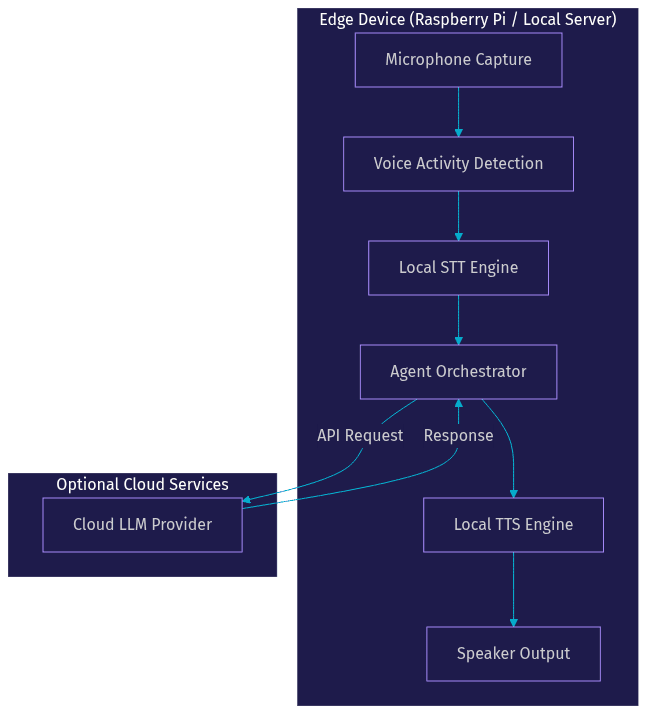
Designing a voice assistant using Python requires careful consideration of where each component runs. A hybrid architecture is common, where audio capture and wake-word detection happen on the edge device, while heavy LLM inference happens in the cloud or on a local GPU server. This split allows you to optimize for both privacy and performance.
The architecture must handle asynchronous audio streams to prevent blocking. When a user speaks, the audio is chunked and sent to the STT engine. As the STT outputs partial transcripts, the LLM can begin processing to reduce end-to-end latency. This streaming approach is critical for achieving sub-second response times. Turn detection, often powered by Voice Activity Detection (VAD), determines when the user has stopped speaking and the assistant should respond. Without accurate VAD, the assistant might interrupt the user or wait too long to reply, degrading the conversational experience.
VideoSDK's AI Agent architecture handles much of this complexity by providing an Agent Worker that manages the session lifecycle inside a VideoSDK room. This is particularly useful if your voice assistant needs to be accessed remotely via web or mobile apps. The Agent Worker ensures that audio packets are routed efficiently between the user's device and your Python pipeline, handling WebRTC negotiations and network adaptivity automatically.
Here is an architecture diagram for deploying a voice assistant using Python on an edge device with optional cloud LLM routing:
Step-by-Step Implementation Overview
Building a voice assistant using Python involves wiring the architectural components together. While exact implementations vary based on your chosen libraries, the narrative flow remains consistent. Here is a comprehensive walkthrough of the process.
1. Set Up the Python Environment
Begin by creating an isolated Python environment to manage dependencies. You will need system-level audio libraries installed so Python can access the microphone. On Linux, this typically involves installing PortAudio. On Windows and macOS, the process is generally more straightforward but still requires granting microphone permissions to your terminal or IDE. Ensure your OS permissions allow the application to capture audio before writing any logic. Using a virtual environment prevents conflicts with system-wide Python packages, which is crucial when dealing with machine learning libraries that have specific version requirements.
2. Install and Configure STT
Choose your STT engine based on your latency and privacy requirements. If running offline, configure Vosk or faster-whisper with the appropriate model size. A smaller model will run faster but might struggle with accents or complex vocabulary. The STT component must continuously listen to the microphone stream and output text chunks. You should implement logic to handle partial transcripts versus final transcripts to optimize response times. Partial transcripts can be used to show the user that the assistant is listening, while final transcripts are sent to the LLM for reasoning.
3. Choose and Connect an LLM
Connect your STT output to an LLM. If you are using Ollama for local inference, ensure the model is loaded into memory before starting the assistant to avoid cold-start delays. For cloud LLMs, configure your API keys securely using environment variables. Never hardcode secrets. The LLM should receive the transcribed text and generate a response. If you are using an orchestration framework like the VideoSDK AI Agent SDK, the pipeline will handle passing the context to the LLM and managing conversation history. This prevents the assistant from losing context in multi-turn conversations.
4. Add Wake-Word Detection
To prevent the assistant from processing all ambient noise, integrate a wake-word engine like OpenWakeWord. The microphone stream should first pass through the wake-word detector. Only when the specific wake word is detected should the audio be routed to the STT engine. This saves compute resources and enhances privacy. You can train custom wake words using small audio samples, allowing you to create a personalized activation phrase like "Hey Computer" or "Start Assistant." This step is vital for always-on assistants deployed in homes or offices.
5. Hook Up TTS
Route the LLM's text response to your chosen TTS engine. If using pyttsx3, configure the voice and speech rate to sound natural. For cloud TTS like ElevenLabs, stream the audio chunks back to the local speaker as they arrive to minimize latency. The goal is to start speaking the first sentence before the LLM has finished generating the entire response. This streaming TTS approach dramatically improves the perceived responsiveness of your voice assistant using Python. You should also implement logic to stop the TTS playback immediately if the user interrupts, enabling a natural conversational flow.
6. Wire Tool Plugins
Extend the assistant by giving the LLM access to external tools. Define functions for web search, email sending, or home automation APIs. When the LLM determines a tool is needed, it outputs a structured request. Your Python application intercepts this, executes the tool, and returns the result to the LLM to synthesize a final voice response. This tool routing transforms your assistant from a simple chatbot into an active agent capable of executing real-world tasks. Ensure your tool functions include error handling so the assistant can gracefully report failures to the user.
Choosing the Right Components for Your Voice Assistant Using Python
Selecting the right components for a voice assistant using Python depends on your specific constraints around latency, privacy, and hardware. [LINKABLE ASSET — comparison table]
| Component | Offline Option | Cloud Option | Typical Latency | Privacy Rating |
|---|---|---|---|---|
| STT | Vosk / faster-whisper | Google Speech, Deepgram | 150 ms | High (Offline) / Medium (Cloud) |
| LLM | Ollama (Llama 3) | OpenAI Realtime, Anthropic Claude | 200 ms | High (Offline) / Medium (Cloud) |
| TTS | pyttsx3 / EdgeTTS (local) | ElevenLabs, OpenAI TTS | 120 ms | High (Offline) / Medium (Cloud) |
Offline components offer the highest privacy because audio data never leaves the device, but they require more local compute power. Cloud options provide superior accuracy and natural-sounding voices but introduce network latency and privacy considerations. For a balanced approach, many developers use local STT and wake-word detection, combined with a cloud LLM and TTS. This keeps sensitive ambient audio local while leveraging the power of cloud AI for reasoning and high-quality voice synthesis.
Real-World Use Cases
A voice assistant using Python can be tailored to numerous practical scenarios. The flexibility of the Python ecosystem makes it suitable for everything from embedded devices to enterprise servers.
Home Automation
Developers frequently build local voice hubs to control smart home devices. By integrating a Python voice assistant with Home Assistant APIs, users can say "turn off the living room lights" without relying on commercial cloud assistants. This keeps smart home data entirely within the local network. A common setup involves a Raspberry Pi running Vosk for STT and Ollama for LLM processing, ensuring zero cloud dependency.
Personal Productivity
A desktop voice assistant can manage calendars, set reminders, and draft emails. By connecting the LLM to productivity APIs, the assistant can parse natural language requests like "schedule a meeting with John tomorrow at 2 PM" and execute the calendar event creation automatically. This use case benefits from cloud LLMs due to their superior reasoning capabilities for complex date and time parsing.
Accessibility Tool
For visually impaired users, a fast, offline voice assistant using Python provides a reliable way to interact with a computer. By routing system events to the assistant, it can read aloud notifications, describe screen content, and execute navigation commands without requiring visual interaction. The low latency of local processing is crucial here, as delays can make the system frustrating to use.
On-Device Tutoring Bot
In educational settings, a voice assistant can act as a tutor. Running a local LLM like Llama 3 via Ollama, the assistant can answer student questions, explain concepts, and quiz the user, all without an internet connection. This is particularly valuable in environments with limited connectivity. The privacy of local processing also ensures student data is never transmitted to external servers.
Production Checklist & Gotchas
Deploying a voice assistant using Python to production requires addressing several infrastructure and security details. Overlooking these can lead to poor user experience or security vulnerabilities.
Hardware and Audio Configuration
Ensure your microphone and speaker devices are correctly mapped in your OS audio settings. On Linux, PulseAudio or PipeWire configurations often need explicit source and sink definitions. Test audio input levels to avoid clipping or low-volume capture, which degrades STT accuracy. A high-quality USB microphone can significantly improve transcription accuracy compared to built-in laptop mics.
Network and WebRTC Considerations
If your voice assistant is accessible via a web interface or mobile app, you will need WebRTC infrastructure. VideoSDK handles this automatically, but if you are building custom infrastructure, you must configure STUN and TURN servers to handle NAT traversal. Without proper TURN servers, users on restrictive corporate networks will experience connection failures. VideoSDK provides built-in cloud proxy and geo-fencing to optimize connectivity.
Security and Token Management
Never hardcode API keys for cloud LLM or TTS providers. Use environment variables and secret management systems. If using VideoSDK for real-time transport, generate Meeting Tokens server-side and scope them appropriately. Implement End-to-End Encryption (E2EE) if transmitting sensitive voice data over the network. Token expiry is a common pitfall; ensure your application refreshes tokens before they expire to prevent sudden disconnections.
Monitoring and Reconnection
Voice assistants must handle network drops gracefully. Implement automatic reconnection logic for cloud APIs. Monitor STT confidence scores and LLM response times to detect degradation. Log pipeline events to diagnose issues where the assistant fails to respond or hallucinates unexpected outputs. A robust logging system is invaluable for debugging production voice assistants.
Definitions Glossary
STT (Speech-to-Text): The process of converting spoken audio into text. In a Python voice assistant, this is often handled by Vosk or faster-whisper.
TTS (Text-to-Speech): The process of converting generated text back into spoken audio. Libraries like pyttsx3 or ElevenLabs handle this.
Wake Word: A specific phrase that triggers the voice assistant to start listening, preventing continuous audio processing.
VAD (Voice Activity Detection): An algorithm that detects the presence of human speech, used to determine when a user starts and stops talking.
Agent Worker: A Python process that manages the lifecycle of an AI agent session, handling the pipeline between STT, LLM, and TTS.
Key Takeaways
- A voice assistant using Python is built by chaining STT, LLM, and TTS components.
- Privacy-first assistants can run entirely offline using tools like Vosk, Ollama, and pyttsx3.
- Cloud APIs like Deepgram and ElevenLabs offer lower latency and higher accuracy at the cost of data transmission.
- Frameworks like the VideoSDK AI Agent SDK simplify real-time audio streaming and pipeline orchestration.
- Production deployments require careful attention to audio hardware configuration, token security, and reconnection strategies.
Conclusion
Building a voice assistant using Python gives developers unparalleled control over privacy, latency, and functionality. By leveraging Python's rich ecosystem of machine learning and audio processing libraries, you can create anything from a fully offline home automation hub to a cloud-connected productivity tool. The modular nature of the STT-LLM-TTS pipeline means you can swap components as your needs evolve. To dive deeper into building real-time AI voice applications, explore the VideoSDK AI Agent documentation and join the VideoSDK Discord community to connect with other developers. What are you building with Python? Drop a comment below.
FAQ