


A voice AI call center uses real-time speech processing, large language models, and telephony integration to automate customer interactions over the phone. VideoSDK provides an open-source AI Agent SDK and SIP integration to build these systems with sub-second latency. Start by connecting a SIP trunk to a VideoSDK agent pipeline.
Call centers are shifting from human-only teams to hybrid models powered by real-time artificial intelligence. A voice AI call center handles inbound and outbound calls using conversational agents that understand context, retrieve data, and respond naturally. Developers building these systems face strict latency requirements, complex telephony integrations, and the challenge of orchestrating multiple AI models. This guide breaks down the architecture, components, and implementation steps needed to deploy a production-ready voice AI solution using modern RTC infrastructure.
What Is a Voice AI Call Center?
A voice AI call center is defined as a telephony infrastructure where inbound and outbound calls are answered, processed, and resolved by AI-driven voice agents instead of human operators. Unlike traditional Interactive Voice Response (IVR) systems that rely on rigid menu trees and dual-tone multi-frequency (DTMF) input, a voice AI call center uses real-time speech-to-text to transcribe caller intent and large language models to generate dynamic, conversational responses.
It also differs significantly from text-based chat AI. Text chat operates asynchronously, allowing the LLM seconds or even minutes to generate a response. Voice AI operates within strict sub-second latency budgets to maintain natural conversation flow. If the AI takes too long to respond, the caller perceieves a dead connection. VideoSDK enables this architecture by providing a Python-based AI Agent SDK that connects LLMs, STT, and TTS providers directly to SIP telephony lines, managing the complex media routing required for real-time voice.
Core Components of a Voice AI Call Center
Building a functional voice AI call center requires orchestrating five distinct technology layers. Each component must be carefully selected and integrated to maintain low latency and high accuracy.
Speech-to-Text (STT) Engine
Real-time transcription is the entry point of the voice AI pipeline. The STT engine converts caller audio into text streams that the LLM can process. Latency is critical here because transcription delays cascade through the entire system. Providers like Deepgram, OpenAI Whisper, and AssemblyAI offer streaming endpoints optimized for conversational audio. When evaluating STT providers, developers must look at word-error-rate (WER) on conversational, often noisy, telephony audio, not just clean studio recordings. VideoSDK's agent pipeline supports plug-and-play integration with these providers, allowing you to stream audio directly from the WebRTC room to the STT engine.
Large Language Model (LLM) / Conversational Engine
The LLM processes the transcribed text and generates a response. Building a voice AI call center requires domain-specific prompting and often a deterministic flow engine. Relying solely on an LLM to control a conversation can lead to hallucinations or missed compliance steps. VideoSDK's Conversational Graph solves this by allowing developers to define conversation flow as a directed graph. The graph enforces business rules and state transitions, while the LLM only handles natural language generation. This is crucial for regulated industries like finance and healthcare.
Text-to-Speech (TTS) Engine
The TTS engine converts the LLM's text response back into audio. Low-latency synthesis is vital for a natural voice AI call center. Providers like ElevenLabs, Cartesia, and OpenAI TTS deliver natural-sounding voices, with some offering voice cloning for brand consistency. Developers should look for providers that support streaming TTS, which begins synthesizing audio before the full LLM response is generated. This drastically reduces time-to-first-audio. VideoSDK includes built-in TTS caching and de-noise features to optimize this stage.
Telephony & SIP Integration
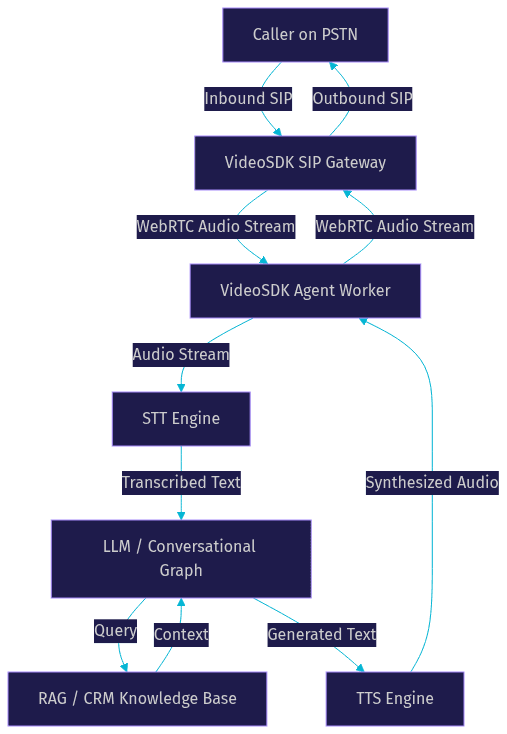
This component bridges traditional phone networks (PSTN) with the WebRTC-based AI pipeline. VideoSDK telephony provides inbound and outbound SIP gateways, allowing AI agents to answer phone calls directly. Developers can connect SIP trunks from Twilio, Telnyx, or Plivo. The SIP gateway translates PSTN audio into WebRTC streams that the AI agent worker can process, and routes the synthesized AI audio back to the caller. It also handles DTMF events and call transfers.
Knowledge Base & Retrieval-Augmented Generation (RAG)
RAG enables the voice agent to access external data sources during a live call. When a caller asks about an order status, the agent queries the CRM or ticketing system, retrieves the relevant document, and feeds it into the LLM context window to generate an accurate answer. Without RAG, an LLM will hallucinate order statuses. VideoSDK's Python SDK allows developers to wire up custom RAG pipelines and function tools, giving the agent real-time access to internal databases and APIs.
Architecture Overview
The end-to-end flow of a voice AI call center begins when a caller dials a SIP trunk number. The telephony gateway routes the audio stream into a VideoSDK room. The agent worker, running as a Python process inside that room, orchestrates the pipeline. Audio is sent to the STT provider, the resulting text is passed to the LLM, and the LLM response is sent to the TTS provider. The synthesized audio is then routed back through the SIP gateway to the caller.
VideoSDK manages the complex media routing, voice activity detection (VAD), and turn detection. This ensures the agent knows exactly when the caller has finished speaking and when to begin generating a response.
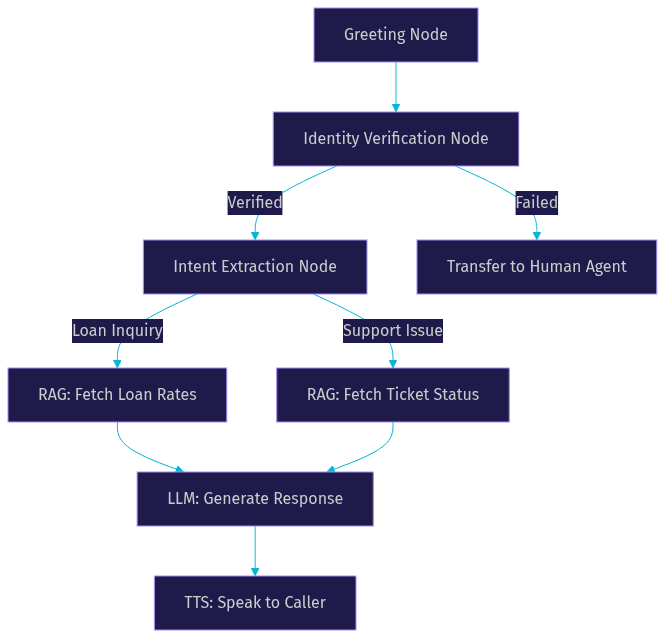
For complex workflows like loan applications, the Conversational Graph enforces a strict node-to-node progression. This guarantees every required data point is collected in order.
Choosing the Right Providers
Selecting the right AI providers dictates the performance and capabilities of your voice AI call center. Developers must evaluate accuracy, latency, multilingual support, and compliance readiness. According to Artificial Analysis Speech Arena benchmarks, latency and WER vary significantly across providers.
For STT, Deepgram is frequently cited for its low latency and high accuracy on conversational audio. OpenAI Whisper offers robust multilingual support. For LLMs, OpenAI GPT-4o and Anthropic Claude provide strong reasoning, while Cerebras offers ultra-low inference latency by running open-weight models on specialized hardware. For TTS, Cartesia Sonic and ElevenLabs lead in natural prosody and low-latency streaming.
[LINKABLE ASSET — comparison table]
| AI Layer | Provider Option 1 | Provider Option 2 | Provider Option 3 | Best For |
|---|---|---|---|---|
| STT | Deepgram Nova | OpenAI Whisper | AssemblyAI Universal | Deepgram for lowest conversational latency |
| LLM | OpenAI GPT-4o | Anthropic Claude | Cerebras Llama | Cerebras for fastest inference throughput |
| TTS | Cartesia Sonic | ElevenLabs | OpenAI TTS | Cartesia for sub-100ms first-byte synthesis |
VideoSDK's open-source Agent SDK integrates with all these providers. This abstraction allows developers to swap out models without rewriting the core telephony integration or agent logic.
Implementation Roadmap – No-Code Perspective
Building a voice AI call center requires connecting telephony infrastructure to an AI pipeline. Here is the implementation path using natural-language architecture principles.
Step 1: Set Up a SIP-Ready Telephony Provider
Start by acquiring a phone number from a SIP trunk provider like Twilio, Telnyx, or Plivo. Configure the trunk to route inbound calls to your VideoSDK telephony inbound gateway. This routes PSTN audio into a WebRTC room where the AI agent can process it. You must define routing rules in the VideoSDK dashboard to map specific phone numbers to specific agent workflows.
Step 2: Connect an AI Voice Agent Platform
Deploy your AI agent using VideoSDK Agent Cloud or a self-hosted Python worker. The agent worker manages the session lifecycle, connects to the WebRTC room, and orchestrates the STT, LLM, and TTS pipeline. VideoSDK handles the media transport, so you only need to define the agent's behavior and select your preferred AI providers. You will need to generate a VideoSDK token server-side to authenticate your agent worker.
Step 3: Define the Conversation Flow
Instead of relying purely on an LLM to control the conversation, use a deterministic flow engine. VideoSDK's Conversational Graph lets you define nodes and transitions. For example, a node might require collecting a caller's date of birth before transitioning to a node that checks account status. This ensures compliance and prevents the AI from hallucinating steps. You define the state model and the extraction criteria, and the graph engine handles the routing.
Step 4: Attach Knowledge Sources
Connect your agent to external data sources using Retrieval-Augmented Generation. Configure your agent worker to query your CRM, ticketing system, or internal FAQs. When the caller asks a specific question, the agent retrieves the relevant text and injects it into the LLM's context window to generate an accurate, grounded response. VideoSDK supports function tools and MCP integration, allowing the agent to execute API calls to fetch real-time data during the call.
Step 5: Test, Monitor, and Optimize
Once deployed, use real-time analytics to monitor performance. Track latency metrics at each pipeline stage, sentiment scores, and first-call resolution rates. VideoSDK provides pipeline observability tools to inspect turn detection, interruptions, and response times. Use this data to iteratively tune your prompts, adjust VAD sensitivity, and optimize your RAG retrieval logic.
Best Practices for Production Deployments
Moving a voice AI call center from prototype to production requires strict engineering discipline. Latency budgeting is the most critical factor. Aim for a total round-trip latency under 800 milliseconds. If STT takes 200ms, LLM takes 300ms, and TTS takes 200ms, you have little room for network overhead. Use streaming STT and streaming TTS to overlap processing and synthesis.
Implement fail-over handling. If the primary LLM provider times out, the agent worker should fall back to a secondary model or a static audio response. VideoSDK provides a Fallback Adapter in its agent pipeline to handle these scenarios gracefully.
For compliance, ensure your architecture supports GDPR and HIPAA requirements. VideoSDK provides geo-fencing and secure SIP options to keep data within specific regulatory regions. Always inform callers that the call is being recorded and processed by AI. Finally, implement warm transfer capabilities. If the AI agent cannot resolve the issue, it should seamlessly transfer the WebRTC stream to a human agent's extension without dropping the call. VideoSDK's telephony API supports both cold and warm transfers.
Measuring ROI and Success Metrics
A voice AI call center must be justified by measurable business outcomes. Track key performance indicators like first-call resolution (FCR), average handling time (AHT), and cost per call. AI agents typically reduce AHT by instantly retrieving CRM data without hold times. Monitor agent attrition reduction, as AI handles repetitive queries, leaving complex issues for human staff.
Track sentiment improvement using post-call AI analytics. VideoSDK provides session analytics that capture real-time transcription and sentiment data. According to industry benchmarks, deploying AI voice agents can reduce call center costs by up to 60% while maintaining or improving customer satisfaction scores.
Real-World Case Studies
Consider a fintech firm that implemented a voice AI call center for loan application processing. By using VideoSDK's Conversational Graph to enforce strict data collection steps and SIP integration for outbound verification calls, the firm reduced call-center operational costs by 60% while maintaining compliance. The AI agent handled initial intake, verified identity, and routed only edge cases to human underwriters.
In another example, a healthcare provider deployed an AI voice agent for appointment scheduling and prescription reminders. Using a RAG-enabled pipeline connected to their EHR system, the agent achieved 98% compliance in delivering HIPAA-compliant automated reminders. The system handled thousands of outbound calls daily, freeing nursing staff for clinical work.
Future Trends in Voice AI for Call Centers
The voice AI call center landscape is evolving rapidly. Multimodal agents are emerging, capable of processing voice alongside visual inputs like phone camera feeds for technical support. Emotion-aware AI is gaining traction, using sentiment analysis to adjust TTS tone and pacing in real-time if a caller becomes frustrated.
Edge-deployed inference is reducing latency further by running STT and LLM models closer to the carrier network. Regulatory developments will likely introduce stricter guidelines for AI voice disclosure and data retention, making deterministic flow engines like VideoSDK's Conversational Graph essential for proving compliance.
Definitions Glossary
Voice AI Call Center: A telephony infrastructure where AI-driven voice agents handle inbound and outbound calls using STT, LLM, and TTS pipelines.
SIP (Session Initiation Protocol): The signaling protocol that bridges traditional phone networks (PSTN) to WebRTC-based AI agent rooms.
RAG (Retrieval-Augmented Generation): A technique where the AI agent queries external databases (like a CRM) during a call to ground its responses in real-time data.
Conversational Graph: A deterministic, graph-based orchestration layer that controls conversation flow, ensuring the LLM only generates text while business rules handle branching.
Agent Worker: The Python process that runs a VideoSDK AI agent, managing the session lifecycle and pipeline execution inside a WebRTC room.
Key Takeaways
- A voice AI call center replaces rigid IVR menus with dynamic, low-latency conversational agents powered by STT, LLM, and TTS pipelines.
- VideoSDK provides the telephony SIP integration and Python Agent SDK needed to connect AI models directly to standard phone lines.
- Using a deterministic Conversational Graph ensures compliance and accuracy in structured flows like finance and healthcare.
- Production deployments require strict latency budgeting, fail-over handling, and warm transfer capabilities to human agents.
- Measuring ROI relies on tracking first-call resolution, average handling time, and cost per call reductions.
Conclusion
Building a voice AI call center in 2026 requires orchestrating telephony, real-time media streaming, and multiple AI models within strict latency budgets. By leveraging VideoSDK's AI Agent SDK, SIP integration, and Conversational Graph, developers can deploy compliant, production-ready voice agents without wrestling with raw WebRTC infrastructure. Explore the VideoSDK AI Agents documentation to start building, or check out the VideoSDK GitHub repository for code samples. What are you building with VideoSDK? Drop a comment below to discuss your voice AI use case.
Free $20 Balance for AI Voice Agents & Video Calls
FAQ