


Voice agent testing tools automate the quality assurance process for conversational AI by simulating callers, evaluating responses, and tracking performance metrics. These tools replace manual testing with synthetic personas and LLM-based judging to catch hallucinations, latency spikes, and dialogue failures before production. Developers building with platforms like VideoSDK AI Voice Agents can integrate these testing pipelines directly into CI/CD workflows to ensure reliable deployments.
Voice AI agents are moving from novelty to core infrastructure. In 2026, businesses are deploying voice agents for customer support, outbound sales, and internal automation. But as production usage scales, the fragility of these systems becomes apparent. A slight change in a prompt, a new speech-to-text model, or an updated tool definition can break a conversation flow entirely.
Manual testing falls short because human testers cannot realistically cover the combinatorial explosion of accents, phrasings, and edge cases that real callers produce. You need dedicated voice agent testing tools to simulate thousands of interactions, evaluate the outcomes, and catch regressions before they reach production. This guide breaks down the capabilities, architectures, and tools you need to build a reliable AI voice agent QA pipeline.
Why Voice Agent Testing Tools Are Essential
Voice agents fail in ways that traditional software does not. A web application either renders a page or returns an error. A voice agent can return a grammatically correct response that is factually wrong, or it can hallucinate a policy that does not exist. It can mispronounce a critical number, like a prescription dosage or a payment amount, with severe real-world consequences.
Latency is another silent killer. If an agent takes more than a second to respond, the caller assumes the call dropped. Manual testing rarely catches latency spikes because they are often dependent on specific backend conditions or API rate limits that only trigger under load.
Automated voice agent testing tools address these failure modes by providing deterministic and probabilistic evaluation frameworks. They allow you to define edge-case scenario testing, measure audio evaluation metrics, and run regression testing for voice bots every time you update your system. The cost of a production bug in a voice agent is not just a bad user experience. It can be a compliance violation, a lost customer, or a hallucinated commitment that the business is now legally bound to honor. Investing in a conversational AI test harness is significantly cheaper than managing production incidents.
Core Capabilities to Look for in Voice Agent Testing Tools
Not all testing tools are built the same. When evaluating a platform for your AI voice agent QA, you should look for capabilities that cover the full spectrum of voice interaction, from audio processing to conversational logic.
Multi-Turn Conversation Simulation
A single utterance test is insufficient. Voice agents are designed for multi-turn dialogue testing. Your testing tool must simulate a synthetic caller persona that can maintain context over a 10-minute conversation, react to agent responses, and follow branching dialogue paths. The tool should allow you to define these paths declaratively, specifying what the caller should say and how the agent is expected to respond.
LLM-Powered Judgment and Scoring
Exact string matching does not work for voice agents. An agent might say "I can help with that" or "Sure, let me look into that for you." Both are correct. LLM-based test judging uses a separate language model to evaluate whether the agent's response meets the semantic intent of the expected outcome. This allows for flexible, natural evaluation without brittle assertions.
Audio-Level Evaluation
Voice agents rely on STT and TTS round-trips. A testing tool must evaluate audio-level metrics, including clarity of the generated speech, accuracy of transcription, and handling of interruptions or background noise. Real-time transcription validation ensures that the agent actually heard what the caller said before generating a response.
Platform-Agnostic Import and Export
Your testing tool should not lock you into a specific voice agent platform. Look for tools that support platform-agnostic voice testing, allowing you to import agent graphs or configurations from platforms like Retell, Vapi, LiveKit, and VideoSDK. This ensures your testing infrastructure survives even if you switch underlying voice providers.
CI/CD Integration and Regression Tracking
Voice agent testing must be automated. The tool should integrate with your existing CI/CD pipeline, triggering tests on pull requests and providing pass or fail signals to block merges. Regression tracking should maintain a history of test runs, allowing you to see exactly when a metric like turn latency or hallucination rate started degrading.
Real-Time Analytics and Diagnostics
When a test fails, you need to know why. Voice agent monitoring tools should provide detailed diagnostics, including the full transcript, audio recordings, latency breakdowns per turn, and the reasoning of the LLM judge. This data is critical for debugging complex conversational failures.
Top Voice Agent Testing Tools Compared
The landscape of voice agent testing tools is maturing rapidly. Here is a comparison of the leading solutions available to developers in 2026.
voicetest
voicetest is an open-source tool that provides a unified AgentGraph intermediate representation. It allows developers to define test cases in a structured format and run them via a command-line interface or web UI. It is highly extensible and supports importing agent definitions from multiple platforms.
TestAI
TestAI is a commercial SaaS platform focused on persona generation and real-time analytics. It excels at generating diverse synthetic caller personas to stress-test voice agents across different accents, ages, and communication styles. It provides a managed dashboard for monitoring test results and tracking regressions over time.
LangWatch
LangWatch is an open-source, scenario-first testing framework that integrates deeply with OpenTelemetry. It is designed for developers who want granular control over their test scenarios and observability stack. It allows you to define complex multi-turn dialogues and evaluate them using custom metrics.
Evalgent
Evalgent is an enterprise-grade platform specializing in limit testing and statistical reliability. It is built for organizations that need to run thousands of tests to achieve statistical confidence in their agent's performance. It provides advanced reporting on confidence intervals and performance distributions.
Voice Agent Tester (livetok-ai)
Voice Agent Tester by livetok-ai is a specialized tool that uses Puppeteer-based headless browser automation to test web-based voice agents. It is ideal for agents deployed as web applications, allowing you to simulate user interactions directly in a browser environment.
| Tool | Key Feature | Pricing Model | Platform Support | Deployment |
|---|---|---|---|---|
| voicetest | Unified AgentGraph IR, CLI/Web UI | Open Source (Free) | Retell, Vapi, LiveKit, VideoSDK | Self-hosted |
| TestAI | Persona generation, real-time analytics | Commercial SaaS | Web, Mobile, Telephony | Cloud |
| LangWatch | Scenario-first API, OpenTelemetry | Open Source (Free) | LangChain, custom pipelines | Self-hosted |
| Evalgent | Limit testing, statistical reliability | Enterprise | Enterprise integrations | Cloud / On-prem |
| Voice Agent Tester | Puppeteer-based browser automation | Open Source (Free) | Web-based agents | Self-hosted |
[LINKABLE ASSET - comparison table]
voicetest stands out for developers seeking an open-source, platform-agnostic solution, while TestAI is the strongest choice for teams needing managed persona generation without infrastructure overhead.
Architecture of an Automated Voice Agent Testing Pipeline
Understanding the architecture of an automated voice agent testing pipeline is critical for building or selecting the right tool. The flow generally moves from generating a synthetic caller to interacting with the voice agent, capturing the audio, transcribing it, and then judging the outcome.
The pipeline begins with a synthetic caller persona, which is essentially a script or an LLM configured to play the role of a human user. This persona sends audio into the voice agent under test. The agent processes the audio, generates a response, and sends audio back. The testing tool captures this audio and passes it through a speech-to-text service to create a transcript. Finally, an LLM judge evaluates the transcript against the expected behavior and aggregates the results into a metrics dashboard.
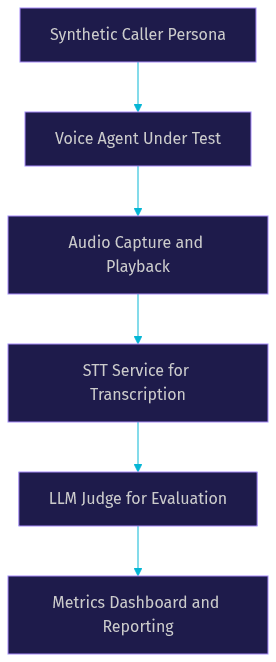
This architecture ensures that the testing pipeline evaluates the entire stack, from audio processing to conversational reasoning. When building agents with the VideoSDK Python SDK, this pipeline can be wrapped around the agent worker to validate changes before deployment.
Setting Up a Test Suite with voicetest
Setting up a test suite with voicetest involves a series of high-level steps that do not require writing traditional application code, but rather defining the parameters and scenarios for the test harness.
First, you install the voicetest tool on your local development machine or CI runner. This typically involves adding the package to your project dependencies. Once installed, you define your test cases using a structured data format like JSON. In this file, you specify the synthetic caller persona, the initial greeting, and the expected branching logic of the conversation. You define what the caller will say and what the agent is expected to do in response.
Next, you import your existing agent graphs. If you are using a platform like VideoSDK, you export your agent's configuration and import it into voicetest so the tool understands the agent's available tools and system prompt. This allows the LLM judge to evaluate whether the agent used its tools correctly.
You then run the test suite locally. The tool will simulate the call, capture the audio, and generate a report. You review the report to ensure your agent handles the defined scenarios correctly. Finally, to automate this process, you integrate the test suite with GitHub Actions. You configure the action to run the voicetest command on every pull request, ensuring no regressions are merged.
Integrating Testing into CI/CD
Integrating voice agent testing into your CI/CD pipeline is the only way to maintain quality at scale. The goal is to automatically trigger a suite of regression tests every time a developer opens a pull request or merges code into the main branch.
You configure your CI system to run the testing tool as a step in the build pipeline. The tool executes the defined test scenarios against a staging version of your voice agent. You define pass and fail thresholds based on your business requirements. For example, you might require a 95 percent pass rate on core user journeys and a maximum turn latency of 800 milliseconds.
If the tests fail to meet these thresholds, the CI system blocks the pull request from merging. This prevents regressions from reaching production. It is critical to handle API keys and secrets securely during this process. You must store credentials for your STT, TTS, and LLM providers as encrypted environment variables in your CI system. Never hardcode secrets into your test definitions. Tools like voicetest and LangWatch are designed to read these configurations from the environment, ensuring your testing pipeline remains secure.
Measuring Success: Metrics That Matter
Running tests is only useful if you measure the right outcomes. Voice agent testing tools provide a wealth of data, but a few key metrics are critical for evaluating agent quality.
Pass score is the overall percentage of test scenarios that the agent completed successfully. Turn-level accuracy measures how often the agent performed the correct action in a specific turn of the conversation. Time-to-first-token (TTFT) and turn latency measure the responsiveness of the agent. Hallucination rate tracks how often the agent invented information not present in its knowledge base. PII leakage detection ensures the agent is not exposing sensitive data in its responses.
You must set thresholds for these metrics based on your business SLAs. A healthcare voice agent will have a much lower tolerance for hallucination rate than a pizza ordering agent. Use the analytics dashboard of your testing tool to track these metrics over time and adjust your thresholds as your agent matures.
Future Trends in Voice Agent Testing
The field of voice agent testing is evolving rapidly. In the near future, we expect to see a shift toward real-time multimodal testing, where tools evaluate not just audio but also visual cues for avatar-based agents. Synthetic noise generation will become more sophisticated, allowing testers to simulate specific real-world environments like a busy call center or a moving vehicle. Automated red-team adversarial scenarios will use specialized LLMs to actively try to break the agent, uncovering vulnerabilities before malicious actors do. Finally, tighter integration with observability platforms will unify testing and monitoring, creating a continuous feedback loop from production back into the testing pipeline.
Definitions Glossary
Synthetic Caller Persona: A simulated user profile defined by specific characteristics, accents, and behavioral scripts used to test voice agents under realistic conditions.
LLM-Based Test Judging: The practice of using a large language model to evaluate whether a voice agent's response meets the semantic intent of an expected outcome, allowing for flexible natural language evaluation.
Time-to-First-Token (TTFT): A performance metric measuring the time elapsed between the end of a user's speech and the beginning of the agent's audio response, critical for perceived responsiveness.
AgentGraph Intermediate Representation: A platform-agnostic format for defining voice agent logic and test scenarios, allowing tests to be portable across different agent frameworks.
Regression Testing for Voice Bots: The process of running automated test suites against a voice agent after changes to its prompt, tools, or underlying models to ensure existing functionality has not degraded.
Key Takeaways
- Voice agent testing tools are essential for catching conversational failures, hallucinations, and latency spikes that manual testing cannot reliably detect.
- Core capabilities to look for include multi-turn dialogue simulation, LLM-powered judgment, and platform-agnostic import and export.
- Open-source tools like voicetest offer flexible, self-hosted testing pipelines, while commercial platforms like TestAI provide managed persona generation and analytics.
- Integrating testing into CI/CD pipelines with strict pass and fail thresholds is the only way to prevent regressions from reaching production.
- Tracking metrics like turn-level accuracy, TTFT, and hallucination rate provides the quantitative data needed to evaluate agent quality against business SLAs.
Conclusion
Choosing the right voice agent testing tools is a critical step in building reliable conversational AI. As voice agents become deeply embedded in customer-facing applications, the cost of untested failures continues to rise. Start by building a small regression suite covering your most critical user journeys. Integrate it into your CI/CD pipeline and expand your test coverage as your agent's capabilities grow. If you are building voice agents with VideoSDK, explore how these testing tools can wrap around your agent worker to ensure every deployment meets your quality standards. What are you building with VideoSDK? Drop a comment below, I would love to hear what kind of voice agent use cases you are working on.
Free $20 Balance for AI Voice Agents & Video Calls
FAQ