


A voice agent is a real-time AI system that listens to human speech, converts it to text, reasons through an LLM, executes tools or retrieval, and responds with synthesized speech, all within a sub-second latency budget. VideoSDK provides an open-source AI Agent SDK that connects STT, LLM, and TTS providers into a single pipeline managed inside VideoSDK Rooms, letting you deploy voice agents on web, mobile, or telephony without building the streaming infrastructure from scratch. This guide walks through the full architecture, implementation steps, and production considerations you need to ship a reliable voice agent in 2026. Start with the VideoSDK AI Voice Agent introduction to get oriented, then follow the implementation walkthrough below.
Voice agents are having their breakout moment in 2026. The combination of streaming speech-to-text models with sub-300-millisecond latency, real-time LLM reasoning, and neural text-to-speech that sounds indistinguishable from a human has crossed the threshold from demo to production. Companies are deploying voice agents for telemedicine intake, outbound appointment reminders, insurance claims processing, and customer support at scale.
But building a voice agent that actually works in production is fundamentally different from prototyping one in a notebook. The hard parts are latency budgeting, streaming pipeline orchestration, error handling when audio drops mid-sentence, and safety guards that prevent the agent from saying something it should not. Most tutorials cover the happy path and skip the engineering discipline that separates a toy from a system you can put in front of real users.
This voice agent implementation guide delivers the full picture: architecture, provider selection, step-by-step assembly, production considerations, and conversational UX best practices. By the end, you will understand how to wire together STT, LLM, and TTS into a streaming pipeline, how to budget latency across each component, and how to deploy with confidence using VideoSDK's Agent SDK.
What Is a Voice Agent?
A voice agent is defined as an AI system that conducts real-time spoken conversations with humans by processing audio input, reasoning about intent, and generating spoken responses. Unlike a text chatbot, a voice agent operates on continuous audio streams and must manage turn-taking, interruptions, and latency constraints that text interfaces never face. Unlike traditional IVR systems that route callers through rigid menu trees, a voice agent uses natural language understanding to handle open-ended conversation.
VideoSDK provides voice agent infrastructure through its AI Agent SDK, which manages the full listen-understand-reason-respond-speak loop inside a VideoSDK Room. The agent worker is a Python process that connects your chosen STT, LLM, and TTS providers, handles voice activity detection, and streams audio back to the user over WebRTC.
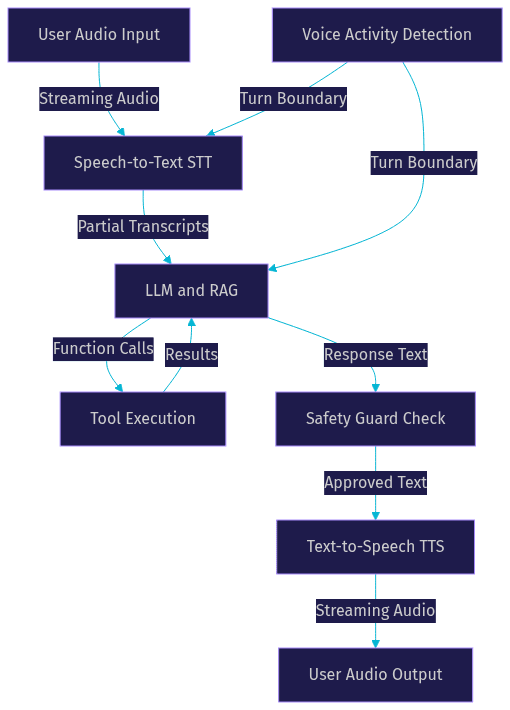
The core loop works as follows: the agent listens to incoming audio and runs streaming STT to produce partial transcripts, then it sends the transcript to an LLM that reasons about intent and decides whether to call a tool, retrieve context, or generate a response, and finally it sends the response text to a streaming TTS engine that produces audio output sent back to the user. This entire loop must complete within a latency budget that feels conversational, typically under 700 milliseconds from the moment the user stops speaking to the moment the agent starts responding.
Core Architecture Overview
A production voice agent architecture is a streaming pipeline where each stage processes data incrementally rather than waiting for the previous stage to finish completely. This streaming design is what makes sub-second response times possible. If you waited for the user to finish speaking, then ran full STT, then sent the complete transcript to the LLM, then waited for the full LLM response, then ran TTS on the entire response, your latency would easily exceed three seconds. Streaming collapses those stages together.
The architecture has four primary stages, each with its own provider choices, latency characteristics, and failure modes. Understanding what each stage does and how it connects to the next is the foundation of a solid implementation.
Listen: Speech-to-Text (STT)
The STT stage converts incoming audio into text using streaming recognition. Streaming STT produces partial transcripts as the user speaks, which means the LLM can begin reasoning before the user has finished their sentence. Provider choice matters here: Deepgram's Nova models, OpenAI Whisper, Google Cloud STT, and AssemblyAI all offer streaming endpoints with different latency profiles, language coverage, and pricing models. According to Artificial Analysis's Speech Arena benchmark, Deepgram Nova-3 achieves a median word-error-rate of roughly 8.2% on conversational audio, making it a strong default for voice agent workloads.
Understand: LLM and Retrieval
The LLM stage takes the streaming transcript and reasons about what the user wants. This is where intent extraction, function calling, and retrieval-augmented generation happen. The LLM decides whether to call an external tool (look up an appointment, check inventory, transfer a call), pull context from a RAG cache, or generate a conversational response directly. Provider choice here ranges from OpenAI's GPT-4o and real-time models to Anthropic Claude, Google Gemini, and open-weight models running on Cerebras for lower-latency inference. The key architectural decision is whether to use a real-time multimodal model that handles audio natively or a traditional text-in-text-out LLM paired with separate STT and TTS stages. Real-time models like OpenAI Realtime API and AWS Nova Sonic reduce pipeline complexity but offer less granular control over each stage.
Respond: Decision and Tool Execution
The decision stage sits between the LLM and TTS, managing turn-based logic and safety. When the LLM decides to call a function, this stage routes the request to the appropriate tool, waits for the result, and feeds it back to the LLM for a final response. Safety guards also live here: input validation to reject malformed or malicious transcripts, profanity filtering, and output guards that review the LLM response before it reaches TTS. VideoSDK's Conversational Graph is particularly useful at this stage when you need deterministic flow control, for example in a loan application where every step must happen in a specific order regardless of what the LLM wants to do.
Speak: Text-to-Speech (TTS)
The TTS stage converts the LLM's text response into audio using streaming synthesis. Streaming TTS starts producing audio after the first sentence or clause rather than waiting for the full response, which shaves hundreds of milliseconds off perceived latency. Provider choice includes ElevenLabs, Cartesia Sonic, OpenAI TTS, AWS Polly, and Hume, each with different voice quality, latency, and pricing characteristics. Voice selection has a direct latency impact: some providers pre-warm specific voices, and caching frequently used responses can eliminate TTS latency entirely for common phrases.
Step-by-Step Implementation
Building a production-ready voice agent requires disciplined sequencing. Each step builds on the previous one, and skipping ahead typically means revisiting earlier decisions when integration fails. The following walkthrough covers the full build path in natural-language prose, explaining what to do, why it matters, and what to expect at each stage.
1. Choose Providers and Set Latency Targets
Start by selecting your STT, LLM, and TTS providers based on your use case, language requirements, and latency budget. For cloud-based processing, you trade lower operational complexity for network latency and per-minute pricing. For on-device processing, you gain privacy and offline capability but face hardware constraints and model size limitations. Most production voice agents use cloud providers for all three stages because the quality gap remains significant.
Set a total latency budget before writing any integration code. A common target is 500 milliseconds from end-of-speech to first-audio-output for simple queries, with 700 milliseconds as the upper bound for complex queries that require tool calls or RAG retrieval. Allocate roughly 150 milliseconds to STT finalization, 200 milliseconds to LLM first-token, and 150 milliseconds to TTS first-audio, leaving 100 to 200 milliseconds of headroom for network transit and processing overhead.
2. Build the Token and Auth Server
VideoSDK uses token-based authentication. You need to generate a token server-side using your API key and secret, then pass it to the Agent SDK when initializing the agent worker. Never expose your API secret on the frontend or in the agent worker configuration that ships to client devices. Always generate tokens server-side.
The token server is a lightweight backend service that authenticates your application's users, generates a VideoSDK JWT with appropriate permissions, and returns it to the client or agent worker. For AI agents that connect via telephony, the token server also manages SIP credentials and routing rules. You can learn more about this in the VideoSDK authentication and token guide.
3. Assemble the Streaming Pipeline
This is the core integration step where you wire STT, LLM, and TTS into a single streaming pipeline managed by the VideoSDK Agent Worker. The agent worker is a Python process that joins a VideoSDK Room as a participant, receives audio streams from human participants, and sends audio back.
The pipeline works as follows: the agent worker receives incoming audio from the VideoSDK Room and feeds it to the STT provider's streaming endpoint. As partial transcripts arrive, they are buffered and sent to the LLM when voice activity detection signals that the user has stopped speaking. The LLM processes the transcript, optionally calls tools or retrieves context from a RAG cache, and produces a response. The response text is streamed to the TTS provider, which produces audio chunks that the agent worker sends back into the VideoSDK Room.
The critical implementation detail is that these stages overlap. STT produces partial results while the user is still speaking, the LLM begins processing the first complete sentence before STT has finalized the full transcript, and TTS starts synthesizing the first sentence of the LLM response before the LLM has finished generating. This overlapping is what keeps total latency under 700 milliseconds.
VideoSDK's Agent SDK handles much of this orchestration through its Pipeline abstraction, which manages the connections between STT, LLM, and TTS providers and exposes hooks for custom logic at each stage. You can read the full AI Agent SDK documentation for details on pipeline configuration and provider plugins.
4. Add Safety Guards
Safety guards are non-negotiable for production voice agents. At minimum, implement three layers: input validation that rejects empty, malformed, or suspiciously long transcripts before they reach the LLM, content filtering that blocks profanity or harmful requests, and an output guard that reviews the LLM response before it reaches TTS. The output guard is especially important because it is your last chance to prevent the agent from saying something inappropriate, factually wrong, or outside its scope. For regulated industries like healthcare and finance, the output guard should also check for compliance violations, such as providing medical advice beyond the agent's scope or disclosing sensitive account information without verification.
5. Deploy and Test End-to-End
Deploy your agent worker to a staging environment that mirrors production as closely as possible. Use the VideoSDK Agent Cloud for managed deployment, or self-host using Docker or Kubernetes if you need full control over the runtime environment. Test with real audio, not just text inputs, because audio introduces network jitter, packet loss, and background noise that text testing never surfaces.
Simulate real-world network conditions by testing on mobile networks with varying bandwidth, not just a fast office connection. Verify that the agent handles interruptions gracefully, that it recovers from dropped audio without getting stuck in a loop, and that token expiry triggers a clean reconnection rather than an error message. Run load tests with concurrent sessions to verify that your agent worker scales and that provider rate limits do not become a bottleneck.

Production-Ready Considerations
Most voice agent tutorials stop at the happy path: user speaks, agent responds, everyone is happy. Production is different. Users speak with accents, background noise, and mid-sentence pauses. Network connections drop. Provider APIs rate-limit. Tokens expire. The following considerations are what separate a demo from a system you can trust in front of real users.
Latency Budgeting per Component
Break down your 700-millisecond window across each pipeline component and track actual performance against the budget. STT finalization typically consumes 100 to 200 milliseconds after end-of-speech, depending on the provider and audio quality. LLM first-token latency ranges from 150 milliseconds for optimized inference providers like Cerebras to 400 milliseconds for standard API calls. TTS first-audio latency ranges from 100 to 250 milliseconds depending on the provider and voice model. Network transit between the user device, VideoSDK Cloud, and provider APIs adds another 50 to 100 milliseconds round-trip.
Allocate headroom of at least 100 milliseconds for processing overhead and unexpected delays. If any component consistently exceeds its budget, investigate provider alternatives or architectural changes, such as switching from a text LLM to a real-time multimodal model that eliminates the STT-to-LLM handoff.
Error Handling and Reconnection
Dropped audio is the most common production failure. When the WebRTC connection between the user and the VideoSDK Room drops, the agent worker should detect the disconnection, pause the pipeline, and wait for reconnection rather than continuing to process stale audio. VideoSDK's SDK handles reconnection at the transport level, but your agent worker logic must also handle the application-level implications: clear partial transcripts, reset the conversation state if the gap is long enough, and resume gracefully when audio returns.
Token expiry is the second most common failure. Tokens have a finite lifetime, and if your agent session runs longer than the token validity period, the connection will drop. Implement proactive token refresh before expiry, and handle the case where refresh fails by gracefully ending the session with a spoken message rather than an abrupt disconnection.
Fallback strategies matter for provider failures. If your primary STT provider goes down, falling back to a secondary provider keeps the agent functional even with degraded quality. VideoSDK's Agent SDK supports fallback adapters for exactly this scenario.
Monitoring and Observability
Collect metrics on every pipeline stage. The most important metric is Time-to-First-Audio, which measures the elapsed time from end-of-speech to the first audio chunk sent back to the user. Track this metric at the percentile level, not just the average, because tail latency is what users notice. Other critical metrics include STT word-error-rate estimated from confidence scores, LLM token generation rate, TTS synthesis time, VAD confidence scores, and error rates per provider.
Set up alerts for latency budget violations, provider error spikes, and conversation abandonment patterns. A sudden increase in Time-to-First-Audio at the 95th percentile often indicates a provider degradation before it shows up in status pages. VideoSDK provides session analytics through its REST API that you can pull into your monitoring dashboard.
Security and Privacy
Voice agents process sensitive audio data, so security and privacy must be designed in from the start. Use end-to-end encryption for audio streams between the user device and the VideoSDK Room. Consider data residency requirements if you serve users in regions with strict data protection laws like GDPR in the European Union. Avoid logging raw audio transcripts unless explicitly required, and when you do log, redact personally identifiable information such as names, addresses, and account numbers.
Scaling and Cost Management
Scale your agent workers horizontally using autoscaling rules based on concurrent session count. Usage-based pricing from STT, LLM, and TTS providers means costs scale linearly with usage, so implement caching where possible: cache RAG retrieval results for common queries, cache TTS output for frequent responses like greetings and confirmations, and use shorter LLM contexts to reduce token costs without sacrificing response quality.
Best Practices for Conversational UX
A technically perfect voice agent with a poor conversational design feels robotic and frustrating. The best voice agents are designed for the ear, not the eye. Response brevity, natural turn-taking, and graceful interruption handling are what make users forget they are talking to an AI.
Voice-First Conversation Design
Write responses for ears, not screens. Spoken responses should be concise, typically under three sentences for most interactions. Avoid numbered lists, complex formatting, and any content that works visually but not auditorily. Use contractions, natural pauses, and conversational phrasing. Test every response by reading it aloud: if you run out of breath or lose the thread, the response is too long.
Turn Detection and Barge-In
Turn detection is the mechanism that decides when a user has finished speaking and the agent should respond. Voice activity detection signals end-of-speech, but tuning the silence threshold is critical: too short and the agent interrupts the user mid-pause, too long and the agent feels sluggish. Barge-in allows users to interrupt the agent while it is speaking, which is essential for natural conversation. When barge-in is detected, the agent should immediately stop TTS playback, discard any queued audio, and begin processing the new input.
Multi-Agent Orchestration
For complex domains, a single agent may not handle every intent well. Multi-agent orchestration lets you route conversations to specialized agents based on intent. For example, a healthcare voice agent might hand off to a scheduling specialist for appointment booking and a symptoms checker for triage questions. VideoSDK's Agent SDK supports multi-agent switching, where the primary agent detects an intent outside its scope and transfers the session to a specialized agent with the conversation context preserved.
Continuous Improvement Loop
Voice agents degrade without maintenance. Collect user feedback through post-call surveys and conversation-level satisfaction signals (did the user hang up abruptly, ask to repeat, or express frustration). Analyze transcripts for common failure patterns, retrain prompts to address gaps, and update LLM and STT models as better versions become available. Schedule monthly reviews of conversation logs and latency metrics to catch drift before it affects users.
Real-World Case Study: Telemedicine Appointment Bot
Consider a healthcare startup building a telemedicine appointment bot using VideoSDK's AI Agent SDK. The bot handles inbound calls from patients who need to schedule, reschedule, or cancel appointments. The call flow is deterministic: verify patient identity, present available slots, confirm the selection, and send a confirmation. Because this is a regulated healthcare interaction, the team uses VideoSDK's Conversational Graph to enforce the step order rather than relying on the LLM to follow instructions.
The architecture uses Deepgram Nova-3 for STT (median 120-millisecond finalization), OpenAI GPT-4o for LLM reasoning (median 180-millisecond first-token), and ElevenLabs for TTS (median 140-millisecond first-audio). Total Time-to-First-Audio averages 440 milliseconds at the 50th percentile and 620 milliseconds at the 95th percentile, well within the 700-millisecond budget.
Safety guards include an input validator that rejects transcripts shorter than two words (likely false positives from background noise), a HIPAA compliance check on the LLM output that blocks any response containing medical advice, and an output guard that verifies appointment slot numbers against the scheduling database before the agent reads them aloud. The bot is deployed on VideoSDK Agent Cloud with autoscaling configured for peak hours, and calls are routed through the VideoSDK Telephony SIP integration so patients can call from any phone without installing an app.
In the first month of production, the bot handled 12,000 calls with a 94% successful completion rate. The 6% failure cases were primarily due to patients with strong accents that STT struggled with, which the team addressed by switching to a multilingual STT model for non-English calls. Monitoring dashboards tracking Time-to-First-Audio and error rates per provider allowed the team to detect a Deepgram latency spike within minutes and fail over to their backup STT provider automatically.
Definitions Glossary
Voice Agent: A real-time AI system that conducts spoken conversations by processing audio input through STT, reasoning with an LLM, and responding with synthesized speech, all within a sub-second latency budget.
Streaming STT: Speech-to-text recognition that produces partial transcripts incrementally as the user speaks, allowing downstream pipeline stages to begin processing before the user has finished their sentence.
Voice Activity Detection (VAD): The mechanism that detects when a user starts and stops speaking, signaling turn boundaries to the pipeline so the agent knows when to begin reasoning and responding.
Latency Budget: The total time allocated across all pipeline components from end-of-speech to first-audio-output, typically set at 500 to 700 milliseconds for conversational voice agents.
Agent Worker: The Python process in VideoSDK's AI Agent SDK that joins a VideoSDK Room, manages the STT-LLM-TTS pipeline, and handles the session lifecycle for a voice agent.
Barge-In: A conversational UX feature that allows a user to interrupt the agent while it is speaking, causing the agent to stop TTS playback and begin processing the new input immediately.
Conversational Graph: VideoSDK's deterministic flow orchestration layer that defines conversation steps as a directed graph, ensuring business rules control branching rather than relying on LLM judgment.
Key Takeaways
- A production voice agent is a streaming pipeline where STT, LLM, and TTS stages overlap to achieve sub-700-millisecond response times, not a sequential request-response cycle.
- Latency budgeting per component is the single most important engineering discipline: track Time-to-First-Audio at the percentile level and investigate any component that consistently exceeds its allocation.
- Safety guards at input, LLM, and output stages are non-negotiable for production, especially in regulated industries like healthcare and finance where compliance violations carry real consequences.
- VideoSDK's AI Agent SDK provides the pipeline orchestration, agent worker lifecycle, fallback adapters, and multi-agent switching that production voice agents require, without building streaming infrastructure from scratch.
- Conversational UX matters as much as technical architecture: design for the ear, tune turn detection carefully, and implement barge-in so users can interrupt naturally.
Conclusion
Building a production voice agent in 2026 is an exercise in disciplined pipeline engineering. The technology is mature enough that the hard parts are no longer whether STT, LLM, and TTS work, but how you wire them together, budget latency across them, handle failures gracefully, and design the conversation for human ears. This voice agent implementation guide covered the full path from architecture through deployment, with production considerations that most tutorials skip.
The next step is to start building. Head to the VideoSDK AI Voice Agent documentation for the full SDK reference and quickstart guides. If you are building a telephony-based agent, read the SIP and telephony integration guide. For deterministic conversation flows, explore the Conversational Graph documentation. Join the VideoSDK Discord community to connect with 3,000+ developers building voice agents, and check the VideoSDK GitHub repository for open-source code samples and quickstart repos.
What are you building with VideoSDK? Drop a comment below, I would love to hear what kind of voice agent use case you are working on.
FAQ