


A voice agent for healthcare is an AI-powered system that handles real-time voice conversations with patients for tasks like appointment scheduling, clinical intake, triage, and follow-up calls. VideoSDK provides the infrastructure to build these agents through its AI Voice Agent SDK, combining speech-to-text, large language models, and text-to-speech inside secure, token-authenticated rooms with built-in telephony support. You can deploy a production-ready healthcare voice agent that integrates with EHR systems and escalates to human operators when needed.
Clinics lose up to 20% of inbound patient calls during peak hours because front-desk staff simply cannot answer every ring. A study by healthcare operations analytics firms found that missed calls translate directly into missed revenue, delayed care, and lower patient satisfaction scores. When a patient calls to schedule an urgent follow-up and gets a busy signal or a voicemail that no one returns for two days, the clinical relationship erodes.
A voice agent for healthcare changes this dynamic. Instead of a static phone tree that frustrates callers with "press 1 for appointments, press 2 for billing," an AI-driven voice assistant picks up every call, understands natural speech, and handles the interaction end-to-end. It can book appointments, answer medication questions, conduct pre-visit intake, and route complex cases to a live nurse. This article walks through what these agents are, why healthcare organizations need them, and how to build one using VideoSDK's AI Voice Agent platform.
What Is a Voice Agent for Healthcare?
A voice agent for healthcare is defined as an AI system that conducts real-time, two-way voice conversations with patients to automate clinical and administrative workflows. It works by capturing spoken audio, converting it to text through speech-to-text (STT), processing the text through a large language model (LLM) to determine intent and generate a response, and converting that response back to speech using text-to-speech (TTS). The entire loop happens in under a second, creating a natural conversational experience.
Definition and Core Capabilities
VideoSDK provides a voice agent for healthcare through its AI Voice Agent SDK, which connects STT, LLM, and TTS providers inside a real-time communication room. The core capabilities include real-time transcription of patient speech, natural-language understanding that goes beyond keyword matching, outbound outreach for appointment reminders and follow-up calls, and multi-language support for diverse patient populations. The agent operates as a Python-based worker process that joins a VideoSDK room alongside the patient, who connects via web, mobile, or traditional phone through SIP telephony integration.
How It Differs from Traditional IVR
Traditional interactive voice response (IVR) systems rely on static menu trees where patients navigate by pressing numbers or speaking rigid keywords. If a patient says something outside the predefined options, the system fails or loops back to the main menu. A voice agent for healthcare replaces this rigid structure with dynamic, AI-driven conversations. The LLM understands context, handles unexpected responses, asks clarifying questions, and adapts its flow based on what the patient actually says. Instead of "press 1 for appointments," the agent hears "I need to reschedule my Tuesday appointment" and acts on it directly.
Why Healthcare Providers Need Voice Agents
Healthcare organizations face a growing gap between patient demand and administrative capacity. Front-desk teams handle calls, check-ins, insurance verification, and scheduling simultaneously, creating bottlenecks that directly affect patient outcomes and revenue.
Reducing Call Abandonment and No-Show Rates
According to healthcare operations research, clinics experience call abandonment rates of 15 to 25% during peak hours, and missed appointments cost the U.S. healthcare system an estimated $150 billion annually. A voice agent for healthcare picks up every call on the first ring, eliminating hold times that drive abandonment. For outbound use cases, automated reminder calls powered by AI voice agents have demonstrated no-show reduction rates of 25 to 35% in published pilot programs. The agent can confirm appointments, offer rescheduling options, and send follow-up reminders without requiring human staff to dial each number manually.
Enhancing Patient Experience and Compliance
A HIPAA-compliant voice agent improves patient experience by providing immediate, personalized responses in the patient's preferred language. VideoSDK's agent supports multiple STT and TTS providers, enabling multilingual conversations without building separate flows for each language. Patients receive consistent, accurate information about their appointments, medications, and pre-visit instructions. On the compliance side, every interaction is recorded and transcribed in real time, creating an auditable trail that satisfies regulatory documentation requirements.
VideoSDK AI Voice Agent: A Healthcare-Focused Solution
VideoSDK's AI Voice Agent platform provides the real-time communication infrastructure, telephony integration, and AI pipeline orchestration needed to build a production-grade voice agent for healthcare. The architecture centers on three components: the VideoSDK room, the Agent Worker, and the telephony gateway.
Architecture Overview
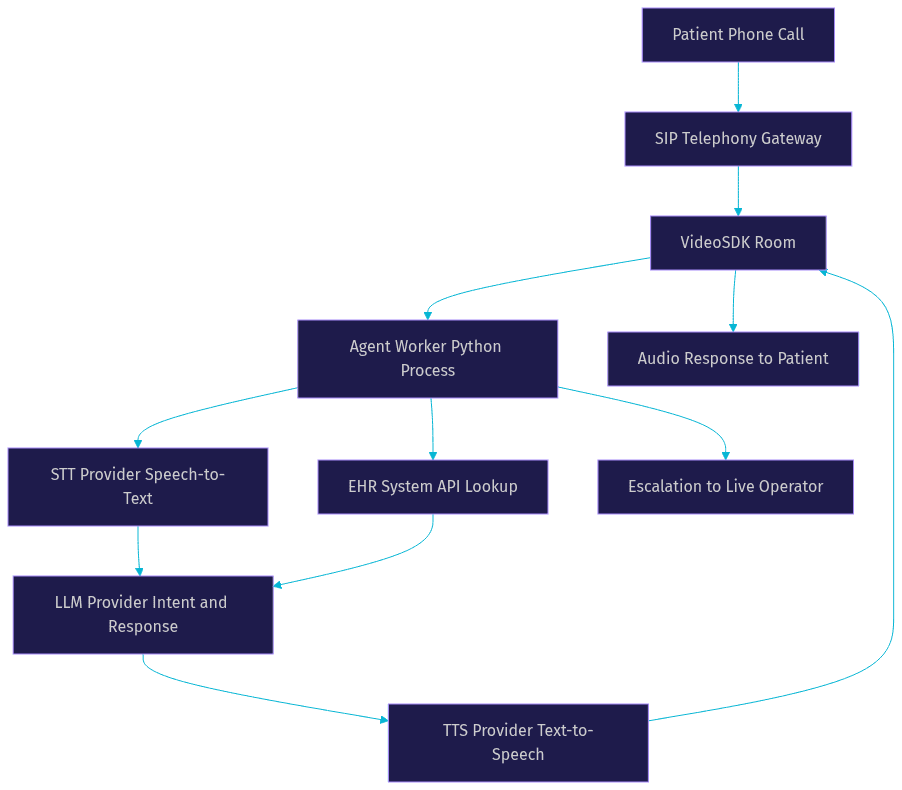
When a patient calls a clinic's phone number, the call enters through a SIP telephony gateway that bridges traditional phone networks to VideoSDK's WebRTC-based rooms. The SIP integration handles inbound and outbound call flows, DTMF events, and call transfers. Once the call connects to a VideoSDK room, the Agent Worker (a Python process) joins the same room and begins processing audio.
The Agent Worker captures the patient's audio stream, routes it through the STT provider for transcription, passes the transcript to the LLM for intent detection and response generation, and sends the LLM output to the TTS provider for speech synthesis. The synthesized audio plays back to the patient through the VideoSDK room. This entire pipeline operates with sub-second latency when configured with real-time models like OpenAI Realtime or Google Gemini Live.
Key Features for Healthcare
VideoSDK's AI Voice Agent includes several features that map directly to healthcare requirements. The platform supports HIPAA-ready pipeline configurations where audio processing, transcription, and storage can be routed through compliant providers. Real-time transcription captures every word of the patient interaction for clinical documentation. Turn detection and voice activity detection (VAD) ensure the agent knows when a patient has finished speaking and when to respond, preventing awkward interruptions. Escalation hooks allow the agent to transfer the call to a live nurse or physician when the conversation exceeds its scope. Multilingual support comes built in through the range of STT and TTS providers, covering languages that matter for diverse patient populations.
Implementing a Voice Agent for Healthcare with VideoSDK
Building a production voice agent for healthcare requires planning across compliance, security, and integration dimensions. VideoSDK provides the building blocks, but the implementation decisions determine whether the agent is safe, effective, and scalable.
Planning and Compliance Considerations
Before writing any agent logic, define the compliance boundary. If you operate in the United States, the voice agent must comply with HIPAA requirements for protected health information (PHI). This means selecting STT, LLM, and TTS providers that offer Business Associate Agreements (BAAs) and configuring data retention policies that do not store PHI outside compliant systems. For European deployments, GDPR consent requirements apply: the agent must inform callers that their conversation is being recorded and processed by AI, and it must offer an opt-out path. Document these decisions before implementation begins, not after.
Token-Based Authentication and Secure Routing
VideoSDK uses token-based authentication to protect every session. When a patient call enters the SIP gateway, your backend server generates a VideoSDK meeting token using your API key and secret. This token authenticates the Agent Worker's connection to the room and enforces role-based access control. You can configure tokens to grant specific permissions: the agent might have speaker and transcription permissions, while a supervising nurse who joins mid-call has broader administrative capabilities. Never expose your API secret on the client side. Always generate tokens server-side through your backend, which can also validate the caller's identity against your patient database before issuing a token.
Integrating with EHR and Scheduling Systems
The voice agent becomes genuinely useful when it can read and write to your existing healthcare systems. VideoSDK's Agent Worker supports function tools and MCP integration, which let the LLM call external APIs during a conversation. For EHR integration, you define functions that the agent can invoke: looking up a patient by phone number, retrieving upcoming appointments, checking available slots, booking a new appointment, or fetching medication instructions. When a patient says "I need to see Dr. Patel next week," the agent calls your scheduling API, receives available time slots, and offers them conversationally. The REST API reference provides the room management endpoints you need to orchestrate these sessions programmatically from your backend.
Best Practices for a Successful Deployment
A voice agent for healthcare succeeds or fails based on conversation design and escalation handling. Two practices separate production-grade deployments from prototypes.
Designing Conversational Flows with Conversational Graph
Healthcare conversations often follow regulatory-driven paths where every step must happen in a specific order. A medication refill request, for example, requires patient identity verification, medication name confirmation, dosage check, and prescriber approval before any action is taken. Letting the LLM control this flow introduces non-determinism: the model might skip verification or hallucinate a dosage.
VideoSDK's Conversational Graph solves this by letting you define the conversation as a directed graph with nodes, transitions, and state. The LLM handles natural language generation within each node, but the graph controls which node comes next. You define a state model (using Pydantic) that tracks collected information, and transitions that enforce business rules. If the patient has not verified their identity, the graph prevents the agent from proceeding to the medication discussion node. This deterministic structure ensures compliance while still delivering a natural conversational experience.
Handling Escalation and Human Handoff
No voice agent handles every scenario. A patient might describe symptoms that require clinical judgment, express emotional distress, or ask a question the agent is not authorized to answer. VideoSDK's Agent Worker includes call transfer and warm transfer capabilities that handle these moments gracefully. When the agent detects a trigger (either through explicit patient request like "I need to speak to a nurse" or through conversational cues that exceed the agent's scope), it initiates a transfer to a live operator. The warm transfer capability preserves context: the operator receives a summary of the conversation so far, including the patient's stated reason for calling and any information already collected. This prevents the patient from repeating everything to a new person, which is one of the most common complaints about automated phone systems.
Voice activity detection plays a role here too. If the agent detects prolonged silence, background noise suggesting an emergency, or speech patterns that indicate confusion, it can proactively escalate rather than continuing to loop through automated prompts.
Measuring Impact and ROI
Deploying a voice agent for healthcare is an investment, and like any clinical technology, it needs measurable outcomes to justify continued funding.
Metrics to Track
Track four core metrics from day one. Call answer rate measures the percentage of inbound calls that connect to the agent versus going to voicemail or being abandoned. Average handling time measures how long each interaction takes, including both agent-handled and escalated calls. No-show reduction compares appointment attendance rates before and after deploying automated reminder calls. Cost per interaction calculates the total platform cost divided by the number of handled calls, which you can compare against the cost of a human front-desk employee handling the same volume.
A mid-sized clinic network handling 2,000 inbound calls per week might spend $15,000 monthly on front-desk staffing for phone coverage alone. A voice agent handling 70% of those calls at a fraction of the per-call cost frees staff for in-person patient care while improving phone availability.
Real-World Case Study Snapshot
A regional healthcare system with 12 primary care locations deployed a VideoSDK-powered voice agent for appointment scheduling and reminders. Within three months, they reduced no-show rates by 30%, cut average call wait time from 4.5 minutes to under 30 seconds, and achieved a 94% call answer rate during peak hours. The agent handled 68% of inbound calls without human intervention, with the remaining 32% escalated to live staff with full conversation context preserved.
Future Trends in Voice Agents for Healthcare
The voice agent landscape is evolving rapidly, and healthcare stands to benefit from several emerging capabilities.
Multimodal AI and Real-Time Translation
Real-time multimodal models like OpenAI Realtime and Google Gemini Live are beginning to combine voice, text, and image inputs in a single inference pipeline. For healthcare, this opens possibilities like a patient describing a rash while simultaneously uploading a photo through a companion app, with the AI agent assessing both the verbal description and the visual input to triage urgency. Real-time translation is another frontier: agents that can converse fluently in a patient's native language while transcribing the interaction in English for the clinical record eliminate the need for separate interpreter services.
Regulatory Outlook
Regulatory bodies are actively developing guidance for AI in healthcare communications. The HHS Office for Civil Rights has signaled upcoming updates to HIPAA guidance that address AI-mediated patient interactions, with expected clarifications on how PHI processed through LLMs should be handled. Developers building voice agents today should design with flexibility in mind, ensuring that their STT, LLM, and TTS provider configurations can be swapped quickly as compliance requirements evolve. VideoSDK's modular pipeline architecture supports this: providers are pluggable, so if a new regulation requires switching to a BAA-covered TTS provider, the change is a configuration update rather than a rebuild.
Definitions Glossary
Voice Agent for Healthcare: An AI system that conducts real-time voice conversations with patients to automate clinical and administrative tasks like scheduling, triage, and intake. VideoSDK enables this through its AI Voice Agent SDK with built-in telephony support.
Agent Worker: The Python process that runs a VideoSDK AI agent and manages its session lifecycle inside a VideoSDK room, processing audio through the STT, LLM, and TTS pipeline.
Conversational Graph: VideoSDK's deterministic flow engine that defines conversation steps as a directed graph, ensuring regulatory-driven branching where business rules (not LLM judgment) control transitions between nodes.
SIP Integration: The telephony bridge that connects traditional phone networks to VideoSDK's WebRTC rooms, enabling patients to call a standard phone number and interact with an AI agent.
Turn Detection: The mechanism that determines when a patient has finished speaking and the AI agent should respond, preventing interruptions and ensuring natural conversation flow.
Warm Transfer: A call transfer method that preserves conversation context, allowing a live operator to receive a summary of the AI-handled portion before speaking with the patient.
Key Takeaways
- A voice agent for healthcare eliminates call abandonment by answering every patient call on the first ring, reducing no-shows by up to 30% through automated reminders and rescheduling.
- VideoSDK's AI Voice Agent SDK provides the complete infrastructure: SIP telephony integration, real-time STT and TTS pipelines, token-based authentication, and escalation hooks for human handoff.
- Conversational Graph ensures deterministic, compliant conversation flows where patient identity verification and clinical protocols are enforced by business rules, not LLM judgment.
- EHR integration through function tools and MCP allows the agent to look up patient records, check appointment availability, and book visits during the call without human intervention.
- Multilingual support and real-time transcription make the agent accessible to diverse patient populations while creating auditable documentation for every interaction.
Conclusion
A voice agent for healthcare is no longer a futuristic concept. Clinics are deploying them today to answer every call, reduce no-shows, and free clinical staff for work that requires human judgment. VideoSDK's AI Voice Agent platform provides the real-time communication infrastructure, telephony integration, and AI pipeline orchestration to build these systems with sub-second latency and production-grade reliability. The Conversational Graph ensures your agent follows clinical protocols deterministically, while the SIP telephony integration lets patients reach the agent through a standard phone call.
Ready to build your own healthcare voice agent? Start with the VideoSDK AI Voice Agent documentation and sign up at app.videosdk.live/login to get your API keys. What are you building with VideoSDK? Drop a comment below, I'd love to hear what kind of voice agent for healthcare use case you're working on.
FAQ