


A voice agent for businesses is an AI-powered system that handles real-time voice conversations with customers, automating tasks like support, scheduling, and outbound outreach. It combines speech-to-text, large language models, and text-to-speech to deliver natural, low-latency interactions. VideoSDK provides an open-source AI Agent SDK and telephony integration to help developers build and deploy these systems at scale.
The demand for conversational AI in enterprise environments is accelerating. According to a Gartner forecast, conversational AI will reduce contact center labor costs by $80 billion by 2026. Companies are moving beyond rigid touch-tone IVR menus and deploying intelligent voice agents that understand context, intent, and nuance.
This shift is driven by advances in real-time speech processing and the availability of powerful large language models. A modern voice agent for businesses can handle complex multi-turn conversations, integrate with backend CRM systems, and scale to thousands of simultaneous calls without adding headcount.
This article breaks down the core technical components of a business voice agent, provides a platform selection framework, and walks through a five-step implementation roadmap. By the end, you will have a clear architecture for deploying a production-grade voice AI system using tools like the VideoSDK AI Agent SDK.
What Is a Voice Agent for Businesses?
A voice agent for businesses is defined as a software system that engages in real-time, two-way voice conversations with human callers to automate business workflows. Unlike traditional Interactive Voice Response (IVR) systems that force callers through static menus, a modern AI voice agent uses natural language understanding to interpret caller intent and respond dynamically.
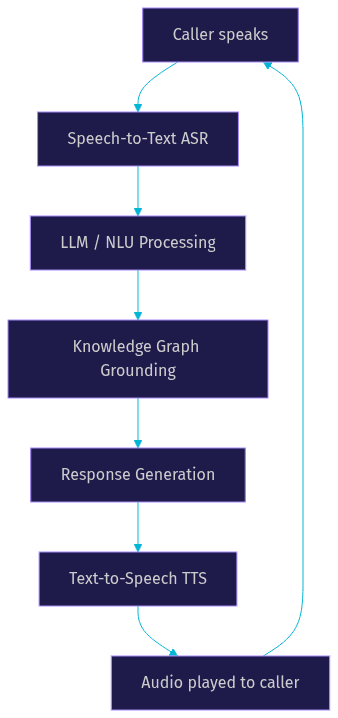
A voice agent for businesses works by capturing live audio from a caller, converting that audio to text using automatic speech recognition (ASR), processing the text through a large language model (LLM) to generate a response, and converting the response back to natural-sounding speech using text-to-speech (TTS) technology. This entire pipeline executes in under a second to maintain conversational flow.
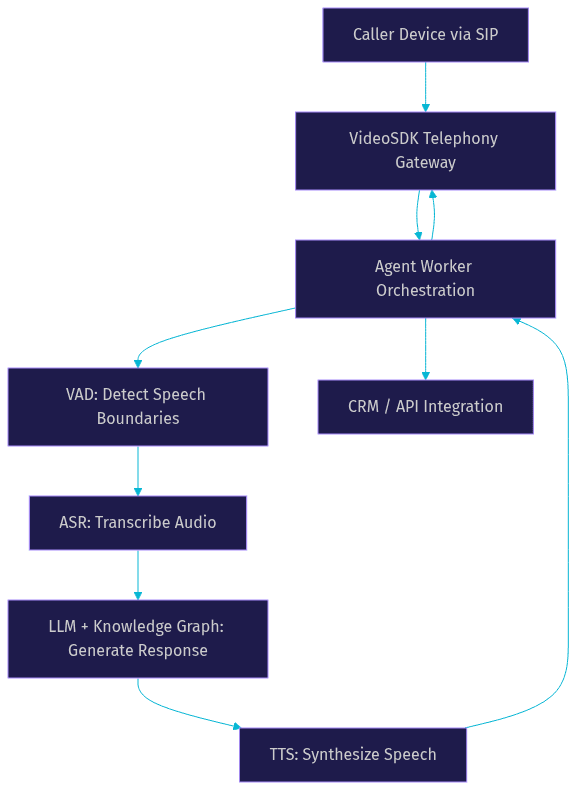
The core components of a business voice agent include the ASR engine for transcription, the LLM or NLU layer for reasoning and response generation, the TTS engine for speech synthesis, and an orchestration layer that manages turn-taking and integrations. VideoSDK provides a unified architecture for these components through its Agent Worker model, which manages the session lifecycle inside a real-time communication room.
Why Companies Adopt a Voice Agent for Businesses
Companies adopt a voice agent for businesses to reduce operational costs while improving customer experience. The primary drivers are cost reduction, 24/7 availability, scalability, and personalized interactions.
A voice agent handles thousands of concurrent calls without the overhead of hiring, training, and retaining human agents. This directly lowers the cost per call. Beyond cost, a voice agent provides consistent service quality at any hour, eliminating after-hours bottlenecks and reducing missed call rates.
Key adoption drivers include:
- Cost reduction: Automating routine inquiries lowers average handling cost and reduces reliance on large contact center teams.
- 24/7 availability: A voice agent operates continuously, capturing leads and resolving issues outside business hours.
- Scalability: Cloud-native voice agents scale elastically to handle call volume spikes during promotions or seasonal peaks.
- Personalized experience: Integration with CRM data allows the agent to greet callers by name and reference past interactions.
- Consistency: Every caller receives the same accurate information, reducing human error and compliance risks.
Core Technical Building Blocks of a Voice Agent for Businesses
Building a production-grade voice agent for businesses requires assembling several specialized technical components. Each block must be tuned for latency, accuracy, and reliability.
Speech-to-Text (ASR) and Accuracy Metrics
Speech-to-text is the entry point of the voice agent pipeline. The ASR engine transcribes caller audio into text in real time. For a business voice agent, latency targets are strict. End-to-end transcription latency should remain under 300 milliseconds to prevent awkward conversational pauses.
Word Error Rate (WER) is the primary accuracy metric for ASR. According to Artificial Analysis's Speech Arena benchmark, leading models like Deepgram Nova-3 and OpenAI Whisper achieve competitive WER scores on conversational audio. Language coverage matters for global businesses. A multilingual voice bot must support dialects and accents relevant to the target market. VideoSDK integrates with multiple STT providers, allowing developers to choose the engine that best fits their accuracy and latency requirements.
Natural-Language Understanding and Knowledge-Graph Grounding
The LLM or NLU layer interprets the transcribed text and generates a response. Raw LLMs are prone to hallucination, which is unacceptable in business contexts like healthcare or finance. Knowledge-graph grounding solves this by constraining the LLM with verified business data.
Developers combine LLMs with retrieval-augmented generation (RAG) and deterministic rules to ensure responses are factual. VideoSDK addresses this challenge directly with its Conversational Graph feature. Instead of letting the LLM control conversation flow, developers define a directed graph of nodes and transitions. The LLM handles natural language generation while the graph enforces business logic, ensuring compliance and accuracy in structured workflows like loan applications or appointment booking.
Text-to-Speech (TTS) Naturalness
TTS naturalness determines how human-like the voice agent sounds. A robotic or monotone voice erodes caller trust. Modern TTS engines from providers like ElevenLabs, Cartesia, and OpenAI deliver expressive, human-quality speech with adjustable pacing and tone.
For a voice agent for businesses, voice style must align with brand identity. A retail brand might choose an upbeat, friendly voice, while a financial services firm might prefer a calm, authoritative tone. Multilingual synthesis is critical for global operations. The TTS engine must handle language switching seamlessly, especially for callers who code-switch between languages. VideoSDK supports a broad ecosystem of TTS providers, giving developers flexibility in voice selection.
Orchestration Layer and Voice Activity Detection
The orchestration layer ties the pipeline together. It manages call flow, handles integrations with CRM systems and internal APIs, and coordinates the handoff between ASR, LLM, and TTS. Voice Activity Detection (VAD) is a critical sub-component of orchestration. VAD determines when a caller has started and stopped speaking, enabling natural turn-taking.
Without accurate VAD, the voice agent either interrupts the caller or waits too long to respond. The orchestration layer also manages the telephony SIP gateway, bridging traditional phone networks to the WebRTC-based AI pipeline. VideoSDK provides built-in telephony integration that connects SIP trunks from providers like Twilio or Telnyx directly to the agent session.
Choosing the Right Voice-Agent Platform for Businesses
Selecting a platform to build a voice agent for businesses requires evaluating several technical and operational criteria. The decision framework should weigh latency, multilingual support, security, integration ecosystem, pricing, and customization depth.
Latency is the most critical factor. If the round-trip time from caller speech to agent response exceeds one second, the conversation feels unnatural. Multilingual support is essential for companies serving diverse regions. Security and compliance requirements, including GDPR and HIPAA, dictate where data is processed and stored.
The integration ecosystem determines how easily the voice agent connects to existing CRM, scheduling, and ERP systems. Pricing models vary from per-minute usage to concurrent session licensing. Customization depth refers to the ability to modify conversation logic, swap AI providers, and deploy on private infrastructure.
[LINKABLE ASSET: Voice Agent Platform Comparison Table]
| Platform | Latency Profile | Multilingual | Security / Compliance | Integration Ecosystem | Best For |
|---|---|---|---|---|---|
| VideoSDK | Sub-second, optimized for real-time | Broad STT/TTS provider support | Data residency controls, encryption | SIP, CRM webhooks, REST APIs, Python SDK | Developers needing full pipeline control and deterministic flows |
| Vapi | Low-latency, managed | Supports major languages | SOC2, basic HIPAA | Twilio, Vonage, common CRMs | Teams wanting a fast managed setup |
| Bland AI | Optimized for outbound | English-centric | Standard encryption | API-first, webhook support | High-volume outbound dialing campaigns |
VideoSDK stands out for developers who need to enforce deterministic conversation flows using Conversational Graph while maintaining the flexibility to choose their own STT, LLM, and TTS providers. The open-source nature of the Agent SDK means you can inspect, modify, and self-host the infrastructure if required.
Implementation Roadmap for a Voice Agent for Businesses
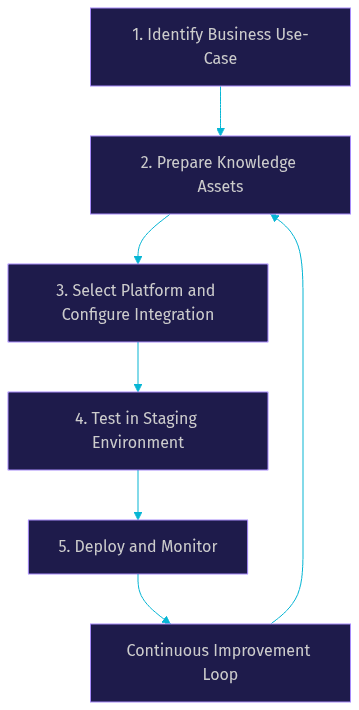
Deploying a voice agent for businesses follows a structured five-step roadmap. Each step builds on the previous one to ensure the final system is accurate, compliant, and production-ready.
1. Identify Business Use-Case
Start by mapping specific pain points to voice-agent scenarios. Common use cases include inbound customer support, outbound appointment reminders, lead qualification, and payment collection. A voice agent for businesses works best when the task is repetitive, high-volume, and rule-bound. Document the expected call flow, required integrations, and success criteria before moving to the next step.
2. Prepare Knowledge Assets
The voice agent needs accurate information to serve callers. Structure your FAQs, standard operating procedures, and product documentation into a format suitable for retrieval. If you are using RAG, chunk your documents into logical sections and store them in a vector database. For deterministic flows, define the data extraction points where the agent must collect specific information from the caller. Clean, well-organized knowledge assets directly improve the accuracy and usefulness of the voice agent.
3. Select Platform and Configure Integration
Choose a platform that aligns with your use-case requirements. Configure the telephony bridge by connecting your SIP trunk provider to the platform's gateway. Set up token-based authentication to secure the connection between your frontend, backend, and the voice agent infrastructure. VideoSDK uses JWT-based meeting tokens generated server-side to authenticate participants and agents.
Establish CRM webhook integrations so the voice agent can read and write customer data during the call. Configure the STT, LLM, and TTS providers based on your latency and language requirements. VideoSDK's pipeline architecture lets you swap providers without rewriting the core orchestration logic.
4. Test in Staging (Latency, Accuracy, Edge Cases)
Before going live, test the voice agent in a staging environment. Measure end-to-end latency from caller speech to agent response. Test ASR accuracy with different accents, background noise levels, and speaking speeds. Run edge-case scenarios including caller interruptions, silence, and out-of-scope requests.
Verify that the deterministic conversation flow handles branching correctly. Test the fallback mechanism that transfers the call to a human agent when the AI cannot resolve the query. Check that CRM integrations return the correct data and that sensitive information is masked in logs.
5. Deploy and Monitor
Deploy the voice agent to production using a phased rollout. Start with a small percentage of call traffic and monitor performance metrics. Set up real-time dashboards to track latency, call completion rate, and error rates. Configure alerts for latency spikes or ASR degradation.
Voice AI monitoring and analytics are essential for continuous improvement. Review call transcripts to identify recurring failure patterns and refine the knowledge base. VideoSDK provides session analytics and pipeline observability to help developers identify bottlenecks in the STT, LLM, or TTS chain.
Best Practices for Production Voice Agents
A production voice agent for businesses must meet stringent security, compliance, and performance standards. Security starts with end-to-end encryption for all audio streams and data residency controls for sensitive industries. If you operate in healthcare, ensure the platform supports HIPAA-compliant data handling. For European markets, verify GDPR compliance and data processing location.
Handling code-switching is a technical best practice that improves caller experience. Callers may switch between languages mid-sentence. The ASR engine must detect the language change, and the LLM must respond in the correct language without explicit prompts.
Fallback to human agents is non-negotiable. The voice agent must recognize when it cannot resolve a query and transfer the call gracefully. VideoSDK supports warm transfers, where the AI agent briefs the human agent on the call context before handing off. Performance tuning involves adjusting VAD sensitivity, optimizing LLM context windows, and enabling TTS caching for common responses to reduce latency.
Measuring ROI and Success Metrics
Measuring the ROI of a voice agent for businesses requires tracking both operational efficiency and customer experience metrics. The key performance indicators provide a clear picture of financial impact and service quality.
[LINKABLE ASSET: Voice Agent KPI Table]
| KPI | Description | Target Improvement |
|---|---|---|
| Call-handling cost | Total cost per automated call vs. human agent | 60-80% reduction |
| First-contact resolution | Percentage of calls resolved without human transfer | Above 70% |
| Conversion rate | Percentage of outbound calls achieving goal | Match or exceed human agents |
| Average handling time | Total duration of automated calls | 20-30% reduction |
| Customer satisfaction (CSAT) | Post-call survey score | Maintain or improve baseline |
Track these metrics over a 90-day period post-deployment to establish a reliable baseline. Compare automated call performance against historical human agent data to quantify the exact ROI.
Real-World Case Studies for a Voice Agent for Businesses
Two examples illustrate the impact of deploying a voice agent for businesses.
Retail Brand Reduces Missed Calls: A national retail chain deployed a voice agent to handle inbound order status and return inquiries. Before deployment, the company missed 40% of calls during peak hours due to agent unavailability. The voice agent, built with VideoSDK's AI Agent SDK and a Deepgram STT engine, handled 100% of inbound calls. Missed calls dropped by 70% within the first month. The technical stack included a SIP integration with Twilio and a deterministic conversation flow for order lookup.
Healthcare Provider Improves Appointment Booking: A regional healthcare network implemented a voice agent for outbound appointment reminders and inbound scheduling. The system used VideoSDK's Conversational Graph to enforce a strict booking workflow, ensuring all required patient data was collected in order. The TTS engine from ElevenLabs provided a natural, calming voice. Appointment booking speed improved by 45%, and the no-show rate decreased by 25% due to consistent automated reminders.
Future Trends in Business Voice Agents
The voice agent for businesses landscape is evolving rapidly. Real-time multimodal models like OpenAI Realtime API and Google Gemini Live are collapsing the separate ASR, LLM, and TTS pipeline into a single inference step. This architecture reduces latency dramatically and improves conversational naturalness.
Edge-deployed inference is gaining traction for enterprises with strict data residency requirements. Running the voice agent pipeline on local hardware eliminates cloud round-trips and keeps sensitive audio data on-premise. AI-driven sentiment analysis is becoming a standard feature, allowing the voice agent to detect caller frustration and adjust tone or trigger a human transfer proactively.
Definitions Glossary
Voice Agent for Businesses: An AI system that automates real-time voice conversations for commercial workflows like support, scheduling, and sales.
Speech-to-Text (STT): The process of converting spoken audio into text, measured by Word Error Rate and latency.
Text-to-Speech (TTS): The synthesis of natural-sounding human speech from generated text responses.
Voice Activity Detection (VAD): The mechanism that detects when a person is speaking and when they stop, enabling natural turn-taking in conversations.
Conversational Graph: A deterministic, graph-based orchestration layer that controls conversation flow using nodes and transitions, ensuring business rules override LLM improvisation.
SIP Gateway: A telephony bridge that connects traditional phone networks to WebRTC-based AI agent sessions.
Key Takeaways
- A voice agent for businesses combines ASR, LLM, and TTS components to automate real-time customer conversations with sub-second latency.
- Deterministic conversation flows, like VideoSDK's Conversational Graph, prevent LLM hallucinations and ensure compliance in regulated industries.
- Platform selection should prioritize latency, security, integration ecosystem, and the ability to swap AI providers.
- A structured five-step implementation roadmap ensures the voice agent is tested for accuracy and edge cases before production deployment.
- ROI is measured through call-handling cost reduction, first-contact resolution, and average handling time improvements.
Conclusion
A voice agent for businesses is no longer an experimental technology. It is a proven tool for reducing operational costs, scaling customer support, and improving service availability. The key to success lies in choosing a platform that offers both flexibility and control over the conversation pipeline. VideoSDK provides the open-source AI Agent SDK, Conversational Graph, and telephony integration needed to build production-grade voice agents. Explore the VideoSDK AI Agents documentation to start building, or sign up for a free trial at app.videosdk.live/login. What are you building with VideoSDK? Drop a comment below to share your voice agent use case.
Free $20 Balance for AI Voice Agents & Video Calls
FAQ