


Voice Activity Detection (VAD) identifies whether speech is present in an audio frame, while turn-taking predicts when a speaker has finished their utterance and a response is appropriate. VAD answers a binary acoustic question; turn-taking answers a conversational timing question. VideoSDK's AI Voice Agent SDK provides both VAD and turn detection as configurable pipeline components, letting developers choose rule-based silence timers or semantic models depending on their latency and accuracy requirements.
Nothing kills a voice agent conversation faster than bad timing. When an AI agent interrupts a user mid-sentence, the user stops trusting the system. When the agent waits too long after the user finishes speaking, the conversation feels sluggish and unnatural. The root cause is usually a confusion between two distinct problems: detecting that speech exists, and predicting when a conversational turn is complete. Developers building with VideoSDK's AI Voice Agent SDK encounter this distinction early, because the pipeline separates Voice Activity Detection from Turn Detection as independent, configurable stages. Understanding the difference between VAD vs turn taking is essential for shipping a voice agent that feels responsive rather than robotic. By the end of this article, you will understand how each mechanism works, where they fail, and how to choose the right approach for your specific conversational AI use case.
What Is VAD vs Turn Taking?
Voice Activity Detection and turn-taking solve fundamentally different problems, and conflating them is the most common architectural mistake in voice agent development.
Voice Activity Detection is defined as the process of classifying individual audio frames as either speech or non-speech. It operates at the frame level, typically processing audio in 10 to 30 millisecond chunks, and produces a binary output: someone is speaking, or someone is not. VAD does not care about meaning, intent, or conversational structure. It cares only about whether the acoustic signal contains human speech energy.
Turn-taking is defined as the process of predicting when a speaker has completed their conversational turn and a response from another participant becomes appropriate. This is sometimes called endpoint detection or end-of-turn detection. Turn-taking considers not just silence but the broader conversational context, including prosody, syntax, and semantic completeness.
The distinction matters because silence does not equal turn completion. A speaker may pause to think, breathe, or emphasize a point, fully intending to continue. Research in conversational analysis has long studied this phenomenon. Psycholinguistic studies consistently find that the average gap between turns in human conversation is approximately 200 milliseconds, which is remarkably short compared to the 400 to 600 millisecond silence timers that most rule-based VAD systems use. If your agent relies on a simple silence threshold, it will either interrupt users during natural pauses or respond too slowly after they actually finish.
VideoSDK addresses this by treating VAD and turn detection as separate pipeline stages. The VAD component handles raw speech detection, while the Turn Detection component consumes that output alongside transcript data to make a richer prediction about whether the user is truly finished. This separation lets developers swap VAD strategies without rebuilding the entire agent pipeline.
How Rule-Based VAD Works in Practice
Rule-based VAD is the simplest and most common starting point for voice agent developers, but its failure modes directly shape the user experience.
In a rule-based setup, the system processes incoming audio in short frames and classifies each frame as speech or silence based on acoustic energy thresholds. When the system detects a transition from speech to silence, it starts a countdown timer. If silence persists for a configured duration, typically around 400 milliseconds, the system declares the turn complete and triggers the agent response pipeline.
Developers typically layer additional rules on top of this basic timer. A minimum speech duration threshold prevents brief noise spikes from registering as a turn. A maximum speech duration cap forces a response even if the user keeps talking, which is useful for time-bounded scenarios. Some systems add a secondary shorter timer for high-confidence endpoints and a longer timer for ambiguous cases.
The two dominant failure modes are premature interruption and dead air. Premature interruption happens when a user pauses mid-utterance and the silence timer expires before they resume speaking. The agent starts responding, the user feels cut off, and the conversation breaks down. Dead air happens when a user finishes speaking but the timer is set too conservatively, leaving an awkward gap before the agent responds.
Here is how a rule-based VAD pipeline flows from audio input to turn decision:
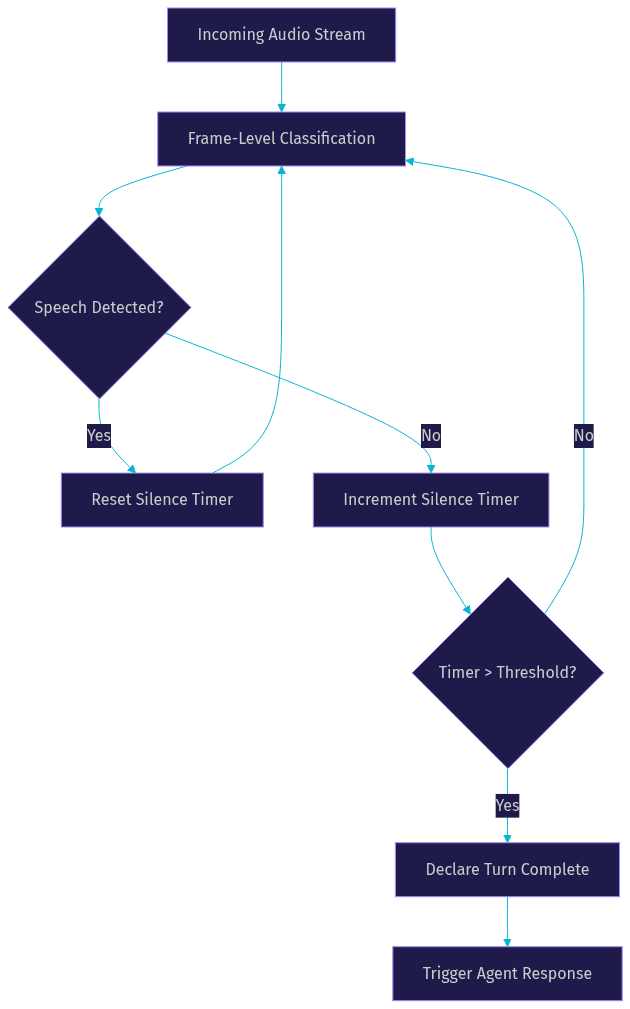
This architecture works acceptably for push-to-talk interfaces and simple prototypes. For production conversational agents, it creates a persistent tension: shorter timers reduce latency but increase false interruptions, while longer timers reduce interruptions but add uncomfortable delays.
Acoustic VAD vs Semantic VAD
The evolution from acoustic VAD to semantic VAD represents the single biggest leap in turn prediction accuracy for modern voice agents.
Acoustic VAD relies on signal-level features to classify audio frames. Traditional implementations use energy thresholds and zero-crossing rates. More sophisticated versions employ small neural network classifiers trained on speech and non-speech datasets. These models are fast, lightweight, and suitable for on-device deployment. However, they share a fundamental limitation: they cannot distinguish between a pause within a turn and a pause at the end of a turn, because both produce the same acoustic signature.
Semantic VAD incorporates language context to predict utterance completion. Instead of looking only at the audio signal, it consumes the streaming transcript from the speech-to-text component, analyzes prosodic features like pitch contour and final lengthening, and evaluates whether the current sentence is syntactically and semantically complete. If the user says "I want to book a flight to..." and then pauses, semantic VAD recognizes that the sentence is incomplete and suppresses the turn endpoint, even if the silence exceeds the timer threshold.
The latency benefits are significant in practice. A rule-based system with a 500 millisecond timer adds 500 milliseconds of dead air to every turn. A semantic VAD system that recognizes a completed utterance can trigger a response in under 200 milliseconds, matching the natural cadence of human conversation. VideoSDK's agent pipeline supports this pattern by allowing the Turn Detection component to consume both VAD output and real-time transcription data, enabling context-aware endpointing without requiring developers to build the integration from scratch.
Here is a side-by-side comparison of the two pipeline architectures:

The semantic pipeline is more computationally expensive because it runs speech-to-text and language analysis alongside the acoustic classifier. For applications where latency is critical and compute budget is limited, the acoustic pipeline remains a valid choice. For customer support agents, multi-turn dialog systems, and any scenario where conversational naturalness matters, semantic VAD delivers a measurably better experience.
Turn-Taking Models Beyond Simple Timers
Modern turn-taking models go beyond silence detection by analyzing multiple conversational cues simultaneously to predict what linguists call transition relevance points.
Transition relevance points are moments in conversation where a change of speaker is socially expected. They occur at syntactic clause boundaries, after falling intonation contours, and when semantic content reaches a natural completion point. Turn-taking models trained on conversational datasets learn to identify these points by combining prosodic cues (pitch movement, speech rate changes, final syllable lengthening), linguistic cues (sentence completion, conjunction markers), and semantic cues (intent fulfillment, question detection).
Integration with VAD output is critical. The VAD component provides the raw speech and silence timeline. The turn-taking model layers its predictions on top, effectively overriding or confirming the VAD-based endpoint. If VAD detects a 300 millisecond silence but the turn-taking model predicts the utterance is incomplete, the system holds. If the model detects a completed question with falling intonation, it can trigger a response faster than the silence timer would allow.
Back-channel handling is where simple VAD systems fail most visibly. When a user says "uh-huh" or "yeah" during an agent's response, they are not taking the turn. They are providing a back-channel cue that signals continued attention. A rule-based VAD system interprets this as speech, stops the agent, and creates a confusing interaction. A trained turn-taking model recognizes back-channels as distinct from turn claims and allows the agent to continue speaking. VideoSDK's Conversational Graph provides a structured way to define how the agent should respond to these cues, giving developers deterministic control over back-channel behavior rather than relying on the LLM to figure it out.
Choosing the Right Approach: VAD vs Turn Taking
Selecting the right turn detection strategy depends on your conversation structure, latency budget, and compute constraints.
For push-to-talk interfaces, simple command-response systems, and early-stage prototypes, a rule-based VAD timer is sufficient. The user explicitly signals when they are done speaking, so the system does not need to predict turn completion. A 300 to 400 millisecond silence timer works well, and the computational footprint is minimal.
For customer support agents, multi-turn dialog systems, and any application where users speak in natural sentences with pauses, semantic VAD or a full turn-taking model is necessary. The cost is higher compute usage and slightly more complex pipeline configuration, but the payoff is a conversation that does not feel broken.
The trade-offs break down across three axes. Latency versus accuracy: simpler VAD adds fixed delay but behaves predictably, while semantic models reduce delay but can occasionally mispredict. Compute cost: acoustic VAD runs efficiently on-device, while semantic VAD typically requires cloud-based STT and language processing. On-device versus cloud: if your agent runs on edge hardware with limited connectivity, acoustic VAD may be your only viable option. If you have cloud infrastructure, semantic VAD unlocks substantially better conversational quality.
Here is a decision tree for selecting the appropriate approach:
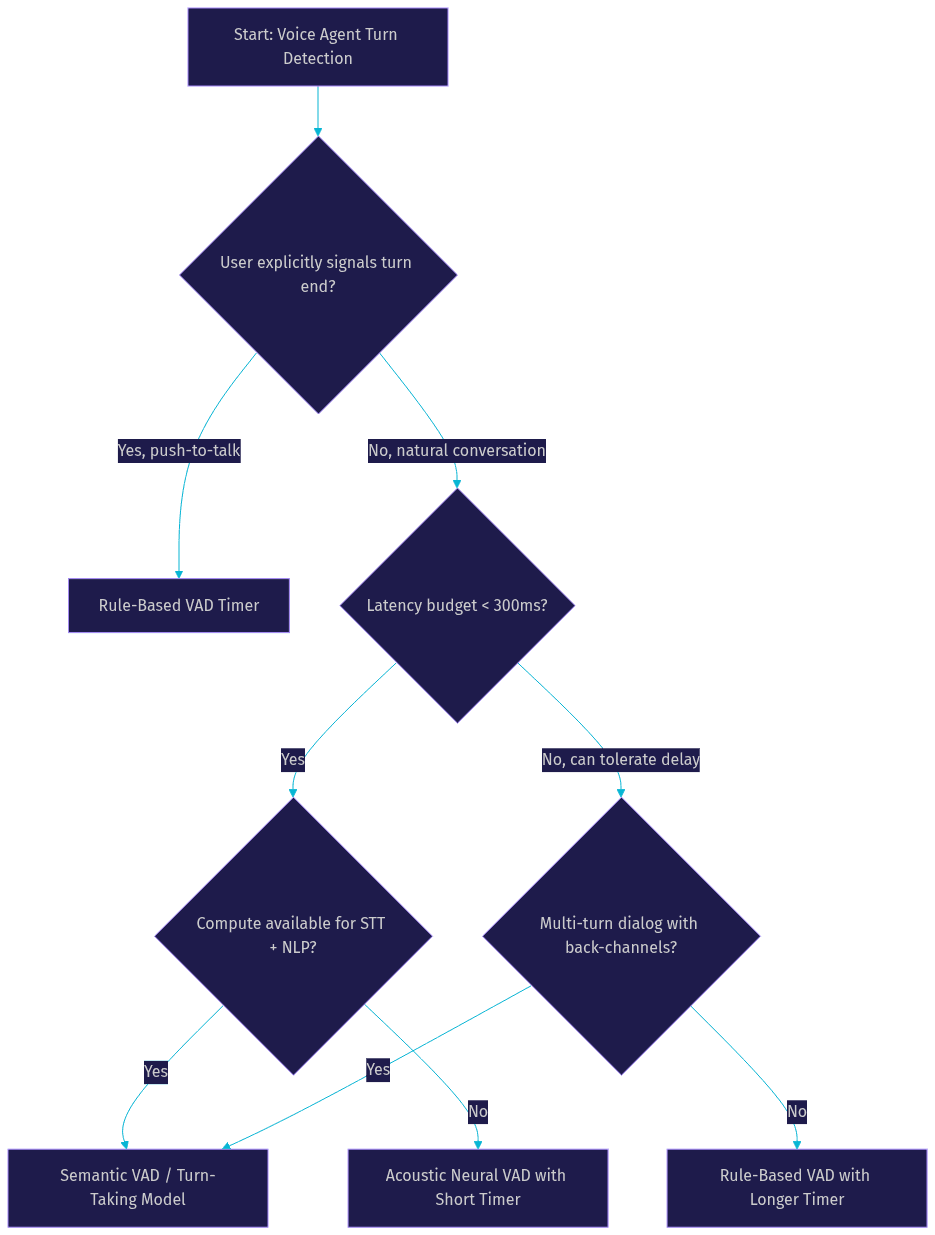
VideoSDK's agent pipeline accommodates all three paths. Developers can start with a simple VAD configuration for prototyping and upgrade to semantic turn detection as their conversation logic matures, without rearchitecting the pipeline.
Implementation Checklist for VideoSDK Voice Agents
Building a production voice agent requires careful configuration of both VAD and turn detection stages.
- Generate your VideoSDK token server-side using your API key and secret. Never expose credentials on the client side. Follow the authentication guide for your SDK.
- Select your VAD mode based on the decision tree above. Start with acoustic VAD for prototyping, then evaluate semantic VAD once your STT pipeline is stable.
- Configure your turn detection component to consume both VAD output and streaming transcript data if you are using semantic mode.
- Define back-channel handling behavior explicitly. If your agent should ignore short affirmations like "yeah" or "right," configure that in your turn detection rules or Conversational Graph nodes.
- Test against three critical scenarios: a user who pauses mid-sentence, a user who barges in while the agent is speaking, and a user in a noisy environment with background speech.
- Monitor latency metrics end-to-end. Measure the time from user speech endpoint to first audio byte of the agent response. Anything above 800 milliseconds will feel sluggish to users.
- Review the AI Agents documentation for the latest supported STT, LLM, and TTS providers, as plugin availability updates frequently.
- Explore the open-source VideoSDK Agents SDK on GitHub for release notes and implementation references.
Future Trends in VAD vs Turn Taking
The boundary between VAD, turn-taking, and speech recognition is dissolving as end-to-end models begin to handle all three jointly.
Emerging research focuses on models that process raw audio and directly output both transcript and turn-completion predictions, eliminating the sequential STT-then-turn-detection pipeline. These models promise lower overall latency because they remove the dependency chain where turn detection must wait for transcript finalization. Real-time multimodal models like OpenAI Realtime and Google Gemini Live are pushing in this direction, and the W3C WebRTC standard continues to evolve to support the low-latency audio transport these models require.
Full-duplex conversational agents represent the next frontier. In a full-duplex system, the agent can listen and speak simultaneously, processing back-channels and interruptions in real time without stopping its own output. This requires VAD and turn-taking to operate continuously, not just during designated listening windows. The anticipated impact is substantial: conversations that feel truly interactive rather than alternating between rigid speak-and-listen phases.
Definitions Glossary
Voice Activity Detection (VAD): The process of classifying audio frames as containing speech or non-speech. VideoSDK's agent pipeline uses VAD as the first stage in turn detection, providing the raw speech timeline that downstream components consume.
Turn-Taking: The process of predicting when a speaker has completed their conversational turn and a response is appropriate. VideoSDK separates turn detection from VAD so developers can choose rule-based or semantic approaches independently.
Semantic VAD: A turn detection approach that combines acoustic VAD output with transcript data, prosodic features, and linguistic analysis to predict utterance completion. It reduces false interruptions during natural pauses.
Transition Relevance Point: A moment in conversation where a change of speaker is socially expected, typically occurring at syntactic boundaries with falling intonation. Turn-taking models are trained to detect these points.
Back-Channel: A short vocalization like "uh-huh" or "yeah" that signals continued attention without claiming the conversational turn. VideoSDK's Conversational Graph lets developers define deterministic handling for these cues.
Key Takeaways
- VAD detects whether speech is present in an audio frame; turn-taking predicts when a conversational turn is complete. Confusing the two leads to premature interruptions and awkward dead air.
- Rule-based VAD with a fixed silence timer works for push-to-talk and prototypes but fails in natural multi-turn conversations where users pause mid-utterance.
- Semantic VAD combines acoustic detection with transcript and prosodic analysis to distinguish mid-utterance pauses from true turn endpoints, reducing response latency to match human conversational cadence.
- VideoSDK's AI Voice Agent SDK treats VAD and turn detection as separate configurable pipeline stages, letting developers start simple and upgrade to semantic turn-taking without rearchitecting their agent.
- Full-duplex agents and end-to-end audio models are converging VAD, STT, and turn prediction into unified systems that will further reduce latency and improve conversational naturalness.
Conclusion
The distinction between VAD vs turn taking is not an academic detail. It is the architectural decision that determines whether your voice agent feels responsive or broken. Rule-based VAD timers are a reasonable starting point, but any production agent serving real users in natural conversation needs semantic turn detection to handle pauses, back-channels, and incomplete sentences gracefully. VideoSDK's AI Voice Agent SDK gives you both options in a single pipeline, with the flexibility to start simple and evolve. Review your current turn detection setup, measure your endpoint-to-response latency, and consider whether semantic VAD can close the gap between your agent and a natural human conversation. You can sign up and start building at app.videosdk.live/login. What are you building with VideoSDK? Drop a comment below, I'd love to hear what kind of voice agent use case you're working on.
Free $20 Balance for AI Voice Agents & Video Calls
FAQ