


Text to speech Python libraries convert written text into spoken audio, enabling developers to build voice-enabled applications. Python serves as an excellent integration layer due to its extensive ecosystem and compatibility with both offline engines like pyttsx3 and cloud APIs like gTTS. For real-time voice applications, you can connect these TTS libraries to VideoSDK AI Voice Agents to deliver synthesized speech directly into live audio rooms.
Developers need reliable text to speech capabilities more than ever. Whether you are building an accessible reading tool, a conversational AI agent, or an interactive e-learning platform, generating natural-sounding audio is a core requirement. The Python ecosystem offers a rich variety of text to speech libraries, ranging from lightweight offline wrappers to deep learning frameworks that produce highly expressive neural voices.
Navigating this landscape requires understanding the trade-offs between latency, voice quality, licensing, and infrastructure costs. This article breaks down the most popular text to speech Python libraries available in 2026. You will learn how to evaluate offline versus cloud solutions, compare synchronous and asynchronous APIs, and select the right library for your specific use case. We will also explore how to integrate these libraries into real-time communication pipelines using VideoSDK.
What Is Text to Speech and Why Use Python Libraries?
Text to speech (TTS) is defined as the technology that converts written text into artificial human speech. A TTS system works by processing input text, converting it into phonetic representations, and generating an audio waveform that mimics human vocal patterns. Modern neural speech synthesis models can produce voices that are nearly indistinguishable from human recordings.
Python is a preferred integration layer for TTS because of its simplicity and the breadth of its machine learning ecosystem. Developers can easily orchestrate text preprocessing, model inference, and audio output handling within a single Python application. Typical use cases for text to speech Python libraries include assistive technologies for visually impaired users, interactive voice bots for customer service, e-learning platforms that narrate course materials, and automated audiobook generation. When you need to stream this synthesized speech into a live call or meeting, platforms like VideoSDK provide the real-time transport layer, allowing your Python backend to push audio directly to participants.
Top Text to Speech Python Libraries Compared
Choosing the right library starts with a high-level comparison. The landscape in 2026 includes established offline tools, convenient cloud wrappers, and advanced deep learning frameworks.
| Library | Type | Key Feature | Best For |
|---|---|---|---|
| pyttsx3 | Offline | Cross-platform OS voice access | Desktop apps, no-network environments |
| gTTS | Cloud | Google Translate voice access | Quick prototypes, multi-language text |
| SpeechFlow | Async Wrapper | Unified asynchronous API | Real-time voice assistants |
| Coqui TTS | Deep Learning | Pretrained neural models | Custom voice creation, high quality |
| TTS | Deep Learning | Broad model zoo | Research, model fine-tuning |
| ElevenLabs SDK | Cloud API | High-fidelity voice cloning | Commercial applications, ultra-realistic audio |
This comparison uses criteria such as deployment environment, latency characteristics, voice quality, and licensing terms. Cloud APIs generally offer superior voice quality but introduce network latency. Offline engines provide instant feedback but rely on the operating system's built-in voices. Deep learning libraries bridge the gap by allowing local neural inference, though they demand significant computational resources.
Choosing the Right Text to Speech Python Libraries
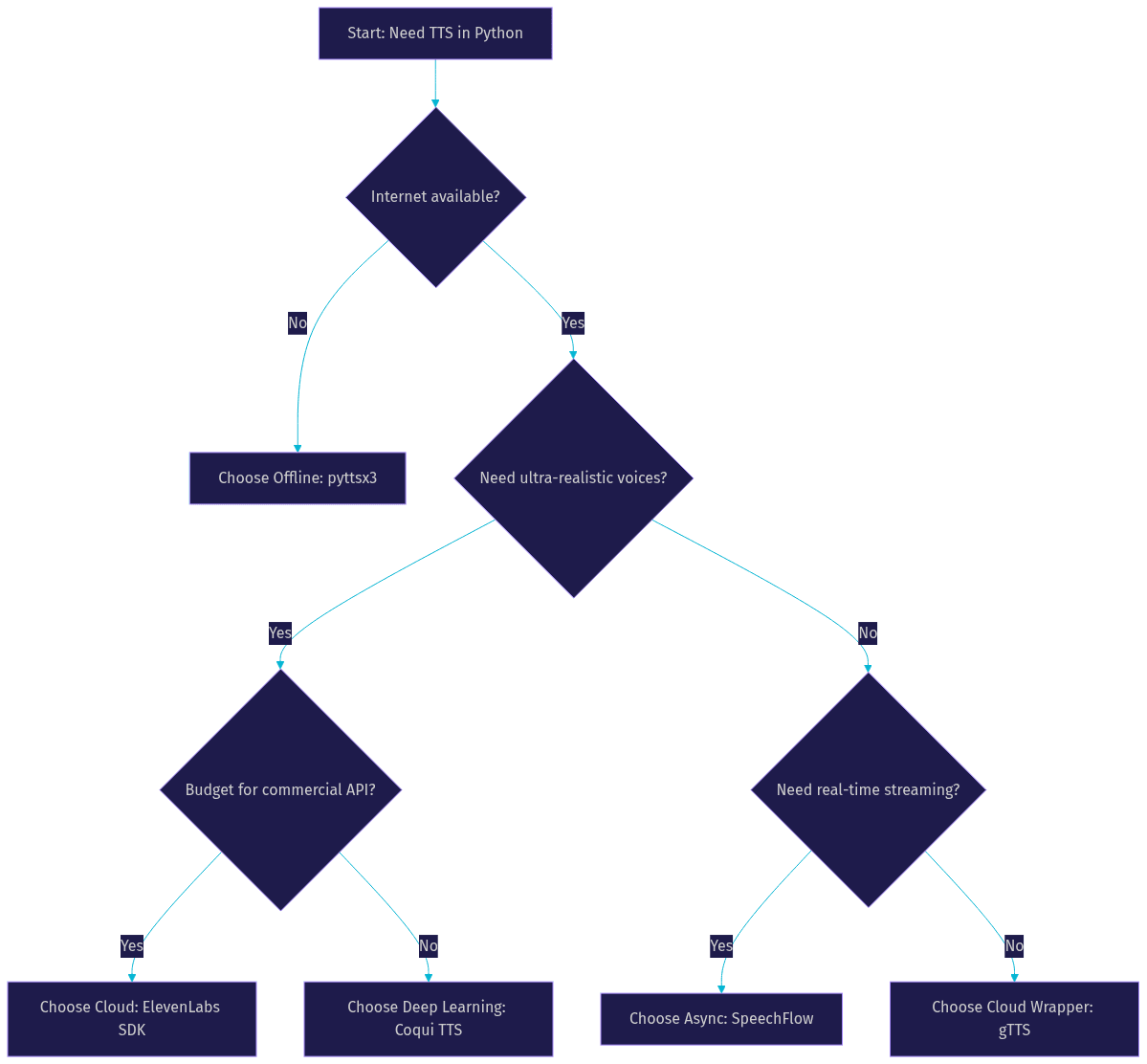
Selecting a TTS library requires mapping your application constraints to library capabilities. If your application operates in an environment without internet access, an offline engine is mandatory. If you need ultra-realistic voice cloning for a commercial product, a cloud API is the better choice. For real-time conversational agents where latency is critical, an asynchronous library that supports streaming is essential.
Here is a decision flowchart to help you navigate the selection process:
Offline vs Cloud
Offline text to speech engines run entirely on the host machine. They rely on voices installed at the operating system level. This approach is crucial for privacy-focused applications, embedded devices, or scenarios where network connectivity is unreliable. The primary trade-off is voice quality, as system voices often sound less natural than neural alternatives.
Cloud TTS services send text to a remote server, which processes the request and returns high-quality audio. These services leverage massive neural models that would be impractical to run locally. The benefits include access to a wide variety of languages, accents, and highly expressive voice profiles. The trade-offs are network latency, potential rate limits, and recurring API costs.
Synchronous vs Asynchronous APIs
The API design of a TTS library significantly impacts your application architecture. Synchronous APIs block the execution thread until the entire audio file is generated. This is simple to implement but problematic for interactive applications where you need to start playing audio before the full synthesis is complete.
Asynchronous APIs allow your application to continue processing while audio generation happens in the background. Libraries that support async out of the box, like SpeechFlow, can stream audio chunks as they become available. This is vital for real-time voice assistants. When building a voice agent with VideoSDK, using an async TTS library allows the agent to start speaking faster, reducing the perceived latency for the end user.
Deep Dive into Individual Libraries
pyttsx3 – Offline, cross-platform engine
pyttsx3 is a popular offline text to speech Python library that provides a unified interface to the operating system's native speech engines. On Windows, it uses SAPI5. On macOS, it uses NSSpeechSynthesizer. On Linux, it uses eSpeak. This cross-platform compatibility makes it a reliable choice for desktop applications.
The library allows developers to control voice selection, speaking rate, and volume. You can enumerate available voices and switch between them programmatically. Since it processes locally, latency is minimal. However, the audio quality is constrained by the OS voices. pyttsx3 is ideal for building accessibility tools, simple desktop notifications, or embedded systems where network access is prohibited.
gTTS – Google Translate based cloud service
gTTS (Google Text-to-Speech) is a lightweight Python library that interfaces with the Google Translate text-to-speech API. It requires an internet connection but does not require an API key for basic usage, making it extremely accessible for beginners.
The library supports a wide range of languages and dialects. You pass text to the library, and it returns an audio file that you can save or play. gTTS is perfect for quick prototypes, small-scale projects, or applications where natural-sounding voices are needed without the complexity of managing API keys. The main limitations are rate limits imposed by Google and the lack of control over voice characteristics like pitch or speed beyond standard rate adjustments.
SpeechFlow – Async-first wrapper for multiple back-ends
SpeechFlow is an asynchronous text to speech Python library designed for real-time applications. It provides a unified async API that can route requests to multiple back-ends, including local engines and cloud services. Its standout feature is streaming support, which allows audio chunks to be processed and played as they arrive.
This library is the right pick when you are building real-time voice assistants or chatbots where responsiveness is critical. By using an async-first design, SpeechFlow prevents the TTS process from blocking the main event loop. When integrated with a real-time communication platform like VideoSDK, SpeechFlow can feed audio directly into a live room, enabling seamless conversational flows.
Coqui TTS – Deep-learning library with pretrained models
Coqui TTS is a powerful deep learning library for speech synthesis. It offers a variety of pretrained models, including Tacotron, FastSpeech, and VITS, allowing developers to generate high-quality neural voices locally. The library supports multi-speaker models, enabling voice selection within a single model.
One of the key strengths of Coqui TTS is the ability to fine-tune models on custom voice data. This allows developers to create unique, branded voices. The library also supports GPU acceleration, which significantly reduces inference time. Coqui TTS is suited for applications requiring custom voice creation, high-quality offline synthesis, or research into speech synthesis models.
TTS – Broad model zoo and training toolkit
The library known simply as TTS is a continuation and expansion of the Coqui TTS project, maintained by the open-source community. It provides a broad model zoo and a comprehensive training toolkit. Developers can train models from scratch or fine-tune existing ones on their datasets.
Differences from the original Coqui TTS include updated model architectures, improved version compatibility, and active community support. This library is ideal for researchers and developers who need granular control over the training pipeline and want to experiment with the latest advancements in speech synthesis.
ElevenLabs Python SDK – Commercial high-fidelity voices
The ElevenLabs Python SDK provides access to one of the most advanced commercial text to speech APIs available in 2026. It is renowned for its high-fidelity, ultra-realistic voices and advanced voice cloning capabilities. With a small sample of audio, the API can create a custom voice clone.
The SDK operates on a commercial pricing model based on character usage. Developers must handle API keys securely. The ElevenLabs SDK is best for commercial applications where voice quality is the top priority, such as premium audiobook production, high-end virtual assistants, or branded content creation. When building AI voice agents with VideoSDK, ElevenLabs is a popular TTS provider choice for delivering lifelike conversational experiences.
Integration Best Practices
Integrating text to speech Python libraries into a production application requires careful planning. Managing API keys and secrets securely is paramount. Never hardcode API keys in your source code. Use environment variables or secret management services to load credentials at runtime.
Handling audio buffers and file formats correctly prevents playback issues. Most libraries output audio in formats like WAV or MP3. Ensure your audio playback or streaming pipeline supports the chosen format. When streaming audio over a network, such as into a VideoSDK room, you may need to resample the audio to match the expected sample rate of the communication channel. The VideoSDK Python SDK allows you to push raw audio frames into a room, making it compatible with async TTS outputs.
Performance optimization is crucial for scalable applications. Implement caching for frequently synthesized phrases to reduce API calls and latency. For batch synthesis jobs, process multiple requests concurrently using asynchronous patterns. If you are using deep learning libraries like Coqui TTS, leverage GPU utilization to speed up inference times.
Error handling patterns are common across libraries. Always implement retries with exponential backoff for cloud API calls to handle rate limits and transient network errors. For offline engines, handle exceptions related to missing system voices or audio device initialization failures gracefully.
Common Pitfalls and How to Avoid Them
Developers frequently encounter a few common issues when working with text to speech Python libraries. One frequent pitfall is the offline engine missing system voices. If you deploy an application using pyttsx3 to a server, ensure the necessary voice packages are installed at the OS level.
Rate-limit errors with cloud services like gTTS or ElevenLabs can disrupt applications. Monitor your usage and implement caching to stay within limits. Upgrading to a paid tier often provides higher quotas.
Mismatched sample rates cause playback glitches. If your TTS library outputs audio at 22 kHz but your playback system expects 44.1 kHz, the audio will sound distorted. Always verify and convert sample rates before playback.
Memory leaks in long-running asynchronous streams can occur if audio buffers are not properly managed. Ensure you close streams and release resources after synthesis is complete to maintain application stability.
Future Trends in Python-Based Text to Speech
The future of text to speech Python libraries is moving toward real-time neural models and multimodal synthesis. In 2026, we anticipate wider adoption of streaming neural TTS that can generate audio with sub-100ms latency. Edge-device inference is also improving, allowing high-quality voices to run on mobile phones without network dependency.
Community directions point toward standardized asynchronous APIs across libraries, making it easier to swap back-ends. Integration with multimodal AI, where TTS is synchronized with facial animations or avatars, is becoming a standard requirement for interactive applications. Platforms like VideoSDK are at the forefront of this trend, enabling developers to build AI agents that not only speak but also present visual avatars in real-time video rooms.
Definitions Glossary
Text to Speech (TTS): The technology that converts written text into spoken audio. In Python, this is achieved through libraries that interface with OS voices or neural models.Neural Speech Synthesis: A method of generating speech using deep learning models, producing highly natural and expressive voices compared to traditional concatenative methods.Asynchronous TTS: A programming pattern where text to speech generation happens in the background, allowing the application to stream audio chunks without blocking the main thread.Voice Cloning: The process of creating a custom synthetic voice from a short sample of a real person's speech, often used in commercial TTS APIs.VideoSDK AI Voice Agent: A Python-based agent that connects LLMs, STT, and TTS providers to VideoSDK rooms, enabling real-time voice AI interactions over WebRTC.
Key Takeaways
- Text to speech Python libraries range from offline OS wrappers to advanced deep learning frameworks and commercial cloud APIs.
- Choose offline libraries like pyttsx3 for privacy and zero-latency needs, and cloud APIs like ElevenLabs for ultra-realistic voice quality.
- Asynchronous libraries like SpeechFlow are essential for real-time voice assistants where streaming audio reduces perceived latency.
- Deep learning libraries like Coqui TTS allow custom voice creation and local neural inference but require significant compute resources.
- You can connect these TTS libraries to VideoSDK AI Voice Agents to stream synthesized speech directly into live, interactive audio and video rooms.
Conclusion
Selecting the right text to speech Python library depends on your specific constraints around latency, voice quality, licensing, and infrastructure. Whether you need a simple offline voice for a desktop tool or a high-fidelity neural voice for a commercial assistant, the Python ecosystem has a solution. For developers building real-time conversational AI, integrating your chosen TTS library with VideoSDK provides the transport layer needed to deliver those voices to users globally. Explore the VideoSDK AI Agents documentation to learn how to connect your TTS pipeline to live rooms. What are you building with text to speech? Drop a comment below, I would love to hear about your voice application use cases.
Free $20 Balance for AI Voice Agents & Video Calls
FAQ