


Persona development for voice agents is the process of defining an AI agent's role, personality, tone, and voice characteristics to create a consistent and trustworthy user experience. VideoSDK enables this through its AI Voice Agent SDK, allowing developers to connect persona-driven system prompts with real-time STT, LLM, and TTS pipelines. By mapping persona guidelines to speech synthesis and dialogue management, teams can build voice agents that align with brand identity and drive user engagement.
Voice agents are no longer just transactional tools that read back account balances or schedule meetings. In 2026, they are the primary interface for customer support, telehealth, financial services, and interactive live streaming. The global shift toward voice-first interactions has accelerated, with users expecting more natural, human-like conversations from the applications they use daily. But a voice agent with a robotic tone or an inconsistent personality will frustrate users and damage brand trust. The hidden impact of a well-crafted persona is what separates a forgettable interaction from a delightful one. Persona development for voice agents bridges the gap between raw language model capabilities and human-centered conversation design. It ensures your AI voice agent personality aligns with your brand, handles edge cases gracefully, and builds trust over time. Whether you are building an AI phone agent for outbound calls or a multimodal voice assistant for a mobile app, defining a clear persona is the foundation of a successful voice UI. This guide will walk you through the core elements of a voice agent persona, a step-by-step development process, and technical integration strategies using VideoSDK.
Understanding Persona Development for Voice Agents
What is a Persona in Voice Context?
A voice assistant persona is a comprehensive profile that dictates how an AI agent communicates, behaves, and reacts. It goes beyond a generic character sheet by incorporating specific voice UI guidelines, dialogue management rules, and emotional tone parameters. In visual interfaces, a persona might define color schemes and typography. In the context of voice, a persona defines not just what the agent says, but how it says it, including pacing, pitch, intonation, and conversational style. It is the blueprint for the agent's identity, ensuring that every interaction feels like it is coming from a single, cohesive entity.
Why It Matters for User Trust and Engagement
Consistent personality drives brand alignment and reduces user friction. When a voice agent maintains a steady tone of voice, users feel more comfortable and confident in the interaction. According to a 2026 study by the Nielsen Norman Group on conversational interfaces, consistent voice agent branding improves user satisfaction by 30% and reduces task abandonment rates significantly. Trust in voice agents is built through predictable, reliable, and context-aware responses. If an agent is empathetic in one turn and cold in the next, the illusion breaks, and the user's trust evaporates. Persona development ensures your agent remains consistent across all interactions, fostering long-term engagement and loyalty. It transforms a functional tool into a relatable brand ambassador. The psychological impact of voice is profound; users subconsciously assign human traits to voices they hear. A well-designed persona leverages this by intentionally guiding those perceptions, ensuring the agent is seen as helpful and competent rather than robotic or uncaring.
Core Elements of a Voice Agent Persona
Role & Mission
The voice agent role definition establishes the agent's purpose and primary function. Is it a customer support agent, a sales assistant, or a telehealth intake coordinator? The role dictates the scope of the agent's responsibilities and the boundaries of its knowledge. A clear mission statement prevents the agent from wandering off-topic and ensures it stays focused on its core objectives. For example, a support agent's mission might be to resolve billing inquiries efficiently while maintaining a calm and helpful demeanor. Defining the role also helps in determining the appropriate level of formality and the specific knowledge base the agent needs to access. Furthermore, a clear role definition provides a benchmark for measuring the agent's success. If the agent's mission is to reduce call handle time, you can evaluate its performance against that specific metric.
Personality Traits & Tone
Personality traits and tone form the emotional core of the AI voice agent personality. Common trait categories include friendly, professional, empathetic, and authoritative. For example, a friendly agent might use conversational phrasing like "I can help with that," while a professional agent might say "I will process your request now." These traits must be documented in your persona guidelines to ensure consistency. The tone should reflect the brand's values and the user's emotional state. An empathetic tone is crucial for healthcare or financial applications where users might be stressed or anxious. Documenting these traits provides a clear framework for the LLM to follow when generating responses. It is also important to define how the tone should shift in different scenarios. For instance, an agent might be generally upbeat but should adopt a more serious and measured tone when discussing account security or fraud.
Voice Characteristics
Voice characteristics cover the acoustic properties of the agent's speech. This includes accent, pitch, speed, and volume. A younger demographic might prefer a faster, higher-pitched voice, while a professional B2B audience might respond better to a measured, lower-pitched tone. These characteristics map directly to the persona and must be selected carefully during speech synthesis configuration. The choice of voice model from providers like ElevenLabs or Cartesia can significantly impact how the persona is perceived. A mismatch between the voice characteristics and the personality traits can create cognitive dissonance for the user, undermining the entire persona. Regional accents also play a role in user perception. An agent with a local accent might feel more familiar and trustworthy to users in that region, while a neutral accent might be preferred for a global audience.
Contextual Guidelines
Contextual guidelines account for the environment, user demographics, and channel considerations. A voice agent onboarding flow for a mobile app might be more casual and interactive than an AI telephony agent handling sensitive financial data over a phone call. Multimodal voice agents need guidelines that adapt to whether the user is looking at a screen or listening on a phone call. For instance, if the user is driving, the agent should use shorter, more direct sentences to minimize cognitive load. Contextual guidelines ensure the persona is flexible enough to handle different situations while maintaining its core identity.
Step-by-Step Process for Persona Development
Research & Define Target Users
Effective persona development starts with user research. Conduct surveys, interviews, and usability tests to understand your target audience's expectations. Analyze existing support call transcripts or chat logs to identify common user queries and pain points. Align your voice persona to the audience's demographics, cultural background, and technical proficiency. If your users are primarily older adults, a slower speech rate and clearer enunciation might be necessary. The goal is to create a persona that resonates with your users and meets them where they are. This research phase is critical for ensuring the persona is grounded in real user needs rather than assumptions. Creating user journey maps can also help visualize the different touchpoints where the voice agent will interact with users, ensuring the persona is tailored to each specific context.
Brainstorm Adjectives & Traits
Generate a focused list of adjectives that describe your ideal AI voice agent personality. Use techniques like card sorting or affinity mapping with your team. Involve stakeholders from product, marketing, and customer support to get a holistic view. Aim for 5 to 7 core traits that balance brand values with user needs. Avoid contradictory traits like "highly formal" and "casual" unless you have clear rules for when to switch between them. The output of this step is a prioritized list of traits that will guide the persona narrative and system prompt. For example, you might prioritize "calm," "knowledgeable," and "efficient" for a technical support agent. Conducting a competitor analysis can also be valuable here. Listen to how competitors' voice agents sound and identify opportunities to differentiate your persona.
Craft a Persona Narrative
Write a concise persona narrative that captures the agent's role, tone, and behavior. This narrative should be a short paragraph that anyone on the team can read and instantly understand the agent's identity. It serves as the north star for all future development. For example, "Alex is a calm, knowledgeable support agent for a fintech app. Alex speaks in clear, reassuring tones, avoids jargon, and always confirms actions before executing them. Alex is patient with users who are not tech-savvy and provides step-by-step guidance." The narrative should be specific enough to guide the LLM's behavior but flexible enough to handle a variety of user inputs. Including a brief backstory can also help solidify the persona. Even if the backstory is never revealed to the user, it gives the development team a shared mental model of who the agent is.
Write System Prompt & Guidelines
Translate the narrative into a system prompt format and a rule set for the LLM. The system prompt should explicitly instruct the model on how to adopt the persona. Include voice agent responsibilities, forbidden topics, and preferred phrasing. For example, you might instruct the model to always greet the user by name, to apologize if it cannot understand the request, and to never provide financial advice. VideoSDK's AI Voice Agent SDK allows you to pass these system prompts directly into your pipeline, ensuring the LLM generates responses that match your persona guidelines. You can explore the VideoSDK AI Agents documentation to see how system prompts are integrated into the agent pipeline. Using few-shot examples within the system prompt can further reinforce the desired tone and style, giving the LLM concrete examples of how to respond in character.
Validate with Stakeholders & Test
Iterative review and persona testing are critical. Share the persona documentation with stakeholders across product, marketing, and compliance teams. Run A/B testing with real users to see if the persona resonates. Collect feedback on the emotional tone and adjust the system prompt or TTS settings accordingly. Testing should cover both typical user flows and edge cases. Measure user satisfaction scores and task completion rates to quantify the persona's effectiveness. This iterative process ensures the persona evolves based on real-world feedback rather than remaining static.
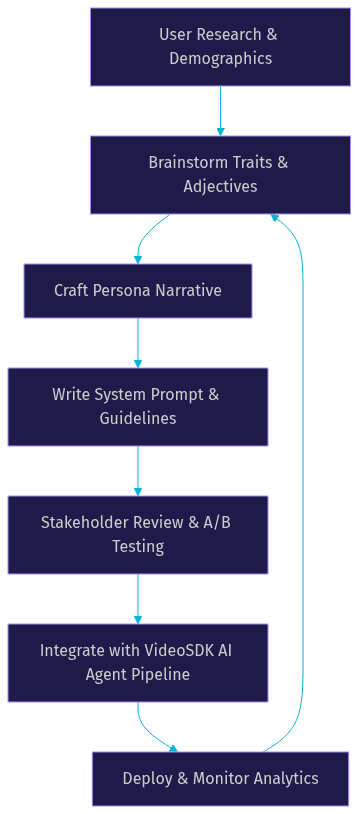
Diagram: Persona Development Workflow
Here is a visual representation of the end-to-end persona development workflow, from initial user research to continuous analytics integration. This diagram illustrates how the process is cyclical, with analytics feeding back into trait brainstorming.
Integrating Persona with Voice Technology
Mapping Persona to TTS & SSML
Choosing the right synthesized voice is only the first step. You must adjust prosody to match the persona's emotional tone. SSML customization allows you to control pitch, rate, and volume dynamically. For instance, if the persona is empathetic, you might use a slower speech rate and softer pitch when delivering bad news. If the persona is energetic, you might use a faster rate and higher pitch for greetings. VideoSDK integrates with leading TTS providers like ElevenLabs, Cartesia, and OpenAI TTS, allowing you to fine-tune the voice output to match your persona guidelines. The VideoSDK AI Agents plugins page provides details on supported TTS providers and configuration options. By mapping persona traits to specific TTS parameters, you create a more immersive and believable voice experience. Some providers also offer voice cloning, which can be used to create a unique, custom voice that perfectly embodies the persona.
Handling Edge Cases & Error Responses
Even the best voice agents encounter situations they cannot handle. Designing consistent fallback lines and recovery strategies is a crucial part of persona development. Instead of a generic "I didn't get that," an empathetic persona might say, "I'm sorry, I didn't quite catch that. Could you repeat it?" These edge case responses must be documented in your persona documentation and tested thoroughly. Consider scenarios like the user speaking too softly, background noise, or the agent failing to understand a complex query. The persona should guide how the agent recovers from these errors gracefully without frustrating the user. A well-designed error recovery flow can actually build trust by showing the agent is patient and helpful. It is also important to design responses for when the user becomes frustrated or angry. The persona should dictate a de-escalation strategy, such as acknowledging the user's frustration and offering to transfer them to a human agent.
Continuous Improvement via Analytics
Metrics are essential for monitoring persona performance. Track user satisfaction scores, task completion rates, and conversation drop-off points. VideoSDK provides session analytics and pipeline observability, allowing you to see exactly where users disengage. Use this data to iterate on your system prompt, adjust TTS parameters, and refine your dialogue management rules. The VideoSDK REST API reference includes endpoints for fetching session analytics and recording data. By continuously analyzing performance data, you can identify areas where the persona is falling short and make data-driven improvements. This ensures your voice agent remains effective and aligned with user expectations over time. Implementing sentiment analysis on the transcribed text can also provide insights into how users are reacting to the persona, allowing you to fine-tune the emotional tone of the responses.
Common Pitfalls and Best Practices
Over-Anthropomorphizing
One of the biggest risks in persona development is over-anthropomorphizing. Making the agent seem too human can lead to the uncanny valley effect, where users feel uneasy or deceived. Always be transparent that the user is speaking to an AI. Trust in voice agents is easily broken if users feel manipulated. Keep the persona relatable but clearly artificial. Avoid giving the agent a fake human name or claiming it has emotions it does not possess. Instead, focus on creating a helpful, consistent, and transparent personality that sets clear expectations. This approach builds more durable trust than trying to mimic human behavior perfectly.
Inconsistent Tone Across Channels
Voice agent consistency must be maintained across all channels. If your agent is friendly on the web chat but cold on the phone, users will notice. Ensure your persona guidelines are applied uniformly across multimodal voice agents. This requires centralized persona documentation that all development teams can access and implement. Inconsistencies can arise when different teams build different parts of the agent's interface. A unified persona guide ensures everyone is working from the same blueprint. Regular cross-channel audits can help identify and fix inconsistencies before they reach users.
Ignoring Accessibility & Localization
Adapting tone for different languages and accessibility needs is often overlooked. A persona that works well in English might not translate directly to another language due to cultural differences in communication. Work with native speakers to localize your persona narrative and system prompts. Additionally, ensure your voice characteristics are accessible to users with hearing impairments by providing text alternatives where possible. Consider users with cognitive disabilities by keeping sentence structures simple and avoiding overly complex vocabulary. Accessibility and localization are not just compliance checkboxes; they are essential for creating an inclusive voice experience that serves all users effectively.
Definitions Glossary
Voice Assistant Persona: A comprehensive profile defining an AI agent's role, personality, tone, and voice characteristics to ensure consistent communication.
SSML Customization: The use of Speech Synthesis Markup Language to control prosody, pitch, and speech rate in text-to-speech systems.
Dialogue Management: The process of managing the flow of a conversation, including context, state, and turn-taking in a voice UI.
Agent Worker: The Python process in VideoSDK that runs an AI agent and manages its session lifecycle within a room.
Pipeline Observability: The ability to monitor and analyze the performance of the STT, LLM, and TTS components in real-time within the VideoSDK platform.
Key Takeaways
- Persona development for voice agents is essential for building user trust, driving engagement, and ensuring brand alignment.
- A well-defined persona includes role, personality traits, voice characteristics, and contextual guidelines that adapt to different channels.
- Mapping persona guidelines to TTS and SSML ensures the agent's voice matches its intended emotional tone and personality.
- VideoSDK's AI Voice Agent SDK provides the tools to integrate persona-driven system prompts with real-time voice pipelines and leading AI providers.
- Continuous improvement through analytics, A/B testing, and user feedback is necessary to maintain persona consistency and effectiveness over time.
Conclusion
Building a voice agent without a persona is like sending a representative to a meeting without any briefing. Persona development for voice agents ensures your AI communicates with purpose, consistency, and brand alignment. By following the step-by-step process of researching users, crafting a narrative, and integrating with TTS and SSML, you can create voice experiences that users trust and enjoy. VideoSDK simplifies this process by providing a robust AI Voice Agent SDK and seamless integrations with leading AI providers. Ready to build your own persona-driven voice agent? Explore the VideoSDK AI Agents documentation and start your free tier today. What are you building with VideoSDK? Drop a comment below.
FAQ