


Node.js AI voice call integration connects speech-to-text, large language models, and text-to-speech within a Node.js service that places or receives phone calls. VideoSDK provides an open-source AI Agent SDK with built-in SIP telephony bridging, sub-500ms pipeline latency, and support for providers like OpenAI, Deepgram, and ElevenLabs. Start by generating a server-side token, then wire your STT, LLM, and TTS providers through the Agent Worker to handle inbound and outbound AI calls.
Building an AI voice agent that actually sounds natural on a phone call is hard. You need real-time speech-to-text that does not lag, an LLM that responds in under a second, text-to-speech that sounds human, and a telephony bridge that connects traditional phone networks to your Node.js backend. Most developers stitch together four or five separate libraries and spend weeks debugging latency, audio codecs, and SIP signaling.
This guide walks through a production-ready approach using VideoSDK's AI Agent platform. By the end, you will understand the full architecture, how to authenticate and manage tokens, how to build the STT to LLM to TTS pipeline, and how to connect everything to SIP telephony for real phone calls.
What is Node.js AI Voice Call Integration?
Definition
Node.js AI voice call integration is the process of combining speech-to-text transcription, large language model inference, and text-to-speech synthesis within a Node.js service that can place or receive telephone calls. The Node.js layer acts as the orchestration backend, managing call sessions, routing audio between the caller and the AI pipeline, and handling business logic like database lookups and conversation state.
The key distinction from a chatbot is that everything happens in real time over a voice channel. The caller speaks, the system transcribes that speech, sends the text to an LLM, generates a response, converts that response back to audio, and plays it back to the caller. All of this must happen fast enough to feel conversational, typically under 500 milliseconds end to end.
Core Components
A complete Node.js AI voice call integration requires five building blocks. First, a speech-to-text provider converts incoming caller audio into text. Second, an LLM processes that text and generates a response. Third, a text-to-speech provider converts the LLM response back into audio. Fourth, a media transport layer carries audio between the caller and your backend, using either WebRTC for browser-based calls or SIP for traditional phone calls. Fifth, an orchestration layer ties everything together, and that is where VideoSDK's AI Agent pipeline comes in, providing the Agent Worker, turn detection, VAD, and session management.
Why Choose VideoSDK for AI Voice Calls?
Feature Overview
VideoSDK provides native support for the entire AI voice call stack within a single platform. The Agent Worker runs as a Python process that manages sessions inside VideoSDK Rooms, handling the STT to LLM to TTS loop with built-in turn detection and voice activity detection. You get real-time transcription, call recording, DTMF event handling, and SIP telephony bridging without assembling separate libraries.
The platform also includes Conversational Graph, a deterministic flow engine that lets you define conversation steps as a directed graph rather than relying on the LLM to control branching. This matters for compliance-driven workflows like loan applications or appointment booking where every step must happen in a specific order.
Competitive Advantages
Compared to building with raw WebRTC libraries and third-party voice bot kits, VideoSDK reduces integration complexity significantly. Generic WebRTC libraries require you to implement your own signaling server, ICE candidate handling, media routing, and codec negotiation. VideoSDK handles all of that internally.
VideoSDK also stands out with its SIP telephony integration, which bridges traditional phone networks to WebRTC rooms without requiring a separate PBX or gateway service. The open-source Agent SDK means you can inspect, fork, and contribute to the codebase on GitHub, which is a trust signal that proprietary voice bot platforms cannot match. Multi-platform SDK breadth, built-in security with token-based access control, and the Conversational Graph for deterministic flows round out the advantages.
Architecture Overview
High-Level Flow
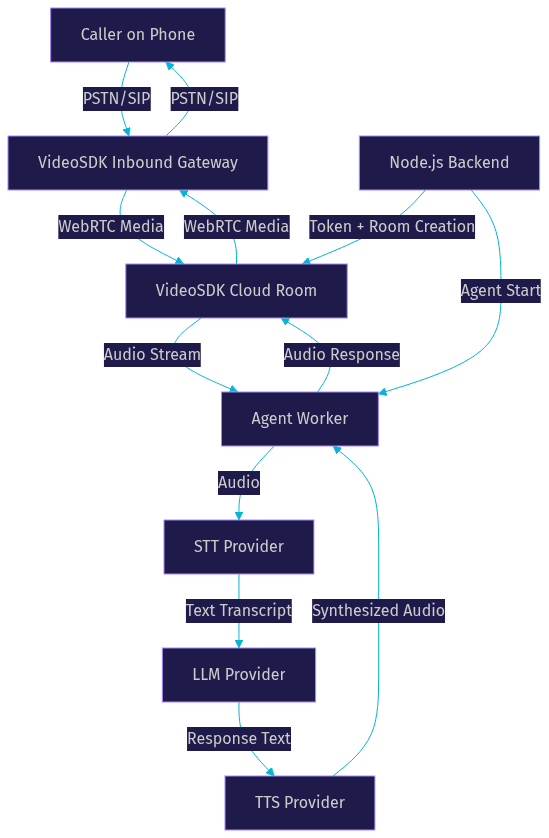
The end-to-end path for a Node.js AI voice call starts with a caller dialing a phone number connected to a SIP trunk. The SIP trunk routes the call to VideoSDK's Inbound Gateway, which bridges the traditional telephony signal into a VideoSDK Room running over WebRTC. Your Node.js backend has already generated a server-side token and created the room before the call arrives.
Once the caller's audio enters the VideoSDK Room, the Agent Worker picks up the audio stream and passes it through the pipeline. The STT provider transcribes the audio in real time, the LLM generates a response, and the TTS provider converts that response back into audio. The synthesized audio flows back through the VideoSDK Room to the SIP gateway and out to the caller's phone. The entire loop targets sub-500ms latency to maintain conversational flow.
Your Node.js service handles the orchestration layer: generating tokens, creating rooms, starting the agent, monitoring events, and storing post-call analytics.
Media Pipeline Details
The STT to LLM to TTS loop is the heart of the system. When the caller speaks, VideoSDK's voice activity detection identifies speech segments and sends audio chunks to the STT provider. The STT provider returns partial transcripts as the caller talks and a final transcript when speech ends. Turn detection decides when the caller has finished speaking and triggers the LLM.
The LLM processes the transcript, optionally invokes external actions (like checking a database or booking an appointment), and returns a text response. The TTS provider converts that text to audio, which VideoSDK routes back to the caller. VideoSDK's Rust-native data plane handles the media routing, keeping the pipeline fast enough for natural conversation.
Setting Up the Environment
Prerequisites
Before you start building, you need three accounts. First, a VideoSDK account with your API key and secret, which you can find in the dashboard after signing up. Second, accounts with your chosen STT and TTS providers, such as OpenAI for Whisper, Deepgram for Nova models, and ElevenLabs for TTS. Third, if you plan to connect to traditional phone lines, a SIP trunk provider like Twilio, Telnyx, or Plivo.
On the Node.js side, you need Node.js version 18 or higher installed on your development machine. You also need a basic Express or Fastify server running to handle token generation and webhook events. For production, you will want a process manager like PM2 and an HTTPS endpoint for webhooks.
Installing the VideoSDK Node.js SDK
VideoSDK provides SDKs across multiple platforms, and the Node.js ecosystem integrates through the REST API and the Python-based Agent SDK. For the Node.js backend, you interact with VideoSDK through REST API calls for room creation, token generation, and session management. The Agent Worker itself runs as a Python process, but your Node.js service orchestrates everything.
To get started, install the VideoSDK JavaScript SDK package from npm into your Node.js project. After installation, verify the package is present in your dependencies and import it into your server file. You can confirm the installation by checking the package version in your lock file.
Authenticating and Managing Tokens
Token Generation
VideoSDK uses token-based authentication with JWT tokens generated server-side. Your Node.js backend creates a token using your VideoSDK API key and secret. The token encodes permissions, room scoping, and participant roles. When a call comes in, your backend generates a fresh token, creates a room via the REST API, and passes the token to the Agent Worker.
The token scoping mechanism means each token can be restricted to a specific room ID and participant role. For inbound calls, you generate a token that allows the agent to join as a speaker. For outbound calls, you generate a token that permits the agent to initiate the call. This scoping prevents token reuse across sessions and limits the blast radius if a token is compromised.
Security Best Practices
Never expose your VideoSDK API secret on the frontend or in client-side code. Always generate tokens on your Node.js server and deliver them to clients over HTTPS. Use short-lived tokens with expiration times of 30 minutes or less for call sessions.
For role-based access control, VideoSDK lets you define participant roles with different permissions. A caller joining via SIP might have limited permissions (listen and speak only), while the AI agent has permissions to record, transcribe, and manage the session. Store your API secret in environment variables or a secrets manager like AWS Secrets Manager. Rotate keys periodically and monitor token usage through VideoSDK's session analytics.
Building the Voice Agent Pipeline
Choosing an STT Provider
The speech-to-text provider you choose directly affects latency and accuracy. OpenAI Whisper offers strong accuracy across multiple languages but can introduce higher latency for real-time use cases. Deepgram's Nova models are optimized for streaming transcription with low latency, making them a popular choice for voice agents. AssemblyAI provides a Universal model with good accuracy and speaker diarization.
VideoSDK's Agent SDK includes adapter plugins for each major STT provider, so switching between them is a configuration change rather than a code rewrite. According to Artificial Analysis's Speech Arena benchmark, Deepgram Nova-3 achieves a median word error rate of around 8% on conversational audio, which is competitive for phone call quality.
For Node.js AI voice call integration, the STT provider must support streaming mode. Batch transcription (processing a full recording after the call) does not work for real-time conversation. VideoSDK handles the streaming connection between the caller's audio and the STT provider internally.
Integrating the LLM
The LLM is the brain of your voice agent. VideoSDK's Agent Worker connects to LLM providers including OpenAI (GPT-4o and the o-series), Anthropic Claude, Google Gemini, and Cerebras for faster inference. Your Node.js backend configures the LLM provider, system prompt, and available tool actions when starting the agent session.
The ability to trigger external actions is critical for voice agents that need to take action on behalf of the caller. For example, if a caller asks to book an appointment, the LLM can request an action that your Node.js backend handles by querying a calendar service and returning available slots. The LLM then formats the response as natural speech for the TTS provider. VideoSDK's Agent SDK supports parallel action execution, so multiple external requests can run simultaneously when the conversation requires it.
For multi-turn conversations where state matters, the Conversational Graph lets you define a deterministic flow. Instead of hoping the LLM follows instructions, you define nodes (conversation steps), transitions (wiring between steps), and extractors (data collection). The LLM handles natural language generation while the graph controls branching.
Configuring TTS
Text-to-speech quality determines how human your agent sounds. ElevenLabs is the leading choice for natural-sounding voices, with models that handle emotion, pacing, and intonation well. AWS Polly is a cost-effective option with decent quality and wide language support. Cartesia Sonic is a newer provider focused on ultra-low-latency TTS, which is particularly valuable for voice agents where every millisecond counts.
When configuring TTS through VideoSDK, you select the provider, voice ID, and tuning parameters. Voice style controls how expressive the voice is, while stability controls consistency across generations. For phone calls, choose a voice that sounds clear on low-bandwidth audio codecs commonly used in telephony.
VideoSDK also supports TTS caching, which stores synthesized audio for common responses (like greetings and standard phrases) to reduce latency and API costs. For a high-volume call center, caching frequently used responses can cut TTS costs significantly.
Connecting to Telephony (SIP or PSTN)
SIP Gateway Setup
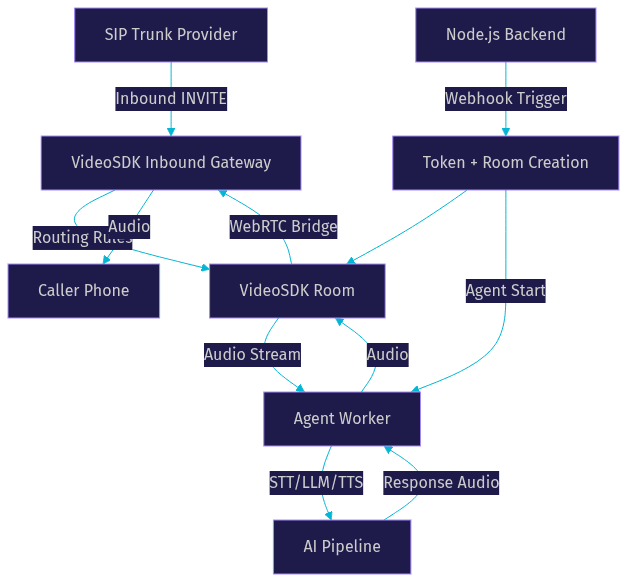
VideoSDK's telephony integration provides an Inbound Gateway and Outbound Gateway that bridge SIP telephony with WebRTC rooms. To set up inbound calls, you register a SIP trunk from a provider like Twilio, Telnyx, or Plivo with VideoSDK's Inbound Gateway. The gateway receives incoming SIP INVITE messages and routes them to a VideoSDK Room based on routing rules you configure.
DTMF events (the tones generated when a caller presses phone keypad buttons) are captured by the gateway and forwarded to the Agent Worker. This lets callers navigate IVR-style menus or enter information like account numbers using their keypad. Your Node.js backend can listen for DTMF events and trigger appropriate actions in the conversation flow.
For secure SIP, VideoSDK supports IP whitelisting and geo-fencing to restrict which IP addresses and regions can send calls to your gateway. This is important for preventing toll fraud and unauthorized call attempts.
Outbound vs Inbound Call Flow
Inbound call flow: A caller dials your SIP trunk number. The SIP provider sends an INVITE to VideoSDK's Inbound Gateway. Your Node.js backend, notified via webhook, generates a token and creates a room. The gateway bridges the caller into the room. The Agent Worker joins the room and begins the conversation pipeline. The caller hears the AI agent's greeting and the conversation proceeds.
Outbound call flow: Your Node.js backend initiates the call by creating a room and starting the Agent Worker first. Then, through VideoSDK's Outbound Gateway, the system places a SIP call to the target phone number via your SIP trunk provider. When the callee answers, the gateway bridges them into the room where the agent is already waiting. The agent begins speaking immediately.
The key difference is timing. Inbound calls require your backend to react to an incoming signal. Outbound calls require your backend to proactively create the session and place the call. Both flows use the same Agent Worker and pipeline once the audio connection is established.
Handling Call Events and Real-Time Transcription
Event Lifecycle
VideoSDK emits a structured sequence of events throughout a call session that your Node.js backend can subscribe to. The call starts with a session initialization event when the Agent Worker joins the room. As the caller speaks, speech detection events fire with partial transcripts, followed by speech final events when the caller pauses. The LLM processes the final transcript and an agent response event fires with the generated text. The TTS provider synthesizes audio and a speech started event indicates the agent is now speaking.
When the call ends, a call ended event fires with session metadata including duration, transcript, and recording URL. Your Node.js backend can use these events to update a dashboard, trigger post-call workflows, or store analytics. Real-time transcription is available throughout the call, so you can display a live transcript to a human supervisor monitoring the conversation.
Managing Interruptions and Barge-In
One of the hardest problems in voice AI is handling interruptions. If the agent is speaking and the caller starts talking, the agent needs to stop mid-sentence and listen. VideoSDK handles this through turn detection and voice activity detection working together.
When VAD detects caller speech while the agent is speaking, VideoSDK's preemptive response mechanism cancels the current TTS audio and switches the agent to listening mode. The Agent Worker stops audio playback, processes the new speech segment, and generates a fresh response. This happens fast enough that the caller experiences a natural conversation flow without awkward pauses or overlapping audio.
For scenarios where barge-in should be disabled (like a compliance disclosure that must be read in full), you can configure the agent to ignore interruptions during specific conversation nodes using the Conversational Graph.
Production Considerations
Scaling, Monitoring, and Cost Tracking
Scaling a Node.js AI voice call integration means handling concurrent calls without degrading latency. VideoSDK's cloud infrastructure handles media routing and transcoding, so your Node.js backend primarily handles token generation, webhook processing, and business logic. The Agent Worker runs either on VideoSDK's managed Agent Cloud or self-hosted on Docker or Kubernetes.
For monitoring, VideoSDK provides session analytics through the REST API, including call duration, participant count, and transcription data. You should log pipeline latency (STT time, LLM time, TTS time) separately to identify bottlenecks. Set up alerts for failed calls, high latency, and STT word error rate anomalies.
Cost tracking is essential because each call incurs charges from multiple providers: VideoSDK for the room and media, STT for transcription, LLM for inference, and TTS for synthesis. Budget per call by estimating average call duration and provider pricing. TTS caching and LLM context window management can reduce costs significantly for high-volume deployments.
Compliance and End-to-End Encryption
AI voice calls often handle sensitive information, making compliance a top priority. For GDPR compliance, ensure caller data (transcripts, recordings) is stored in appropriate regions and retained only as long as necessary. VideoSDK supports geo-fencing to restrict data processing to specific regions.
For PCI-DSS compliance, never let the AI agent repeat or store full credit card numbers. Use DTMF collection for sensitive numeric input so the caller enters card details via keypad rather than speaking them aloud. The Agent Worker can be configured to mask sensitive data in transcripts.
VideoSDK supports end-to-end encryption for voice streams, which prevents intermediaries from accessing call audio. Enable E2EE for calls handling health information, financial data, or legal consultations. For healthcare use cases, verify that your configuration meets HIPAA requirements and sign a Business Associate Agreement with VideoSDK.
Common Pitfalls and Troubleshooting
Several issues come up frequently in Node.js AI voice call integration projects. Token expiry is the most common: if your token expires mid-call, the agent disconnects. Generate tokens with sufficient lifetime for your expected call duration and refresh them proactively for long sessions.
ICE failures occur when the WebRTC connection cannot establish a path through firewalls or NAT. VideoSDK provides cloud proxy and TURN server fallback, but ensure your network configuration allows outbound traffic on the required ports. In production, always test from behind corporate firewalls.
Mismatched audio codecs between the SIP trunk and the WebRTC room cause garbled audio or one-way audio. VideoSDK handles transcoding internally, but verify that your SIP trunk is configured to use a compatible codec like PCMU (G.711u) for standard telephony.
High latency usually traces to one of three sources: a slow STT provider, an LLM with high time-to-first-token, or a TTS provider with high synthesis latency. Measure each pipeline stage independently and switch providers for the slowest stage. Cerebras offers fast LLM inference, and Cartesia Sonic targets sub-100ms TTS latency.
Finally, conversation loops where the agent repeats itself usually stem from poor turn detection configuration or an LLM system prompt that lacks conversation history. Use VideoSDK's context management features to maintain appropriate conversation history without exceeding the LLM context window.
Definitions Glossary
Agent Worker: The Python process that runs a VideoSDK AI agent and manages its session lifecycle inside a VideoSDK Room, handling the STT to LLM to TTS pipeline.
SIP (Session Initiation Protocol): The signaling protocol that bridges traditional phone networks to VideoSDK WebRTC rooms, enabling inbound and outbound calls through gateways.
Turn Detection: The mechanism that decides when a caller has finished speaking and the AI agent should respond, using voice activity detection and silence threshold analysis.
Conversational Graph: VideoSDK's deterministic flow engine that defines conversation steps as a directed graph with nodes, transitions, and extractors, giving developers control over branching instead of relying on LLM judgment.
DTMF Events: Dual-tone multi-frequency signals generated when a caller presses phone keypad buttons, captured by VideoSDK's SIP gateway and forwarded to the Agent Worker for IVR navigation and data entry.
Meeting Token: A JWT generated server-side using your VideoSDK API key and secret that authenticates a participant's access to a VideoSDK Room, scoped to specific permissions and room IDs.
Key Takeaways
- Node.js AI voice call integration requires five components: STT, LLM, TTS, media transport, and an orchestration layer, all of which VideoSDK provides through its Agent SDK and SIP telephony integration.
- VideoSDK's Rust-native data plane and built-in turn detection keep the STT to LLM to TTS pipeline under 500ms, which is the threshold for natural conversational flow.
- Token-based authentication with server-side JWT generation and short-lived expiration is mandatory for secure call sessions, and API secrets must never reach client-side code.
- The Conversational Graph enables deterministic conversation flows for compliance-driven use cases like loan applications and appointment booking where LLM-driven branching is too unpredictable.
- Production deployments require monitoring per-stage pipeline latency, enabling TTS caching for cost reduction, and configuring E2EE and geo-fencing for compliance with GDPR, PCI-DSS, and HIPAA requirements.
Conclusion
Node.js AI voice call integration does not have to mean stitching together half a dozen libraries and debugging SIP signaling for weeks. VideoSDK's Agent SDK, SIP telephony bridging, and Conversational Graph give you a production-ready path from prototype to scale. The platform handles media routing, turn detection, and codec negotiation so your Node.js backend can focus on business logic and conversation design.
If you are ready to build, start with the AI Agents quickstart guide and the telephony integration docs. You can also explore the Conversational Graph documentation for deterministic flow control. Sign up for a free account at app.videosdk.live/login to get started with free credits.
What are you building with VideoSDK? Drop a comment below. I would love to hear what kind of Node.js AI voice call use case you are working on, whether it is an outbound appointment reminder system, an inbound customer support agent, or something entirely new.
Free $20 Balance for AI Voice Agents & Video Calls
FAQ