


Multilingual conversational AI enables systems to understand, process, and respond in multiple languages without relying solely on translation pipelines. VideoSDK's AI Voice Agent SDK supports this by connecting multilingual STT, LLM, and TTS providers into a single real-time pipeline. Developers can build language-aware agents that detect, process, and respond natively across dozens of languages using VideoSDK's AI agent infrastructure.
Hiring human support agents for every language your customers speak is expensive and operationally complex. A single multilingual support team covering just eight languages can cost upwards of $500,000 annually in salaries, training, and infrastructure. Multilingual conversational AI changes this equation by letting developers build systems that understand and respond in multiple languages natively, without maintaining separate bots or translation layers for each one.
In this guide, you will learn what multilingual conversational AI is, how it differs from simple translation-based chatbots, the technical challenges of building language-aware systems, and how to architect a scalable pipeline that handles detection, processing, and response generation across languages. We will also cover real-world use cases, best practices for testing cultural accuracy, and emerging trends shaping the field in 2026.
What Is Multilingual Conversational AI?
Multilingual conversational AI is defined as a system that can detect, understand, and generate responses in multiple natural languages within a single conversational interface. Unlike monolingual chatbots that require a separate deployment for each language, a multilingual system dynamically identifies the user's language and processes the conversation in that language natively.
The key distinction is between systems that translate and systems that understand. A translation-based bot receives input in Spanish, translates it to English, processes it with an English-language model, translates the response back to Spanish, and delivers it. A native multilingual system processes the Spanish input directly, reasoning in Spanish and generating a Spanish response without an intermediate translation step.
This distinction matters because translation introduces latency, loses cultural nuance, and can produce awkward or incorrect phrasing. Native-language processing preserves idioms, formality levels, and context that translation pipelines strip away. According to research published by the Association for Computational Linguistics, native-language models outperform translation-based approaches by significant margins in user satisfaction scores, particularly for languages with complex honorific systems like Korean and Japanese.
VideoSDK provides multilingual conversational AI capabilities through its AI Voice Agent SDK, which connects speech-to-text, large language model, and text-to-speech providers into a unified pipeline that can operate across multiple languages in real time.
Native-Language Processing vs. Translation Pipelines
Native-language processing means the AI model has been trained on text from the target language and can reason within that language's grammatical and cultural framework. When a user asks a question in Hindi, the model processes the Hindi text directly, retrieves relevant knowledge, and generates a Hindi response.
Translation pipelines, by contrast, treat every non-English input as a translation problem. The system detects the input language, translates it to a pivot language (usually English), processes it, and translates the response back. This approach adds latency at two translation steps and introduces compounding errors. A phrase that makes perfect sense in Arabic might become nonsensical after translation to English and back.
The practical implication for developers is that native-language processing delivers better user experience but requires models with strong multilingual capabilities. Translation pipelines are easier to build but produce lower quality conversations, especially for languages structurally distant from English.
Core Components of a Multilingual Conversational AI System
A production-grade multilingual conversational AI system consists of five interconnected components that work together to handle cross-language conversations.
The first component is language detection, which identifies the user's input language and assigns a confidence score. The second is language-specific natural language understanding, which extracts intent, entities, and sentiment from the input. The third is response generation, where a multilingual LLM produces a contextually appropriate reply in the detected language. The fourth is multilingual knowledge base retrieval, which fetches relevant information regardless of the language the query is in. The fifth is an optional translation fallback layer for languages the system does not support natively.
Here is a visual representation of how these components connect:
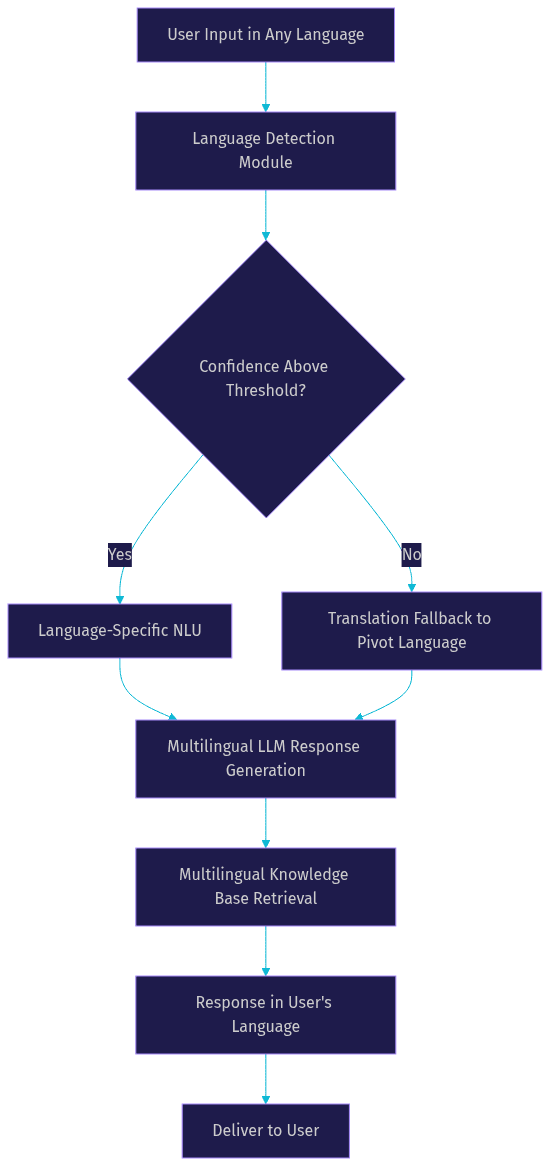
Each component must be evaluated and tested independently as well as part of the integrated pipeline. A weak language detection module cascades errors downstream, while a strong LLM with poor knowledge base retrieval produces fluent but inaccurate responses.
Benefits for Businesses
Businesses deploying multilingual conversational AI see measurable improvements across cost, speed, and customer satisfaction metrics. The most immediate benefit is cost reduction: a single AI system handling ten languages replaces the need for ten separate monolingual bot deployments or a large multilingual human support team.
Response times drop dramatically. Human agents average 30 seconds to several minutes per response, while AI systems respond in under two seconds for text and under one second for voice-based interactions. This speed advantage holds across all supported languages simultaneously, meaning a customer writing in Portuguese gets the same response speed as one writing in English.
Customer satisfaction improves when users can interact in their preferred language. Research from Common Sense Advisory found that 75 percent of consumers are more likely to purchase from the same brand again if customer support is available in their native language. Multilingual AI makes this economically feasible at scale.
Round-the-clock coverage becomes practical. A multilingual AI system provides 24/7 support across all time zones without shift scheduling or overtime costs. For businesses operating globally, this means a customer in Tokyo and a customer in Berlin both receive immediate responses at 3 AM their local time.
Cultural relevance is the final differentiator. Native-language processing allows the AI to adjust formality levels, use culturally appropriate examples, and avoid phrases that might be technically correct but socially awkward in a given language community.
Technical Challenges and How to Overcome Them
Building multilingual conversational AI systems introduces technical challenges that monolingual systems never encounter. Understanding these challenges before architecture decisions are made prevents costly rework.
Accuracy in low-resource languages is the most persistent problem. While models perform well in English, Spanish, French, and Mandarin, languages like Swahili, Bengali, or Icelandic often suffer from higher error rates due to limited training data. Developers must evaluate model performance per language rather than relying on aggregate benchmarks.
Latency is the second challenge. Multilingual models are often larger than monolingual ones, and additional processing steps for language detection and knowledge base retrieval add milliseconds that compound. For voice-based agents using VideoSDK's real-time pipeline, keeping total response latency under one second requires careful provider selection and optimization.
Maintaining a single knowledge base across languages is the third challenge. Most knowledge bases are written in one primary language, and queries arrive in many. The system must retrieve relevant documents regardless of query language, which requires cross-lingual retrieval capabilities or on-the-fly translation of queries before retrieval.
Code-switching, where users mix languages within a single message, is the fourth challenge. A user might write a message mixing English and Spanish. The system must handle this gracefully rather than failing or misclassifying the language.
Data privacy is the fifth challenge. Different regions have different regulations about how user data can be processed and stored. A multilingual system serving EU customers must comply with GDPR, while one serving customers in other regions must consider local data localization requirements.
Language Detection Accuracy
Language detection is the foundation of multilingual conversational AI. If the system misidentifies the input language, every downstream component processes incorrect data.
Modern language detection models achieve over 95 percent accuracy for high-resource languages with sufficient input text. However, short messages, code-switched text, and languages with shared scripts (like Hindi and Nepali using Devanagari) reduce accuracy significantly.
Developers should configure confidence thresholds rather than accepting the top prediction unconditionally. If the detection model returns a confidence score below the threshold, the system should either ask the user to confirm their language or fall back to a translation pipeline that processes the input in a pivot language.
Fallback strategies are essential. A common pattern is to default to the user's previously detected language when confidence is low, since most users consistently communicate in one language per session. Another approach is to run parallel processing in the top two detected languages and compare results.
Managing Low-Resource Languages
Low-resource languages lack the large text corpora that power modern LLMs. For these languages, developers can use three complementary strategies.
Transfer learning leverages a model trained on a high-resource language from the same language family and fine-tunes it with available data from the target language. For example, a model trained on Spanish can be adapted to Catalan with relatively small amounts of Catalan text.
Data augmentation creates synthetic training data through back-translation, paraphrasing, and template-based generation. This expands the effective training set without requiring human annotation at scale.
Hybrid approaches combine native-language processing with translation fallback. The system attempts to process in the user's language but falls back to translation when the native model's confidence is low. This provides graceful degradation rather than complete failure for unsupported or under-supported languages.
Designing a Scalable Multilingual Conversational AI Architecture
A scalable multilingual architecture processes user input through a series of stages, each optimized for cross-language operation. The goal is to handle language diversity without creating separate pipelines for each language.
The flow begins with user input arriving in any language. The language detection module identifies the language and assigns a confidence score. If confidence is high, the input passes to language-specific NLU for intent extraction. If confidence is low, the system routes through a translation fallback that converts the input to a pivot language for processing.
The multilingual LLM then generates a response, drawing on a knowledge base that supports cross-lingual retrieval. The response is delivered in the user's detected language, with optional translation if the LLM generated in a pivot language.
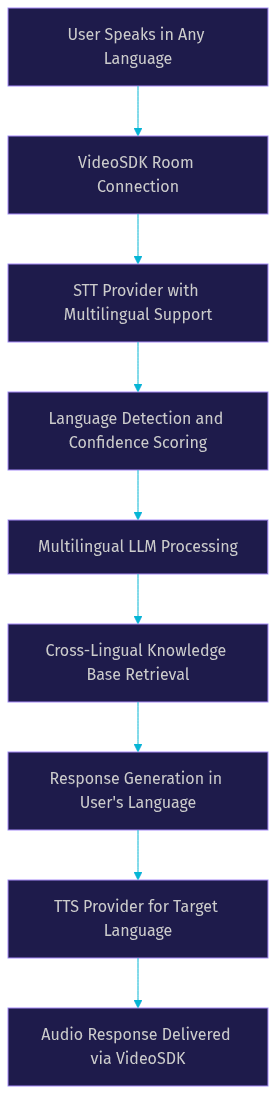
VideoSDK's AI Voice Agent SDK implements this architecture for voice-based multilingual agents. The agent worker manages the session lifecycle, connecting STT providers that support multiple languages, LLM providers with multilingual capabilities, and TTS providers that synthesize speech in the target language. The entire pipeline operates within a VideoSDK room, keeping latency low enough for real-time conversation.
For structured multilingual flows, VideoSDK's Conversational Graph adds a deterministic layer on top of the LLM, ensuring that business-critical conversations follow the correct sequence regardless of the language the user speaks. This is particularly valuable for use cases like loan applications or appointment booking where compliance requires every step to happen in order.
Here is the end-to-end architecture for a multilingual voice agent:
Choosing the Right LLM and Tokenizer
The choice of LLM directly determines multilingual quality. According to Artificial Analysis benchmarks from 2026, models like OpenAI GPT-4o, Google Gemini, and Anthropic Claude demonstrate strong multilingual capabilities but differ in language coverage and tokenization efficiency.
Tokenization matters more than developers often realize. A tokenizer that inefficiently handles non-Latin scripts increases token counts, which raises cost and latency. For example, a single Korean character might require multiple tokens in one model but only one token in another. Over a long conversation, this difference compounds significantly.
When selecting an LLM for multilingual conversational AI, evaluate three factors: performance on your target languages using standardized benchmarks, tokenization efficiency for those languages, and latency for real-time use cases. VideoSDK's agent SDK supports multiple LLM providers, allowing developers to route different languages to different models if needed.
Knowledge Base Strategy
The knowledge base is where multilingual systems often fail. A common mistake is maintaining separate knowledge bases per language, which creates synchronization problems and doubles maintenance effort.
The recommended approach is a single source of truth in a primary language, supplemented by AI-driven cross-lingual retrieval. When a user queries in French, the system retrieves relevant documents from the English knowledge base using semantic search that spans languages, then the LLM generates a French response grounded in that retrieved content.
This approach requires embeddings models with strong cross-lingual performance. Multilingual embedding models map semantically similar text from different languages to nearby points in vector space, enabling retrieval regardless of query language.
For knowledge bases with critical accuracy requirements, developers can pre-translate key documents into supported languages and store both versions. The system retrieves in the user's language when a translated version exists and falls back to cross-lingual retrieval otherwise.
Implementation Best Practices with VideoSDK AI Agents
Implementing a multilingual conversational AI system requires careful sequencing of setup steps. Each step builds on the previous one, and skipping any step creates gaps that surface in production.
The first step is setting up language detection. Configure your STT provider to detect language automatically if it supports multilingual input, or add a dedicated language detection module that processes transcribed text. Set confidence thresholds based on your supported language list and test with real user inputs from each language.
The second step is configuring NLU per language. If you are using a multilingual LLM for intent extraction, verify that it handles each supported language with acceptable accuracy. For languages where the LLM underperforms, consider adding a translation step before NLU processing.
The third step is enabling response generation. Configure your LLM to respond in the user's detected language. Most modern LLMs handle this through system prompts that specify the response language, but verify that the model does not drift into English mid-conversation, which is a known issue with some models.
The fourth step is testing cultural nuance. Run conversations with native speakers of each supported language and collect feedback on tone, formality, and appropriateness. A response that is grammatically correct but culturally tone-deaf damages user trust.
The fifth step is monitoring latency. Track end-to-end response time per language, since some languages may process slower due to tokenization differences or model routing. Set alerts for latency spikes that could indicate provider issues or model degradation.
VideoSDK provides code samples for AI agent implementations that demonstrate these patterns in practice.
Testing for Cultural and Contextual Accuracy
Functional testing confirms the system works technically. Cultural testing confirms it works for real users. The two are not the same.
Use real-world user queries from each language market rather than translated test scripts. A query that a native speaker would naturally ask in Japanese might be structurally different from what an English speaker would ask, and translating English test cases to Japanese produces unnatural test inputs.
A/B testing across language variants helps identify which response styles resonate. For example, Spanish spoken in Mexico differs from Spanish spoken in Spain in vocabulary, formality, and cultural references. Test both variants separately.
Collect feedback through post-conversation surveys that ask users to rate the quality of the AI's responses in their language. Track this metric per language to identify which languages need additional tuning or model upgrades.
Monitoring and Continuous Improvement
Production monitoring for multilingual conversational AI requires language-specific metrics rather than aggregate dashboards.
Track language detection confidence per language to identify languages where the detector struggles. Monitor response latency per language to catch tokenization or routing issues early. Measure user satisfaction scores per language to identify quality gaps that technical metrics miss.
Track language-specific error rates, including instances where the AI responds in the wrong language, switches languages mid-conversation, or produces responses that users mark as unhelpful. These errors often correlate with specific languages and indicate where the model needs additional training data or where a translation fallback would improve results.
Set up automated alerts for any language where error rates exceed baseline thresholds. A sudden spike in errors for one language often indicates a provider outage or model update that degraded performance for that specific language.
Real-World Use Cases
Multilingual conversational AI is deployed across industries where language diversity is a business reality rather than a nice-to-have feature.
In e-commerce support, a single AI agent handles customer queries about orders, returns, and product details across twenty or more languages. A customer in Brazil asks about a delayed shipment in Portuguese and receives an immediate response in the same language, while a customer in Japan asks about a return policy in Japanese and gets an equally accurate answer.
In travel booking, multilingual AI assists users with flight searches, hotel reservations, and itinerary changes. Travel platforms serve customers from dozens of countries, and language support directly impacts booking conversion rates. AI agents that converse naturally in the user's language reduce abandonment during the booking flow.
In fintech help desks, AI agents handle account inquiries, transaction disputes, and product questions across regulated markets. The AI must maintain compliance awareness per region while conversing in the local language, which is where deterministic flow engines like VideoSDK's Conversational Graph add value by enforcing required steps regardless of language.
In healthcare triage, multilingual AI collects patient symptoms, provides preliminary guidance, and schedules appointments. Language accuracy is critical in healthcare, where misunderstanding a symptom description could have serious consequences. Native-language processing reduces the risk of translation errors in medical contexts.
In internal employee assistants, multinational companies deploy AI agents that answer HR questions, IT support queries, and policy questions in whatever language the employee prefers. This is particularly valuable for companies with offices across Asia, Europe, and the Americas where employees are more comfortable asking questions in their native language.
Future Trends in Multilingual Conversational AI
The field is moving rapidly toward more natural, more capable, and more accessible multilingual AI. Four trends are shaping the roadmap for 2026 and beyond.
Emerging multimodal models process text, audio, and visual input together, enabling AI agents that can read a document in one language, discuss it in another, and reference visual context. This is particularly relevant for use cases like technical support where users share screenshots or product photos alongside their text queries.
Real-time voice-to-voice translation is approaching conversational quality. Systems that detect spoken language, translate, and synthesize speech in another language with sub-second latency are becoming viable for production use. VideoSDK's real-time architecture is designed for this use case, with the agent pipeline handling STT, LLM, and TTS stages within a single room session.
Edge deployment brings multilingual AI to devices with limited connectivity. Compressed multilingual models running on local hardware enable AI assistants that work offline or in low-bandwidth environments, which is critical for regions where internet access is unreliable.
AI-driven cultural adaptation goes beyond language to adjust behavior based on cultural context. Future systems will automatically adjust formality levels, reference culturally relevant examples, and avoid topics that are sensitive in specific regions, all without explicit configuration per locale.
Definitions Glossary
Multilingual Conversational AI: A system that detects, understands, and generates responses in multiple natural languages within a single conversational interface, without requiring separate deployments per language.
Native-Language Processing: Processing user input in the language it was received, without translating to a pivot language first. Preserves cultural nuance and reduces latency compared to translation pipelines.
Language Detection: The process of identifying the language of a user's input text or speech and assigning a confidence score to that identification.
Cross-Lingual Retrieval: A knowledge base retrieval approach where queries in one language retrieve relevant documents written in another language, using multilingual embedding models.
Code-Switching: The practice of mixing two or more languages within a single message or conversation turn, common in bilingual and multilingual users.
Agent Worker: In VideoSDK's AI agent architecture, the Python process that manages an AI agent's session lifecycle within a VideoSDK room, coordinating STT, LLM, and TTS providers.
Key Takeaways
- Multilingual conversational AI processes and responds in multiple languages natively, avoiding the latency and quality loss of translation pipelines.
- Native-language processing preserves cultural nuance, formality levels, and idiomatic expressions that translation-based approaches strip away.
- A scalable architecture combines language detection, multilingual NLU, cross-lingual knowledge base retrieval, and response generation in a single pipeline.
- VideoSDK's AI Voice Agent SDK enables developers to build real-time multilingual voice agents by connecting STT, LLM, and TTS providers that support multiple languages.
- Testing cultural accuracy with native speakers and monitoring per-language metrics are essential for maintaining quality across all supported languages.
- Low-resource languages require transfer learning, data augmentation, and hybrid fallback strategies to achieve acceptable performance.
Conclusion
Multilingual conversational AI is no longer a research problem. It is a production capability that developers can architect and deploy today using the right combination of language detection, multilingual LLMs, cross-lingual retrieval, and real-time voice infrastructure. The businesses that win globally will be the ones that speak to every customer in their preferred language, instantly and naturally.
If you are building a multilingual AI agent, VideoSDK's AI Voice Agent SDK provides the real-time infrastructure to connect your STT, LLM, and TTS providers into a single low-latency pipeline. Start with a pilot in two languages, measure detection accuracy and response quality, and scale from there. You can sign up for free at app.videosdk.live/login and join the VideoSDK Discord community to connect with other developers building multilingual AI agents.
What are you building with multilingual conversational AI? Drop a comment. I would love to hear what languages you are targeting and what challenges you are running into.
Free $20 Balance for AI Voice Agents & Video Calls
FAQ