


Multilingual ASR (automatic speech recognition) is the technology that lets a single speech-to-text model transcribe audio across dozens or hundreds of languages, including low-resource ones with minimal paired training data. Modern systems combine a shared acoustic encoder, language identification, and language-agnostic decoding to scale coverage efficiently. VideoSDK integrates real-time transcription into its video calling SDK, so developers can add multilingual captioning to live applications without managing ASR infrastructure separately.
More than 7,000 languages are spoken worldwide, yet commercial speech recognition systems support fewer than 120 of them. That gap is not just a research curiosity. Developers building global products, from telemedicine platforms to live streaming services, increasingly need transcription that works for users regardless of the language they speak. Multilingual ASR has emerged as the practical answer: instead of training and deploying a separate model per language, you train one model that handles many.
The field has moved fast. Open-source projects hosted on the Hugging Face Hub now offer pretrained checkpoints covering over 1,600 languages. Architectures like Whisper proved that a single encoder-decoder transformer can transcribe 99 languages with surprising accuracy. More recent work pushes coverage further using techniques like zero-shot language extension and hierarchical mixture-of-experts routing.
This guide walks through the architectures, data strategies, training techniques, deployment considerations, and evaluation methods that define multilingual ASR in 2026. Whether you are building a real-time transcription feature or evaluating which open-source model to fine-tune, the sections below cover what you need to know.
What Is Multilingual ASR?
Multilingual ASR is defined as automatic speech recognition where a single model transcribes spoken audio into text across multiple languages without requiring a separate model per language. It differs from monolingual ASR in that the acoustic model, vocabulary, and decoding strategy must accommodate cross-lingual variation in phonetics, syntax, and writing systems.
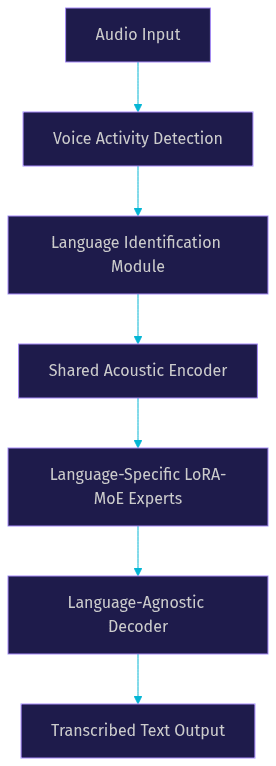
A multilingual ASR system has three core components: an acoustic model that converts audio frames into phonetic or character-level representations, a language model (or decoder) that maps those representations into text, and a language identification (LID) module that determines which language is being spoken. In modern systems, these components are often fused into a single neural network rather than running as separate pipeline stages.
Two dominant architectures compete in this space. CTC (Connectionist Temporal Classification) models map audio frames to output tokens without an explicit language model during training, making them efficient and easy to scale. Encoder-decoder models, popularized by OpenAI's Whisper, use a sequence-to-sequence transformer that generates text autoregressively, trading higher latency for stronger contextual reasoning.
Architectural Choices for Multilingual ASR
The architecture you choose for a multilingual ASR system determines your latency ceiling, memory footprint, and ability to extend to new languages without retraining from scratch.
CTC-Based Multilingual Models
CTC models scale well because the training objective is simple: align input audio frames with output token sequences without needing pre-segmented labels. This makes CTC attractive when you have large volumes of multilingual audio but imperfect transcriptions.
A recent innovation in this space is hierarchical LoRA-MoE (Low-Rank Adaptation with Mixture of Experts). Instead of fine-tuning the entire model for each new language, you attach lightweight language-specific expert modules to a shared backbone. During inference, a language-agnostic router sends each audio frame to the most relevant expert. This approach keeps the base model frozen while adding language capacity incrementally, which dramatically reduces the parameter cost of supporting 1,000+ languages.
CTC models also benefit from simpler decoding pipelines. Because there is no autoregressive generation step, inference latency is lower and more predictable, which matters for real-time transcription in live video calling applications.
Encoder-Decoder (AED) Models
Whisper-style models use an attention-based encoder-decoder architecture where the encoder processes the audio and the decoder generates text tokens one at a time. This design excels at contextual reasoning and can produce more natural transcriptions, especially for languages with complex morphology.
The trade-off is latency. Autoregressive decoding means each token depends on the previous one, creating a sequential bottleneck that increases inference time linearly with output length. For batch processing of recorded audio, this is rarely a problem. For real-time transcription on edge devices, it can be a dealbreaker without aggressive optimization.
Tokenization is another challenge. A shared vocabulary across 100+ languages can lead to token fragmentation for low-resource languages with non-Latin scripts, inflating character error rate (CER). Language-specific token sets solve this but complicate the decoder head.
Hybrid Approaches
Many production systems blend both architectures. A common pattern uses a lightweight LID front-end to identify the spoken language, then routes audio to a shared acoustic backbone with language-specific output heads. This combines the latency advantages of CTC with the contextual quality of encoder-decoder decoding.
A real-world example is Qwen3-ASR, which integrates LID, acoustic encoding, and decoding into a single all-in-one model. By sharing representations across languages while maintaining language-specific output layers, it achieves broad coverage without the overhead of running separate models per language.
Data Strategies for Scaling to 1,600+ Languages
Architecture matters, but data is the real bottleneck. Most of the world's languages lack the thousands of hours of paired speech-text data that traditional ASR training requires.
Paired Speech-Text Collections
Community-driven datasets have become the backbone of multilingual ASR research. Mozilla's CommonVoice project crowdsources recordings in over 100 languages, including many low-resource African and Indigenous languages. VoxPopuli provides parliamentary recordings in 18 European languages. The Multilingual LibriSpeech (MLS) dataset extends LibriSpeech to 8 languages with over 50,000 hours of paired data.
For developers, the practical takeaway is that you no longer need to build a data collection pipeline from scratch. These datasets are publicly available and regularly updated. The challenge is quality: crowdsourced recordings vary widely in audio quality, speaker demographics, and transcription accuracy, which directly affects word error rate (WER) on downstream models.
Zero-Shot Language Extension
One of the most exciting developments in multilingual ASR is zero-shot language extension. The idea is that a model trained on many languages learns shared phonetic representations, and a handful of paired examples (sometimes as few as 10 minutes of audio) can unlock a new language without full fine-tuning.
This works because related languages share phonetic and orthographic patterns. A model that has learned French, Spanish, and Italian can often transcribe Occitan or Catalan with minimal additional data. The key is cross-lingual transfer: the acoustic encoder generalizes phonetic features across the language family, and only the output vocabulary needs adaptation.
Tokenization and Vocabulary Design
Tokenization strategy has an outsized impact on multilingual ASR performance. A shared byte-level or sentence-piece vocabulary ensures every language can be represented, but it can produce long token sequences for languages with large character sets (like Mandarin or Thai), increasing both CER and inference time.
Language-specific token sets offer better compression but require the model to manage multiple output heads, which adds complexity. The emerging best practice is a hybrid: a shared subword vocabulary for high-resource languages with language-specific extensions for low-resource ones, balanced to keep the total vocabulary size manageable.
Training and Fine-Tuning Techniques
Training a multilingual ASR model is not just about stacking more languages into the same dataset. The order, weighting, and parameter allocation all affect final performance.
Multi-Task Learning
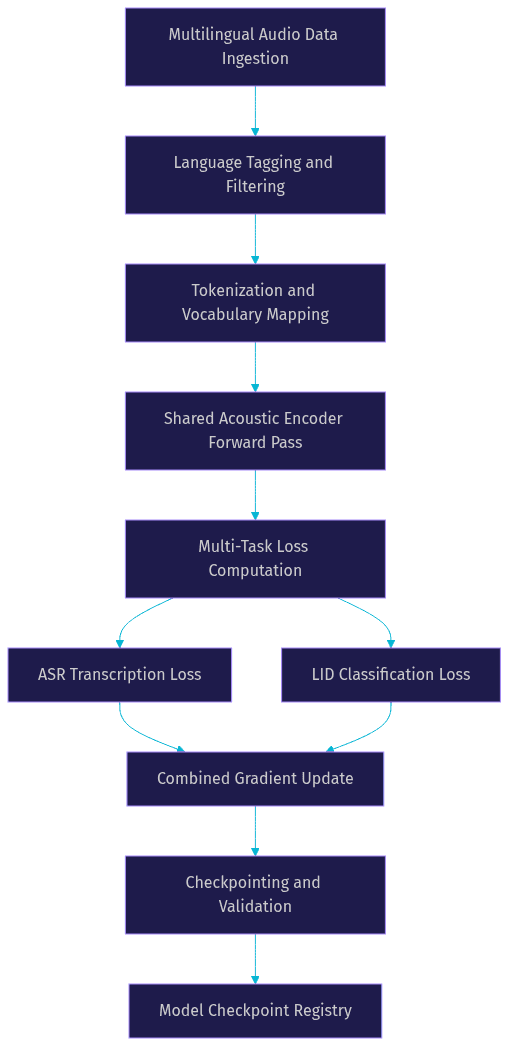
Joint training of ASR and LID is a proven technique for multilingual models. By adding an auxiliary classification head that predicts the spoken language alongside the transcription head, the model learns language-discriminative features that improve both tasks. The ASR head benefits from better language awareness, and the LID head benefits from richer acoustic representations.
In practice, this means your training loop computes two losses simultaneously: a CTC or cross-entropy loss for the transcription and a classification loss for language identification. The combined gradient signal encourages the shared encoder to learn representations that are both phonetically rich and language-aware.
Curriculum Scheduling
Not all languages should be trained equally from the start. Curriculum scheduling prioritizes high-resource languages (like English, Mandarin, Spanish) early in training to establish strong acoustic representations. Low-resource languages are introduced progressively, allowing the model to leverage cross-lingual transfer from already-learned languages.
This approach prevents low-resource languages from being drowned out by high-resource data. Without curriculum scheduling, a model trained on 1,000 hours of English and 5 hours of Wolof will essentially ignore Wolof. With it, the model first learns general speech patterns from English, then adapts those patterns to Wolof with the smaller dataset.
Parameter-Efficient Adaptation
Full fine-tuning of a large multilingual model for each new language is prohibitively expensive. Parameter-efficient techniques like LoRA (Low-Rank Adaptation), adapters, and MoE experts let you add language capacity without touching the base model weights.
LoRA works by injecting small trainable rank-decomposition matrices into each transformer layer. For a model with billions of parameters, a LoRA adapter for a new language might add only a few million parameters, which can be trained on a single GPU in hours. This makes it feasible to maintain a library of language-specific adapters, each trained on modest data, all sharing the same frozen backbone.
Deployment Considerations
A model that achieves 5% WER on a benchmark but takes 3 seconds to decode 1 second of audio is useless in production. Deployment constraints shape which architecture and model size you can actually ship.
Real-Time Inference on Edge Devices
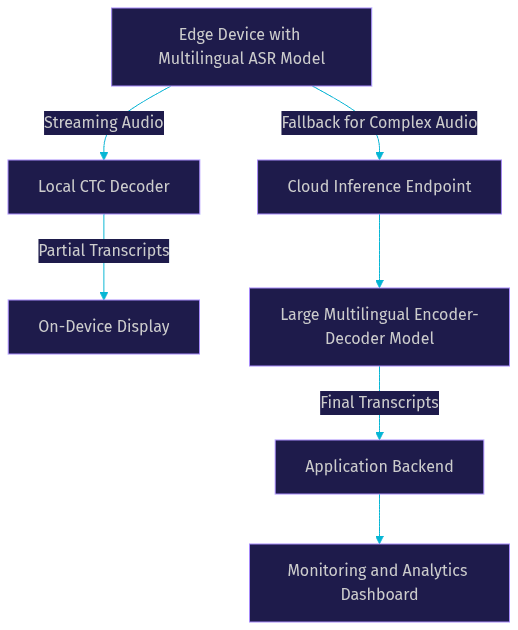
For mobile and IoT deployments, model size and inference latency are the dominant constraints. A CTC-based model with a compact encoder can achieve sub-second decoding on a modern mobile CPU when quantized to 8-bit integers. Encoder-decoder models are harder to optimize for edge because of the autoregressive decoding loop, though techniques like speculative decoding and parallel beam search help.
The practical approach for edge multilingual ASR is to use a distilled CTC model with a shared vocabulary, quantized for the target hardware. Language-specific LoRA adapters can be loaded on demand based on the LID module's prediction, keeping the resident memory footprint small while supporting many languages.
VideoSDK's real-time transcription feature handles this complexity for developers building live video applications. Instead of managing model quantization, streaming audio buffers, and decoding pipelines yourself, the transcription runs as part of the VideoSDK room infrastructure with results delivered through SDK events.
Unlimited Audio Length Decoding
Most ASR models have a maximum input length determined by the encoder's context window. For short utterances this is fine, but for long meetings, lectures, or podcasts, you need a strategy for unlimited audio length.
Streaming approaches process audio in small chunks (typically 100-500ms) and emit partial results continuously. This is ideal for live captioning but can introduce boundary errors at chunk edges. Chunk-based processing with overlapping windows and overlap-and-stitch decoding reduces these errors but adds latency.
Recent models like omniASR address this with architectures designed for unlimited audio length decoding, using recurrent state propagation or chunked attention that maintains context across arbitrarily long inputs without reprocessing.
Scaling with Cloud Services
For batch transcription of large audio archives, cloud deployment is more practical than edge. Hugging Face Inference Endpoints provide managed GPU infrastructure for serving ASR models, and frameworks like vLLM can batch multiple audio streams through a single model instance for higher throughput.
The key architectural decision is whether to run a single multilingual model or route to language-specific models after LID. A single model simplifies deployment and monitoring. Language-specific models can achieve lower WER for individual languages but multiply your operational overhead.
For most teams, starting with a single multilingual model and only splitting into language-specific deployments when a particular language's accuracy is unacceptable is the right trade-off.
Evaluation Metrics and Benchmarks
Evaluating multilingual ASR requires looking beyond a single WER number. Different languages, scripts, and resource levels produce very different error profiles.
Word error rate (WER) is the standard metric for languages with clear word boundaries (English, French, German). Character error rate (CER) is more appropriate for languages without whitespace delimiters (Mandarin, Thai, Japanese). A multilingual evaluation suite should report both metrics, broken down by language and resource tier.
Latency and memory footprint are equally important in production. A model that achieves 3% WER but uses 4GB of RAM and adds 800ms of latency may be worse for your use case than a model at 6% WER that fits in 500MB and decodes in 100ms.
Standard benchmark suites include Multilingual LibriSpeech (MLS) for read speech in 8 languages, CommonVoice for crowdsourced speech in 100+ languages, and LibriSpeech as a high-resource English baseline. When comparing models, pay attention to whether results are zero-shot (the model was not fine-tuned on that language's test set) or fine-tuned. Zero-shot results tell you about cross-lingual transfer capacity. Fine-tuned results tell you about the ceiling performance for a given language.
According to the W3C WebRTC Statistics specification, monitoring real-time audio quality metrics like jitter, packet loss, and round-trip time is essential for understanding transcription quality in live communication scenarios. Poor network conditions degrade audio before it reaches the ASR model, inflating error rates regardless of model quality.
Future Directions and Open Challenges
The frontier of multilingual ASR is moving toward three goals: broader language coverage, lower deployment cost, and more ethical deployment.
Community-driven data collection remains the most promising path to covering the remaining 5,000+ unsupported languages. Projects like CommonVoice and Hugging Face's speech community are making it easier for speakers of low-resource languages to contribute recordings. The challenge is ensuring these contributions represent diverse speakers, accents, and recording conditions rather than narrow demographics.
Bias reduction is an open challenge. Multilingual models trained predominantly on European languages can perform poorly on African and Asian languages, not because of architectural limitations but because of data imbalance. Techniques like balanced sampling, language-aware loss weighting, and adversarial debiasing are active research areas.
Emerging research directions include language-agnostic LoRA-MoE architectures that dynamically compose expert modules at inference time, and multimodal speech-text models that leverage large language models for post-processing and context-aware correction. The convergence of ASR and LLM technology is accelerating, and models that fuse acoustic decoding with LLM-based language modeling are showing promising results on low-resource languages.
Definitions Glossary
Multilingual ASR: A speech recognition system where a single model transcribes audio across multiple languages, using shared acoustic representations and language-aware decoding.
CTC (Connectionist Temporal Classification): A training objective that maps variable-length input sequences to output tokens without requiring pre-aligned labels, enabling efficient multilingual training.
Language Identification (LID): The task of detecting which language is being spoken in an audio segment, used as a front-end routing module or auxiliary training signal in multilingual ASR.
LoRA-MoE: A parameter-efficient adaptation technique that combines low-rank adaptation with mixture-of-experts routing, allowing language-specific expert modules to be added to a frozen base model.
Zero-Shot Language Extension: The ability of a multilingual model to transcribe a language it was not explicitly trained on, leveraging cross-lingual transfer from related languages.
Word Error Rate (WER): The percentage of words incorrectly transcribed, calculated as the sum of substitutions, insertions, and deletions divided by the total words in the reference transcript.
Character Error Rate (CER): An error metric computed at the character level, used for languages without clear word boundaries or when comparing across scripts.
Key Takeaways
- Multilingual ASR replaces the need for separate per-language models with a single architecture that shares acoustic representations across languages, reducing both training and deployment costs.
- CTC-based models offer lower latency and easier scaling for real-time transcription, while encoder-decoder models like Whisper provide stronger contextual reasoning at the cost of higher inference time.
- Zero-shot language extension and parameter-efficient adaptation (LoRA, MoE) are the key techniques for expanding coverage to low-resource languages without full retraining.
- Production deployment requires balancing WER against latency, memory footprint, and model size, especially on edge devices where sub-second decoding is critical.
- VideoSDK's real-time transcription feature integrates multilingual ASR into its video calling SDK, letting developers add live captioning to applications without managing ASR infrastructure independently.
Conclusion
Multilingual ASR has moved from a research ambition to a practical engineering reality. With open-source models covering over 1,600 languages, community datasets growing monthly, and parameter-efficient techniques making fine-tuning accessible on single GPUs, the barriers to building multilingual speech features have never been lower. The decisions that matter now are architectural: CTC versus encoder-decoder, shared versus language-specific tokenization, edge versus cloud deployment. Each choice trades accuracy against latency, coverage against complexity. Start by exploring pretrained multilingual ASR models on the Hugging Face Hub, evaluate them against your target languages using WER and CER, and integrate the winner into your application stack. If you are building a live video or audio application, VideoSDK's real-time transcription handles the ASR pipeline for you, so you can focus on your product. Check out the VideoSDK code samples to see transcription in action, or join the VideoSDK Discord community to discuss your use case with other developers. What are you building with multilingual ASR? Drop a comment below, I would love to hear what languages and use cases you are targeting.
Free $20 Balance for AI Voice Agents & Video Calls
FAQ