


Multi turn conversation handling is the process of managing state, context, and dialogue flow across multiple exchanges between a user and an AI system. VideoSDK addresses this through its Conversational Graph engine, which provides deterministic flow control for structured multi-turn voice interactions. Developers can use VideoSDK's AI Voice Agent SDK to build production-grade multi-turn dialogue systems with built-in state management and context retention.
Introduction
Multi turn conversation handling has become one of the defining engineering challenges for teams building LLM-powered assistants. When a user asks a follow-up question, references something said three turns ago, or abruptly changes topic, the system must maintain coherent context without ballooning latency or token costs. According to research published by Artificial Analysis in 2025, conversational AI systems that maintain structured state across turns achieve significantly higher task completion rates than stateless alternatives.
The stakes are real. A voice agent that forgets a user's stated preference mid-flow, or a chatbot that loops back to an already-answered question, erodes trust instantly. Developers building with VideoSDK's AI Voice Agent SDK face these challenges head-on when deploying real-time voice assistants that handle appointment booking, loan applications, and customer support flows.
By the end of this article, you will understand the architecture patterns, evaluation metrics, and production pitfalls that define effective multi turn conversation handling in 2026. You will also see how VideoSDK's Conversational Graph provides a deterministic alternative to pure LLM-driven flow control.
What Is Multi Turn Conversation Handling?
Multi turn conversation handling is defined as the systematic management of dialogue state, context retention, and turn transitions across a sequence of interactions between a user and an AI system. Unlike single-turn queries where each request is independent, multi-turn dialogue requires the system to remember, reference, and build upon prior exchanges.
Multi turn conversation handling works by maintaining a conversation state object that tracks the dialogue history, extracted entities, user intent, and current position within a conversational flow. Each new user input is evaluated against this accumulated state before the LLM generates a response. VideoSDK provides multi-turn conversation infrastructure through its Conversational Graph product, which lets developers define conversation steps as nodes in a directed graph while the LLM handles only natural language generation within each step.
Core Challenges in Multi Turn Dialogue Systems
Building robust multi turn conversation handling requires solving several interconnected problems that grow harder as conversations lengthen.
Context Management
Every turn adds tokens to the conversation history. A 15-turn dialogue can easily consume 4,000 to 8,000 tokens of context, leaving less room for the model to reason about the current turn. Context must be actively curated rather than blindly accumulated.
Developers need strategies to identify which prior turns remain relevant, which can be summarized, and which should be dropped entirely. Without active curation, the model's attention disperses across irrelevant history, degrading response quality. In practice, teams using VideoSDK's AI Voice Agent SDK configure pipeline hooks that intercept each turn and apply compression logic before the context reaches the LLM.
State Persistence
Multi-turn systems must persist more than just raw message history. User intent, slot values, confirmed preferences, and intermediate decisions all need to survive across turns. A loan application flow, for example, might collect the applicant's name in turn one, their income in turn three, and their employment status in turn five. Each piece must be stored, validated, and retrievable when the system generates its next response.
VideoSDK's Conversational Graph handles this through Pydantic-based state models that persist across nodes, ensuring that extracted data remains accessible throughout the conversation lifecycle.
Topic Shifts and Interruptions
Users rarely follow a linear path. A customer might start discussing a billing issue, pivot to asking about a new product, then return to the original billing complaint. The system must detect these shifts, preserve the prior context without forcing the user to repeat themselves, and resume the earlier thread when the user returns to it.
This requires a dialogue manager that can track multiple active topics simultaneously and prioritize the most relevant one based on the current user input. VideoSDK's Conversational Graph addresses this through its transition system, which allows developers to define conditional jumps between nodes while preserving accumulated state.
Scalability and Token Limits
Every LLM has a finite context window. As conversations grow longer, the cost of sending full history increases linearly while latency degrades. Systems must balance completeness against the practical constraints of token budgets and response time targets.
Designing Effective Conversation State
Effective conversation state design separates raw message logs from structured, queryable state that the dialogue manager can reason about efficiently.
Data Structures for Turn History
A well-designed turn history goes beyond a flat list of strings. Each entry should be a structured message object containing a role tag (system, user, assistant, or tool), the message content, a timestamp, and optional metadata such as confidence scores, extracted entities, or references to external documents.
This structure allows the dialogue manager to selectively query history by role, time range, or topic relevance rather than always passing the full log to the model. VideoSDK's Agent Session maintains this structured history as part of its pipeline observability layer, giving developers programmatic access to each turn's metadata for debugging and analytics.
History Compression Techniques
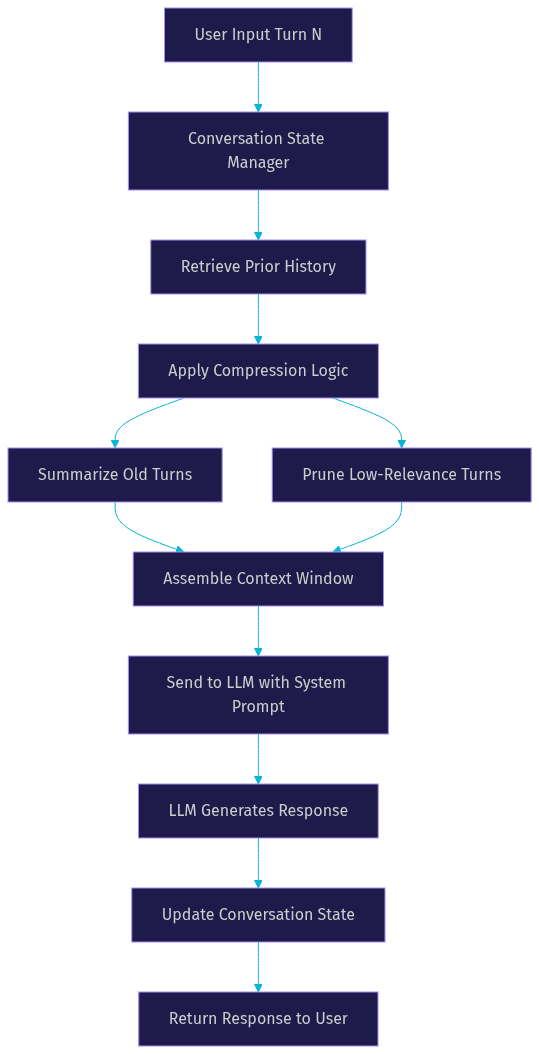
Three primary techniques dominate production multi-turn systems. Summarization involves asking the LLM (or a smaller, faster model) to condense older turns into a compact paragraph that preserves key facts. Selective pruning removes turns that the system classifies as low-relevance, such as greetings or confirmations. Sliding windows keep only the most recent N turns in full fidelity while compressing everything older.
The most effective systems combine all three: a sliding window for recent context, summarization for mid-history, and pruning for noise. VideoSDK's pipeline hooks allow developers to insert compression logic at any point in the agent pipeline, giving fine-grained control over what reaches the LLM's context window.
Role Management and System Prompts
Multi-turn conversations typically involve four role types. The system role carries persistent instructions, behavioral constraints, and persona definitions that should remain constant across turns. The user role represents the human's inputs. The assistant role represents the AI's prior responses. The tool role represents outputs from external functions or APIs called during the conversation.
Managing these roles correctly is critical. System prompts must be re-injected each turn to maintain behavioral consistency, while tool outputs should be curated to avoid flooding the context with raw API responses. VideoSDK's Agent SDK handles role management automatically within its pipeline, ensuring that system prompts, user inputs, and tool results are properly sequenced for each LLM call.
The diagram below shows how a conversation state manager receives messages, applies compression, and feeds the assembled context to the LLM:
Practical Patterns for LLM Integration
Integrating multi turn conversation handling with LLMs requires choosing the right combination of prompt structure, retrieval, and memory persistence for your use case.
Prompt Engineering for Multi-Turn
The most common pattern is stitching conversation history into the prompt as a sequence of role-tagged messages, followed by the current user input. Best practices include placing the system prompt first, maintaining chronological order for history, and adding a brief summary of key facts extracted from older turns before the recent history block.
This gives the model both the compressed long-term context and the verbatim recent context. Developers should also include explicit turn markers so the model can distinguish between the current turn and prior turns. VideoSDK's Agent SDK automates this stitching process within its pipeline, but developers who build custom pipelines can configure the same pattern through pipeline hooks.
Retrieval-Augmented Generation
Retrieval-augmented generation enhances multi-turn conversations by grounding responses in external knowledge rather than relying solely on the model's parametric memory. In a multi-turn setting, RAG becomes more complex: the retrieval query must account for the current user input and the conversation context.
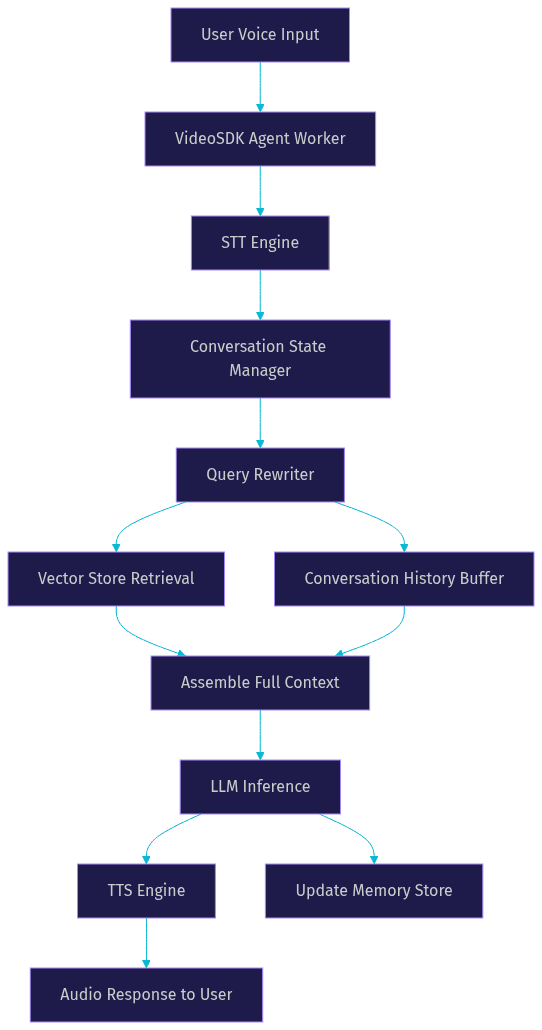
A user who asks "what about the premium plan?" after discussing basic plans needs the retriever to understand that "what about" refers to pricing or features. This requires query rewriting, where the system uses conversation history to reformulate ambiguous follow-up questions into standalone retrieval queries. VideoSDK's Agent SDK supports RAG integration through its function tools and MCP integration, allowing agents to call external knowledge bases mid-conversation while maintaining full dialogue state.
Memory Buffers and External Stores
For conversations that span hours, days, or recurring sessions, in-context history is insufficient. Long-term memory requires external storage, typically a vector database for semantic retrieval or a structured database for key-value lookups.
The system stores important facts, user preferences, and conversation summaries externally, then retrieves them at the start of each new session or when the current conversation references past interactions. VideoSDK's Agent SDK provides memory and context management primitives that handle this persistence, including context window management and RAG capabilities built into the agent pipeline.
The architecture diagram below illustrates how an LLM, retrieval system, and memory buffer work together to handle multi-turn input in a VideoSDK voice agent:
Evaluation Metrics and Benchmarks
Measuring multi turn conversation handling quality requires metrics that go beyond single-turn accuracy.
Turn Accuracy and Context Retention
Turn accuracy measures whether the model's response in turn N correctly references and builds upon information from turns 1 through N-1. Context retention metrics evaluate whether extracted entities, user preferences, and task state remain consistent across the full conversation.
In practice, developers use automated evaluation pipelines that inject known facts in early turns, then query for those facts in later turns to measure recall. Systems using VideoSDK's Conversational Graph typically achieve higher context retention scores because state is persisted deterministically rather than relying on the LLM's attention over raw history.
User Satisfaction and Success Rate
Task completion rate measures whether the conversation achieves its intended goal, such as booking an appointment or resolving a support ticket. User satisfaction is typically measured through post-conversation surveys or implicit signals like conversation length and follow-up frequency.
According to a 2025 ACM survey on dialogue systems, multi-turn assistants with structured state management achieve notably higher task completion rates compared to stateless LLM chatbots. The gap widens as conversation length increases, making structured state management essential for any production deployment handling complex workflows.
Public Benchmarks
Several benchmarks specifically target multi-turn evaluation. MT-Bench, developed by LMSYS, evaluates models on multi-turn instruction following across eight task categories. MultiChallenge tests context retention and coreference resolution across extended dialogues. The ACM survey datasets from 2025 provide standardized evaluation sets for task-oriented multi-turn systems.
Developers should benchmark their specific pipeline against these public datasets before deploying to production. Artificial Analysis also publishes conversational AI performance comparisons that can serve as baseline references for latency and accuracy targets.
Common Pitfalls and Solutions
Even well-designed multi-turn systems encounter predictable failure modes in production.
Token Overflow
When conversation history exceeds the model's context window, the system must detect the overflow and truncate safely. The danger is naive truncation that removes critical early turns containing foundational context.
The solution is priority-based truncation: always preserve the system prompt, the most recent N turns, and any turns containing extracted entities or confirmed decisions. Compress or drop everything else. VideoSDK's context window management handles this automatically by applying configurable retention policies within the agent pipeline.
Context Drift
Context drift occurs when the model gradually deviates from the original conversation goal, producing responses that are technically coherent but increasingly irrelevant. This is especially common in open-ended conversations without structural guardrails.
The solution is periodic goal-checking: after every few turns, the system evaluates whether the current response aligns with the original user intent. VideoSDK's Conversational Graph prevents drift by design, since each node has a defined purpose and transitions are governed by business rules rather than LLM judgment.
Latency Overheads
Multi-turn systems that combine retrieval, compression, and LLM inference can accumulate significant latency per turn. A retrieval call adds 100 to 300 milliseconds, compression adds another 200 to 500 milliseconds, and LLM inference adds 500 to 2000 milliseconds depending on model size.
For real-time voice agents, this latency budget is tight. VideoSDK's Agent SDK addresses this through TTS caching, pipeline parallelization, and preemptive response generation, which begins processing before the user has fully finished speaking. Developers should profile each pipeline stage and parallelize independent operations wherever possible.
Future Trends in Multi Turn Conversation Handling
The landscape of multi turn conversation handling is evolving rapidly, with several emerging patterns gaining traction in 2026.
Graph-Based Conversational Memory
Deterministic conversation graphs are replacing pure LLM-driven flow control for structured use cases. Instead of trusting the LLM to maintain conversation direction, developers define the flow as a directed graph where each node represents a conversation step and transitions are governed by explicit business rules.
VideoSDK's Conversational Graph is a leading implementation of this pattern, supporting state persistence, checkpointing, and human-in-the-loop pauses. This approach is particularly valuable for compliance-driven conversations like loan applications and insurance claims where every step must happen in a defined order.
Real-Time Adaptive Retrieval
Static retrieval queries are giving way to dynamic query rewriting that adapts per turn. The system analyzes the current user input in the context of conversation history, then generates an optimized retrieval query that accounts for coreferences, topic shifts, and accumulated context.
This per-turn adaptation produces more relevant retrieved documents and reduces hallucination risk. VideoSDK's Agent SDK supports this pattern through its function tools and pipeline hooks, enabling developers to inject custom query rewriting logic at any stage of the agent pipeline.
Hybrid Human-in-the-Loop
Not every conversation can or should be fully automated. The emerging pattern is hybrid systems that can pause mid-conversation and hand off to a human agent when the AI detects uncertainty, complex emotional content, or scenarios outside its training distribution.
VideoSDK's Conversational Graph supports this through its human-in-the-loop feature, which pauses the conversation at defined nodes and waits for external input before resuming. This is critical for healthcare, legal, and financial applications where regulatory requirements mandate human oversight for certain decisions.
Definitions Glossary
Conversation State Management: The practice of storing and updating dialogue context, user intent, and extracted entities across multiple turns of interaction. VideoSDK's Conversational Graph provides built-in state management through Pydantic data models that persist across conversation nodes.
Context Window: The maximum number of tokens an LLM can process in a single inference call. Multi-turn systems must manage this budget carefully, compressing older history to leave room for new input and response generation.
Turn Tracking: The mechanism by which a dialogue system identifies and records each exchange between user and assistant. VideoSDK's Agent Session maintains structured turn metadata including timestamps, role tags, and extracted entities for every interaction.
Dialogue State: The structured representation of the current conversation's status, including collected information, confirmed decisions, and the current position within a conversational flow. In VideoSDK's Conversational Graph, dialogue state is modeled as a Pydantic object that flows between nodes.
Context Compression: The process of reducing conversation history size while preserving essential information. Common techniques include summarization, selective pruning, and sliding windows, all of which can be implemented through VideoSDK's pipeline hooks.
Conversational Graph: VideoSDK's deterministic conversation orchestration layer that defines multi-turn flows as directed graphs with nodes, transitions, actions, and state, giving developers control over conversation structure while the LLM handles language generation.
Key Takeaways
- Multi turn conversation handling requires active state management, not passive history accumulation, to maintain coherent context across extended dialogues.
- Context compression through summarization, pruning, and sliding windows is essential for staying within token limits without losing critical information.
- VideoSDK's Conversational Graph provides deterministic flow control that prevents context drift and ensures compliance-driven conversations follow defined steps.
- Evaluation should combine automated context retention metrics with task completion rates and user satisfaction surveys to capture both technical and experiential quality.
- Production systems must profile latency at each pipeline stage and parallelize independent operations to meet real-time response requirements for voice agents.
Conclusion
Multi turn conversation handling sits at the intersection of state management, context engineering, and real-time performance optimization. As LLM-powered assistants move from simple chat interfaces to production voice agents handling complex workflows, the ability to maintain coherent, structured dialogue across dozens of turns becomes a defining quality differentiator. VideoSDK's AI Voice Agent SDK and Conversational Graph give developers the infrastructure to build these systems without reinventing state management from scratch. Start prototyping your multi-turn voice agent today with VideoSDK's free tier, and explore the code samples for working examples. What are you building with VideoSDK? Drop a comment below, I'd love to hear what kind of multi-turn conversation use case you're working on.
Free $20 Balance for AI Voice Agents & Video Calls
FAQ