


Low latency voice agents are conversational AI systems that respond to user speech in under one second, measured by time-to-first-audio (TTFA). They achieve this by streaming every pipeline stage (speech-to-text, LLM reasoning, text-to-speech) instead of waiting for each step to complete. VideoSDK provides an open-source AI Agent SDK with built-in real-time media transport, turn detection, and pipeline observability to help developers ship sub-second voice experiences.
A 200-millisecond pause in a phone conversation feels natural. Cross 700 milliseconds and the other person starts wondering if the line went dead. Voice agents live in that same psychological window, and most of them fail it. When a user asks a question and hears silence for two seconds, the illusion of conversation breaks completely.
Low latency voice agents close that gap. They process speech, reason about it, and start speaking back in less time than a human takes to say "um." The engineering behind this involves streaming every stage of the pipeline, choosing models that produce their first token quickly, and architecting fallback paths so the agent always has something to say.
This guide walks through the full latency budget, architectural patterns for sub-second turns, component-level optimizations, and a real-world case study. By the end, you will understand how to design and measure a voice agent pipeline that feels instantaneous, and how VideoSDK's AI Agent SDK provides the real-time media infrastructure to make it production-ready.
What Is a Low Latency Voice Agent?
A low latency voice agent is a real-time conversational AI system designed to produce its first audio response within a target window, typically under 500 milliseconds from the moment the user stops speaking. Unlike generic voice bots that process full utterances in batch mode and respond after complete processing, low latency agents stream partial results through every stage of the pipeline.
The defining metric is time-to-first-audio (TTFA): the elapsed time between the end of user speech and the first byte of agent audio reaching the speaker. According to research on human conversational turn-taking published by the Max Planck Institute, natural human dialogue has median response gaps of roughly 200 to 250 milliseconds. Voice agents targeting sub-second TTFA aim to stay within that perceptual window or at least close enough that the interaction feels live rather than laggy.
VideoSDK provides real-time voice agent capabilities through its AI Agent SDK, which connects speech-to-text, LLM, and text-to-speech providers to VideoSDK rooms over WebRTC with sub-300ms media transport latency. The SDK handles session management, turn detection, and pipeline observability so developers can focus on model selection and conversation design.
The End-to-End Latency Budget
Every millisecond in a voice agent pipeline is accountable. You cannot optimize what you have not measured, and you cannot measure without a budget.
The voice agent pipeline has five stages: audio capture, speech-to-text (STT), large language model (LLM) reasoning, text-to-speech (TTS), and audio playback. Each stage adds latency, and the sum of those latencies determines whether your agent feels responsive or sluggish.
A realistic budget for a sub-500ms TTFA target looks something like this: audio capture and network transport consume roughly 30 milliseconds, streaming STT adds 80 to 120 milliseconds for partial transcript confidence, the LLM needs 100 to 200 milliseconds for time-to-first-token, streaming TTS adds 60 to 100 milliseconds for first audio chunk generation, and playback buffering accounts for 20 to 40 milliseconds. That sums to approximately 290 to 490 milliseconds, which sits right at the edge of natural conversational timing.
The key insight is that these stages overlap in a well-designed system. Streaming STT sends partial transcripts to the LLM before the user finishes speaking. The LLM begins generating tokens before STT finalizes. TTS starts synthesizing the first sentence before the LLM finishes its full response. This pipelining collapses the effective latency from a serial sum to something closer to the longest single stage.
Human turn-taking research from the Max Planck Institute for Psycholinguistics found that conversational gaps longer than 700 milliseconds trigger a perception of delay in most listeners. That gives you a hard ceiling. If your P95 TTFA exceeds 700 milliseconds, users will notice. If it exceeds one second, they will start repeating themselves or assuming the agent failed.
Architectural Patterns for Sub-Second Turns
Three architectural patterns separate production-grade low latency voice agents from slow prototypes: streaming at every stage, dual-agent architecture, and optimistic voice user interface design.
Streaming at Every Stage
The single most impactful design decision is making every pipeline stage stream its output incrementally rather than waiting for completion. Streaming STT sends partial transcripts as confidence builds. The LLM generates tokens one at a time and forwards them immediately. Streaming TTS begins synthesizing audio from the first sentence before the LLM finishes its full response. This pipelining means the effective latency is not the sum of all stages but roughly the duration of the slowest single stage plus small handoff overhead.
Dual-Agent Architecture
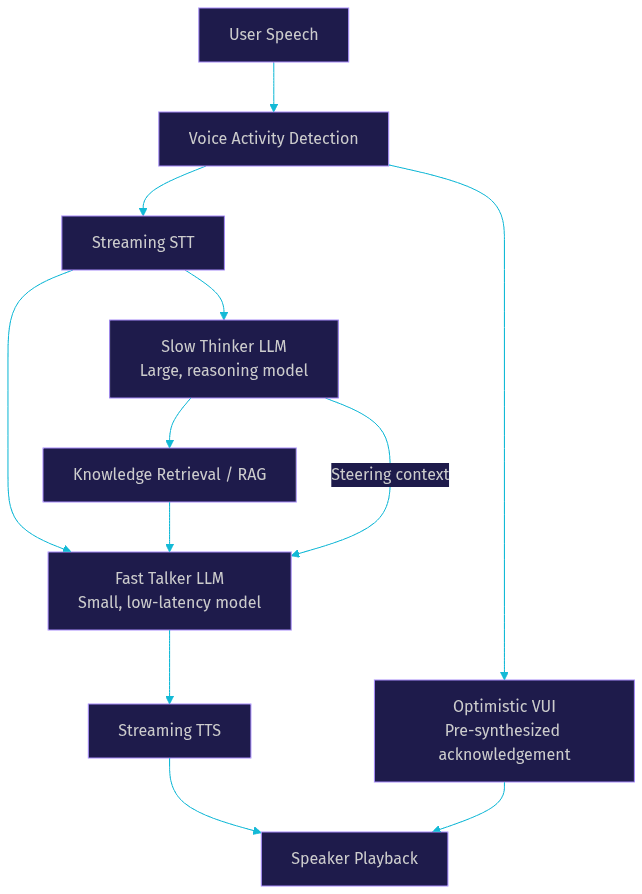
The dual-agent pattern, sometimes called "fast talker plus slow thinker," runs two LLM paths in parallel. The fast talker is a small, low-latency model that generates immediate conversational responses: acknowledgements, confirmations, and short answers. The slow thinker is a larger model running in the background that performs complex reasoning, retrieval-augmented generation, or multi-step tool calls. The slow thinker's output feeds back into the fast talker's context for subsequent turns.
This pattern works because most conversational turns do not require deep reasoning. When a user says "sounds good," the fast talker handles it instantly. When a user asks a complex question, the fast talker buys time with a bridging phrase while the slow thinker computes the real answer.
Optimistic VUI
Optimistic voice user interface (VUI) design means the agent acknowledges input before fully processing it. When the agent detects end-of-speech, it immediately produces a short acknowledgement like "let me check that" using a pre-synthesized audio clip or a fast TTS path. This fills the perceptual gap while the real pipeline computes the response. Barge-in handling lets the user interrupt the agent mid-speech, cancel the current TTS output, and restart the listening loop.
Component-Level Latency Optimizations
Each pipeline component has specific optimization levers. Understanding them lets you make informed tradeoffs between latency, accuracy, and cost.
Capture and Network Transport
Audio capture latency depends on your media transport layer. WebRTC provides sub-300 millisecond transport over UDP with built-in jitter buffering and adaptive bitrate. For telephony-based agents, SIP introduces additional latency from codec transcoding and network hops through PSTN gateways. VideoSDK's telephony and SIP integration bridges traditional phone networks to WebRTC rooms, minimizing transcoding overhead by keeping media on the same transport where possible.
Keep network hops minimal. Every proxy, TURN server, or media relay adds 20 to 50 milliseconds. If your agent runs on a cloud server in a different region from the user, network round-trip alone can consume 100 milliseconds or more. Deploy agent workers close to your users, and use geo-fencing to route connections to the nearest media server.
Speech-to-Text
Streaming STT models produce partial transcripts every 100 to 300 milliseconds, allowing downstream components to start working before the user finishes speaking. Cloud-based streaming STT providers like Deepgram, AssemblyAI, and OpenAI Whisper offer real-time endpoints with endpointing capabilities that detect end-of-speech within 200 to 400 milliseconds of the actual pause.
Endpointing is the STT feature that determines when a user has finished speaking. Aggressive endpointing (short silence thresholds) reduces latency but can cut off users who pause mid-thought. Conservative endpointing waits longer and feels laggy. The sweet spot for most conversational agents is a 300 to 500 millisecond silence threshold, tuned per use case.
Large Language Model
LLM latency is dominated by two factors: time-to-first-token (TTFT) and tokens-per-second generation rate. For voice agents, TTFT matters more than total generation speed because the first token triggers TTS synthesis. A model that produces its first token in 80 milliseconds but generates slowly is better for voice than a model with 300 millisecond TTFT that generates rapidly.
Model selection directly impacts TTFT. Smaller models (7B to 13B parameters) typically produce first tokens in 50 to 150 milliseconds on dedicated hardware. Larger models (70B+) can take 300 to 800 milliseconds for first token. Speculative retrieval, where the system pre-fetches likely relevant context before the user finishes speaking, can reduce effective LLM latency by warming the context window.
VideoSDK's Conversational Graph adds another optimization layer: deterministic flow control. Instead of letting the LLM decide what to do next (which requires more tokens and more reasoning), the graph defines conversation nodes and transitions. The LLM only generates natural language for the current node, reducing both TTFT and total generation time.
Text-to-Speech
Streaming TTS engines synthesize audio in chunks, typically producing the first audio segment within 50 to 150 milliseconds of receiving the first text tokens. The choice of audio codec affects both latency and quality. Low-bitrate codecs like Opus (used by WebRTC) add minimal encoding overhead. Higher-quality codecs add processing latency.
Buffer tuning is critical. A TTS buffer that accumulates too much audio before playback introduces latency. A buffer that is too small causes audio glitches and underruns. Most production voice agents use a 20 to 40 millisecond buffer, just enough to absorb network jitter without adding perceptible delay.
Turn Detection and Barge-in
Voice activity detection (VAD) determines when the user starts and stops speaking. Basic VAD uses energy thresholds and silence timeouts. Semantic VAD goes further by analyzing the content of partial transcripts to distinguish between a completed thought and a mid-sentence pause. Semantic VAD reduces false endpointing at the cost of slightly higher processing latency.
Barge-in handling cancels ongoing TTS playback when the user starts speaking again. This requires the system to simultaneously listen while speaking, which means the microphone must stay active during agent speech. VideoSDK's agent pipeline supports full-duplex audio, enabling real barge-in without muting conflicts.
Open-source projects in this space provide concrete reference implementations. The VideoSDK agents SDK on GitHub includes turn detection, VAD, and pipeline hooks. Community projects like Pipecat offer alternative pipeline architectures for comparison.
Measuring and Monitoring Latency
You cannot ship a low latency voice agent without instrumentation. Every stage needs a timestamp, and every timestamp needs to flow into an observability pipeline.
Per-stage timestamping means recording the exact moment each pipeline event occurs: when audio capture starts, when the first STT partial arrives, when the LLM emits its first token, when TTS produces its first audio chunk, and when that audio reaches the speaker. The difference between consecutive timestamps gives you per-stage latency, and the difference between the first and last gives you end-to-end TTFA.
Track P50 and P95 TTFA separately. P50 tells you the typical experience. P95 tells you the worst case that 5% of your users will encounter. If your P50 is 300 milliseconds but your P95 is 1.2 seconds, you have a tail latency problem that averages will hide.
For retrieval-augmented generation pipelines, also track cache-hit rate. A warm cache that serves context in 5 milliseconds versus a cold vector database query that takes 200 milliseconds can be the difference between sub-second and multi-second TTFA. Pre-warm caches for common queries during off-peak hours.
VideoSDK provides built-in session analytics through its REST API, including participant join times, media quality metrics, and session-level telemetry. For deeper pipeline observability, the Agent SDK includes pipeline hooks that emit per-stage timing events, which you can forward to external observability platforms like Datadog, Grafana, or custom dashboards.
Real-World Case Study: Building a Sub-Second Appointment Scheduler
Consider a healthcare startup building a voice agent that handles appointment scheduling over the phone. Users call in, the agent answers, and they book, reschedule, or cancel appointments through natural conversation. The target TTFA is under 500 milliseconds because anything slower makes callers repeat themselves or hang up.
The developer chose VideoSDK's AI Agent SDK as the real-time media layer, connecting it to Deepgram for streaming STT, a small Llama 3 8B model as the fast talker, and ElevenLabs for streaming TTS. A larger model runs in the background for complex scheduling logic that involves checking calendar availability across multiple providers.
Authentication follows VideoSDK's standard pattern: the backend server generates a meeting token using the API key and secret, then passes it to the agent worker process. The agent joins a VideoSDK room as a participant, and the caller connects to the same room via SIP through VideoSDK's telephony integration. The token is never exposed on the client side.
The design choices that kept TTFA low: streaming STT sends partial transcripts every 100 milliseconds, the fast talker LLM produces its first token in roughly 90 milliseconds on a dedicated GPU, and streaming TTS generates the first audio chunk within 70 milliseconds of receiving the first LLM token. Optimistic VUI plays a pre-synthesized "let me check" audio clip the moment VAD detects end-of-speech, filling the 200-millisecond gap before the real response is ready.
Measured results in production: P50 TTFA of 280 milliseconds, P95 TTFA of 420 milliseconds. Callers reported the agent felt "responsive" and "like talking to a real person." The slow thinker model handled calendar queries in the background, typically completing within 800 milliseconds and feeding results to the fast talker for the next turn. The Conversational Graph ensured the scheduling flow followed a deterministic path: collect patient name, collect preferred date, check availability, confirm booking. The LLM never had to decide what step comes next, which reduced token generation and kept each turn fast.
Common Pitfalls and How to Avoid Them
Four mistakes repeatedly surface in voice agent deployments, and each one adds hundreds of milliseconds to TTFA.
Serial processing bottlenecks. Teams build their pipeline as a strict sequence: wait for STT to finish, then call the LLM, then wait for the full response, then send text to TTS. This guarantees multi-second latency. Fix it by streaming every stage and overlapping processing.
Over-reliance on remote vector database retrieval. Every RAG query that hits a cold vector database adds 150 to 400 milliseconds. For common queries, cache results locally or pre-compute embeddings. Use the slow thinker pattern to handle retrieval in the background while the fast talker responds immediately.
Misconfigured VAD leading to dead air. A silence threshold set too high means the agent waits 800 milliseconds after the user stops speaking before responding. Set it too low and the agent interrupts users mid-sentence. Start at 350 milliseconds and tune based on your specific conversation patterns.
Ignoring network jitter in production. Localhost testing shows 200 millisecond TTFA. Production traffic over mobile networks shows 900 milliseconds because jitter buffers absorb variability. Test on real networks, measure P95 not just P50, and deploy agent workers geographically close to your users.
Future Trends in Low Latency Voice AI
The voice agent landscape is moving toward two major shifts that will reshape latency budgets.
First, speech-to-speech models are emerging that collapse the STT-LLM-TTS pipeline into a single neural network. Models like OpenAI's Realtime API and Google's Gemini Live process audio input and produce audio output directly, eliminating the text intermediary. This can reduce TTFA to under 200 milliseconds because there is no text generation bottleneck. VideoSDK's agent SDK already supports real-time multimodal models from OpenAI, Google, and AWS as pipeline providers.
Second, edge-native inference is bringing LLM token generation closer to the user. Sub-10 millisecond token generation on edge devices would make network transport the dominant latency factor rather than model inference. Integrated media-telephony stacks like VideoSDK, which combine WebRTC transport, SIP bridging, and agent orchestration in one platform, reduce the number of hops between the user and the inference engine.
Definitions Glossary
Time-to-First-Audio (TTFA): The elapsed time between the end of user speech and the first byte of agent audio reaching the speaker. TTFA is the primary performance metric for low latency voice agents, with sub-500ms being the production target for natural conversation.
Voice Activity Detection (VAD): The mechanism that detects when a user starts and stops speaking by analyzing audio energy and speech patterns. VideoSDK's agent pipeline includes built-in VAD with configurable silence thresholds for turn detection.
Barge-in: The ability for a user to interrupt the agent mid-speech, canceling ongoing TTS playback and restarting the listening loop. Barge-in requires full-duplex audio where the microphone stays active during agent speech.
Dual-Agent Architecture: A pattern where a small, fast LLM (the fast talker) handles immediate conversational responses while a larger model (the slow thinker) performs complex reasoning in the background. The slow thinker's output feeds back into the fast talker's context for subsequent turns.
Streaming STT: Speech-to-text processing that outputs partial transcripts incrementally as the user speaks, rather than waiting for the full utterance to complete. This allows downstream LLM and TTS stages to begin processing before the user finishes speaking.
Conversational Graph: VideoSDK's deterministic flow engine that defines conversation steps as nodes with explicit transitions, letting developers control branching logic while the LLM handles only natural language generation. This reduces token count and improves latency.
Key Takeaways
- Low latency voice agents target sub-500ms TTFA to stay within the natural conversational turn-taking window that humans expect.
- Streaming every pipeline stage (STT, LLM, TTS) collapses effective latency from a serial sum to roughly the duration of the slowest single stage.
- The dual-agent pattern (fast talker plus slow thinker) handles simple turns instantly while complex reasoning runs in the background.
- Per-stage instrumentation with P50 and P95 TTFA tracking is essential for identifying tail latency problems that averages hide.
- VideoSDK's AI Agent SDK provides the real-time media transport, turn detection, and pipeline observability needed to ship production-grade low latency voice agents across web, mobile, and telephony channels.
Conclusion
Building low latency voice agents is fundamentally an exercise in budget management. Every millisecond in the capture-to-playback pipeline is accountable, and the difference between a natural conversation and a frustrating one often comes down to 200 milliseconds of avoidable delay. By streaming every stage, adopting dual-agent architecture, and instrumenting per-stage latency, you can hit sub-second TTFA in production. VideoSDK's AI Agent SDK gives you the WebRTC media transport, SIP telephony bridge, and pipeline observability to make it real. Start building at app.videosdk.live/login and join the VideoSDK Discord community to share what you are building. What kind of voice agent use case are you working on? Drop a comment, I would love to hear about it.
Free $20 Balance for AI Voice Agents & Video Calls
FAQ