


A low code voice agent is a conversational AI application built using visual flow editors and pre-configured pipelines rather than raw programming, combining speech-to-text, large language models, and text-to-speech into a deployable voice interface. VideoSDK provides the real-time communication infrastructure and AI agent SDK that powers these pipelines, letting developers move from prototype to production phone or web calls without managing WebRTC complexity. Start with the VideoSDK AI Agents documentation to see the underlying architecture.
Building a voice agent from scratch used to mean wiring WebRTC signaling, managing audio buffers, integrating three separate AI providers, and debugging latency issues for weeks. In 2026, the landscape has shifted dramatically. According to Artificial Analysis's Speech Arena benchmark, real-time voice AI pipelines now achieve sub-500ms turnaround times, making conversational agents viable for production phone lines and customer-facing applications.
A low code voice agent collapses this complexity into a browser-based workflow. You define a persona, pick your model stack, map a few actions, and deploy. The best platforms also export the underlying code so you retain full control when you need it. This article walks through what low code voice agents are, how they work, and how to choose the right platform for your use case.
What Is a Low Code Voice Agent?
A low code voice agent is defined as a voice-based conversational AI application built primarily through visual interfaces, pre-built component libraries, and configuration-driven pipelines rather than hand-coded SDK integration. It works by chaining speech-to-text transcription, LLM-based reasoning, and text-to-speech synthesis into a real-time audio loop that users interact with through phone calls or web browsers.
The distinction from legacy systems matters. Traditional IVR systems use rigid decision trees with no natural language understanding. You press 1 for sales, 2 for support. A low code voice agent understands spoken intent and responds conversationally. Text-only chatbots lack the audio pipeline entirely. Full-code voice agent SDKs like VideoSDK's AI Voice Agent SDK give you maximum control but require Python expertise and pipeline configuration. Low code platforms sit in the middle: faster to prototype, with a path to code when you need it.
VideoSDK's approach is particularly relevant here. The Conversational Graph engine provides deterministic flow control on top of the AI agent pipeline, which is exactly the kind of architecture that low code visual builders generate behind the scenes. When you drag nodes in a visual editor, you are essentially building a graph of conversation states, transitions, and actions. VideoSDK gives you both the visual abstraction and the open-source code underneath.
Core Components of a Low Code Voice Agent Platform
Every low code voice agent platform shares four foundational layers that work together to turn spoken input into spoken output in real time.
Speech-to-Text (STT) Layer
The STT layer converts incoming audio into text the LLM can process. Provider options include Deepgram Nova-3, OpenAI Whisper, Google Cloud Speech-to-Text with Chirp, and AssemblyAI Universal. Latency is the critical metric here. Deepgram consistently reports sub-200ms transcription latency on conversational audio, while cloud-based Whisper endpoints can add 300 to 500ms depending on region. Most low code platforms let you swap STT providers without rewriting your flow, which matters because the wrong STT choice can add a full second of perceived delay.
Large Language Model (LLM) Orchestration
The LLM handles intent recognition, reasoning, and tool calls. In a low code context, you configure the model through a settings panel rather than API integration. You pick a provider (OpenAI GPT-4o, Anthropic Claude, Google Gemini, or open-weight models like Llama), write a system prompt, and define function tools the agent can call. The platform manages context windows, conversation history, and turn detection automatically. VideoSDK's agent architecture supports all major LLM providers and includes built-in turn detection and voice activity detection so the agent knows when a user has finished speaking.
Text-to-Speech (TTS) Engine
The TTS engine converts the LLM's text response back into audio. Voice quality and latency vary significantly across providers. ElevenLabs leads in natural voice quality, Cartesia Sonic offers ultra-low-latency synthesis, and AWS Polly provides cost-effective multilingual coverage. For multilingual agents, the TTS provider must support the target languages with natural prosody, not just basic translation. Real-time synthesis matters because streaming TTS can begin speaking the first words before the full response is generated, reducing perceived latency.
Visual Flow Builder
The visual flow builder is the defining feature of a low code platform. You drag conversation nodes onto a canvas, connect them with transitions, and configure prompts, conditions, and actions at each node. Most platforms offer a live preview mode where you can test the agent by speaking directly through your browser microphone. This immediate feedback loop is what makes low code dramatically faster than traditional development for prototyping and iteration.
End-to-End Build Workflow
Building a low code voice agent follows a consistent five-step workflow that takes you from concept to deployed application entirely within a browser environment.
The process starts with persona definition and ends with cloud deployment, with model selection, action mapping, and live testing in between. Here is how each step works in practice.
Step 1: Define Persona and Prompts
You begin by writing a system prompt that defines the agent's personality, role, and constraints. For example, a customer support agent for a fintech startup might be configured to answer account questions, escalate disputes, and never share sensitive data without identity verification. The prompt is the single most important quality lever. Most low code platforms provide prompt templates for common use cases like support, sales qualification, and appointment booking.
Step 2: Select STT, LLM, and TTS Models
Next, you choose your model stack from the platform's provider catalog. The key decision is whether to use a real-time multimodal model like OpenAI Realtime API or a cascaded pipeline where STT, LLM, and TTS run as separate steps. Real-time models offer lower latency but less control over individual components. Cascaded pipelines let you mix and match the best provider for each layer. Most low code platforms default to cascaded pipelines because they are easier to visualize and debug.
Step 3: Map Actions and Tool Calls
Actions are what make a voice agent useful beyond conversation. You define function tools that the agent can call during a conversation: looking up a customer in a database, checking order status, booking an appointment, or transferring a call. In a low code platform, you configure these through form interfaces that specify the endpoint, parameters, and expected response format. VideoSDK's agent SDK supports function tools and MCP integration natively, which means the code exported from a low code builder can leverage these capabilities directly.
Step 4: Test with Live Voice
Before deploying, you test the agent by speaking to it through your browser. This is where you catch prompt issues, latency problems, and misunderstood intents. Most platforms show a transcript alongside the audio so you can see exactly what the STT heard, what the LLM decided, and what the TTS produced. Pay attention to turn detection false positives (the agent interrupts you) and false negatives (the agent waits too long to respond).
Step 5: Deploy to Cloud
Deployment typically involves selecting a target channel (web, phone via SIP, or both) and clicking deploy. The platform provisions the necessary infrastructure, assigns a phone number if needed, and provides you with a URL or phone number to share. VideoSDK's telephony integration supports inbound and outbound SIP calls, meaning a low code agent deployed on VideoSDK infrastructure can receive calls from traditional phone networks.
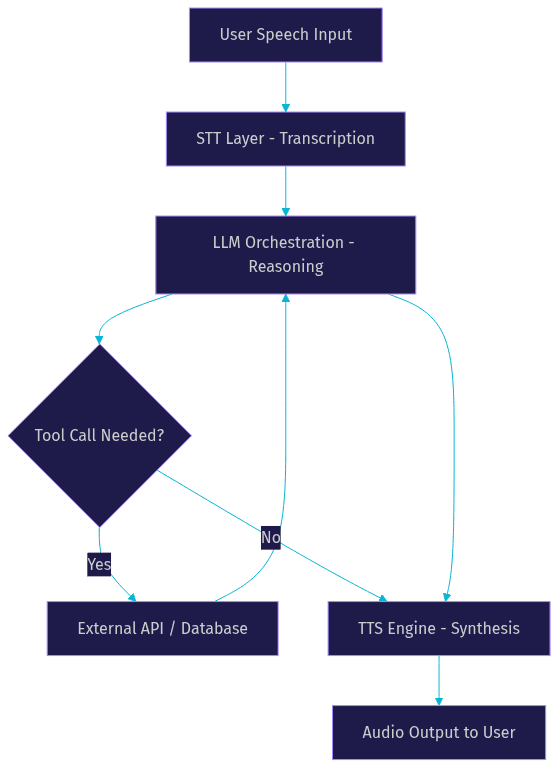
The diagram above shows the cascaded pipeline architecture that most low code voice agent platforms generate behind the scenes. Audio enters as speech, gets transcribed, flows through the LLM for reasoning, optionally triggers external tool calls, and returns as synthesized speech. The entire loop must complete in under 500ms for the conversation to feel natural.
Choosing the Right Model Stack
Selecting the right combination of STT, LLM, and TTS providers is the most consequential architectural decision when building a low code voice agent.
The first decision is real-time versus cascaded. Real-time multimodal models like OpenAI Realtime API and Google Gemini Live handle speech input and output natively, eliminating the STT-to-LLM-to-TTS chain. This reduces latency but locks you into one provider's quality for all three components. Cascaded pipelines let you use Deepgram for STT, Claude for reasoning, and ElevenLabs for TTS, optimizing each layer independently.
For monolingual English agents, a cascaded pipeline with Deepgram Nova-3, GPT-4o, and Cartesia Sonic typically delivers the best balance of quality and latency. For multilingual agents, Google Cloud STT with Chirp and Google Cloud TTS offer the broadest language coverage, though voice quality in non-English languages may lag behind specialized providers. Always verify current benchmark scores on Artificial Analysis before committing to a provider stack.
Cost is the third axis. Real-time models charge per audio minute, which can be expensive for long conversations. Cascaded pipelines charge separately for each component, but you can reduce costs by using cheaper models for simple intents and reserving expensive models for complex reasoning. Most low code platforms show estimated cost per call based on your selected stack, which helps you model ROI before deploying.
Production Considerations
Moving a low code voice agent from prototype to production introduces four critical concerns that visual builders abstract away but developers must understand.
Latency and Quality of Service
Sub-500ms turnaround time is the benchmark for natural conversation. This means the time from when a user stops speaking to when the agent begins responding must be under half a second. According to Artificial Analysis's Speech Arena benchmark, the best cascaded pipelines achieve 300 to 400ms end-to-end latency, while real-time models can hit 200 to 300ms. Anything above 700ms feels sluggish and causes users to speak over the agent. Monitor latency in production and set up alerts for degradation.
Security and Token Management
Production voice agents handle sensitive data. Your platform should support JWT-based authentication for room access, role-based access control for different participant types, and end-to-end encryption for media streams. VideoSDK provides all three as part of its core video and audio calling infrastructure. Never expose API keys in client-side code. Generate tokens server-side and scope them to specific rooms and roles. For telephony agents, ensure your SIP provider supports secure SIP and IP whitelisting.
Scaling and Multi-Region Deployment
A voice agent that works for 10 concurrent calls may fail at 100. Ask your platform about concurrency limits, auto-scaling behavior, and multi-region deployment options. VideoSDK's Agent Cloud handles scaling automatically, but self-hosted deployments require you to manage Kubernetes clusters and load balancing yourself. For telephony integration, verify that your SIP trunk provider can handle your expected call volume and that your routing rules distribute calls across regions to minimize latency.
Export-to-Code Benefits
The ability to export your visual flow as runnable code is what separates a toy from a production tool. When you export, you get a Python or Node project with your pipeline configuration, prompt definitions, and tool mappings as code. This matters for three reasons. First, you can version-control your agent. Second, you can add custom logic that the visual builder does not support. Third, you are not locked into the platform. If the low code provider raises prices or shuts down, you have a working codebase you can deploy elsewhere. VideoSDK's open-source AI Agent SDK on GitHub is designed to be exactly this kind of escape hatch.
Real-World Use Cases
Low code voice agents are already deployed across several industries, each with distinct requirements and ROI profiles.
Customer support hotlines are the most common use case. A telecom company replaces its legacy IVR with a voice agent that understands natural language queries, looks up account details through API calls, and resolves common issues without human transfer. The ROI is straightforward: call deflection rates of 30 to 40 percent reduce agent workload significantly.
Voice-driven e-commerce checkout lets customers order products by speaking naturally. A food delivery startup deploys a voice agent that takes orders, confirms details, and processes payments through a tool call to their payment gateway. The agent handles the entire transaction without a human operator.
Internal knowledge-base assistants give employees a voice interface to company documentation. An engineering team builds an agent that answers questions about internal APIs, deployment procedures, and on-call runbooks. The agent searches a vector database and returns spoken answers, which is particularly useful for hands-busy scenarios like driving or walking between meetings.
Multilingual call centers deploy agents that switch languages mid-conversation based on the caller's preference. A healthcare provider serving a diverse community uses a single agent that greets callers in English, detects Spanish or Mandarin speech, and switches its STT, LLM, and TTS models accordingly. This eliminates the need for separate language-specific IVR trees.
Comparison of Leading Low Code Voice Agent Platforms
Several platforms now offer low code voice agent building capabilities. Here is how they compare across the dimensions that matter most to developers.
| Platform | Visual Flow Builder | Model Catalog | Export to Code | Pricing | Multilingual |
|---|---|---|---|---|---|
| VideoSDK AI Agents + Conversational Graph | Graph-based deterministic flow | OpenAI, Google, Anthropic, Deepgram, ElevenLabs, Cartesia | Yes, open-source Python SDK | Free tier with credits | Yes, via provider selection |
| Vapi | Visual prompt and flow config | OpenAI, Deepgram, ElevenLabs, Cartesia | Limited export | Pay per minute | Yes, provider-dependent |
| Retell AI | Prompt-based builder with state | OpenAI, Deepgram, ElevenLabs | Yes, Python and Node | Usage-based | Yes, provider-dependent |
| LiveKit Agents | Code-first with visual debugging | OpenAI, Google, Deepgram, Cartesia | Yes, open-source framework | Open source, self-hosted | Yes, provider-dependent |
| Cognigy | Enterprise visual flow builder | Limited but extensible | Enterprise export | Enterprise pricing | Yes, 100+ languages built-in |
VideoSDK stands out for developers who want a graph-based approach to conversation flow. The Conversational Graph engine lets you define nodes, transitions, and state as a directed graph, which is exactly the mental model that visual flow builders use. The difference is that VideoSDK gives you both the visual abstraction and the open-source code underneath.
Vapi shines for rapid prototyping. If you need a voice agent running in under an hour and do not need deep customization, its streamlined builder gets you there fast.
Retell AI is the strongest choice when export-to-code is your priority. The generated Python and Node projects are clean and maintainable, making it easy to transition from low code to full code as your needs evolve.
LiveKit Agents is best for teams that want to stay close to the code. It is more of a framework with visual debugging than a true low code platform, but the open-source nature means no vendor lock-in.
Cognigy serves enterprise deployments where compliance, multi-language support, and integration with existing contact center infrastructure are non-negotiable.
Getting Started Quickly
Getting from zero to a deployed voice agent is faster than you might think. Here is a practical checklist.
First, sign up for a VideoSDK account at app.videosdk.live/login and generate your API key from the dashboard. You will need this to authenticate your agent sessions.
Second, create a new project and define your agent persona. Write a clear system prompt that specifies the agent's role, tone, and constraints. Keep it under 500 words for the initial prototype.
Third, select your model stack. For a quick prototype, use Deepgram for STT, GPT-4o for the LLM, and ElevenLabs for TTS. You can optimize later.
Fourth, map one or two simple actions. A lookup tool that queries a mock database is enough to validate the tool-calling pipeline.
Fifth, test with live voice using the browser preview. Speak naturally and check the transcript for accuracy. Adjust your prompt based on what the agent gets wrong.
Sixth, deploy to the VideoSDK Agent Cloud and test with a real phone call if you have SIP integration enabled. The entire process should take under 30 minutes for a basic prototype.
For detailed setup instructions, refer to the VideoSDK AI Agents quickstart guide and explore the code samples for working examples.
Definitions Glossary
Low Code Voice Agent: A voice-based conversational AI application built through visual interfaces and configuration rather than hand-coded SDK integration, combining STT, LLM, and TTS into a deployable real-time audio pipeline.
Cascaded Pipeline: An architecture where speech-to-text, LLM reasoning, and text-to-speech run as separate sequential steps, allowing independent optimization of each component compared to a single real-time multimodal model.
Conversational Graph: VideoSDK's deterministic flow engine that defines conversation as a directed graph of nodes, transitions, and state, giving developers control over branching logic while the LLM handles natural language generation.
Turn Detection: The mechanism that determines when a user has finished speaking and the AI agent should begin responding, critical for maintaining natural conversation flow and avoiding interruptions.
SIP Integration: The bridge between traditional telephone networks and WebRTC-based voice agent rooms, enabling AI agents to receive and make phone calls through standard phone numbers.
Key Takeaways
- A low code voice agent combines visual flow building with pre-configured STT, LLM, and TTS pipelines to let developers prototype conversational AI without deep engineering effort.
- The cascaded pipeline architecture (STT to LLM to TTS) remains the most flexible approach, letting you optimize each layer independently and swap providers without rebuilding your flow.
- VideoSDK's Conversational Graph provides the deterministic flow control that visual builders generate behind the scenes, with the added benefit of an open-source Python SDK for full code-level control.
- Production deployment requires attention to latency (sub-500ms target), security (JWT tokens and end-to-end encryption), and scaling (multi-region deployment and SIP trunk capacity).
- Export-to-code capability is the single most important feature for long-term maintainability, version control, and avoiding vendor lock-in.
Conclusion
Low code voice agents have made conversational AI accessible to developers who need production-ready voice interfaces without weeks of WebRTC engineering. The best platforms combine visual prototyping speed with the ability to export clean, maintainable code. VideoSDK's AI Voice Agent SDK and Conversational Graph engine provide the real-time infrastructure and deterministic flow control that make this possible, whether you start in a visual builder or write Python from scratch. Sign up for free at app.videosdk.live/login and join the VideoSDK Discord community to connect with thousands of developers building voice agents. What are you building with VideoSDK? Drop a comment below, I would love to hear what kind of voice agent use case you are working on.
Free $20 Balance for AI Voice Agents & Video Calls
FAQ