


The key differentiator of conversational AI is its ability to maintain context awareness and multi-turn memory across a conversation. Unlike rule-based chatbots that follow static decision trees, conversational AI uses natural language understanding and dialogue state tracking to remember previous interactions, adapt to user intent in real time, and generate dynamic responses. Platforms like VideoSDK enable this by providing an AI integration layer that connects large language models directly into real-time voice and video streams.
The conversational AI market is projected to reach massive scale by 2026, driven by rapid adoption in customer support, sales, and internal enterprise tools. For software developers and technical founders, this explosion means evaluating communication SDKs and AI agent frameworks is now a core product decision. Knowing the key differentiator of conversational AI matters because it dictates whether your application will feel like a genuine assistant or a frustrating automated menu.
When you build AI-powered customer support or real-time voice assistants, the underlying architecture determines the ceiling of your user experience. If you choose a system built on static rules, you hit a wall when users deviate from expected paths. If you choose a system built on context-aware generative AI, you unlock fluid, multi-turn interactions. Understanding this distinction helps you allocate engineering resources effectively, choose the right AI integration layer, and build applications that scale without degrading quality.
What the Key Differentiator of Conversational AI Actually Means
To understand what sets conversational AI apart, you have to look past the chat interface and examine the engine driving the interaction. The key differentiator of conversational AI is not merely the use of a large language model, but the orchestration of that model within a persistent, stateful environment.
Definition of Conversational AI
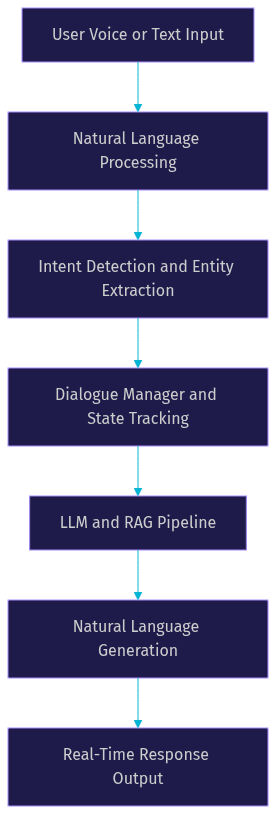
Conversational AI is defined as a set of technologies that enable computers to simulate human-like conversations. It works by processing user inputs through natural language understanding to extract intent and entities, passing that data through a dialogue manager to track conversation state, and using natural language generation to produce relevant responses. Unlike basic chatbots that rely on keyword matching, conversational AI comprehends nuance, handles interruptions, and adapts to shifting user goals. VideoSDK provides a robust foundation for this by offering an AI agent SDK that connects these cognitive pipelines directly into real-time audio and video rooms, allowing developers to build true voice assistants rather than simple text bots.
Core Technology Stack
The core technology stack of a conversational AI system includes several interconnected layers. First, natural language processing handles the raw text or audio input. Second, natural language understanding parses the meaning behind the input. Third, a dialogue manager maintains the conversation state, deciding what to ask next or when to execute a function. Fourth, a large language model or retrieval-augmented generation pipeline formulates the actual response. Finally, an AI integration layer connects these components to the end user. VideoSDK acts as this integration layer, managing the real-time media streams, turn detection, and voice activity detection required to make the conversation feel instantaneous.
The Main Differentiator: Context Awareness and Memory
The single most important capability that separates conversational AI from legacy chatbots is context awareness combined with multi-turn memory. This is the key differentiator of conversational AI that developers must prioritize.
Why Context Matters
Context matters because human conversation is inherently non-linear. A user might ask a question, provide partial information, change their mind, and reference an earlier point without repeating it. A system lacking multi-turn memory treats every input as an isolated event, forcing users to repeat themselves and breaking the illusion of intelligence. Context awareness allows an AI agent to remember that a user mentioned a specific product two minutes ago, and use that detail to personalize a recommendation now. This continuity directly impacts user satisfaction. When an AI agent maintains intent continuity, users complete tasks faster and report higher satisfaction scores. VideoSDK supports this by maintaining agent sessions that preserve context across the lifecycle of a call, ensuring the AI does not suffer from amnesia mid-conversation.
Dialogue Management and State Tracking
Dialogue management and conversation state tracking are the mechanisms that enforce context awareness. A dialogue manager operates like a state machine for conversation. It logs the current topic, tracks what information has been collected, and determines the next best action. This differs drastically from static rule trees, which force users down rigid, pre-defined paths. With a stateful dialogue manager, if a user asks an off-topic question in the middle of a booking flow, the AI can answer the question and seamlessly guide the user back to the booking. VideoSDK takes this further with its Conversational Graph, a deterministic orchestration layer that lets developers define exact conversation flows as directed graphs. This ensures the LLM handles natural language generation while business logic controls the branching, giving you both flexibility and absolute control over the dialogue state.
Supporting Differentiators that Strengthen Context
While context awareness is the foundation, several supporting differentiators amplify its effectiveness. These include omnichannel deployment, real-time personalization, and robust safety guardrails.
Omnichannel Integration
Context awareness becomes significantly more powerful when it travels with the user across channels. Omnichannel integration means a conversation can start on a web chat interface, move to a voice assistant on a mobile app, and finish over a phone call via SIP telephony, all without losing the conversation state. VideoSDK enables this by providing a unified room architecture. A user can join a VideoSDK room via a React web app, an iOS native app, or a traditional phone line through the SIP integration. The AI agent worker inside that room maintains the same context regardless of how the user connects. This eliminates the siloed experience where users have to restart a support ticket every time they switch devices.
Real-Time Personalization and Learning
Conversational AI systems use context to drive real-time personalization. As the conversation progresses, the AI builds a dynamic user profile based on stated preferences, sentiment, and historical interactions. This profile feeds into recommendation hooks and retrieval-augmented generation pipelines, allowing the AI to tailor its responses instantly. For example, if a user indicates they are a beginner, the AI adjusts its language complexity for the rest of the session. Over time, developers can use these conversation logs to fine-tune the underlying models, creating a continuous feedback loop that improves AI scalability and accuracy. VideoSDK agents can leverage memory and RAG features to store and retrieve these user profiles during live sessions.
Safety, Guardrails, and Fallback Handling
Context awareness also enables graceful failure. When an AI agent detects high user frustration or encounters an intent it cannot safely handle, the dialogue manager can trigger a fallback. Instead of looping through unhelpful automated responses, the system uses its context to compile a summary of the issue and hand the conversation off to a human agent. VideoSDK supports human-in-the-loop workflows, allowing a live support agent to join the same room and pick up exactly where the AI left off.
How It Stacks Up Against Rule-Based Chatbots
To fully appreciate the key differentiator of conversational AI, you have to compare it directly with the legacy alternative: rule-based chatbots. The difference between conversational AI vs chatbot architectures is fundamental.
Rule-Based vs AI-Driven
Rule-based chatbots operate on strict if-then logic. Developers map out decision trees, and users must select from predefined options or type exact keywords to progress. If a user phrases a question slightly differently than expected, the bot fails. These systems are rigid and require constant manual updates to handle new edge cases. AI-driven conversational agents, by contrast, rely on natural language understanding. They interpret the meaning behind a user's words rather than matching exact strings. This allows users to speak naturally, using varied vocabulary and complex sentences. The AI dynamically generates the next step based on the current conversation state, making the interaction feel fluid rather than restrictive.
Performance Metrics Comparison
When you compare these two approaches across standard performance metrics, the gap widens. Rule-based chatbots might show high accuracy for simple, high-volume tasks like password resets, but their deflection rate plummets when queries get complex. Conversational AI maintains a higher deflection rate across varied topics because it can infer intent and pull answers from a knowledge base using RAG. In terms of user satisfaction, AI agents consistently score higher due to their natural language generation capabilities. Maintenance effort is another major factor. Updating a rule-based bot requires re-mapping entire decision trees, while updating a conversational AI often involves simply adding new documents to a RAG pipeline or adjusting a system prompt. Finally, AI scalability is superior, as a single LLM can handle diverse domains without requiring a unique flow chart for every scenario.
Real-World Impact of the Differentiator
The theoretical advantages of context awareness translate into measurable business outcomes. Let's look at two real-world scenarios where the key differentiator of conversational AI drives results.
Customer Support Case Study
Consider a healthcare startup building a telemedicine application using the VideoSDK React SDK. They integrated an AI voice agent to handle initial patient intake. A patient calls in reporting a persistent cough and mild fever. The AI agent, using context awareness, asks about pre-existing conditions and current medications. When the patient mentions a specific medication, the AI cross-references it with the reported symptoms using a RAG pipeline. Because the AI maintains multi-turn memory, it does not ask the patient to repeat their symptoms. It compiles a concise intake summary and routes the call to a doctor, who joins the VideoSDK room via the warm transfer feature. The result is a drastically reduced resolution time and a patient who feels heard from the first second of the call.
Sales and Lead Qualification Case Study
Imagine a B2B SaaS company deploying an AI agent to qualify inbound leads via their website. A visitor starts a chat asking about pricing for a team of fifty. The AI agent understands the intent and begins a multi-turn qualification flow. It asks about the team's current tech stack and primary use cases. The visitor provides fragmented answers over several minutes, occasionally asking off-topic questions about integrations. The AI handles the tangents, answers them, and smoothly returns to the qualification flow. Because the dialogue manager tracks the conversation state, the AI knows exactly which qualification criteria are still missing. It completes the qualification, scores the lead, and books a demo. This multi-turn capability improves conversion rates compared to a static form that would likely be abandoned.
Evaluating the Differentiator for Your Project
If you are planning to integrate conversational AI into your application, you need a framework to evaluate whether a platform truly delivers on the key differentiator of context awareness.
Decision Checklist
Before committing to an AI agent platform, ask yourself these questions about your project. First, what is the expected conversation complexity? If users need to perform multi-step tasks with frequent interruptions, context awareness is mandatory. Second, what is your channel mix? If you need to support web chat, mobile voice, and telephony, you need an omnichannel platform like VideoSDK. Third, what are your data privacy and AI safety requirements? Ensure the platform offers robust guardrails and human-in-the-loop fallback options. Fourth, what is your budget for AI model latency? Real-time voice requires sub-second response times, meaning you need a platform optimized for low-latency streaming. Finally, does the platform offer deterministic control when needed, like VideoSDK's Conversational Graph, to ensure compliance in regulated industries?
Implementation Considerations
Once you decide to build a context-aware AI agent, implementation requires careful planning. Choosing a platform involves evaluating the breadth of SDKs, the flexibility of the AI integration layer, and support for leading STT, LLM, and TTS providers. You must plan for AI model latency by selecting providers optimized for real-time interaction, such as those offering streaming TTS and fast turn detection. VideoSDK simplifies this by providing a managed Agent Cloud and open-source Python SDK, allowing you to focus on conversation design rather than infrastructure. You also need to plan for continuous improvement by logging conversations and refining your RAG pipelines over time.
Definitions Glossary
Conversational AI: A type of artificial intelligence that simulates human conversation through natural language processing, understanding, and generation, enabling dynamic and context-aware interactions.
Context Awareness: The ability of an AI system to remember and utilize information from previous turns in a conversation, allowing for continuous and relevant multi-turn interactions.
Dialogue Management: The engine within a conversational AI system that tracks conversation state, determines the next action, and ensures the interaction follows a logical flow.
Natural Language Understanding (NLU): A subfield of AI that focuses on machine reading comprehension, extracting intent and entities from user inputs to understand meaning.
Retrieval-Augmented Generation (RAG): An AI framework that retrieves facts from an external knowledge base to ground large language models on accurate, up-to-date information before generating responses.
Key Takeaways
- The key differentiator of conversational AI is context awareness and multi-turn memory, allowing systems to maintain intent continuity across complex interactions.
- Dialogue management and conversation state tracking provide the structural foundation that enables AI agents to handle interruptions and non-linear user journeys.
- Omnichannel integration ensures conversation context travels seamlessly across web, mobile, and telephony channels, a core capability of VideoSDK's room architecture.
- Conversational AI significantly outperforms rule-based chatbots in deflection rate, user satisfaction, and AI scalability due to its use of natural language understanding.
- Platforms like VideoSDK provide the essential AI integration layer, combining real-time media streams with deterministic flow control through the Conversational Graph.
Conclusion
The key differentiator of conversational AI is its ability to maintain context and memory, transforming rigid automated scripts into fluid, intelligent interactions. By leveraging natural language understanding, dialogue management, and retrieval-augmented generation, developers can build AI agents that genuinely understand and assist users. This capability drives higher deflection rates, better user satisfaction, and scalable AI-powered customer support. If you are ready to build context-aware voice agents, explore VideoSDK's AI Voice Agent documentation and start building with our Python SDK. What are you building with VideoSDK? Drop a comment below, I would love to hear what kind of conversational AI use case you are working on.
Free $20 Balance for AI Voice Agents & Video Calls
FAQ