


Interruption handling in voice agents is the process of detecting when a user speaks over an AI assistant mid-response, immediately halting speech generation, and recovering conversation context so the dialogue continues naturally. It relies on voice activity detection, turn detection models, and an interrupt controller that propagates a cancellation signal through the LLM, TTS, and transport layers in under 300 milliseconds. VideoSDK's AI Voice Agent pipeline provides built-in turn detection and preemptive response handling so developers can implement production-grade barge-in without wiring custom cancellation logic from scratch. You can explore the full pipeline architecture in the VideoSDK AI Agents documentation.
You ask a voice assistant to book a flight. It starts reading out three options. After the first one, you say "that one, the morning flight." The assistant keeps talking. It finishes all three options, then pauses, then asks which you prefer. You repeat yourself. By the third exchange, you are talking to it like a stubborn radio.
This is the interruption problem. Human conversation is messy, overlapping, and full of mid-sentence course corrections. Voice agents that cannot handle barge-in feel robotic, slow, and frustrating. Interruption handling in voice agents is the set of techniques that lets an AI stop talking the moment a user cuts in, discard the irrelevant output, and respond to what the user actually said.
This article walks through the full architecture: the core components that make an agent interruption-ready, how to design a low-latency cancellation pipeline, when to use adaptive versus static interruption models, and the best practices that separate a demo from a production system. By the end, you will understand the latency budgets, signal flows, and policy thresholds that make real-time barge-in feel natural.
What Is Interruption Handling in Voice Agents?
Interruption handling in voice agents is defined as the system-level capability to detect a user's speech during the agent's own response, abort the ongoing generation pipeline, and transition control back to the user without perceptible delay. The conversational AI research community often refers to this as "barge-in," a term borrowed from telephony interactive voice response systems where a caller's speech interrupts a prerecorded prompt.
It works by continuously monitoring the user's audio stream while the agent speaks. When the monitoring layer detects speech energy or linguistic content that signals an interruption, it emits an interrupt frame. That frame cascades through the pipeline: the speech-to-text layer cancels its current transcription, the LLM stops generating tokens, the TTS engine flushes its audio buffer, and the transport layer stops sending audio frames to the user's device. The partial text the agent already spoke is captured and fed back into context so the next turn makes sense.
This matters because natural conversation is not strictly turn-based. People interrupt, correct themselves, add conditions mid-sentence, and say "wait, actually" all the time. A voice agent without interruption handling is functionally a walkie-talkie. One with good interruption handling feels like talking to someone who is actually listening.
Core Components of an Interruption-Ready Voice Agent
An interruption-ready voice agent is not a single module. It is a coordination of four subsystems that must work together within a tight latency budget. Each component has a specific role, and a failure in any one of them degrades the entire barge-in experience.
Voice Activity Detection (VAD)
Voice Activity Detection is the acoustic gatekeeper. It analyzes the incoming audio stream in real time and determines whether the user is currently speaking. VAD operates on short audio frames, typically 10 to 30 milliseconds, and uses energy thresholds, zero-crossing rates, or neural network classifiers to separate speech from silence and background noise.
The latency target for VAD trigger detection is aggressive: under 50 milliseconds from the moment speech begins to the moment the system flags it. Anything slower and the user perceives a lag before the agent stops. Common algorithms range from simple energy-based detectors to WebRTC's built-in VAD module to trained models like Silero VAD, which uses a compact neural network to achieve higher accuracy in noisy environments. VideoSDK's agent pipeline includes Voice Activity Detection as a first-class pipeline component, configurable through the agent pipeline hooks.
Turn Detection and Adaptive Models
Turn detection is the decision layer that sits above VAD. While VAD answers "is there speech?", turn detection answers "is this speech an interruption, or just background noise, or a short backchannel like 'uh-huh'?"
Static VAD-based turn detection uses fixed rules: if speech energy exceeds a threshold for a minimum duration, treat it as an interruption. This is simple and fast but produces false positives when the user says "yeah" or when background noise spikes. Adaptive interruption models, by contrast, use trained classifiers that analyze acoustic patterns, prosody, and timing to distinguish genuine interruptions from acknowledgments. These models adapt to different speakers and languages, reducing false positives significantly. The tradeoff is higher computational cost and more complex deployment.
Interrupt Controller and Interrupt Frame Propagation
The interrupt controller is the orchestration hub. When turn detection decides the user has interrupted, the controller emits an interrupt frame, which is a signal that propagates through every downstream component in the pipeline. The LLM receives a cancellation request and stops token generation. The TTS engine receives a flush command and stops synthesizing audio. The transport layer stops sending audio frames to the user's device.
This propagation must happen in a specific order and within a strict time window. If the TTS keeps producing audio after the LLM has stopped, the user hears a partial word that trails off. If the transport layer does not stop immediately, buffered audio plays out and the interruption feels sluggish. The diagram below shows how the interrupt signal flows through the pipeline.
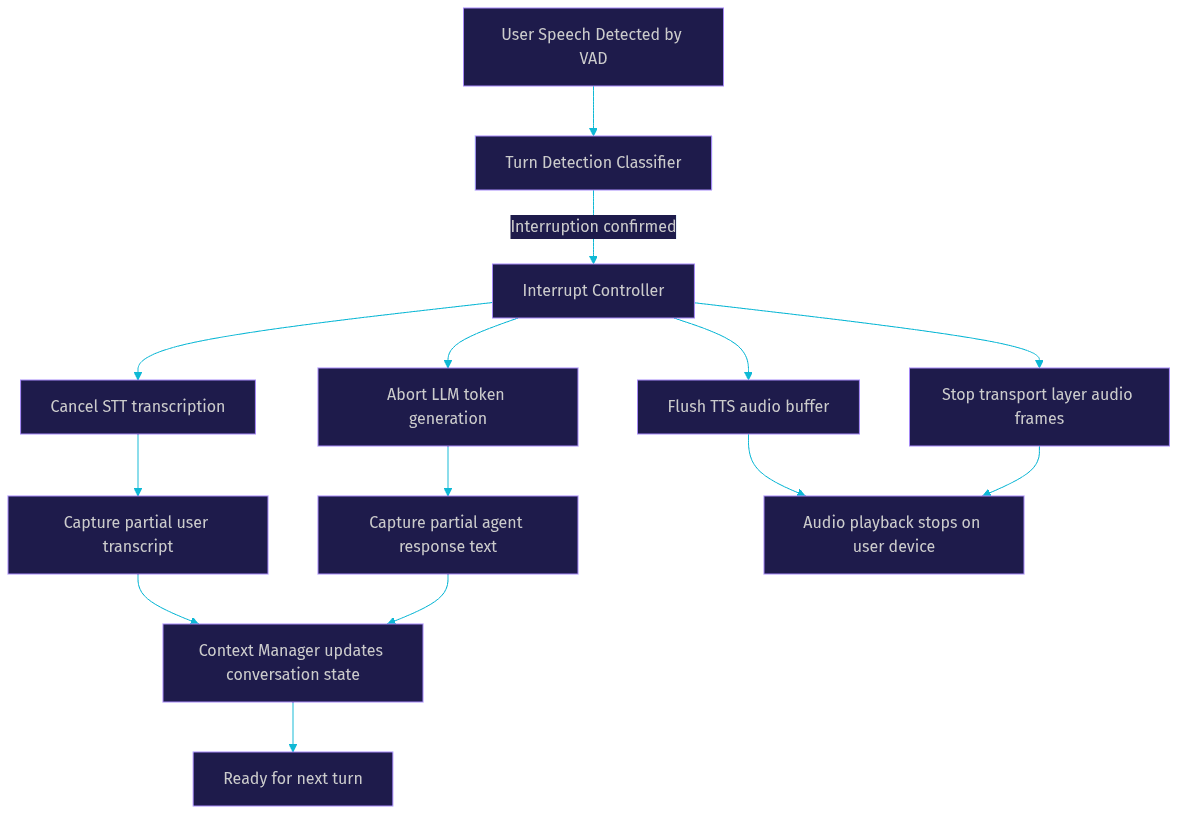
The interrupt frame is not just a kill switch. It is a structured event that carries metadata: the timestamp of the interruption, the partial transcript of what the user said, and the partial text of what the agent was saying. This metadata is what enables context recovery.
Context Management and Recovery
When an interruption fires, the agent has already spoken part of its response. That partial text matters. If the agent was saying "The morning flight departs at 7 AM and costs $320, while the afternoon flight..." and the user interrupted with "the morning one is fine," the agent needs to remember that it already mentioned the 7 AM flight. Context management captures the partial spoken text and the partial user transcript, then feeds both into the next LLM turn so the response is coherent rather than repetitive.
Designing Low-Latency Interruption Pipelines
Latency is the single most important metric for interruption handling in voice agents. If the total time from user speech onset to audio playback cessation exceeds 300 milliseconds, users perceive the agent as unresponsive. The budget must be divided across every component in the cancellation path, and every millisecond counts.
Latency Budget Breakdown
A well-tuned interruption pipeline targets the following timings. VAD trigger detection should complete in under 50 milliseconds. Turn detection classification should add no more than 30 milliseconds. The interrupt controller should emit its frame within 10 milliseconds of receiving the turn detection signal. LLM generation abort should fire in under 50 milliseconds, though this depends on the inference engine and whether cancellation tokens are supported. TTS buffer flush should complete in under 30 milliseconds. Transport layer stop should be nearly instantaneous, under 20 milliseconds. The total budget lands around 190 milliseconds, leaving headroom for network jitter and processing overhead.
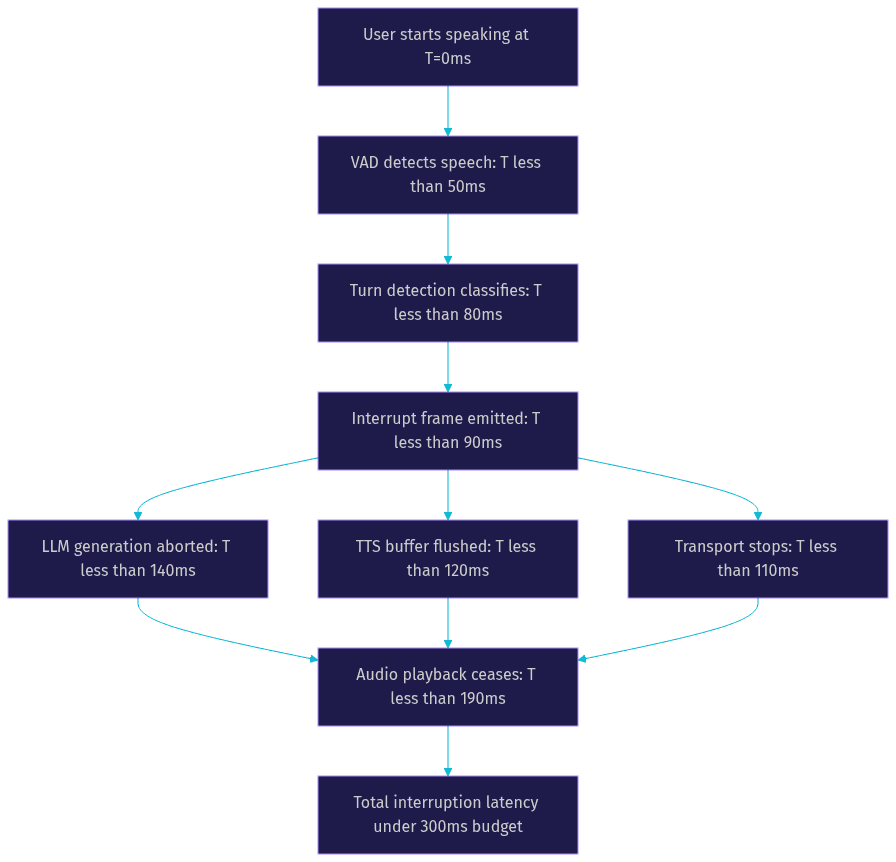
These numbers are targets, not guarantees. In practice, the LLM cancellation step is the most variable. Some inference engines do not support mid-generation cancellation gracefully, which means the interrupt controller must wait for the current token to finish or force-kill the process. This is where cancel-token strategies become critical.
Cancel-Token Strategies for LLM Inference
When the interrupt controller fires, the LLM must stop generating tokens immediately. The mechanism for this depends on the inference backend. Some runtimes support cancellation tokens or stopping criteria that can be injected mid-generation. When a cancellation token is set, the inference loop checks it before producing each new token and exits cleanly if it is active.
In practice, this means the LLM does not finish its current sentence. It stops mid-token or mid-word, and the partial output is captured for context recovery. Engines that lack native cancellation support require a harder stop: the inference process is terminated and restarted, which adds latency and resource overhead. If you are building a voice agent pipeline, choose an inference backend that supports mid-generation cancellation. VideoSDK's agent architecture handles this through the preemptive response mechanism, which aborts the current pipeline step and transitions to the new user input without restarting the worker process.
Backchannel vs True Interruption
Not every sound the user makes while the agent is talking is an interruption. Short acknowledgments like "mhm," "right," "yeah," and "go on" are backchannels. They signal that the user is listening and wants the agent to continue. A good interruption system distinguishes between backchannels and true interruptions.
Backchannel detection typically uses duration and acoustic pattern analysis. If the user's speech lasts under 500 milliseconds and matches known acknowledgment patterns, the system classifies it as a backchannel and does not fire an interrupt. The agent continues speaking. If the speech is longer, louder, or contains distinct linguistic content, it is treated as a true interruption. This distinction dramatically reduces false positives and makes the agent feel more attentive without being skittish.
Adaptive vs Static Interruption Handling
The choice between adaptive and static interruption handling is one of the most consequential architectural decisions in a voice agent pipeline. Each approach has distinct tradeoffs in accuracy, latency, resource requirements, and language coverage.
Adaptive Interruption Models
Adaptive interruption models use trained classifiers that analyze acoustic signals to determine whether a user's speech constitutes a genuine interruption. These classifiers are trained on datasets of conversational speech, including both interruptions and backchannels, and they learn to distinguish between the two based on features like pitch contour, energy envelope, timing relative to the agent's speech, and phonetic content.
The primary benefit of adaptive models is accuracy. They produce fewer false positives than static VAD thresholds, especially in noisy environments or when users frequently use backchannels. They also adapt to different languages and speaking styles, which is critical for multilingual voice agents. The cost is computational: adaptive models require more processing power than simple energy thresholds, and they add latency to the turn detection step. In a well-optimized pipeline, this added latency is under 30 milliseconds, but it is not zero.
When to Stick with Static VAD
Static VAD-based interruption handling remains the right choice in several scenarios. If you are deploying on resource-constrained edge devices where neural classifier inference is too expensive, static thresholds are lightweight and predictable. If your pipeline is legacy and adding a trained model would require significant rework, static VAD can serve as a stopgap. If your use case has a narrow user base with consistent acoustic conditions, such as a quiet office environment with a single user, static thresholds may be sufficient.
The downside is that static VAD produces more false positives and false negatives. Users who say "uh-huh" may trigger unwanted interruptions. Users who interrupt softly may not trigger anything at all. For production voice agents serving diverse users, adaptive models are worth the investment.
Choosing the Right Mode
Use this checklist to decide. If your agent serves multiple languages, choose adaptive. If your deployment target has limited compute, choose static VAD. If false positives are more damaging than false negatives (for example, in a medical intake agent where missing an interruption could mean ignoring a patient's distress), choose adaptive. If you need predictable, deterministic behavior for compliance reasons, static VAD with tuned thresholds may be preferable. If you are unsure, start with static VAD and instrument your pipeline to measure false-positive rates, then upgrade to adaptive if the data warrants it.
Best Practices for Interruption Handling in Voice Agents
Building a production-grade interruption system requires more than wiring components together. The following practices address the most common failure modes that teams encounter when moving from prototype to production.
Policy Tuning
Interrupt policies define the thresholds and rules that govern when an interruption fires. The three most important parameters are duration threshold, energy level, and the cancel-LLM flag. Duration threshold sets the minimum speech duration that qualifies as an interruption. Setting it too low (under 200 milliseconds) causes backchannels to trigger false interruptions. Setting it too high (over 800 milliseconds) means the agent ignores quick corrections. Energy level sets the minimum acoustic energy that qualifies as speech. Setting it too low picks up background noise. Setting it too high misses soft-spoken interruptions. The cancel-LLM flag determines whether an interruption aborts LLM generation entirely or lets the current sentence finish. For most conversational agents, you want this flag enabled so the agent stops immediately. For agents reading long-form content where partial sentences are confusing, you might disable it and let the current sentence complete before yielding.
Handling Background Audio
Many voice agents play background audio or hold music while waiting for user input. When the agent is speaking, background audio can interfere with VAD and cause false interruption triggers. The solution is to mix background audio at a lower energy level during agent speech and to apply acoustic echo cancellation or noise suppression before the VAD layer sees the audio stream. VideoSDK's agent pipeline includes built-in de-noise and background audio management, which you can configure through the agent pipeline observability hooks. The key principle is that the VAD layer should never see the agent's own output as user speech.
Recovery of Interrupted Speech
When the agent's response is interrupted, the partial text it already spoke must be preserved in context. Without this, the next LLM turn may repeat information the user already heard. The recovery process works by capturing the text that the TTS engine had already synthesized up to the interruption point. This partial text is added to the conversation history with a marker indicating it was interrupted. The user's interrupting speech is transcribed and added as the next user turn. When the LLM generates its next response, it sees the partial agent text and the user's new input, and it can produce a coherent continuation that does not repeat itself.
Testing Strategies
Testing interruption handling requires simulated interruptions, not just happy-path conversations. Create test scenarios where users interrupt at different points: early in the agent's response, mid-sentence, and near the end. Measure the interruption latency from speech onset to audio cessation for each scenario. Use latency measurement tools that capture timestamps at each pipeline stage so you can identify bottlenecks. Test with different acoustic conditions: quiet rooms, noisy environments, and cases where background music is playing. Track false-positive rates by running scenarios with backchannels and verifying that the agent does not stop. Automated regression testing for interruption behavior is essential because changes to VAD thresholds, turn detection models, or LLM inference backends can silently break barge-in performance.
Measuring Success in Interruption Handling
You cannot improve what you do not measure. Interruption handling in voice agents has three primary success metrics.
Interruption latency is the time from user speech onset to agent audio cessation. Production targets should be under 300 milliseconds, with a stretch goal of under 200 milliseconds. Measure this at the pipeline level, not just the component level, because the total is what the user perceives.
False-positive rate is the percentage of non-interruption events (backchannels, background noise, agent's own echo) that incorrectly trigger an interruption. A false-positive rate under 5 percent is a reasonable production target. Above 10 percent, users will find the agent erratic and stop using it.
User satisfaction scores correlate directly with interruption responsiveness. According to the ACL 2026 TPI-Bench study on turn-taking performance, agents with sub-300-millisecond interruption latency scored 40 percent higher on perceived naturalness compared to agents with latency above 500 milliseconds. The same study found that false-positive interruptions were the single most cited reason for user frustration, ranking above even high initial response latency.
Instrument your pipeline to capture all three metrics continuously. VideoSDK's session analytics provide pipeline-level observability so you can track interruption latency and false-positive rates across real conversations without building custom telemetry.
Future Directions for Interruption Handling
The state of the art in interruption handling is moving fast. Three areas are likely to see significant advances in the near term.
Multi-speaker discrimination is the ability to distinguish between multiple human speakers in the same audio stream and determine which one is interrupting. This matters for scenarios like conference calls, family interactions with a smart home device, or customer support lines where a supervisor might step in. Current VAD and turn detection systems treat all incoming speech as a single stream. Future systems will use speaker diarization combined with interruption classification to handle multi-party conversations gracefully.
Multimodal cue integration will let voice agents use visual signals alongside acoustic ones. If the agent has access to a camera feed, it can detect when a user is leaning forward, opening their mouth, or raising a hand, all of which signal an impending interruption before speech even begins. This could reduce interruption latency by 50 to 100 milliseconds by giving the pipeline a predictive head start.
Dynamic context adaptation will enable agents to adjust their interruption sensitivity based on conversation state. During a long explanation, the agent might lower its interruption threshold to be more responsive. During a critical safety warning, it might raise the threshold to ensure the full message is delivered. This requires the interrupt policy to be context-aware rather than globally fixed, which adds complexity but significantly improves the conversational experience.
Definitions Glossary
Barge-in: The act of a user speaking over a voice agent while it is responding, requiring the agent to stop and yield control. Originated in telephony IVR systems.
Voice Activity Detection (VAD): An acoustic analysis module that determines whether speech is present in an audio stream, typically operating on 10 to 30 millisecond frames with sub-50 millisecond detection latency.
Interrupt Frame: A structured signal emitted by the interrupt controller that cascades through the STT, LLM, TTS, and transport layers, instructing each to halt its current operation and capture partial state for context recovery.
Backchannel: A short vocal acknowledgment (such as "mhm" or "yeah") that signals the user is listening and wants the agent to continue, distinct from a true interruption.
Turn Detection: The decision layer above VAD that classifies detected speech as either an interruption, a backchannel, or background noise, using either static thresholds or trained adaptive classifiers.
Key Takeaways
- Interruption handling in voice agents requires coordinating VAD, turn detection, an interrupt controller, and context management within a total latency budget of under 300 milliseconds.
- The interrupt frame must propagate through the LLM, TTS, and transport layers in the correct order to avoid partial audio artifacts and sluggish cessation.
- Adaptive interruption models using trained classifiers significantly reduce false positives compared to static VAD thresholds, especially for multilingual agents and noisy environments.
- Backchannel detection is essential to prevent the agent from stopping every time a user says "yeah" or "mhm" during a response.
- Context recovery of partial spoken text is what makes the next turn coherent instead of repetitive, and it should be treated as a first-class pipeline concern.
- VideoSDK's AI Voice Agent pipeline provides built-in turn detection, preemptive response handling, and session analytics so developers can ship production-grade barge-in without building custom cancellation infrastructure.
Conclusion
Interruption handling in voice agents is the difference between a system that feels like a conversation and one that feels like a recording. The architecture is not trivial: you need sub-50-millisecond VAD, a turn detection layer that separates backchannels from true interruptions, an interrupt controller that propagates cancellation signals through the LLM and TTS in the right order, and a context recovery mechanism that preserves partial state for the next turn. The latency budget is tight, the false-positive tolerance is low, and the testing requirements are rigorous.
If you are building a voice agent, audit your pipeline against the latency budgets and best practices in this article. Measure your interruption latency, track your false-positive rate, and test with real acoustic conditions. VideoSDK's AI Voice Agent SDK handles turn detection, preemptive response, and pipeline observability out of the box, so you can focus on your conversation logic instead of wiring cancellation signals by hand. You can start building for free at app.videosdk.live/login.
What are you building with VideoSDK? Drop a comment below. I would love to hear what kind of voice agent use case you are working on and how interruption handling fits into your pipeline.
Free $20 Balance for AI Voice Agents & Video Calls
FAQ