


Improving speech recognition accuracy requires a systematic approach across five layers: data quality, acoustic model tuning, language model integration, domain adaptation, and LLM-based post-processing. VideoSDK supports real-time transcription and AI voice agent pipelines that let developers apply these techniques in production communication workflows. Start by measuring your current word error rate, then work through each layer to reduce transcription errors progressively.
A typical production-grade speech recognition system achieves a word error rate between 5% and 15% depending on domain, speaker diversity, and audio conditions. For a developer building transcription into a video calling app or an AI voice agent, that error range translates into real costs: misunderstood user intents, broken downstream NLP pipelines, and frustrated users who repeat themselves. Improving speech recognition accuracy is not a single optimization. It is a layered process where each stage of the automatic speech recognition (ASR) pipeline contributes to or detracts from the final transcript quality. This guide walks through a five-step roadmap covering data preparation, acoustic model enhancements, language model integration, domain adaptation, and LLM-based post-processing. By the end, you will have a practical framework for speech recognition error reduction that applies whether you are fine-tuning an open-source model or integrating a managed ASR service like VideoSDK's real-time transcription.
Fundamentals of Speech Recognition Accuracy
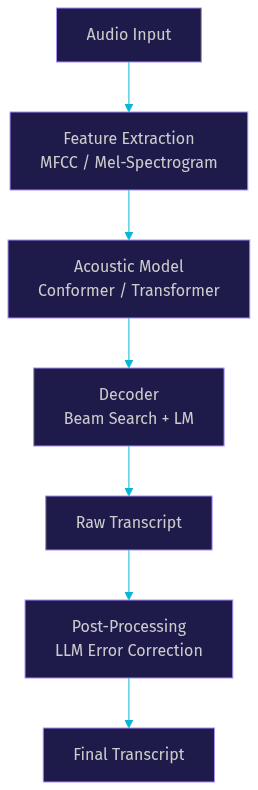
Every speech recognition system breaks down into three core components: an acoustic model, a language model, and a decoder that combines their outputs into text. The acoustic model converts audio frames into phoneme or subword probabilities. The language model scores how likely a sequence of words is given the language's statistical or neural patterns. The decoder searches for the most probable text sequence given both models' outputs. Errors can originate in any of these three stages.
Acoustic errors happen when the model mishears a sound due to background noise, accent variation, or overlapping speech. Language model errors occur when the decoder picks a grammatically valid but semantically wrong word. Decoder errors arise when the search space is too narrow (beam search width too small) or too wide (computationally expensive without accuracy gains). Understanding which component causes the most errors is the first step in improving speech recognition accuracy.
Here is how the classic ASR pipeline flows from audio input to final transcript:
Data Quality and Augmentation
The single highest-impact factor in speech recognition accuracy is the quality and diversity of training data. A model trained on clean studio audio will fail in real-world conditions with reverberation, background chatter, and varying microphone distances. Developers improving ASR accuracy should audit their training datasets for speaker diversity (age, accent, gender), environmental conditions, and domain-specific vocabulary coverage.
Synthetic data augmentation expands effective dataset size without new recordings. Speed perturbation (slowing down or speeding up audio by 5% to 10%) teaches the model to handle speaking rate variation. Noise injection adds background sounds at controlled signal-to-noise ratios, improving noise robustness. SpecAugment, a frequency and time masking technique applied directly to spectrograms, has become standard practice since its introduction in 2019 and consistently reduces word error rate by 10% to 20% across published benchmarks.
Acoustic Model Enhancements
Modern acoustic models have moved far beyond recurrent architectures. Conformer models, which combine convolutional neural networks for local pattern detection with self-attention for long-range context, represent the current state of the art for speech recognition as of 2026. Transformer-based encoders also perform strongly, particularly when paired with large pretraining datasets.
Speaker adaptation techniques fine-tune the acoustic model to individual speakers or speaker groups, reducing errors caused by accent and vocal tract differences. Low-rank adaptation (LoRA) and prefix-tuning allow efficient adaptation without retraining the full model. SpecAugment remains a critical regularization technique during training, preventing overfitting on small datasets.
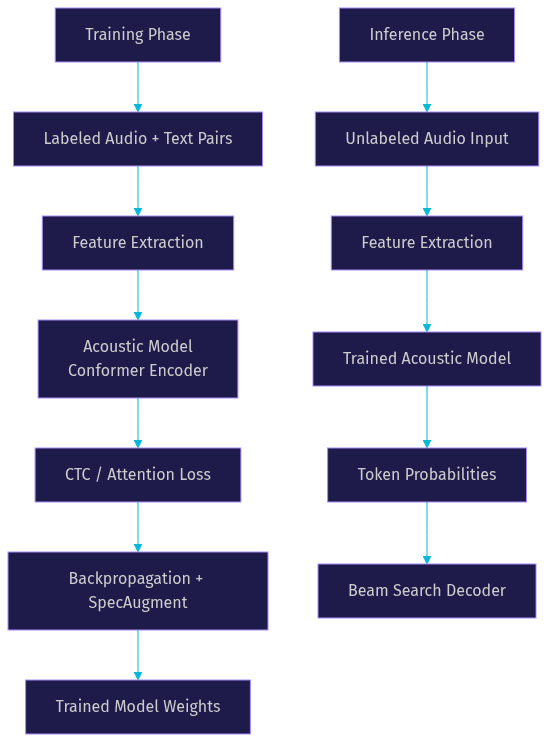
The training and inference paths for an acoustic model differ in important ways. During training, the model sees labeled audio-text pairs and optimizes connectionist temporal classification (CTC) loss or attention-based losses. During inference, the model processes unlabeled audio and outputs probability distributions over a vocabulary at each time step.
Language Model Integration for Accuracy
The language model determines which word sequences the decoder considers valid. A weak language model produces transcripts that are phonetically plausible but semantically nonsensical. Traditional n-gram language models, built from statistical word co-occurrence counts, are fast and lightweight but lack deep semantic understanding. Neural language models, trained on large text corpora, capture longer-range dependencies and produce more accurate transcripts.
The frontier of language model integration in 2026 involves large language models (LLMs) directly in the decoding process. Three integration approaches dominate. Warm initialization starts the ASR decoder from LLM weights, giving the acoustic model a strong linguistic prior from the start. Logit fusion combines the ASR decoder's output logits with LLM logits at inference time, allowing the LLM to rescore or override low-confidence predictions. Hybrid search uses the LLM as a targeted correction engine, taking the N-best hypotheses from the ASR decoder and selecting or rewriting the most likely correct transcript.
Research on hybrid search strategies has shown that LLM-based rescoring can reduce word error rate by 15% to 30% on domain-specific tasks where the base ASR model lacks specialized vocabulary knowledge. The key insight is that LLMs bring world knowledge and semantic reasoning that acoustic models alone cannot capture. For developers building AI voice agents with VideoSDK, this integration is particularly valuable because conversational AI demands both acoustic accuracy and semantic coherence.
Model Adaptation and Custom Vocabulary
Domain-specific adaptation is where general-purpose ASR models gain the largest accuracy improvements for specialized applications. A medical transcription system needs to recognize "myocardial infarction" with the same confidence as "hello." A legal deposition system must handle case citations and statute references. Without adaptation, the ASR model substitutes domain terms with phonetically similar common words.
Google Cloud Speech-to-Text provides several adaptation mechanisms that illustrate the general approach. Phrase-set biasing increases the probability of specific words or phrases during decoding. Class tokens map spoken numbers, dates, and addresses to structured formats. Custom voice adaptation fine-tunes the model on domain-specific audio data. Similar capabilities exist in other managed ASR services and in open-source frameworks through fine-tuning pipelines.
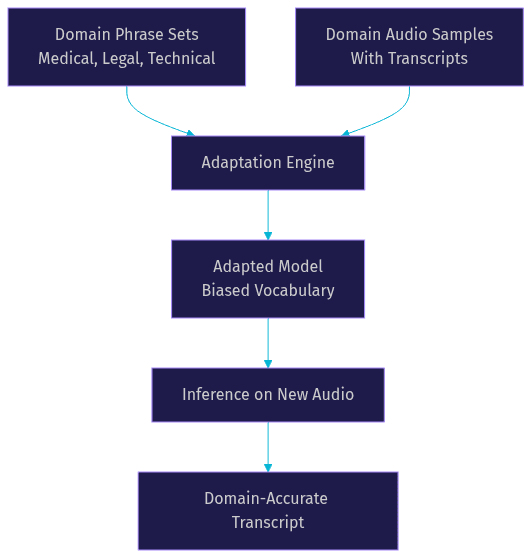
The adaptation data flow moves from domain-specific phrase lists and audio samples through the model adaptation process and into inference:
For real-time transcription in video calling applications, VideoSDK's Python SDK enables developers to connect custom ASR pipelines to live media streams, making domain adaptation directly applicable to production communication workflows.
Noise-Robust and Multimodal Techniques
Real-world audio is noisy. Background music, keyboard typing, HVAC systems, and overlapping speakers all degrade acoustic model performance. Noise-robust training techniques address this by training on noisy data or applying front-end denoising before the acoustic model sees the audio.
Front-end denoising uses signal processing or neural networks to clean audio before feature extraction. Spectral subtraction, Wiener filtering, and deep learning-based denoisers like RNNoise are common choices. The tradeoff is that aggressive denoising can distort speech features, so developers must tune the denoising strength against recognition accuracy.
Multimodal speech processing goes beyond audio by incorporating visual cues. Lip reading models extract visual features from speaker video and fuse them with acoustic features, improving accuracy in noisy environments by 20% to 40% according to multiple published studies. Spectrogram visual features, where the audio spectrogram is treated as an image and processed by vision models, provide another modality for robustness.
Recent research directions include Speech-MLM (masked language modeling for speech) and chain-of-thought ASR (CoT-ASR), which use semantic guidance to improve robustness. These approaches leverage the insight that understanding what is being said helps the model handle how it is being said, even in adverse acoustic conditions.
Post-Processing with LLM-Based Error Correction
The most significant recent advance in improving speech recognition accuracy is generative error correction (GER). Instead of relying solely on the ASR decoder's single best output, GER takes the N-best hypotheses (the top alternative transcripts ranked by confidence) and uses an LLM to select or generate the most likely correct transcript.
ClozeGER extends this by filling in masked tokens within the transcript, similar to a cloze test, allowing the LLM to focus on specific uncertain regions rather than rewriting the entire transcript. Multi-stage LLM correction applies successive correction passes, first fixing obvious errors and then refining domain-specific terms.
Prefix-tuning offers an efficient way to adapt the LLM for error correction without full fine-tuning. By training a small set of prefix vectors that condition the LLM's attention, developers can specialize a general-purpose LLM for ASR error correction with minimal compute. This is particularly useful for domain-specific adaptation where the correction model needs to know that "stent placement" is more likely than "spent placement" in a cardiology transcript.
The correction pipeline involves several decision points where uncertainty estimation prevents over-correction:
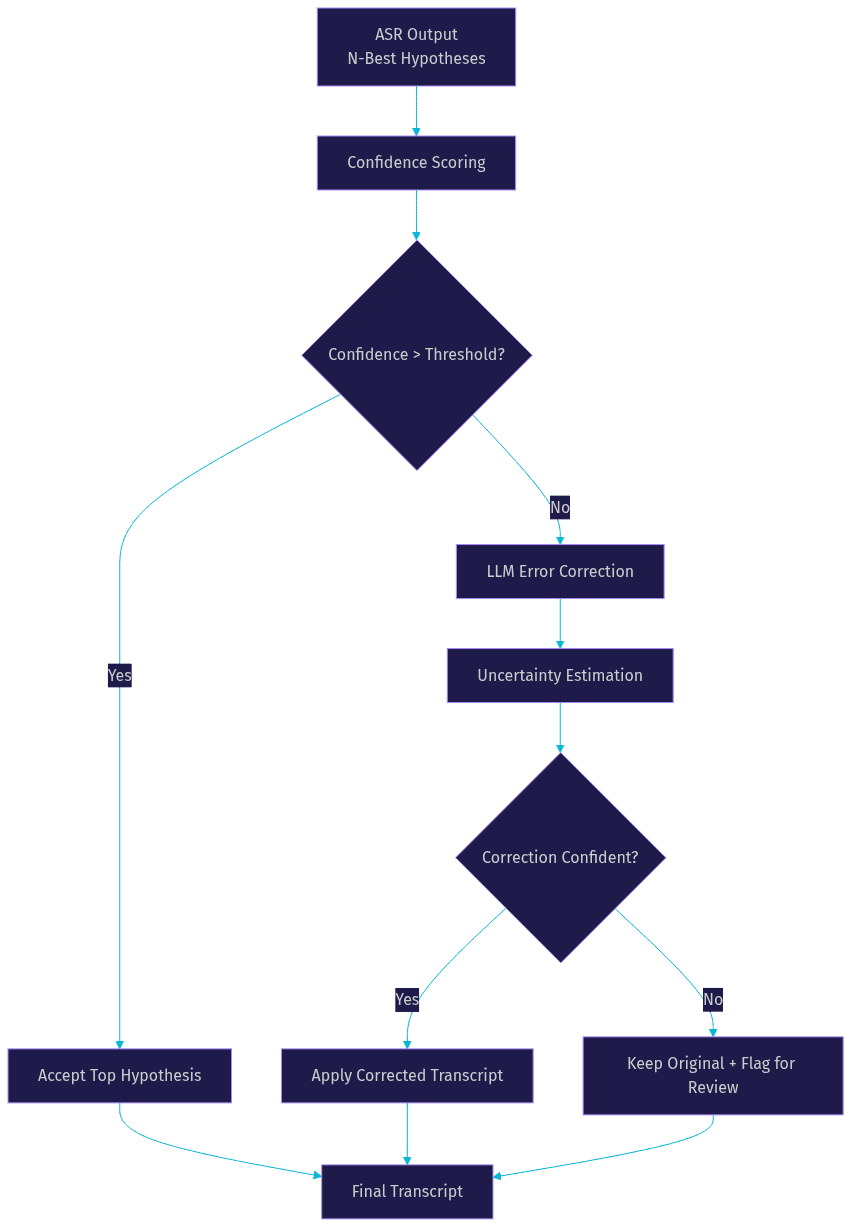
A critical risk in LLM-based correction is over-correction, where the LLM rewrites a correct transcript into a plausible but wrong alternative. Uncertainty estimation and confidence thresholds mitigate this by only applying corrections when the ASR model's confidence is low and the LLM's correction confidence is high. Developers should monitor correction rates and audit a sample of corrected transcripts to calibrate thresholds.
Evaluation, Metrics, and Continuous Monitoring
You cannot improve what you do not measure. Word error rate (WER) is the standard metric for speech recognition accuracy, calculated as the sum of substitutions, deletions, and insertions divided by the total words in the reference transcript. Character error rate (CER) provides a finer-grained measure, particularly useful for languages without clear word boundaries.
For domain-specific applications, entity error rate tracks accuracy on critical terms like medication names, product codes, or legal citations. Confidence scoring, where the ASR model outputs a probability alongside each word, enables downstream systems to flag low-confidence segments for human review or additional processing.
A robust evaluation loop tracks these metrics after each improvement step. Before acoustic model tuning, record baseline WER. After tuning, measure again on the same test set. After language model integration, measure again. This incremental approach isolates the impact of each technique and prevents regressions from going unnoticed. For production systems, continuous monitoring on real user audio (not just curated test sets) reveals accuracy drift over time.
Practical Checklist for Improving Speech Recognition Accuracy
Use this checklist as a quick reference when working through the improvement roadmap:
- Data preparation: Audit training data for speaker diversity, environmental conditions, and domain coverage. Apply speed perturbation and noise injection augmentation. Use SpecAugment during training.
- Acoustic model tuning: Evaluate Conformer or Transformer architectures. Apply speaker adaptation with LoRA or prefix-tuning for accent and speaker variation. Regularize with SpecAugment to prevent overfitting.
- Language model integration: Compare n-gram and neural language models for your use case. Explore LLM-based logit fusion or hybrid search for domain-specific vocabulary. Measure WER before and after LM changes.
- Domain adaptation: Build phrase sets for custom vocabulary. Use class tokens for structured entities like dates and numbers. Fine-tune on domain-specific audio when available.
- Noise handling: Apply front-end denoising tuned to your audio conditions. Consider multimodal features (lip reading, spectrogram vision) for high-noise environments. Train on noisy data to improve robustness.
- LLM correction: Implement generative error correction on N-best hypotheses. Use confidence thresholds to prevent over-correction. Monitor correction rates and audit corrected samples.
- Evaluation: Track WER, CER, and entity error rate after each step. Monitor production accuracy on real user audio. Set up alerts for accuracy drift.
Definitions Glossary
Word Error Rate (WER): The percentage of words incorrectly recognized, calculated as substitutions plus deletions plus insertions divided by total reference words. WER is the primary metric for evaluating speech recognition accuracy improvements.
Acoustic Model: The component of an ASR system that converts audio features into phoneme or subword probability distributions. Modern acoustic models use Conformer or Transformer architectures.
Language Model: The component that scores the probability of word sequences, helping the decoder choose grammatically and semantically likely transcripts. Neural and LLM-based language models outperform traditional n-gram models.
Generative Error Correction (GER): A post-processing technique where an LLM selects or rewrites the best transcript from N-best ASR hypotheses, reducing errors that the acoustic and language models missed.
SpecAugment: A data augmentation technique that masks random frequency and time bands in spectrograms during training, improving model robustness and consistently reducing WER.
Beam Search: The decoding algorithm that explores multiple candidate transcripts simultaneously, keeping the top N hypotheses ranked by combined acoustic and language model scores.
Key Takeaways
- Improving speech recognition accuracy is a layered process spanning data quality, acoustic modeling, language modeling, domain adaptation, and LLM-based post-processing, not a single optimization.
- Data quality and augmentation (SpecAugment, noise injection, speed perturbation) deliver the highest initial accuracy gains for most projects.
- LLM integration through logit fusion, hybrid search, and generative error correction represents the most significant recent advance, with WER reductions of 15% to 30% on domain-specific tasks.
- Domain adaptation through custom vocabulary and phrase-set biasing is essential for specialized applications like medical, legal, and technical transcription.
- VideoSDK's real-time transcription and AI voice agent pipeline capabilities let developers apply these ASR accuracy techniques directly in production video calling and voice agent workflows.
Conclusion
Higher speech recognition accuracy directly improves user satisfaction, reduces downstream processing costs, and unlocks reliable conversational AI experiences. The five-step roadmap in this guide gives you a systematic framework for speech recognition error reduction, from foundational data quality work through cutting-edge LLM-based correction. Start by measuring your current WER, then work through each layer incrementally. If you are building real-time communication applications, explore how VideoSDK's AI voice agents and real-time transcription capabilities can integrate your custom ASR pipeline into live video and audio workflows. You can sign up for a free account at app.videosdk.live/login to start building. What are you building with speech recognition? Drop a comment below, I would love to hear what kind of ASR use case you are working on.
FAQ