


Scaling a voice agent means designing every layer of your pipeline, from speech recognition to telephony, to handle concurrent calls without latency degradation or state loss. VideoSDK provides the real-time media infrastructure and AI agent orchestration that lets you deploy stateless voice agent workers across multiple regions with built-in session management. Start by calculating your target concurrency, then choose an architecture pattern that matches your call volume and latency budget.
Getting a voice agent to handle one call in a demo is straightforward. Getting it to handle ten thousand simultaneous calls across multiple regions without dropping audio or losing conversation context is an entirely different engineering challenge. Developers building voice AI systems routinely hit a wall around fifty to a hundred concurrent calls, where latency spikes, GPU memory exhausts, and telephony providers start rejecting new connections.
The path from prototype to production is not about throwing more servers at the problem. It is about making deliberate architectural choices at each layer of your voice agent stack. By the end of this guide, you will understand the capacity planning framework, architecture patterns, and operational practices needed to scale a voice agent to production-grade concurrency.
How to Scale a Voice Agent: Core Principles
Scaling a voice agent is an architectural discipline, not a post-hoc fix applied after your demo crashes under load. The fundamental principle is that every component in your voice pipeline, from the moment audio enters your system to the moment synthesized speech leaves it, must be designed for concurrency from day one.
A voice agent processes real-time audio in both directions simultaneously. Unlike a text-based chatbot where a two-second delay is tolerable, voice interactions demand sub-500ms round-trip latency or users perceive the conversation as broken. This constraint means that scaling is not just about handling more calls. It is about maintaining latency targets while call volume increases.
The three core principles are: design stateless workers so any pod can serve any call, decouple your telephony ingress from your AI processing so carrier limits do not bottleneck inference, and monitor p95 latency rather than averages because tail latency is what destroys user experience in real-time voice.
The Voice Agent Stack: Five Essential Layers
Every voice agent pipeline contains five distinct processing layers, and each one scales differently. Understanding where your bottleneck lives is the first step in knowing how to scale a voice agent effectively.
1. Speech Recognition (ASR)
The ASR layer converts incoming audio streams to text in real time. Streaming ASR providers like Deepgram and AssemblyAI handle scaling on their side, but if you self-host Whisper models on GPU instances, you need to plan for GPU memory per concurrent stream. Each active ASR stream consumes roughly 1 to 2 GB of GPU VRAM depending on model size, which means a single A10G GPU handles approximately 8 to 12 concurrent streams before memory pressure causes latency spikes.
2. LLM Reasoning
The reasoning layer generates conversational responses from transcribed text. If you use managed LLM APIs from OpenAI or Anthropic, scaling is limited by rate limits and token throughput quotas. If you self-host open-weight models like Llama, GPU inference becomes your primary scaling constraint. LLM inference for voice agents benefits from streaming token generation, which lets you begin TTS synthesis before the full response is complete, reducing perceived latency.
3. Response Generation
This layer handles conversation orchestration, including deciding when the agent should speak, handling interruptions, and managing turn detection. VideoSDK's Conversational Graph provides a deterministic flow engine that keeps this layer stateless and reproducible, which is critical for horizontal scaling because any worker can resume a conversation from its last checkpoint.
4. Text-to-Speech (TTS)
The TTS layer converts generated text back to audio. Streaming TTS providers like ElevenLabs and Cartesia support concurrent synthesis sessions, but each session has its own latency profile. TTS caching is essential at scale. If your agent repeats common phrases like greetings or confirmation prompts, caching those audio segments eliminates redundant synthesis calls and reduces load on your TTS provider.
5. Telephony and Orchestration
The telephony layer bridges phone networks or WebRTC sessions to your AI pipeline. This is where SIP trunk capacity, calls-per-second throttling, and DTMF event handling live. VideoSDK's telephony and SIP integration handles this bridging layer, connecting traditional phone lines to WebRTC rooms where your AI agent workers participate as virtual participants.
Planning Your Capacity: The Throughput Framework
Capacity planning for voice agents requires calculating three numbers: your target concurrent calls, your peak calls per second (CPS), and your per-call resource budget. These numbers determine your infrastructure footprint and your provider tier requirements.
Start with your business target. If you need to handle 1,000 concurrent calls during peak hours, and each call lasts an average of 4 minutes, your CPS rate is approximately 4.2 new calls per second entering the system. Your telephony provider must support that ingress rate, and your ASR and LLM layers must spin up new sessions at that rate without queueing.
| Metric | Formula | Example (1,000 concurrent) |
|---|---|---|
| Target concurrency | Business requirement | 1,000 calls |
| Avg call duration | Measured or estimated | 4 minutes |
| Peak CPS | Concurrency / duration in seconds | 1,000 / 240 = ~4.2 CPS |
| GPU instances needed | Concurrency / streams per GPU | 1,000 / 10 = 100 GPUs (self-hosted ASR) |
| TPS for LLM API | Concurrency x tokens per turn / turn interval | ~2,000 TPS |
If you use managed services for ASR and LLM, your capacity planning shifts to API rate limits and concurrent session caps rather than GPU math. Always verify your provider's concurrency limits before assuming they can handle your peak load.
Architecture Patterns for Different Scales
The right architecture for your voice agent depends on your concurrency target. What works for a hundred calls will waste money at ten calls, and what works for a hundred calls will collapse at ten thousand. Here are three proven patterns matched to scale tiers.
MVP: 1 to 100 Concurrent Calls
At this scale, simplicity wins. A monolithic architecture using managed services for every layer is the right choice.
- Single region deployment with one telephony ingress point
- Managed ASR and TTS APIs (no self-hosted GPU inference)
- Managed LLM API for reasoning
- Single VideoSDK room per call, agent joins as a participant
- Conversation state stored in process memory or a single Redis instance
This pattern lets you focus on conversation quality and agent behavior rather than infrastructure. Most teams should stay here until they demonstrably need more capacity.
Growth: 100 to 10,000 Concurrent Calls
At this scale, stateless micro-services with autoscaling become necessary. The key shift is moving conversation state out of process memory into a centralized store.
- Stateless agent worker pods that can serve any call
- Redis or DynamoDB for conversation context and session state
- Horizontal pod autoscaler triggered by active call count
- Separate telephony gateway tier from AI processing tier
- TTS caching layer with Redis or CDN distribution
- Per-region ASR and LLM endpoints for latency optimization
VideoSDK's AI Voice Agent architecture fits naturally into this pattern. Each agent worker is a Python process that joins a VideoSDK room as a participant. Because the room itself holds the media session, workers can restart or migrate without dropping the call.
Enterprise: 10,000+ Concurrent Calls
At enterprise scale, you need multi-region active-active deployment with sharded state and sophisticated traffic routing.
- Multi-region deployment with DNS-based geographic routing
- Active-active failover with automatic session migration
- Sharded Redis clusters for conversation state partitioning
- Dedicated GPU pools per region for self-hosted inference
- SIP trunk diversity across multiple carriers for telephony redundancy
- Real-time capacity forecasting and pre-warming of autoscaling groups
The trade-off at each tier is complexity versus resilience. The MVP pattern is easy to operate but cannot survive a region outage. The enterprise pattern survives regional failures but requires a dedicated platform team to maintain.
Horizontal Scaling: Pods, Autoscaling, and Sticky Routing
Horizontal scaling for voice agents is fundamentally different from scaling web applications. Voice streams are long-lived, stateful connections that cannot be load-balanced per-request. Once a call connects to a specific agent worker pod, that pod must handle all audio frames for the entire duration of that call.
Pod sizing depends on your inference strategy. If your pods only orchestrate managed API calls (ASR, LLM, TTS all external), each pod can handle 50 to 100 concurrent calls because the pod is mostly waiting on network I/O. If your pods run local inference, pod sizing is determined by GPU allocation, typically 8 to 12 concurrent calls per GPU.
Sticky session affinity is non-negotiable for voice agent scaling. When a new call arrives, the load balancer routes it to an available pod and pins that call to the pod for its entire duration. If the pod dies mid-call, the call must either migrate to a new pod with restored state or terminate gracefully with a callback to the user.
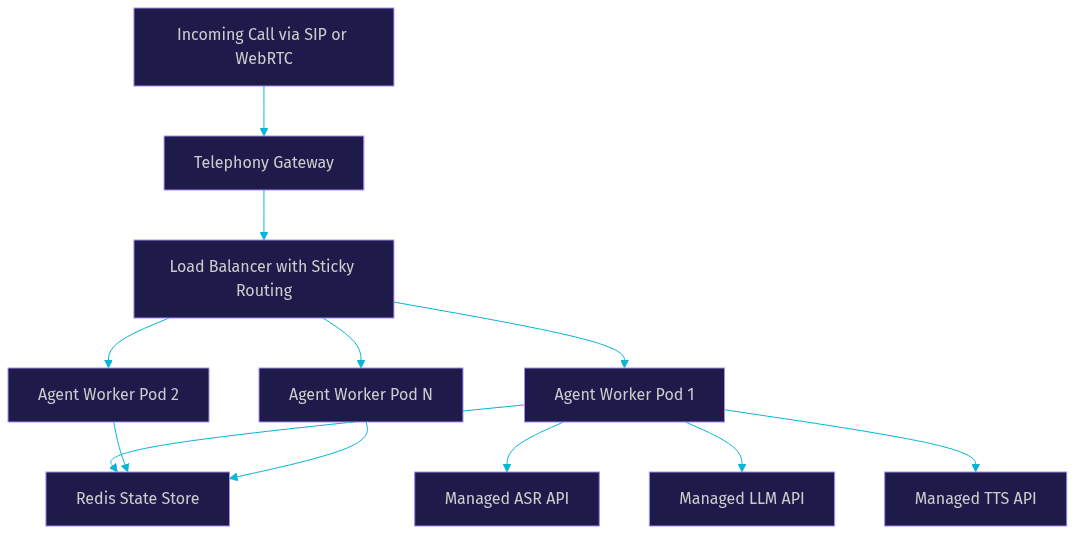
Autoscaling for voice pods should be triggered by active call count, not CPU utilization. A pod handling 50 concurrent calls might show low CPU if all inference is external, but it cannot accept more calls without degrading audio quality. Use custom metrics exposed by your agent workers to drive autoscaling decisions.
Graceful shutdown is critical. When a pod scales down, it should stop accepting new calls, complete all active calls, and only then terminate. Kubernetes termination grace periods must be set longer than your maximum call duration, or you risk killing active conversations.
Decoupling State: Stateless Sessions and Centralized Stores
The single most important architectural decision when scaling a voice agent is making your agent workers stateless. A stateless worker can be restarted, replaced, or migrated without losing the conversation. A stateful worker that crashes takes the entire conversation with it.
Conversation state includes the dialogue history, extracted entities (like a customer's name or account number), the current node in a conversation graph, and any pending actions. This state should live in a fast, centralized store like Redis or DynamoDB, not in the worker's process memory.
VideoSDK's Conversational Graph supports checkpointing, which means the full conversation state is serialized and stored after each turn. If a worker pod restarts, a new pod can pick up the conversation from the last checkpoint by rejoining the same VideoSDK room. The caller experiences a brief pause rather than a dropped call.
State serialization should be fast and compact. Pydantic models work well for defining conversation state schemas because they serialize to JSON quickly and validate types on deserialization. Keep your state object under 10 KB to ensure Redis reads and writes complete in under 2 milliseconds.
For multi-turn conversations that span minutes, consider time-to-live (TTL) settings on your state store. A conversation that has been inactive for 30 minutes should expire automatically, freeing memory and preventing stale sessions from accumulating.
Multi-Region Deployment: Reducing Latency and Improving Resilience
Single-region deployment is acceptable for MVPs but becomes a liability as your user base grows geographically. A user in Europe calling a voice agent hosted in US East will experience 150 to 250ms of additional round-trip latency, which is enough to make the conversation feel unnatural.
Multi-region deployment solves two problems simultaneously: it reduces latency for geographically distributed callers, and it provides resilience against regional outages. The architecture requires three components: DNS-based traffic routing, regional telephony ingress, and state replication.
DNS-based routing using services like AWS Route 53 or Cloudflare directs callers to the nearest region based on geographic latency. Regional SIP trunks from providers like Twilio or Telnyx ensure that phone calls enter the network close to the caller. State replication between Redis clusters keeps conversation context available in case of regional failover.
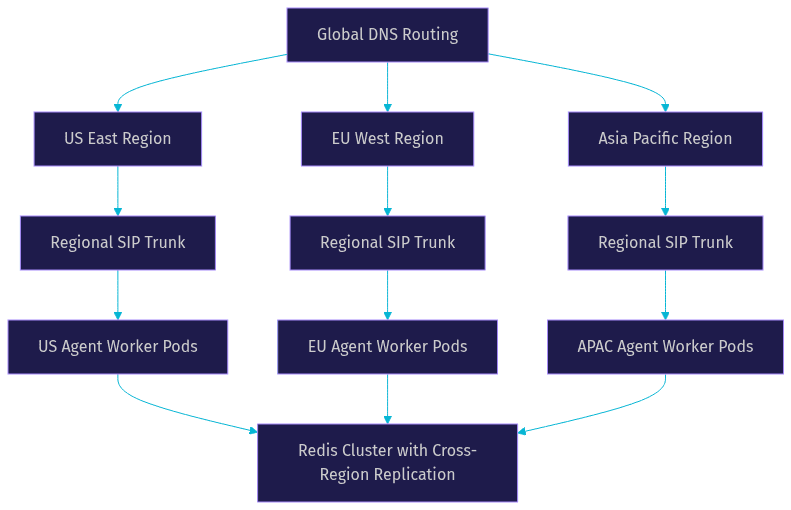
Active-active deployment means every region serves live traffic simultaneously. Active-passive means one region handles traffic while others stand by for failover. Active-active is more efficient but requires careful state synchronization to prevent split-brain scenarios when regions lose connectivity.
For voice agents, active-active with regional state ownership is the safest pattern. Each conversation is owned by the region where it started. If that region fails, the conversation state is replicated to a backup region and the call is reconnected through the regional SIP trunk.
Telephony Layer: SIP vs WebSocket, CPS Management, and DTMF Handling
The telephony layer is where many voice agent scaling efforts fail. You can have perfectly autoscaled AI workers and still hit a wall because your SIP trunk cannot handle the calls-per-second rate your business requires.
SIP trunks from traditional carriers offer reliability and wide geographic coverage but come with CPS limits. A typical SIP trunk provisioned through Twilio or Telnyx supports 10 to 50 CPS depending on your tier. If your peak CPS exceeds your trunk capacity, new calls receive busy signals or connection errors.
WebSocket-based telephony, where browsers or mobile apps connect directly to your voice agent over WebRTC, avoids SIP trunk limits entirely. VideoSDK's video and audio calling SDK provides this WebRTC transport layer, letting users connect to voice agents through web and mobile apps without traditional phone infrastructure.
CPS throttling is essential even when your trunk supports your peak rate. If you burst 100 new calls per second into your system, your ASR and LLM providers may reject connections or queue requests. Implement a token bucket or leaky bucket rate limiter at your telephony ingress to smooth call arrival rates.
DTMF handling (touch-tone input) is often overlooked in scaling plans. If your voice agent uses IVR menus with DTMF collection, each DTMF event is a separate telephony signal that your system must process and route. High-volume DTMF handling requires dedicated event processing to prevent tone detection delays from accumulating under load.
VideoSDK's SIP integration bridges traditional telephony with WebRTC rooms, supporting both inbound and outbound call flows with DTMF event propagation, call transfer, and geo-fencing for compliance.
Monitoring, Alerting, and Load-Testing
You cannot scale what you cannot measure. Voice agent monitoring requires tracking metrics across all five pipeline layers, with p95 latency as your north star.
Key metrics to track include p95 and p99 round-trip latency (from user speech to agent response), ASR word error rate, TTS synthesis latency, LLM token generation rate, call drop rate, GPU utilization (if self-hosting), and active concurrent call count per pod. Set alerts on p95 latency crossing your target threshold, call drop rate exceeding 1 percent, and any pod exceeding 80 percent of its concurrent call limit.
For load-testing, use synthetic call generation tools that simulate concurrent callers interacting with your voice agent. Tools like k6 can be extended for voice workloads, or you can build a custom synthetic caller using VideoSDK's Python SDK that joins rooms as a participant, plays pre-recorded audio, and measures response latency. Gradually increase concurrent synthetic callers until latency degrades, and record the breaking point.
According to Artificial Analysis's Speech Arena benchmark , streaming ASR providers achieve varying word error rates and latencies that directly impact your end-to-end voice agent performance. Always benchmark with your specific audio conditions, not just vendor marketing data.
Common Pitfalls and How to Avoid Them
Teams scaling voice agents for the first time consistently hit the same set of problems. Recognizing these patterns early saves weeks of debugging.
- Over-provisioning GPU for ASR and TTS: If managed API providers can handle your concurrency, self-hosting GPU inference is unnecessary complexity. Only self-host when latency, cost, or data residency requirements demand it.
- Ignoring state persistence: Storing conversation context in process memory means every pod restart drops calls. Move state to Redis or DynamoDB before you need to scale horizontally.
- Single-region latency spikes: Deploying in one region creates a single point of failure and penalizes geographically distant users. Plan for multi-region before your user base demands it.
- Neglecting graceful shutdown: Pods that terminate without draining active calls cause user-facing failures. Configure termination grace periods and implement drain logic in your agent workers.
- Underestimating CPS requirements: Peak CPS, not peak concurrency, determines your telephony capacity. Calculate CPS from your call duration and concurrency target, then verify your carrier can handle it.
- Skipping load tests with real audio: Synthetic load tests that do not stream real audio miss ASR and TTS bottlenecks. Always load-test with audio streams that match your production codec and bitrate.
Quick-Start Checklist for Scaling Your Voice Agent
Use this checklist as a starting point when planning your production deployment.
- Calculate your target concurrent calls and peak CPS rate
- Choose managed vs self-hosted inference for each pipeline layer
- Design stateless agent workers with conversation state in Redis
- Implement sticky session routing at your load balancer
- Configure horizontal pod autoscaling based on active call count
- Set up CPS throttling at your telephony ingress
- Deploy monitoring for p95 latency, call drop rate, and GPU utilization
- Run synthetic load tests with real audio streams
- Plan multi-region deployment if serving geographically distributed users
- Implement graceful pod shutdown with call draining
Definitions Glossary
Concurrent Calls: The number of active voice agent sessions simultaneously in progress. This is the primary capacity metric for voice agent infrastructure sizing.
Calls Per Second (CPS): The rate at which new calls enter your system. CPS determines telephony trunk capacity and session initialization throughput requirements.
Stateless Worker: An agent processing pod that does not store conversation context in local memory. Stateless workers can be restarted or replaced without losing active conversations because state lives in a centralized store.
Sticky Routing: A load balancing strategy where a specific call is pinned to a specific worker pod for its entire duration. Required for voice agents because audio streams cannot be transferred between pods mid-call.
Agent Worker: The Python process that runs a VideoSDK AI agent, managing the STT to LLM to TTS pipeline for a single call session within a VideoSDK room.
Conversational Graph: VideoSDK's deterministic flow engine for structured multi-turn voice conversations. It enables checkpointing and stateless resumption, which are essential for horizontal scaling.
Key Takeaways
- Scaling a voice agent requires architectural planning across all five pipeline layers: ASR, LLM reasoning, response generation, TTS, and telephony orchestration.
- Stateless worker design with centralized state storage in Redis or DynamoDB is the single most important decision for horizontal scaling.
- Sticky session routing is non-negotiable for voice agent pods because real-time audio streams cannot be load-balanced per-request.
- Capacity planning should be driven by peak CPS rate, not just concurrent call count, to avoid telephony trunk bottlenecks.
- Multi-region deployment reduces latency for geographically distributed users and provides resilience against regional outages.
- VideoSDK's AI Voice Agent SDK and Conversational Graph provide the room-based architecture and checkpointing needed to deploy stateless agent workers that scale horizontally without dropping calls.
Conclusion
Scaling a voice agent from prototype to production is a holistic effort that touches every layer of your pipeline. The teams that succeed treat scaling as an architectural discipline from the first commit, not a fire drill after their demo goes viral. Start with stateless workers, move conversation state to a centralized store, implement sticky routing, and plan your telephony capacity around CPS rather than just concurrency. VideoSDK's AI Voice Agent SDK gives you the room-based media infrastructure, SIP telephony integration, and Conversational Graph checkpointing needed to deploy production-grade voice agents that scale horizontally. You can sign up for a free account at app.videosdk.live/login and start building today. What are you building with VideoSDK? Drop a comment below, I would love to hear what kind of voice agent use case you are scaling.
FAQ