


An AI voice agent is a software system that conducts real-time, spoken conversations with human users by processing audio through a speech-to-text, large language model, and text-to-speech pipeline. Building one requires assembling these components, managing sub-second latency, and integrating telephony or web connectivity. VideoSDK provides an open-source AI Agent SDK that handles the real-time media transport and orchestration, letting developers focus on conversation logic.
Voice AI has reached a point of maturity in 2026 where conversational agents sound indistinguishable from human operators. For developers, this means the barrier to building a production-grade AI voice agent has shifted from raw model capability to system integration. Orchestrating speech-to-text, large language models, and text-to-speech into a seamless, low-latency loop is the new challenge. You need a clear, production-ready roadmap to navigate provider selection, latency budgets, and telephony integration. This guide breaks down how to build an AI voice agent from architecture to deployment, covering the exact steps needed to ship a reliable conversational experience. Whether you are building a customer support bot, an appointment booking system, or a lead qualification agent, the systematic approach outlined here will help you avoid common traps and scale effectively. The era of frustrating, menu-driven phone systems is ending. Users now expect fluid, natural conversations. Meeting this expectation requires a deep understanding of real-time audio processing and a robust orchestration layer.
What Is an AI Voice Agent?
An AI voice agent is defined as a software application that engages in real-time, bidirectional voice conversations with users. It works by listening to human speech, transcribing it to text, generating a response using a large language model, and vocalizing that response. Unlike traditional Interactive Voice Response (IVR) systems that rely on rigid menu trees and keyword spotting, an AI voice agent understands natural language and adapts to user intent dynamically. It also differs from text-based chatbots because it operates in a continuous audio stream, requiring real-time turn detection and voice activity detection to know when a user has finished speaking. This real-time audio processing introduces strict latency constraints that text chatbots never face. A text chatbot can take three seconds to respond and the user will wait. A voice agent that takes three seconds to respond feels broken. The AI voice agent must process audio, reason, and generate speech in under a second to maintain the illusion of a live conversation. Modern agents also incorporate multi-modal capabilities, allowing them to process visual inputs alongside audio for richer interactions.
Core Architecture Overview
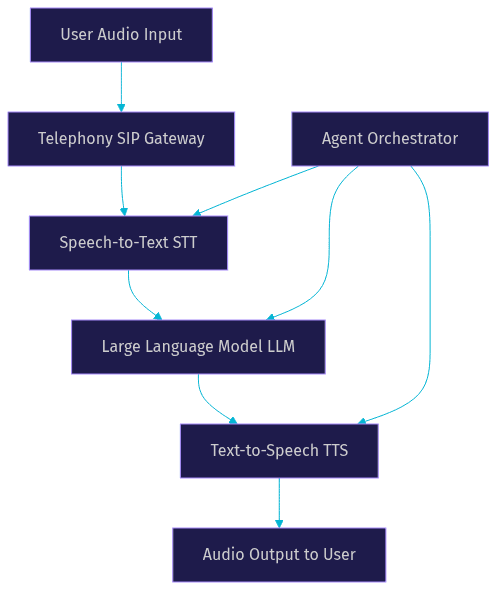
The architecture of an AI voice agent revolves around a continuous, three-layer loop: Speech-to-Text (STT), Large Language Model (LLM), and Text-to-Speech (TTS). When a user speaks, the audio stream is captured and sent to the STT layer, which transcribes the spoken words into text. This text is passed to the LLM, which processes the intent, retrieves any necessary context, and generates a text response. Finally, the TTS layer converts the LLM's text output back into audio, which is played back to the user.
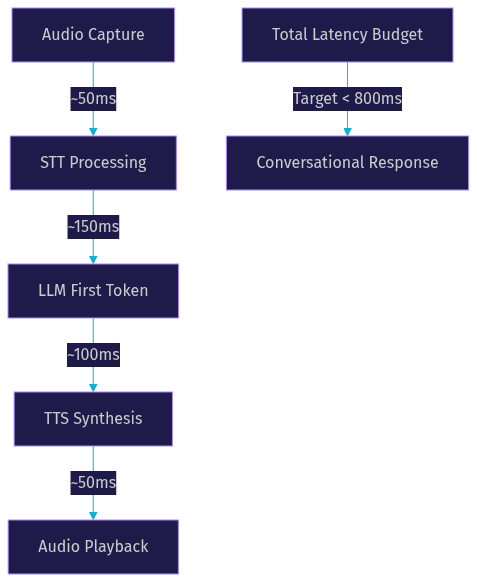
This entire cycle must happen within a sub-second latency budget to feel conversational. If the round-trip time exceeds 800 to 1000 milliseconds, users perceive an awkward delay, leading them to talk over the agent or assume the system broke. Managing this loop requires an orchestration layer that handles audio buffering, stream management, and interruption handling. The orchestrator ensures that if a user interrupts the agent mid-sentence, the agent stops speaking, processes the new input, and responds accordingly. When telephony is involved, a SIP gateway bridges traditional phone networks to the WebRTC media stream used by the agent. This gateway translates phone network audio into internet protocol packets that the agent can process.
The Four Essential Components
Building an AI voice agent requires four core components. The first is the Speech-to-Text (STT) engine, which must deliver low-latency, high-accuracy transcription. Providers like Deepgram and AssemblyAI are popular choices for real-time transcription because they offer streaming APIs that return partial transcripts as the user speaks. The second is the Large Language Model (LLM), responsible for reasoning and response generation. OpenAI, Anthropic, and Google Gemini provide the cognitive engine. Real-time multimodal models like OpenAI Realtime can process audio directly, bypassing the STT step, while traditional LLMs require text input. The third is Text-to-Speech (TTS), which converts text back to natural-sounding audio. ElevenLabs and Cartesia are leading TTS providers known for their realistic, low-latency voices that support streaming output. The fourth, often overlooked, is Turn Detection and Voice Activity Detection (VAD). This component determines when the user starts and stops speaking, preventing the agent from talking over the user or waiting in awkward silence. VideoSDK's AI Agent SDK includes built-in VAD and turn detection to manage this critical timing, ensuring smooth conversational flow.
Step-by-Step Playbook
Building a production-ready AI voice agent requires a systematic approach. Here is a step-by-step playbook to guide you through the process.
Phase 1: Define the Agent's Purpose
Before writing any logic, define the exact scope of your AI voice agent. Determine the primary use case, such as appointment booking, lead qualification, or customer support. Establish clear success criteria, like a target call completion rate or average handling time. Define escalation rules for when the agent should transfer the call to a human. A well-defined scope prevents the agent from attempting to answer questions outside its knowledge base, which leads to hallucinations and user frustration. Document the expected conversation flow, required data extractions, and integration points with your backend systems. This planning phase is critical because it informs your provider choices and architecture. An agent handling sensitive health data will have different compliance requirements than one booking restaurant reservations. Define the agent's persona and tone to ensure a consistent user experience.
Phase 2: Choose Build-or-Buy Path
Decide whether to use a no-code voice agent platform, a managed Voice Agent API, or a fully custom stack. No-code platforms are fast but offer limited customization and lock you into their provider ecosystem. A managed API like VideoSDK's AI Agent SDK provides the right balance of control and abstraction, handling the complex media transport and orchestration while letting you choose your STT, LLM, and TTS providers. A fully custom stack using raw WebRTC and individual provider APIs gives maximum control but requires significant infrastructure and maintenance overhead. The maintenance burden of a custom stack often distracts from core product development. For most developers, a managed SDK is the optimal path to production. It eliminates the need to build a WebRTC media server from scratch and handles edge cases like network jitter and packet loss.
Phase 3: Assemble the Pipeline
Assembling the pipeline involves selecting your STT, LLM, and TTS providers and wiring them together. Start by choosing a real-time STT provider that supports streaming audio. Next, select an LLM that fits your latency and reasoning requirements. Real-time models like OpenAI Realtime or Google Gemini Live offer multimodal capabilities, while traditional LLMs require text-only processing. Finally, pick a TTS provider that supports streaming audio output to minimize time-to-first-audio.
The critical factor here is the latency budget. You must account for network transit, STT processing, LLM generation, TTS synthesis, and audio playback. VideoSDK's AI Agent SDK manages the orchestration of these components, but you need to select providers that meet your sub-second target. The SDK handles the audio stream routing, so you only need to configure your chosen providers within the pipeline. A typical budget allocates 150 milliseconds for STT, 300 milliseconds for the LLM first token, 150 milliseconds for TTS, and 100 milliseconds for network transit. If any component exceeds its budget, the conversation feels sluggish. Time-to-first-audio is the most important metric for user perception.
Phase 4: Integrate Telephony
If your AI voice agent needs to make or receive phone calls, you must integrate telephony. This involves connecting a SIP trunk from a provider like Twilio, Vonage, or Telnyx to your agent infrastructure. VideoSDK provides a SIP integration that bridges traditional phone networks to its WebRTC rooms. You need to configure inbound and outbound call flows, handle DTMF events for keypad inputs, and set up call transfers for human escalation. The telephony gateway handles the conversion between phone network protocols and the internet-based media stream your agent uses. This allows your web-based AI agent to interact with standard telephone lines seamlessly. Proper telephony integration also requires handling call metadata, recording conversations for compliance, and managing call routing rules.
Phase 5: Design the Conversation Flow
Designing the conversation flow involves prompt engineering and state management. Write a clear system prompt that defines the agent's persona, rules, and constraints. Implement fallback handling for when the agent does not understand the user. For compliance-heavy use cases like loan applications or insurance claims, use a deterministic Conversational Graph. VideoSDK's Conversational Graph lets you define a directed graph of conversation nodes, ensuring the agent collects required information in the correct order without relying on the LLM's judgment for flow control. This prevents the agent from skipping mandatory compliance steps. The graph-based approach is essential when business rules, not LLM judgment, must control branching. It allows you to define exact transitions between conversation states and extract structured data at each step.
Phase 6: Test, Optimize, and Deploy
Testing an AI voice agent requires real-world latency measurement and network simulation. Test on poor network conditions to ensure network-adaptive streaming works. Implement error handling for provider timeouts and API failures. When deploying, ensure your infrastructure meets production requirements, including HTTPS for secure connections and TURN servers for firewall traversal. VideoSDK handles the media transport infrastructure, but you must monitor your agent's performance and log conversation transcripts for debugging. Deploy using VideoSDK Agent Cloud for a managed experience, or self-host using Docker or Kubernetes for maximum control. Continuous optimization involves analyzing call transcripts, identifying failure points, and refining your system prompt or conversation graph. Monitor your cost per minute and adjust your provider choices as needed to maintain profitability.
Build-vs-Buy Comparison Table
Choosing the right approach to build your AI voice agent depends on your team's expertise and customization needs. Here is a comparison of the three main paths.
| Approach | Customization | Time to Production | Maintenance | Best For |
|---|---|---|---|---|
| No-code platform | Low | Days | Low | Simple, high-volume tasks with standard flows |
| Managed Voice Agent API | High | Weeks | Medium | Custom logic, specific provider choices, scalable apps |
| Fully custom stack | Maximum | Months | High | Unique infrastructure needs, proprietary models |
A managed API like VideoSDK's AI Agent SDK is the best choice for most developers. It provides the flexibility to choose your AI providers while abstracting away the complex WebRTC and media routing infrastructure. This lets you focus on the conversation logic and user experience rather than managing media servers and TURN configurations. No-code platforms often hit a wall when you need custom logic or specific provider integrations.
Real-World Example
Consider a healthcare startup building an AI voice agent for appointment booking. They used VideoSDK's AI Agent SDK to orchestrate Deepgram for STT, OpenAI for the LLM, and ElevenLabs for TTS. The agent receives inbound calls via a Twilio SIP trunk connected to VideoSDK's telephony gateway. When a patient calls, the agent greets them, asks for their details, and checks the clinic's calendar API for available slots. Using VideoSDK's Conversational Graph, the startup ensured the agent always verified patient identity before disclosing any health information. The graph-based flow guaranteed that the agent asked for date of birth and insurance details before proceeding to booking. The result was a 40% reduction in administrative call volume and an average call latency of 650 milliseconds, well within the conversational budget. The startup deployed the agent on VideoSDK Agent Cloud, scaling effortlessly during peak flu season.
Common Pitfalls & How to Avoid Them
Building an AI voice agent comes with specific challenges. Token expiry is a common issue; ensure your authentication tokens are refreshed regularly to avoid dropped calls. Latency spikes often occur when an LLM generates a long response before TTS can start; use streaming TTS to play audio as it is generated. Audio clipping happens when turn detection is too aggressive; tune your Voice Activity Detection thresholds to allow for natural pauses in speech. Compliance gaps can occur if the LLM hallucinates; use a deterministic Conversational Graph for regulated industries. Finally, scaling challenges arise from inefficient media handling; rely on a managed SDK like VideoSDK to handle WebRTC scaling automatically. Another common pitfall is ignoring background noise; implement de-noise filters in your audio pipeline to ensure the STT engine receives clean audio.
Definitions Glossary
AI Voice Agent: A software system that conducts real-time, spoken conversations with human users by processing audio through an STT, LLM, and TTS pipeline.
STT (Speech-to-Text): The process of converting spoken audio into text, enabling the AI agent to understand user input.
TTS (Text-to-Speech): The process of converting generated text responses back into natural-sounding audio.
Turn Detection: The mechanism that determines when a user has finished speaking and the AI agent should respond, preventing interruptions.
Conversational Graph: A deterministic, graph-based orchestration layer that controls conversation flow using nodes and transitions, ensuring compliance and structured data collection.
Key Takeaways
- Building an AI voice agent requires orchestrating STT, LLM, and TTS components within a strict sub-second latency budget.
- A managed Voice Agent API like VideoSDK provides the optimal balance of customization and infrastructure abstraction.
- Telephony integration via SIP gateways bridges traditional phone networks to your WebRTC-based agent.
- For compliance-heavy use cases, a deterministic Conversational Graph prevents LLM hallucinations from skipping mandatory steps.
- Testing on poor networks and implementing robust error handling are critical for production deployment.
Conclusion
Building an AI voice agent in 2026 is a systems integration challenge as much as an AI challenge. By following a systematic approach to define, assemble, and deploy your pipeline, you can ship a reliable, low-latency conversational experience. VideoSDK's AI Agent SDK handles the complex real-time media transport and orchestration, letting you focus on conversation logic and provider selection. Ready to build your own? Explore the VideoSDK AI Voice Agent documentation and start building today. What are you building with VideoSDK? Drop a comment below.
Free $20 Balance for AI Voice Agents & Video Calls
FAQ