


Building AI voice assistants for debt collection requires a six-layer architecture: telephony and SIP integration, voice activity detection, real-time speech-to-text, LLM orchestration with compliance guardrails, neural text-to-speech, and continuous monitoring. VideoSDK provides the telephony, room management, and AI agent infrastructure to connect these layers with sub-800ms latency. Start with the VideoSDK AI Agents documentation to wire your pipeline end to end.
Collections teams lose millions to manual dialing, inconsistent scripts, and agent burnout. AI voice assistants solve this by scaling outbound calls while maintaining regulatory compliance. But building one is not just plugging an LLM into a phone line. You need a layered architecture where each component handles a specific job, from audio ingestion to compliance enforcement.
The target latency for a natural conversation is under 800 milliseconds from the moment a debtor finishes speaking to the moment the AI begins responding. Anything above that feels broken. That budget gets split across speech-to-text, LLM inference, and text-to-speech, leaving no room for sloppy integration. VideoSDK's AI Voice Agent SDK is designed to keep this pipeline tight by managing the agent worker, session lifecycle, and media routing in one coordinated system.
By the end of this guide, you will understand each layer, how they connect, and what production considerations matter most when deploying AI-driven debt collection at scale.
How to Build AI Voice Assistants for Debt Collection: Architecture Overview
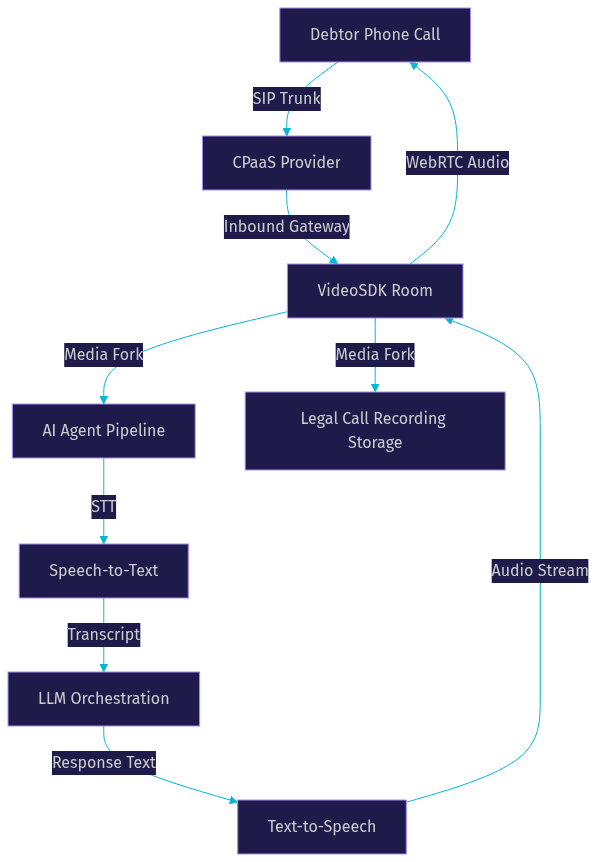
An AI voice assistant for debt collection is a real-time pipeline that bridges traditional telephony with modern AI inference. The debtor speaks into a phone, the audio travels through a SIP trunk into a processing pipeline, and the AI responds with a synthesized voice. The entire round trip must feel conversational.
The architecture breaks into six layers. Layer one handles telephony and SIP integration, bringing phone audio into a WebRTC-accessible environment. Layer two applies voice activity detection and noise suppression so the pipeline only processes actual speech. Layer three converts speech to text using streaming ASR. Layer four orchestrates the LLM, applying debt-specific prompts, compliance guardrails, and function calling for payment actions. Layer five converts the LLM response back to speech using neural TTS. Layer six wraps everything in compliance monitoring, fail-safe controls, and post-call analytics.
VideoSDK sits at the center of this stack. Its telephony integration bridges SIP calls into VideoSDK rooms, and the Python SDK connects your AI pipeline directly to those media streams. This means you can build the entire assistant on one platform without stitching together separate telephony and AI orchestration tools.
Layer 1: Telephony and SIP Integration
Every AI debt collection call starts with telephony. You need to place outbound calls, receive inbound calls, and route audio between the phone network and your AI pipeline. SIP trunking is the standard mechanism for this. A SIP trunk connects your application to the public switched telephone network through a CPaaS provider, letting you provision phone numbers, manage call routing, and handle DTMF events.
VideoSDK's telephony layer includes an inbound gateway, an outbound gateway, and a routing rules engine. When a call connects, the audio stream enters a VideoSDK room as a participant. Your AI agent, running as a separate participant in the same room, receives the audio stream in real time. This architecture means the AI agent and the human caller share the same low-latency media path, with no intermediate hops that add delay.
For testing, you can use WebRTC clients to simulate calls before connecting real SIP trunks. This lets you validate your pipeline end to end without burning phone credits or risking compliance violations on live calls.
Choosing a CPaaS Provider
Your CPaaS provider handles the physical phone network connection. Major options include Twilio, Vonage, Telnyx, and Plivo. When evaluating providers for debt collection, prioritize reliability metrics like call answer rate and audio quality, but also check compliance certifications. Some providers offer features specifically for regulated industries, such as call recording consent prompts and state-level routing restrictions.
VideoSDK integrates with all major SIP trunk providers, so you can choose based on pricing and coverage while keeping your AI pipeline on VideoSDK. This separation matters because switching CPaaS providers should not require rebuilding your agent logic.
Media Forking and Call Recording
Debt collection calls are legally required to be recorded in many jurisdictions. Media forking solves this by duplicating the audio stream at the SIP gateway level. One copy goes to your AI pipeline for real-time processing. The other copy goes to secure storage for legal retention.
This separation is critical. If your AI processing fails or introduces artifacts, the legal recording remains pristine. VideoSDK handles this through its recording infrastructure, which can run alongside the AI agent session without adding latency to the live conversation.
Layer 2: Voice Activity Detection and Noise Handling
Voice activity detection, or VAD, is the gatekeeper of your pipeline. It decides when the debtor is actually speaking versus when there is silence, background noise, or a dog barking. Poor VAD causes the AI to interrupt the caller or respond to phantom speech, which destroys trust in a collections call where tone matters enormously.
You need three VAD capabilities. First, silence threshold detection that identifies when a speaker has paused long enough to indicate they finished their thought. Second, barge-in detection that lets the AI stop speaking mid-sentence if the debtor interrupts, which happens frequently in collections conversations. Third, background-noise suppression that filters out non-speech audio before it reaches the ASR layer.
Silero VAD is a widely used open-source model for this task. It runs efficiently on CPU and handles the edge cases that simple energy-threshold detectors miss. VideoSDK's AI agent pipeline includes built-in voice activity detection and denoise processing, so you get these capabilities without wiring a separate VAD service into your stack.
The threshold tuning matters for debt collection specifically. Debtors often pause mid-sentence when thinking about payment options. If your VAD triggers too aggressively, the AI cuts them off. If it waits too long, the conversation feels sluggish. A common production setting is 400 to 600 milliseconds of silence before triggering end-of-speech, adjusted based on call analytics.
Layer 3: Real-Time Speech-to-Text (ASR)
Speech-to-text converts the debtor's audio into text the LLM can process. For debt collection, you need streaming ASR, not batch processing. Streaming ASR returns partial transcripts as the person speaks, with total latency between 200 and 400 milliseconds. Batch models like Whisper-class systems deliver higher accuracy but add seconds of delay, which breaks conversational flow.
The challenge in debt collection is domain-specific vocabulary. Debtors mention account numbers, dollar amounts, bank names, and payment terms. Generic ASR models often mishear these. You need a provider that supports custom vocabulary tuning so that "sixty-seven dollars and fifty cents" does not become "six seven dollars fifty cents."
VideoSDK's agent pipeline supports multiple STT providers including Deepgram, OpenAI Whisper, Google Cloud STT, and AssemblyAI. You can swap providers without rewriting your agent logic, which matters because ASR accuracy varies significantly across accents and line conditions common in collections calls.
Selecting an ASR Provider
When choosing an ASR provider for debt collection, evaluate four criteria. Latency: the provider must stream partial results in under 400 milliseconds. Accuracy on financial vocabulary: test with real collections call samples, not generic benchmarks. Compliance certifications: the provider must meet data residency requirements for financial services. Cost at scale: collections operations run high call volumes, so per-minute pricing adds up fast.
Deepgram's Nova series and AssemblyAI's Universal model are frequently chosen for financial services because they handle numeric vocabulary well and offer streaming endpoints.
Handling Partial Transcripts
Streaming ASR returns partial transcripts that update as more audio arrives. The first pass might return "I can pay" and then update to "I can pay next Friday." Your orchestration layer must decide when to act on a partial versus wait for a final result.
The standard approach is to wait for a final transcript triggered by VAD end-of-speech detection. But for barge-in scenarios, you may need to act on a partial if the debtor says something urgent like "stop calling me." VideoSDK's pipeline handles this through its turn detection and preemptive response mechanisms, which can interrupt the AI mid-speech based on partial transcript analysis.
Layer 4: LLM Orchestration and Prompt Engineering
The LLM is the brain of your debt collection assistant. It receives the transcript, applies conversation logic, and generates a response. Three architectural options exist for this layer.
The first option is a unified realtime voice API, where a single model handles speech understanding and generation end to end. OpenAI's Realtime API and Google Gemini Live follow this pattern. The advantage is low latency because there is no STT-to-LLM-to-TTS handoff. The disadvantage is limited control over each stage.
The second option is a multimodal realtime API that accepts audio input and produces audio output but still uses separate internal components. AWS Nova Sonic fits this category. It offers more flexibility than a pure unified model but less than a fully cascaded pipeline.
The third option is a cascaded pipeline with separate STT, LLM, and TTS components. This is the most flexible approach and the one most debt collection deployments use. You can tune each component independently, swap providers, and insert compliance checks between stages. VideoSDK's agent architecture is built around this cascaded model, with the Conversational Graph providing deterministic flow control on top of the LLM.
For debt collection, the cascaded approach wins because compliance requirements demand granular control over what the AI says and when it says it.
Building Debt-Specific Prompts
Debt collection prompts are not generic customer service prompts. They must enforce legal requirements at every turn. The Mini-Miranda warning is mandatory in the United States: the AI must identify itself as a debt collector, state that information will be used to collect a debt, and disclose that this is an attempt to collect a debt.
Your prompt structure should include a system prompt defining the agent's role and legal obligations, a conversation state tracker that knows where in the collection flow the call sits, and guardrails that prevent the AI from making illegal promises. For example, the AI must never promise to remove a credit report entry or claim that partial payment settles the full debt.
VideoSDK's Conversational Graph is particularly useful here. Instead of relying on the LLM to follow instructions perfectly, you define a directed graph where each node represents a conversation step. The LLM generates natural language, but the graph controls transitions between steps. This means the Mini-Miranda always gets delivered before payment discussion, regardless of how the conversation flows.
Function Calling for Payment Actions
The AI assistant needs to take actions, not just talk. Function calling lets the LLM trigger external APIs based on conversation context. In debt collection, the most common actions are sending a payment link via SMS, scheduling a callback, updating the account status in your CRM, and escalating to a human agent.
VideoSDK's agent SDK supports function tools and MCP integration, so your LLM can call these APIs directly from the pipeline. When a debtor agrees to pay, the LLM triggers the payment-link function, which sends an SMS with a payment URL. When a debtor requests more time, the LLM triggers the callback scheduling function with a proposed date and time.
The key design principle is that the LLM decides what action to take, but the function implementation enforces business rules. The LLM cannot waive a fee or change a payment amount. It can only trigger pre-approved actions with parameters validated by your backend.
Layer 5: Text-to-Speech (TTS) and Voice Cloning
Text-to-speech converts the LLM's response into audio the debtor hears. For debt collection, TTS quality directly impacts payment rates. A robotic voice reduces trust and increases hang-ups. A natural, calm voice keeps debtors engaged long enough to negotiate.
Neural TTS providers achieve time-to-first-byte latency around 150 milliseconds, which fits within the 800-millisecond total budget when combined with fast ASR and LLM inference. The critical requirement is streaming output: the TTS must start producing audio before the full response text is generated. If the LLM produces a 40-word response, the TTS should begin speaking the first sentence while the LLM continues generating the rest.
Popular TTS providers for this use case include ElevenLabs, AWS Polly, Azure Speech, and Cartesia. Each offers different voice styles and latency profiles. For debt collection, choose a voice that sounds professional and empathetic, not overly cheerful. The tone should match the seriousness of the conversation.
Voice cloning is tempting but risky for collections. Cloning a specific agent's voice can improve consistency, but it raises ethical and legal questions about impersonation. Most production deployments use pre-built neural voices from certified providers instead. VideoSDK's agent pipeline supports all major TTS providers with built-in streaming and caching, so the first byte of audio reaches the caller as fast as possible.
Compliance-ready phrasing matters here too. The TTS should pronounce legal disclosures clearly, without rushing through them. Some providers allow you to control speaking rate and emphasis, which helps ensure the Mini-Miranda is intelligible.
Layer 6: Compliance, Monitoring, and Fail-Safe Controls
Compliance is not a feature you add at the end. It is a layer that runs through the entire pipeline. The Fair Debt Collection Practices Act (FDCPA) governs how debt collectors can communicate with debtors in the United States. Violations carry statutory damages, so your AI assistant must enforce compliance automatically.
Key FDCPA requirements include calling only between 8 AM and 9 PM local time, honoring cease-communication requests, not contacting debtors at work if prohibited, and not using threatening or deceptive language. Your system must enforce these rules programmatically, not rely on the LLM to follow instructions.
DTMF handling is essential for compliance. If a debtor presses a key sequence indicating they want to stop receiving calls, the system must log that request, update the account status, and suppress future calls. VideoSDK's telephony layer captures DTMF events and routes them to your compliance engine.
Call recording storage must meet financial services data retention requirements. Recordings should be encrypted at rest, access-controlled, and retained for the legally required period. VideoSDK's recording infrastructure handles storage, and you can configure retention policies through the REST API.
Real-Time Guardrails
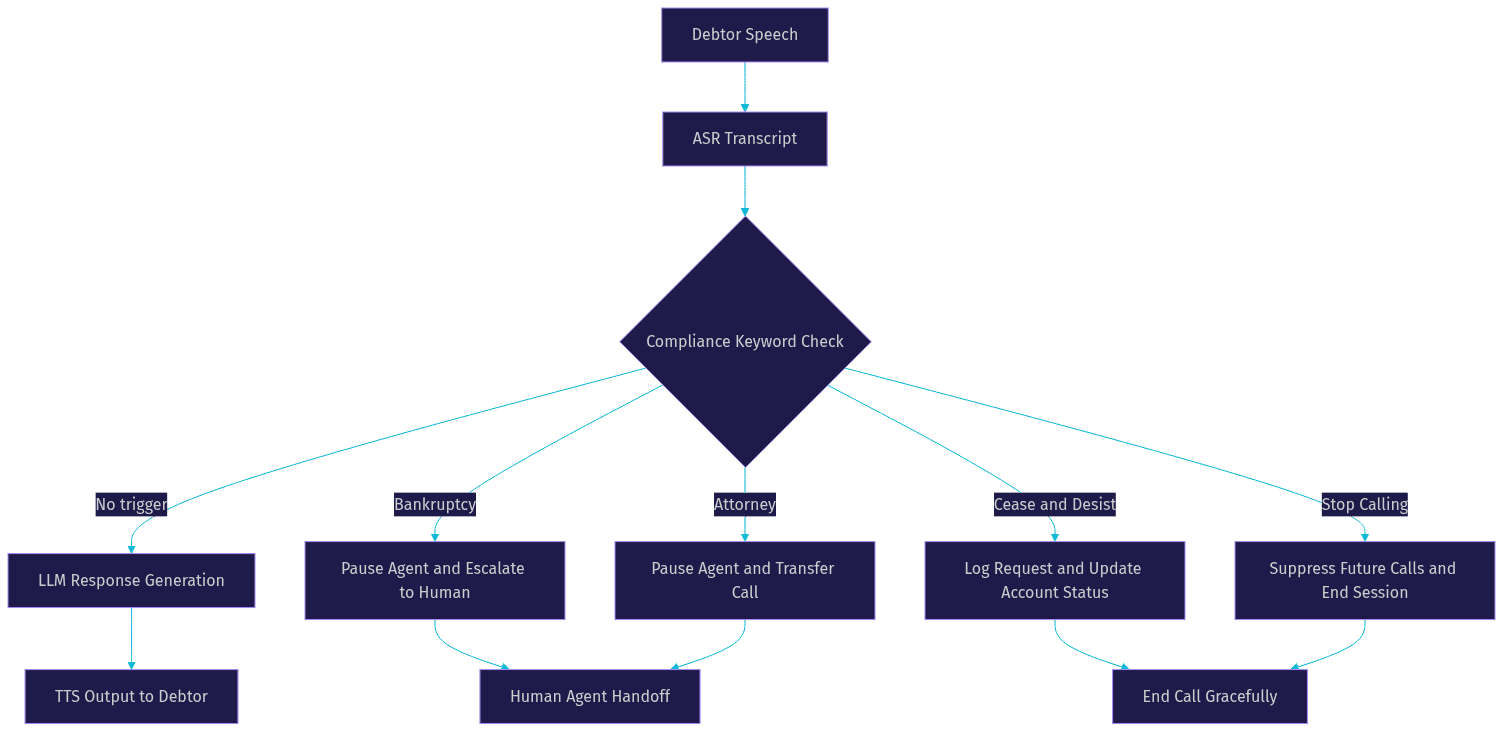
Certain keywords require immediate action. If a debtor says "bankruptcy," "attorney," or "I am recording this call," the AI must pause, stop its current response, and trigger a predefined compliance workflow. In the case of bankruptcy, the call may need to be escalated to a human agent or terminated entirely.
VideoSDK's pipeline supports this through preemptive response and pipeline hooks. You can define keyword triggers that interrupt the LLM mid-generation and route the conversation to a compliance node. The Conversational Graph makes this deterministic: the keyword always triggers the same workflow, regardless of LLM behavior.
Post-Call Analytics
After each call, your system should capture metrics that measure both operational performance and collection effectiveness. Answer rate tells you how many calls connect. Promise-to-pay rate tells you how many debtors commit to a payment. Escalation rate tells you how often the AI hands off to a human. Latency reporting breaks down the time spent in each pipeline stage.
VideoSDK provides session analytics through its REST API, including participant timelines, media quality metrics, and recording metadata. You can pull these metrics into your analytics platform and build dashboards that track performance over time. The REST API reference covers all available endpoints for session data retrieval.
Deployment Checklist: From Development to Production
Moving from a development environment to production requires several infrastructure changes. First, your token server must run on HTTPS. VideoSDK requires secure connections for all SDK initialization in production, and browsers will block insecure WebRTC connections.
Second, TURN server configuration matters for telephony calls where the debtor's network may restrict UDP traffic. VideoSDK provides cloud proxy and TURN fallback, but you should verify connectivity from your deployment region.
Third, scaling considerations depend on call volume. Each AI agent session runs as a Python process consuming CPU for VAD and audio processing. VideoSDK's Agent Cloud handles scaling automatically, but if you self-host using Docker or Kubernetes, you need to provision worker nodes based on concurrent call volume.
Fourth, monitoring should cover both infrastructure health and conversation quality. Set up alerts for latency spikes, ASR failures, and compliance keyword triggers. VideoSDK's pipeline observability features give you visibility into each stage of the agent pipeline.
Finally, test with real phone calls before going live. WebRTC testing validates the pipeline, but SIP introduces variables like codec negotiation, packet loss, and echo that only appear on real telephony connections.
Measuring Success and Continuous Improvement
Deploying the assistant is the starting line, not the finish. Collections performance improves through iterative optimization. A/B test different conversation scripts to see which produces higher promise-to-pay rates. Test different voice styles to measure impact on call duration and debtor engagement.
Feedback loops are essential. Review calls where the AI failed to collect a payment and identify patterns. Was the objection handling too aggressive? Did the AI miss a payment plan opportunity? Use these insights to refine your prompts and Conversational Graph transitions.
For advanced deployments, consider an LLM-as-a-Judge approach where a separate LLM evaluates call transcripts for compliance and effectiveness. This automated review scales better than human auditing and can flag problematic calls for manual review. VideoSDK's post-call transcription and summary features provide the data these evaluation pipelines need.
Common Pitfalls and How to Avoid Them
Several failure modes recur in AI debt collection deployments. Token expiry causes agents to disconnect mid-call. Generate tokens with sufficient lifetime and implement refresh logic before expiry. VideoSDK's authentication guide covers token management in detail.
Latency spikes often trace back to ASR provider rate limiting or LLM inference queues. Monitor each stage independently and set latency budgets with fallback behavior. If ASR exceeds 500 milliseconds, consider switching to a faster provider for that session.
Mis-routed SIP calls happen when routing rules are not updated after number provisioning changes. Test call routing after any CPaaS configuration change and maintain a routing rule audit log.
Compliance oversights are the most expensive failure. The most common is failing to deliver the Mini-Miranda on every call. Use the Conversational Graph to make this deterministic rather than relying on prompt instructions. The second most common is ignoring cease-communication requests. Ensure DTMF events and keyword triggers both update your account status system in real time.
Quick Recap: Key Steps to Build AI Voice Assistants for Debt Collection
- Layer 1: Integrate SIP telephony through a CPaaS provider and bridge calls into VideoSDK rooms using the inbound and outbound gateways.
- Layer 2: Apply voice activity detection with tuned silence thresholds and barge-in support for collections conversation patterns.
- Layer 3: Use streaming ASR with financial vocabulary tuning for accurate transcription of account numbers and payment amounts.
- Layer 4: Orchestrate the LLM with debt-specific prompts, Conversational Graph flow control, and function calling for payment actions.
- Layer 5: Deploy neural TTS with streaming output and compliance-ready phrasing for clear legal disclosures.
- Layer 6: Enforce FDCPA compliance with real-time keyword guardrails, DTMF handling, and post-call analytics.
- Deploy with HTTPS, TURN fallback, scalable worker infrastructure, and continuous monitoring.
Definitions Glossary
SIP Trunk: A virtual phone line that connects your application to the public telephone network through a CPaaS provider, enabling inbound and outbound calls over the internet.
Media Forking: The process of duplicating an audio stream at the gateway level so one copy goes to AI processing and another goes to legal call recording storage.
Voice Activity Detection (VAD): A mechanism that identifies when speech is present in an audio stream, determining when a speaker starts and stops talking to trigger pipeline processing.
Mini-Miranda: A legally required disclosure in the United States that debt collectors must state at the beginning of communication, identifying the caller as a debt collector and stating the purpose of the call.
Conversational Graph: VideoSDK's deterministic flow engine that defines conversation steps as a directed graph, ensuring compliance steps like Mini-Miranda delivery always occur in the correct order regardless of LLM behavior.
Function Calling: A capability that lets the LLM trigger external APIs, such as sending payment links or scheduling callbacks, based on conversation context and validated parameters.
DTMF Events: Dual-tone multi-frequency signals generated when a caller presses phone keypad buttons, used in debt collection for compliance actions like cease-communication requests.
Key Takeaways
- Building AI voice assistants for debt collection requires a six-layer architecture where each layer handles a specific job from telephony to compliance monitoring.
- The cascaded STT-LLM-TTS pipeline offers the best control for debt collection because it lets you tune each stage independently and insert compliance checks between them.
- VideoSDK's Conversational Graph ensures deterministic compliance enforcement so the Mini-Miranda and other legal requirements always execute in the correct order.
- Real-time guardrails for keywords like "bankruptcy" and "attorney" must interrupt the LLM mid-generation and route to predefined compliance workflows.
- Post-call analytics covering answer rate, promise-to-pay rate, and latency per stage are essential for continuous improvement of collection performance.
Conclusion
Building AI voice assistants for debt collection is a multi-layer engineering challenge where compliance is as important as conversational quality. The six-layer architecture, from SIP telephony through TTS output, gives you the control needed to enforce FDCPA requirements while maintaining sub-800-millisecond latency. VideoSDK provides the telephony integration, agent pipeline, Conversational Graph, and session analytics to build this end to end on one platform. Start with the VideoSDK AI Agents quickstart and the telephony integration guide to wire your first compliant collections call. You can sign up for free at app.videosdk.live/login and join the VideoSDK Discord community to connect with other developers building voice AI agents. What are you building with VideoSDK? Drop a comment below, I would love to hear what kind of AI voice assistant use case you are working on.
FAQ