


AI voice assistants for customer support are real-time voice applications that use speech-to-text, large language models, and text-to-speech to handle customer calls autonomously. VideoSDK provides an open-source AI Agent SDK, telephony integration, and Conversational Graph to build, deploy, and scale these assistants with sub-second latency. Start by connecting your STT, LLM, and TTS providers to a VideoSDK room, then wire in your CRM APIs for a production-ready support agent.
Customer support call centers are expensive to run, hard to scale, and notoriously inconsistent in quality. A single missed detail in a refund verification flow can cost a business a customer and a compliance penalty. AI voice assistants for customer support change that equation by handling repetitive, high-volume calls with deterministic accuracy while escalating complex cases to human agents.
This guide walks you through the full architecture, from choosing speech-to-text and TTS providers to designing conversation flows, managing latency, integrating your backend CRM, and deploying securely at scale. By the end, you will understand exactly how to build AI voice assistants for customer support using VideoSDK's AI Voice Agent SDK and Conversational Graph.
What Are AI Voice Assistants for Customer Support?
AI voice assistants for customer support are defined as voice-based AI systems that conduct real-time, multi-turn phone or in-app conversations with customers to resolve support queries without human intervention. They work by capturing spoken audio, transcribing it to text, reasoning over the transcript with an LLM, generating a spoken response, and repeating this loop until the query is resolved or escalated.
Traditional Interactive Voice Response (IVR) systems rely on rigid menu trees where customers press buttons or speak limited keywords. AI voice assistants differ fundamentally because they understand natural language, handle ambiguous phrasing, call backend APIs dynamically, and adapt their responses based on conversation context. Text chatbots share the LLM reasoning layer but lack the real-time audio pipeline, telephony integration, and turn-detection complexity that voice demands.
The core value proposition is straightforward: AI voice assistants reduce average handle time, operate around the clock, scale elastically during peak volumes, and maintain consistent compliance with business rules. VideoSDK provides the real-time communication infrastructure, agent orchestration, and telephony bridge to make this production-ready.
Core Technical Components
Building AI voice assistants for customer support requires four tightly coupled technical components: speech-to-text, LLM reasoning, text-to-speech, and telephony integration. Each component has distinct performance requirements and failure modes that determine whether your assistant feels natural or frustrating.
Speech-to-Text (STT)
STT is the entry point of every voice interaction. For customer support, entity accuracy matters more than general transcription quality. If your assistant mishears an order ID like "AX7K9P" as "AX7K9T," the entire lookup fails. Choose a streaming STT model that supports partial results so you can start LLM reasoning before the user finishes speaking. Deepgram's Nova series and OpenAI Whisper are common choices.
Common pitfalls include background noise on customer phone lines, accents, and alphanumeric confusion. Use a provider with strong noise suppression and configure your agent to re-prompt when extracted entities fail validation.
Large Language Model (LLM) Reasoning
The LLM is the brain of your assistant. It interprets intent, decides which backend tool to call, generates responses, and manages multi-turn context. Prompt design is critical: your system prompt should define the assistant's persona, available tools, escalation rules, and guardrails for compliance-sensitive topics.
Tool-calling is where the LLM transitions from conversation to action. When a customer asks about a refund, the LLM should call your order lookup API, receive the result, and respond based on real data rather than hallucinating. Handling ambiguous intents requires a fallback strategy: if the LLM confidence is low, ask a clarifying question rather than guessing.
Text-to-Speech (TTS)
TTS converts the LLM's text response back into spoken audio. Naturalness affects customer trust: a robotic voice signals a cheap implementation. Latency is equally important. If TTS takes 800 milliseconds to generate the first audio chunk, the customer experiences dead air and assumes the call dropped.
Choose a TTS provider that supports streaming output so audio begins playing before the full response is generated. ElevenLabs, Cartesia Sonic, and OpenAI TTS are widely used. Voice customization lets you match your brand's tone, but prioritize latency over voice variety in customer support contexts.
Telephony / SIP Integration
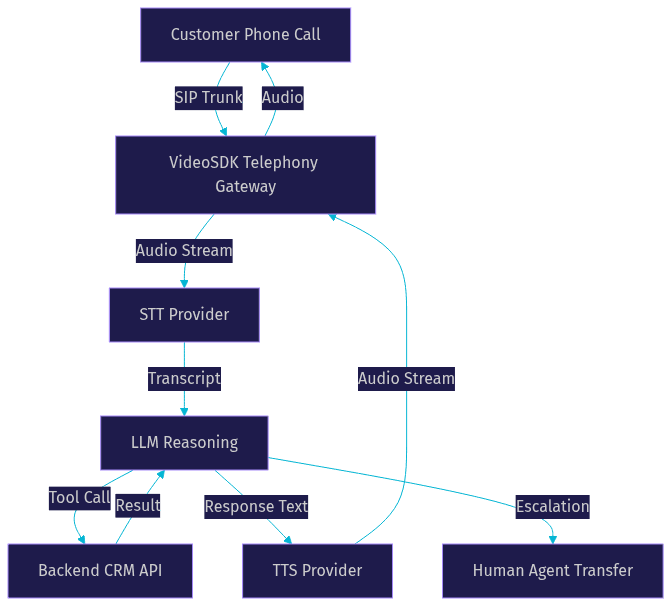
Telephony integration bridges traditional phone networks to your WebRTC-based AI agent. VideoSDK's SIP and telephony integration supports inbound calls from customers, outbound calls from your agent, DTMF tone handling for keypad input, and call transfer to human agents when escalation is needed.
DTMF matters because some customers press buttons during a voice call, and your agent must interpret those tones alongside speech. Call transfer is essential for escalation: when the assistant cannot resolve the query, it should warm-transfer the customer to a human agent with full conversation context attached.
Designing a Robust Conversation Flow
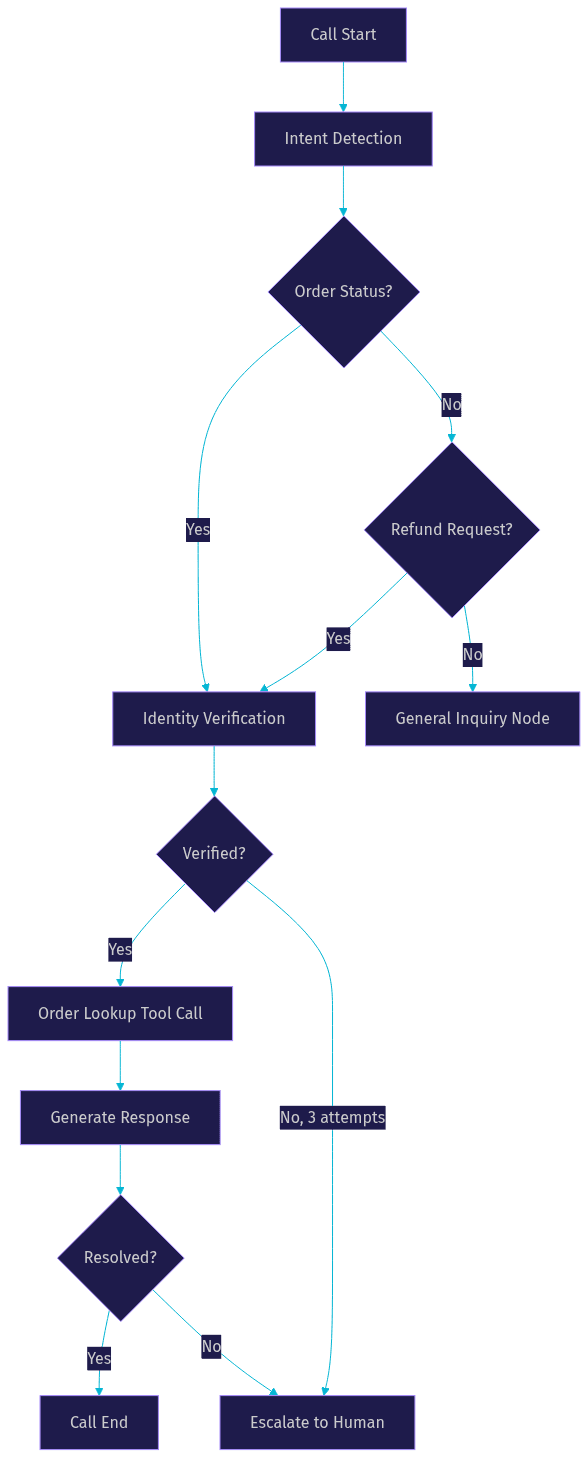
A robust conversation flow is the difference between an assistant that resolves 80 percent of calls and one that frustrates every customer it touches. Map your common support intents first: order status, identity verification, refund requests, billing disputes, password resets, and appointment scheduling. Each intent has a predictable sequence of steps, and your flow should enforce that sequence deterministically.
VideoSDK's Conversational Graph is purpose-built for this. Instead of letting the LLM freely control the conversation, you define a directed graph where each node represents a conversation step. The LLM handles natural language generation within each node, but the graph controls transitions, state, and branching. This is critical for compliance-driven flows like loan applications or insurance claims where every step must happen in order.
For example, a refund flow has nodes for identity verification, order lookup, refund eligibility check, confirmation, and execution. The LLM cannot skip verification and jump to execution because the graph enforces the transition. If the customer provides incomplete information, the graph node re-prompts rather than proceeding.
Fallback to human is a first-class design element, not an afterthought. Define explicit escalation triggers: three failed verification attempts, sentiment detection indicating frustration, queries outside the assistant's scope, or any compliance-sensitive topic. The assistant should warm-transfer to a human agent with a summary of the conversation so far.
Ensuring High Entity Accuracy
Entity accuracy is the single biggest quality lever in customer support voice AI. Customers call in with order numbers, tracking codes, email addresses, phone numbers, and account IDs. If your STT model transcribes these incorrectly, every downstream step fails.
For alphanumeric IDs, use a phonetic confirmation loop. After extracting an order ID, the assistant repeats it back using the NATO phonetic alphabet or digit-by-digit confirmation. If the customer corrects it, re-extract and validate again. This adds a few seconds but prevents cascading errors.
For email and phone extraction, validate the format immediately. If the extracted string does not match an email pattern or phone number format, re-prompt the customer rather than passing garbage data to your CRM API. VideoSDK's Conversational Graph supports extractors that validate and re-prompt within a node, keeping the flow deterministic.
Re-prompting techniques matter. Instead of saying "I did not catch that," say "I heard order number AX7K9P. Is that correct?" This gives the customer a concrete reference point to confirm or correct, reducing total interaction time.
Managing Latency and Turn Detection
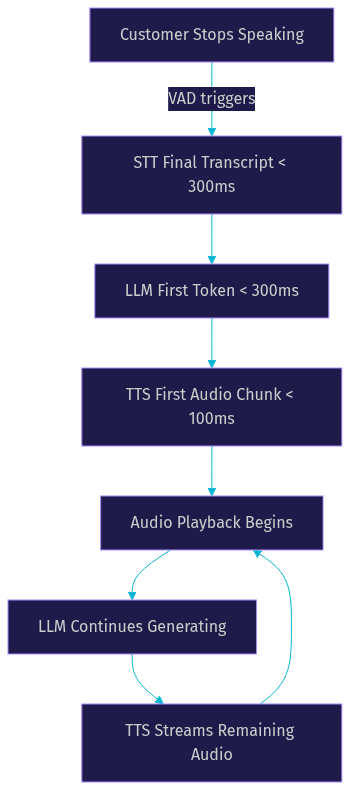
Latency is the make-or-break metric for AI voice assistants for customer support. If the gap between the customer finishing a sentence and the assistant responding exceeds one second, the conversation feels broken. Your total latency budget is roughly 700 milliseconds, and every component must hit its target.
A practical budget breakdown: STT should deliver partial transcripts in under 300 milliseconds, LLM first-token generation should be under 300 milliseconds, and TTS should produce the first audio chunk in under 100 milliseconds. This leaves a small buffer for network transit and processing overhead.
Turn detection prevents two common failures: interrupting the customer mid-sentence and leaving dead air after they finish. VideoSDK's AI Agent SDK includes Voice Activity Detection (VAD) and turn detection that monitors speech patterns to determine when a customer has finished speaking. Configure the end-of-speech threshold carefully: too short and you interrupt, too long and you create awkward pauses.
Progressive speech synthesis is the technique of starting TTS generation as soon as the LLM produces its first sentence, not waiting for the full response. This shaves hundreds of milliseconds off perceived latency and keeps the conversation flowing naturally.
Building Backend Integration
Your AI voice assistant is only as useful as the data it can access. Backend integration connects the assistant to your CRM, order management system, billing platform, and identity verification service. This is where tool-calling transforms the LLM from a conversational interface into a functional support agent.
Start with secure token generation. VideoSDK uses token-based authentication where tokens are generated server-side using your API key and secret. Never expose your API secret on the client side. Your token server creates a VideoSDK room, generates a meeting token, and passes it to the agent worker and the customer's connection. Learn about VideoSDK authentication.
For each support intent, define a backend REST API endpoint the LLM can call. An order lookup endpoint takes an order ID and returns status, items, and shipping information. An identity verification endpoint takes a phone number or email and returns a verification challenge. A refund endpoint takes an order ID and refund reason and initiates the refund workflow.
Context passing is critical. When the assistant calls a tool, it should pass the full conversation context so the backend can make informed decisions. Error handling is equally important: if the CRM API returns a 404, the assistant should inform the customer and re-prompt rather than crashing or hallucinating a response.
VideoSDK's AI Agent SDK supports function tools and MCP integration, letting you define tool schemas that the LLM can invoke during a conversation. The agent worker manages the tool execution lifecycle, passes results back to the LLM, and handles timeouts gracefully.
Deployment, Security, and Compliance
Deploying AI voice assistants for customer support introduces security and compliance requirements that go beyond typical web applications. You are handling customer voice data, personally identifiable information, and potentially payment details over phone lines.
Use HTTPS everywhere. VideoSDK rooms support end-to-end encryption for media streams, and your token server should enforce TLS for all API communication. Geo-fencing lets you restrict media routing to specific regions, which is critical for GDPR compliance when serving EU customers.
GDPR and CCPA considerations include data minimization, retention policies, and the right to deletion. Record only what you need, and configure retention periods explicitly. Recording consent is legally required in many jurisdictions: your assistant should inform the customer that the call may be recorded and proceed only after consent is captured.
Scaling requires cloud proxies and regional infrastructure. VideoSDK's cloud proxy and geo-fencing capabilities let you route calls through the nearest media server, reducing latency for geographically distributed customers. For high-volume deployments, use VideoSDK Agent Cloud for managed scaling or self-host with Kubernetes for full control.
Testing, Monitoring, and Continuous Improvement
A voice assistant is never truly finished. Customer behavior shifts, new product SKUs launch, and LLM models update. Testing, monitoring, and continuous improvement are ongoing operational disciplines.
Automated end-to-end tests should simulate real call flows: dial in, speak a query, verify the assistant responds correctly, and check that backend tools were called with the right parameters. VideoSDK's Python SDK and agent observability features let you instrument every pipeline stage for testing.
Real-time analytics should track key metrics: containment rate (percentage of calls resolved without human escalation), average handle time, entity accuracy rate, latency percentiles, and customer satisfaction scores. Error logging should capture STT failures, LLM hallucinations, tool-call errors, and turn-detection misses.
A/B testing prompts is one of the highest-leverage improvements you can make. Test different system prompts, escalation thresholds, and re-prompting strategies against a subset of live calls. Measure the impact on containment rate and customer satisfaction, then roll out the winner.
VideoSDK's pipeline observability and session analytics provide the data foundation for this continuous improvement loop. Monitor your agents in production, identify failure patterns, and iterate.
Future Trends in Voice Support AI
Voice support AI is evolving rapidly. Multimodal agents that combine voice with visual inputs are emerging, enabling scenarios where a customer shows their damaged product to the agent via camera while describing the issue. Retrieval-augmented generation (RAG) is becoming standard for policy retrieval, letting assistants answer complex policy questions accurately by grounding responses in your actual documentation rather than relying on LLM training data.
Low-code platforms are lowering the barrier to building voice agents, but deterministic orchestration layers like VideoSDK's Conversational Graph remain essential for compliance-sensitive flows. Emerging standards around AI agent transparency, disclosure, and consent are shaping how voice assistants must identify themselves and handle customer data.
Definitions Glossary
Agent Worker: The Python process that runs a VideoSDK AI agent and manages its session lifecycle, including STT, LLM, TTS, and tool execution.
Conversational Graph: VideoSDK's deterministic flow engine for structured multi-turn voice conversations, where nodes represent steps, transitions enforce business rules, and the LLM handles only natural language generation.
Turn Detection: The mechanism that decides when a user has finished speaking and the AI agent should respond, using voice activity detection and speech pattern analysis.
DTMF: Dual-Tone Multi-Frequency signaling, the tones generated by phone keypad presses that voice agents must interpret alongside speech input.
Pipeline: The STT to LLM to TTS chain that processes user speech and generates spoken responses in a VideoSDK AI agent.
Key Takeaways
- AI voice assistants for customer support require four tightly coupled components: streaming STT, LLM reasoning with tool-calling, low-latency TTS, and telephony integration via SIP.
- Deterministic conversation flows using VideoSDK's Conversational Graph prevent LLM hallucinations and enforce compliance in critical steps like identity verification and refund processing.
- Total latency must stay under 700 milliseconds, with progressive speech synthesis and accurate turn detection keeping conversations natural.
- Backend CRM integration through function tools transforms the LLM from a chatbot into a functional support agent that resolves real customer queries.
- VideoSDK's open-source AI Agent SDK, telephony integration, and Agent Cloud provide the infrastructure to build, deploy, and scale production voice assistants.
Conclusion
Building AI voice assistants for customer support is a multi-layered engineering challenge that spans speech recognition, LLM orchestration, telephony, conversation design, and compliance. The teams that succeed treat it as a systems problem, not a prompt-engineering problem. They choose streaming STT for low latency, enforce deterministic flows for compliance, integrate backend tools for real query resolution, and monitor relentlessly in production. VideoSDK gives you the real-time communication infrastructure, AI agent orchestration, and telephony bridge to build this end-to-end. Ready to start? Explore the VideoSDK AI Agents documentation and join the VideoSDK Discord community to connect with other developers building voice AI. What are you building with VideoSDK? Drop a comment below, I would love to hear what kind of voice assistant use case you are working on.
Free $20 Balance for AI Voice Agents & Video Calls
FAQ