


Building an AI voice assistant for the logistics industry involves connecting a speech-to-text engine, a large language model, and a text-to-speech engine to your TMS or WMS via APIs. VideoSDK provides an open-source AI Agent SDK that simplifies this pipeline, handling real-time audio streaming and WebRTC infrastructure so you can deploy low-latency voice bots for carrier check-calls and dispatch automation. Start by defining high-impact use cases, then configure your AI providers and integrate them with your logistics backend.
Logistics runs on communication. Every shipment requires a chain of phone calls, status updates, and manual data entries between dispatchers, drivers, and carriers. When volume spikes, human operators become bottlenecks, leading to delayed updates and error-prone record keeping. That is why logistics firms are turning to real-time voice AI to automate routine conversations.
By building a voice-first assistant, you can handle carrier check-calls, provide delivery ETAs, and trigger inventory alerts without human intervention. This guide breaks down exactly how to build ai voice assistant for logistics industry applications, covering everything from core architecture components to deployment best practices and ROI measurement.
Why AI Voice Assistants Are Transforming Logistics
The logistics sector has historically lagged in digital communication adoption, relying on manual phone calls and fragmented radio communications. AI voice assistants are changing this by introducing automated, real-time conversational interfaces that scale effortlessly.
Common Pain Points in Traditional Logistics Communication
Traditional logistics communication is deeply manual. Dispatchers spend hours making carrier check-calls to verify pickup and delivery statuses. Drivers struggle with hands-free communication requirements, often pulling over to text or call in updates. Data entry is error-prone when operators transcribe noisy phone audio into a Transportation Management System (TMS). These manual touchpoints create latency in visibility, meaning stakeholders often do not know about a delay until it is too late to mitigate.
Business Benefits of Voice-First Automation
Voice-first automation eliminates these bottlenecks. An AI voice assistant can handle hundreds of concurrent check-calls, providing 24/7 availability without increasing headcount. Dispatchers are freed to handle exception management rather than routine status updates. Cost reduction is significant, as automated calls cost a fraction of human labor. Furthermore, modern text-to-speech engines support multilingual output, allowing global logistics firms to communicate with drivers in their native languages without hiring bilingual staff.
Core Components of an AI Voice Assistant for Logistics
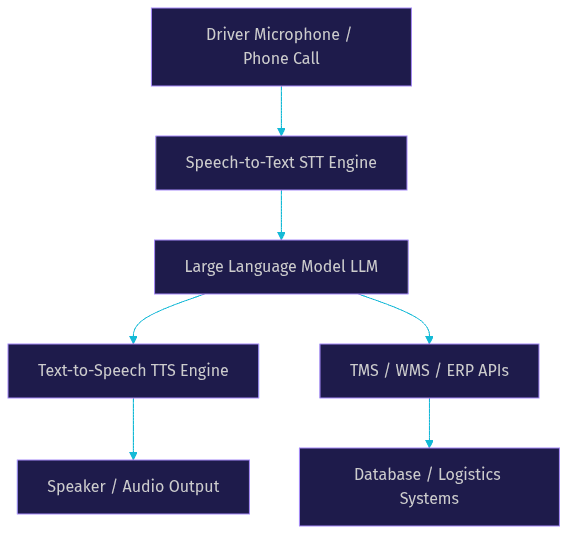
To understand how to build ai voice assistant for logistics industry systems, you need to grasp the underlying architecture. A functional voice assistant requires four primary components working in tandem with sub-second latency.
Speech-to-Text (STT) Engine
The STT engine transcribes incoming driver audio into text. For logistics, accuracy is critical because ambient truck noise and poor cellular connections can degrade audio quality. You need an STT provider with strong noise robustness and low latency. Providers like Deepgram and OpenAI Whisper are popular choices for real-time transcription in noisy environments.
Large Language Model (LLM) for Intent and Dialogue
The LLM processes the transcribed text to understand intent and generate a response. For logistics, the LLM must understand domain-specific terminology like "bill of lading," "layover," and "detention time." You can use models from OpenAI or Anthropic and enhance them with prompt engineering or retrieval-augmented generation to ground responses in your specific logistics data.
Text-to-Speech (TTS) Engine
The TTS engine converts the LLM text response back into spoken audio. Naturalness is crucial for driver acceptance. You want a voice that sounds professional and clear. Providers like ElevenLabs and Cartesia offer low-latency, natural-sounding voices that can be branded to match your company tone.
Integration Layer (TMS/WMS/ERP)
The integration layer connects the AI assistant to your existing logistics infrastructure. When a driver asks about a load, the assistant must query the TMS via REST APIs. When a delivery is confirmed, the assistant must update the Warehouse Management System (WMS). This layer handles data mapping and triggers event webhooks to keep your systems in sync.
How to Build AI Voice Assistant for Logistics Industry: Step-by-Step Blueprint
Building a production-ready voice assistant requires a structured approach. Here is a six-step blueprint to guide your implementation.
1. Define High-Impact Use Cases
Start by identifying the most painful communication bottlenecks. Common high-impact use cases in logistics include automated carrier check-calls, delivery ETA queries, and inventory stock alerts. Focus on a single use case for your initial pilot to keep scope manageable. For example, automating the arrival at facility check-in call saves immediate dispatcher time.
2. Choose the Underlying Platform
You need a platform to manage the real-time audio stream between the driver and the AI pipeline. VideoSDK offers an AI Agent SDK designed specifically for this. It handles the WebRTC infrastructure, voice activity detection, and real-time audio transport. You can deploy agents on VideoSDK Agent Cloud or self-host them. Alternatively, you could piece together open-source WebRTC libraries, but this requires significant infrastructure maintenance.
3. Design the Conversation Flow
For simple queries, an LLM can handle the conversation freely. However, logistics often requires compliance-driven steps where specific data must be collected in order. Use a deterministic Conversational Graph to enforce these flows. For example, a carrier check-in might require collecting the load number, driver name, and current location before granting gate access. The graph ensures the agent never skips a step.
4. Set Up the Infrastructure
Provision your compute resources based on your chosen deployment. If self-hosting, you need a server capable of handling WebRTC connections and running the Python agent worker. Set up a secure token server to authenticate users connecting via web or mobile apps. If your drivers connect via phone calls, configure a SIP trunk through a provider like Twilio or Telnyx and route it through the VideoSDK Telephony integration.
5. Train and Configure STT, LLM, TTS
Select your AI providers and configure them in the agent pipeline. Choose an STT provider that handles noisy environments well. Configure your LLM with a system prompt that defines its role as a logistics assistant, and provide it with tools to query your TMS. Select a TTS provider with a clear, professional voice. Test the combined latency of this pipeline to ensure it stays under 300 milliseconds to feel conversational.
6. Test in Real-World Scenarios
Deploy the assistant to a small pilot group of drivers. Monitor how well the voice activity detection handles pauses in speech and background noise. Capture instances where the assistant misunderstands intent or fails to extract the correct load number. Iterate on your LLM prompts and STT configurations based on these real-world failures before scaling to the entire fleet.
Deployment Considerations and Best Practices
Moving from a pilot to production requires attention to security, scalability, and monitoring.
Security and Compliance
Logistics data is sensitive. Ensure all voice streams and transcriptions are encrypted in transit and at rest. If your assistant processes payment data for freight brokers, it must comply with PCI-DSS. For European operations, ensure GDPR compliance by configuring data retention policies for call recordings and transcripts. Use token-based authentication to secure access to your voice rooms.
Scalability and Latency
Drivers will not tolerate a laggy conversation. Your end-to-end latency, from the driver finishing a sentence to the assistant starting to speak, must be under 300 milliseconds. Use platforms that offer auto-scaling for agent workers. VideoSDK handles the media routing via a global SFU, ensuring low latency regardless of driver location. Load-balance your LLM and TTS API calls to prevent rate-limiting during peak dispatch hours.
Monitoring, Analytics and Continuous Improvement
Deploy observability tools to track call-level metrics. Monitor the word error rate of your STT engine over time, as accents and background noise vary. Track the average handling time for automated calls versus human calls. Implement a feedback loop where dispatchers can flag incorrect assistant responses, and use these transcripts to refine your LLM prompts and conversational graph logic.
Measuring ROI and Success Metrics
Quantifying the impact of your AI voice assistant secures ongoing investment.
Cost Savings and Labor Reduction
Calculate the reduction in dispatcher call hours. If a dispatcher previously spent 4 hours a day on check-calls and the assistant handles 80 percent of them, quantify that labor savings. Factor in the cost of the AI infrastructure and API calls to determine net savings. Most logistics firms see a positive ROI within the first quarter of full deployment.
Accuracy and Error Rate
Measure the intent recognition success rate. If a driver says they are at the gate for a specific load, the assistant should extract the load number and location accurately 99 percent of the time. Track the word error rate of transcriptions. High error rates indicate you need to tune your STT provider or improve audio input quality.
Customer and Driver Satisfaction
Survey drivers after interactions. A voice assistant should reduce their administrative burden, not add frustration. Track Net Promoter Score among drivers using the system. If the assistant handles check-ins faster than waiting for a human dispatcher, satisfaction will rise.
Definitions Glossary
Speech-to-Text (STT): The process of converting spoken audio into text. In logistics, STT engines must handle noisy environments like truck cabs and loading docks.
Large Language Model (LLM): An AI model that understands and generates human language. For logistics, the LLM is configured to understand supply chain terminology and interact with TMS APIs.
Text-to-Speech (TTS): The process of converting text into spoken audio. Logistics applications require low-latency TTS to maintain natural conversational flow with drivers.
Conversational Graph: A deterministic flow engine that structures multi-turn conversations. It ensures compliance-driven logistics steps, like collecting a bill of lading number, happen in the correct order.
Voice Activity Detection (VAD): The mechanism that detects when a user is speaking and when they have stopped. Accurate VAD is critical for natural turn-taking in driver communications.
Key Takeaways
- Building an AI voice assistant for logistics requires connecting STT, LLM, and TTS components to your TMS or WMS via APIs.
- VideoSDK AI Agent SDK provides the real-time WebRTC infrastructure needed to transport voice data with sub-300ms latency.
- Using a Conversational Graph ensures compliance-driven logistics workflows, like carrier check-ins, follow a strict, deterministic path.
- Production deployment requires strict attention to security, scalability, and continuous monitoring of transcription accuracy.
- Measuring ROI involves quantifying dispatcher labor reduction, intent recognition success rates, and driver satisfaction improvements.
Conclusion
Building an AI voice assistant for the logistics industry transforms how dispatchers, drivers, and carriers interact. By automating routine check-calls and status updates, you reduce operational costs and eliminate communication bottlenecks. The blueprint is clear: define your use case, choose a robust platform like VideoSDK, design your conversation flow, and iterate based on real-world testing. Ready to automate your logistics communications? Explore the VideoSDK AI Agent documentation to start building today. What are you building with VideoSDK? Drop a comment below to share your logistics voice AI use case.
FAQ