


Introduction to AI Voice Agents in Gaming Industry
In recent years, AI voice agents have transformed the way we interact with technology, offering hands-free assistance and a more engaging user experience. In the gaming industry, these agents provide unique opportunities to enhance gameplay, offer real-time assistance, and create immersive experiences.
What is an AI Voice Agent?
An AI voice agent is a software application that uses artificial intelligence to understand and respond to voice commands. It typically integrates speech-to-text (STT), natural language processing (NLP), and text-to-speech (TTS) technologies to process and respond to user inputs.
Why are they important for the gaming industry?
In gaming, voice agents can assist players with game mechanics, provide tips and strategies, and offer updates on the latest gaming news. They can also help troubleshoot common issues and recommend games based on user preferences, enhancing the overall gaming experience.
Core Components of a Voice Agent
A typical voice agent consists of several core components:
- Speech-to-Text (STT): Converts spoken language into text.
- Natural Language Processing (NLP): Interprets the text to understand user intent.
- Text-to-Speech (TTS): Converts text responses back into spoken language.
To get a comprehensive understanding of these components, refer to the AI voice Agent core components overview.
What You'll Build in This Tutorial
In this tutorial, you will learn how to build an AI voice assistant tailored for the gaming industry using the VideoSDK framework. We will guide you through setting up the environment, building the agent, and testing it in a real-time scenario.
Architecture and Core Concepts
Understanding the architecture of your AI voice agent is crucial for building an efficient and responsive system.
High-Level Architecture Overview
The architecture of our AI voice agent is designed to handle voice interactions seamlessly. It includes components for voice activity detection, turn detection, and a cascading pipeline for processing audio inputs and generating responses.
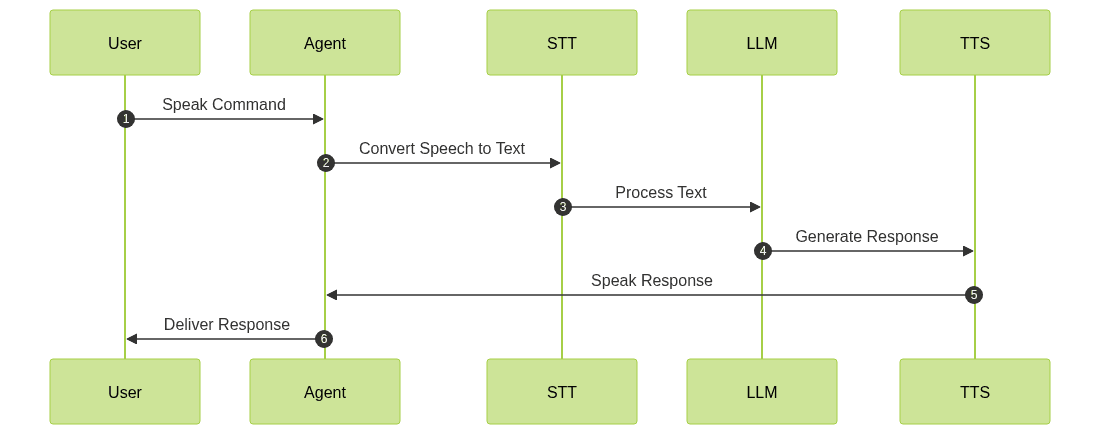
Understanding Key Concepts in the VideoSDK Framework
Agent
The
Agent class represents the core of your voice bot. It handles the interaction logic and manages the conversation flow.CascadingPipeline
The
CascadingPipeline orchestrates the flow of audio processing, integrating STT, NLP, and TTS components to ensure smooth communication.VAD & TurnDetector
Voice Activity Detection (VAD) and Turn Detection are critical for determining when the agent should listen and when it should speak, ensuring a natural conversation flow.
Setting Up the Development Environment
Before diving into the code, let's set up the necessary environment.
Prerequisites
- Python 3.11+: Ensure you have Python 3.11 or higher installed.
- VideoSDK Account: Sign up at app.videosdk.live to access API keys and other resources.
Step 1: Create a Virtual Environment
Create a virtual environment to manage dependencies:
1python -m venv venv
2source venv/bin/activate  # On Windows use `venv\\Scripts\\activate`
3
Step 2: Install Required Packages
Install the necessary Python packages using pip:
1pip install videosdk
2pip install python-dotenv
3
Step 3: Configure API Keys in a .env file
Create a
.env file in your project directory and add your VideoSDK API key:1VIDEOSDK_API_KEY=your_api_key_here
2Building the AI Voice Agent: A Step-by-Step Guide
Let's dive into building the AI voice agent. Below is the complete code block that we'll break down step-by-step.
1import asyncio, os
2from videosdk.agents import Agent, AgentSession, CascadingPipeline, JobContext, RoomOptions, WorkerJob, ConversationFlow
3from videosdk.plugins.silero import SileroVAD
4from videosdk.plugins.turn_detector import TurnDetector, pre_download_model
5from videosdk.plugins.deepgram import DeepgramSTT
6from videosdk.plugins.openai import OpenAILLM
7from videosdk.plugins.elevenlabs import ElevenLabsTTS
8from typing import AsyncIterator
9
10pre_download_model()
11
12agent_instructions = "You are a knowledgeable AI Voice Assistant specialized in the gaming industry. Your primary role is to assist gamers by providing information about game mechanics, tips, and strategies, as well as updates on the latest gaming news and releases. You can also help with troubleshooting common gaming issues and recommend games based on user preferences. However, you are not a human and cannot provide personal opinions or engage in real-time gameplay. Always remind users to take breaks and play responsibly. You must include a disclaimer that your advice is based on available data and users should verify information from official game sources."
13
14class MyVoiceAgent(Agent):
15    def __init__(self):
16        super().__init__(instructions=agent_instructions)
17    async def on_enter(self): await self.session.say("Hello! How can I help?")
18    async def on_exit(self): await self.session.say("Goodbye!")
19
20async def start_session(context: JobContext):
21    agent = MyVoiceAgent()
22    conversation_flow = ConversationFlow(agent)
23
24    pipeline = CascadingPipeline(
25        stt=DeepgramSTT(model="nova-2", language="en"),
26        llm=OpenAILLM(model="gpt-4o"),
27        tts=ElevenLabsTTS(model="eleven_flash_v2_5"),
28        vad=SileroVAD(threshold=0.35),
29        turn_detector=TurnDetector(threshold=0.8)
30    )
31
32    session = [AgentSession](https://docs.videosdk.live/ai_agents/core-components/agent-session)(
33        agent=agent,
34        pipeline=pipeline,
35        conversation_flow=conversation_flow
36    )
37
38    try:
39        await context.connect()
40        await session.start()
41        await asyncio.Event().wait()
42    finally:
43        await session.close()
44        await context.shutdown()
45
46def make_context() -> JobContext:
47    room_options = RoomOptions(
48        name="VideoSDK Cascaded Agent",
49        playground=True
50    )
51    return JobContext(room_options=room_options)
52
53if __name__ == "__main__":
54    job = WorkerJob(entrypoint=start_session, jobctx=make_context)
55    job.start()
56
Step 4.1: Generating a VideoSDK Meeting ID
The
make_context function is responsible for setting up the meeting environment. By using RoomOptions with playground=True, a test URL is generated, allowing you to interact with the agent in a controlled environment.1def make_context() -> JobContext:
2 room_options = RoomOptions(
3 name="VideoSDK Cascaded Agent",
4 playground=True
5 )
6 return JobContext(room_options=room_options)
7Step 4.2: Creating the Custom Agent Class
The
MyVoiceAgent class extends the Agent class, incorporating specific instructions for the gaming industry. It defines how the agent greets users and handles session termination.1class MyVoiceAgent(Agent):
2 def __init__(self):
3 super().__init__(instructions=agent_instructions)
4 async def on_enter(self): await self.session.say("Hello! How can I help?")
5 async def on_exit(self): await self.session.say("Goodbye!")
6Step 4.3: Defining the Core Pipeline
The
CascadingPipeline integrates various plugins to process voice commands. It includes STT, LLM, TTS, VAD, and turn detection components.1pipeline = CascadingPipeline(
2 stt=DeepgramSTT(model="nova-2", language="en"),
3 llm=OpenAILLM(model="gpt-4o"),
4 tts=ElevenLabsTTS(model="eleven_flash_v2_5"),
5 vad=SileroVAD(threshold=0.35),
6 turn_detector=TurnDetector(threshold=0.8)
7)
8Step 4.4: Managing the Session and Startup Logic
The
start_session function initializes the session, connects to the VideoSDK, and manages the lifecycle of the agent.1async def start_session(context: JobContext):
2 agent = MyVoiceAgent()
3 conversation_flow = ConversationFlow(agent)
4
5 pipeline = CascadingPipeline(
6 stt=DeepgramSTT(model="nova-2", language="en"),
7 llm=OpenAILLM(model="gpt-4o"),
8 tts=ElevenLabsTTS(model="eleven_flash_v2_5"),
9 vad=SileroVAD(threshold=0.35),
10 turn_detector=TurnDetector(threshold=0.8)
11 )
12
13 session = AgentSession(
14 agent=agent,
15 pipeline=pipeline,
16 conversation_flow=conversation_flow
17 )
18
19 try:
20 await context.connect()
21 await session.start()
22 await asyncio.Event().wait()
23 finally:
24 await session.close()
25 await context.shutdown()
26Running and Testing the Agent
Step 5.1: Running the Python Script
To start the agent, run the following command in your terminal:
1python main.py
2
Step 5.2: Interacting with the Agent in the Playground
Once the script is running, a test URL will be displayed in the console. Open this URL in your browser to interact with the agent. Use Ctrl+C in the terminal to stop the agent gracefully.
Advanced Features and Customizations
Extending Functionality with Custom Tools
You can extend the agent's capabilities by integrating custom tools and plugins, allowing for more specialized interactions.
Exploring Other Plugins
Explore additional plugins available in the VideoSDK framework to enhance your agent's functionality.
Troubleshooting Common Issues
API Key and Authentication Errors
Ensure your API keys are correctly set in the
.env file and match those in your VideoSDK account.Audio Input/Output Problems
Check your microphone and speaker settings to ensure they are configured correctly.
Dependency and Version Conflicts
Make sure all dependencies are up-to-date and compatible with Python 3.11+.
Conclusion
Summary of What You've Built
In this tutorial, you built a fully functional AI voice assistant tailored for the gaming industry using the VideoSDK framework.
Next Steps and Further Learning
Consider exploring more advanced features of the VideoSDK framework and integrating additional plugins to further enhance your agent's capabilities.
FAQ