


Building an AI voice agent for the supply chain industry involves connecting speech-to-text, large language models, and text-to-speech providers to your logistics data sources via real-time communication infrastructure. VideoSDK provides the audio transport and agent orchestration framework needed to deploy sub-300ms latency voice assistants that handle inventory checks, shipment tracking, and order creation. Start by defining deterministic conversation flows, then integrate your ERP data, and deploy using VideoSDK's AI Agent SDK.
Communication delays cost the global supply chain industry billions of dollars annually. When a warehouse manager cannot get an immediate answer on inventory levels, or a freight dispatcher waits hours for shipment status updates, the entire logistics network slows down. In an industry where margins are thin and customer expectations are higher than ever, these friction points are unsustainable. Voice AI is changing this paradigm. By building an AI voice agent for supply chain operations, you can enable hands-free, real-time data access for workers on the floor and automated status updates for partners. Instead of stopping to log into a terminal or fumble with a handheld RF scanner, a worker can simply speak to the system. This shift from reactive problem-solving to proactive, conversational data retrieval is a massive competitive advantage. By the end of this guide, you will understand the complete architecture, provider selection, and deployment steps required to build a production-ready AI voice agent tailored for logistics contexts.
What Is an AI Voice Agent for the Supply Chain Industry?
An AI voice agent for the supply chain industry is a software system that understands and processes spoken language to execute logistics tasks, retrieve data, and provide real-time updates. It differs significantly from traditional Interactive Voice Response (IVR) systems and basic text chatbots. Traditional IVR relies on rigid phone menus, forcing users to navigate tedious prompts like "Press 1 for inventory, press 2 for shipping." Chatbots handle text but lack the low-latency, hands-free utility required on a noisy warehouse floor or a moving freight truck. A chatbot requires a user to look at a screen and type, which is impossible when driving a forklift or carrying a box. Voice AI frees the user's hands and eyes, allowing them to interact with complex systems using only their voice.
A modern supply chain voice assistant operates with core capabilities: speech-to-text (STT) to transcribe spoken commands, intent extraction to understand the user's goal, real-time data lookup against supply-chain databases, and text-to-speech (TTS) to deliver a natural-sounding response. VideoSDK provides the real-time communication layer that makes this possible, allowing developers to embed these voice agents into web, mobile, or telephony interfaces with sub-300ms latency. Unlike a simple voice command system, an AI voice agent maintains context memory, allowing a user to ask follow-up questions without repeating themselves. Furthermore, modern agents are multi-modal. A worker can take a photo of a damaged pallet and send it with a voice note, and the agent can process both the image and the audio to file a damage report automatically.
Core Architectural Components
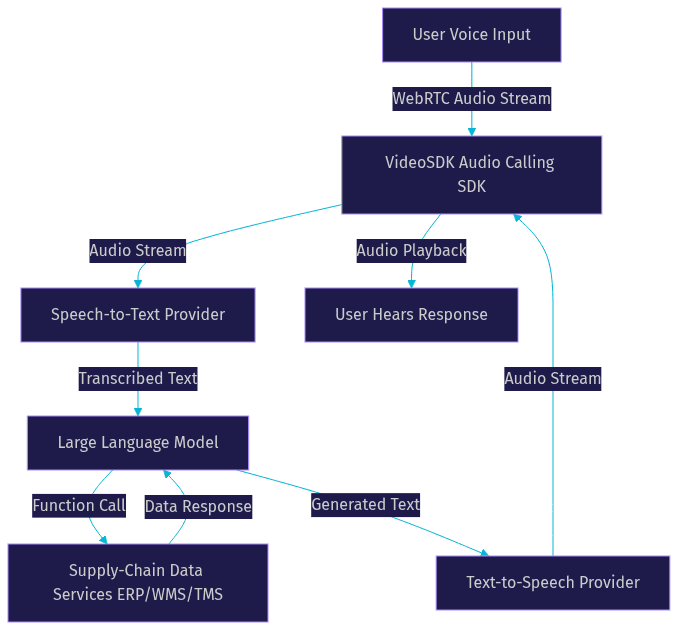
The end-to-end pipeline of an AI-driven voice agent architecture begins with audio capture and ends with audio playback. When a user speaks, the audio stream is captured and sent to a Speech-to-Text provider. Streaming STT is preferred, as it provides partial transcriptions before the user finishes speaking, reducing perceived latency. The transcribed text is passed to a Large Language Model (LLM) equipped with function calling capabilities. The LLM determines the intent and triggers business logic, querying supply-chain data services like an ERP or WMS. The retrieved data is formatted into a response, sent to a Text-to-Speech provider, and streamed back to the user. Streaming TTS is also critical, as it starts to speak the first sentence before the LLM has generated the full response, making the interaction feel instantaneous.
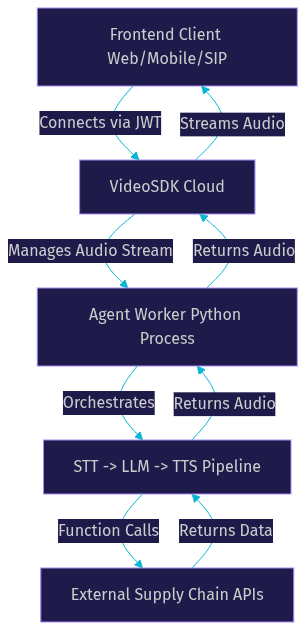
Key building blocks include the STT provider, the LLM, function calling tools, Voice Activity Detection (VAD), turn detection, and context memory. VideoSDK's AI Agent SDK manages this pipeline, handling the orchestration between these components. The Agent Worker, a Python process, runs the session and connects the user's audio stream to the AI pipeline. Developers can choose to deploy this worker on VideoSDK Agent Cloud for a managed experience or self-host it using Docker and Kubernetes for maximum control over data residency. The context window is another critical component. It allows the agent to remember the last 10 turns of conversation, which is essential when a user is comparing multiple suppliers or tracking several shipments in one session.
Selecting the Right AI Providers
Choosing the right AI providers is critical for a supply chain voice assistant. You need to evaluate providers based on latency, domain-specific accuracy, multilingual support, and pricing. Logistics networks are global, so multilingual support is often non-negotiable. A freight management voice assistant might need to switch between English, Spanish, and Mandarin in the same conversation.
For STT, Deepgram and OpenAI Whisper are top choices as of 2026. Deepgram's Nova models offer high accuracy even with background noise common in warehouses, while Whisper excels at handling diverse accents. For TTS, ElevenLabs provides highly realistic, low-latency voice generation that does not sound robotic. For the real-time LLM, OpenAI Realtime or Google Gemini offer the speed and function-calling capabilities needed for instant data retrieval. Always evaluate provider SLAs against your supply-chain workloads to ensure they can handle peak operational hours without degradation. Consider the trade-off between cost and latency: faster models might cost more per minute but can significantly improve user satisfaction. To verify accuracy claims, consult independent benchmarks like the Artificial Analysis Speech Arena, which provides unbiased word-error-rate data for conversational audio.
Designing the Voice Agent Workflow for Supply-Chain Use Cases
Common supply chain voice agent use cases include inventory checks, shipment status updates, demand forecast queries, risk alerts, and order creation. Each use case requires a specific conversation flow. For an inventory check, the agent must query the WMS with the requested SKU and return the available quantity. For a shipment status update, the agent queries the TMS with the tracking number and returns the estimated time of arrival. For a risk alert, the agent proactively notifies the user of a delay, such as a port congestion event, and suggests alternative routes. Instead of relying on the LLM to control the flow non-deterministically, you should map each use case to a deterministic conversation flow.
This is where the Conversational Graph concept becomes essential. By defining nodes, transitions, and actions, you ensure the voice agent follows business rules strictly. For example, an order creation flow must verify the SKU, confirm quantity, and check payment terms before executing. The graph enforces this sequence. Handling multi-turn context is also vital. If a user asks about a supplier and then says, "What about the second supplier?", the agent must retain the previous list in its context memory and resolve the reference accurately. VideoSDK's Conversational Graph allows developers to define this state, ensuring the LLM only generates natural language while the graph controls the logic. The graph also uses extractors to pull specific entities, like SKU numbers or supplier names, directly from the user's speech, passing them as structured data to your backend APIs.
Building the Agent Backend
Building the agent backend requires secure infrastructure and robust data integration. First, set up a secure token server. You need to generate a JSON Web Token (JWT) using your API key and secret, store the secret securely in environment variables, and expose a token endpoint for your frontend clients. Never expose your API secret on the client side. This token authenticates the user's connection to the VideoSDK room. The frontend client requests this token from your server and uses it to join the room, ensuring that only authorized users can interact with the voice agent.
Next, connect the agent to your supply-chain data sources. Your ERP, WMS, and TMS systems must be accessible via REST APIs. The LLM uses function calling to trigger these APIs, pulling real-time inventory levels or transit statuses. Orchestrating multiple specialized agents improves reliability. Instead of one massive prompt, deploy modular agents: an info agent for raw data, a scenario agent for what-if analysis, a strategy agent for recommendations, and an impact agent for risk assessment. VideoSDK's Python SDK allows you to connect these custom AI pipelines directly to your media streams. Multi-agent switching enables the system to route the conversation to the right agent based on the user's intent. Parallel tool calling is another powerful feature, allowing the agent to query multiple suppliers or shipment records simultaneously, drastically reducing response times.
Error handling and fallback strategies are crucial. If the STT provider fails to capture a warehouse ID due to a loud forklift passing by, the agent should prompt the user to repeat it. If the ERP API times out, the agent should inform the user and offer to transfer the query to a human dispatcher. Implementing a fallback adapter ensures the conversation degrades gracefully rather than crashing.
Integrating the Front-End Voice Interface
The front-end voice interface captures user audio and plays back the agent's response. You have several options for audio capture: a web-based WebRTC microphone, mobile SDKs, or a SIP-based phone line for traditional telephony integration. Using VideoSDK's Audio Calling SDK as the transport layer provides a robust WebRTC infrastructure that ensures high-quality, real-time audio streams without the overhead of video tracks. For warehouse workers, a mobile app built with the VideoSDK React Native or Flutter SDK can provide a dedicated device for voice interactions, complete with push-to-talk functionality.
Managing turn-taking and Voice Activity Detection (VAD) is essential to avoid overlapping speech. The VAD component detects when the user stops speaking and triggers the LLM to generate a response. If the user interrupts the agent, preemptive response handling should immediately stop the TTS playback and listen to the new input. Ensuring low-latency streaming, specifically sub-300ms, is what makes the conversation feel natural. VideoSDK's infrastructure is optimized for this, handling the media routing efficiently. You must also consider acoustic challenges in a warehouse environment. Implementing noise suppression and echo cancellation on the client side ensures the STT provider receives clean audio. For legacy system integration, VideoSDK's SIP integration can bridge traditional desk phones and PBX systems into the same WebRTC room, allowing a dispatcher to call the AI agent from a standard phone line. DTMF events can also be captured, allowing users to input tracking numbers via a phone keypad if speech is impractical.
Production Considerations
Deploying a voice AI for warehouse operations requires rigorous production considerations. Security is paramount. Implement end-to-end encryption for all audio streams, enforce role-based access control so only authorized personnel can query sensitive shipment data, and ensure compliance with GDPR and ISO 27001 standards. Voice data contains personally identifiable information, so configure retention policies carefully.
Scaling the agent worker is the next challenge. Containerize the Python agent worker using Docker and deploy it on Kubernetes with auto-scaling rules. If your TTS provider supports GPU acceleration, leverage it to maintain low latency during high-volume periods. Monitoring is non-negotiable. Set up real-time transcription logs to audit what the agent hears and says. Build latency dashboards to track STT, LLM, and TTS response times, and configure alerting on failed turns or high latency spikes. Pipeline observability tools can help you trace the exact time spent in each stage of the process. Finally, test the agent in real warehouse environments. Background noise, accents, and rapid speech patterns will stress-test your STT accuracy and VAD thresholds in ways a quiet office cannot. Gather user feedback continuously to refine the conversation flows and adjust the agent's TTS caching to improve performance for frequently asked questions.
Case Study Snapshot
Consider a fictional but realistic deployment at a mid-size third-party logistics (3PL) provider. They faced bottlenecks in order confirmation times because warehouse staff had to stop picking to check inventory on desktop terminals. The constant context switching reduced productivity and increased error rates. By deploying a voice AI logistics assistant built with VideoSDK's Audio Calling SDK and AI Agent framework, workers could query inventory and shipment updates hands-free. The agent used a Conversational Graph to ensure strict compliance with order verification rules, preventing incorrect shipments. Within three months, the 3PL reduced order-confirmation time by 40% and saw a significant drop in picking errors, proving the ROI of voice AI in logistics.
Definitions Glossary
Voice Activity Detection (VAD): A software feature that detects the presence or absence of human speech, allowing an AI agent to know when a user has finished speaking. VideoSDK's AI Agent SDK includes built-in VAD for seamless turn-taking.
Conversational Graph: A deterministic, graph-based conversation orchestration layer that controls multi-turn voice flows using nodes and transitions, ensuring the LLM follows business rules rather than guessing.
Function Calling: The ability of a Large Language Model to trigger external APIs or functions, enabling the voice agent to query live supply-chain data from an ERP or WMS.
Agent Worker: The Python process that runs a VideoSDK AI agent, managing its session lifecycle and orchestrating the STT, LLM, and TTS pipeline.
Speech-to-Text (STT): The technology that converts spoken audio into text, serving as the input mechanism for the AI voice agent pipeline.
Key Takeaways
- Building an AI voice agent for the supply chain industry requires connecting STT, LLM, and TTS providers to logistics data sources via a real-time audio transport layer.
- VideoSDK's Audio Calling SDK and AI Agent SDK provide the infrastructure for sub-300ms latency, hands-free voice interactions.
- Using a Conversational Graph ensures deterministic conversation flows, critical for compliance-driven tasks like order creation and inventory verification.
- Production deployment demands rigorous attention to security, auto-scaling, and real-time monitoring of latency and transcription logs.
- Modular agent architecture improves reliability by separating info, scenario, strategy, and impact functions.
Conclusion
Building an AI voice agent for the supply chain industry transforms how logistics teams access data, reducing delays and enabling hands-free operations on the warehouse floor. By leveraging VideoSDK's real-time communication infrastructure and AI Agent SDK, you can build a production-ready voice assistant that integrates seamlessly with your existing ERP and WMS systems. Ready to start building? Explore the VideoSDK AI Agents documentation and the Audio Calling SDK quickstart to deploy your first supply chain voice assistant today. What are you building with VideoSDK? Drop a comment below.
FAQ