


An AI voice agent for live commerce is a real-time conversational system that lets shoppers talk to a virtual assistant during a live shopping stream, asking about products and completing purchases by voice. VideoSDK provides the real-time audio transport layer that connects shoppers to an STT, LLM, and TTS pipeline with sub-second latency. You can build one using VideoSDK's AI Agent SDK with your preferred speech and language providers.
Introduction
Live commerce has grown into a major sales channel, with platforms generating billions in gross merchandise value through real-time video shopping events. As competition intensifies, merchants are looking for ways to differentiate their streams and convert more viewers into buyers. AI voice agents are emerging as a powerful competitive edge, letting shoppers ask product questions aloud and receive instant, spoken answers without typing or scrolling through FAQs.
The technical challenge is significant. A voice agent that takes two seconds to respond feels broken in a live shopping context. Shoppers expect sub-second latency, natural conversation flow, and accurate product knowledge. Building this requires careful orchestration of real-time audio transport, speech recognition, language model reasoning, and speech synthesis. This guide walks through the complete architecture, provider selection, and deployment strategy for building a production-grade AI voice agent for live commerce using VideoSDK's real-time communication infrastructure.
Understanding Live Commerce and AI Voice Agents
Live commerce is a sales format where a host demonstrates products through a live video stream while viewers interact in real time. It combines the urgency of live shopping with the engagement of interactive media. Viewers typically ask questions in chat, but as audiences grow, human hosts cannot keep up with the volume of queries.
An AI voice agent fills this gap by acting as an always-available shopping assistant that can hold spoken conversations with viewers. Instead of typing a question about sizing or shipping, a viewer speaks naturally and receives a spoken response within seconds. The agent draws on product catalog data to answer specific questions about availability, specifications, pricing, and recommendations.
The core of any AI voice agent is a three-stage pipeline: Speech-to-Text (STT) converts the shopper's spoken words into text, a Large Language Model (LLM) processes that text and generates a response using product knowledge, and Text-to-Speech (TTS) converts the response back into natural-sounding audio. Each stage adds latency, so the total round-trip time from the shopper finishing their sentence to hearing the first word of the response must stay under 500 milliseconds for the experience to feel conversational. VideoSDK's AI Voice Agent SDK provides the real-time room infrastructure that connects this pipeline to shoppers over WebRTC.
Core Architecture Overview
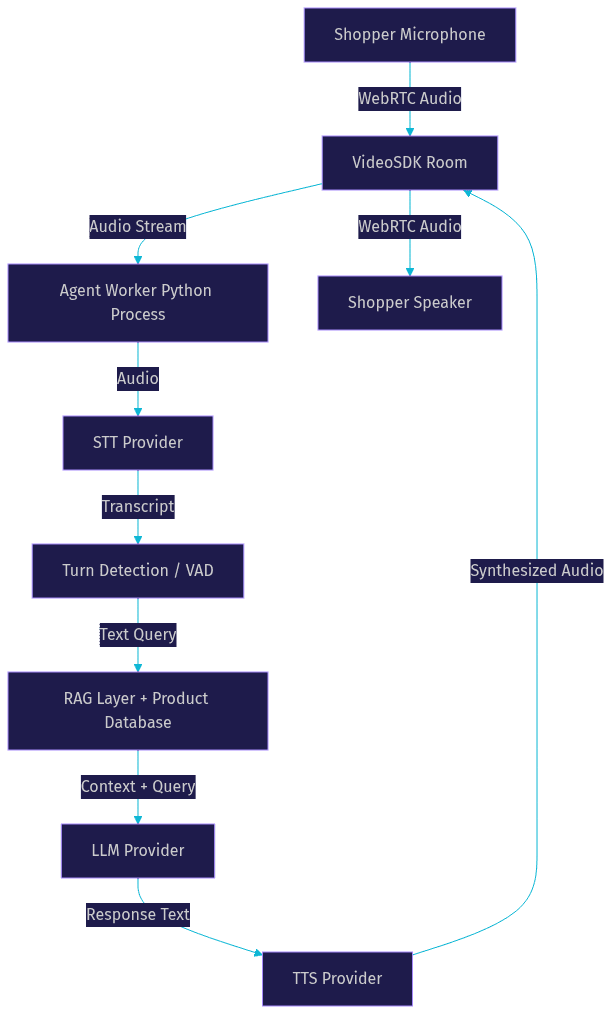
The end-to-end system for a live commerce voice agent follows a straightforward but latency-sensitive data flow. The shopper's microphone audio travels through a WebRTC connection to a VideoSDK room, where an agent worker process listens to the audio stream. The worker forwards the audio to an STT service, which returns incremental transcripts. When the system detects that the shopper has finished speaking, the transcript is sent to an LLM along with relevant product context retrieved from a RAG layer. The LLM generates a response, which is passed to a TTS engine. The synthesized audio is then streamed back into the VideoSDK room and delivered to the shopper's speaker.
Key Components
The architecture depends on five core components working in concert. Real-time audio transport is handled by VideoSDK Rooms, which provide the WebRTC-based SFU (Selective Forwarding Unit) that routes audio between the shopper and the agent worker. The W3C WebRTC specification defines the underlying protocol that makes this low-latency transport possible.
The STT provider transcribes incoming audio with low latency and high accuracy. The LLM handles product reasoning, natural language generation, and tool calls for product lookups. The TTS engine converts text responses into natural speech. Finally, a product data store with a RAG layer supplies the LLM with accurate, up-to-date catalog information so responses are grounded in real product data rather than model hallucinations.
Selecting STT, LLM, and TTS Providers
Choosing the right providers for each pipeline stage is the single most important decision when you build an AI voice agent for live commerce. Each provider trades off accuracy, latency, cost, and language coverage differently.
For Speech-to-Text, AssemblyAI and OpenAI Whisper are popular choices. AssemblyAI tends to offer strong entity recognition for product names and SKUs, which matters when shoppers reference specific items. Google Cloud Speech-to-Text provides solid multi-language support. According to Artificial Analysis's Speech Arena benchmark, word-error-rate differences between top providers are narrowing, but latency variance remains significant across vendors.
For the LLM layer, OpenAI GPT-4o, Anthropic Claude, and Google Gemini Live each bring different strengths. GPT-4o offers fast inference and strong tool-calling for product database queries. Claude excels at nuanced, safety-conscious responses. Gemini Live supports native audio input, which can eliminate the separate STT stage for some use cases. The choice depends on your product catalog complexity and whether you need structured tool calls for RAG retrieval.
For Text-to-Speech, ElevenLabs, Cartesia Sonic, and Azure Speech are leading options. ElevenLabs is known for natural prosody and emotional range. Cartesia Sonic prioritizes ultra-low latency, which is critical for live commerce. Azure Speech offers broad language coverage and enterprise-grade reliability.
Decision Matrix
[LINKABLE ASSET: comparison table]
| Criterion | STT Priority | LLM Priority | TTS Priority |
|---|---|---|---|
| Accuracy / WER | High | N/A | Medium |
| Response Latency | Critical | Critical | Critical |
| Cost per Minute | Medium | Medium | Medium |
| Multi-language | High | Medium | High |
| Tool Calling | N/A | High | N/A |
| Voice Naturalness | N/A | N/A | High |
The most important row is latency. In a live commerce context, every 100 milliseconds of added round-trip delay degrades the conversational experience. Prioritize providers that offer streaming inference rather than batch processing at every stage.
Building the Real-Time Pipeline
Building the real-time pipeline requires orchestrating audio transport, speech recognition, language model inference, and speech synthesis into a single coordinated flow. Here is the step-by-step process.
Step 1: Provision a VideoSDK Room and Generate a Meeting Token
VideoSDK uses token-based authentication. You need to generate a meeting token server-side using your API key and secret, then pass it to the SDK on the client side. Never expose your API secret on the frontend. Always generate tokens server-side using the VideoSDK REST API. Create a room, retrieve its room ID, and generate a token that authorizes the shopper to join. The token should be scoped with appropriate permissions and an expiry that covers the expected session duration.
Step 2: Connect the Shopper's Microphone to the Room
Once the shopper joins the VideoSDK room using their token, the client SDK captures microphone audio and publishes it as an audio track within the room. The agent worker process, also joined to the same room as a participant, subscribes to the shopper's audio track and receives the raw audio stream in real time over WebRTC.
Step 3: Stream Audio to the STT Service
The agent worker forwards the incoming audio stream to your chosen STT provider. Most modern STT providers support streaming WebSocket connections that return partial transcripts as the user speaks and finalize them when the user pauses. The worker collects these incremental transcripts and monitors them for completeness.
Step 4: Detect Turn Boundaries and Forward to the LLM
Turn detection is the mechanism that decides when the shopper has finished speaking and the agent should respond. VideoSDK's AI Agent SDK includes built-in Voice Activity Detection that monitors the audio stream for silence. When the VAD detects a pause of a configurable duration, the worker finalizes the transcript and sends it to the LLM along with any retrieved product context from the RAG layer.
Step 5: Synthesize and Stream the Response
The LLM generates a text response, which the worker passes to the TTS engine. The TTS provider synthesizes the text into audio and streams it back. The worker publishes this audio as a track into the VideoSDK room, and the shopper hears the response through their speaker. The entire round trip from the shopper finishing their sentence to hearing the first word of the response should take under 500 milliseconds.
Handling Barge-In
Barge-in occurs when a shopper starts speaking while the agent is still delivering a TTS response. Without handling this, the agent talks over the shopper and the conversation breaks down. The agent worker must continuously monitor the incoming audio stream even during TTS playback. When the VAD detects speech during playback, the worker immediately stops the TTS audio stream, cancels any remaining buffered synthesis, and switches back to listening mode. This creates a natural, interruptible conversation flow that mirrors human interaction.
Integrating Product Data and RAG
A live commerce voice agent is only as good as its product knowledge. Without grounding the LLM in real catalog data, responses will be generic or factually wrong. Retrieval-Augmented Generation solves this by fetching relevant product information and injecting it into the LLM's context before generating a response.
The process works as follows. Product metadata, including names, descriptions, pricing, specifications, and availability, is stored in a vector database such as Supabase pgvector or Pinecone. Each product is embedded as a vector using an embedding model. When the shopper asks a question, the agent worker converts the query into an embedding and performs a similarity search against the product vector store. The top matching products are retrieved and formatted into a structured context block that is passed to the LLM alongside the user's transcript.
The LLM then generates a response that references the retrieved products directly. For example, if a shopper asks about available sizes in a specific color, the RAG layer fetches the relevant product variant data and the LLM can answer accurately. When retrieval returns no relevant results, the system falls back to a static FAQ or a graceful response indicating the information is unavailable, rather than hallucinating product details.
This approach keeps product answers accurate and current. When the catalog changes, you only need to update the vector database, not retrain the LLM. The RAG layer acts as the bridge between your live commerce inventory system and the conversational AI pipeline.
Deploying and Scaling with VideoSDK
VideoSDK's cloud-hosted SFU architecture handles the scaling demands of live commerce, where thousands of concurrent shoppers may join a single shopping event. Unlike peer-to-peer WebRTC, which limits participants, an SFU routes media streams through a server that scales horizontally. VideoSDK manages this infrastructure automatically.
For deployment, the agent worker process can run on VideoSDK's managed Agent Cloud or be self-hosted using Docker or Kubernetes. The managed option reduces operational overhead, while self-hosting gives you full control over the runtime environment and network configuration.
Token-based authentication ensures that only authorized shoppers can join rooms and interact with the voice agent. Tokens are generated server-side with scoped permissions and expiry times. Geo-fencing routes connections through the nearest VideoSDK data center, reducing latency for shoppers in different regions.
For teams that need to ship quickly, VideoSDK's Prebuilt UI Kit provides a drop-in interface that handles participant join flows, device selection, and audio controls without custom UI code. You can embed a working live commerce voice experience with minimal frontend work while the agent worker handles the AI pipeline on the backend.
Testing, Monitoring, and Optimizing Latency
Testing a live commerce voice agent requires both synthetic and real-world validation. Start with synthetic audio load testing to measure baseline latency under controlled conditions. Then test with real-world accents, background noise, and varied speaking speeds to evaluate STT robustness.
The primary metric to track is round-trip latency: the time from when the shopper stops speaking to when the first word of the response reaches their speaker. Target under 500 milliseconds. Break this down into STT finalization time, LLM first-token time, TTS first-audio time, and network transport time. VideoSDK's session analytics provide audio packet loss, jitter, and round-trip time data that helps isolate network issues from pipeline issues.
Monitor STT word-error-rate continuously, especially for product names and SKU references. Track LLM response time percentiles, not just averages, to catch tail latency spikes that degrade the experience for some shoppers.
Best Practices and Common Pitfalls
Several practical lessons emerge from building production voice agents for live commerce. Avoid long-running TTS buffers that delay the first audio chunk. Stream TTS output as soon as the first sentence is ready rather than waiting for the full response. Handle token expiry gracefully by refreshing tokens before they lapse, not after. Guard against LLM hallucinations by always grounding responses in RAG-retrieved data and setting system prompts that instruct the model to decline when context is insufficient. Ensure GDPR-compliant data handling by configuring recording and transcription retention policies in VideoSDK and avoiding storage of personally identifiable audio beyond the session. Test barge-in handling thoroughly, as poor interruption handling is the most common reason voice agents feel unnatural. Finally, always test on real mobile devices over cellular networks, not just desktop browsers on fast connections.
Definitions Glossary
Room: A VideoSDK meeting room that participants join to share real-time audio and video streams, identified by a unique room ID and secured by a meeting token.
Agent Worker: The Python process that runs a VideoSDK AI agent, managing its session lifecycle inside a room and orchestrating the STT, LLM, and TTS pipeline.
Turn Detection: The mechanism that decides when a user has finished speaking and the AI agent should begin responding, typically using Voice Activity Detection to monitor for silence.
RAG (Retrieval-Augmented Generation): A technique that fetches relevant data from an external knowledge base and injects it into an LLM's context to ground responses in factual, up-to-date information.
Barge-In: The ability of a user to interrupt an AI agent's spoken response by starting to speak, causing the agent to stop playback and switch back to listening mode.
SFU (Selective Forwarding Unit): A media server architecture that routes audio and video streams between participants without mixing or transcoding, enabling scalable real-time communication.
Key Takeaways
- An AI voice agent for live commerce requires a coordinated STT, LLM, and TTS pipeline with sub-500-millisecond round-trip latency to feel conversational.
- VideoSDK provides the WebRTC-based room infrastructure and AI Agent SDK that connects shoppers to the voice pipeline over real-time audio transport.
- RAG integration is essential for grounding product responses in accurate catalog data and preventing hallucinations during live shopping events.
- Barge-in handling and turn detection are the most critical conversational UX features, and poor implementation is the top reason voice agents feel unnatural.
- VideoSDK's cloud-hosted SFU scales to thousands of concurrent shoppers with geo-fencing and token-based authentication for production deployment.
Conclusion
Building an AI voice agent for live commerce is a multi-layered engineering challenge that rewards careful provider selection, tight latency optimization, and robust product data integration. VideoSDK's real-time communication infrastructure handles the hardest part: transporting audio between shoppers and your AI pipeline with sub-second latency at scale. By combining VideoSDK's AI Agent SDK with your preferred STT, LLM, and TTS providers, and grounding responses in a RAG-powered product catalog, you can ship a voice shopping experience that converts. Start building with VideoSDK's free tier and explore the code samples to see the pipeline in action. What are you building with VideoSDK? Drop a comment below, I'd love to hear what kind of live commerce voice experience you're working on.
FAQ