


An AI voice agent for the aviation industry is a real-time, speech-driven assistant that processes pilot and controller audio through a pipeline of speech-to-text, large language model reasoning, retrieval-augmented generation, and text-to-speech to deliver hands-free operational support. VideoSDK provides the AI Agent SDK and Conversational Graph needed to orchestrate this pipeline with sub-second latency over WebRTC, while enforcing deterministic conversation flows required for safety-critical ATC interactions. Start by mapping your aviation use case to VideoSDK's agent architecture, then layer in domain-specific data sources and regulatory checks.
Pilots, air traffic controllers, and maintenance crews operate in environments where hands are occupied, eyes are forward, and every second of latency matters. A voice assistant that can pull up a METAR weather report, look up a clearance, or query a maintenance manual without anyone touching a screen is not a convenience feature. It is an operational necessity.
This guide walks you through how to build an AI voice agent for the aviation industry using VideoSDK's AI Agent SDK as the orchestration layer. By the end, you will have a clear architecture for a production-ready voice agent that handles noisy cockpit audio, integrates real-time aviation data, and enforces deterministic conversation flows for safety-critical interactions.
Understanding Aviation-Specific Requirements
Aviation is one of the most regulated domains in software engineering, and any voice agent deployed in this space inherits constraints that consumer AI assistants never face.
Regulatory frameworks from the FAA and EASA govern how software interacts with flight operations. Any AI system that touches communication, navigation, or aircraft status data must comply with standards for software safety, data integrity, and auditability. Developers building aviation voice agents need to design with compliance in mind from day one, not bolt it on later.
Latency expectations are equally unforgiving. Air traffic control communications demand near-instantaneous response. If a pilot requests a clearance and the agent takes three seconds to process and respond, that delay creates a gap in the communication loop that can cascade into operational risk. The entire pipeline, from voice activity detection through speech-to-text, LLM reasoning, and text-to-speech, must complete in under one second for ATC-adjacent use cases.
The acoustic environment adds another layer of complexity. Cockpits and tarmacs are loud. Engine noise, radio interference, and cabin pressurization systems create audio conditions that degrade STT accuracy significantly compared to quiet-room benchmarks. Your voice agent needs aggressive noise suppression and VAD tuning calibrated for aviation audio profiles.
Data sources for an aviation voice agent are diverse: flight plans, METAR and TAF weather feeds, NOTAMs, aircraft technical manuals, and maintenance logs. Each source has its own API, update cadence, and data format. Finally, safety-critical conversations require deterministic flows. You cannot let an LLM improvise a clearance delivery sequence. The conversation must follow a defined path with explicit transitions and safety checks at every node.
Core Components of an Aviation AI Voice Agent
Every aviation voice agent rests on four pillars: speech-to-text, large language model reasoning, text-to-speech, and orchestration. Each pillar has specific requirements in an aviation context.
Speech-to-text for aviation must handle accented English, radio communication phrasing, and high-noise environments. OpenAI Whisper is a strong baseline, and specialized models trained on ATC corpora can reduce word-error-rate significantly on aviation-specific vocabulary. Deepgram's Nova models also perform well on noisy audio and offer streaming inference with low latency.
The LLM layer handles natural language understanding, intent extraction, and response generation. Google Gemini is a compelling choice for aviation because of its large context window, which is useful when feeding in flight plan data and weather reports alongside the conversation history. OpenAI's GPT-4o and Anthropic Claude are also viable, with the choice often coming down to latency, cost, and tool-calling reliability.
Text-to-speech in aviation needs clarity above all. The output must be intelligible over cockpit speakers or headsets in noisy conditions. ElevenLabs provides highly natural voices, while Azure Speech Service offers neural voices with good clarity and robust deployment options. The key is selecting a TTS provider that balances naturalness with the crisp articulation needed for readbacks and clearances.
Orchestration ties everything together. VideoSDK's AI Agent SDK provides the agent worker process, pipeline hooks, turn detection, and voice activity detection needed to manage the real-time flow. It also handles the WebRTC transport layer, so audio streams between the user and the agent with sub-second latency.
| Component | Recommended Provider | Aviation Strength | Best For |
|---|---|---|---|
| STT | OpenAI Whisper / Deepgram Nova | Handles noisy audio, ATC vocabulary | Cockpit and tarmac environments |
| LLM | Google Gemini / OpenAI GPT-4o | Large context for flight data, tool calling | Intent extraction and response generation |
| TTS | ElevenLabs / Azure Speech | Clear articulation over headsets | Clearance readbacks and weather reports |
| Orchestration | VideoSDK AI Agent SDK | WebRTC transport, deterministic flows, VAD | Real-time pipeline management |
[LINKABLE ASSET — comparison table]
The table above summarizes the core stack. In practice, the orchestration layer is the most critical decision because it determines how the other three components interact and whether you can enforce deterministic conversation flows.
High-Level Architecture Overview
The end-to-end flow of an aviation voice agent follows a linear pipeline with feedback loops for tool calls and safety checks. Audio enters from the user's microphone, passes through voice activity detection to identify speech segments, then moves to the STT service for transcription. The orchestrator receives the transcript, routes it to the LLM with relevant context, and the LLM may invoke tool calls to fetch flight plan data, weather information, or maintenance manual excerpts. The LLM response is sent to the TTS service, and the resulting audio is played back to the user over WebRTC.
VideoSDK's Agent Worker sits at the center of this pipeline, managing the session lifecycle, handling turn detection, and coordinating the STT, LLM, and TTS stages through pipeline hooks.
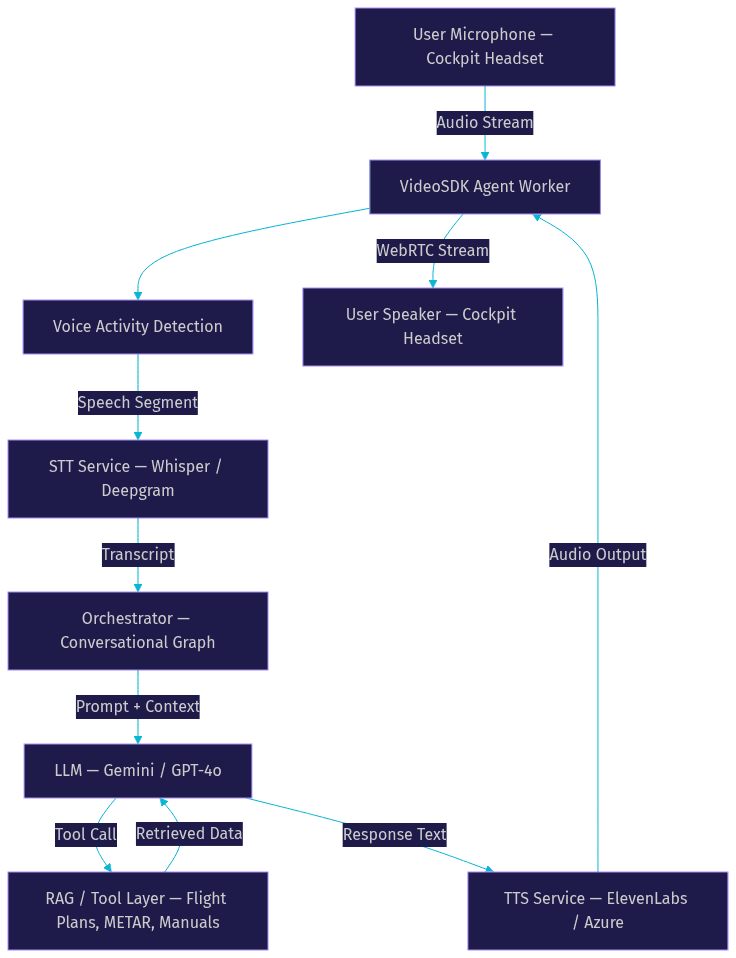
The diagram shows how the VideoSDK Agent Worker acts as the central node, receiving audio, routing it through the pipeline, and returning synthesized speech. The RAG and tool layer is a branch, not a linear stage, because the LLM may make multiple tool calls during a single turn before generating a final response.
Setting Up the Development Environment
Before building the pipeline, you need the right foundation. Your development environment must include Python 3.11 or later, since VideoSDK's AI Agent SDK is Python-based and relies on modern async features for real-time pipeline management.
Create a VideoSDK account through the VideoSDK dashboard to obtain your API key and secret. You will need these to generate authentication tokens for your agent sessions. VideoSDK uses token-based authentication where tokens are generated server-side using your API key and secret, then passed to the agent worker to authorize session creation. Never expose your API secret in client-side code or commit it to version control.
For the AI providers, you need API access to your chosen STT, LLM, and TTS services. OpenAI provides access to Whisper and GPT-4o through their platform. Google Cloud offers Gemini through the Google AI Studio or Vertex AI. ElevenLabs requires an account and API key for TTS access. Each provider has its own authentication mechanism, typically an API key passed in request headers.
For aviation data, identify the APIs you will integrate. Flight plan services, METAR and TAF weather feeds, and NOTAM databases each have their own access requirements. Some are free public feeds, while others require organizational agreements. If you are using a vector store like Qdrant for RAG over maintenance manuals, you need a Qdrant instance running locally or in the cloud.
You also need a cloud provider for hosting the agent worker in production. VideoSDK supports both managed Agent Cloud deployment and self-hosted options using Docker or Kubernetes. For development, a local environment is sufficient, but production deployment requires a server with sufficient CPU and memory to handle real-time audio processing.
Designing the Orchestrator and Conversation Flow
The orchestrator is where aviation voice agents diverge most sharply from consumer assistants. In a consumer context, you want the LLM to handle open-ended conversation with flexibility. In aviation, you need deterministic flows where every step happens in a defined order and business rules, not LLM judgment, control branching.
VideoSDK's Conversational Graph is built for exactly this use case. Instead of prompting the LLM to manage conversation flow, you define the flow as a directed graph with nodes, transitions, actions, state, and extractors. The LLM only handles natural language generation within each node.
For an ATC simulation agent, you would model each communication phase as a node. A clearance delivery node handles initial route and altitude clearance. A ground control node manages taxi instructions. A tower node handles takeoff and landing clearance. Each node has defined transitions to the next phase, and the graph enforces that a pilot cannot skip from clearance delivery directly to tower without passing through ground control.
State management is critical. The conversation state holds the current flight plan, assigned squawk code, taxi route, and runway information. This state is modeled as a Pydantic data structure that the graph updates as the conversation progresses. Extractors pull specific information from user speech, such as a callsign or altitude readback, and validate it against expected values.
Safety checks are embedded at transition points. Before moving from one node to the next, the graph can verify that a readback matches the issued clearance. If the readback is incorrect, the transition is blocked and the agent re-issues the clearance. This is the kind of deterministic enforcement that prompt engineering alone cannot reliably achieve.
Every aviation voice agent must include a fallback to a human operator. If the agent encounters an unrecognized intent, a confidence threshold is not met, or a safety check fails repeatedly, the Conversational Graph can trigger a human-in-the-loop transition that pauses the agent and alerts a human controller. This is not a failure mode. It is a designed safety boundary.
Integrating Aviation Data Sources
An aviation voice agent is only as useful as the data it can access. The integration layer connects your agent to the external systems that hold flight plans, weather data, and technical manuals.
Flight plan APIs provide structured data about routes, waypoints, altitudes, and estimated times. When a pilot asks about their route, the LLM makes a tool call to the flight plan service, retrieves the relevant data, and incorporates it into the response. The tool call pattern works well here because flight plan data is structured and queryable by flight number or callsign.
METAR and TAF weather feeds are essential for any aviation voice agent. METAR reports provide current weather conditions at a specific airport, while TAF reports give forecasts. These feeds are available through public APIs and follow standardized formats. Your agent can parse the raw METAR string and have the LLM translate it into plain language for the pilot, or read back the raw format if the pilot requests it.
Aircraft maintenance manuals are where RAG becomes essential. A single aircraft type can have thousands of pages of technical documentation across multiple manuals. Loading all of that into an LLM context window is impractical and expensive. Instead, you store the manuals as vector embeddings in a vector database like Qdrant. When a maintenance crew member asks about a specific procedure, the agent retrieves the most relevant passages and feeds them to the LLM as context.
The RAG pipeline works as follows. The user's question is converted to a vector embedding. Qdrant performs a similarity search against the stored manual embeddings and returns the top matches. These matches are inserted into the LLM prompt as context, and the LLM generates a response grounded in the actual manual text. This reduces hallucination risk, which is critical in aviation where incorrect maintenance guidance can have severe consequences.
Securing the data pipeline is non-negotiable. API keys for flight plan and weather services must be stored in environment variables or a secrets manager, never hardcoded. The connection between your agent and the vector database should use TLS encryption. If you are handling maintenance data that contains proprietary aircraft manufacturer information, enforce access controls so that only authorized personnel can query specific manual sets.
Handling Real-World Audio Challenges
The acoustic environment in aviation is hostile to voice AI. Engine noise on the tarmac can exceed 100 decibels. Cockpit noise from avionics fans and pressurization systems creates a constant low-frequency rumble. Radio communications introduce static and compression artifacts.
Noise suppression is your first line of defense. VideoSDK's AI Agent SDK includes built-in de-noise capabilities that filter background noise before the audio reaches the STT service. This preprocessing step can significantly improve transcription accuracy in noisy environments.
Voice activity detection tuning is the second critical adjustment. Default VAD thresholds are calibrated for quiet-room speech. In a cockpit, you need to raise the energy threshold so that engine noise does not trigger false speech detection, while keeping it low enough that softer speech from a fatigued pilot is still captured. VideoSDK's VAD configuration lets you adjust these parameters to match the aviation acoustic profile.
Bandwidth is another concern, particularly for general aviation aircraft using satellite-based connectivity. VideoSDK's network-adaptive streaming automatically adjusts bitrate and audio quality based on available bandwidth, ensuring the agent maintains a connection even on constrained links. This is the same technology that powers VideoSDK's video calling SDK, adapted for the audio-only agent pipeline.
Testing, Monitoring, and Production Deployment
Testing an aviation voice agent requires a layered approach because each pipeline stage can fail independently. Start with unit-level testing of each component. Verify that your STT provider accurately transcribes sample ATC audio with background noise. Test your LLM tool-calling logic with mock flight plan and weather data. Validate that your TTS output is intelligible when played through aviation headsets rather than studio monitors.
End-to-end testing should simulate full ATC sessions. Record sample conversations between pilots and controllers, then play the pilot audio through your agent and compare the agent's responses to the expected controller responses. Measure word-error-rate on the STT stage, response latency for the full pipeline, and turn-detection accuracy. These metrics form your baseline for production monitoring.
VideoSDK provides session analytics and health-check endpoints that you can use for ongoing monitoring in production. Track median and p95 latency for the full pipeline. Monitor STT confidence scores to detect degradation in audio quality. Watch for turn-detection errors where the agent interrupts the user or fails to respond after the user stops speaking.
For production deployment, VideoSDK's Agent Cloud offers a managed environment that handles scaling and infrastructure. If you need more control, self-hosting with Docker or Kubernetes is fully supported. Either way, ensure your deployment includes automated restarts on failure, log aggregation for debugging, and alerting on latency threshold breaches.
Regulatory compliance in production means maintaining audit logs of all agent interactions, ensuring data residency requirements are met, and having a documented fallback procedure for when the agent is unavailable. The agent should never be the sole communication path for safety-critical operations. It augments human controllers and pilots, it does not replace them.
Future Enhancements and Scaling
Once your aviation voice agent is in production, scaling and enhancement paths open up. Multi-agent architectures allow you to run separate agent instances for simultaneous flights, each with its own conversation state and data context. VideoSDK's multi-agent switching capability lets you coordinate these instances and route conversations based on callsign or flight phase.
Adding visual overlays via WebRTC is a natural extension. A pilot could receive a visual clearance confirmation on a cockpit display while the agent reads it back verbally. VideoSDK's custom video track feature makes it possible to send generated visual content alongside the audio stream, creating a multi-modal interaction without changing the underlying transport layer.
Extending to telephony and SIP bridges the gap between WebRTC-based agents and traditional ground-to-air radio systems. VideoSDK's telephony integration provides inbound and outbound SIP gateways that connect standard phone lines and radio bridges to VideoSDK rooms. This means your agent can participate in ground-to-air communications through existing infrastructure without requiring pilots to use a separate app or device.
Definitions Glossary
Conversational Graph: A deterministic, graph-based conversation orchestration layer in VideoSDK that defines conversation flow as nodes and transitions, with the LLM handling only natural language generation within each node.
Voice Activity Detection (VAD): The mechanism that determines when a user has started and stopped speaking, triggering the STT and response pipeline. In aviation, VAD thresholds must be tuned for high-noise cockpit environments.
RAG (Retrieval-Augmented Generation): A technique where relevant document passages are retrieved from a vector database and provided as context to an LLM, grounding responses in source material such as aircraft maintenance manuals.
METAR: A standardized aviation weather report format providing current conditions at an airport, including visibility, wind, cloud cover, and temperature.
Agent Worker: The Python process in VideoSDK's AI Agent SDK that manages the real-time session lifecycle, coordinates the STT, LLM, and TTS pipeline stages, and handles the WebRTC transport layer.
Key Takeaways
Aviation voice agents require deterministic conversation flows enforced by a graph-based orchestrator like VideoSDK's Conversational Graph, not open-ended LLM prompting, because safety-critical interactions cannot rely on probabilistic language model behavior.
The core stack of STT, LLM, TTS, and orchestration must be selected with aviation-specific constraints in mind: noisy audio, accented speech, regulatory compliance, and sub-second latency requirements.
RAG over aircraft maintenance manuals using a vector database like Qdrant grounds LLM responses in authoritative technical documentation, reducing hallucination risk in a domain where incorrect guidance can be catastrophic.
VideoSDK's AI Agent SDK provides the WebRTC transport, VAD, turn detection, and pipeline orchestration needed to ship a production-ready aviation voice agent with the low latency that ATC-adjacent use cases demand.
Every aviation voice agent must include a human fallback path, audit logging, and a deployment architecture where the agent augments rather than replaces human operators.
Conclusion
Building an AI voice agent for the aviation industry is fundamentally an orchestration and integration problem. The STT, LLM, and TTS components are powerful, but they only become safe and useful in aviation when wrapped in a deterministic conversation framework, connected to authoritative data sources, and deployed with the latency and reliability that flight operations require. VideoSDK's AI Agent SDK and Conversational Graph give you the orchestration layer, the WebRTC transport, and the pipeline hooks to bring these pieces together without building the real-time infrastructure from scratch. If you are ready to start building, head to the VideoSDK AI Agents documentation or explore the code samples on the VideoSDK GitHub. What are you building with VideoSDK? Drop a comment below, I would love to hear what kind of aviation voice agent use case you are working on.
Free $20 Balance for AI Voice Agents & Video Calls
FAQ