


Building an AI voice agent for appointment booking involves connecting a telephony gateway, a speech-to-text service, a large language model, a text-to-speech engine, and a calendar API. VideoSDK's AI Agent SDK hosts the AI pipeline, handles token authentication, and scales the solution. Follow the step-by-step guide below.
Introduction
Missed calls and double-booked calendars cost businesses thousands of dollars every month. A receptionist can only handle one caller at a time, and after-hours bookings simply never happen. An AI voice agent solves this by answering every call instantly, understanding natural language, and booking appointments directly into your calendar system.
VideoSDK provides the infrastructure to build and deploy this kind of agent without stitching together half a dozen fragile services. Its AI Agent SDK manages the real-time media pipeline, connects to major STT and TTS providers, and integrates telephony through SIP. By the end of this guide, you will understand the full architecture and have a clear implementation path for a production-ready appointment booking voice agent.
What is an AI Voice Agent for Appointment Booking?
An AI voice agent for appointment booking is a software system that conducts natural spoken conversations with callers to schedule, reschedule, or cancel appointments without human intervention. Unlike traditional interactive voice response systems that force callers through rigid menu trees, an AI voice agent understands open-ended speech and adapts its responses dynamically.
The core capabilities include recognizing spoken dates and times, checking real-time calendar availability, proposing alternative slots, confirming bookings, and writing them to a calendar system. The agent can handle follow-up questions, clarify ambiguous requests, and gracefully transfer to a human when a conversation exceeds its capabilities.
VideoSDK provides the foundation for this through its AI Agent SDK, which manages the real-time audio pipeline between the caller and the AI models. The SDK handles session lifecycle, turn detection, and voice activity detection so you can focus on the conversation logic and calendar integration rather than low-level audio processing.
Key Components of an Appointment-Booking Voice Agent
A production-grade appointment booking voice agent requires six interconnected components. Each plays a specific role in the pipeline, and understanding how they interact is essential before you start building.
Speech-to-Text
The speech-to-text component transcribes the caller's spoken audio into text in real time. Accuracy and latency are the two critical metrics here. Deepgram's Nova-3 model and OpenAI Whisper are popular choices, with Deepgram consistently scoring well on conversational audio benchmarks. VideoSDK's Agent SDK integrates with both providers through its plugin system, so you can swap STT engines without rewriting your pipeline.
Large Language Model
The large language model processes the transcribed text, understands intent, and generates a natural response. For appointment booking, the LLM must handle date parsing, slot-filling logic, and context retention across multiple turns. OpenAI's GPT-4o and Google's Gemini are strong choices for this use case because they support function calling, which lets the agent trigger calendar lookups as structured tool calls rather than freeform text.
Text-to-Speech
The text-to-speech component converts the LLM's text response back into spoken audio. Latency matters enormously here because the gap between the caller finishing a sentence and hearing a response defines the perceived quality of the conversation. ElevenLabs and Cartesia Sonic are widely used for their natural-sounding output and low synthesis latency. VideoSDK's Agent SDK includes TTS caching, which stores frequently used responses to cut synthesis time on repeated phrases.
Calendar Integration
The calendar integration component connects the agent to a real scheduling system. Google Calendar API is the most common choice, but Microsoft Graph API and Calendly also work. The agent needs to query available slots, create events, and update or delete them when callers reschedule or cancel. This is typically implemented as a function tool that the LLM calls during the conversation.
Telephony Gateway
The telephony gateway bridges traditional phone networks to your AI agent. Twilio is the most widely used provider, offering inbound voice webhooks and media streaming over WebSocket. When a caller dials your number, Twilio forwards the audio stream to your agent and relays the agent's audio response back to the caller. VideoSDK's telephony integration supports Twilio, Telnyx, Vonage, and Plivo through its SIP inbound gateway.
VideoSDK AI Agent Cloud
VideoSDK AI Agent Cloud is the hosting and orchestration layer that ties everything together. It runs the Python-based agent worker, manages the real-time media session, and handles scaling. You can deploy your agent to VideoSDK's managed cloud or self-host using Docker. The Agent Cloud handles session persistence, observability, and automatic reconnection so your agent stays responsive even under network instability.
Architecture Overview: How to Build AI Voice Agent for Appointment Booking
The architecture follows a unidirectional flow where audio enters from the phone network, gets processed through the AI pipeline, and returns as synthesized speech. Understanding this flow is critical because a bottleneck at any stage degrades the entire conversation.
When a caller dials your Twilio number, Twilio initiates a media stream session and forwards the caller's audio to VideoSDK's SIP inbound gateway. VideoSDK creates a room and spawns an agent worker process that joins that room as a participant. The agent worker receives the caller's audio track and passes it through the pipeline.
The STT engine transcribes the incoming audio in real time. The transcription is fed to the LLM along with the conversation history and any available calendar context. The LLM determines the next action: it might ask a clarifying question, call a calendar function tool to check availability, or confirm a booking. The generated response text is sent to the TTS engine, which produces audio that the agent worker publishes back into the VideoSDK room. VideoSDK routes that audio through the SIP gateway back to Twilio, and Twilio plays it to the caller.
Here is the architecture diagram showing the complete data flow:
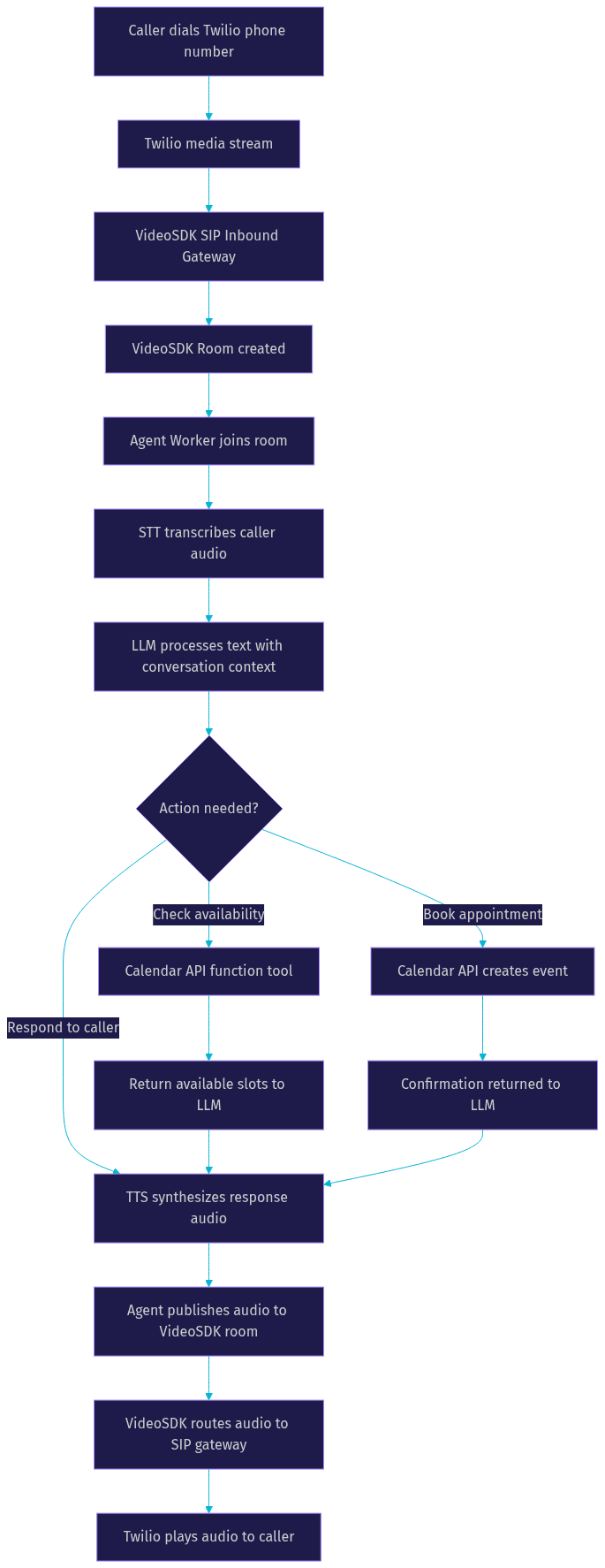
The entire round trip from caller speech to agent response should complete in under one second for a natural conversation. VideoSDK's architecture is designed to keep this latency low by running the STT, LLM, and TTS components within the same agent worker process, avoiding network hops between pipeline stages.
Step-by-Step Implementation Guide
Building the agent involves five major steps. Each step builds on the previous one, so complete them in order.
Step 1: Set Up Your VideoSDK Agent Environment
Start by creating a VideoSDK account through the developer portal. Once registered, you will receive an API key and secret key. These credentials are used to generate authentication tokens that authorize your agent worker to join VideoSDK rooms.
You need a token server running on your backend. This server accepts requests from your application, generates a short-lived JWT using your API key and secret, and returns it to the client or agent worker. Never expose your secret key in client-side code or in your agent's environment variables on unsecured infrastructure. The token server should be hosted on a reliable endpoint with HTTPS enabled.
VideoSDK's authentication documentation covers the token generation process in detail. The token includes a room ID, participant permissions, and an expiry timestamp. For appointment booking agents, set a token expiry that matches your expected call duration plus a buffer for long conversations.
Step 2: Configure Twilio for Inbound Calls
Provision a phone number through Twilio's console. Twilio offers local numbers in most countries, and you can port existing numbers if you already have one. Once you have a number, configure its voice webhook to point to your application's endpoint.
When a call comes in, Twilio sends an HTTP request to your webhook URL. Your server responds with instructions to start a media stream, which opens a bidirectional WebSocket connection between Twilio and your agent infrastructure. The media stream carries the caller's audio in real time using mulaw encoding at 8kHz.
VideoSDK's telephony integration simplifies this by providing a SIP inbound gateway that accepts Twilio's media stream directly. You configure Twilio to route calls to your VideoSDK SIP endpoint instead of building a custom WebSocket handler. The telephony documentation walks through the specific Twilio configuration needed for inbound call routing.
Step 3: Connect to Google Calendar
Create a Google Cloud service account with access to the Google Calendar API. Download the service account credentials as a JSON key file and store it securely on your server. Share the target calendar with the service account's email address and grant it editor permissions.
The service account needs the calendar events scope to read, create, and modify events. Your agent calls the Calendar API through function tools that the LLM invokes during the conversation. The three core functions you need are: list available slots for a given date range, create a new event with a caller's details, and cancel an existing event by ID.
Keep the calendar queries fast by caching availability for short periods. If a caller asks about Tuesday morning and then asks again thirty seconds later, the cache prevents a redundant API call. Just make sure the cache expires quickly enough that newly booked slots are reflected in subsequent queries.
Step 4: Design the Conversation Flow
The conversation flow is the logic that guides the agent from greeting the caller to confirming the booking. Start with a clear system prompt that defines the agent's role, tone, and constraints. For an appointment booking agent, the prompt should specify that the agent collects the caller's name, preferred date, preferred time, and reason for the visit before attempting to book.
Slot-filling is the technique of gathering required information across multiple turns. The agent asks for one piece of information at a time, confirms it, and moves to the next. If the caller provides multiple pieces at once, the agent should acknowledge all of them and ask for any missing slots.
VideoSDK's Conversational Graph is ideal for this use case because it lets you define the conversation as a deterministic state machine. Instead of relying on the LLM to decide what to ask next, you define nodes for each conversation step and transitions that control the flow. This ensures every caller goes through the same booking process regardless of how the conversation unfolds.
Define fallback handling for cases where the caller says something unexpected. If the caller asks to speak to a human, the agent should acknowledge the request and initiate a call transfer. If the caller provides a date that has no available slots, the agent should proactively suggest the next available date rather than simply saying nothing is available.
Step 5: Deploy and Test the Agent
Deploy your agent to VideoSDK Agent Cloud for managed hosting, or use Docker for self-hosted deployment. In staging, test with internal phone numbers before pointing your production Twilio number at the agent. Make test calls that cover the common scenarios: new booking, rescheduling, cancellation, and out-of-scope requests.
Monitor latency at each pipeline stage during testing. VideoSDK's pipeline observability tools show the time spent in STT, LLM processing, and TTS synthesis for every turn. If you notice the LLM taking more than 800 milliseconds to respond, consider switching to a faster model or reducing the context window size.
Perform live test calls with real phone numbers to verify audio quality. Listen for artifacts, clipping, or unnatural pauses. Test with different phone types and network conditions to ensure the agent handles variable audio quality gracefully. Once you are satisfied with staging performance, update your Twilio webhook to point to the production endpoint and monitor the first few live calls closely.
Handling Common Challenges
Even a well-designed appointment booking agent encounters edge cases. Preparing for them in advance prevents poor caller experiences.
Managing Ambiguous Dates
Callers rarely speak in precise terms. They say "next Tuesday," "the week after," or "sometime next week." Your LLM prompt should instruct the agent to always confirm ambiguous dates by restating them in absolute terms: "Just to confirm, you would like to book for Tuesday, July 14th. Is that correct?" This prevents bookings on the wrong day and builds caller confidence.
If the caller says "this afternoon," the agent should check the current time and propose specific available slots rather than asking the caller to be more specific. The more the agent can infer, the shorter the conversation and the better the experience.
Ensuring Low Latency
Latency is the single most important quality metric for voice agents. A conversation feels natural when the round-trip time from caller speech to agent response stays under one second. To achieve this, use streaming STT that returns partial transcriptions, choose an LLM with fast inference times, and enable TTS caching for common responses like greetings and confirmations.
VideoSDK's agent worker runs all pipeline components in the same process, which eliminates network latency between stages. The SDK also supports preemptive responses, where the agent starts speaking before the LLM has fully generated its response, further reducing perceived latency.
Error Handling and Retries
Calendar API calls can fail due to rate limits, network issues, or permission errors. Your function tools should implement retry logic with exponential backoff for transient failures. If a calendar call fails permanently, the agent should inform the caller that the system is experiencing issues and offer to take their details for a callback.
VideoSDK's fallback adapter handles pipeline failures gracefully. If the primary STT provider goes down, the adapter switches to a backup provider without dropping the call. Configure fallback providers for both STT and TTS to maximize uptime.
Production Considerations
In production, your agent handles real callers with real scheduling needs. Enable call recording for quality assurance and dispute resolution, but ensure compliance with local recording consent laws. VideoSDK supports both individual and composite recording through its REST API.
Set up monitoring alerts for failed calls, high latency, and agent crashes. VideoSDK's session analytics provide call-level metrics that you can feed into dashboards. Implement a human fallback path where calls that exceed the agent's capabilities are transferred to a live receptionist using VideoSDK's call transfer feature.
Best Practices and Optimization Tips
- Cache TTS output for fixed phrases like greetings, confirmations, and error messages to eliminate synthesis latency on repeated utterances
- Use short-lived tokens with expiry times matched to expected call duration to minimize the risk of token compromise
- Monitor call quality metrics including jitter, packet loss, and round-trip time through VideoSDK's session analytics dashboard
- Implement DTMF tone detection so callers can press keys to confirm or cancel appointments as a fallback to voice input
- Keep the LLM context window lean by summarizing conversation history after every few turns rather than passing the full transcript
- Use warm transfer instead of cold transfer when routing to a human agent so the caller does not experience silence during the handoff
- Test your agent with diverse accents and speech patterns before going live to ensure STT accuracy across your caller base
- Set a maximum conversation duration to prevent infinite loops where the agent and caller cannot reach a booking confirmation
- Enable voicemail detection so the agent does not attempt to converse with an answering machine when making outbound booking confirmation calls
- Version your agent prompts and conversation graphs so you can roll back to a previous configuration if a new prompt degrades performance
Real-World Example: Dental Clinic Booking Agent
A dental clinic in Austin was losing approximately 15 bookings per week to missed calls. Their receptionist handled calls during business hours, but after-hours calls went to voicemail and 60 percent of those callers never left a message. The clinic needed a solution that could answer every call, book appointments into their existing Google Calendar, and transfer complex cases to the front desk.
The clinic built their agent using VideoSDK's AI Agent SDK with Deepgram for STT, OpenAI GPT-4o as the LLM, and ElevenLabs for TTS. They connected Twilio as the telephony gateway and integrated Google Calendar through function tools. The conversation flow was designed using VideoSDK's Conversational Graph to ensure every caller was asked for their name, preferred date, preferred time, and reason for visit in a consistent order.
Within the first month of deployment, the agent handled over 400 calls with a 92 percent successful booking rate. The average conversation lasted under two minutes, and the median response latency was 650 milliseconds. The clinic recovered an estimated 12 bookings per week that would have otherwise been lost to missed calls. The remaining 8 percent of calls were transferred to the receptionist for cases involving insurance questions or complex rescheduling.
VideoSDK was chosen over alternatives because of its built-in telephony integration, which eliminated the need to build a custom WebSocket bridge between Twilio and the AI pipeline. The managed Agent Cloud also meant the clinic did not need to maintain infrastructure for a system that needed to be available whenever someone might call.
Definitions Glossary
AI voice agent: A software system that conducts natural spoken conversations with users over phone or web channels, understanding intent and taking actions like booking appointments without human intervention.
Tool hook: A function that the LLM can invoke during a conversation to perform external actions, such as querying a calendar API or creating a booking event.
VideoSDK token: A JWT generated server-side using your API key and secret that authenticates an agent worker or participant to join a VideoSDK room.
Slot-filling: A conversation design technique where the agent collects required pieces of information across multiple turns before completing an action like booking an appointment.
Fallback adapter: A VideoSDK feature that automatically switches to a backup STT or TTS provider when the primary provider fails, preventing call drops.
Key Takeaways
- Building an AI voice agent for appointment booking requires six components: STT, LLM, TTS, calendar integration, a telephony gateway, and an orchestration layer like VideoSDK Agent Cloud.
- VideoSDK's AI Agent SDK manages the real-time media pipeline, handles telephony through SIP integration, and provides observability for latency monitoring at every pipeline stage.
- Using VideoSDK's Conversational Graph for the conversation flow ensures deterministic, consistent booking experiences rather than relying on the LLM to control the conversation structure.
- Latency under one second is the benchmark for natural conversation quality, achievable through streaming STT, TTS caching, and VideoSDK's same-process pipeline architecture.
- Production deployment requires error handling, fallback providers, call recording, human transfer paths, and continuous monitoring of call quality metrics.
Conclusion
An AI voice agent for appointment booking transforms how businesses handle inbound calls, eliminating missed bookings and providing 24/7 availability without adding headcount. VideoSDK's AI Agent SDK gives you the telephony integration, pipeline orchestration, and deployment infrastructure to build this in days rather than months. Start with the AI Agents documentation to set up your environment, then follow the steps in this guide to connect your calendar and deploy your first booking agent. What are you building with VideoSDK? Drop a comment below, I would love to hear what kind of voice agent use case you are working on. You can also join the VideoSDK Discord community to connect with other developers building AI voice agents.
FAQ