


High accuracy speech recognition means achieving sub-5% WER on target domains while maintaining sub-500ms latency for streaming use-cases. Modern end-to-end neural models such as WhisperX, FireRedASR2, and Google Gemini 3.5 Transcribe combine large-scale pre-training, custom vocabularies, and noise-robust training to hit these targets. Evaluate candidates against your latency, language, and cost requirements before deployment.
When a doctor dictates patient notes during a telehealth consultation, a single misrecognized word can alter a treatment plan. When a live webinar captions speaker names incorrectly, accessibility compliance takes a hit. High accuracy speech recognition has moved from a research curiosity to a production requirement across telehealth, media, customer support, and legal tech.
The journey from hidden Markov models in the 1990s to today's transformer-based architectures represents one of the most dramatic accuracy improvements in machine learning history. Early ASR systems struggled to break 30% WER on clean speech. Modern neural models now achieve under 5% on benchmark datasets like LibriSpeech, and some domain-specific systems reach near-human parity.
This article breaks down what "high accuracy" actually means in measurable terms, which model architectures and providers lead the pack in 2026, and how to evaluate and deploy the right solution for your application. Whether you are building a real-time transcription feature into a video calling app or selecting an STT provider for an AI voice agent, the decisions you make here directly shape user experience.
What Defines High Accuracy in Speech Recognition?
High accuracy speech recognition is defined by measurable, reproducible metrics rather than marketing claims. The two dominant metrics are Word Error Rate (WER) and Character Error Rate (CER), both of which quantify the edit distance between a model's transcript and a ground-truth reference.
WER calculates the minimum number of substitutions, deletions, and insertions needed to transform the predicted transcript into the reference, divided by the total reference words. A WER of 5% means roughly 1 in 20 words is wrong. CER performs the same calculation at the character level, which matters for languages without clear word boundaries like Mandarin or Japanese.
Several factors influence these numbers. Acoustic model quality determines how well the system maps audio features to phonetic representations. Language model quality governs how well the system predicts likely word sequences from partial acoustic evidence. Training data diversity matters: a model trained on broadcast news will underperform on medical dictation unless it sees representative audio. Noise handling, including background music, cross-talk, and reverberation, separates production-ready systems from lab demos.
Core Metrics and Benchmarks
Beyond WER and CER, two operational metrics shape real-world performance. Real-time factor (RTF) measures processing speed relative to audio duration: an RTF of 0.3 means 10 seconds of audio processes in 3 seconds. Latency measures the delay between a user speaking a word and that word appearing in the transcript, which is critical for streaming transcription in live applications.
Public benchmark suites provide standardized comparison points. LibriSpeech tests clean and noisy read English speech. AISHELL evaluates Mandarin. According to Artificial Analysis's Speech Arena, commercial providers like Deepgram and OpenAI Whisper consistently rank among the top performers for English transcription accuracy. These benchmarks help establish a baseline, but your target domain's actual audio conditions will determine real-world accuracy.
Leading Technologies Enabling High Accuracy
The architectures powering high accuracy speech recognition in 2026 share a common foundation: end-to-end neural training that eliminates the hand-engineered pipelines of older systems.
Conformer models combine the local feature extraction strength of convolutions with the global context modeling of transformers. This hybrid approach excels at capturing both fine-grained phonetic detail and long-range language context. RNN-Transducer models, widely used in streaming ASR, process audio incrementally and emit tokens as speech arrives, making them ideal for low-latency applications.
Pre-training on massive multilingual corpora has become the default starting point. Models trained on hundreds of thousands of hours of diverse audio learn robust acoustic representations that transfer to new domains with minimal fine-tuning. Fine-tuning then adapts the model to specific accents, vocabularies, or acoustic conditions.
Custom vocabulary biasing lets developers prioritize domain-specific terms during decoding. A medical ASR system can bias toward drug names and anatomical terms, reducing substitution errors that generic models make. Domain adaptation through fine-tuning on representative audio further sharpens accuracy.
Noise-robust training uses data augmentation techniques like adding background noise, reverberation, and codec distortion to training data. This teaches the model to ignore irrelevant acoustic features and focus on speech. According to the W3C WebRTC specification, real-time audio processing in browser environments introduces its own codec artifacts and packet loss, making noise-robust models essential for web-based applications.
Model Families Comparison
The 2026 landscape splits between open-source models and commercial APIs. OpenAI's Whisper family, including community-enhanced variants like WhisperX, remains a strong baseline for multilingual transcription. FireRedASR2 has demonstrated competitive WER on Mandarin benchmarks. MiMo-V2.5 and Confucius4-R2T2 represent newer entrants optimized for streaming and low-latency scenarios.
On the commercial side, Google Gemini 3.5 Transcribe, Deepgram's Nova series, and AssemblyAI's Universal model offer managed APIs with built-in scaling, punctuation, and speaker diarization. Deepgram consistently reports some of the lowest WER figures on English benchmarks, while Google's offering excels in multilingual scenarios.
The trade-off is control versus convenience. Open-source models give you full control over deployment, customization, and data privacy, but require GPU infrastructure and ML expertise. Commercial APIs eliminate infrastructure burden but introduce per-minute pricing and potential vendor lock-in.
| Model / Provider | Type | Key Strength | Best For | Reported WER (English) |
|---|---|---|---|---|
| WhisperX | Open-source | Multilingual, word-level timestamps | Batch transcription, research | ~5-8% on LibriSpeech |
| FireRedASR2 | Open-source | Mandarin accuracy | Chinese-language apps | Competitive on AISHELL |
| Confucius4-R2T2 | Open-source | Streaming, low-latency | Live captioning | Sub-5% on domain tests |
| Deepgram Nova | Commercial API | Lowest WER, fast inference | Production real-time apps | ~5-6% on LibriSpeech |
| Google Gemini 3.5 Transcribe | Commercial API | Multilingual, code-switching | Global products | Varies by language |
| OpenAI Whisper API | Commercial API | Easy integration, multilingual | Quick prototypes | ~8-10% on LibriSpeech |
| AssemblyAI Universal | Commercial API | Speaker diarization, summarization | Content analysis | ~7-9% on LibriSpeech |
Deepgram and WhisperX lead their respective categories for English accuracy, but your specific domain, language mix, and latency budget should drive the final choice.
Real-World Deployment Considerations
Deploying high accuracy speech recognition in production introduces trade-offs that benchmark scores do not capture.
Streaming versus batch mode is the first decision. Streaming ASR processes audio in real-time chunks and emits partial results that update as more context arrives. This creates a "stable prefix" problem: early words may change as the model receives more audio. Batch mode processes complete recordings and achieves higher accuracy because the model sees the full context, but introduces latency measured in minutes rather than milliseconds. For live applications like video calling transcription, streaming is mandatory. For post-call analytics, batch mode is preferable.
Word-level timestamps matter for downstream tasks like subtitle generation, keyword spotting, and conversation analytics. Without precise timestamps, aligning transcripts with video or audio timelines becomes guesswork. Speaker diarization, the process of identifying who spoke when, is essential for multi-participant scenarios like meetings and interviews. VideoSDK's real-time transcription integrates these capabilities directly into meeting room SDKs, so developers get timestamped, diarized transcripts without building a separate ASR pipeline.
Multilingual and code-switching scenarios remain challenging. Code-switching, where speakers alternate between languages mid-sentence, is common in global teams and customer support. Models trained on monolingual data struggle here. Commercial providers with dedicated multilingual models handle this better than most open-source alternatives.
Infrastructure choices directly affect both cost and latency. GPU inference is necessary for real-time streaming with large models. TensorRT optimization and vLLM back-ends can reduce inference latency by 30-50% compared to vanilla PyTorch. For batch processing, CPU-based inference with quantized models may suffice at a fraction of the cost.
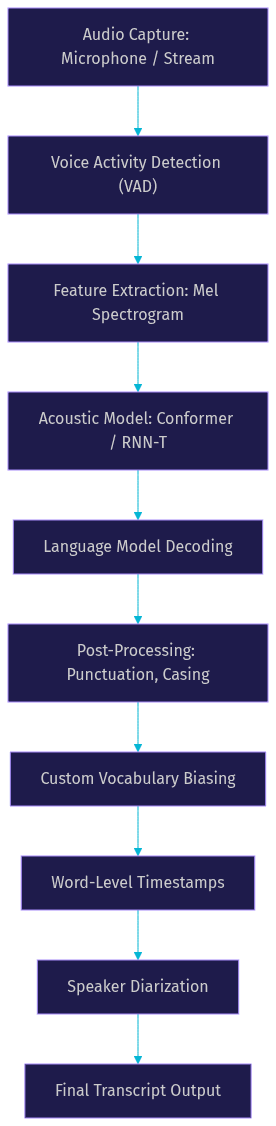
This pipeline represents the typical flow from audio capture to final transcript. Each stage adds processing time, and optimizing the end-to-end pipeline for both accuracy and latency is where production engineering matters most.
How to Evaluate and Choose a High-Accuracy Solution
Selecting a high accuracy speech recognition system requires matching technical capabilities to your specific use case. Start by defining your requirements in four dimensions: target WER, maximum acceptable latency, language coverage, and budget.
For real-time applications like live captioning or AI voice agents, sub-500ms latency is typically the threshold for acceptable user experience. For batch transcription of recorded meetings, accuracy matters more than speed. If your application handles sensitive data, on-premise deployment with open-source models may be non-negotiable.
Run a quick benchmark before committing. Collect 30-60 minutes of representative audio from your actual use case, not clean studio recordings. Create ground-truth transcripts manually. Run each candidate model and measure WER, RTF, and resource consumption. This real-world test often reveals gaps that benchmark scores hide.
Consider the total cost of ownership. Commercial APIs charge per minute of audio, which scales linearly with usage. Open-source models require upfront infrastructure investment but have marginal costs approaching zero at scale. For applications processing thousands of hours monthly, open-source deployment often becomes more cost-effective.
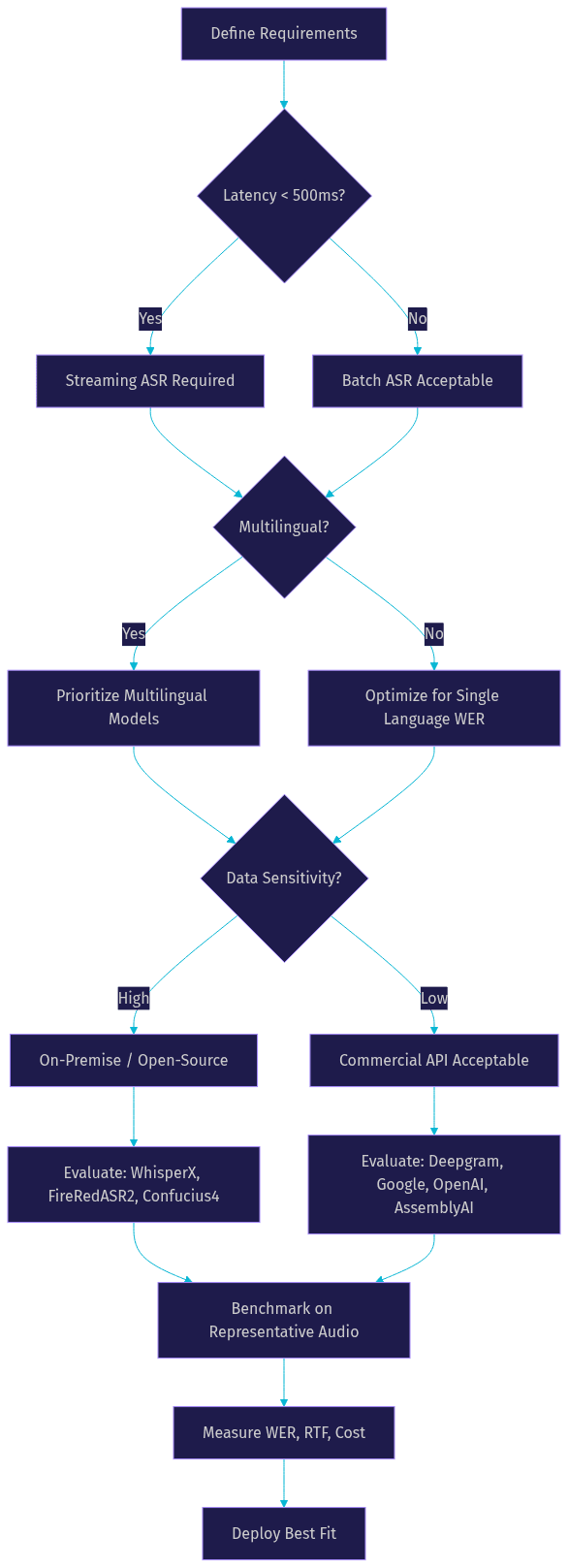
This decision framework helps narrow the field quickly. The final benchmark step is non-negotiable: never deploy based on vendor-reported WER alone.
Case Study: Deploying High-Accuracy ASR for Live Captioning
A media company needed live captioning for weekly webinars with 500+ attendees. The speakers used technical jargon, occasionally switched between English and Mandarin, and audience comprehension depended on caption accuracy.
The team selected Confucius4-R2T2 for its streaming architecture and competitive WER on mixed-language audio. The model was deployed on GPU infrastructure with TensorRT optimization to minimize inference latency.
The implementation followed a clear sequence. First, the team loaded the model and configured the streaming API to accept audio chunks at 100ms intervals. Voice activity detection filtered silence to reduce unnecessary processing. A custom vocabulary list containing 200 domain-specific terms was loaded to bias decoding toward technical jargon. Stable prefix handling was configured to minimize caption flicker, ensuring that already-displayed words would not change as new audio arrived.
The results were measurable. End-to-end latency averaged 420ms from speech to caption display. WER on a manually transcribed test set of 30 minutes was 4.2%, with most errors concentrated in code-switching segments. The custom vocabulary biasing reduced jargon-related substitution errors by approximately 40% compared to the baseline model.
This deployment demonstrates that high accuracy speech recognition is achievable in production, but requires careful model selection, infrastructure optimization, and domain adaptation. The team's investment in benchmarking and vocabulary tuning paid off in measurable user satisfaction improvements.
Future Trends in High-Accuracy Speech Recognition
The trajectory of speech recognition points toward multimodal integration and on-device intelligence. Emerging models that process audio, text, and vision simultaneously are beginning to appear in research labs. These models can leverage visual context, such as lip movements or presentation slides, to improve recognition accuracy in noisy environments.
On-device inference is becoming viable for moderate-accuracy use cases. Quantized models running on mobile NPUs can achieve acceptable WER for dictation and voice commands without sending audio to the cloud. This matters for privacy-sensitive applications and for reducing latency in regions with poor connectivity.
Self-supervised learning continues to push the boundaries of what is possible with unlabeled audio data. Models pre-trained on millions of hours of raw audio learn richer acoustic representations than supervised approaches, and fine-tuning requires less labeled data per language. This trend is particularly promising for low-resource languages that currently lack sufficient training data.
According to OpenAI's Whisper repository on GitHub, the open-source community continues to contribute multilingual fine-tuning data and optimization techniques, accelerating improvement across the ecosystem.
Definitions Glossary
Word Error Rate (WER): The percentage of words incorrectly recognized by an ASR system, calculated as the sum of substitutions, deletions, and insertions divided by total reference words. WER is the primary metric for evaluating high accuracy speech recognition systems.
Character Error Rate (CER): The same edit-distance calculation as WER but applied at the character level. CER is the preferred metric for languages without clear word boundaries, such as Mandarin and Japanese.
Real-Time Factor (RTF): The ratio of processing time to audio duration. An RTF below 1.0 means the system processes audio faster than it arrives, which is required for real-time streaming applications.
Speaker Diarization: The process of segmenting audio by speaker identity, answering "who spoke when." Diarization is essential for multi-participant transcription in VideoSDK meeting rooms and conference calls.
Voice Activity Detection (VAD): A preprocessing step that identifies speech segments in an audio stream and filters out silence. VAD reduces computational load and improves transcription accuracy by preventing the model from hallucinating text during silent periods.
Custom Vocabulary Biasing: A decoding technique that increases the probability of domain-specific terms appearing in transcripts. This is critical for applications in healthcare, legal, and technical domains where generic models frequently misrecognize specialized terminology.
Key Takeaways
- High accuracy speech recognition is defined by measurable WER (target sub-5%) and operational latency (sub-500ms for streaming), not marketing claims.
- End-to-end neural architectures like Conformer and RNN-Transducer, combined with large-scale pre-training and custom vocabulary biasing, drive modern accuracy improvements.
- Open-source models (WhisperX, FireRedASR2, Confucius4-R2T2) offer control and cost advantages at scale, while commercial APIs (Deepgram, Google, OpenAI) provide convenience and built-in features like diarization.
- Always benchmark candidates on representative audio from your actual use case before deploying, as vendor-reported WER on clean benchmarks rarely matches real-world performance.
- VideoSDK integrates real-time transcription and speaker diarization directly into its video calling SDK, letting developers add high-accuracy speech recognition to applications without building a separate ASR pipeline.
Conclusion
High accuracy speech recognition in 2026 is a solved problem for many domains and an active frontier for others. The combination of end-to-end neural architectures, massive pre-training corpora, and domain adaptation techniques has pushed WER below 5% for mainstream English applications. The remaining challenges, including code-switching, low-resource languages, and extreme noise conditions, are where the next wave of innovation is focused.
For developers building real-time communication applications, the choice of STT provider shapes both user experience and infrastructure complexity. VideoSDK's built-in real-time transcription and AI voice agent capabilities integrate leading STT providers directly into meeting rooms, eliminating the need to wire up a separate ASR pipeline. Explore the VideoSDK documentation to see how transcription, diarization, and post-call summaries work out of the box.
What are you building with VideoSDK? Drop a comment below. I would love to hear what kind of speech recognition use case you are working on, whether it is live captioning, meeting transcription, or an AI-powered voice agent. You can also join the VideoSDK Discord community to connect with 3,000+ developers building real-time communication apps. Sign up free at app.videosdk.live/login to start building today.
FAQ