


Handling interruptions in voice agents means detecting when a user speaks over the assistant (barge-in), immediately canceling in-flight LLM generation, flushing TTS audio buffers, and preserving conversation context. VideoSDK provides turn detection, voice activity detection, and pipeline hooks to manage this workflow in real-time AI voice agent pipelines.
When a user interrupts a voice agent mid-sentence, the system has under 200 milliseconds to detect the interruption, stop generating text, halt audio playback, and prepare to listen. If any of those steps lag, the user hears overlapping audio, the assistant keeps talking over them, and the conversation feels broken. Yet most voice agent tutorials skip interruption handling entirely, focusing only on the happy path where users politely wait their turn.
Real users do not wait. They correct themselves, change their minds, and barge in with new information. Building a voice agent that handles interruptions gracefully is one of the hardest problems in real-time voice AI, and it sits at the intersection of speech detection, pipeline orchestration, and conversation context management. This guide walks through the full interruption workflow, from detecting user speech to canceling in-flight processing and recovering context, so you can build voice agents that feel responsive and natural.
What Are Interruptions in Voice Agents?
An interruption, commonly called a barge-in, occurs when a user begins speaking while the voice agent is still producing a response. The agent must stop its current output, process the new user input, and respond appropriately. This is different from a backchannel cue, where the user says something like "uh-huh" or "yeah" to signal continued attention without intending to take the conversational floor.
Distinguishing between a true interruption and a backchannel is a core challenge. A true interruption means the user wants to redirect the conversation, add information, or correct the agent. A backchannel means the user is still listening and the agent should continue speaking. Misclassifying a backchannel as an interruption causes the agent to stop unnecessarily, creating a choppy experience. Misclassifying an interruption as a backchannel means the agent talks over the user, which feels rude and unresponsive.
Voice agent interruption strategies must account for both scenarios. The detection layer needs to differentiate intent from the audio signal alone, or combine audio with semantic understanding to make a more informed decision. VideoSDK's AI Voice Agent pipeline includes turn detection and voice activity detection components that help developers classify these events accurately.
Why Handling Interruptions Is Critical
Interruption handling directly impacts four dimensions of voice agent quality: latency, cost, user satisfaction, and audio clarity.
When an agent fails to interrupt quickly, it continues generating LLM tokens and synthesizing TTS audio that the user will never hear. Those wasted tokens increase API costs, and the unnecessary processing adds latency to the eventual response once the system finally catches up. In a high-volume deployment, wasted generation from unhandled interruptions can inflate LLM costs significantly.
User satisfaction drops sharply when agents talk over people. In conversational UX, responsiveness signals intelligence. An agent that stops instantly when a user speaks feels attentive and human. One that plows through its scripted response feels robotic and frustrating. Audio quality also suffers: overlapping speech from the agent and user creates garbled output that degrades the user's microphone signal and makes subsequent speech recognition less accurate.
Detecting User Speech: Turn Detection and VAD
Detecting that a user has started speaking is the first step in handling interruptions. This detection must happen in real-time, with minimal latency, and it must distinguish meaningful speech from background noise, coughs, and brief utterances.
Voice Activity Detection Basics
Voice Activity Detection, or VAD, is the foundational layer that determines whether audio frames contain human speech. VAD operates at the frame level, typically processing audio in 10 to 30 millisecond chunks. It uses energy thresholds, spectral analysis, or lightweight machine learning models to classify each frame as speech or silence.
Low-latency VAD is essential because every millisecond spent detecting speech adds to the total interruption latency. A VAD that takes 50 milliseconds to process a frame means the system cannot react faster than that. Most production VAD implementations target sub-20-millisecond processing per frame. However, VAD alone has limitations. It cannot distinguish between a user saying "wait" and a user coughing, and it struggles in noisy environments where background speech triggers false positives.
Turn-Detection Strategies
Turn detection builds on VAD to determine when a user has finished speaking or when they intend to take the floor. Three primary strategies exist, each with different trade-offs.
Rule-based silence timers are the simplest approach. The system waits for a configurable silence duration after the last detected speech frame, typically 300 to 700 milliseconds, before declaring the turn complete. Short timers feel responsive but cause false turn-end detections when users pause mid-sentence. Long timers feel sluggish because the agent waits too long before responding.
Semantic end-of-speech detection uses a lightweight language model to analyze the transcribed text and determine if the user has completed a thought. This approach reduces false positives from pauses but adds latency because the system must wait for partial transcription before making a decision.
Adaptive models combine VAD, acoustic features, and semantic signals to make a holistic turn-end prediction. These models, often based on small transformer architectures, learn from conversational patterns to predict whether a pause is mid-utterance or end-of-turn. They offer the best accuracy but require more computational resources.
Adaptive Interruption Handling
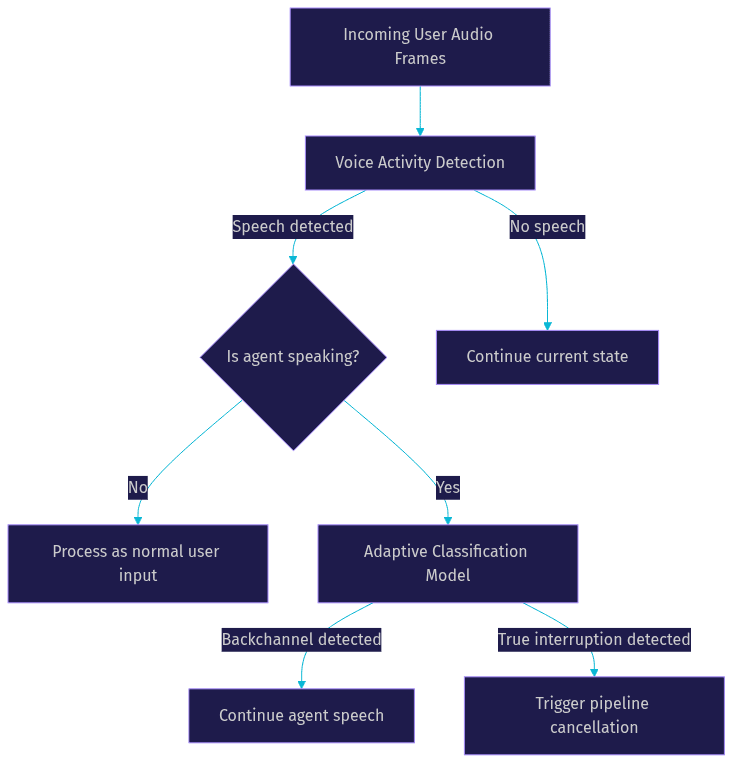
Modern voice agent frameworks use adaptive interruption handling to distinguish true interruptions from backchannels. When VAD detects speech during agent output, the system does not immediately cancel the pipeline. Instead, it routes the audio through a classification model that evaluates the speech duration, energy profile, and semantic content.
A short, low-energy utterance like "mhm" is classified as a backchannel, and the agent continues speaking. A longer, higher-energy utterance like "actually, no" is classified as a true interruption, and the pipeline cancellation process begins. This adaptive approach significantly reduces false-positive interruptions while maintaining responsiveness to genuine user input.
VideoSDK's AI agent pipeline supports configurable turn detection and VAD components, allowing developers to choose the detection strategy that fits their use case and tune thresholds for their specific acoustic environment.
The following diagram illustrates the detection pipeline flow:
Interrupting the Pipeline: Canceling LLM, TTS, and Transport
Once an interruption is detected, the system must propagate a cancellation signal through every active component in the pipeline. This is where most voice agent implementations break down. Each component, from the LLM to the TTS engine to the audio transport layer, has its own buffering and processing characteristics that complicate clean cancellation.
Canceling In-Flight LLM Generation
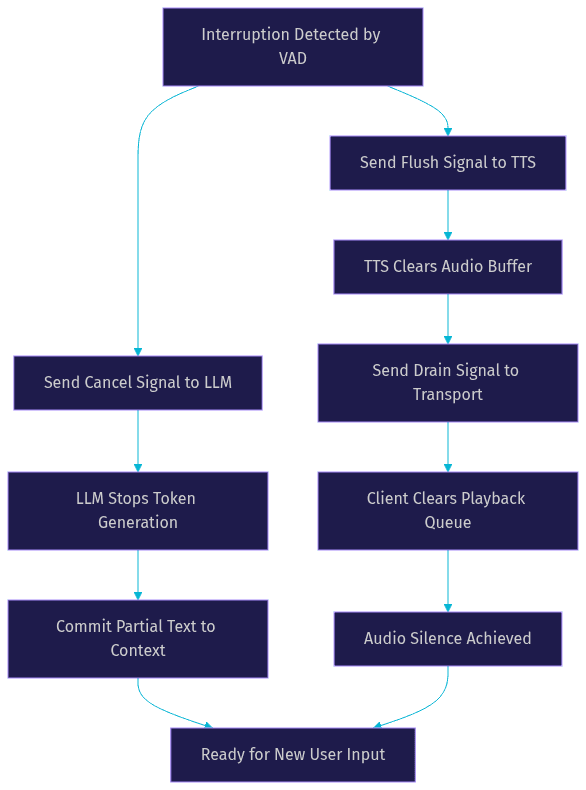
When an interruption occurs, the LLM may be mid-generation, producing tokens for a response the user no longer wants to hear. The system must send a cancellation signal to the LLM provider to stop token generation immediately. Most modern LLM APIs support streaming cancellation, which halts generation at the current token boundary.
The key consideration is context preservation. The tokens generated before the interruption may represent a partial response that is still semantically relevant. Some implementations discard the partial generation entirely, while others retain it in the conversation context with a flag indicating it was interrupted. Retaining partial context helps the LLM produce a more coherent follow-up response, but it increases the context window size and can confuse the model if the partial text is nonsensical.
A best practice is to commit the partial text to the assistant's context with an explicit interrupted flag. This tells the LLM that the previous response was cut short and the new user input should take priority. VideoSDK's pipeline hooks allow developers to intercept the cancellation event and define custom context management behavior.
Flushing TTS Buffers
After the LLM stops generating, the TTS engine likely has audio queued in its output buffer. This buffer may contain several seconds of synthesized speech that has not yet been played. The system must flush this buffer immediately to stop audio playback.
Flushing is not always instantaneous. Some TTS engines produce audio in chunks that cannot be split mid-frame. If the current frame is partially played, the system may need to wait for the frame boundary before stopping, adding a few milliseconds of latency. High-quality TTS implementations support immediate buffer clearing with frame-level granularity.
The system must also handle the case where TTS audio is already in the transport queue, buffered for network transmission. Flushing the TTS buffer does not automatically clear the transport buffer, so the cancellation signal must propagate to both layers.
Draining the Transport Layer
The transport layer manages the actual audio stream sent to the user's device. Even after the TTS buffer is cleared, previously transmitted audio frames may still be in the network buffer or the client-side playback queue. The system must drain these buffers to prevent the user from hearing residual audio after the interruption.
Draining involves sending a signal to the client to clear its audio playback queue and stop rendering audio immediately. The target latency for this entire process, from VAD detection to audio silence on the client, should be under 200 milliseconds. Anything longer creates a perceptible overlap where the user hears the agent's voice trailing off after they started speaking.
Background audio, if used, needs special handling. Some voice agents play subtle background audio during responses to fill silence. This audio should typically continue during an interruption, as it masks the abrupt stop and creates a smoother transition. The transport layer must distinguish between TTS audio, which should be flushed, and background audio, which should continue.
The following diagram shows how an interruption signal propagates through the pipeline components:
Managing Conversation Context After an Interruption
After the pipeline is canceled and audio is silenced, the system must update the conversation context to reflect what happened. This step is critical for producing coherent follow-up responses.
The partial text the assistant generated before the interruption should be committed to the conversation history. Without it, the LLM has no record of what it was saying and may repeat itself or produce a response that ignores the partial context. With it, the LLM understands that it was mid-response and can adjust its next response accordingly.
The most common approach is to append the partial assistant response to the conversation context with a metadata flag indicating it was interrupted. This flag, sometimes called an include-interrupted-speech flag, tells the LLM and any downstream processing that the response was cut short by user input. The LLM can then use this context to produce a response that acknowledges the interruption naturally, such as picking up where it left off or addressing the user's new input directly.
Context recovery strategies vary by use case. In a customer service agent, the system might discard the partial response entirely and focus on the user's new input, since the interruption likely indicates the user wants to change direction. In a tutoring agent, the system might retain the partial response and offer to continue it after addressing the user's interjection. The choice depends on the conversational dynamics of the specific application.
VideoSDK's Conversational Graph provides structured state management that makes context recovery after interruptions more deterministic. By defining conversation nodes and transitions explicitly, developers can control exactly how the system behaves when an interruption occurs at any point in the flow.
Configuring Interrupt Policies
Interrupt policies define when and how the system responds to user speech during agent output. These policies range from fully permissive, where any user speech triggers an interruption, to fully restrictive, where the agent ignores all user input until it finishes speaking.
Global vs. Per-Turn Settings
Most voice agent frameworks allow developers to configure interruption behavior at two levels: globally and per-turn. Global settings apply to the entire conversation and define the default behavior. Per-turn settings override the global configuration for a specific response, allowing the agent to adjust its interruptibility based on what it is saying.
For example, a voice agent might have global interruptions enabled but disable them for a specific turn where it is reading a legal disclosure that must be completed in full. The per-turn override ensures the user cannot interrupt the disclosure while still allowing interruptions during normal conversation.
VideoSDK's agent SDK exposes configuration options for enabling or disabling interruptions at both the session level and the individual turn level, giving developers fine-grained control over interrupt behavior.
Tuning Thresholds
Several configurable thresholds affect interruption detection accuracy. The minimum speech duration threshold defines how long user speech must last before it is considered a potential interruption. Setting this too low causes false positives from brief noises. Setting it too high means short but meaningful interruptions, like the word "stop," are missed.
The energy threshold determines the minimum audio energy required to trigger VAD. In a quiet office environment, a low threshold works well because background noise is minimal. In a noisy factory or vehicle environment, a higher threshold is necessary to avoid triggering on ambient sound. Developers should tune this value based on the expected acoustic environment of their users.
The cancel LLM flag controls whether an interruption cancels in-flight LLM generation. In some cases, developers may want to let the LLM finish generating even if the user interrupts, perhaps to log the full response or use it for analytics. This flag provides that control.
Disabling Interruptions for Specific Use Cases
Some voice agent use cases require strict turn-taking. Dictation modes, where the user is providing extended input, should disable interruptions entirely so the agent does not interpret the user's own speech as an interruption. Similarly, agents delivering critical information, such as emergency alerts or medication instructions, may need to enforce completion before accepting new input.
In other cases, developers may want to mute user audio entirely during agent speech to prevent any interruption detection. This approach is useful in broadcast-style voice agents where the user is a passive listener, such as a news briefing or weather report. VideoSDK's pipeline supports audio muting and dictation mode configurations for these scenarios.
Best Practices and Production Considerations
Building a robust interruption handling system requires attention to latency, monitoring, testing, and edge case management. The following practices come from production voice agent deployments and represent the most impactful decisions developers can make.
Latency Budgets
The end-to-end interruption latency budget, from the moment the user starts speaking to the moment the agent's audio stops on the client device, should target sub-200 milliseconds. This budget breaks down across several stages: VAD processing (10 to 20 milliseconds), interruption classification (20 to 50 milliseconds), LLM cancellation signal propagation (10 to 30 milliseconds), TTS buffer flush (10 to 20 milliseconds), and transport drain (20 to 50 milliseconds). Every stage must be measured and optimized independently.
If the total exceeds 200 milliseconds, users perceive a noticeable overlap. If it exceeds 400 milliseconds, the experience feels broken. Profile each stage in your pipeline and identify the bottleneck. In most implementations, the transport drain or TTS flush is the slowest stage.
Monitoring and Observability
Production voice agents need dedicated monitoring for interruption behavior. Key metrics to track include interruption count per session, average cancellation latency, false-positive rate (backchannels misclassified as interruptions), false-negative rate (true interruptions missed), and context recovery success rate.
A high false-positive rate indicates that the VAD threshold is too low or the adaptive classifier is too aggressive. A high false-negative rate suggests the opposite. Both degrade user experience in different ways, and both should be tracked with alerting thresholds.
VideoSDK's pipeline observability features provide hooks for instrumenting these metrics, allowing developers to export interruption events to their monitoring stack for analysis.
Testing Strategies
Testing interruption handling is inherently difficult because it involves real-time audio timing. Automated audio-injection tests, where pre-recorded user speech is injected into the pipeline at specific timestamps during agent output, provide a repeatable way to verify interruption behavior. These tests should cover various interruption timings: early in the response, mid-response, and near the end.
A/B testing different interruption strategies in production is also valuable. Running adaptive interruption handling against rule-based handling with a portion of traffic reveals which approach performs better for a specific user base. Metrics for comparison include user satisfaction scores, conversation completion rates, and average turn count.
Handling Edge Cases
Background noise is the most common edge case. In environments with consistent background noise, such as vehicles or factories, the VAD threshold must be calibrated to the noise floor. Some implementations use noise suppression before VAD to improve detection accuracy. VideoSDK includes built-in noise suppression capabilities that can be enabled in the agent pipeline.
Overlapping speech, where the user and agent are both talking, creates a particularly challenging scenario. The system must isolate the user's speech from the agent's output, which may be picked up by the user's microphone. Echo cancellation and headphone detection help mitigate this, but the problem is not fully solvable with software alone.
Multi-speaker environments, where multiple users are near the same microphone, require speaker diarization to determine which speaker is interrupting. This adds complexity but is necessary for shared-device scenarios like smart speakers or conference room systems.
Future Directions in Interruption Handling
Interruption handling in voice AI is an active research area with several emerging directions. Multimodal cue integration, where the system combines audio with visual signals from cameras or motion sensors, promises more accurate interruption detection. A user leaning forward or raising a hand could signal an intention to speak before any audio is produced, giving the system a head start on interruption processing.
Speaker diarization integrated directly into the interruption pipeline will enable multi-user voice agents that handle interruptions from specific individuals. This is particularly relevant for smart home devices and in-car assistants where multiple people interact with the same agent.
Dynamic context adaptation is another frontier. Current systems use fixed context recovery strategies, but future agents may adapt their recovery behavior based on conversation history, user preferences, and the semantic content of the interruption. An agent that knows a user frequently interrupts to add detail might handle those interruptions differently from one who interrupts to change the subject entirely.
Open-source interruption engines, modular libraries focused solely on interruption detection and handling, are beginning to appear. These engines aim to provide framework-agnostic interruption management that developers can plug into any voice agent pipeline, standardizing what is currently a bespoke implementation in every framework.
Definitions Glossary
Barge-in: A user speech event that occurs while the voice agent is producing a response, requiring the agent to stop and process the new input.
Voice Activity Detection (VAD): A signal processing technique that classifies audio frames as containing human speech or silence, operating at the frame level with typical processing times under 20 milliseconds.
Turn Detection: The process of determining when a user has finished speaking or intends to take the conversational floor, using rule-based timers, semantic analysis, or adaptive machine learning models.
TTS Flush: The immediate clearing of a text-to-speech engine's audio output buffer to stop playback, typically triggered by an interruption cancellation signal.
Backchannel: A brief vocalization, such as "uh-huh" or "yeah," that signals continued attention without intending to take the conversational floor, distinct from a true interruption.
Interrupt Policy: A configurable set of rules that defines when and how a voice agent responds to user speech during its own output, adjustable at global and per-turn levels.
Key Takeaways
- Handling interruptions in voice agents requires a coordinated pipeline that detects user speech, cancels LLM generation, flushes TTS buffers, and drains the transport layer, all within a sub-200-millisecond latency budget.
- Adaptive interruption handling using machine learning models significantly reduces false positives by distinguishing true barge-ins from backchannel cues.
- Conversation context management after an interruption is critical for coherent follow-up responses, and using an interrupted-speech flag helps the LLM understand what happened.
- Interrupt policies should be configurable at both global and per-turn levels, with thresholds tuned to the specific acoustic environment of the target users.
- VideoSDK's AI agent pipeline provides turn detection, VAD, pipeline hooks, and observability features that support robust interruption handling in production voice agents.
Conclusion
Interruption handling is what separates a voice agent that feels natural from one that feels robotic. The technical challenge is real: you need sub-200-millisecond detection, coordinated cancellation across LLM and TTS layers, and intelligent context recovery. But the payoff is equally real: users who can barge in and be heard feel respected, and conversations flow more naturally. Start by implementing a clean detection pipeline with VAD and adaptive classification, then layer in cancellation signals for each pipeline component, and finish with context management that preserves partial responses intelligently. VideoSDK's AI voice agent infrastructure gives you the hooks and configuration options to build this workflow without reinventing the transport and signaling layers. What are you building with VideoSDK? Drop a comment below, and try the free tier to get started with your own voice agent pipeline.
Free $20 Balance for AI Voice Agents & Video Calls
FAQ