


Fallback responses in a voice agent are the messages and actions triggered when the system fails to understand user input or encounters a processing error. A well-designed fallback responses voice agent strategy combines clarification prompts, intent-based recovery, generative AI responses, and human escalation to maintain conversation continuity. VideoSDK's AI Voice Agent SDK provides built-in fallback adapters and pipeline observability to handle these scenarios gracefully across STT, LLM, and TTS layers.
Voice agents have become the frontline of customer interaction, handling everything from appointment scheduling to technical support. But even the most sophisticated speech recognition and natural language understanding systems mishear or fail to parse user input. When that happens, the difference between a frustrated user abandoning the call and a successful resolution often comes down to one thing: how well the agent recovers.
Unrecognized input is inevitable in voice interactions. Background noise, accents, unexpected phrasing, and domain-specific jargon all contribute to recognition failures. What separates a production-grade voice agent from a prototype is its ability to handle these failures without breaking the conversation flow.
Fallback responses are the safety net that catches these moments. They guide users back on track, provide alternative paths, and know when to escalate. In this guide, you will learn how to design, implement, and optimize fallback responses for voice agents across popular platforms, with practical strategies for prompt-based recovery, intent-based handling, and generative AI-driven fallbacks.
What Are Fallback Responses in a Voice Agent?
Fallback responses are predefined or dynamically generated messages that a voice agent delivers when it cannot confidently match user input to a recognized intent or when a processing error occurs. They differ from regular prompts because they are triggered by failure conditions rather than successful intent recognition.
A fallback responses voice agent strategy typically activates on two primary conditions: no-match (the user said something but the system could not map it to any intent) and no-input (the user remained silent beyond the configured timeout). Some platforms also trigger fallbacks on confidence threshold breaches, where the system recognized speech but the matching confidence was too low to act on reliably.
VideoSDK's AI Voice Agent SDK treats fallback as a first-class pipeline concern. The architecture includes dedicated fallback adapters that can switch between STT, LLM, or TTS providers when the primary provider fails, times out, or returns low-quality output. This means fallback handling is not just about what the agent says to the user, but also about how the underlying infrastructure recovers from provider-level failures transparently.
Why Fallback Responses Matter
When a voice agent fails to understand a user and responds poorly, the consequences extend far beyond a single awkward interaction. User satisfaction drops sharply, and in transactional scenarios like booking or support, abandonment rates climb significantly.
According to research published by Gartner, organizations that fail to resolve customer issues through self-service channels face escalation costs that are roughly four to five times higher than resolved interactions. When voice agents loop through the same unhelpful fallback message repeatedly, users either hang up or demand human transfer, both of which erode the cost savings that motivated the voice agent deployment in the first place.
Brand perception is equally affected. A voice agent that says "I didn't understand" three times in a row makes the entire brand feel technologically incompetent. Users do not distinguish between a poorly configured fallback and a poorly built product. They simply experience frustration and attribute it to the company behind the agent.
Effective fallback responses mitigate these risks by providing graceful recovery paths. They acknowledge the failure, offer guidance, and progressively escalate toward resolution. This keeps users engaged, reduces abandonment, and preserves the brand experience even when the underlying technology stumbles.
Types of Fallback Strategies
Prompt-Based Fallbacks
Prompt-based fallbacks are the simplest recovery mechanism in a voice agent's toolkit. When the agent fails to recognize input, it delivers a clarification prompt asking the user to rephrase or narrow their request. For example, if a user says something unintelligible, the agent might respond with "Could you rephrase that?" or "I didn't quite catch that. Could you say it again?"
Reprompts are a variation where the agent rephrases its original question to guide the user toward a recognizable response. Instead of repeating the same question, the agent might say, "I'm looking for your account number. It should be a six-digit code starting with your area code." This approach reduces cognitive load by giving the user a more specific target.
The key to prompt-based fallbacks is progressive refinement. The first fallback should be generic, the second more specific, and the third should pivot to an alternative path or escalation. This prevents the endless loop problem where the agent keeps asking the same question and the user keeps giving the same unrecognized answer.
Intent-Based Fallbacks
Intent-based fallbacks leverage built-in catch-all intents that platforms provide specifically for unrecognized input. Amazon Lex has AMAZON.FallbackIntent, Google Dialogflow has default fallback intents, and similar mechanisms exist across most voice agent platforms.
These fallback intents act as a safety net at the intent routing layer. When no other intent matches with sufficient confidence, the platform routes the utterance to the fallback intent, which then triggers a configured response or workflow. This is more structured than a simple prompt because it allows developers to attach complex logic, context preservation, and conditional branching to the fallback path.
The advantage of intent-based fallbacks is that they integrate with the platform's existing state management. The agent can track how many times the fallback intent has fired within a session and adjust its behavior accordingly, escalating to a human after a configured number of consecutive fallbacks rather than looping indefinitely.
Generative Fallbacks
Generative fallbacks represent the most advanced approach, using large language models to produce contextually relevant responses when traditional intent matching fails. Instead of a canned "I didn't understand" message, the LLM generates a response that acknowledges what the user might have been trying to say and guides them forward based on the full conversation history.
Google Dialogflow CX supports generative fallback through its Vertex AI integration, where the system can generate a response based on the conversation history and the agent's configured persona. This approach feels more natural to users because the response is tailored to the specific conversation context rather than being a generic error message repeated verbatim.
VideoSDK's Conversational Graph takes generative fallback further by allowing developers to define deterministic fallback nodes within a graph-based conversation structure. The LLM handles natural language generation, but the graph controls which fallback path is taken based on conversation state, user history, and business rules. This hybrid approach combines the flexibility of generative AI with the predictability that production voice agent deployments require.
Designing Effective Fallback Responses
Keep It Short and Helpful
Fallback responses should be shorter than normal agent responses. Users are already frustrated by the failure, and a long explanation compounds that frustration. Aim for one to two sentences that acknowledge the problem and provide a clear next step.
The tone should be apologetic without being overly submissive. "I'm having trouble understanding that" works better than "I sincerely apologize for the inconvenience." The goal is to sound helpful, not robotic. Avoid technical jargon like "intent recognition failed" and instead use human-friendly language like "I didn't catch that."
Always end a fallback response with a concrete action the user can take. "Could you try saying that differently?" gives the user a clear path forward, while "I didn't understand" leaves them stranded without direction.
Escalation Paths
Every fallback strategy needs an escalation path. If the agent fails to understand after two or three attempts, continuing to ask the user to rephrase is counterproductive and damages the user experience further. The escalation path should transfer the user to a human agent, offer an alternative channel like SMS or web chat, or provide a self-service option like a menu of common requests.
The escalation threshold should be configurable based on use case sensitivity. Some scenarios, like healthcare or financial services, may require escalation after just one fallback to ensure compliance and user safety. Others, like general information queries, can tolerate two or three fallbacks before escalating.
VideoSDK's AI agent architecture supports call transfer and warm transfer as built-in capabilities, making it straightforward to escalate from an AI agent to a human operator when fallback thresholds are reached. The warm transfer feature preserves conversation context so the human agent picks up where the AI left off.
Personalization
Personalized fallback responses use session data and conversation history to tailor the recovery message. If the agent knows the user's name, account type, or recent transactions, it can reference that context in the fallback to make the response feel more relevant and less mechanical.
For example, instead of a generic "I didn't understand," a personalized fallback might say, "I'm having trouble with that, John. Would you like me to connect you with a support agent, or would you prefer to try your request again?" This approach acknowledges the user as an individual and provides options rather than a dead end.
Session context also helps the agent make smarter fallback decisions. If the user has already successfully completed three steps in a booking flow, the fallback should preserve that context and offer to continue from where things went wrong, rather than restarting the entire conversation from scratch.
Implementing Fallbacks Across Popular Platforms
Amazon Lex
Amazon Lex provides a built-in fallback intent called AMAZON.FallbackIntent that catches any utterance not matched by other intents. Developers configure this intent at the bot level, and it can be customized with response messages, follow-up prompts, and transition logic. The Amazon Lex documentation details the full configuration options available.
The configuration process involves adding the fallback intent to the bot, setting the response message, and defining what happens after the fallback fires. Lex also supports contextual fallback handling, where the fallback behavior changes based on the current conversation context. For example, the fallback during a slot-filling sequence might differ from the fallback at the initial greeting.
Lex's no-input handling is configured separately through the prompt and max-attempts settings on each intent. Developers should ensure that no-match and no-input fallbacks work together coherently rather than creating conflicting recovery paths that confuse users.
Google Dialogflow CX
Dialogflow CX offers fallback handling through its default fallback intent and the newer generative fallback feature. The default fallback intent works similarly to other platforms, catching unmatched input and delivering a configured response.
Generative fallback in Dialogflow CX leverages Vertex AI to produce dynamic responses when the standard fallback intent fires. Developers enable this feature at the flow level, configuring the generative agent's persona, instruction template, and knowledge base. When a fallback occurs, the system generates a response based on the conversation context and the configured parameters. The Dialogflow CX documentation provides setup guidance for generative features.
The platform also supports no-input events through configurable timeout settings. Developers can set different timeout durations per state and define specific responses for each no-input occurrence, allowing for progressive escalation within a single conversation flow.
LiveKit Agents
LiveKit Agents provides a framework for building voice agents with built-in fallback capabilities. The platform supports inference fallback adapters that can switch between different STT, LLM, or TTS providers when the primary provider fails or returns low-quality results.
Configuration involves defining primary and fallback providers in the agent pipeline, setting quality thresholds that trigger the fallback, and specifying the behavior when a fallback occurs. For example, if the primary STT provider returns a low-confidence transcription, the system can route the audio to a secondary STT provider for a second attempt before giving up.
VideoSDK's AI agent pipeline architecture follows a similar multi-provider pattern, with fallback adapters that can switch between providers like OpenAI, Deepgram, and ElevenLabs based on availability, latency, and quality metrics. This ensures that a single provider outage does not take the entire voice agent offline, which is critical for production deployments handling real customer calls.
Kore.ai Voice Gateway
Kore.ai Voice Gateway offers tiered fallback configuration through its conversation design interface. Developers can define multiple fallback levels, each with different responses and escalation behaviors.
The first level might be a simple clarification prompt, the second a more guided reprompt with examples, and the third a transfer to a human agent. Kore.ai also provides resilience settings that control how the platform handles network issues, provider timeouts, and other infrastructure-level failures that could trigger fallback conditions.
Fallback Decision Tree Architecture
The following diagram illustrates how a well-designed fallback responses voice agent processes user input through multiple recovery layers before escalating to a human operator.
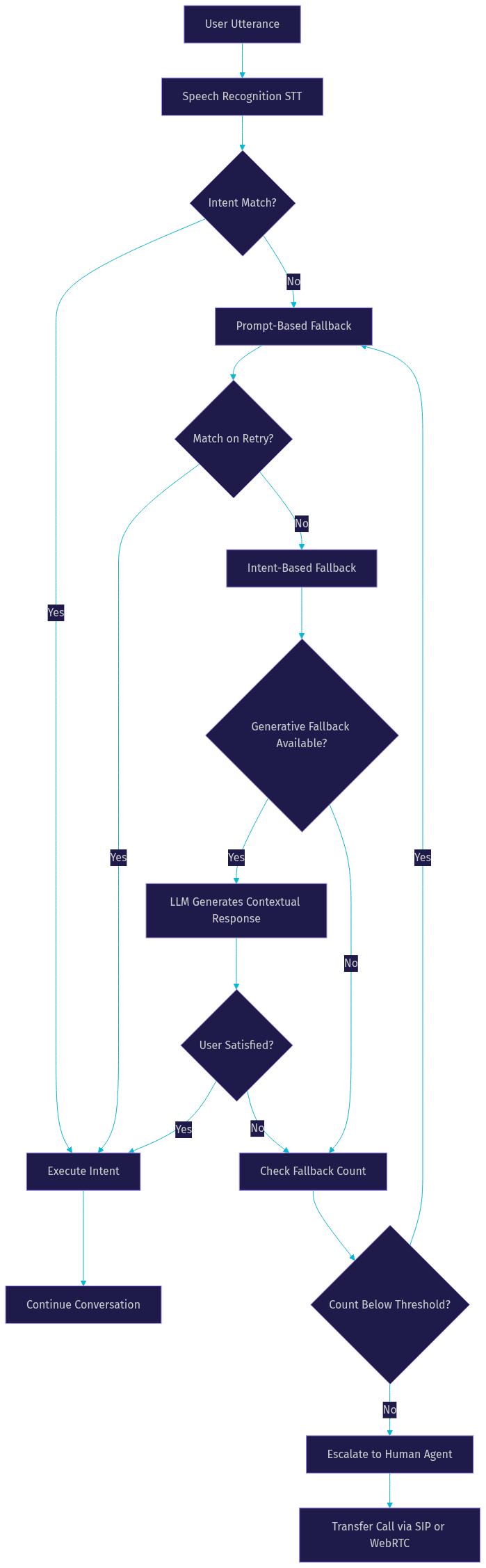
This decision tree represents the progressive fallback pattern that production voice agents should follow. Each layer provides a more sophisticated recovery attempt, and the system tracks fallback count to prevent infinite loops. The final escalation path uses SIP or WebRTC transfer to route the user to a human agent when all automated recovery options are exhausted.
Best Practices and Common Pitfalls
Building effective fallback responses requires attention to patterns that work and mistakes that repeatedly cause problems in production. Here are the most important practices to follow and pitfalls to avoid.
Do implement progressive fallback. Start with a simple clarification, move to a more specific reprompt, then offer alternatives or escalation. This gives users multiple chances to be understood without feeling trapped in a loop.
Do handle no-input separately from no-match. Silence and unrecognized speech are different failure modes and should trigger different responses. A no-input fallback might say "I didn't hear anything. Are you still there?" while a no-match fallback should acknowledge that the user spoke but the system could not parse it.
Do monitor fallback frequency. If a particular intent or conversation flow triggers fallbacks at a high rate, that signals a design problem, not a user problem. The intent model may need retraining, the prompts may be confusing, or the expected phrasing may not match how users naturally speak.
Do not create endless fallback loops. Always cap the number of consecutive fallback attempts and escalate when the limit is reached. An agent that asks "Could you rephrase that?" five times in a row is worse than no agent at all.
Do not use the same fallback message every time. Variety prevents the conversation from feeling mechanical and gives users the impression that the agent is actively trying to understand rather than stuck in a rigid loop.
Do not ignore fallback analytics. Every fallback event is a data point that reveals where the agent's understanding breaks down. Aggregating and analyzing these events should be a continuous process, not an afterthought deployed after complaints roll in.
Monitoring and Optimizing Fallback Performance
Measuring fallback performance is essential for maintaining a high-quality voice agent experience. Without monitoring, fallback responses become a black box where failures accumulate silently and user satisfaction erodes over time without anyone noticing until abandonment metrics spike.
The primary metric to track is fallback rate, which is the percentage of user turns that trigger a fallback response. A healthy fallback rate depends on the use case, but generally, anything above 15 to 20 percent indicates that the agent's intent model or conversation design needs attention. Track this metric per intent, per conversation flow, and per user segment to identify specific problem areas rather than looking at a single aggregate number.
Escalation count measures how often fallbacks result in human transfer. This metric directly impacts operational costs and should be trended over time. A rising escalation rate may indicate model degradation, changing user behavior, or new query types the agent was not trained on. Pair this metric with average handle time to understand the full cost impact of fallback failures.
User satisfaction after fallback is harder to measure but critical. Post-call surveys, sentiment analysis on the conversation transcript, and repeat call rates all provide signals about whether fallback responses are helping users recover or simply delaying inevitable frustration. According to Artificial Analysis, sentiment-aware monitoring of voice agent transcripts can surface dissatisfaction patterns that aggregate metrics miss.
Tools for fallback monitoring range from platform-native analytics dashboards to custom logging pipelines. VideoSDK's pipeline observability features provide real-time visibility into agent session performance, including fallback events, provider switches, and latency metrics. This data can be routed to external analytics platforms for long-term trending and alerting.
Future Trends in Voice Agent Fallbacks
The fallback landscape is evolving rapidly as generative AI capabilities mature and voice agent architectures become more sophisticated. Several trends are shaping how fallback responses will work in the near future.
Adaptive fallback based on sentiment is emerging as a powerful approach. Instead of using the same fallback strategy regardless of user state, the agent analyzes the user's tone and emotional trajectory to choose the right recovery path. A frustrated user might be escalated immediately, while a neutral user might receive another attempt at clarification. This requires real-time sentiment analysis integrated into the fallback decision logic.
Multimodal fallback is another trend gaining traction. When a voice agent fails to understand, it can supplement the voice channel with visual cues on a companion screen, sending a menu of options to the user's phone or displaying relevant information on a kiosk. This reduces the cognitive load of recovery by giving users multiple ways to respond beyond just speaking again.
Real-time model switching is becoming more feasible as inference infrastructure improves. Instead of relying on a single LLM for generative fallback, agents can dynamically route to different models based on the conversation domain, language, or complexity. A specialized medical model might handle fallbacks in a healthcare agent, while a general-purpose model handles fallbacks in a customer service agent.
VideoSDK's multi-provider agent architecture is built for this future. The pipeline's modular design allows developers to swap providers at runtime, and the Conversational Graph's deterministic flow control ensures that fallback behavior remains predictable even as the underlying models change. This separation of flow control from language generation is what makes production-grade fallback management possible at scale.
Definitions Glossary
Fallback Response: A message delivered by a voice agent when it cannot match user input to a recognized intent or encounters a processing error. Fallback responses guide users back into the conversation flow or escalate to alternative resolution paths.
No-Match: A condition where the user spoke but the voice agent could not map the utterance to any configured intent with sufficient confidence. No-match triggers fallback handling in most voice agent platforms.
No-Input: A condition where the user remained silent beyond the configured timeout period. No-input is handled separately from no-match because the failure mode and appropriate response differ.
Fallback Adapter: A pipeline component in VideoSDK's AI Voice Agent architecture that detects provider failures or low-quality output and switches to a secondary provider. Fallback adapters can operate at the STT, LLM, or TTS layer independently.
Escalation Path: A predefined route that transfers a user from the AI voice agent to a human agent or alternative channel when automated fallback recovery attempts are exhausted.
Generative Fallback: A fallback strategy that uses a large language model to produce a contextually relevant response based on conversation history, rather than delivering a canned error message.
Key Takeaways
- Fallback responses are a critical component of any production voice agent, directly impacting user satisfaction, abandonment rates, and brand perception when recognition failures occur.
- A layered fallback strategy combining prompt-based recovery, intent-based handling, and generative AI responses provides the most resilient user experience across diverse conversation scenarios.
- Progressive fallback with clear escalation thresholds prevents endless loops and ensures users reach resolution through automated recovery or human transfer.
- Monitoring fallback rate, escalation count, and post-fallback user satisfaction is essential for continuous optimization of voice agent performance over time.
- VideoSDK's AI Voice Agent SDK provides built-in fallback adapters and pipeline observability that simplify multi-provider resilience and fallback analytics for production deployments.
Conclusion
Well-engineered fallback responses transform a voice agent from a fragile prototype into a reliable production system. By implementing progressive fallback strategies, monitoring performance metrics, and leveraging generative AI for contextual recovery, you can build voice agents that maintain user trust even when recognition fails.
The platforms and strategies covered in this guide give you a starting framework, but the real work happens in continuous iteration. Every fallback event is an opportunity to learn how users speak, what they expect, and where your agent's understanding breaks down. Treat fallback monitoring as an ongoing practice, not a one-time configuration task.
If you are building a voice agent and want a pipeline architecture with built-in fallback adapters, multi-provider support, and deterministic conversation flow control, explore VideoSDK's AI Voice Agent documentation and the Conversational Graph guide. You can sign up for free at app.videosdk.live/login and start building resilient voice agents today.
What are you building with VideoSDK? Drop a comment below. I would love to hear what kind of voice agent use case you are working on and how you are handling fallback responses in your deployment.
Free $20 Balance for AI Voice Agents & Video Calls
FAQ