


Enterprise conversational AI is the deployment of large language model-powered agents across voice, chat, and messaging channels to automate business conversations at scale while maintaining governance, security, and human oversight. VideoSDK supports this ecosystem with its AI Voice Agent SDK, Conversational Graph for deterministic flows, and SIP telephony integration, enabling enterprises to build production-grade conversational experiences. Start with a clear use case, then expand to omnichannel deployment using the roadmap in this guide.
Enterprise conversational AI has moved from experimental pilot to production priority. Organizations across banking, healthcare, retail, and telecommunications are deploying agentic AI systems that do far more than answer FAQs. These systems reason through multi-turn conversations, call external APIs to take real actions, and hand off to human agents when the situation demands it.
The business drivers are concrete. According to McKinsey's 2025 State of AI report, companies deploying generative AI in customer operations report average cost reductions of 15 to 30 percent alongside measurable improvements in customer satisfaction scores. The pressure to capture those gains is pushing enterprise teams to move fast, but speed without architecture creates fragile systems that fail under real production load.
This guide synthesizes the overlapping claims from dozens of vendor platforms into a practical framework. You will learn what enterprise conversational AI actually is, how to architect it end-to-end, how to evaluate vendors on measurable criteria, and how to avoid the pitfalls that derail most deployments.
What Is Enterprise Conversational AI?
Enterprise conversational AI is defined as the use of AI-driven systems, powered by large language models and orchestration engines, to conduct business conversations across multiple channels at production scale. It differs from traditional chatbots in three fundamental ways: it reasons rather than pattern-matches, it takes actions rather than only surfacing information, and it escalates to humans with full context rather than dead-ending.
Traditional chatbots follow rigid decision trees. Enterprise conversational AI platforms use agentic architectures where the AI model interprets intent, selects appropriate tools, executes transactions through backend APIs, and maintains conversation state across turns. VideoSDK's Conversational Graph exemplifies this shift, letting developers define deterministic conversation flows where the LLM handles natural language generation while business rules control branching and state transitions.
Core Components of an Enterprise Conversational AI Platform
A production-grade enterprise conversational AI platform is not a single model or API. It is a composite system with five distinct layers, each serving a specific function in the conversation pipeline.
Natural Language Understanding and Generation
The NLU and NLG layer is where user input is interpreted and responses are generated. Modern platforms use large language models from providers like OpenAI, Anthropic, Google, and others as the core reasoning engine. Some architectures pair a fast, specialized model for intent classification with a larger model for complex reasoning and response generation. This hybrid approach balances latency against capability, which matters when you are handling thousands of concurrent conversations.
Speech-to-text and text-to-speech components extend this layer for voice channels. Providers like Deepgram, ElevenLabs, and Cartesia offer models optimized for conversational latency. VideoSDK's AI Voice Agent SDK integrates with these providers directly, so the STT-to-LLM-to-TTS pipeline runs inside a VideoSDK room with sub-second response targets.
Multi-Modal Interaction Channels
Enterprise deployments rarely live on a single channel. A robust platform supports voice calls, web chat, mobile in-app messaging, WhatsApp, SMS, email, and increasingly video. The challenge is maintaining conversation continuity and context as users switch between channels mid-interaction.
VideoSDK's architecture is particularly relevant here because its video calling SDK and AI agent infrastructure share the same room-based model. A conversation that starts as a voice call can escalate to a video session with a human agent without changing the underlying session or losing context. The telephony and SIP integration bridges traditional phone infrastructure into the same WebRTC-based rooms, so inbound PSTN calls and web-based chat sessions flow through one orchestration layer.
Orchestration Engine and Workflow Automation
The orchestration engine is the brain of the platform. When a user sends a message or speaks, the orchestrator routes the input through the NLU layer, determines the appropriate response strategy, calls external tools or APIs, and delivers the output back through the correct channel.
In agentic architectures, the orchestrator manages tool selection. If a user asks about their account balance, the orchestrator invokes a banking API. If the user then asks about loan options, the orchestrator switches to a loan qualification tool while carrying forward the account context. VideoSDK's Conversational Graph handles this through a directed graph structure where each node represents a conversation step, transitions are controlled by business rules, and extractors pull structured data from user responses.
Governance, Security, and Compliance
Enterprise deployments require governance features that consumer AI tools lack. Policy guardrails prevent the AI from discussing off-topic subjects or making unauthorized commitments. Audit logs capture every interaction for regulatory review. Data sovereignty controls ensure conversation data stays within specified geographic boundaries.
Human-in-the-loop capabilities are essential. The system must detect when a conversation exceeds AI confidence thresholds or involves sensitive topics, then route to a human agent with the full conversation history. VideoSDK supports this through its agent session architecture, where a human participant can join the same room as the AI agent and take over seamlessly.
Compliance certifications matter for enterprise procurement. SOC 2 Type II, HIPAA for healthcare, and GDPR for European operations are baseline requirements.
Analytics and Continuous Optimization
Production conversational AI systems generate enormous volumes of interaction data. Real-time dashboards track metrics like containment rate (percentage of conversations resolved without human handoff), average handle time, customer satisfaction scores, and sentiment trends. A/B testing different conversation flows or model configurations lets teams optimize continuously.
VideoSDK's REST APIs provide session analytics, participant data, and recording management that feed into these dashboards. Post-call transcription and summary capabilities give teams the raw material for quality assurance and model fine-tuning.
Typical Enterprise Use Cases
Enterprise conversational AI deployments succeed when they target specific, measurable business processes rather than attempting to be general-purpose assistants. Here are the patterns that consistently deliver ROI.
Customer Service and Support
The most common starting point is tier-1 customer support. An AI agent handles password resets, balance inquiries, appointment scheduling, and order status checks. When the conversation involves billing disputes, complex technical issues, or emotional customers, the agent escalates to a human representative with full context and a recommended next action.
The key metric here is containment rate. Enterprises targeting 60 to 70 percent containment on tier-1 queries typically see payback within six months of deployment.
Sales Enablement and Lead Qualification
AI agents can qualify inbound leads through structured conversation flows before routing hot prospects to sales representatives. The Conversational Graph approach shines here because lead qualification follows a deterministic sequence: gather company size, identify pain points, assess budget timeline, then score and route. The LLM makes the conversation natural while the graph ensures no qualifying question is skipped.
HR and Internal Helpdesks
Internal deployments reduce the burden on HR and IT teams. Employees ask about benefits enrollment, PTO policies, expense submission processes, or IT troubleshooting. The AI agent pulls from knowledge bases, submits forms through backend integrations, and escalates complex cases to the appropriate team.
Industry-Specific Examples
In banking, a typical flow starts with a customer calling about a suspicious transaction. The AI agent verifies identity through voice biometrics or security questions, pulls recent transaction history from the core banking system, helps the customer confirm or dispute the charge, and either resolves the issue or escalates to a fraud specialist with a complete case summary.
In healthcare, a voice agent handles appointment scheduling, prescription refill requests, and basic symptom triage using approved clinical protocols. The agent integrates with the electronic health record system and follows HIPAA-compliant data handling throughout.
In retail, an AI agent processes return requests, checks inventory across warehouses, initiates refund or exchange workflows, and offers personalized product recommendations based on purchase history.
Designing an End-to-End Architecture
Architecture is where most enterprise conversational AI deployments either scale or collapse. A well-designed architecture handles channel diversity, backend integration, security boundaries, and human handoff as first-class concerns.
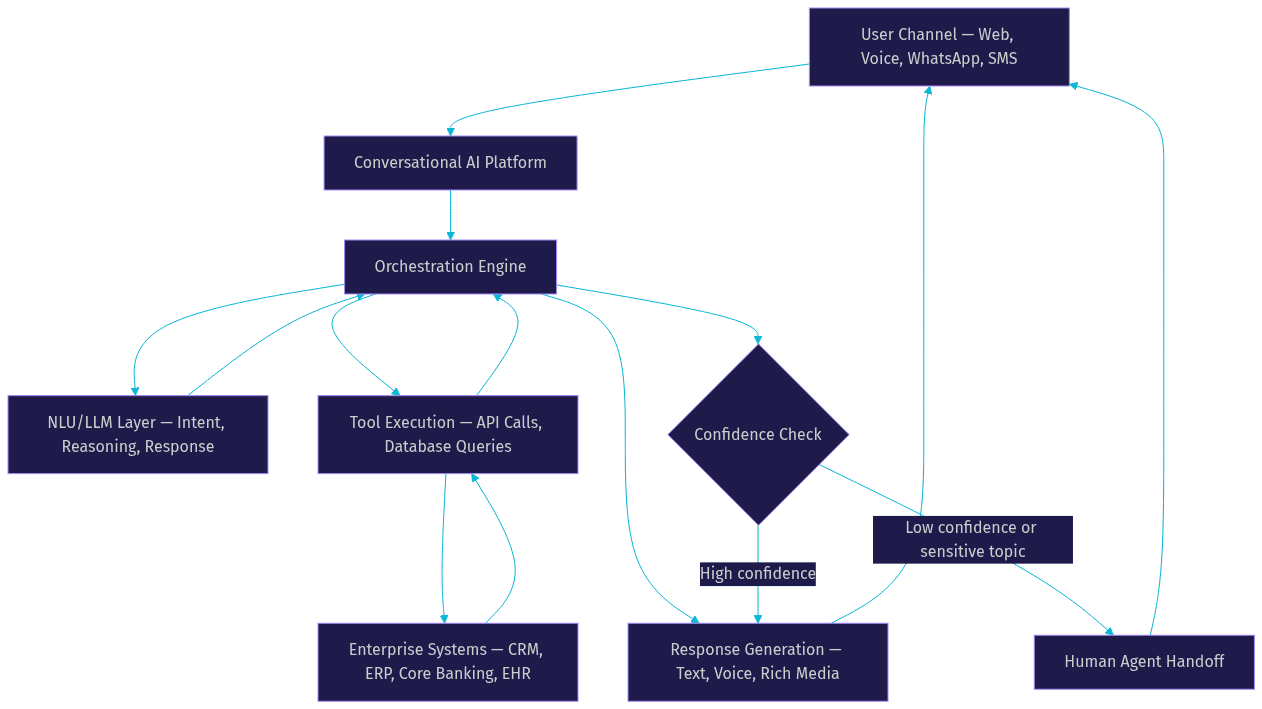
The diagram below maps the end-to-end flow from user interaction through the conversational AI platform to enterprise backend systems and human agent escalation.
Understanding Each Architecture Block
The user channel layer is the entry point. Each channel has different latency requirements and media types. Voice calls demand sub-second response times, while web chat can tolerate slightly longer generation times. WhatsApp and SMS introduce asynchronous conversation patterns where the user may not respond for minutes or hours.
The conversational AI platform sits between the user and your enterprise systems. It must never expose backend credentials or internal API structures to the user. All tool execution happens server-side within the orchestration engine, which acts as a secure proxy.
The orchestration engine is the critical path. Every conversation turn flows through it. It must be stateless horizontally scalable, with conversation state persisted externally in a database or cache layer. This lets you scale to millions of concurrent sessions without session affinity requirements.
The confidence check block is what separates enterprise-grade systems from consumer chatbots. After each turn, the orchestrator evaluates whether the AI response meets confidence thresholds. If not, or if the conversation touches sensitive topics like financial advice or medical diagnosis, the system routes to a human agent with the full conversation transcript and a summary of what the AI was attempting to do.
Security considerations span every block. Data in transit uses TLS everywhere. Data at rest in conversation logs is encrypted. PII is redacted or tokenized before being sent to external LLM providers. Access to conversation recordings and transcripts is role-based and audited.
Implementation Roadmap for Enterprises
Building enterprise conversational AI is a multi-phase journey. Skipping phases or rushing through them is the most common cause of failed deployments.
Phase 1: Proof of Concept and Goal Definition
Start with one specific use case, not a platform-wide rollout. Define the target metric: reduce tier-1 ticket volume by 40 percent, increase lead qualification speed by 50 percent, or achieve 65 percent containment on appointment scheduling calls. Without a measurable goal, you cannot evaluate success or justify expansion.
Identify the conversation flow at a high level. What are the top five user intents? What backend systems must the AI access? Where does human handoff occur? Document these before selecting any technology.
Phase 2: Platform Selection and Security Review
Evaluate platforms against the decision framework in the next section. Prioritize security and compliance early because retrofitting governance into a deployed system is painful. If you operate in healthcare, confirm HIPAA compliance. If you process payments, confirm PCI-DSS scope. If you serve European customers, confirm GDPR data processing agreements.
For teams building with VideoSDK, the AI Voice Agent SDK provides the agent infrastructure while the Python SDK handles backend AI pipeline integration. Review the authentication model: VideoSDK uses token-based authentication where tokens are generated server-side using your API key and secret, never exposed on the client.
Phase 3: Build and Test Conversational Flows
Use a low-code or no-code conversation builder for standard flows, then extend with custom logic for complex scenarios. VideoSDK's Conversational Graph lets you define conversation nodes, transitions, and extractors through a Python-based configuration, giving you both visual clarity and programmatic control.
Test with real conversation samples from your existing support logs. This reveals edge cases that synthetic test data misses. Pay special attention to ambiguous inputs, multi-intent queries, and user corrections mid-conversation.
Phase 4: Integrate Backend Systems
Connect the orchestration engine to your CRM, ERP, knowledge base, and custom APIs. Design the data pipeline to handle authentication, rate limiting, and error recovery gracefully. If a backend API is slow or unavailable, the AI agent should inform the user and offer alternatives rather than hanging indefinitely.
For voice-based agents, VideoSDK's SIP telephony integration connects traditional phone infrastructure to your AI agent pipeline. Inbound calls route through the SIP gateway into a VideoSDK room where the agent worker processes the conversation.
Phase 5: Deploy, Monitor, and Optimize
Deploy in stages. Start with a small percentage of traffic, monitor error rates and customer satisfaction, then ramp up. Set up dashboards for containment rate, handoff rate, average handle time, and sentiment scores. Review conversation transcripts weekly to identify failure patterns and refine flows.
Continuous optimization is not optional. Language models drift in performance as user behavior changes. Conversation flows need updating as products and policies evolve. Budget for ongoing maintenance, not just initial deployment.
Evaluating Vendors: A Decision Framework
Vendor evaluation for enterprise conversational AI platforms requires scoring against concrete, measurable criteria rather than marketing claims. The framework below covers the dimensions that matter most for production deployments.
| Criteria | What to Measure | Why It Matters |
|---|---|---|
| Latency | Median and P95 response time for voice and text channels | Sub-second voice latency is required for natural conversation; text channels tolerate 2-3 seconds |
| Scalability | Maximum concurrent sessions and sessions per second ramp rate | Enterprise peaks (holiday retail, open enrollment) can spike 10x above baseline |
| Omnichannel Support | Number of native channel integrations and cross-channel context persistence | Users switch channels mid-conversation; context loss destroys CX |
| Security Certifications | SOC 2, HIPAA, PCI-DSS, GDPR, ISO 27001 status | Enterprise procurement gates on certifications; missing one can disqualify a vendor |
| Governance Features | Guardrails, policy enforcement, audit logs, human-in-the-loop controls | Regulated industries require demonstrable control over AI behavior |
| Customization Depth | Ability to define custom conversation flows, tool integrations, and model selection | Rigid platforms force you to adapt your business to the tool, not the reverse |
| Pricing Model | Per-conversation, per-minute, per-session, or platform fee | Pricing structure determines unit economics at scale |
| Support and SLA | Response time guarantees, dedicated technical account manager, documentation quality | Production AI systems need fast vendor response when issues arise |
[LINKABLE ASSET — vendor evaluation framework]
Score each vendor on a 1-to-5 scale per criterion. Weight security and governance higher if you operate in regulated industries. Weight scalability and pricing higher if you expect high-volume deployments. The vendor with the highest weighted score is your shortlist candidate, but always run a proof-of-concept before committing.
VideoSDK's positioning in this framework is strongest for teams that need deep customization, multi-modal voice and video capabilities, and deterministic conversation flows through the Conversational Graph. Teams that need a fully managed, no-code platform with zero engineering involvement may find turnkey CX platforms better suited to their needs.
Common Pitfalls and How to Avoid Them
The same failure patterns repeat across enterprise conversational AI deployments. Recognizing them early saves months of rework.
Over-reliance on AI without human fallback. Teams deploy AI agents with inadequate confidence thresholds and let the system handle conversations it is not ready for. The result is customer frustration and brand damage. Fix: set conservative confidence thresholds at launch and lower them gradually as you collect performance data.
Ignoring data privacy in the AI pipeline. Sending raw PII to external LLM providers without redaction creates compliance violations. Fix: implement PII detection and redaction before any data leaves your infrastructure. Use data processing agreements with every AI provider in your pipeline.
Insufficient monitoring and alerting. Teams deploy without real-time visibility into failure rates, latency spikes, or sentiment drops. By the time someone notices, the damage is done. Fix: instrument every conversation turn with timing, confidence, and outcome metrics. Set alerts for anomaly detection.
Building everything at once. Attempting to launch a full omnichannel platform with dozens of integrations in phase one guarantees a delayed, buggy launch. Fix: start with one channel and one use case. Prove the architecture, then expand methodically.
Treating conversation design as an afterthought. Engineering teams focus on infrastructure and treat the actual conversation scripts as trivial. Poorly designed flows feel robotic and fail to handle natural language variation. Fix: involve conversation designers and UX researchers from day one.
Definitions Glossary
Agentic AI: AI systems that can reason, decide, take actions through tool calls, and escalate to humans, rather than only generating text responses.
Conversational Graph: A deterministic, graph-based conversation orchestration layer where business rules control conversation flow while the LLM handles natural language generation. VideoSDK provides this through its Conversational Graph framework.
Containment Rate: The percentage of conversations resolved by the AI agent without human handoff. A primary success metric for enterprise conversational AI deployments.
Human-in-the-Loop: A governance pattern where the AI system pauses and routes to a human agent when confidence is low or the topic is sensitive, passing full conversation context.
Orchestration Engine: The central component that routes user input through NLU, selects tools, calls backend APIs, and delivers responses through the appropriate channel.
STT/TTS Pipeline: The speech-to-text and text-to-speech chain that enables voice-based conversational AI, converting spoken input to text for the LLM and generating spoken output from the model's response.
Key Takeaways
- Enterprise conversational AI requires a composite architecture with five layers: NLU/NLG, multi-modal channels, orchestration, governance, and analytics. No single model or API covers all five.
- Agentic AI that reasons, acts, and hands off to humans is fundamentally different from traditional rule-based chatbots. Platforms like VideoSDK's Conversational Graph enable deterministic flows where business rules control branching.
- Start with one use case and one channel, prove the architecture, then expand. Attempting full omnichannel deployment in phase one is the most common cause of failed projects.
- Security and governance are not add-ons. PII redaction, audit logs, confidence-based human handoff, and compliance certifications must be designed in from day one.
- VideoSDK's AI Voice Agent SDK, SIP telephony integration, and room-based architecture provide a strong foundation for teams building custom enterprise conversational AI with voice and video capabilities.
Conclusion
Enterprise conversational AI in 2026 is no longer a question of whether to deploy but how to architect for scale, security, and measurable business outcomes. The teams succeeding are not the ones chasing the most advanced models. They are the ones building solid orchestration layers, designing conversations thoughtfully, integrating backend systems reliably, and maintaining human oversight where it matters.
VideoSDK provides the infrastructure layer for teams that want to build rather than buy. The AI Voice Agent SDK handles the real-time media pipeline, the Conversational Graph manages deterministic conversation flows, and the telephony integration bridges traditional phone systems into your AI agent architecture. You can explore code samples or sign up for a free account at app.videosdk.live/login to start building.
What are you building with VideoSDK? Drop a comment below. I would love to hear what kind of enterprise conversational AI use case you are working on, whether it is a banking support bot, a healthcare scheduling agent, or something entirely new.
FAQ