


End to end testing voice agent is the practice of validating the entire call flow of a voice AI system, from caller speech input through telephony gateways, speech-to-text transcription, LLM reasoning, text-to-speech synthesis, backend side effects, and audio output returned to the caller. VideoSDK provides an AI Voice Agent SDK that connects LLMs, STT, and TTS providers into real-time rooms, making it a natural surface for building and testing voice agent pipelines. This guide covers the tools, frameworks, and CI/CD strategies you need to ship reliable voice agents in 2026.
Manual QA for voice agents is expensive, slow, and inconsistent. A human tester calling your voice bot ten times might catch a broken intent or a hallucinated response, but they will miss latency spikes that only appear under load, subtle audio-text divergence where the transcript says one thing and the TTS says another, and multi-turn state corruption that only surfaces after the seventh conversational turn. The cost compounds as you add languages, accents, personas, and edge cases.
End to end testing voice agent solves this by automating the full call lifecycle. Instead of unit-testing your LLM prompt in isolation or clicking through a web UI, you simulate a real caller, drive the call through the actual telephony layer, transcribe the agent's audio response, judge whether the response was correct, verify that backend systems were updated, and publish a pass/fail report to your CI pipeline. By the end of this guide, you will understand the components of a robust voice agent test pipeline, the open-source tools available in 2026, and how to integrate automated voice testing into your development workflow.
What Is End to End Testing Voice Agent?
End to end testing voice agent is defined as the practice of validating a voice AI system by exercising the complete call path from caller input to backend actions and back to audio output, using automated tooling that simulates real callers and evaluates agent behavior across multiple conversational turns.
Voice agent testing works by orchestrating a synthetic or real telephony call, streaming audio into the agent pipeline, capturing the agent's audio response, transcribing it back to text, and then asserting that the response matches expected behavior using fuzzy matching, LLM-as-judge evaluation, or rule-based checks. It also verifies that side effects like CRM updates, database writes, or ticket creation actually occurred.
This is fundamentally different from unit testing individual components. A unit test might check that your intent classifier returns the right label for a given transcript. A UI-only test might verify that the call widget renders correctly in a browser. Neither catches the failure modes that matter in production: the STT model mishearing a caller with a regional accent, the LLM hallucinating a policy that does not exist, the TTS cutting off mid-sentence due to a streaming buffer issue, or the agent failing to update Salesforce after a successful appointment booking.
The core dimensions of end to end voice agent testing span five layers: telephony connectivity (SIP, WebRTC, PSTN), speech-to-text accuracy, LLM response quality and safety, text-to-speech naturalness and correctness, and backend integration verification (CRM, database, ticketing systems). A test that does not cover all five layers is not truly end to end.
VideoSDK's AI Voice Agent architecture maps directly onto these layers, with an Agent Worker managing the STT-to-LLM-to-TTS pipeline inside a VideoSDK room that participants connect to via web, mobile, or phone through SIP telephony integration.
Key Challenges in Voice-Agent QA
Voice agent QA is harder than traditional software testing because the system is bidirectional, real-time, and non-deterministic. Here are the core challenges that make end to end testing voice agent a distinct discipline.
Bidirectional streaming and real-time audio. Voice agents operate on streaming audio, not request-response HTTP calls. The caller speaks while the agent is still processing the previous utterance. Interruptions, barge-ins, and overlapping speech create timing-dependent failure modes that static test cases cannot reproduce reliably.
Non-deterministic LLM responses. The same input can produce different outputs across runs due to sampling temperature, model version changes, or provider-side updates. A test that asserts an exact string match will fail intermittently even when the agent is working correctly. This is why LLM-as-judge and semantic similarity scoring are essential for voice agent test assertions.
Multi-turn context and state management. A voice agent might need to maintain context across fifteen turns of a loan application conversation. State corruption at turn seven might not surface until turn twelve. Test suites must cover full conversation flows, not just single-turn interactions.
Audio-text divergence and hallucinations. The LLM might generate a correct text response, but the TTS engine might pronounce a number wrong, skip a word, or add an artifact. Speech hallucination detection compares the transcribed audio output against the original LLM text to catch these divergences.
Latency and performance spikes. Voice agents must respond within a conversational window, typically under 800 milliseconds for turn-taking. Latency monitoring for voice bots must measure end-to-end response time including STT processing, LLM inference, TTS synthesis, and network transport. Spikes that only appear under concurrent load are invisible to single-call tests.
Security and data privacy in test environments. Voice agent tests often process synthetic PII, payment data, or health information. Test environments must isolate secrets, use vault-managed credentials, and avoid logging sensitive audio or transcripts to CI artifacts.
Core Components of an End to End Test Pipeline
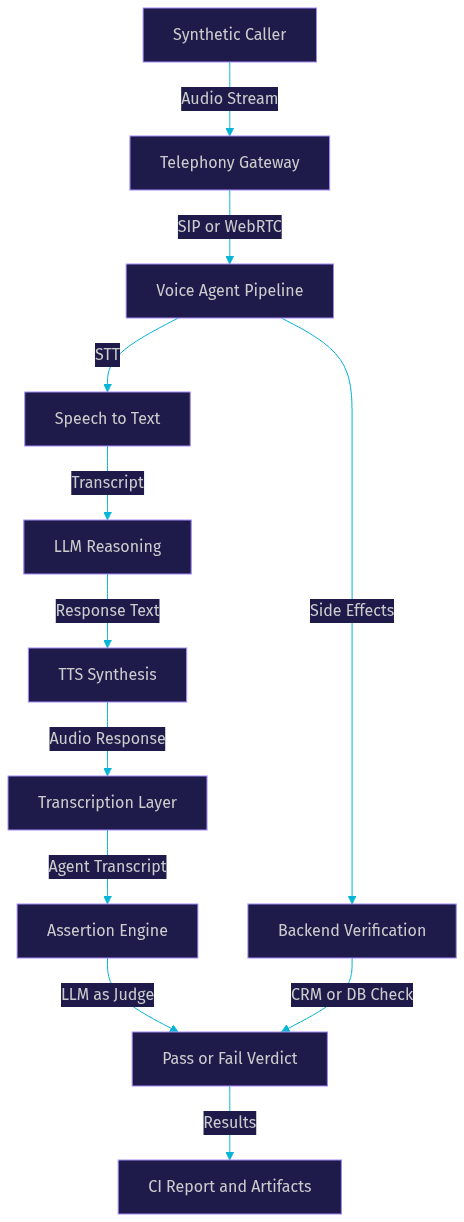
A robust end to end testing voice agent pipeline consists of five interconnected components, each addressing a specific layer of the voice agent stack. Understanding these components is essential before evaluating tools or building a test suite.
Call orchestration is the entry point. This component initiates calls through real telephony APIs (Twilio, Vonage, Telnyx), SIP trunks, or WebRTC sessions. For VideoSDK-based agents, the orchestrator connects a synthetic caller to a VideoSDK room using the same SDK that real users would use. The orchestrator streams audio into the room and captures the agent's audio response in real time.
Transcription layer converts the agent's audio response back to text for assertion checking. This typically uses the same STT providers powering the agent itself (OpenAI Whisper, Deepgram, Google STT, AssemblyAI), though using an independent transcription model can catch errors that the agent's own STT might miss. The transcription layer must handle streaming audio and produce timestamps for latency measurement.
Assertion engine evaluates whether the transcribed response meets expectations. Modern voice agent test frameworks support three assertion strategies: exact or regex matching for deterministic responses (like phone numbers or confirmation codes), fuzzy semantic matching for paraphrased responses, and LLM-as-judge evaluation where a separate LLM scores the agent response against a rubric. The assertion engine must also handle multi-turn conversations where the correctness of turn five depends on the state established in turns one through four.
Backend verification checks that the agent's conversation actually triggered the expected side effects. Did the CRM contact get updated? Was the appointment created in the scheduling database? Was the support ticket escalated? This component queries external systems (Salesforce, HubSpot, internal APIs) after the call completes and asserts that the expected state changes occurred.
Reporting and CI integration collects test results, audio evidence, transcripts, latency metrics, and backend verification outcomes into a structured report. This report is published as a CI artifact, displayed in a dashboard, or used to gate pull request merges.
Open-Source Tools Landscape
The open-source ecosystem for end to end testing voice agent has matured significantly by 2026. Several frameworks now provide production-grade call orchestration, assertion engines, and CI integration. Here is a breakdown of the leading tools.
Audrique provides autonomous multi-layer orchestration with a visual scenario studio for designing complex multi-turn test cases without writing scripts. It supports parallel Playwright-based browser verification for web-deployed voice agents and integrates with major telephony providers. Its strength is scenario complexity and visual test design, making it suitable for teams with QA engineers who prefer declarative test creation.
Voice Agent Tester is a Puppeteer-based framework that uses YAML scenario definitions to drive voice agent interactions. It handles TTS-based caller input, records agent responses, and captures performance metrics including response latency and turn duration. It is lightweight and easy to integrate into existing Node.js CI pipelines.
Voice Agent TestOps focuses on regression testing with risk-based assertions. It produces CI-ready JSON reports and emphasizes test coverage metrics, making it suitable for teams that need quantitative quality gates. Its assertion engine supports both rule-based and LLM-as-judge evaluation modes.
Bespoken BST is a veteran in the voice testing space, originally built for Alexa and Google Assistant skills. It uses YAML functional test definitions and provides a virtual device SDK that simulates voice assistant interactions. While originally focused on smart speaker platforms, it has expanded to support custom voice agents deployed on web and telephony channels.
TestAI operates as a cloud SaaS platform with persona generation, real-time analytics, and a no-code suite builder. It is not fully open-source but offers a free tier. Its strength is rapid test creation for teams that want to avoid infrastructure management.
AWS Nova Sonic Test Harness provides no-microphone evaluation for voice agents built on AWS infrastructure. It includes LLM-as-judge evaluation and audio-text divergence detection, making it particularly useful for teams already invested in the AWS ecosystem. According to AWS documentation, the harness supports batch evaluation of pre-recorded conversations alongside live call testing.
voicetest introduces a unified AgentGraph intermediate representation that allows test scenarios to be imported and exported across platforms. It supports cross-platform test portability and uses LLM-based diagnosis to explain test failures in natural language, reducing debugging time.
The following comparison table summarizes the key characteristics of each tool. This is a linkable asset you can reference when evaluating options for your stack.
| Tool | Language | Platform Support | CI Ready | Visual Studio | Pricing |
|---|---|---|---|---|---|
| Audrique | Python or JS | Twilio, WebRTC, custom | Yes | Yes | Open source |
| Voice Agent Tester | JavaScript | Web, Puppeteer | Yes | No | Open source |
| Voice Agent TestOps | Python | Twilio, Amazon Connect | Yes | No | Open source |
| Bespoken BST | JavaScript | Alexa, Google Assistant, web | Yes | Limited | Free tier plus paid |
| TestAI | Cloud SaaS | Multi-platform | Yes | Yes | Free tier plus paid |
| AWS Nova Sonic Test Harness | Python | AWS ecosystem | Yes | No | AWS usage-based |
| voicetest | Python or JS | Cross-platform import and export | Yes | No | Open source |
Audrique and voicetest stand out for teams that need cross-platform portability and visual scenario design. Voice Agent TestOps is the strongest choice for regression-focused teams that want risk-based assertions and structured CI reporting. Bespoken BST remains relevant for teams testing smart-speaker skills alongside telephony agents.
Selecting the Right Tool for Your Stack
Choosing the right end to end testing voice agent tool depends on four factors: your telephony platform, your team's language preference, your CI/CD requirements, and your budget.
If your voice agent is deployed on Twilio, look for tools with native Twilio integration or SIP support. Voice Agent TestOps and Audrique both support Twilio call orchestration. If you are on Amazon Connect, the AWS Nova Sonic Test Harness provides the tightest integration. For Salesforce Service Cloud Voice, look for tools that can verify Salesforce CRM updates as part of the backend verification layer.
Language preference matters for maintainability. Python-heavy teams will find Audrique, Voice Agent TestOps, and voicetest more natural to extend. JavaScript and Node.js teams should evaluate Voice Agent Tester and Bespoken BST.
For CI/CD needs, every tool listed above produces machine-readable reports, but the format varies. If your CI pipeline expects JUnit XML, check whether the tool exports that format. If you use GitHub Actions or GitLab CI, look for tools that provide exit-code-based pass/fail gating and artifact publishing.
The open-source versus SaaS decision comes down to infrastructure capacity and customization needs. Open-source tools give you full control over test execution, data privacy, and assertion logic, but require you to manage telephony credentials, call provisioning, and test infrastructure. SaaS platforms like TestAI handle infrastructure but may limit customization and introduce data residency considerations.
For teams building voice agents with VideoSDK's AI Agent SDK, the Python-based tools integrate naturally since the VideoSDK Agent Worker is Python-native. The VideoSDK Python SDK can be used to build custom test harnesses that connect synthetic callers directly to VideoSDK rooms.
Building a Robust Test Suite
A robust end to end testing voice agent suite is not just a collection of happy-path call scripts. It is a structured set of scenarios that cover personas, edge cases, performance thresholds, and backend verification. Here is how to build one.
Define personas and edge-case scenarios. Start by identifying the distinct caller personas your voice agent will encounter. A healthcare scheduling bot might serve elderly callers who speak slowly, non-native English speakers with accents, frustrated callers who interrupt frequently, and tech-savvy callers who try to bypass the conversational flow. Each persona should have its own set of test scenarios. Edge cases include callers who provide incomplete information, callers who change their mind mid-conversation, callers who ask off-topic questions, and callers who go silent for extended periods.
Write declarative test definitions. Most modern voice testing frameworks support declarative test definitions in YAML or JSON. These definitions specify the caller's utterances, expected agent responses, assertion strategies, and backend verification checks. Declarative tests are version-controllable, reviewable in pull requests, and portable across environments. Avoid imperative test scripts that hard-code timing and control flow, as these are brittle and difficult to maintain.
Incorporate LLM-as-judge for fuzzy assertions. For any agent response that cannot be verified with exact string matching, use an LLM-as-judge evaluation. The judge LLM receives the caller's input, the agent's transcribed response, and a rubric describing what a correct response should contain. It returns a pass or fail verdict with a confidence score. This handles the inherent non-determinism of LLM-powered agents. According to research from Artificial Analysis, LLM-as-judge evaluation correlates strongly with human quality assessments when the rubric is well-defined.
Add performance thresholds. Every test scenario should include latency assertions. Measure the time from caller speech end to agent audio start, the time from STT completion to LLM response, and the total turn duration. Set thresholds based on your conversational design requirements. A voice agent that takes more than 1.2 seconds to respond will feel broken to callers, even if the response content is perfect.
Capture audio and video evidence. When a test fails, the transcript alone is often insufficient to diagnose the problem. Save the full audio recording of the call, the agent's text response, the STT transcript, and any video or screen capture if the agent has a visual component. These artifacts should be published as CI artifacts or stored in a test evidence repository for debugging.
Version control and test data management. Store test definitions in the same repository as your voice agent code. Use dynamic test data generation for names, phone numbers, and account identifiers to avoid test pollution in shared environments. Never hard-code real phone numbers or customer data in test definitions.
Integrating Tests into CI/CD
End to end testing voice agent delivers value only when it runs automatically on every code change. Integrating voice agent tests into your CI/CD pipeline ensures that regressions are caught before they reach production.
Trigger on pull requests and nightly builds. Run a fast subset of critical-path tests on every pull request to provide rapid feedback during development. Run the full test suite, including edge cases and performance benchmarks, as a nightly build. This two-tier approach balances feedback speed with coverage depth.
Use headless execution. Voice agent tests do not require a graphical interface. Run them headless in CI environments using containerized runtimes. The test orchestrator should initiate calls, stream audio, capture responses, and produce reports without any browser or desktop interaction.
Pipeline steps in natural language. A typical CI pipeline for voice agent testing follows these stages. First, the pipeline generates authentication tokens for the telephony provider and the voice agent platform. Second, it provisions a temporary phone number or WebRTC session for the test call. Third, it executes the test scenarios, streaming synthetic caller audio into the agent and capturing responses. Fourth, it transcribes the agent responses and runs assertion checks including LLM-as-judge evaluation. Fifth, it queries backend systems to verify side effects. Sixth, it publishes a structured report as a CI artifact and sets the exit code to pass or fail based on assertion results.
Artifact publishing. Publish test reports, audio recordings, transcripts, and latency metrics as CI artifacts. Most CI platforms (GitHub Actions, GitLab CI, Jenkins) support artifact retention policies. Keep audio evidence for at least 30 days to support debugging of intermittent failures.
For VideoSDK-based agents, the VideoSDK REST API can be used to create rooms, validate tokens, and manage sessions programmatically from your CI pipeline. This allows the test orchestrator to spin up isolated VideoSDK rooms for each test run and tear them down afterward.
Best Practices and Common Pitfalls
Building a reliable end to end testing voice agent pipeline requires attention to environmental isolation, non-determinism handling, and ongoing maintenance. Here are the best practices and pitfalls to avoid.
Keep test environments isolated. Use separate telephony numbers, separate VideoSDK rooms, and separate backend sandboxes for test execution. Never run tests against production CRM or database systems. Use vault-managed secrets for all credentials and rotate them regularly.
Handle non-determinism with tolerance windows. LLM-based agents will produce slightly different responses across runs. Use semantic similarity thresholds instead of exact string matching. For latency assertions, use percentile-based thresholds (such as 95th percentile under 1 second) rather than absolute limits on every single call. Run critical scenarios multiple times and use majority-vote pass criteria to reduce flakiness.
Monitor flaky tests and implement retry logic. Voice agent tests are inherently more flaky than traditional software tests due to network variability, STT accuracy fluctuations, and LLM non-determinism. Track flakiness rates per test scenario and quarantine consistently flaky tests for investigation. Implement bounded retry logic (such as retry once on failure) but avoid masking real failures with excessive retries.
Regularly update voice model versions and re-baseline. When your STT, LLM, or TTS provider releases a new model version, your test expectations may need updating. Schedule regular re-baselining sessions where QA engineers review test results against the new model versions and update assertion rubrics accordingly. Tag test definitions with the model versions they were validated against.
Avoid hard-coding phone numbers. Use dynamic phone number provisioning through your telephony provider's API. Twilio, Telnyx, and Vonage all support programmatic number allocation. Hard-coded numbers create test pollution, interfere with other test runs, and can accidentally call real customers.
Future Trends in Voice-Agent Testing
The field of end to end testing voice agent is evolving rapidly. Four trends are shaping the next generation of voice QA tooling.
Real-time multimodal evaluation is emerging as voice agents gain video and visual capabilities. Test frameworks are beginning to evaluate not just audio responses but also visual outputs like avatars, screen sharing, and gesture synchronization. VideoSDK's support for vision and multi-modality in AI agents positions it well for this shift.
Automated prompt-engineering loops with continuous evaluation are becoming practical. Instead of manually refining agent prompts and re-running tests, teams are building pipelines that automatically generate prompt variations, evaluate them against test scenarios, and promote the best-performing version. This closes the loop between testing and prompt optimization.
Cloud-native test harnesses with serverless scaling allow teams to run hundreds of concurrent test calls without managing infrastructure. This is particularly valuable for load testing and for running large regression suites within reasonable CI execution times.
Standardized benchmark suites for voice-agent quality are beginning to emerge, similar to what LMSYS Chatbot Arena provides for text LLMs. These benchmarks will allow teams to compare their voice agent quality against industry baselines and track improvements over time.
Definitions Glossary
End to End Testing Voice Agent: The practice of validating a voice AI system by exercising the complete call path from caller input through telephony, STT, LLM, TTS, backend actions, and audio output using automated tooling.
LLM-as-Judge: An evaluation method where a separate LLM scores an agent's response against a rubric, used for fuzzy assertions when exact string matching is not feasible due to non-deterministic outputs.
Audio-Text Divergence: A failure mode where the LLM generates a correct text response but the TTS engine produces audio that differs from the text, detected by transcribing the audio output and comparing it to the original LLM text.
Call Orchestration: The component of a voice agent test pipeline that initiates calls through telephony APIs, SIP trunks, or WebRTC sessions and manages the audio streaming lifecycle.
Backend Verification: The process of querying external systems like CRM platforms, databases, or ticketing systems after a test call to confirm that the agent's conversation triggered the expected side effects.
VideoSDK Agent Worker: The Python process that runs a VideoSDK AI agent and manages its session lifecycle inside a VideoSDK room, connecting STT, LLM, and TTS providers into a real-time pipeline.
Key Takeaways
- End to end testing voice agent validates the full call lifecycle from caller speech to backend side effects, catching failure modes that unit tests and UI tests cannot detect.
- Non-deterministic LLM responses require fuzzy assertion strategies like LLM-as-judge and semantic similarity scoring rather than exact string matching.
- The open-source tooling landscape in 2026 includes purpose-built frameworks like Audrique, Voice Agent TestOps, and voicetest that support declarative test definitions and CI integration.
- A robust test suite covers multiple caller personas, edge cases, performance thresholds, and backend verification, with audio evidence captured for debugging.
- VideoSDK's AI Voice Agent SDK and Python SDK provide a natural integration surface for building custom voice agent test harnesses that connect synthetic callers to real VideoSDK rooms.
Conclusion
End to end testing voice agent is not optional for production voice AI deployments. The combination of real-time streaming audio, non-deterministic LLM responses, multi-turn state management, and backend integration creates too many failure modes for manual QA to catch reliably. By selecting the right testing framework, building declarative scenario-based test suites, and integrating them into your CI/CD pipeline, you can ship voice agents with confidence. Start by evaluating one of the open-source tools highlighted in this guide against your telephony platform and language stack. If you are building voice agents with VideoSDK, explore the AI Voice Agent documentation and the VideoSDK GitHub repository for code samples and integration patterns. Sign up at app.videosdk.live/login to get started with free credits. What are you building with VideoSDK? Drop a comment below, I would love to hear what kind of voice agent use case you are working on.
Free $20 Balance for AI Voice Agents & Video Calls
FAQ