


Dialogue management systems are the decision-making layer that sits between natural language understanding and response generation in a conversational AI pipeline. They track conversation state, apply a policy to select the next action, and coordinate external calls or knowledge retrieval. VideoSDK's Conversational Graph brings this same deterministic orchestration to real-time voice agents, letting developers define conversation flow as a directed graph while the LLM handles language generation. Start with the architecture fundamentals below, then explore an open-source framework or VideoSDK's agent pipeline to prototype your own.
Building a conversational AI assistant that actually holds a coherent multi-turn conversation is one of the hardest problems in applied NLP. The dialogue manager is the component that makes or breaks the experience. It decides what the system says next, tracks what has already been discussed, and routes the conversation toward a goal whether that is booking a flight, controlling a robot, or answering a support question.
In 2026, dialogue management systems have moved far beyond simple if-then chatbot logic. They now incorporate neural state tracking, reinforcement-learned policies, knowledge-graph reasoning, and multi-modal input fusion. Developers building voice agents, robotics applications, and customer service bots need to understand the architectural patterns, evaluate open-source frameworks, and follow proven implementation practices. This guide covers all three.
What Is a Dialogue Management System?
A dialogue management system is the component within a conversational AI architecture that maintains the state of a conversation and decides what action the system should take next. It receives structured output from a natural language understanding module, updates its internal representation of the dialogue, applies a policy to select an action, and passes that action to a response generation module.
Dialogue management systems handle three core responsibilities. First, dialogue state tracking maintains a running representation of what the user wants, what information has been collected, and what context is active. Second, the policy engine decides the next system action based on the current state, which could be asking a clarifying question, confirming a slot value, executing an API call, or generating a response. Third, action execution coordinates external calls, database lookups, or downstream service invocations that fulfill the user's request.
There are three dominant approaches to building dialogue managers. Rule-based systems use hand-crafted finite-state machines or decision trees where every possible conversation path is explicitly defined. Statistical systems use probabilistic models like partially observable Markov decision processes to track belief states and learn policies from data. Neural systems use transformer-based models to encode dialogue history and predict actions, often fine-tuned on large dialogue corpora. Each approach trades off predictability against flexibility, and production systems increasingly blend all three.
VideoSDK's Conversational Graph represents a modern hybrid approach: developers define the conversation flow as a deterministic directed graph with nodes, transitions, and state, while an LLM handles natural language generation within each node. This gives you the predictability of a rule-based system with the language flexibility of a neural model.
Core Architectural Components
Every dialogue management system shares a common architectural backbone, regardless of whether it runs on a web server, a robot, or a voice agent pipeline. Understanding these components is essential before evaluating frameworks or writing your first dialogue policy.
State Representation and Tracking
Dialogue state tracking is the process of maintaining a structured representation of the conversation at every turn. The state typically includes the user's intent, a set of slots (key-value pairs representing extracted information), the dialogue history, and contextual variables like the current topic or active task.
For example, in a restaurant booking system, the state might include the intent "reservetable," slots for partysize (filled), date (filled), time (unfilled), and a history of the last three turns. The state tracker updates these values after every user utterance based on NLU output, handling uncertainties like corrected values, partial information, and user-initiated topic switches.
State representations vary across architectures. Some systems use flat slot-value pairs. Others use hierarchical or graph-based representations that capture relationships between entities. In task-oriented dialogue systems, the state often includes a task graph that tracks progress toward a goal, marking which steps are complete and which remain.
Policy Engine
The policy engine is the decision-making heart of a dialogue management system. It takes the current dialogue state as input and outputs the next system action. The action space typically includes asking for more information, confirming a value, providing an answer, executing a database query, or ending the conversation.
Rule-based policies use finite-state machines where each state has predefined transitions triggered by specific intents or slot updates. These are highly predictable and easy to debug, but they become unwieldy as the conversation space grows. Reinforcement-learning policies learn optimal action sequences through trial and error, typically using reward signals based on task completion and dialogue efficiency. Neural policies encode the dialogue state using transformers and predict actions through a classification head, often trained on large annotated dialogue datasets.
In practice, many production systems use a hybrid policy. Critical paths like payment confirmation or personal data collection follow strict rules, while open-ended conversation segments use a neural model for flexibility. VideoSDK's Conversational Graph formalizes this hybrid pattern by letting developers define deterministic transitions between nodes while delegating language generation to an LLM within each node.
Popular Open-Source Dialogue Management Frameworks
Choosing the right framework can save months of development time. The open-source landscape in 2026 offers several mature options, each with distinct architectural philosophies and target use cases.
Emora STDM (State Transition Dialogue Manager)
Emora STDM is a state-machine-based dialogue manager that combines finite-state transitions with flexible update rules. Developed at Emory University, it lets developers define conversation flows as a graph of states connected by transitions, where each transition can carry conditions and update logic.
The framework's strength lies in its balance between structure and flexibility. You get the predictability of a state machine for critical conversation paths, but the update-rule system allows dynamic slot filling and context-dependent branching without hard-coding every possible path. Emora STDM is commonly used in academic research and task-oriented dialogue applications where conversation flow must be both controlled and adaptable.
ROS2 Dialogue Manager
The ROS2 Dialogue Manager integrates dialogue management directly into the Robot Operating System 2 ecosystem. It is designed for robots that need to converse with humans while coordinating perception, navigation, and manipulation skills.
This framework leverages ROS2's lifecycle node system, allowing the dialogue manager to start, pause, and resume in coordination with other robot subsystems. It supports multi-modal inputs by subscribing to ROS topics for speech recognition, vision data, and sensor readings, then fusing these inputs into a unified dialogue state. The ROS2 Dialogue Manager is the go-to choice for developers building social robots, service robots, or any embodied AI system where conversation must be tightly coupled with physical action.
Converse (Tree-Based Modular System)
Converse structures dialogue as an and-or tree, where each node represents a conversational task and branches represent dependencies between sub-tasks. This architecture is particularly effective for complex, multi-step conversations where certain tasks must complete before others can begin.
The tree-based approach makes task dependencies explicit and manageable. If a user asks to book a flight and a hotel, the system can represent these as parallel branches that share common slots like travel dates and destination. Converse handles the coordination automatically, tracking which sub-tasks are complete and which still need information. This framework suits applications with complex task graphs, such as travel planning, multi-service booking, or technical support workflows.
VOnDA (Ontology-Based System)
VOnDA uses an RDF/OWL ontology as its memory layer, enabling long-term user adaptation through semantic reasoning over stored knowledge. The system represents dialogue context, user preferences, and domain knowledge as linked data, allowing the dialogue manager to infer relationships and personalize responses over time. VOnDA is best suited for applications where persistent, semantically rich user modeling is more important than raw conversational speed.
Designing a Robust Dialogue Management System
Building a dialogue manager that survives real-world use requires careful design decisions around ontology modeling, multi-modal input handling, error recovery, and memory management. These are the areas where production systems most commonly fail.
Defining a Clear Ontology or Task Graph
The foundation of any dialogue management system is a well-defined ontology or task graph that models the domain. Start by enumerating every intent the system needs to handle, then map the slots each intent requires, and finally define the valid transitions between conversation states.
A common mistake is under-specifying the ontology. Developers often model the happy path (the ideal conversation flow) but forget to account for user corrections, topic switches, and incomplete information. A robust ontology includes fallback states, repeat-request handling, and explicit transitions for when the user asks to cancel or restart. Think of the task graph as a state machine where every state has at least one exit path, even if that path leads to a clarification prompt.
For slot definitions, specify the type, validation rules, and confirmation requirements for each slot. A date slot should validate against a calendar range. A phone number slot should match a pattern. Slots containing sensitive information like payment details should require explicit user confirmation before the system proceeds.
Managing Multi-Modal Inputs
Modern dialogue management systems increasingly need to process inputs beyond text. Speech, vision, and sensor data all contribute to understanding what the user wants and what the system should do next.
Multi-modal dialogue management requires an input fusion layer that aligns signals from different modalities temporally and semantically. A user pointing at an object while saying "what is that" requires the system to resolve the deictic reference using both the speech input and the gesture or gaze direction. In robotics applications using frameworks like the ROS2 Dialogue Manager, this fusion happens through topic subscriptions that feed into a shared state representation.
The key design principle is to treat every modality as evidence that updates the dialogue state, not as a separate conversation stream. A vision system detecting a person approaching should update the same state tracker that processes speech input, allowing the dialogue policy to respond appropriately even before the user speaks.
Handling Errors and Recovery
Every dialogue management system will encounter situations it cannot handle gracefully: unrecognized intents, ambiguous slot values, API failures, and user inputs that deviate from expected paths. Error handling is what separates a demo from a production system.
Design explicit fallback intents that trigger when the NLU confidence falls below a threshold. Implement graceful degradation where the system acknowledges it did not understand and offers options rather than silently failing or repeating the same prompt. For API failures, build retry logic with exponential backoff and a user-facing message that explains the delay. Most importantly, give users an always-available escape hatch to restart the conversation or speak to a human agent.
Scaling Memory and Context
As conversations grow longer and systems serve more users, memory management becomes a critical concern. Short-term context (the current conversation) must be accessible with low latency, while long-term memory (user preferences, past interactions) needs persistent storage and efficient retrieval.
In-memory dialogue state works for single-turn or short multi-turn conversations. For longer sessions, consider external state stores that can persist dialogue context across server restarts. Some frameworks like VOnDA use semantic knowledge graphs for long-term memory, enabling the system to recall user preferences from past sessions. For high-volume deployments, partition memory by user session and use caching layers to keep active conversations in fast storage while archiving completed ones.
VideoSDK's AI Voice Agents address this through built-in context management and memory features, allowing voice agents to maintain conversation state across turns and retrieve relevant context from external stores during a live call.
Implementation Blueprint
Building a dialogue management system from scratch follows a logical sequence of decisions and integration steps. Here is the path a developer typically takes, mapped to the frameworks and concepts discussed above.
Step 1: Define Intents and States. Enumerate every user intent your system will handle. For each intent, list the required slots, optional slots, and validation rules. Map the conversation flow as a state graph, including happy paths, error states, and fallback transitions. This is where frameworks like Emora STDM or VideoSDK's Conversational Graph shine, because they let you encode this structure explicitly.
Step 2: Choose a Policy Engine. Decide whether your policy will be rule-based, learned, or hybrid. For critical workflows like payment processing or medical intake, use deterministic rules. For open-ended conversation segments, use a neural policy trained on dialogue corpora. If you are building a voice agent, VideoSDK's Conversational Graph gives you the hybrid model out of the box.
Step 3: Connect NLU. Integrate a natural language understanding module that converts user utterances into structured intent and slot representations. This module feeds the dialogue state tracker. Popular choices include fine-tuned transformer models, commercial NLU services, or pipeline-based tools from frameworks like ConvLab.
Step 4: Integrate Response Generation. Connect a response generation module that converts the policy's selected action into natural language. This can be template-based for predictable responses, neural for flexible generation, or a combination. In VideoSDK's agent pipeline, the LLM handles generation within the constraints of the current graph node.
Step 5: Deploy and Monitor. Deploy your dialogue manager with logging on every state transition, policy decision, and action execution. Monitor task success rate, average dialogue length, and user satisfaction signals. Use this data to refine your policy and ontology over time.
The following diagram shows the end-to-end flow of a typical dialogue management pipeline:
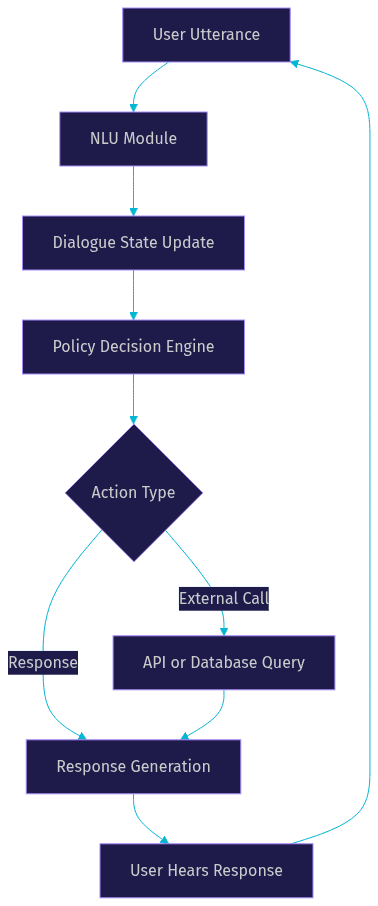
This flow repeats for every turn in the conversation. The state update step is where context accumulates, and the policy decision is where the system chooses its next move. In a VideoSDK voice agent, this entire loop runs within an Agent Worker process that manages the session lifecycle inside a VideoSDK room.
Evaluation and Benchmarking
A dialogue management system is only as good as its measured performance. Evaluation must cover both objective metrics (does the system complete the task?) and subjective metrics (did the user find the conversation natural and efficient?).
The most common objective metric is task success rate, which measures the percentage of conversations where the user's goal was achieved. Dialogue length, measured in turns, indicates efficiency: shorter successful dialogues are better. Latency measures the time between user utterance and system response, which is critical for real-time voice agents where users expect sub-second responses.
For standardized evaluation, the research community relies on benchmark suites. MultiWOZ is a large-scale multi-domain dialogue dataset that provides labeled conversations across seven domains (restaurant, hotel, attraction, taxi, train, hospital, police). It is the de facto standard for evaluating task-oriented dialogue systems. ConvLab is an open-source toolkit that provides a modular evaluation pipeline, letting developers plug in their own NLU, state tracker, and policy modules and test them against MultiWOZ conversations.
User satisfaction is harder to measure automatically. Some systems use post-conversation surveys or implicit signals like whether the user returned for a follow-up session. In production, A/B testing different policy configurations against real user traffic is the most reliable way to measure subjective quality.
Future Trends in Dialogue Management
The dialogue management landscape is evolving rapidly. Four trends are shaping where the field is heading in 2026 and beyond.
Knowledge-graph reasoning is becoming a first-class capability in dialogue managers. Instead of relying solely on slot-filling, systems are increasingly querying structured knowledge graphs to answer complex questions, resolve entity references, and maintain semantically rich conversation context. This is particularly relevant for enterprise applications where domain knowledge is already encoded in graph databases.
Hybrid symbolic-neural models are gaining traction as developers seek the predictability of rules with the flexibility of neural generation. VideoSDK's Conversational Graph exemplifies this trend, combining deterministic graph-based flow control with LLM-powered language generation. Expect more frameworks to adopt this pattern.
Continual learning is addressing the problem of dialogue systems that go stale. Rather than retraining from scratch, next-generation dialogue managers will update their policies incrementally based on live conversation data, adapting to new user behaviors and domain changes without downtime.
Privacy-preserving memory is becoming a priority as regulations tighten. Dialogue systems that store user preferences and conversation history must increasingly do so in ways that protect personally identifiable information, using techniques like federated learning, differential privacy, and on-device state storage.
Definitions Glossary
Dialogue State Tracking: The process of maintaining a structured representation of the current conversation, including user intent, slot values, dialogue history, and contextual variables. In VideoSDK's Conversational Graph, state is managed through a Pydantic data model that persists across nodes.
Dialogue Policy: The decision-making component that selects the next system action based on the current dialogue state. Policies can be rule-based, learned through reinforcement learning, or hybrid.
Task-Oriented Dialogue: A type of conversation where the user has a specific goal (booking, ordering, information retrieval) and the system guides the conversation toward completing that goal through structured slot filling and action execution.
Conversational Graph: VideoSDK's deterministic, graph-based conversation orchestration layer that defines dialogue flow as nodes and transitions while delegating natural language generation to an LLM. It combines the predictability of state machines with the flexibility of neural models.
Agent Worker: The Python process that runs a VideoSDK AI agent and manages its session lifecycle inside a VideoSDK room, handling the STT to LLM to TTS pipeline and dialogue state management.
Key Takeaways
- Dialogue management systems are the decision-making layer that tracks conversation state, applies a policy to select actions, and coordinates external calls or response generation.
- Three architectural approaches dominate: rule-based finite-state machines, statistical models, and neural policies, with production systems increasingly using hybrid combinations.
- Open-source frameworks like Emora STDM, ROS2 Dialogue Manager, Converse, and VOnDA each serve distinct use cases from academic research to robotics to long-term user adaptation.
- A robust dialogue manager requires a well-defined ontology, multi-modal input fusion, explicit error recovery paths, and scalable memory management.
- VideoSDK's Conversational Graph represents the modern hybrid approach, combining deterministic graph-based flow control with LLM-powered language generation for real-time voice agents.
Conclusion
Dialogue management systems are the backbone of any conversational AI that needs to do more than answer single questions. Whether you are building a task-oriented chatbot, a social robot, or a real-time voice agent, the principles are the same: model your domain carefully, choose the right policy architecture, handle errors gracefully, and measure everything. The open-source frameworks covered here give you a head start, and VideoSDK's Conversational Graph offers a production-ready path for developers who want deterministic flow control with neural language flexibility. Pick a framework, define your first task graph, and start prototyping today. You can sign up for free at app.videosdk.live/login and explore the AI Voice Agents documentation to see how dialogue management works in a live voice pipeline. What are you building with dialogue management systems? Drop a comment below, and I'd love to hear what kind of conversational AI use case you're working on.
Free $20 Balance for AI Voice Agents & Video Calls
FAQ