


Dialogue history management is the practice of storing, retrieving, and structuring past conversation turns so players or users can review, replay, and analyze interactions. It spans game engines like Ren'Py and RPG Maker, modding frameworks like SKSE, and AI chat platforms where conversation memory drives contextual responses. VideoSDK's AI Voice Agents address this through built-in context management and memory features for real-time voice conversations. Start by defining your entry structure, then layer in storage, retrieval, and pruning strategies as described below.
Developers building interactive experiences know that conversations are not disposable. A player who forgets a critical NPC hint gets frustrated. A QA engineer who cannot replay a buggy dialogue branch cannot reproduce the issue. An analytics team that cannot see which dialogue choices players pick is flying blind. Reliable dialogue history management solves all three problems at once.
This article covers what dialogue history management is, how to structure and store entries, how to implement history in popular engines, how to design a usable history UI, and how to keep performance healthy as conversations grow long. Whether you are working in Ren'Py, Skyrim's SKSE, RPG Maker, Unity, Godot, or an AI chat framework, the principles here apply directly.
What Is Dialogue History Management?
Dialogue history management is defined as the systematic process of recording, storing, retrieving, and pruning conversation entries during an interactive session. Its core purpose is to give both the end user and the developer a reliable record of what was said, by whom, and in what order.
A critical distinction exists between a history log and state persistence. A history log is a sequential record of displayed dialogue entries, each capturing a single turn or line. State persistence goes further by saving the full dialogue state, including current node position, variable values, and branch conditions, so a session can be resumed exactly where it left off. Both are part of dialogue history management, but they serve different needs.
History logs answer "what did the player see?" State persistence answers "where is the player in the conversation graph?" A robust system handles both. VideoSDK's AI Voice Agents, for example, manage conversation memory and context windows as part of their pipeline, ensuring that real-time voice agents maintain coherent state across turns without requiring developers to build custom persistence layers from scratch. You can explore this in the VideoSDK AI Agents documentation.
Core Components of a Dialogue History System
A well-architected dialogue history system has three core components: entry structure, storage mechanism, and retrieval and display. Each component must be designed with the target engine and expected conversation volume in mind.
Entry Structure
Every dialogue entry should capture a consistent set of fields. The minimum viable fields are speaker identity, displayed text, timestamp, and a unique turn ID. Metadata fields such as dialogue node reference, branch label, and emotional tone add value for analytics and replay systems.
Different engines model entries differently. Ren'Py uses a HistoryEntry object that stores the speaker name, the text, and a "who" identifier. An SKSE dialogue history plugin for Skyrim captures the speaker's reference ID, the response text, and the quest context. An RPG Maker dialogue recorder typically stores the speaker name, the message text, and a face graphic index. Despite these differences, the underlying pattern is the same: a structured record per turn that can be serialized and retrieved later.
Storage Mechanisms
Storage choices fall into two broad categories: in-memory arrays and serialized save files. In-memory arrays are fast and simple but vanish when the session ends. Serialized save files persist across sessions but introduce I/O overhead and file-size concerns.
JSON is the most portable format and is human-readable, making it ideal for debugging and cross-tool export. Binary blobs are more compact and faster to load for large histories. Engine-specific formats, such as Ren'Py's native save system or RPG Maker's save data structure, integrate seamlessly but are harder to inspect externally. The best approach often combines both: keep a rolling in-memory buffer for the current session and serialize to disk at save points.
Retrieval and Display
Retrieval is about pulling stored entries into a UI panel, a replay system, or an analytics pipeline. The retrieval layer should support filtering by speaker, timestamp range, and turn ID. Display logic handles rendering, pagination, and scroll position restoration.
Implementing Dialogue History in Popular Engines
Each engine has its own approach to dialogue history management. Here is how the most common platforms handle it and what developers need to know.
Ren'Py
Ren'Py has built-in dialogue history support that requires minimal configuration. The engine maintains an internal list called the history list, and developers control its size through a configuration variable that sets the maximum number of entries retained. When the list exceeds this limit, the oldest entries are automatically removed.
Developers can extend each history entry by registering custom callbacks that fire when a new entry is created. These callbacks let you inject additional metadata such as the current location, relationship values, or custom tags. This is useful for analytics and for building richer history UIs that show context alongside the spoken text. The VideoSDK React SDK quickstart demonstrates a similar callback-driven pattern for participant events, which can inspire your history callback architecture.
A common gotcha in Ren'Py is forgetting that the history list is capped. If your game has long cutscenes with hundreds of lines, earlier entries may be pruned before the player opens the history panel. Consider temporarily increasing the cap during critical story sequences or implementing a secondary persistent log for important conversations.
Skyrim (SKSE) Plugin
The Skyrim Script Extender community has produced dialogue history plugins that capture NPC conversations in real time. These plugins hook into the game's dialogue events and store each response with the speaker's name, reference ID, and the dialogue topic. The plugin typically requires SKSE itself as a dependency, plus a UI extension framework such as SkyUI to display the history in-game.
Managing max entries is critical here because Skyrim's scripting environment has performance constraints. Most plugins default to a rolling buffer of a few hundred entries. Developers modifying these plugins should profile memory usage carefully, especially during long play sessions with heavy NPC interaction. A good practice is to flush older entries to a log file on disk periodically rather than holding everything in memory.
RPG Maker
RPG Maker does not include native dialogue history, so developers rely on community scripts or plugins. A typical dialogue history script enables a recorder that hooks into the message window, capturing each displayed line along with the speaker name and face graphic. The recorder then writes entries into a game variable or a dedicated data structure.
Save-load integration is the trickiest part. RPG Maker's save system serializes game variables but may not automatically capture custom data structures unless the script explicitly registers them. Developers must ensure the history array is included in the save data and restored on load. Test this by saving mid-conversation, reloading, and verifying the history panel shows the correct entries.
Designing a Robust History UI
A dialogue history UI is the player's window into past conversations, and its design directly affects usability. The core principles are scrollability, searchability, and contextual clarity.
Every history panel should support smooth scrolling through entries. Search and filter functionality lets players find specific topics or speakers without scrolling through hundreds of lines. Timestamps help players understand when a conversation happened relative to game events. Speaker icons or portraits provide visual anchoring and make the panel feel less like a raw log.
A simple list works for most games. A full event tree is better for branching narratives where the player needs to see which choices led to which outcomes. The decision depends on your game's dialogue complexity. A linear visual novel needs a list. A branching RPG with mutually exclusive dialogue paths benefits from a tree view.
Here is a flowchart showing the typical UI interaction pattern:
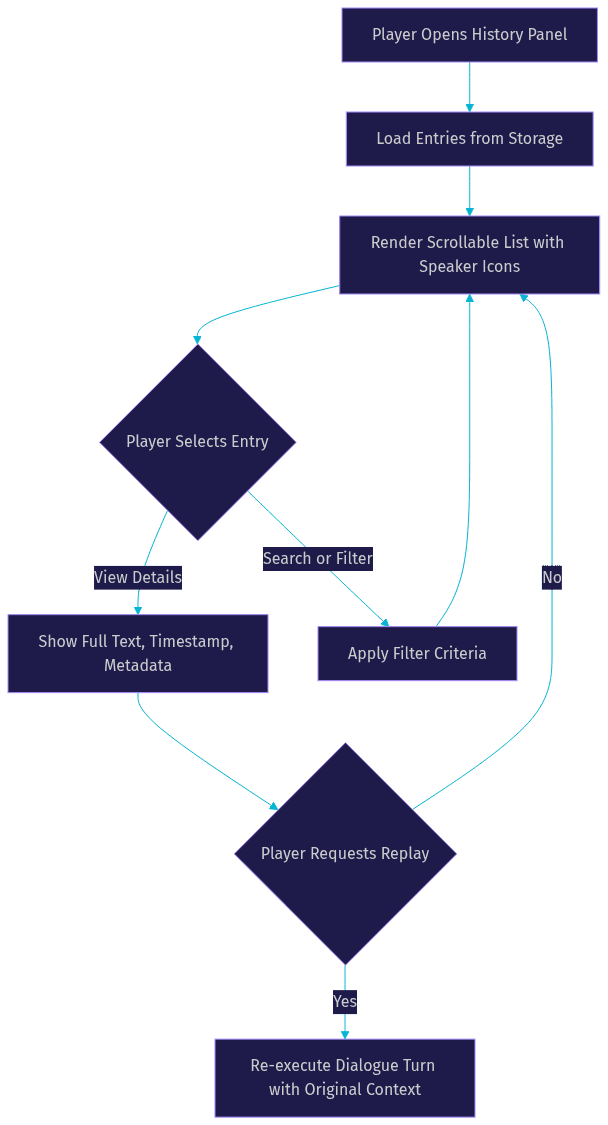
The key UX insight is that selecting an entry should do more than show text. It should offer context: where the conversation happened, what choices were available, and whether the player can replay it. This transforms a passive log into an interactive tool.
Managing History Size and Performance
Unbounded dialogue history is a performance problem waiting to happen. As conversations accumulate, memory usage grows, save file sizes balloon, and load times increase. Managing history size is a core part of dialogue history management.
The three primary strategies are max entry limits, rolling buffers, and pruning old turns. Max entry limits cap the total number of stored entries, typically between 200 and 1000 depending on the platform. Rolling buffers implement a circular queue where new entries overwrite the oldest ones once the cap is reached. Pruning goes further by removing entries based on relevance, such as deleting generic NPC barks while retaining story-critical conversations.
A pruning algorithm in prose works as follows. When the history reaches its maximum size, the system evaluates the oldest entries. Entries tagged as low-priority, such as ambient NPC comments or repeated shopkeeper greetings, are removed first. Entries tagged as story-critical are retained regardless of age. If the history is still over capacity after low-priority pruning, the system removes the oldest remaining non-critical entries until the size is within bounds.
Profiling is essential. Monitor memory usage during long play sessions, measure save file sizes after extended dialogue sequences, and track load times when restoring large histories. Most engines provide profiling tools. Use them. VideoSDK's session analytics, documented in the VideoSDK REST API reference, offer a parallel example of how production systems track and report session-level data for performance monitoring.
Advanced Features: Callbacks, Replay, and Analytics
Once the basics are in place, dialogue history management opens the door to advanced features that significantly improve both player experience and development insight.
History Callbacks
Callbacks fire when a new history entry is created, letting developers inject custom data at the moment of capture. In Ren'Py, you register functions that receive the entry object and can attach arbitrary fields. In custom engines, you implement a similar observer pattern. Use callbacks to record the current game state, player inventory, relationship scores, or even screen position. This metadata becomes invaluable for debugging and analytics.
Dialogue Replay
A replay system re-executes past dialogue turns with their original context. This is powerful for both players and QA. Players can revisit important conversations without replaying the game. QA engineers can reproduce a bug by replaying the exact sequence of turns that triggered it.
Building replay requires storing not just the text but the dialogue node reference and any variables that affected the branch. When replaying, the system navigates to the stored node, restores the relevant variables, and re-displays the dialogue. The challenge is ensuring that side effects, such as relationship changes or item grants, are not re-triggered during replay. Mark replay sessions as read-only to prevent unintended state mutations.
Analytics Export
Exporting dialogue history for analytics reveals how players interact with your conversation system. Common metrics include choice frequency, dialogue skip rates, average time spent reading, and sentiment trends across story arcs. Export history as JSON or CSV and feed it into your analytics pipeline.
For AI-driven conversations, VideoSDK's AI Voice Agents support post-call transcription and summary features that integrate naturally with analytics workflows. The VideoSDK AI Agents introduction describes how transcription data flows through the agent pipeline, which is directly analogous to exporting dialogue logs for analysis.
Common Pitfalls and How to Avoid Them
Even experienced developers fall into predictable traps when implementing dialogue history management. Here are the most common ones and how to sidestep them.
Forgetting to disable history during cutscenes. Cinematic sequences can generate hundreds of entries that players will never read back. Disable or suspend history recording during cutscenes, or tag those entries as non-displayable so they do not clutter the history panel.
Over-saving leading to large save files. If your save system serializes the entire history on every save, file sizes grow rapidly. Consider saving only a summary or delta, or compress history data before serialization. Test save and load times with histories of 500-plus entries.
Mismatched turn IDs causing broken replay. Turn IDs must be unique and monotonically increasing. If IDs are reused or generated non-deterministically, the replay system may jump to the wrong node. Use a simple counter that increments on every new entry and never resets during a session.
Ignoring memory management for dialogue on low-end platforms. Mobile devices and older consoles have tighter memory budgets. Profile history memory usage on your minimum-spec hardware, not just your dev machine.
Best Practices Checklist
- Define a consistent entry structure with speaker, text, timestamp, and turn ID before writing any storage logic.
- Cap history size with a rolling buffer and prune low-priority entries automatically.
- Use callbacks to inject contextual metadata at capture time rather than reconstructing it later.
- Test save and load with large histories to catch file-size and performance issues early.
- Disable or suspend history recording during cutscenes to avoid clutter and wasted memory.
- Ensure turn IDs are unique and monotonic to prevent replay and debugging errors.
- Export history data as JSON for analytics, debugging, and cross-tool compatibility.
Definitions Glossary
History Log: A sequential record of displayed dialogue entries, each capturing a single turn or line of conversation.
State Persistence: The saving of full dialogue state, including current node position and variable values, so a session can be resumed exactly where it left off.
Rolling Buffer: A circular queue data structure where new entries overwrite the oldest ones once a maximum capacity is reached.
Turn ID: A unique, monotonically increasing identifier assigned to each dialogue entry, used for replay and debugging.
History Callback: A function registered to fire when a new history entry is created, allowing developers to inject custom metadata at capture time.
Dialogue Replay: A system that re-executes past dialogue turns with their original context, enabling players to revisit conversations and QA engineers to reproduce bugs.
Key Takeaways
- Dialogue history management combines history logging and state persistence to give players and developers a reliable record of conversations.
- A consistent entry structure with speaker, text, timestamp, and turn ID is the foundation of any history system across Ren'Py, SKSE, RPG Maker, and AI chat frameworks.
- Performance management through rolling buffers, max entry limits, and intelligent pruning prevents memory bloat and save file inflation.
- Advanced features like callbacks, replay, and analytics export transform a passive log into an interactive development tool.
- VideoSDK's AI Voice Agents provide built-in context management and memory features that handle dialogue history concerns for real-time voice conversations, reducing custom infrastructure work for AI-powered applications.
Conclusion
Disciplined dialogue history management is what separates a polished interactive experience from a frustrating one. Players rely on history to recall important details. Developers rely on it to debug, analyze, and improve conversation systems. By defining a clear entry structure, choosing the right storage mechanism, designing a usable UI, and implementing performance safeguards, you build a system that scales with your game or application. Explore the VideoSDK AI Agents documentation to see how conversation memory and context management work in real-time voice agent pipelines, and check the VideoSDK code samples for integration examples. What are you building with dialogue history? Drop a comment and share your use case with the VideoSDK Discord community.
Free $20 Balance for AI Voice Agents & Video Calls
FAQ