


Introduction to AI Voice Agents in Conversational Memory
What is an AI Voice Agent?
An AI Voice Agent is a sophisticated software application that uses artificial intelligence to interact with users through voice commands. These agents are designed to understand natural language, process it, and respond in a way that mimics human conversation. They are increasingly becoming integral in various industries, providing customer support, personal assistance, and more.
Why are they important for the conversational memory industry?
Conversational memory refers to an AI's ability to remember past interactions and use this information to provide contextually relevant responses. This capability is crucial for creating a seamless user experience, as it allows the AI to maintain context over multiple interactions, making conversations more natural and engaging.
Core Components of a Voice Agent
The core components of a voice agent typically include:
- Speech-to-Text (STT): Converts spoken language into text.
- Natural Language Processing (NLP): Understands and processes the text.
- Text-to-Speech (TTS): Converts processed text back into speech.
- Voice Activity Detection (VAD): Identifies when the user is speaking.
What You'll Build in This Tutorial
In this tutorial, you will build a conversational AI Voice Agent using the VideoSDK framework. This agent will feature conversational memory, allowing it to remember previous interactions within a session and provide contextually aware responses. You will learn how to set up the environment, create the agent, and test it in a playground environment.
Architecture and Core Concepts
High-Level Architecture Overview
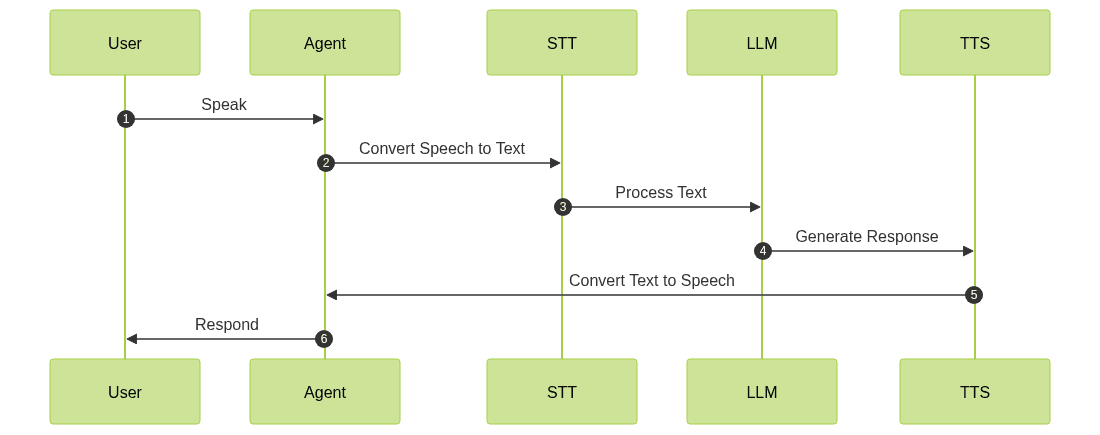
The architecture of our AI Voice Agent is designed to handle the flow of audio data from input to response generation. The system integrates various components, including STT, NLP, and TTS, to create a seamless conversational experience.
Understanding Key Concepts in the VideoSDK Framework
Agent
The
Agent class is the core of your AI Voice Agent. It represents the bot and manages the interaction flow.Cascading Pipeline in AI voice Agents
The
CascadingPipeline orchestrates the flow of audio processing, starting with STT, followed by processing through a language model (LLM), and finally converting the response back to speech using TTS.VAD & TurnDetector
Voice Activity Detection (VAD) and Turn Detection are crucial for determining when the agent should listen and when it should respond, ensuring a natural conversational flow.
Setting Up the Development Environment
Prerequisites
Before you begin, ensure you have Python 3.7 or higher installed on your system. You will also need an account with VideoSDK to obtain API keys.
Step 1: Create a Virtual Environment
To keep dependencies organized, create a virtual environment:
1python -m venv venv
2source venv/bin/activate  # On Windows use `venv\\Scripts\\activate`
3
Step 2: Install Required Packages
Install the necessary packages using pip:
1pip install videosdk-agents videosdk-plugins
2
Step 3: Configure API Keys in a .env file
Create a
.env file to store your API keys securely:1VIDEOSDK_API_KEY=your_api_key_here
2Building the AI Voice Agent: A Step-by-Step Guide
Step 4.1: Generating a VideoSDK Meeting ID
To interact with your agent, you need a meeting ID. You can generate one using the VideoSDK API or through the dashboard.
Step 4.2: Creating the Custom Agent Class
Let's begin by defining our custom agent class. This class will inherit from the
Agent class and implement the on_enter and on_exit methods:1class MyVoiceAgent(Agent):
2 def __init__(self):
3 super().__init__(instructions=agent_instructions)
4 async def on_enter(self): await self.session.say("Hello! How can I help?")
5 async def on_exit(self): await self.session.say("Goodbye!")
6Step 4.3: Defining the Core Pipeline
The core pipeline is defined using the
CascadingPipeline class, which manages the flow of data through the STT, LLM, and TTS components:1pipeline = CascadingPipeline(
2 stt=DeepgramSTT(model="nova-2", language="en"),
3 llm=OpenAILLM(model="gpt-4o"),
4 tts=ElevenLabsTTS(model="eleven_flash_v2_5"),
5 vad=SileroVAD(threshold=0.35),
6 turn_detector=TurnDetector(threshold=0.8)
7)
8Step 4.4: Managing the Session and Startup Logic
The AI voice Agent Sessions class manages the lifecycle of the agent's interaction. Here, we define how the session starts and handles cleanup:
1async def start_session(context: JobContext):
2    agent = MyVoiceAgent()
3    conversation_flow = ConversationFlow(agent)
4    session = AgentSession(
5        agent=agent,
6        pipeline=pipeline,
7        conversation_flow=conversation_flow
8    )
9    try:
10        await context.connect()
11        await session.start()
12        await asyncio.Event().wait()
13    finally:
14        await session.close()
15        await context.shutdown()
16
Running and Testing the Agent
Step 5.1: Running the Python Script
To run your agent, execute the Python script:
1python main.py
2
Step 5.2: Interacting with the Agent in the Playground
After starting the script, you will see a link to the VideoSDK playground in the console. Use this link to join the session and interact with your agent.
Advanced Features and Customizations
Extending Functionality with Custom Tools
You can extend your agent's functionality by integrating custom tools and plugins, enhancing its capabilities.
Exploring Other Plugins
VideoSDK offers a range of plugins for different functionalities, such as different STT and TTS engines, which you can explore to customize your agent further.
Troubleshooting Common Issues
API Key and Authentication Errors
Ensure your API keys are correctly set in the
.env file and that your VideoSDK account is active.Audio Input/Output Problems
Check your microphone and speaker settings to ensure proper audio input and output.
Dependency and Version Conflicts
Ensure all dependencies are installed and compatible with your Python version.
Conclusion
Summary of What You've Built
You have successfully built a conversational AI Voice Agent with conversational memory using the VideoSDK framework.
Next Steps and Further Learning
Explore additional plugins and features to enhance your agent, and consider deploying it in a real-world application for further learning.
FAQ