


Conversational flow design is the architectural process of mapping how an AI assistant interacts with users to achieve specific goals. It involves structuring dialogue management, intent modeling, and error recovery strategies to create robust chatbot flows. Applying conversational design principles ensures a seamless user journey mapping experience, guiding developers from initial happy paths to complex human handoff scenarios.
Building an AI assistant that actually helps users requires more than connecting a large language model to an API. Without a structured approach, conversations quickly spiral into confusing, unhelpful loops. This is where conversational flow design becomes critical. It provides the blueprint for how an assistant interprets input, makes decisions, and responds. A well-designed flow anticipates user needs, handles unexpected inputs gracefully, and guides the interaction toward a successful resolution. In this guide, we will explore the conversation design process, from foundational layers to robust error handling in chatbots, and show you how to build conversational architecture that stands up to real-world user behavior.
What Is Conversational Flow Design?
Conversational flow design is defined as the systematic process of mapping the logic, structure, and progression of an interaction between a user and an AI system. It goes far beyond simple script writing. While a script dictates exact responses, conversational flow design builds a dynamic state machine that adapts to user inputs.
It works by defining a set of states the conversation can exist in, the transitions between those states, and the conditions that trigger them. This process is central to conversational UX. It ensures the assistant remains helpful and coherent even when users change topics or provide incomplete information. By focusing on user intent disambiguation and micro-successes in dialogue, developers can create AI-driven conversations that feel natural rather than rigidly mechanical.
The Three Core Layers of Conversational Flow Design
A robust conversational architecture relies on three distinct layers working in harmony. Separating these concerns makes conversational flow optimization manageable.
Understanding (NLU) Layer
The Natural Language Understanding layer is where the system interprets user intent. It takes raw text or speech and extracts meaning, entities, and context. Effective intent modeling here is crucial. If the system cannot accurately classify what the user wants, the subsequent layers will fail.
Dialogue Management Layer
This layer acts as the brain of the operation, steering the conversation toward predefined goals. It tracks conversation state, remembers context, and decides the next best action. Dialogue management ensures the assistant follows conversational design principles, maintaining logical progression without forcing the user down a single rigid path.
Recovery & Handoff Layer
Even the best AI assistants encounter situations they cannot handle. The recovery and handoff layer manages error handling in chatbots, dealing with interruptions, ambiguities, and system failures. It implements recovery strategies, such as clarification prompts or graceful exits, and dictates when to transfer the user to a human agent.
Step-by-Step Design Process
Building robust chatbot flows requires a systematic conversation design process. Here is a step-by-step approach to creating effective conversational flow templates.
1. Research & Persona Development
Before mapping any flows, you must understand who you are building for. Gather user needs, expectations, and context. Define the assistant's persona, ensuring its tone aligns with your brand and the specific use case.
2. Map User Journeys
Identify the primary goals users want to achieve. User journey mapping involves charting the optimal path to these goals, but also recognizing micro-successes in dialogue. These are small confirmations that keep the user engaged and confident the assistant is helping.
3. Define Intents & Slots
Outline exactly what the agent must understand. List the primary intents and the specific data points, or slots, the system needs to extract from the user's input to fulfill those intents. This step forms the backbone of your NLU configuration.
4. Sketch the Happy Path
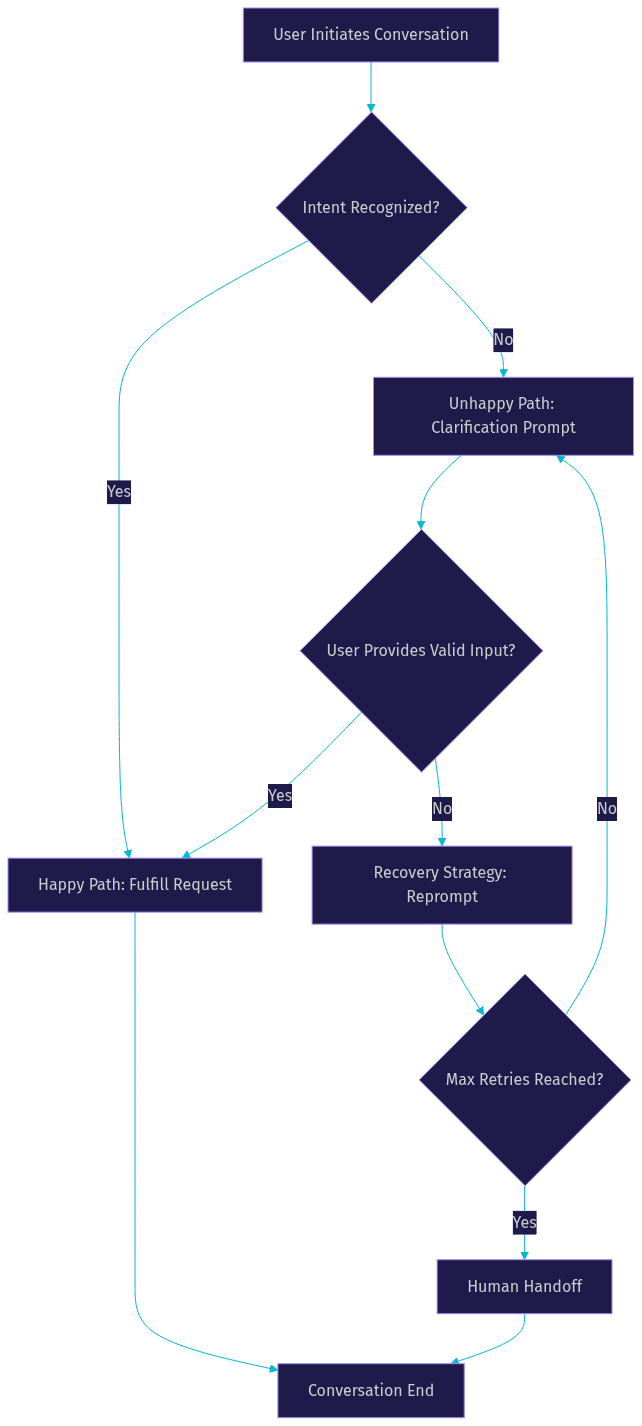
Build the optimal flow where everything goes right. The user states their intent clearly, provides the required slots, and the assistant fulfills the request. This establishes the baseline logic of your conversational flow design.
5. Design Unhappy Paths
Real users rarely stick to the happy path. Anticipate interruptions, ambiguities, and failures. What if the user provides an invalid date? What if they change their mind halfway through? Designing unhappy paths is where you implement robust error handling in chatbots.
6. Plan Human Handoff
Determine the exact conditions under which the AI should give up and transfer the conversation to a live agent. This might be triggered by repeated failures, user frustration, or complex requests outside the AI's scope.
Here is a visual representation of how these paths connect in a typical conversational architecture:
Designing for Robustness
Robust chatbot flows are not just about covering the happy path. They must handle the unpredictable nature of human conversation. Conversational AI best practices dictate specific strategies for maintaining flow when things go wrong.
Handling Interruptions
Users often change topics mid-sentence or ask unrelated questions. Your dialogue management system must allow for out-of-turn input. The assistant should address the interruption, answer the question, and then gracefully steer the conversation back to the original task.
Managing Ambiguity
When a user's intent is unclear, the system must employ user intent disambiguation. Instead of guessing, the assistant should ask targeted clarification questions. For example, if a user asks for a flight to a city with multiple airports, the system should ask which specific airport they prefer.
Fallback & Error Recovery
When the NLU layer fails completely, fallback strategies take over. Use lightweight reprompts to guide the user, such as asking them to rephrase their request. If the system still fails, provide a graceful exit, offering alternative ways to get help rather than trapping the user in a loop.
Empathy & Tone Consistency
Maintaining brand voice during recovery is a core conversational design principle. If the system fails, the response should be apologetic and helpful, not robotic. Empathy in error states significantly improves the overall conversational UX.
Visualizing Flows with Diagrams
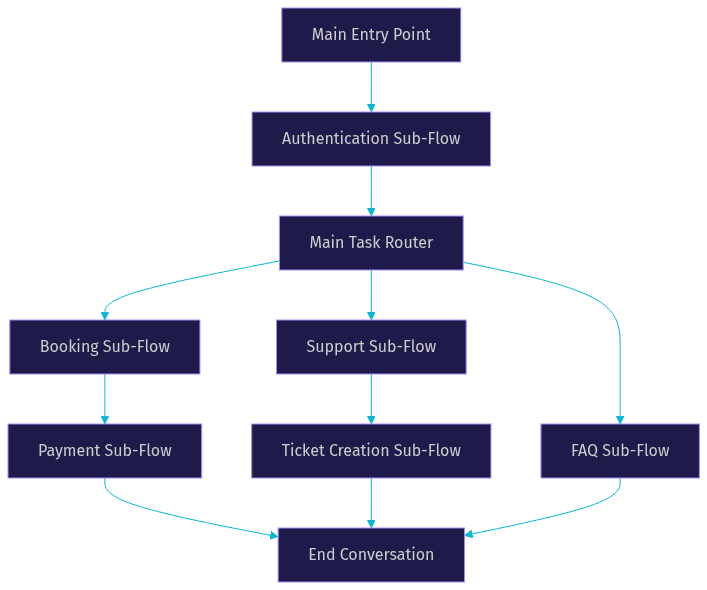
Visual flowcharts aid collaboration between developers, designers, and stakeholders. They make abstract conversational logic tangible. Using flowcharting tools allows teams to spot dead ends and logical gaps before writing any code. A modular flow architecture, where complex flows are broken into smaller, reusable sub-flows, is easier to maintain and test.
Testing, Analytics, and Iteration
Conversational flow optimization is an ongoing process. Conversation testing must include both automated unit tests for intent recognition and user testing for conversational UX. Deploy A/B experiments to test different phrasing or recovery strategies. Monitor analytics to see where users drop off or where the system triggers human handoff. Use these metrics to continuously refine your flows and improve AI-driven conversation quality.
Common Pitfalls and How to Avoid Them
Many teams fall into predictable conversational design pitfalls. Over-reliance on happy paths is the most common; teams design only for the best-case scenario and leave users stranded when errors occur. Vague intents lead to poor NLU performance. Ignoring edge cases, like users sending empty messages or rapid-fire inputs, breaks the flow. Avoid these by rigorously designing unhappy paths and testing with real, unpredictable user data.
Tools, Platforms, and Resources
Several platforms streamline the conversation design process. Voiceflow offers robust visual flowcharting tools for voice and chat assistants. Rasa CALM provides a framework for building contextual AI assistants with advanced dialogue management. Botpress includes a visual editor and built-in conversational flow templates. For developers building voice agents, VideoSDK offers an AI Agent SDK that integrates with these platforms to handle real-time media transmission. You can explore VideoSDK code samples to see how these integrations work in practice.
Definitions Glossary
Conversational Flow Design: The systematic process of mapping the logic and structure of interactions between a user and an AI system to achieve specific goals.
Dialogue Management: The component of a conversational system that tracks state, remembers context, and decides the next action based on user input.
Intent Modeling: The process of defining and training a system to recognize the underlying goal or purpose behind a user's input.
User Intent Disambiguation: A strategy where the AI asks targeted questions to clarify a user's goal when the input is ambiguous or could match multiple intents.
Human Handoff: The process of transferring a conversation from an AI assistant to a live human agent when the AI cannot resolve the user's issue.
Key Takeaways
- Conversational flow design is an architectural process, not just script writing, requiring dynamic state management.
- A robust conversational architecture separates NLU, dialogue management, and recovery layers.
- Designing unhappy paths and error recovery strategies is more critical than perfecting the happy path.
- Visualizing flows with diagrams helps teams identify dead ends and build modular, maintainable logic.
- Continuous testing and analytics are required to optimize conversational UX and handle real-world user behavior.
Conclusion
A systematic, layered approach to conversational flow design is what separates a frustrating chatbot from a reliable AI assistant. By focusing on dialogue management, anticipating unhappy paths, and implementing robust recovery strategies, you can build conversational architecture that genuinely serves your users. Remember that conversation design is an iterative process; test your flows, analyze the data, and refine your logic continuously. What are you building with VideoSDK? Drop a comment below to share your conversational AI use case, or join the VideoSDK Discord community to discuss with other developers. You can start building today by signing up at app.videosdk.live/login.
FAQ