


Conversational AI in insurance refers to AI-driven voice and text agents that handle real-time customer interactions like claims intake, policy questions, and renewal outreach. Unlike generic chatbots, these systems use grounded retrieval, structured data extraction, and human-in-the-loop escalation to stay compliant with regulations like NAIC Model Bulletin 23-1. VideoSDK provides the real-time communication infrastructure and AI agent SDK to build and deploy these systems securely.
Every insurance carrier knows the first 60 seconds of a claim matter. A customer who just had a car accident or discovered water damage in their home is stressed, vulnerable, and expecting immediate help. If your call center puts them on hold for 20 minutes, you lose trust before the claim even begins. Conversational AI in insurance is changing that first-minute window by automating intake, triage, and routing without sacrificing compliance or empathy.
The technology has moved well beyond simple FAQ bots. In 2026, insurers are deploying AI voice agents that can conduct full first-notice-of-loss interviews, extract structured data from unstructured speech, classify severity, and escalate to human adjusters with complete context preservation. This guide walks through the use cases, regulatory landscape, architecture patterns, and implementation best practices you need to build a production-grade conversational AI system for insurance.
Understanding Conversational AI in Insurance
Conversational AI in insurance is defined as the application of natural language processing, speech recognition, and large language models to automate real-time customer interactions across the insurance lifecycle. This includes claims reporting, policy inquiries, renewal outreach, and fraud screening.
Generic chatbots fail in insurance because they lack grounding. A chatbot that free-associates answers about coverage can create legal liability. Insurance demands agents that are auditable, grounded in policy documents, and constrained by business rules. That means every response must be traceable to a source document, every data extraction must be validated, and every escalation must preserve full conversation context.
VideoSDK addresses this by providing a real-time communication layer where AI agents connect to rooms, process speech through STT and TTS pipelines, and interact with users over voice or video. The VideoSDK AI Agent SDK lets you build deterministic conversation flows using the Conversational Graph, ensuring the LLM generates natural language while your business logic controls what happens next.
The distinction matters: a generic chatbot says whatever the model predicts. A grounded insurance agent follows a structured flow, extracts data into typed fields, checks compliance rules, and only speaks what the policy and regulations allow.
Key Use Cases and Benefits
Insurance carriers deploying conversational AI in insurance see measurable returns across five high-impact use cases. Each one targets a different stage of the customer journey and delivers distinct ROI drivers.
FNOL Triage and Intake
First Notice of Loss is the most time-sensitive interaction in insurance. An AI voice agent can answer the call immediately, conduct a structured interview, capture photos or video of the damage, and route the claim based on severity. This reduces average handle time by 40 to 60 percent in deployed systems and ensures no claim waits in a queue.
Policy and Coverage Q&A
Customers constantly ask whether their policy covers a specific scenario. A grounded AI agent with retrieval-augmented generation over policy documents can answer these questions accurately, cite the relevant clause, and flag when a human agent should confirm. This deflects a large volume of routine calls from licensed agents.
Renewal Outreach
AI voice agents can proactively call policyholders approaching renewal, present updated terms, answer questions about coverage changes, and even bind renewals when authorized. This increases retention rates and reduces the workload on human renewal teams.
Claims Status Updates
Policyholders want to know where their claim stands. Instead of calling a human agent, customers can interact with an AI agent that pulls real-time status from the claims management platform and provides updates with next-step guidance.
Lead Capture and Quoting
For new business, AI agents can conduct initial intake, gather driver or property information, and generate preliminary quotes. High-intent leads get routed to licensed agents for binding, while the AI handles the data collection overhead.
The ROI drivers are clear: reduced handle time, higher net promoter scores from faster response, indemnity savings from earlier fraud detection, and lower operational costs from call deflection.
Regulatory and Compliance Landscape
Insurance is one of the most regulated industries for AI deployment. Building conversational AI in insurance without a compliance-first approach is a recipe for fines, litigation, and reputational damage.
The NAIC Model Bulletin 23-1, issued by the National Association of Insurance Commissioners, establishes expectations for how insurers develop and use AI systems. It requires a formal governance program, risk assessment, and documentation of AI-driven decisions. Insurers must maintain audit trails showing how an AI agent arrived at a recommendation or action, especially in claims handling.
State-level unfair-claims-practice statutes add another layer. Many states prohibit insurers from using AI to automatically deny claims without human review. Your architecture must include human-in-the-loop checkpoints for any decision that affects claim outcomes.
Two-party consent laws for call recording vary by state. If your AI voice agent records conversations for training or audit purposes, you need consent mechanisms built into the call flow. The agent should announce recording at the start of the call and capture explicit consent before proceeding.
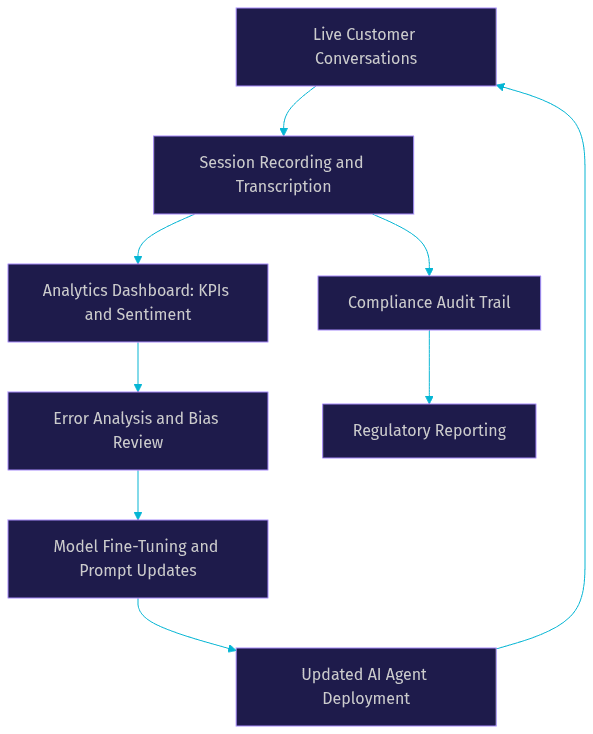
Audit-trail requirements mean every interaction must be logged with sufficient detail to reconstruct what happened. This includes the user's input, the AI's response, the data sources consulted, the routing decisions made, and any human escalation. VideoSDK supports this through session recording and post-call transcription, which you can read about in the VideoSDK transcription documentation.
Embedding compliance into the system means designing routing logic that automatically escalates to licensed humans when the conversation touches regulated decisions. It means constraining the LLM with retrieval grounding so it cannot fabricate coverage answers. And it means logging every step for regulatory review.
Designing a Scalable Architecture
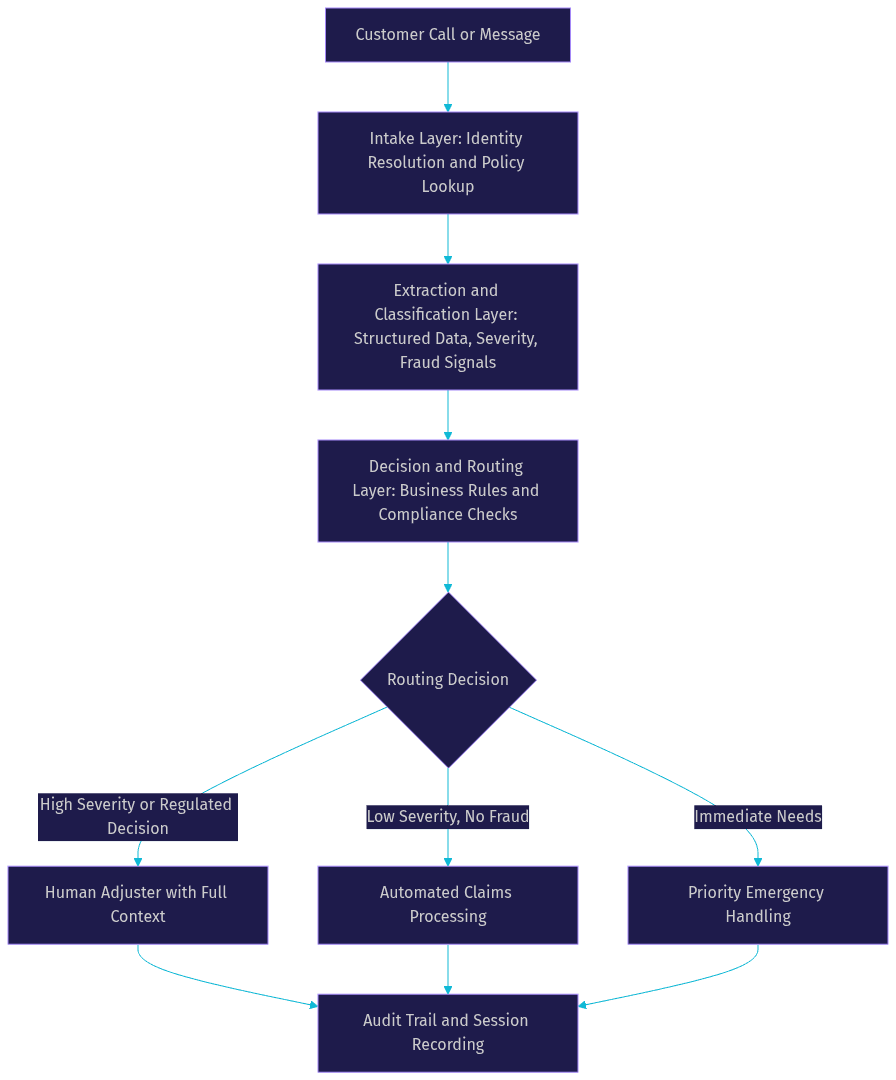
A production conversational AI system for insurance requires a layered architecture that separates concerns: intake, extraction, decision-making, and human escalation. Each layer has distinct responsibilities and failure modes.
Intake Layer
The intake layer handles identity resolution and policy lookup before the conversation begins. When a customer calls, the system should match the phone number to an existing policyholder record, pull active policies, and preload relevant context. This eliminates the need for the AI agent to ask for policy numbers and lets the conversation start with personalized context.
If identity cannot be resolved automatically, the agent conducts a lightweight verification flow using date of birth, ZIP code, or last four digits of a stored identifier. The intake layer also captures consent for recording and AI processing.
Extraction and Classification Layer
Once the conversation starts, the AI agent must extract structured data from unstructured speech. When a customer describes an accident, the agent captures the date, location, vehicles involved, parties present, and damage description into typed fields. This structured data feeds downstream systems without human data entry.
Severity classification happens in parallel. The agent assesses whether the claim is low, medium, or high severity based on injury reports, property damage extent, and liability indicators. Fraud signal detection runs alongside, flagging inconsistencies, repeated claim patterns, or suspicious circumstances for review.
Decision and Routing Layer
The decision layer applies business rules to the extracted data. Low-severity claims with no fraud signals may proceed to automated processing. High-severity claims route immediately to a senior adjuster. Claims with immediate needs, such as medical emergencies or habitability issues, trigger priority handling.
This layer also enforces regulatory constraints. If the conversation moves toward a coverage determination or claim denial, the system automatically routes to a licensed human agent. The routing logic is deterministic, not LLM-driven, which is where a tool like the VideoSDK Conversational Graph becomes essential.
Human-in-the-Loop and Escalation
Escalation is not a failure mode. It is a designed feature. When the AI agent escalates, the human adjuster receives the full conversation transcript, extracted data fields, severity classification, and fraud signals. The hand-off must be seamless, with no need for the customer to repeat information.
VideoSDK supports this through its real-time room architecture. The AI agent and the human agent can exist in the same room, allowing a warm transfer where the AI introduces the human agent and provides a summary before disconnecting. You can learn more about this capability in the VideoSDK AI agents documentation.
Implementation Best Practices
Building conversational AI in insurance requires attention to data integration, security, model training, and ongoing monitoring. Each area has specific pitfalls that can derail a production deployment.
Data Integration
Your AI agent is only as good as the data it can access. Connect the agent to your policy administration system, claims management platform, and CRM before the conversation starts. The agent should be able to query active policies, claim status, payment history, and customer preferences in real time.
Use REST APIs for real-time lookups during the conversation. Batch-sync policy documents into a vector store for retrieval-augmented generation. The VideoSDK REST API can handle room creation, session management, and recording control from your backend.
Security and Privacy
Insurance data is subject to state and federal privacy regulations. All data in transit must be encrypted. Use token-based authentication for every API call, and never expose API secrets on the client side. VideoSDK uses JWT-based token authentication generated server-side, which you can read about in the VideoSDK authentication guide.
Practice data minimization. The AI agent should only access the policy fields relevant to the current interaction. Do not pass entire policy documents to the LLM context window when a targeted retrieval query will suffice. This reduces both latency and risk.
Model Training and Fine-Tuning
Generic LLMs do not understand insurance terminology out of the box. Fine-tune on domain-specific corpora including policy templates, claims adjuster notes, and regulatory guidance. Build a retrieval-augmented generation pipeline over your actual policy documents so the agent grounds its answers in real coverage language.
Continuous learning means feeding corrected interactions back into the training pipeline. When a human adjuster corrects the AI's classification or extraction, that correction should improve future performance. VideoSDK's session recording and transcription capabilities provide the raw data for this feedback loop.
Monitoring and Continuous Improvement
Deploy dashboards that track deflection rate, average handle time, escalation rate, and customer sentiment in real time. Monitor for bias in routing decisions, such as whether certain demographics are disproportionately escalated or denied automated service.
Error analysis should be systematic. Review escalated conversations weekly to identify patterns where the AI agent failed to extract data correctly, misclassified severity, or gave inaccurate policy information. Feed these findings back into prompt engineering, retrieval tuning, and model fine-tuning.
Measuring ROI and Success Metrics
Quantifying the impact of conversational AI in insurance requires both quantitative and qualitative metrics. Track these from day one of your pilot.
Quantitative KPIs:
- Deflection rate: Percentage of calls handled entirely by AI without human escalation. Target 40 to 60 percent for routine inquiries.
- Average handle time: Time from call start to resolution. AI-driven FNOL typically reduces this by 40 to 60 percent.
- Indemnity reduction: Savings from earlier fraud detection and more accurate severity classification. Measure claim payout differences between AI-triaged and human-only claims.
- NPS uplift: Net Promoter Score improvement from faster response times and 24/7 availability.
- Cost per interaction: Total cost divided by handled interactions, including AI infrastructure and human escalation costs.
Qualitative indicators:
- Customer sentiment: Analyze transcription data for sentiment trends across interaction types.
- Compliance audit scores: Track pass rates on internal and regulatory audits of AI-driven decisions.
- Adjuster satisfaction: Survey human adjusters on the quality of context they receive during escalations.
Future Trends and 2026 Outlook
The conversational AI landscape in insurance is evolving rapidly. Three trends will shape 2026 and beyond.
Multimodal agents are emerging as the next frontier. Instead of voice-only interactions, customers will share live video of damage during a claim call. The AI agent will process visual input alongside speech, asking targeted follow-up questions based on what it sees. VideoSDK's support for custom video tracks and real-time video processing positions insurers to build these experiences today.
Plan-based reasoning is replacing simple intent matching. Instead of following a rigid decision tree, AI agents will formulate a plan at the start of each interaction, adjust that plan as new information arrives, and execute steps dynamically. This is where deterministic flow engines like the Conversational Graph become critical, providing structure while allowing flexible execution.
AI-driven underwriting assistance is moving from pilot to production. AI agents will support underwriters by gathering risk information, pulling data from third-party sources, and presenting pre-scored recommendations. Regulatory guidance is catching up, with the NAIC expected to release updated bulletins on AI in underwriting decisions.
Definitions Glossary
FNOL (First Notice of Loss): The initial report a policyholder makes when a covered event occurs. Automating FNOL intake is the highest-ROI use case for conversational AI in insurance.
NAIC Model Bulletin 23-1: A regulatory framework from the National Association of Insurance Commissioners that establishes governance, risk assessment, and documentation requirements for AI systems used by insurers.
Conversational Graph: VideoSDK's deterministic flow engine that lets developers define conversation steps as a directed graph while the LLM handles natural language generation. Essential for compliance-driven insurance flows.
Human-in-the-Loop: A design pattern where AI agents escalate to human operators for regulated decisions, complex cases, or when confidence thresholds are not met. Required by most state unfair-claims-practice statutes.
Deflection Rate: The percentage of customer interactions resolved by AI without human intervention. A primary ROI metric for conversational AI deployments.
Key Takeaways
- Conversational AI in insurance requires grounded, auditable agents, not generic chatbots. Every response must be traceable to a policy document and logged for regulatory review.
- The highest-impact use cases are FNOL triage, policy Q&A, renewal outreach, claims status, and lead capture. These deliver ROI through reduced handle time, higher NPS, and indemnity savings.
- Compliance with NAIC Model Bulletin 23-1 and state-level statutes is non-negotiable. Build human-in-the-loop checkpoints, audit trails, and consent mechanisms into the architecture from day one.
- A four-layer architecture (intake, extraction, decision, escalation) separates concerns and ensures each component can be tested, monitored, and improved independently.
- VideoSDK provides the real-time communication infrastructure, AI agent SDK, and Conversational Graph engine needed to build compliant conversational AI for insurance. Start with the VideoSDK AI agents documentation to explore a pilot.
Conclusion
Conversational AI in insurance is no longer experimental. Carriers that deploy grounded, compliant AI voice agents are seeing measurable reductions in handle time, improvements in customer satisfaction, and earlier fraud detection. The technology is ready. The regulatory framework is clarifying. The competitive advantage goes to teams that build now with compliance baked into the architecture rather than bolted on later. If you are planning a conversational AI pilot for claims, policy servicing, or renewals, explore the VideoSDK AI Agent SDK and join the VideoSDK Discord community to connect with other developers building in this space. What are you building with VideoSDK? Drop a comment below, I would love to hear what insurance AI use case you are working on.
Free $20 Balance for AI Voice Agents & Video Calls
FAQ