


Conversational AI in healthcare refers to AI systems that understand and respond to patient or clinician queries using natural language, powered by large language models, speech recognition, and retrieval-augmented generation. VideoSDK provides AI Voice Agent infrastructure that enables developers to build HIPAA-aware healthcare voice applications with real-time transcription and deterministic conversation flows.
The healthcare industry faces a paradox: demand for care is rising faster than the supply of clinicians, and patients expect faster, more personalized interactions. Conversational AI in healthcare addresses this gap by automating routine interactions, supporting clinical decision-making, and enabling 24/7 patient engagement without overwhelming staff.
As of 2026, healthcare organizations are moving beyond simple rule-based chatbots toward sophisticated AI systems that can triage symptoms, follow up after surgery, monitor chronic conditions, and even support mental health. This guide covers the architecture, benefits, risks, and implementation considerations for building healthcare conversational AI systems, with practical guidance for developers using modern real-time communication infrastructure.
What Is Conversational AI in Healthcare?
Conversational AI in healthcare is defined as the application of natural language processing, large language models, and speech interfaces to facilitate meaningful interactions between patients, clinicians, and medical knowledge systems. Unlike simple chatbots that follow rigid decision trees, healthcare conversational AI systems understand context, reason about symptoms, and generate evidence-grounded responses.
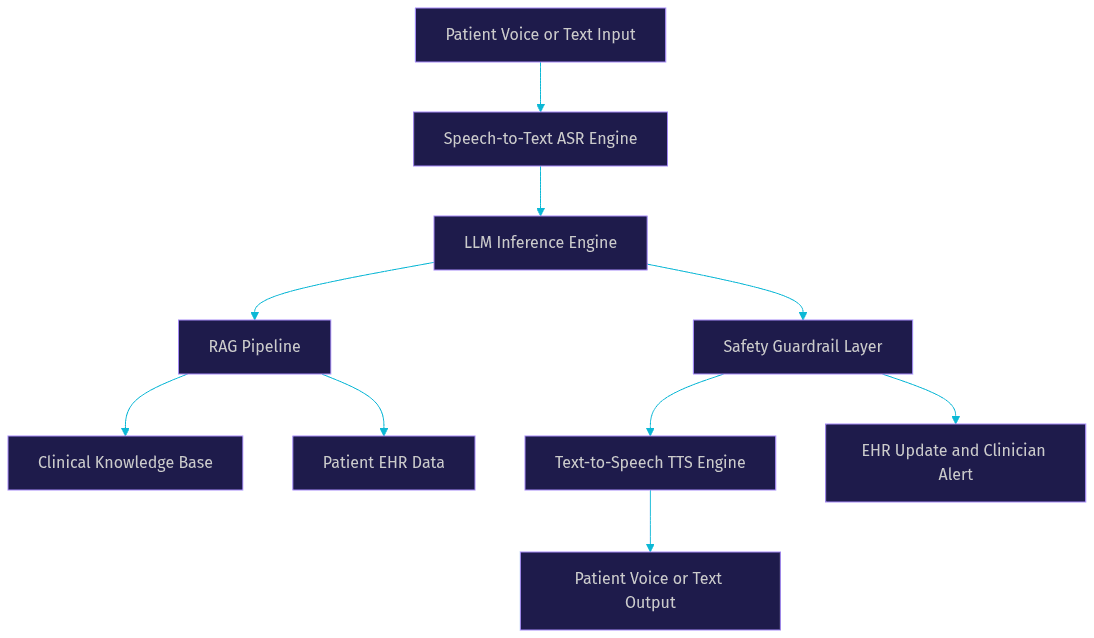
Healthcare conversational AI works by combining several core technologies: speech-to-text engines transcribe patient speech, large language models process the transcribed text, retrieval-augmented generation pipelines inject current clinical guidelines, and text-to-speech engines deliver spoken responses back to the patient. The entire pipeline operates within a safety framework that includes guardrails, escalation triggers, and human-in-the-loop checkpoints.
VideoSDK provides the real-time communication layer for these systems through its AI Voice Agent SDK, which connects LLMs, speech-to-text, and text-to-speech providers into a unified pipeline that runs inside VideoSDK rooms. For telemedicine scenarios that also require video, VideoSDK's video calling SDK can run alongside the voice agent, enabling seamless escalation from AI triage to a live video consultation with a clinician.
The following diagram illustrates the high-level architecture of a healthcare conversational AI system:
Benefits of Conversational AI for Patients and Providers
Conversational AI in healthcare delivers measurable improvements in access, efficiency, and patient engagement when implemented with appropriate safety guardrails.
For patients, the most immediate benefit is 24/7 availability. A conversational AI agent can assess symptoms at 2 AM, provide guidance on whether to seek emergency care, and schedule an appointment for the next available slot. This is particularly valuable for rural populations and patients with mobility limitations who struggle to access in-person care.
For providers, conversational AI reduces administrative burden significantly. AI-powered documentation assistants can transcribe patient encounters, generate structured clinical notes, and even suggest ICD-10 codes based on the conversation. According to a 2025 study published in the Journal of the American Medical Informatics Association, AI-assisted documentation reduced clinician documentation time by approximately 30% while maintaining note quality.
AI-driven triage systems also improve care coordination. When a patient describes symptoms to a conversational agent, the system can categorize urgency, route the patient to the appropriate specialist, and pre-populate the clinician dashboard with relevant context. This reduces repeat queries and ensures that clinicians receive patients with the right information at the right time.
Patient engagement improves through personalized follow-up interactions. After a hospital discharge, an AI agent can check in daily, ask about pain levels, medication adherence, and wound healing, and flag concerning responses to the care team. Healthcare organizations using AI-driven follow-up have reported higher patient satisfaction scores and reduced 30-day readmission rates.
Key Challenges and Risks
Building conversational AI for healthcare introduces risks that generic AI applications do not face, and developers must address these systematically.
Data privacy is the most immediate concern. Healthcare conversations contain protected health information, and any AI system processing this data must comply with HIPAA in the United States, GDPR in Europe, and equivalent regulations in other jurisdictions. This means encryption in transit and at rest, strict access controls, and business associate agreements with every vendor in the processing chain.
Regulatory compliance adds another layer of complexity. The FDA Software as a Medical Device action plan classifies AI systems that provide diagnostic or treatment recommendations as medical devices, requiring premarket submission and ongoing performance monitoring. The WHO ethics guidance for AI in health emphasizes transparency, accountability, and inclusiveness. Developers must understand where their conversational AI falls on the regulatory spectrum.
Clinical safety is the most critical risk. Large language models can hallucinate, generating plausible but incorrect medical advice. A conversational agent that recommends the wrong medication dosage or misses a red-flag symptom could cause real harm. Mitigation strategies include retrieval-augmented generation to ground responses in verified clinical guidelines, rule-based safety checks for critical topics, and mandatory human escalation for high-risk scenarios.
Bias and fairness present persistent challenges. If a model is trained primarily on data from one demographic group, its performance may degrade for others. For example, speech recognition systems have shown higher error rates for non-native English speakers and certain dialects. Regular bias audits and diverse training data are essential.
Explainability matters in clinical settings. When an AI agent recommends a course of action, clinicians and patients need to understand the reasoning. Systems that cite their sources and show their retrieval context build more trust than black-box models.
Core Components of a Healthcare Conversational AI System
A production-grade healthcare conversational AI system requires five interconnected components, each addressing a specific technical and clinical requirement.
Large Language Model Selection
The LLM serves as the reasoning engine for the conversational agent. In healthcare, model selection criteria extend beyond general benchmarks to include medical domain performance, context length, and inference latency. Models fine-tuned on medical literature and clinical guidelines produce more accurate responses for health-specific queries. Context length matters because patient conversations often reference prior interactions, lab results, and medication history. Latency is critical for voice-based interactions, where response times above one second break the conversational flow.
Retrieval-Augmented Generation
Retrieval-augmented generation, or RAG, addresses the knowledge cutoff problem inherent in LLMs. Instead of relying solely on the model training data, a RAG pipeline retrieves relevant documents from a clinical knowledge base at inference time and includes them in the model context. This ensures that the agent references current clinical guidelines, drug interaction databases, and institution-specific protocols. For healthcare applications, the retrieval index typically includes peer-reviewed medical literature, FDA drug labels, and internal clinical decision support rules.
Speech Interfaces
Speech-to-text and text-to-speech engines form the interface between patients and the AI system. For healthcare, these components must handle medical terminology accurately, suppress background noise in home environments, and support multiple languages. Real-time transcription enables the system to process patient speech as it happens rather than waiting for complete utterances. VideoSDK AI Voice Agent pipelines integrate with leading STT providers including Deepgram and OpenAI Whisper, and TTS providers including ElevenLabs and Cartesia, giving developers flexibility in choosing the right speech components for their patient population.
Safety Layer and Guardrails
The safety layer sits between the LLM output and the patient, intercepting responses before delivery. This layer typically includes rule-based checks for critical topics such as medication dosing, suicidal ideation, and emergency symptoms. A second-opinion verification mechanism can route borderline responses to a clinician for review. Escalation triggers automatically transfer the conversation to a human when the AI detects high-risk scenarios or when its confidence score falls below a threshold. VideoSDK's Conversational Graph provides a deterministic flow engine that ensures critical conversation steps, such as collecting informed consent or verifying allergy information, always happen in the correct order regardless of LLM behavior.
Integration Points
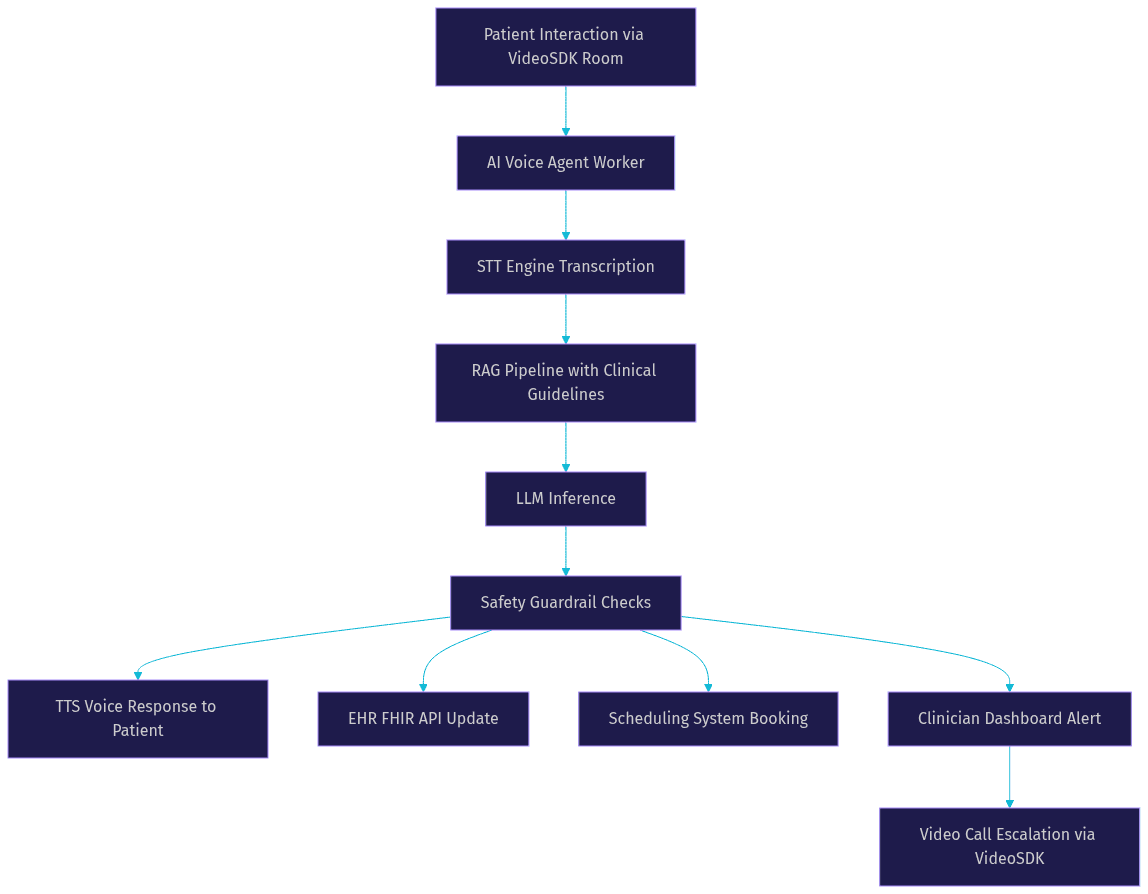
A healthcare conversational AI system rarely operates in isolation. It must connect to electronic health records for patient context, scheduling systems for appointment booking, and pharmacy systems for medication reconciliation. These integrations use standard healthcare APIs such as FHIR for EHR data and custom REST endpoints for institutional systems. The following diagram shows the end-to-end data pipeline:
Real-World Use Cases
Healthcare organizations are deploying conversational AI across the care continuum, from initial patient contact through long-term disease management.
Automated Triage for Telemedicine
A regional telemedicine provider implemented an AI voice agent that greets patients calling their virtual care line. The agent asks about primary symptoms, duration, and severity, then uses a RAG-grounded clinical knowledge base to categorize urgency. Low-acuity cases receive self-care guidance and a follow-up scheduling option. Medium-acuity cases are routed to the next available telemedicine slot. High-acuity cases trigger an immediate transfer to a nurse triage line. The system reduced average time-to-triage from 12 minutes to under 2 minutes and decreased unnecessary emergency department visits by 18%.
Post-operative Follow-up Assistant
After orthopedic surgery, patients typically require daily check-ins for the first two weeks. A hospital system deployed a conversational AI agent that calls patients daily to ask about pain levels, mobility, wound appearance, and medication adherence. The agent uses VideoSDK's telephony integration to place outbound calls to patient phone numbers, making the system accessible to patients without smartphones. When a patient reports concerning symptoms, the agent immediately alerts the surgical team and schedules a video follow-up using VideoSDK video calling infrastructure.
Chronic Disease Monitoring
For patients with diabetes or heart failure, consistent monitoring prevents complications. A health system built a conversational AI agent that conducts weekly check-ins with chronic disease patients. The agent asks about blood glucose readings, weight changes, symptoms of fluid retention, and medication adherence. Responses are logged to the EHR and analyzed for trends. When the system detects a pattern suggesting deteriorating control, it notifies the care team for proactive intervention. Early results showed a 22% reduction in diabetes-related hospitalizations among enrolled patients.
Mental-Health Support Bots
Mental health conversational agents provide an accessible first touchpoint for patients experiencing anxiety, depression, or stress. These agents use empathetic dialogue patterns, cognitive behavioral therapy techniques, and crisis detection algorithms. When the system detects language suggesting self-harm risk, it immediately escalates to a crisis counselor. While these bots do not replace therapy, they provide continuous support between sessions and help reduce the stigma of seeking help. A 2025 study in the Journal of Medical Internet Research found that patients using AI mental health support reported a 35% reduction in self-reported anxiety scores over eight weeks.
Implementation Considerations
Deploying conversational AI in a healthcare setting requires careful planning across privacy, infrastructure, monitoring, and evaluation dimensions.
Data Privacy and HIPAA Compliance
Every component in the AI pipeline must be evaluated for HIPAA compliance. This includes the LLM provider, STT and TTS services, the communication platform, and any cloud infrastructure used for hosting. Business associate agreements are required with each vendor that touches protected health information. Data retention policies must define how long conversation transcripts, audio recordings, and model outputs are stored. De-identification techniques can reduce risk for analytics and model improvement workflows. VideoSDK supports encrypted media transport and provides configurable data handling that aligns with healthcare compliance requirements.
Model Hosting Choices
The decision between cloud-hosted and on-premises LLM inference depends on data sensitivity, latency requirements, and cost. Cloud providers offer the latest models with minimal infrastructure overhead but require data to leave the institution. On-premises hosting keeps data within the organizational firewall but requires significant GPU infrastructure and model maintenance expertise. A hybrid approach, where routine queries use cloud models and sensitive cases route to on-premises inference, offers a practical middle ground for many institutions.
Monitoring and Continuous Learning
Production conversational AI systems require ongoing monitoring to detect performance drift, emerging safety issues, and changing clinical guidelines. Conversation logs should be reviewed by clinical staff on a regular schedule. Patient feedback mechanisms, such as post-interaction satisfaction surveys, provide direct signal on agent quality. Model updates should be validated against a held-out test set of clinical scenarios before deployment. VideoSDK pipeline observability features give developers visibility into agent session metrics, including latency, turn detection accuracy, and escalation rates.
Evaluation Metrics
Healthcare conversational AI requires metrics that go beyond standard NLP benchmarks. Clinical safety scores measure the rate of harmful or incorrect advice. Task completion rates track whether the agent successfully resolved the patient need without human escalation. Patient-reported empathy scores assess whether the interaction felt human and caring. Response latency directly impacts user experience, particularly for voice-based interactions. A balanced evaluation framework includes all four dimensions.
Deployment Workflow
A phased deployment approach minimizes risk. Start with a pilot in a limited clinical area, such as post-operative follow-up for a single surgical specialty. Validate performance against predefined safety and satisfaction metrics. Expand to additional clinical areas only after the pilot demonstrates stable performance. At each stage, maintain the ability to roll back to human-only workflows if the AI system encounters unexpected failure modes.
Best Practices for Building Trustworthy Conversational AI
Trustworthy healthcare conversational AI requires intentional design choices that prioritize patient safety and transparency above raw capability.
Transparent reasoning means the agent should explain its recommendations in terms patients understand and cite the clinical guidelines it referenced. When a patient asks why the agent recommends a specific action, the response should include the source of that recommendation, not just the recommendation itself.
Human-in-the-loop escalation is non-negotiable for clinical applications. The system must detect its own limitations and transfer to a human clinician when it encounters high-risk scenarios, ambiguous symptoms, or patient distress. The escalation path should be seamless, preserving conversation context so the clinician does not start from scratch.
Regular bias audits should test the system across demographic groups, languages, and clinical conditions. If the system performs worse for certain populations, that is a safety issue, not just a fairness issue. Audit results should inform model updates and retrieval pipeline adjustments.
User feedback loops capture real-world performance signals. Post-interaction surveys, complaint monitoring, and clinician reviews all contribute to a continuous improvement cycle. The system should make it easy for patients to report concerns and for those reports to reach the development team.
Clear consent flows ensure patients understand they are interacting with an AI system, not a human. Patients should have the option to request a human at any point. The system should disclose what data it collects, how it uses that data, and who has access to it.
Future Trends and Emerging Research
The next wave of healthcare conversational AI will move beyond text and voice to multimodal interactions that incorporate visual signals.
Multimodal agents that combine vision and speech are emerging as a powerful tool for clinical assessment. A patient could show the agent a wound, a rash, or a medication bottle, and the agent would analyze the image alongside the spoken description. VideoSDK vision and multi-modality support for AI agents enables this capability, allowing the agent to process visual input from the patient camera within the same real-time session.
Real-time personalization will allow agents to adapt their communication style based on patient preferences, health literacy levels, and emotional state. A patient who responds better to direct, concise information will receive a different interaction style than one who needs more reassurance and explanation.
Federated learning offers a path to improving healthcare AI models without centralizing sensitive patient data. Multiple institutions can train models on their local data and share only model updates, preserving privacy while benefiting from collective learning. This approach is particularly relevant for rare conditions where no single institution has enough data to train a robust model.
Definitions Glossary
Conversational AI in Healthcare: AI systems that use natural language processing, LLMs, and speech interfaces to interact with patients and clinicians in clinical contexts, grounded in medical knowledge and safety guardrails.
Retrieval-Augmented Generation (RAG): A technique that retrieves relevant documents from a knowledge base at inference time and includes them in the LLM context, ensuring responses are grounded in current clinical guidelines rather than relying solely on training data.
Clinical Decision Support AI: AI systems that assist clinicians in making diagnostic or treatment decisions by analyzing patient data against clinical guidelines and evidence-based protocols.
HIPAA Compliance: Adherence to the Health Insurance Portability and Accountability Act, which requires encryption, access controls, and business associate agreements for any system handling protected health information.
Agent Worker: The Python process that runs a VideoSDK AI agent and manages its session lifecycle, including the STT, LLM, and TTS pipeline within a VideoSDK room.
Conversational Graph: VideoSDK deterministic flow engine that defines conversation steps as a directed graph, ensuring critical clinical steps such as consent collection and allergy verification always occur in the correct order.
Key Takeaways
- Conversational AI in healthcare combines LLMs, RAG pipelines, and speech interfaces to deliver evidence-grounded patient interactions with appropriate safety guardrails.
- Real-world deployments in triage, post-operative follow-up, chronic disease monitoring, and mental health support show measurable improvements in access, efficiency, and patient satisfaction.
- Data privacy, regulatory compliance, clinical safety, and bias mitigation are non-negotiable requirements that must be addressed in the system architecture, not added as afterthoughts.
- VideoSDK AI Voice Agent SDK and Conversational Graph provide the real-time communication infrastructure and deterministic flow control needed to build production healthcare voice agents.
- A phased deployment approach with continuous monitoring, clinical staff review, and human-in-the-loop escalation is essential for safe scaling.
Conclusion
Conversational AI in healthcare is moving from experimental pilots to production deployments that meaningfully improve patient access and clinical efficiency. The technology stack is mature enough to build with, but the safety, compliance, and clinical validation requirements demand a disciplined approach. Developers building these systems need real-time communication infrastructure that supports voice, video, and deterministic conversation flows within a compliance-aware framework.
VideoSDK provides the building blocks for healthcare conversational AI through its AI Voice Agent SDK, Conversational Graph, and telephony integration. Combined with its video calling SDK for telemedicine escalation, VideoSDK covers the full spectrum of real-time patient interaction modalities.
Start building with VideoSDK free tier at app.videosdk.live/login and join the VideoSDK developer community on Discord to connect with other developers building healthcare AI applications. What are you building with VideoSDK? Drop a comment below and let us know what kind of healthcare conversational AI use case you are working on.
FAQ