


Conversational AI in banking refers to the use of natural language processing, large language models, and voice interfaces to enable customers to interact with financial services through spoken or typed language. VideoSDK supports this transformation by providing real-time communication infrastructure, AI voice agent capabilities, and telephony integration that banks can use to build secure, compliant conversational experiences across web, mobile, and phone channels. Start with a focused pilot and scale using the architecture and roadmap in this guide.
A recent McKinsey report estimated that generative AI could unlock up to $1 trillion in value across the global banking sector annually. Much of that value comes not from back-office automation but from the front line: the conversations banks have with their customers every day. Conversational AI in banking is reshaping how institutions handle those conversations, moving from rigid menu trees to fluid, natural language interactions that resolve issues in seconds rather than minutes.
For developers building these systems, the challenge is not just stringing together an LLM and a chat window. It is architecting a pipeline that understands intent, verifies identity, enforces compliance guardrails, executes real transactions against core banking systems, and produces auditable records for regulators. This guide walks through the technologies, benefits, real-world use cases, architecture, compliance requirements, and implementation roadmap you need to build production-grade conversational banking experiences.
What Is Conversational AI in Banking?
Conversational AI in banking is defined as the application of natural language understanding, dialogue management, and generative AI to create interactive systems that customers can talk to or text with for financial tasks. It works by interpreting user input through speech-to-text and NLU, routing the detected intent to the appropriate banking service, generating a natural language response, and confirming actions before execution.
Unlike a simple FAQ bot, a banking-grade conversational AI system must integrate directly with core banking APIs, payment rails, and customer databases. It must also enforce strict security and compliance policies at every turn. VideoSDK provides the real-time media and agent infrastructure that makes these voice and video interactions possible, with sub-second latency and built-in telephony support for phone-based banking.
Core Technologies
The technology stack for conversational AI in banking combines several layers. Speech-to-text engines convert spoken input into text with high accuracy, even in noisy environments. Large language models handle natural language understanding, intent detection, and response generation. Text-to-speech engines synthesize natural-sounding replies. Dialogue management systems maintain context across multi-turn conversations, remembering account details and prior requests.
Security layers wrap around every component. These include voice biometrics for speaker verification, encryption for data in transit and at rest, and real-time content filtering to prevent prompt injection or data exfiltration attempts. VideoSDK's AI voice agent pipeline integrates these components through a Python-based agent worker that manages session lifecycle, turn detection, and pipeline observability.
How It Differs From Traditional Chatbots
Traditional banking chatbots rely on deterministic decision trees. Each user input is matched against a predefined set of intents, and the bot follows a scripted path to resolution. If the user phrases something unexpectedly, the bot fails or loops back to a menu.
Conversational AI in banking replaces rigid scripts with generative models that understand context, handle variations in phrasing, and adapt to multi-turn conversations. The critical difference for banking is compliance focus: while a general chatbot can improvise freely, a banking conversational AI system must operate within guardrails that prevent it from offering unauthorized financial advice, disclosing sensitive information to unverified users, or executing transactions without explicit confirmation.
Key Benefits for Banks
Banks deploying conversational AI in banking consistently see measurable improvements across three dimensions: operational efficiency, customer experience, and revenue growth. The technology reduces the burden on human agents while simultaneously improving the quality of automated interactions.
Operational Efficiency
Call deflection is the most immediate operational win. When a conversational AI system handles balance inquiries, transaction history requests, and card services without human intervention, call center volume drops significantly. Banks using AI-driven customer service report call deflection rates of 30 to 50 percent for routine inquiries. Average handling time also decreases because AI systems retrieve information instantly without putting customers on hold.
Beyond call centers, conversational AI reduces back-office work by automating data extraction from customer interactions. Spoken or typed requests can be parsed into structured data and routed directly to the appropriate banking system, eliminating manual entry.
Customer Experience
Customers expect 24/7 availability and instant responses. Conversational AI delivers both without the constraints of staffing schedules. Customer satisfaction scores improve when wait times disappear and interactions feel natural rather than navigational.
Multilingual support is another major advantage. A single AI system can serve customers in dozens of languages without hiring specialized agents for each one. This is particularly valuable for banks operating across multiple regions or serving immigrant communities. VideoSDK's real-time transcription and translation capabilities further enhance this by providing live captions and cross-language communication during complex interactions.
Revenue Growth
Conversational AI in banking drives revenue through intelligent cross-sell and upsell. When a customer asks about their account balance, the AI can surface a relevant product recommendation, such as a high-yield savings account or a pre-approved credit line, based on their transaction history and financial profile.
New account acquisition also benefits. AI-powered virtual financial advisors can guide prospects through account opening, loan eligibility checks, and document submission conversationally, reducing abandonment rates compared to traditional web forms. Banks report conversion rate improvements of 15 to 25 percent when conversational interfaces replace static application flows.
Real-World Use Cases
Three concrete scenarios illustrate how conversational AI in banking works in practice. Each involves natural language input, identity verification, compliance checks, and real transaction execution.
Voice-Enabled Money Transfers
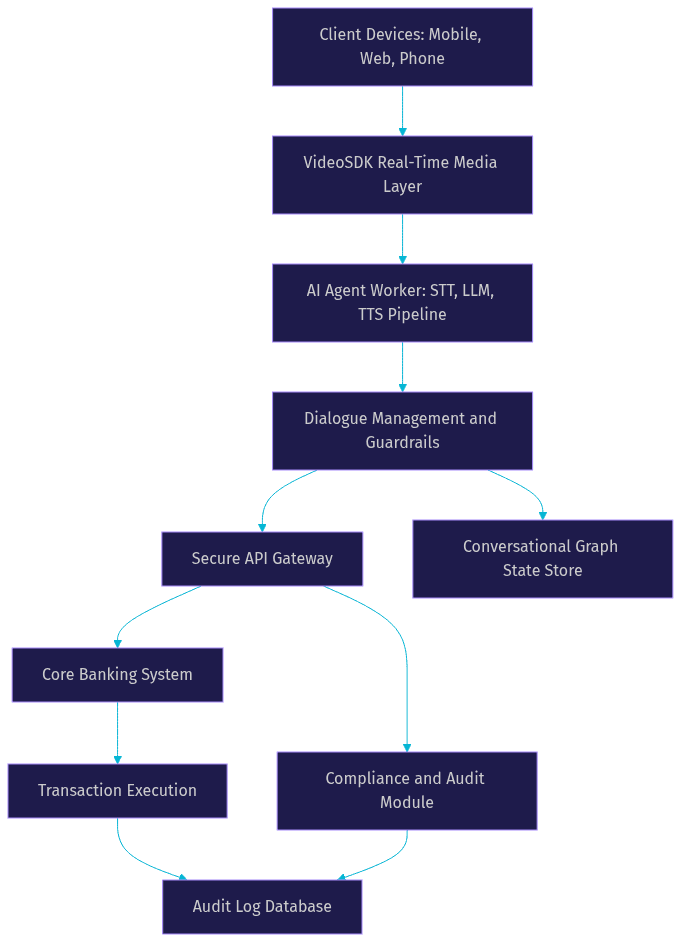
A customer calls their bank and says, "Transfer five hundred dollars to John Smith." The conversational AI system first verifies the caller's identity using voice biometrics and a one-time passcode sent to their registered phone. Once authenticated, the system uses NLU to extract the transfer amount and recipient name.
The system then checks compliance guardrails: Is the amount within daily transfer limits? Is the recipient on the customer's approved payee list? Does the transaction trigger any fraud detection rules? If all checks pass, the system reads back the transaction details and asks for explicit confirmation. Only after the customer says "yes" or "confirm" does the system execute the transfer via the core banking API.
This flow demonstrates the critical difference between a chatbot and a transactional AI system. Every step involves verification, guardrails, and audit logging.
Automated Card Services
Card-related requests are among the most common reasons customers contact their bank. Conversational AI in banking handles these end to end. A customer can say, "Block my debit card" or "Increase my credit card limit to ten thousand dollars."
For card blocking, the system verifies identity, confirms which card (if the customer has multiple), executes the block immediately, and confirms the action. For limit increases, the system performs a real-time credit assessment, checks the customer's eligibility against bank policy, and either approves the increase or explains why it cannot be granted.
Virtual card issuance is an emerging capability. The AI can generate a single-use virtual card number for online purchases, set spending limits, and expire it automatically after the transaction completes.
Financial Advisory and Product Recommendation
A customer asks, "Should I refinance my mortgage?" The conversational AI system retrieves the customer's current loan details, checks prevailing interest rates, and calculates potential savings. It then presents a personalized analysis in natural language.
For loan eligibility, the system can perform a soft credit check, assess debt-to-income ratio, and provide a pre-qualification result without impacting the customer's credit score. If the customer expresses interest, the AI guides them through the application process, collecting required information conversationally and submitting it to the underwriting system.
These advisory interactions require careful guardrails. The AI must clearly state when it is providing factual information versus financial advice, and in regulated jurisdictions, it may need to route certain queries to a licensed human advisor. VideoSDK's Conversational Graph is designed for exactly this kind of deterministic, compliance-driven flow where business rules, not LLM judgment, control branching.
Architecture Blueprint
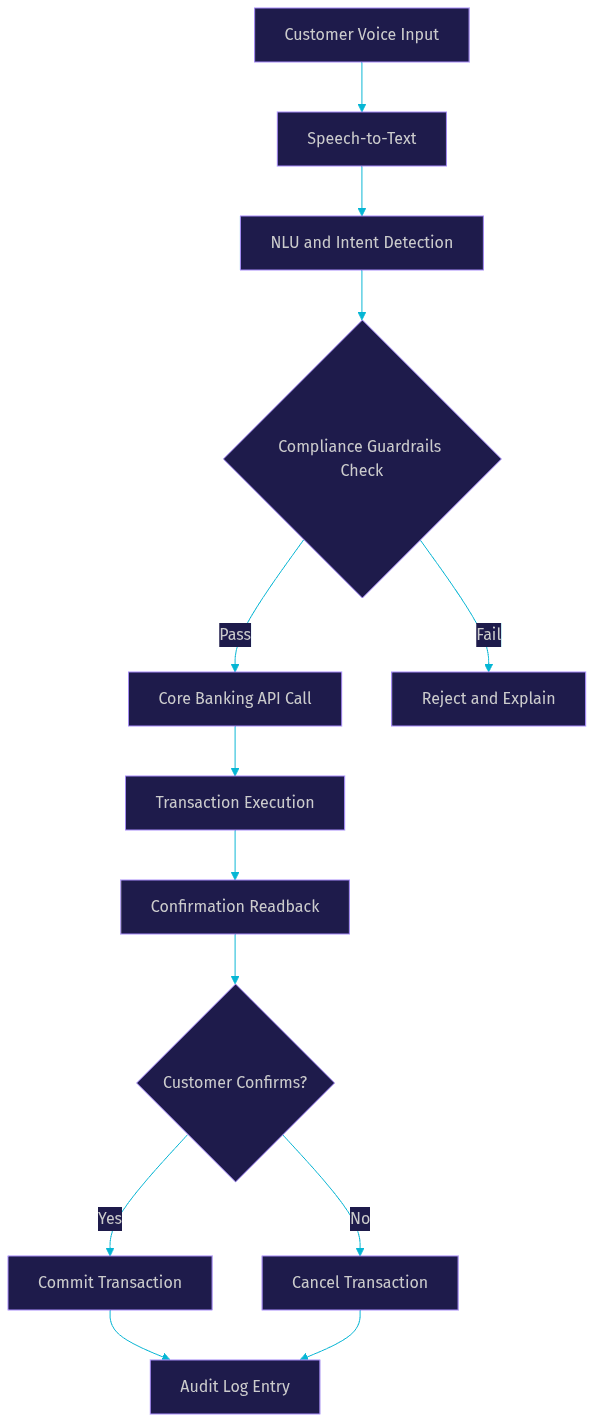
Building conversational AI in banking requires a layered architecture that separates user interaction, dialogue management, and core banking integration. Each layer has distinct security and performance requirements.
Front-End Interaction Layer
The front-end layer is where customers interact with the system. This includes mobile banking apps, web portals, voice channels through phone calls, and emerging channels like WhatsApp and smart speakers. Omnichannel support is essential because customers expect the same conversation to continue seamlessly across devices.
VideoSDK's multi-platform SDKs cover React, React Native, Flutter, Android, iOS, and JavaScript, making it possible to embed conversational interfaces directly into existing banking applications. For phone-based interactions, VideoSDK's telephony and SIP integration bridges traditional phone networks with WebRTC-based AI agent sessions.
Dialogue Management Engine
The dialogue management engine is the brain of the system. It maintains conversation context, routes intents to the correct handler, enforces guardrails, and generates responses. This layer can use a combination of LLMs for natural language generation and deterministic rules for compliance-critical decisions.
Context storage is critical. The engine must remember what the customer said earlier in the conversation, what actions have been taken, and what verification steps have been completed. VideoSDK's Conversational Graph provides state management, checkpointing, and human-in-the-loop capabilities that are essential for banking workflows where every step must be auditable.
Core Banking Integration
The integration layer connects the conversational AI system to the bank's core services through a secure API gateway. Every transaction request must be authenticated, signed, and logged. The gateway enforces rate limits, transaction limits, and fraud detection rules before forwarding requests to the core banking system.
Audit logging is non-negotiable. Every API call, every guardrail decision, and every customer confirmation must be recorded with timestamps, user identifiers, and transaction details. This creates the audit trail that regulators require.
Compliance, Security, and Trust
Conversational AI in banking operates under some of the strictest regulatory requirements in any industry. GDPR governs data privacy in Europe. PSD2 mandates strong customer authentication for payment services. SOC 2 compliance is required for systems handling customer financial data. In the United States, GLBA and CCPA add additional layers of consumer protection.
Every conversational AI deployment must be designed with these regulations as foundational constraints, not afterthoughts. The system must minimize data retention, encrypt all sensitive information, and provide regulators with full transparency into how AI decisions are made.
Guardrails and Policy Enforcement
Guardrails are real-time checks that prevent the AI from taking unauthorized actions. These include content filtering to block prompt injection attacks, transaction limits that prevent the AI from moving funds above a threshold without additional verification, and policy rules that restrict the AI from offering specific types of financial advice.
Guardrails must be enforced at the dialogue management layer, not just at the API gateway. This means the AI system itself must be aware of what it is allowed to say and do. VideoSDK's Conversational Graph enforces these constraints by defining allowed transitions between conversation nodes, making it impossible for the LLM to deviate from the approved flow.
Identity Verification
Every transactional conversation must begin with identity verification. Voice biometrics provide a frictionless layer by analyzing the unique characteristics of a customer's voice during natural speech. This can be combined with one-time passcodes sent via SMS or email, knowledge-based authentication questions, or device fingerprinting.
Multi-factor authentication is required for high-value transactions or sensitive operations like changing account details. The system must also detect and prevent replay attacks, where a fraudster records and replays a customer's voice. Liveness detection, which requires the customer to say a random phrase, is an effective countermeasure.
Auditing and Transparency
Regulators increasingly demand explainability from AI systems. Banks must be able to show exactly why an AI system made a particular decision, what data it used, and what rules it applied. Session logs capture every interaction in detail, including the customer's input, the AI's interpretation, the guardrail checks performed, and the final action taken.
Explainability is particularly important for adverse decisions. If the AI denies a loan application or blocks a transaction, the bank must be able to provide a clear reason. This requires the dialogue management engine to log not just the outcome but the reasoning path that led to it.
Implementation Roadmap for Banks
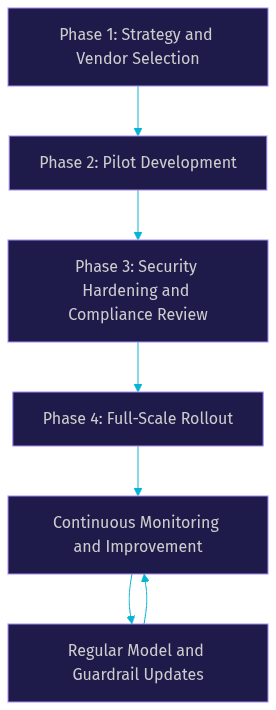
Deploying conversational AI in banking is a multi-phase process. Rushing directly to full-scale deployment without proper piloting and compliance review is a recipe for regulatory trouble and customer trust erosion.
Phase 1: Strategy and Vendor Selection
Begin by defining the specific use cases you want to address. Prioritize high-volume, low-complexity interactions like balance inquiries and card services before tackling complex advisory flows. Evaluate AI platforms based on their banking-specific capabilities: compliance guardrails, identity verification integration, core banking API compatibility, and audit logging. VideoSDK's open-source AI agent SDK and Conversational Graph provide a strong foundation for banks that need deterministic control over conversation flows.
Phase 2: Pilot Development
Build a minimal viable conversational flow for one use case. Test it with a small segment of customers, ideally internal employees first, then a limited group of real customers. Focus on measuring accuracy of intent detection, success rate of transaction completion, and customer satisfaction. Use VideoSDK's agent observability features to monitor pipeline performance and identify failure points.
Phase 3: Security Hardening and Compliance Review
Before expanding to a broader audience, conduct a thorough security review and compliance audit. Integrate all guardrails, verify identity verification flows, and ensure audit logging captures every required data point. Engage your compliance team and, if necessary, external auditors to validate that the system meets regulatory requirements. This phase often reveals gaps in data retention policies, encryption configurations, or guardrail coverage that must be addressed before launch.
Phase 4: Full-Scale Rollout and Continuous Improvement
Roll out the conversational AI system to all customers across all channels. Implement continuous monitoring to track KPIs, detect anomalies, and identify opportunities for improvement. Regularly update the LLM and guardrail rules based on new regulatory requirements, emerging fraud patterns, and customer feedback. Model updates should be treated with the same change management rigor as any core banking system change.
Measuring Success
The success of conversational AI in banking is measured through a combination of operational, customer, and compliance KPIs. Call deflection rate tracks the percentage of inquiries handled by AI without human agent escalation. Average handling time measures how quickly the AI resolves customer requests compared to human agents. Conversion rate monitors how effectively the AI drives product applications and cross-sell opportunities.
Compliance incidents are a critical inverse metric. The goal is zero compliance violations, and any incident requires immediate investigation and remediation. User satisfaction, measured through CSAT and NPS, indicates whether the conversational experience meets customer expectations. Banks should also track containment rate, which measures how many conversations the AI resolves end to end without transferring to a human, and first-contact resolution rate, which measures whether the AI resolves the issue on the first interaction.
Future Trends in Conversational AI for Banking
The next wave of conversational AI in banking will be defined by three trends. First, generative AI models with real-time transaction capability will move beyond answering questions to executing complex multi-step financial workflows autonomously, with human oversight for high-value actions. Second, multimodal interfaces combining voice and visual elements will enable customers to talk about their finances while simultaneously viewing charts, account summaries, and transaction details on their screens. VideoSDK's vision and multi-modality support for AI agents positions it well for this trend.
Third, regulatory-aware LLMs will embed compliance rules directly into the model's training or inference pipeline, reducing the need for external guardrails. AI-driven risk scoring will become more sophisticated, using real-time transaction patterns and behavioral signals to detect fraud during the conversation itself. Banks that invest in these capabilities now will build a durable competitive advantage as conversational interfaces become the primary way customers interact with their financial institutions.
Definitions Glossary
Conversational AI in Banking: The application of natural language processing, LLMs, and voice interfaces to enable customers to perform financial tasks through spoken or typed language, integrated with core banking systems and compliance guardrails.
Conversational Graph: VideoSDK's deterministic, graph-based conversation orchestration layer that defines conversation flow as nodes and transitions, ensuring business rules rather than LLM judgment control branching in compliance-critical banking workflows.
Voice Biometrics: A security technique that verifies a customer's identity by analyzing the unique acoustic characteristics of their voice, used in banking to authenticate callers without passwords.
Guardrails: Real-time policy enforcement checks that prevent an AI system from taking unauthorized actions, exceeding transaction limits, or providing unlicensed financial advice.
Call Deflection Rate: The percentage of customer inquiries resolved by an AI system without escalation to a human agent, a primary operational KPI for conversational AI deployments.
Key Takeaways
- Conversational AI in banking replaces rigid chatbot decision trees with generative models that understand context, handle natural language variations, and execute real transactions against core banking systems.
- The architecture requires three layers: a front-end interaction layer supporting omnichannel access, a dialogue management engine with guardrails and context storage, and a secure core banking integration layer with full audit logging.
- Compliance is a foundational constraint, not an afterthought. Every conversational AI deployment must enforce identity verification, transaction guardrails, and transparent audit trails to meet GDPR, PSD2, SOC 2, and other regulatory requirements.
- VideoSDK's real-time communication infrastructure, AI voice agent pipeline, and Conversational Graph provide the building blocks for deterministic, compliant banking conversations across web, mobile, and telephony channels.
- A phased implementation roadmap, starting with a focused pilot and progressing through security hardening before full-scale rollout, minimizes regulatory risk and builds customer trust.
Conclusion
Conversational AI in banking is no longer an experimental technology. It is a strategic capability that reduces operational costs, improves customer experience, and drives revenue growth. The banks that succeed will be those that treat compliance and security as architectural foundations, not bolt-on features, and that choose infrastructure partners capable of supporting real-time, multi-channel, deterministic conversation flows. VideoSDK's combination of real-time communication SDKs, AI voice agents, Conversational Graph, and telephony integration gives developers the tools to build banking-grade conversational experiences. Start your pilot today by exploring the VideoSDK AI Agents documentation and the Conversational Graph guide. What are you building with VideoSDK? Drop a comment below, I would love to hear what kind of conversational AI use case you are working on.
FAQ