


Conversational AI for sales uses large language models, speech-to-text, and text-to-speech to automate and enhance sales conversations across voice and chat channels. VideoSDK provides the real-time communication infrastructure and AI Voice Agent SDK that lets developers build production-grade sales agents with sub-second response times. Start by connecting your LLM and STT/TTS providers to a VideoSDK room, then layer in your sales playbook logic.
Sales teams spend roughly 65% of their time on non-selling activities like manual data entry, follow-up emails, and scheduling. That gap is exactly where conversational AI for sales has emerged as a competitive differentiator. Companies deploying AI-driven sales agents report 30 to 50% improvements in lead response times and meaningful lifts in conversion rates.
For developers building these systems, the challenge is not access to LLMs. The challenge is wiring speech recognition, language models, and text-to-speech into a real-time conversation that feels natural to a prospect on a phone call or chat window. Latency, context retention, and CRM integration are the hard parts.
This article breaks down what conversational AI for sales actually is, how it maps to the sales funnel, and how to architect a production-grade sales agent using VideoSDK's real-time communication infrastructure and AI Voice Agent SDK.
What Is Conversational AI for Sales?
Conversational AI for sales is defined as the application of natural language processing, large language models, and speech technologies to automate, augment, or fully handle sales conversations with prospects and customers.
Conversational AI for sales works by capturing prospect input through voice or text, processing it through a speech-to-text engine, routing the transcript to an LLM that applies sales-specific logic and context, and returning a spoken or written response through a text-to-speech engine or chat interface.
The core components include a speech-to-text layer for transcription, an LLM for reasoning and response generation, a dialogue manager for conversation flow control, a text-to-speech layer for voice output, and an integration layer that connects to CRM systems and sales tools.
VideoSDK provides the real-time communication layer through its Video Calling API and SDKs and its AI Voice Agent SDK, which together handle the media transport, room management, and agent session lifecycle that sales AI applications require. The SDK supports ten or more platforms including React, Flutter, iOS, Android, and Python, giving developers flexibility to deploy sales agents across web, mobile, and phone channels.
How Conversational AI Transforms the Sales Funnel
Every stage of the sales funnel benefits from conversational AI, but the impact is unevenly distributed across stages.
At the top of the funnel, AI agents handle inbound lead capture by engaging website visitors in real time, asking qualifying questions, and scheduling demos without human intervention. Response time drops from hours to seconds, which directly correlates with conversion rates. Research from InsideSales.com found that responding to leads within five minutes increases conversion odds by 21x compared to waiting 30 minutes.
In the middle of the funnel, AI assists with lead qualification by dynamically adapting questions based on prospect responses, pulling CRM data to personalize the conversation, and scoring leads against your ideal customer profile. The AI can detect buying signals, flag objections, and route high-priority opportunities to human reps.
At the bottom of the funnel, conversational AI supports closing by generating personalized follow-up emails, summarizing call notes, drafting proposals, and even handling basic negotiation on pricing or terms. Post-close, AI agents handle onboarding conversations and renewal outreach.
The key insight is that conversational AI does not replace sales reps. It handles repetitive, time-sensitive interactions so reps can focus on relationship-building and complex deal strategy.
Core Technologies Behind Conversational AI for Sales
Building a conversational AI sales agent requires several technology layers working in concert.
The speech-to-text layer converts prospect speech into text in real time. Leading providers include Deepgram, OpenAI Whisper, and AssemblyAI, each offering different latency and accuracy profiles. For sales calls, low latency matters more than perfect accuracy because the LLM can handle minor transcription errors.
The LLM layer handles reasoning, response generation, and sales logic. OpenAI GPT-4o, Anthropic Claude, and Google Gemini are common choices. The LLM needs access to a sales playbook, product knowledge base, and CRM context to generate relevant responses.
The text-to-speech layer converts AI responses back into natural-sounding speech. ElevenLabs, Cartesia, and OpenAI TTS are popular options. For sales, voice quality directly impacts prospect trust, so natural intonation and low latency are critical.
The integration layer connects the AI agent to your CRM, calendar, and sales tools. This is where most implementation effort goes. VideoSDK's Python SDK provides backend orchestration for connecting these AI pipelines to real-time media streams.
Intent detection and sentiment analysis run alongside the core pipeline, helping the agent recognize when a prospect is frustrated, interested, or ready to buy. These signals can trigger real-time coaching for human reps or adjust the AI's conversational strategy.
Architecture Blueprint for Conversational AI Sales Agents
A production conversational AI sales agent follows a pipeline architecture where each stage processes the prospect's input and contributes to the response.
The flow starts with the prospect connecting through a voice call, web chat, or phone dial-in. The input enters a VideoSDK room, which manages the real-time media session over WebRTC. The AI agent worker, running as a Python process inside the room, receives the audio stream and passes it through the speech-to-text engine. The transcript goes to the LLM along with conversation context, CRM data, and sales playbook instructions. The LLM generates a response, which the text-to-speech engine converts back to audio. The agent worker sends this audio back through the VideoSDK room to the prospect.
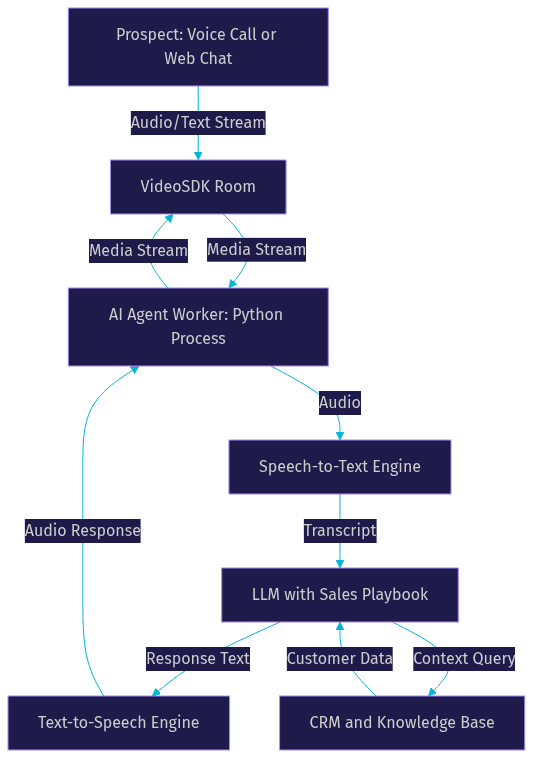
The critical design decision is where to host the agent worker. VideoSDK Agent Cloud provides managed hosting, or you can self-host using Docker or Kubernetes. For sales applications where call quality and latency directly impact conversion, managed hosting reduces operational overhead.
Building a Context-Aware Sales Agent
A context-aware sales agent maintains awareness of where the prospect is in the buying journey, what has been discussed, and what the next best action is.
Stage awareness means the agent knows whether it is in a discovery call, a product demo, a pricing negotiation, or a follow-up conversation. Each stage has different conversation goals and acceptable topics. A discovery call should focus on understanding pain points and budget. A pricing negotiation should focus on value justification and terms.
Dynamic playbooks provide the agent with stage-specific instructions. Rather than a single static prompt, the agent receives a playbook that changes based on conversation stage, prospect responses, and CRM data. For example, if the prospect mentions a competitor, the playbook can trigger a comparison script. If the prospect raises a pricing objection, the playbook can activate a value-based response framework.
Memory management is what separates a good sales agent from a chatbot. The agent needs short-term memory for the current conversation and long-term memory for cross-session context. If a prospect called last week about a specific feature, the agent should reference that in the next call. VideoSDK's AI Agent SDK includes context management and memory features that handle this without requiring you to build a custom state system.
The Conversational Graph feature takes this further by letting you define deterministic conversation flows. For structured sales processes like qualification calls or demo scheduling, the graph ensures every required step happens in order while the LLM handles natural language generation.
Integrating with Your Existing Sales Stack
Your conversational AI sales agent is only as useful as its integration with your existing sales infrastructure.
CRM integration is the foundation. Salesforce and HubSpot are the most common targets. The AI agent needs to read prospect data before a call (company size, industry, previous interactions) and write data back after a call (call summary, lead score, next steps). This typically happens through REST API calls from the agent worker to the CRM's API.
Calendar integration lets the agent schedule meetings in real time during a conversation. When a prospect agrees to a demo, the agent checks availability and books the slot without transferring to a human rep.
Call platform integration determines how prospects reach the AI agent. VideoSDK's telephony and SIP integration bridges traditional phone systems to VideoSDK rooms, so prospects can call a standard phone number and reach an AI agent. This works with Twilio, Vonage, Telnyx, and other SIP trunk providers.
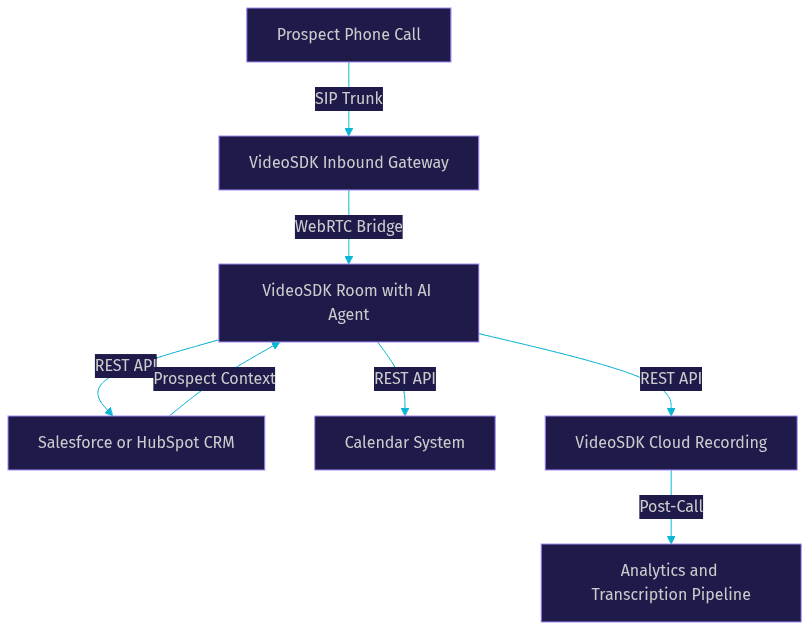
Data pipelines feed conversation transcripts, sentiment scores, and outcome data into your analytics stack. Post-call processing through VideoSDK's REST APIs lets you pull recordings, transcripts, and session analytics for sales performance analysis.
The integration layer is where most projects stall. Plan your API rate limits, authentication flows, and error handling before writing any agent logic.
Real-World Use Cases for Conversational AI in Sales
Four use cases consistently deliver measurable ROI for sales teams adopting conversational AI.
Live Call Coaching
Live call coaching gives human reps real-time guidance during sales calls. The AI agent listens to the conversation, transcribes it, and surfaces relevant playbook content, objection responses, and competitive battle cards on the rep's screen. When a prospect mentions a competitor, the agent instantly displays a comparison sheet. When a prospect raises a pricing objection, the agent suggests a value-based response. This does not require the AI to speak. It requires real-time transcription and low-latency context retrieval.
Inbound Chat Assistants
Inbound chat assistants qualify website visitors and schedule demos. A prospect lands on your pricing page, and the AI agent initiates a conversation, asks qualifying questions about company size and use case, and books a demo if the prospect fits your ideal customer profile. VideoSDK's Prebuilt UI Kit can embed a video chat interface so the prospect can escalate from text to a face-to-face conversation with a human rep when needed.
Automated Outbound Outreach
Automated outbound outreach uses AI voice agents to make initial contact calls at scale. The agent dials prospects from your list, delivers a personalized opening based on CRM data, and handles initial qualification. Interested prospects are warm-transferred to a human rep. VideoSDK's AI Agent SDK supports call transfer and warm transfer for this workflow.
Post-Call Summarization and Follow-Up Drafting
Post-call summarization saves reps 15 to 30 minutes per call. The AI agent processes the call transcript, generates a structured summary, updates CRM fields, and drafts a personalized follow-up email. This is the lowest-risk starting point for teams new to conversational AI.
Benefits and ROI of Conversational AI for Sales
The ROI of conversational AI for sales shows up in four measurable areas.
Higher conversion rates come from faster lead response and better qualification. AI agents respond to inbound leads in seconds, not hours. They ask consistent qualifying questions every time, eliminating the variance that human reps introduce. Companies using AI-driven lead qualification report 20 to 35% improvements in qualified lead conversion.
Reduced response time is the most immediate benefit. The InsideSales.com research showing 21x conversion improvement from sub-five-minute responses is well documented, but AI agents push that to sub-five-second responses. For inbound web leads, this is transformative.
Increased rep productivity comes from automating administrative work. Post-call summarization, CRM updates, follow-up emails, and scheduling collectively consume hours per rep per week. AI agents handle these tasks, freeing reps to spend more time on actual selling.
Cost savings come from handling routine conversations without human involvement. An AI agent can handle initial qualification calls at a fraction of the cost of a human SDR. This does not eliminate SDR roles but shifts their focus to high-value conversations.
Common Implementation Challenges
Five challenges consistently surface when teams build conversational AI for sales.
Data privacy is the first concern. Sales conversations contain sensitive information about deals, pricing, and customer relationships. Your AI agent must comply with GDPR, CCPA, and industry-specific regulations like HIPAA for healthcare sales. VideoSDK supports end-to-end encryption for media streams, but you are responsible for how transcript and CRM data is stored and processed.
Hallucination control is the biggest risk with LLM-powered sales agents. An agent that invents pricing, fabricates product features, or makes unauthorized commitments can damage deals and create legal exposure. Use retrieval-augmented generation to ground responses in your approved knowledge base, and implement guardrails that prevent the agent from discussing topics outside its scope.
Model latency directly impacts conversation quality. If the prospect finishes speaking and waits three seconds for a response, the conversation feels broken. Target sub-500ms response time from end of speech to start of AI response. This requires choosing fast STT and TTS providers and optimizing your LLM inference pipeline.
Integration complexity is where projects get stuck. Connecting the AI agent to Salesforce, HubSpot, your calendar system, and your call platform involves multiple API integrations with different authentication schemes and rate limits. Budget more time for integration than for agent logic.
Change management determines adoption. Sales reps may resist AI tools they perceive as threatening or burdensome. Involve reps early, show them how the AI handles grunt work, and position it as a productivity tool rather than a replacement.
Best-Practice Checklist for Adopting Conversational AI
Here is a practical checklist for teams adopting conversational AI for sales.
- Start with post-call summarization before attempting live AI conversations
- Ground all LLM responses in a curated, approved knowledge base using RAG
- Set a sub-500ms response time target for voice agents and test it in production
- Integrate CRM data before the first call so the agent has prospect context
- Implement conversation guardrails that prevent off-topic or unauthorized commitments
- Use deterministic conversation flows for structured processes like qualification calls
- Record all AI conversations and review transcripts weekly for quality issues
- Train sales reps on how to work alongside AI agents, not against them
- Monitor sentiment analysis signals to detect prospect frustration in real time
- Plan for compliance from day one, not as an afterthought
Future Trends in Conversational AI for Sales
The conversational AI for sales landscape is evolving rapidly in three directions.
Multimodal agents will process voice, text, video, and screen sharing simultaneously. A sales agent will watch a prospect's screen share during a demo, read their facial expressions, and adjust its coaching in real time. VideoSDK's AI Agent SDK already supports vision and multi-modality, making this architecture available today for early adopters.
Voice-first sales interactions will become the default for outbound outreach. As TTS quality from providers like ElevenLabs and Cartesia approaches human indistinguishability, prospects will increasingly interact with AI agents without knowing it. This raises ethical questions about disclosure that the industry is still working through.
Autonomous deal closing is the frontier. Current AI agents assist with sales conversations. Future agents will handle complete deal cycles from initial outreach through negotiation and closing, with human oversight rather than human participation. This requires advances in reasoning, context management, and trust that are actively being developed.
Definitions Glossary
Conversational AI for Sales: The application of NLP, LLMs, and speech technologies to automate or enhance sales conversations with prospects across voice and chat channels.
AI Agent Worker: A Python process that runs inside a VideoSDK room, managing the session lifecycle and processing the STT to LLM to TTS pipeline for real-time voice AI interactions.
Sales Playbook: A structured set of instructions, objection responses, and qualifying questions that guides the AI agent's behavior during sales conversations, adapted dynamically based on conversation stage and prospect responses.
Conversational Graph: VideoSDK's deterministic flow engine that lets developers define conversation steps as a directed graph, ensuring structured sales processes follow a required sequence while the LLM handles natural language.
Warm Transfer: A call transfer method where the AI agent introduces the prospect to a human rep and briefs the rep on the conversation context before handing off the call.
Speech-to-Text (STT): The technology layer that converts prospect speech into text in real time, enabling the LLM to process and respond to spoken input during sales calls.
Key Takeaways
- Conversational AI for sales automates lead capture, qualification, follow-up, and coaching across voice and chat channels, with measurable ROI in conversion rates and rep productivity.
- The core technology stack includes STT, LLM, TTS, and CRM integration, with VideoSDK providing the real-time communication infrastructure and AI Voice Agent SDK that ties these layers together.
- Start with low-risk use cases like post-call summarization before deploying live AI voice agents in prospect-facing conversations.
- Context awareness, memory management, and deterministic conversation flows are what separate production-grade sales agents from basic chatbots.
- VideoSDK's Conversational Graph enables structured sales workflows like qualification calls and demo scheduling to follow a required sequence while the LLM handles natural language generation.
Conclusion
Conversational AI for sales is no longer experimental. Teams are deploying AI voice agents for outbound outreach, inbound qualification, and live call coaching with measurable results in conversion rates and rep productivity. The technology stack is mature enough for production, with providers like Deepgram, OpenAI, and ElevenLabs delivering the speech components and VideoSDK providing the real-time communication infrastructure and agent orchestration layer.
If you are building a conversational AI sales agent, start with VideoSDK's AI Voice Agent SDK and the Conversational Graph for deterministic sales flows. You can sign up for a free account at app.videosdk.live/login and explore the code samples to see working implementations. Join the VideoSDK Discord community to connect with other developers building AI-powered sales tools.
What are you building with VideoSDK? Drop a comment. I would love to hear what kind of conversational AI for sales use case you are working on.
Free $20 Balance for AI Voice Agents & Video Calls
FAQ