


Conversational AI for customer service uses natural language understanding, dialogue management, and integration layers to automate customer interactions across text and voice channels. VideoSDK supports this with its AI Voice Agent SDK and Conversational Graph for deterministic, compliant conversation flows. Start with a pilot, measure CSAT and FCR, then scale.
According to industry research, AI-powered customer support can reduce average handling time by up to 40% while improving first-contact resolution rates. That is not a marginal optimization. It is a structural shift in how support organizations operate.
Conversational AI for customer service has moved from experimental chatbot deployments to production-grade systems that handle complex, multi-turn conversations across channels. The technology stack now includes real-time speech-to-text, large language models, text-to-speech engines, and deterministic flow engines that together create experiences indistinguishable from skilled human agents for many query types.
VideoSDK provides the infrastructure layer for these systems through its AI Voice Agent SDK, Conversational Graph engine, and telephony integration capabilities. Developers building customer service applications can use these tools alongside VideoSDK's video calling SDK for face-to-face support scenarios. The platform supports sub-second latency for voice interactions and deterministic flow control for compliance-heavy workflows.
This guide covers the architecture patterns, implementation roadmap, vendor evaluation criteria, and success metrics you need to deploy conversational AI in a customer service environment. By the end, you will have a clear framework for building, testing, and scaling an AI-driven support system.
What Is Conversational AI for Customer Service?
Conversational AI for customer service is a technology stack that automates customer interactions through natural language understanding and dialogue management. It is defined as a system that combines NLU for intent detection, dialogue management for multi-turn conversation flow, and integration layers that connect the AI to backend systems like CRMs, ticketing platforms, and knowledge bases. It works by processing customer input through these layers in sequence: understanding intent, retrieving relevant information, generating a response, and delivering it through the appropriate channel.
The distinction between simple chatbots and true conversational agents is significant. Traditional chatbots rely on keyword matching and rigid decision trees. They break when customers phrase things unexpectedly. True conversational agents use NLU to understand intent even when the phrasing varies, maintain context across turns, and adapt their responses based on conversation history.
VideoSDK's Conversational Graph exemplifies this evolution. Instead of letting an LLM control conversation flow non-deterministically, developers define the flow as a directed graph with nodes, transitions, and state management. The LLM handles natural language generation while the graph enforces business rules, making it suitable for customer service scenarios like loan applications, insurance claims, or appointment booking where every step must happen in order.
Voice-enabled agents add another dimension. Using VideoSDK's AI Voice Agent SDK, developers can build systems that handle inbound and outbound phone calls with real-time speech processing. The agent worker connects speech-to-text providers, LLMs, and text-to-speech engines into a pipeline that processes customer speech and generates spoken responses with sub-second latency.
Core Benefits for Businesses
Faster first-response times are the most immediate impact of deploying conversational AI in customer service. When an AI agent handles the initial interaction, customers stop waiting in queue. The AI can process the query, retrieve relevant information, and begin formulating a response within milliseconds of the customer finishing their sentence. This eliminates the average hold time that drives dissatisfaction.
First-contact resolution improves when the AI has access to integrated knowledge bases and CRM data. Instead of transferring a customer through multiple agents, the AI can look up order status, process returns, update account information, and answer policy questions in a single interaction. Organizations deploying conversational AI report FCR improvements of 15 to 35 percentage points compared to human-only support teams.
Cost savings scale with volume. An AI agent handles thousands of concurrent conversations for a fraction of the cost of equivalent human staffing. The economics become particularly compelling for high-volume, low-complexity query categories like order status, password resets, and billing inquiries. Human agents can then focus on complex cases that require empathy, negotiation, or creative problem-solving.
Continuous learning loops mean the system improves over time. Every conversation generates data that can refine intent detection, expand knowledge base coverage, and tune response quality. Developers can use VideoSDK's session analytics and post-call transcription to identify gaps and retrain models with domain-specific data.
Conversational AI for customer service reduces average handling time by up to 40%, improves first-contact resolution by 15 to 35 percentage points, and scales to thousands of concurrent conversations at a fraction of human agent costs. The key is combining deterministic flow control with LLM-powered natural language generation.
Key Architectural Patterns
The architecture you choose determines how well your conversational AI system scales and handles edge cases. Four patterns dominate production deployments.
Centralized AI Agent Hub
A centralized AI agent hub acts as a single service that handles text, voice, and channel routing. Instead of building separate AI systems for web chat, phone support, and messaging apps, the hub receives all incoming queries, normalizes them, and routes them through a unified processing pipeline. This pattern simplifies maintenance and ensures consistent behavior across channels.
Hybrid Human-in-the-Loop
Human-in-the-loop is not a fallback. It is a core architectural decision. The system must detect when a conversation exceeds the AI's capabilities and transfer to a live agent with full context. VideoSDK's telephony integration supports warm transfers where the AI briefs the human agent before handing off, reducing the customer's need to repeat information.
Deterministic Conversation Graphs vs. Pure LLM Flow
Pure LLM-driven conversations are non-deterministic. The same customer input can produce different responses on different calls. For casual chatbot interactions, this is acceptable. For customer service workflows involving payments, compliance, or account changes, it is not. VideoSDK's Conversational Graph solves this by letting developers define conversation steps as a directed graph. The LLM generates natural language, but the graph controls what step comes next.
Integration Points
The AI agent needs to connect to your CRM, ticketing system, knowledge base, and payment APIs. These integrations happen through REST API connectors, webhook events, and authentication layers. VideoSDK's REST API reference provides the endpoints for room management, participant control, and session analytics that tie the AI agent into your broader infrastructure.
Here is a typical conversational AI architecture for customer service:
Choosing the Right Model
Real-time multimodal models like OpenAI Realtime API and Google Gemini Live process speech directly, eliminating the need for separate STT and TTS components. This reduces latency but increases cost and limits provider flexibility. Batch LLMs paired with dedicated STT and TTS providers offer more control over each pipeline stage and let you swap components independently. The trade-off is slightly higher latency and more integration complexity.
For customer service, latency matters more than raw model capability. A response that takes three seconds feels broken to a customer on a phone call. According to Artificial Analysis benchmarks, the gap between fastest and slowest real-time models can exceed 500 milliseconds in median response time. Choose the fastest model that meets your accuracy requirements, not the most capable model that exceeds your latency budget.
Implementation Roadmap for Conversational AI for Customer Service
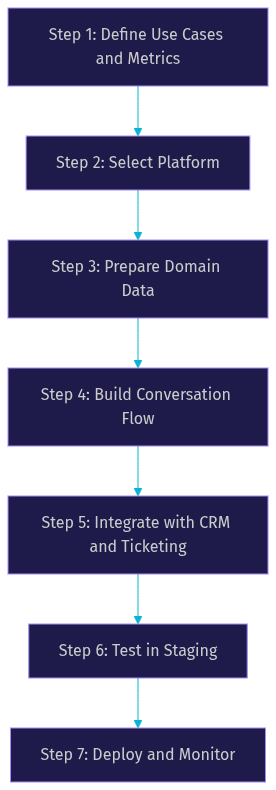
Building conversational AI for customer service requires a structured approach. Skipping steps leads to systems that work in demos but fail in production. Here is a seven-step roadmap that takes you from use case definition to live deployment.
Step 1: Define Use Cases and Success Metrics
Start by identifying high-volume, high-impact scenarios. Password resets, order status checks, billing inquiries, and appointment scheduling are ideal candidates. For each use case, define success metrics: target CSAT, first-contact resolution rate, average handling time, and escalation rate. These metrics become your acceptance criteria for going live.
Step 2: Select a Platform
Evaluate platforms against four criteria: multi-channel support, deterministic conversation flow capability, integration ecosystem, and compliance certifications. If your use case involves regulated industries, deterministic flow is non-negotiable. VideoSDK's Conversational Graph provides this alongside its AI Voice Agent SDK, making it suitable for compliance-heavy customer service workflows.
Step 3: Prepare Domain Data
Gather your knowledge base articles, FAQs, past support tickets, and domain-specific intent examples. Clean and structure this data for retrieval. If you are using retrieval-augmented generation, ensure your document chunks are sized appropriately and your embeddings capture domain terminology accurately.
Step 4: Build the Conversation Flow
Use a deterministic graph for compliance-heavy steps like payment processing, identity verification, and account changes. Use LLM-driven responses for open-ended queries where flexibility matters. VideoSDK's Conversational Graph lets you mix both approaches within a single conversation, applying structure where needed and flexibility where appropriate.
Step 5: Integrate with Existing Systems
Connect the AI agent to your CRM, ticketing system, and knowledge base through API connectors and webhook events. Handle authentication carefully. Never expose API secrets on the client side. Generate tokens server-side and pass them to the SDK, following the same pattern VideoSDK uses for video calling authentication.
Step 6: Test in Staging
Simulate real-world traffic patterns. Test with accents, background noise, interrupted speech, and edge-case queries. Monitor for hallucinations where the LLM generates plausible but incorrect information. Measure latency end-to-end, from customer speech completion to AI response start. Anything over one second on voice channels needs optimization.
Step 7: Deploy and Monitor
Roll out gradually. Start with a percentage of traffic, monitor metrics, and expand. Set up real-time analytics dashboards with alerts for latency spikes, escalation rate increases, and CSAT drops. Run A/B tests comparing AI-handled conversations against human-handled baselines.
Common Pitfalls and How to Avoid Them
Over-reliance on keyword matching is the most common failure mode. Systems that match specific phrases instead of understanding intent break when customers paraphrase. Use NLU-based intent detection instead of keyword rules.
Ignoring context persistence across channels creates fragmented experiences. A customer who starts a conversation on web chat and continues on phone should not have to repeat their issue. Implement session state that carries across channels.
Insufficient fallback to human agents erodes trust. If the AI cannot resolve an issue, it must transfer to a human with full context. Define clear escalation triggers and ensure the handoff includes conversation history.
Neglecting data privacy and compliance is a legal risk. Customer service conversations contain personal information. Ensure your platform supports encryption, data residency requirements, and audit logging. VideoSDK provides end-to-end encryption and geo-fencing capabilities that help meet these requirements.
Evaluating Vendors and Open-Source Options
Choosing a conversational AI platform for customer service requires evaluating multiple dimensions. The table below compares leading providers across the criteria that matter most for production deployments.
| Platform | Multi-Channel | Deterministic Flow | Voice Support | Best For |
|---|---|---|---|---|
| VideoSDK | Yes, via SDKs and SIP | Yes, Conversational Graph | Yes, AI Voice Agent plus Telephony | Developers needing deterministic flows with voice and video |
| Google Gemini Enterprise CX | Yes | Limited | Yes | Enterprises already on Google Cloud |
| Intercom Fin AI | Web, email, messaging | No | No | SaaS companies with existing Intercom setup |
| Gupshup Conversation Cloud | Yes | Limited | Yes | High-volume messaging across regions |
| ASAPP CXP | Yes | Yes | Yes | Large call centers with AI-native workflows |
| Pipecat (open source) | Yes, via integrations | Yes, via pipeline | Yes | Teams wanting full control and self-hosting |
VideoSDK stands out for developers who need deterministic conversation flows alongside real-time voice and video capabilities. The Conversational Graph provides the structured flow control that compliance-heavy customer service requires, while the AI Voice Agent SDK handles real-time speech processing. The open-source agent SDK means you can inspect, modify, and extend the pipeline without vendor lock-in.
Intercom Fin AI excels for SaaS companies already using Intercom for customer messaging, but it lacks voice and deterministic flow capabilities. ASAPP CXP is strong for large call centers but comes with enterprise pricing and implementation complexity. Pipecat offers maximum flexibility as an open-source option but requires significant engineering investment to match managed platform features.
Measuring Success: Metrics and Dashboards
Customer Satisfaction Score (CSAT) is the primary indicator of conversational AI effectiveness in customer service. Measure it through post-interaction surveys triggered after AI-handled conversations. Target a CSAT within five points of your human agent baseline before expanding AI coverage.
First-Contact Resolution (FCR) measures whether the AI resolved the issue without escalation. Low FCR indicates the AI is attempting conversations it cannot complete. Adjust your escalation triggers and expand the knowledge base to address the gap.
Average Handling Time (AHT) should decrease with AI deployment. If it increases, the AI may be generating overly long responses or getting stuck in loops. Monitor AHT by use case to identify which conversation types benefit from AI and which need human handling.
Cost per contact drops as AI handles more volume. Track this metric alongside CSAT to ensure cost savings do not come at the expense of customer experience. Escalation rate indicates how often the AI transfers to humans. A healthy escalation rate depends on your use case mix but typically ranges from 15 to 30 percent.
Set up real-time monitoring dashboards with alerts for latency spikes, CSAT drops, and escalation rate increases. Review metrics weekly during the first month of deployment, then monthly once the system stabilizes.
Future Trends in Conversational AI for Customer Service
Multimodal agents that combine voice and visual elements are emerging as the next frontier. A customer calling about a product issue could simultaneously receive a video stream showing setup instructions, with the AI agent narrating in real time. VideoSDK's video calling SDK combined with its AI Voice Agent creates the foundation for these experiences.
Real-time retrieval-augmented generation is replacing static knowledge bases. Instead of pre-loading documents into the model context, the AI retrieves relevant information at query time from live data sources. This ensures responses reflect the most current information without retraining.
Autonomous action execution is expanding beyond information retrieval. AI agents are beginning to execute transactions directly: processing refunds, updating shipping addresses, and modifying subscription plans. This requires deterministic flow control to ensure every action follows approved business logic.
Regulatory focus on AI-driven customer interactions is increasing. The EU AI Act and similar regulations are establishing requirements for transparency, human oversight, and data handling in automated customer service systems. Platforms that provide audit trails, conversation logging, and deterministic flow control will have a compliance advantage.
Definitions Glossary
Conversational AI: A technology stack that enables automated systems to understand and respond to customer queries in natural language across text and voice channels, combining NLU, dialogue management, and integration layers.
Natural Language Understanding (NLU): The component that interprets customer intent and extracts relevant entities from text or speech, enabling the AI to understand what the customer wants even when phrasing varies.
Deterministic Conversation Graph: A structured flow engine where conversation steps follow predefined rules and business logic rather than LLM judgment, ensuring compliance-heavy processes execute in the correct order every time.
First-Contact Resolution (FCR): A customer service metric measuring whether a customer's issue is fully resolved during their first interaction, without escalation or follow-up contacts.
Human-in-the-Loop: A support architecture where AI handles routine queries and automatically escalates complex or sensitive cases to live human agents, transferring full conversation context during the handoff.
Agent Worker: The Python process that runs a VideoSDK AI agent and manages its session lifecycle, connecting speech-to-text, LLM, and text-to-speech providers into a unified processing pipeline.
Key Takeaways
- Conversational AI for customer service combines NLU, dialogue management, and integration layers to automate customer interactions, with deterministic flow control ensuring compliance-heavy processes execute correctly every time.
- VideoSDK's Conversational Graph and AI Voice Agent SDK provide the deterministic flow control and real-time voice processing that production customer service systems require.
- Start with high-volume, low-complexity use cases like order status and password resets, then expand to more complex scenarios as the system learns.
- Measure success through CSAT, FCR, AHT, and escalation rate, comparing AI-handled conversations against human agent baselines.
- Architecture matters as much as model choice: a centralized AI agent hub with human-in-the-loop fallback and CRM integration outperforms isolated chatbot deployments.
Conclusion
Conversational AI for customer service is a strategic advantage for organizations willing to invest in proper architecture, deterministic flow control, and continuous measurement. The technology has matured beyond simple chatbots into production-grade systems that handle complex, multi-turn conversations across text and voice channels. VideoSDK provides the building blocks through its AI Voice Agent SDK, Conversational Graph, and telephony integration. Start with a pilot on a single high-volume use case, measure your metrics against human baselines, and iterate. You can sign up and start building at app.videosdk.live/login. What are you building with VideoSDK? Drop a comment below, I would love to hear what kind of conversational AI use case you are working on.
Free $20 Balance for AI Voice Agents & Video Calls
FAQ