


Conversational AI for banking refers to natural-language voice and chat agents that handle customer interactions like balance inquiries, transfers, and loan applications without human agents. Banks deploying these systems typically see 30 to 40 percent call deflection and 24/7 availability. VideoSDK provides the real-time communication infrastructure and AI agent SDK that lets financial institutions build and deploy these voice agents securely.
The shift from rigid, menu-driven IVR systems to natural-language conversational AI is reshaping how banks interact with their customers. For decades, calling a bank meant navigating endless touch-tone menus, waiting on hold, and repeating your account number to three different agents. Conversational AI for banking replaces that friction with something closer to talking with a knowledgeable banker who already knows who you are.
The market momentum is undeniable. According to a 2025 McKinsey report on banking technology, over 70 percent of financial institutions have either deployed or are piloting conversational AI solutions. The drivers are clear: rising call-center costs, shrinking branch networks, and customer expectations shaped by voice assistants like Alexa and Google Assistant. Banks that fail to adopt conversational AI risk losing customers to neobanks and fintechs that already offer seamless, AI-driven self-service experiences.
By the end of this guide, you will understand the architecture behind banking conversational AI platforms, the security and compliance requirements, real-world use cases, and how to implement a production-grade system using modern real-time communication infrastructure like VideoSDK's AI agent platform.
Why Conversational AI is a Game-Changer for Banks
Conversational AI delivers measurable operational improvements that traditional IVR and chatbot systems simply cannot match. The core benefit is resolution speed. When a customer asks about a recent transaction, a conversational AI agent can authenticate them, pull transaction history from core banking systems, and provide an answer in under 10 seconds. A human agent handling the same query takes an average of 4 to 6 minutes including hold time.
The numbers back this up. Banks deploying conversational AI report 30 to 40 percent call deflection rates, meaning nearly a third of inbound calls are resolved without human intervention. Cross-sell uplift ranges from 20 to 25 percent because AI agents can surface personalized product recommendations during natural conversation flow, something menu-driven systems cannot do. Customer satisfaction scores climb because customers get answers instantly, any time of day or night.
Beyond cost savings, conversational AI for banking enables true 24/7 availability. A voice agent built on VideoSDK's real-time communication infrastructure can handle thousands of simultaneous calls without scaling headcount. For community banks and credit unions that cannot staff round-the-clock call centers, this levels the playing field against larger institutions.
The reduction in average handling time is another critical metric. Conversational AI agents resolve routine queries in 60 to 90 seconds compared to the 5 to 8 minutes a human agent needs. That compounds across millions of interactions annually into significant operational savings.
Core Components of a Banking Conversational AI Platform
A production-grade conversational AI platform for banking requires four foundational components working in concert. Each addresses a specific challenge that financial services uniquely face.
Natural Language Understanding tuned for finance is the first pillar. Generic NLU models struggle with banking terminology like ACH, RTGS, NFC, or APR. A banking-grade conversational AI system needs domain-specific language models trained on financial transcripts, product disclosures, and regulatory documents. This ensures the agent understands when a customer says "I want to dispute a charge" versus "I want to report fraud" and routes each appropriately.
Retrieval-Augmented Generation (RAG) powers policy-driven answers. Banks have thousands of pages of product terms, fee schedules, and policy documents. Instead of hardcoding responses, a RAG pipeline retrieves relevant policy fragments and feeds them to the language model at inference time. This means when a customer asks about foreign transaction fees on their debit card, the AI agent pulls the exact fee schedule from the bank's knowledge base and cites it accurately.
Secure authentication and transaction execution is non-negotiable. The AI agent must verify customer identity through multi-factor authentication before executing any transaction. This typically involves voice biometrics, one-time passcodes sent via SMS or email, and knowledge-based verification questions. Only after authentication can the agent interact with core banking APIs to execute transfers, block cards, or process loan applications.
Compliance guardrails wrap every interaction in audit trails, data masking, and policy filters. Every conversation is logged with timestamps, intent classifications, and actions taken. Sensitive data like account numbers and Social Security numbers are masked in transcripts. The system enforces policy boundaries, preventing the AI from making unauthorized promises or disclosing information the customer is not authorized to access.
Architecture Overview: From User to Core Banking System
The architecture of a conversational AI system for banking connects multiple layers, each with distinct responsibilities. Understanding this flow is essential before implementation. The user initiates contact through a channel like a phone call, mobile app, or web chat. That input flows through an AI processing layer where speech is transcribed, intent is classified, and responses are generated. Compliance checks gate every action before it reaches the core banking system.
Here is how the end-to-end architecture looks:
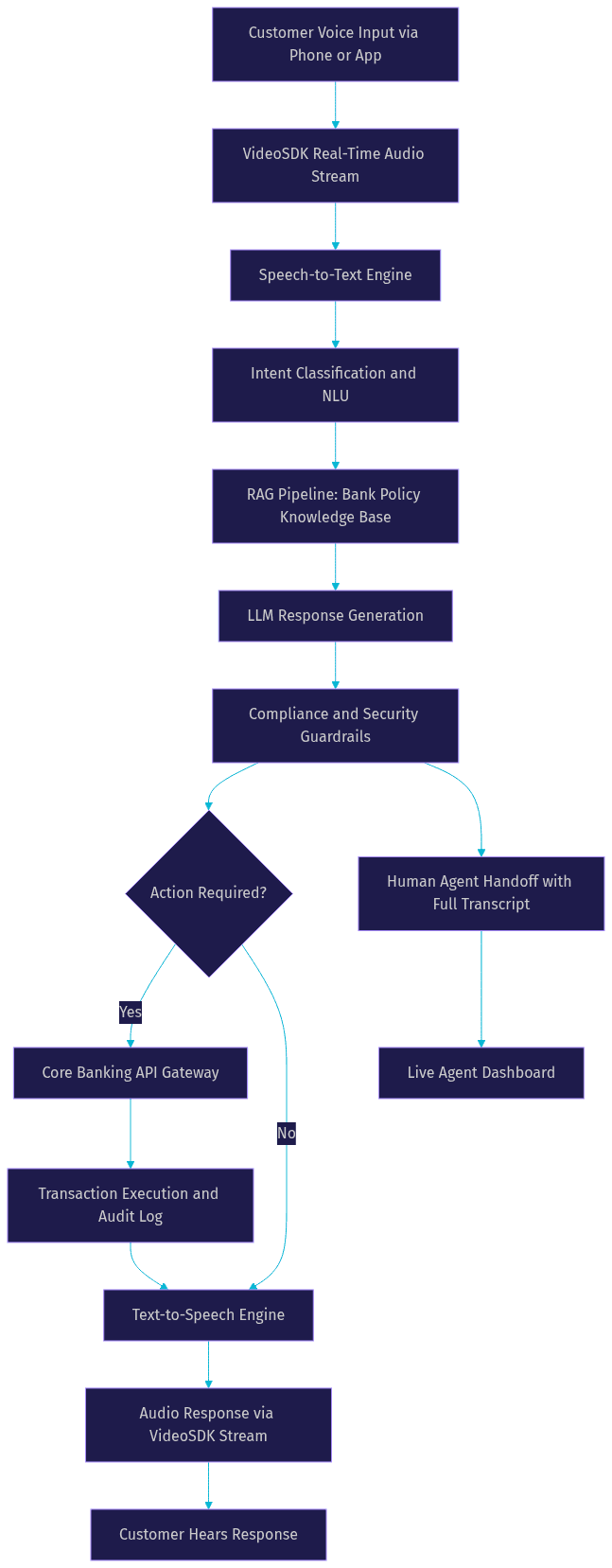
The flow begins when a customer speaks into their phone or app. The audio stream is carried over VideoSDK's WebRTC infrastructure, which ensures sub-300ms latency for natural conversation. The speech-to-text engine transcribes the audio in real time, feeding text to the intent classification layer.
The intent engine determines what the customer wants. If the query requires policy knowledge, the RAG pipeline retrieves relevant documents from the bank's knowledge base. The language model then generates a response, which passes through compliance guardrails that check for policy violations, sensitive data exposure, and authorization requirements.
If the customer's request involves a transaction, the system routes through the core banking API gateway. This is where integration with banking systems happens, typically through REST APIs, SOAP services, or ISO 20022 messaging standards. Every transaction is logged with a full audit trail. The response then converts to speech and streams back to the customer through the same VideoSDK audio channel.
For complex or sensitive cases, the system can hand off to a human agent with the full conversation transcript, eliminating the need for the customer to repeat information.
Multilingual Support: Speaking the Customer's Language
Banks serve diverse populations, and language accessibility is a competitive differentiator. Conversational AI for banking must support local dialects, not just major languages. A bank in the Middle East needs Arabic dialect support covering Gulf, Levantine, and Egyptian variants. Banks in Southeast Asia need Bahasa Indonesia and Malay. Banks in the Americas need Spanish variants for Mexico, Colombia, and Argentina.
The technical approach involves deploying language-specific automatic speech recognition and text-to-speech models. For languages where dedicated models are unavailable, the system can fall back to English while flagging the interaction for future model improvement. VideoSDK's AI agent platform supports multiple STT and TTS providers, allowing banks to select the best-performing model for each target language.
Multilingual support also extends to the language model layer. The LLM must understand financial terminology in the target language and generate responses that sound natural to native speakers. This requires fine-tuning on localized banking transcripts and product documentation, not just machine translation of English content.
Ensuring Security and Regulatory Compliance in Conversational AI
Security in banking conversational AI is not a feature you add later. It is an architectural constraint that shapes every design decision. The system must enforce role-based access control, ensuring customers can only access their own accounts and data. End-to-end encryption protects audio streams and data in transit. Token-based authentication ensures that every API call to core banking systems is verified and time-limited.
Compliance guardrails operate at multiple layers. Policy filters prevent the AI agent from making unauthorized commitments, such as promising loan approval before underwriting completes. Audit logs capture every interaction with immutable timestamps, creating a record that regulators can review. Data masking automatically redacts sensitive information like full account numbers and government IDs from stored transcripts.
Regulatory alignment depends on your operating jurisdictions. GDPR governs European customer data. PDPA applies in Singapore and other Asian markets. SOC 2 Type II certification is often required for US financial institutions. The conversational AI platform must be configurable to meet each framework's requirements for data retention, consent management, and breach notification.
Human handoff is a critical compliance feature. When the AI agent encounters a situation outside its authorization scope, such as a complex fraud claim or a customer requesting an exception to bank policy, it must transfer the call to a human agent with the full conversation transcript. This ensures continuity and creates an audit trail of the escalation. VideoSDK's telephony integration supports seamless call transfers between AI agents and human agents through SIP-based infrastructure.
Real-World Use Cases for Conversational AI in Banking
The practical value of conversational AI for banking becomes clear when you examine specific use cases. Each scenario below represents a high-volume interaction that currently consumes significant call-center resources.
Account Inquiries and Transaction History
Customers frequently call to check their balance, verify recent transactions, or confirm whether a deposit has cleared. A conversational AI agent handles these requests instantly by authenticating the caller and querying the core banking system through REST APIs. The agent can read out the current balance, list recent transactions with dates and amounts, and flag any pending holds. This use case alone can deflect 20 to 30 percent of total inbound call volume.
Payments and Transfers via Voice
Voice-initiated transfers represent a higher-stakes use case that requires robust verification. The AI agent authenticates the customer through voice biometrics and a one-time passcode. The customer then specifies the transfer amount and recipient. The agent confirms the details verbally before executing the transfer through the banking core. For security, the system can enforce daily transfer limits and require additional verification for amounts above a threshold.
Card Services: Block, Replace, and Limit Management
Lost or stolen card reports are urgent, high-stress interactions where speed matters. A conversational AI agent can immediately block the card, initiate a replacement request, and provide a tracking timeline. The agent can also handle credit limit increase requests by pulling the customer's credit profile and applying the bank's underwriting rules in real time.
Loan Applications and Eligibility Checks
Loan applications involve structured data collection that conversational AI handles efficiently. The agent guides the customer through income verification, employment details, and loan purpose. Using VideoSDK's Conversational Graph, banks can define a deterministic flow that ensures every required field is collected in the correct order. The agent can perform preliminary eligibility checks and provide instant pre-approval indications, escalating to a human loan officer for final approval.
Personalized Product Recommendations
Conversational AI agents can analyze customer context in real time to surface relevant product offers. If a customer calls about a savings account, the agent can recommend a high-yield CD based on their balance history. If a customer asks about travel, the agent can offer a travel rewards credit card. These contextual recommendations drive the 20 to 25 percent cross-sell uplift that makes conversational AI financially compelling for banks.
Measuring Success: KPIs and ROI for Conversational AI
Implementing conversational AI for banking requires clear success metrics. Without them, you cannot justify the investment or identify improvement opportunities.
Call deflection rate measures the percentage of inbound calls resolved without human agent involvement. Industry benchmarks for banking conversational AI range from 30 to 40 percent within the first six months of deployment. Average handling time tracks how long the AI agent takes to resolve an interaction, typically 60 to 90 seconds compared to 5 to 8 minutes for human agents.
Customer satisfaction (CSAT) and Net Promoter Score (NPS) indicate whether the AI experience meets customer expectations. Well-implemented conversational AI maintains CSAT scores within 5 percent of human agent performance. Conversion uplift measures the revenue impact of AI-driven cross-sell and product recommendations. Cost per interaction is the bottom-line metric, typically dropping from $5 to $7 per human-handled call to $0.50 to $1.00 per AI-handled interaction.
Benchmark these metrics against your existing IVR and human agent performance quarterly to track improvement and identify areas where the AI agent needs additional training or human handoff tuning.
Implementation Best Practices for Conversational AI in Banking
Successful conversational AI deployments in banking follow a disciplined implementation approach. Starting wrong can erode customer trust and create compliance risks that take months to resolve.
Start with high-volume, low-risk use cases. Account balance inquiries and transaction history lookups are ideal starting points. They represent significant call volume, carry low transaction risk, and let you train the AI agent on real customer interactions before handling money movement. Once these use cases achieve target deflection rates, expand to payments, card services, and loan applications.
Use a sandbox environment for compliance testing. Never connect a conversational AI agent to production banking APIs until it has passed comprehensive testing in an isolated environment. The sandbox should mirror production API behavior but use synthetic data. Test authentication flows, transaction limits, error handling, and compliance guardrails exhaustively before going live.
Implement continuous model monitoring with human-in-the-loop oversight. AI agents can drift over time as language models encounter new query patterns. Set up monitoring dashboards that track intent classification accuracy, response quality scores, and handoff rates. Maintain a human-in-the-loop review process where a sample of interactions is reviewed weekly by compliance and operations teams.
Plan your core banking integration carefully. Most core banking systems expose APIs through REST, SOAP, or ISO 20022 messaging. Work with your core banking vendor to understand rate limits, authentication requirements, and error response formats. VideoSDK's REST APIs can orchestrate room management and session analytics alongside your banking API calls, creating a unified orchestration layer.
Future Trends: Agentic AI and Autonomous Banking
The next evolution of conversational AI for banking is agentic AI. Unlike current conversational agents that handle single-turn or multi-turn queries within a defined scope, agentic AI can plan, reason, and execute multi-step transactions autonomously.
Imagine a customer saying, "Move $5,000 from savings to checking, pay my credit card bill, and then check if I have enough left for a $2,000 car down payment." An agentic AI system breaks this into sub-tasks, executes each in sequence, verifies outcomes, and reports back. This requires integration with robotic process automation (RPA) and workflow orchestration tools that can coordinate across multiple banking systems.
VideoSDK's Conversational Graph already provides the deterministic flow orchestration needed for multi-step banking transactions. As agentic capabilities mature, banks will combine the flexibility of LLM-driven conversation with the reliability of graph-based state machines to handle complex financial workflows.
Regulatory developments will shape how quickly autonomous banking becomes reality. Expect new frameworks from financial regulators addressing AI agent accountability, transaction authorization limits, and mandatory human oversight thresholds for high-value operations.
Definitions Glossary
Conversational AI for Banking: AI-powered voice and chat agents that handle banking customer interactions using natural language, integrated with core banking systems for transaction execution.
RAG (Retrieval-Augmented Generation): A technique where the AI retrieves relevant documents from a knowledge base before generating a response, ensuring answers are grounded in bank policies rather than model hallucination.
Call Deflection Rate: The percentage of inbound customer calls resolved by an AI agent without requiring human agent involvement, a primary KPI for banking conversational AI deployments.
Conversational Graph: A deterministic, graph-based conversation orchestration layer that defines conversation flow as nodes and transitions, ensuring compliance-driven banking workflows follow required steps in order.
Core Banking System: The backend platform that processes banking transactions and manages account data, typically accessed through REST, SOAP, or ISO 20022 APIs by conversational AI agents.
Voice Biometrics: Authentication technology that verifies a customer's identity using unique characteristics of their voice, commonly used in banking conversational AI for secure phone-based transactions.
Key Takeaways
- Conversational AI for banking replaces menu-driven IVR with natural-language agents that resolve 30 to 40 percent of inbound calls without human intervention.
- A production-grade banking AI platform requires domain-specific NLU, RAG for policy accuracy, secure authentication, and compliance guardrails as foundational components.
- Architecture flows from customer voice input through STT, intent classification, RAG, LLM generation, compliance checks, and core banking API execution before returning a spoken response.
- Start implementation with high-volume, low-risk use cases like balance inquiries before expanding to payments and loan applications.
- VideoSDK provides the real-time communication infrastructure, AI agent SDK, and Conversational Graph needed to build and deploy secure banking voice agents at scale.
Conclusion
Conversational AI for banking is no longer experimental. It is a proven technology delivering measurable cost reductions, improved customer satisfaction, and new revenue through contextual cross-sell. The banks that move now will build the customer relationships and operational efficiencies that define the next decade of financial services. The architecture is well understood, the use cases are validated, and platforms like VideoSDK's AI agent infrastructure provide the real-time communication layer needed to deploy production-grade voice agents.
If you are ready to explore a proof-of-concept, start by mapping your top five call-center use cases and evaluating them against the implementation framework in this guide. You can sign up for a free VideoSDK account at app.videosdk.live/login and access code samples to accelerate your build. What are you building with conversational AI for banking? Drop a comment below, I would love to hear about your use case and deployment plans.
FAQ