


Conversational AI consulting guides organizations through strategy, design, deployment, and optimization of AI-powered conversation systems across text and voice channels. It spans use-case assessment, platform selection, dialogue design, governance, and continuous improvement using infrastructure like VideoSDK's AI Voice Agents. An experienced consulting partner helps enterprises avoid costly mistakes and achieve measurable outcomes like 30 to 40 percent support cost reduction.
Customer expectations have shifted dramatically. By 2026, over 80 percent of customer service interactions involve some form of AI, according to Gartner research. Organizations that previously relied on static FAQ pages and rigid IVR menus now face pressure to deliver natural, conversational experiences across chat, voice, and messaging platforms. But building a production-grade conversational AI system requires far more than plugging an API key into a chatbot framework. It demands careful strategy, dialogue design, compliance planning, and continuous optimization. That gap between ambition and execution is where conversational AI consulting delivers measurable value. This article walks through what conversational AI consulting involves, why organizations need it, how a typical engagement works, and how to choose the right partner for your enterprise.
What Is Conversational AI Consulting?
Conversational AI consulting is the professional practice of guiding AI conversation system strategy, design, and optimization across text and voice channels. It covers everything from initial opportunity assessment through post-deployment continuous improvement.
Conversational AI consulting works by bridging the gap between business objectives and technical execution. Consultants assess which customer interactions are worth automating, select appropriate platforms and models, design conversation flows, establish governance frameworks, and oversee deployment. The key distinction from pure technology implementation is that consulting focuses on outcomes and strategy first, not on writing integration code.
Typical deliverables from a conversational AI consulting engagement include a prioritized use-case roadmap, platform and model selection recommendations, conversation design specifications, governance and compliance documentation, proof-of-concept validation reports, and post-deployment optimization plans. Consultants may also recommend specific infrastructure, such as VideoSDK's AI Voice Agents for real-time voice interactions, depending on the organization's channel requirements.
The scope of consulting can range from a focused two-week assessment to a multi-month enterprise transformation program. What remains constant is the emphasis on aligning AI capabilities with real business problems rather than deploying technology for its own sake.
Why Organizations Need Conversational AI Consulting
Organizations that approach AI conversations strategically achieve significantly better outcomes than those building ad hoc chatbots. The gap between a well-architected conversational system and a poorly planned one is measured in millions of dollars and countless damaged customer relationships.
Three primary drivers push enterprises toward professional consulting. First, cost reduction. According to McKinsey, organizations implementing AI-driven customer support see 30 to 40 percent reductions in support costs by deflecting routine inquiries and automating first-contact resolution. Second, 24/7 availability. AI agents handle off-hours queries without staffing overhead. Third, scalability. A well-designed conversational system handles ten thousand simultaneous interactions without degradation, something human teams cannot match.
The risks of DIY approaches are equally clear. Teams that skip strategic planning often produce chatbots with poor conversational UX, frequent hallucinations, and no escalation framework. A healthcare startup building a patient intake bot without governance planning risks exposing protected health information through unredacted conversation logs. A financial services firm deploying an LLM-powered assistant without confidence thresholds may serve incorrect account information to customers, creating regulatory liability.
Consulting engagements address these risks systematically. Consultants bring pattern recognition from dozens of deployments across industries, helping organizations avoid mistakes that internal teams encounter for the first time. They also provide the governance scaffolding that compliance teams require before approving production deployment.
Core Components of a Conversational AI Consulting Engagement
A thorough conversational AI consulting engagement covers seven interconnected components, each addressing a specific layer of the conversation system lifecycle.
Opportunity and Use-Case Assessment
Consultants begin by analyzing existing customer interaction data to identify high-volume, low-complexity conversations that are prime candidates for automation. They evaluate call center transcripts, support ticket logs, and chat histories to map interaction patterns. The output is a prioritized matrix of use cases ranked by business value and implementation feasibility, ensuring that early wins build momentum for broader adoption.
Strategy and Roadmap Development
Once use cases are prioritized, consultants develop a phased rollout strategy. This includes build-versus-buy analysis for each component, timeline estimation, resource allocation, and dependency mapping. The roadmap typically starts with a contained pilot in a single department before expanding to enterprise-wide deployment. Consultants also define success criteria for each phase, creating clear go and no-go decision points.
Architecture and Platform Selection
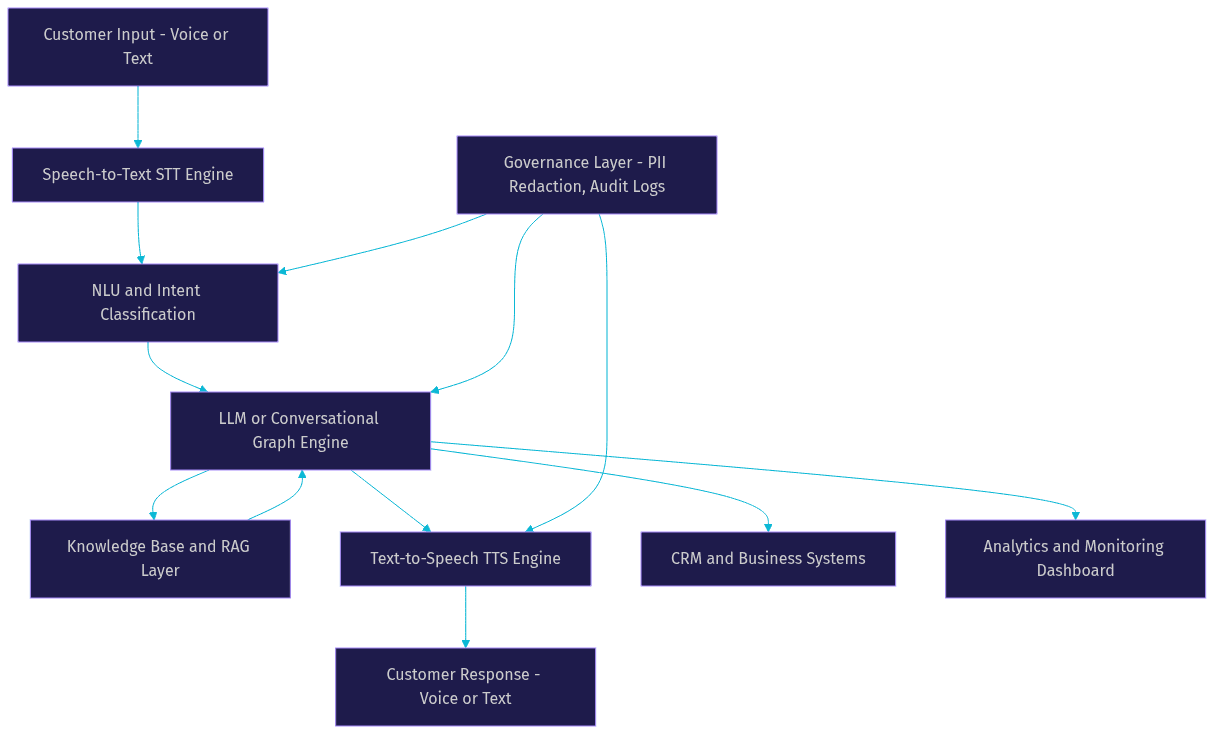
Platform selection is where many organizations struggle without expert guidance. Consultants evaluate factors like hybrid NLU requirements, LLM selection based on latency and accuracy tradeoffs, on-premises versus cloud deployment, and integration with existing CRM and knowledge base systems. For voice-based interactions, they may recommend infrastructure like VideoSDK's AI Voice Agents, which connects speech-to-text, LLM, and text-to-speech providers into a unified real-time pipeline. For deterministic conversation flows, consultants might suggest a graph-based approach using the Conversational Graph framework.
Conversation Design and UX
Conversation design is where technical capability meets user experience. Consultants define the AI agent's persona, tone, and communication style based on brand guidelines and audience expectations. They map multi-turn dialogue flows, design fallback responses for unrecognized intents, and establish clear escalation paths to human agents. The goal is to create conversations that feel natural and productive, not robotic and frustrating.
Governance, Risk, and Compliance
Every conversational AI deployment touches sensitive customer data, making governance non-negotiable. Consultants design data privacy frameworks that address GDPR compliance requirements, HIPAA, and SOC 2 depending on the industry. This includes PII redaction in conversation logs, role-based access controls, audit trail configuration, and data retention policies. For organizations deploying voice agents through telephony integrations, consultants also evaluate SIP and telephony security considerations.
Proof-of-Concept and Validation
Before full deployment, consultants scope and execute a contained proof-of-concept. This typically involves a single use case, a limited user group, and a defined evaluation period. Success criteria might include deflection rate targets, CSAT thresholds, and latency benchmarks. The POC produces a go or no-go decision backed by real data rather than assumptions, reducing the risk of scaling a flawed design.
Deployment, Monitoring, and Continuous Optimization
Post-deployment, consultants establish real-time analytics dashboards that track conversation quality, user satisfaction, and system performance. They configure feedback loops that capture user corrections and agent escalations, feeding this data back into model retraining pipelines. Continuous optimization ensures the system improves over time rather than degrading as customer behavior shifts.
How a Typical Consulting Process Works
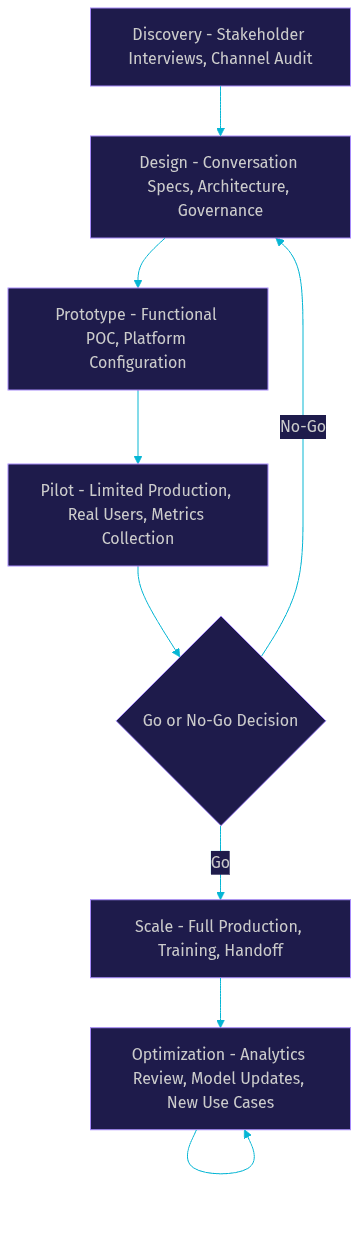
A conversational AI consulting engagement follows a structured lifecycle that moves from discovery through design, prototyping, piloting, scaling, and ongoing optimization. Each phase has distinct deliverables, stakeholders, and decision points.
The engagement begins with a discovery phase, where consultants conduct stakeholder interviews, audit existing customer interaction channels, and document business objectives. This phase typically lasts one to two weeks and produces a discovery report that frames the entire project.
Next comes the design phase. Consultants synthesize findings from discovery into a conversation design specification, architecture recommendation, and governance framework. Client stakeholders review and approve these artifacts before any prototyping begins. Collaboration is critical here: the best designs emerge when business teams, compliance officers, and technical staff all contribute.
The prototype phase builds a functional proof-of-concept using the selected platform and conversation design. Consultants work alongside the client's technical team to configure the system, integrate with existing data sources, and test against realistic scenarios. This phase validates that the architecture works and the conversation flows feel natural.
Pilot deployment extends the prototype to a limited production environment with real users. Consultants monitor performance closely, collecting metrics on deflection rate, containment, CSAT, and escalation frequency. The pilot phase ends with a formal review and a decision to scale, iterate, or abandon.
Scaling moves the system from pilot to full production. Consultants oversee the transition, ensuring that infrastructure handles increased load, governance controls are enforced, and support teams are trained on the new system. Handoff documentation and training sessions prepare the client's internal team to manage the system independently.
The optimization phase continues indefinitely after handoff. Consultants may return periodically to review analytics, recommend model updates, and identify new use cases for expansion.
Choosing the Right Conversational AI Consulting Partner
Selecting the wrong consulting partner wastes time and budget while exposing your organization to compliance risks. The right partner brings domain expertise, platform neutrality, and a proven track record of measurable outcomes.
Start by evaluating domain expertise. The best consultants have deployed conversational AI in your specific industry, whether that is healthcare, financial services, retail, or telecommunications. They understand the regulatory landscape, common customer pain points, and integration challenges unique to your sector. Ask for case studies that include before-and-after metrics, not just implementation summaries.
Platform neutrality is equally important. Some consultancies are tied to a single vendor and will recommend that vendor regardless of fit. A neutral consultant evaluates multiple platforms, including open-source options, and recommends based on your requirements. They should be comfortable working with infrastructure from various providers, including VideoSDK's AI agent platform, OpenAI, Google, and others.
Security certifications matter. Look for partners with SOC 2 Type II compliance, ISO 27001 certification, or equivalent credentials. If your organization operates under HIPAA or GDPR, the consultant must demonstrate experience implementing data protection controls in conversational AI systems.
Watch for red flags. Consultants who promise 90 percent automation rates in the first month are over-promising. Anyone who dismisses governance as a later concern does not understand enterprise deployment. A partner who cannot provide references from clients in your industry should be approached with caution.
Here is a practical checklist for decision-makers. Does the partner have relevant industry case studies with quantified results? Can they explain their platform selection methodology? Do they have a documented governance framework? Will they provide post-deployment support? Do they offer outcome-based pricing models? Can they work with your existing technology stack without demanding a full rip-and-replace?
Measuring Success: Key Metrics and ROI
A consulting engagement without measurable outcomes is just advice. The best consultants define success metrics before deployment begins and build dashboards that track them in real time.
Five metrics anchor most conversational AI programs. Deflection rate measures the percentage of inquiries handled by AI without human agent involvement. Containment rate tracks how many conversations stay within the AI system from start to finish. First-contact resolution measures whether the AI resolves the customer's issue in a single interaction. CSAT captures user satisfaction through post-conversation surveys. Cost per interaction compares the expense of AI-handled conversations against human-handled ones.
Consultants set up analytics dashboards that aggregate these metrics across channels, time periods, and use cases. The dashboards typically include alerting thresholds that notify teams when performance drops below acceptable levels. For voice-based deployments, consultants may also track latency metrics like time-to-first-response and average handle time.
A typical post-implementation impact study might look like this. A retail organization deploying an AI chatbot for order status inquiries achieved a 45 percent deflection rate within three months, reducing call center volume by 30,000 interactions per month. CSAT for AI-handled conversations reached 4.2 out of 5, compared to 4.5 for human agents. The organization recovered its consulting and implementation investment within six months and projected annual savings of 1.2 million dollars.
These outcomes are not unusual for well-executed programs. The difference between success and failure often comes down to whether the organization engaged professional consulting or attempted to build without strategic guidance.
Common Pitfalls and How to Avoid Them
Even with consulting support, conversational AI projects can stumble. Recognizing common pitfalls early helps teams course-correct before they become expensive failures.
Ignoring multi-channel consistency is a frequent mistake. Organizations deploy a chatbot on their website, a separate voice agent on their phone line, and a different bot on WhatsApp, each with different capabilities and conversation styles. Customers receive inconsistent answers depending on the channel they choose. Consultants address this by designing a unified conversation layer that shares intent models and knowledge bases across all channels.
Underestimating data quality is another common error. AI systems trained on messy, incomplete, or outdated knowledge bases produce unreliable responses. Consultants conduct data audits early in the engagement, identifying gaps and recommending cleanup before training begins. For RAG-based systems, this means ensuring source documents are current, accurate, and properly structured for retrieval.
Failing to define confidence thresholds and handoff rules creates dangerous gray zones. When the AI is uncertain but has no defined escalation path, it either hallucinates an answer or loops indefinitely. Consultants establish explicit confidence thresholds below which the system routes to a human agent, along with context transfer so the human picks up the conversation without making the customer repeat themselves.
Lacking a continuous learning pipeline means the system degrades over time. Customer language evolves, new products launch, and policies change. Without a feedback loop that captures corrections and retrains models, accuracy drops month over month. Consultants design these pipelines as part of the deployment, not as an afterthought.
Future Trends in Conversational AI Consulting
The conversational AI consulting landscape is evolving rapidly as underlying technology advances and regulatory frameworks mature.
Generative AI has fundamentally changed what conversational systems can do. Consultants now focus less on building rigid dialogue trees and more on designing guardrails around LLM-powered agents that generate responses dynamically. The Conversational Graph approach represents this shift, combining deterministic flow control with LLM-generated language for structured business processes like loan applications and insurance claims.
Real-time retrieval is becoming standard. Rather than relying on static training data, modern conversational systems query knowledge bases live during conversations. This reduces hallucinations and ensures responses reflect the most current information available. Consultants help organizations build RAG pipelines that connect AI agents to internal document repositories, product catalogs, and policy databases.
Voice-first experiences are gaining traction. As real-time voice AI platforms mature, organizations are deploying AI phone agents that handle inbound and outbound calls with natural conversation. VideoSDK's telephony integration bridges traditional SIP phone networks with WebRTC-based AI agents, enabling use cases like automated appointment reminders and AI-driven customer support calls.
Compliance standards are catching up to technology. The EU AI Act, fully enforced by 2026, introduces risk-based requirements for AI systems including conversational agents. Consultants increasingly incorporate AI compliance consulting as a core service, helping organizations navigate transparency obligations, risk assessments, and documentation requirements.
The consulting model itself is shifting toward outcome-based engagements. Rather than billing by the hour, some consultancies tie fees to achieved metrics like deflection rate or cost savings. This alignment of incentives benefits both parties and reflects growing confidence in the measurable impact of well-executed conversational AI.
Definitions Glossary
Conversational AI Consulting: The professional practice of advising organizations on strategy, design, deployment, and optimization of AI systems that interact with users through natural language across text and voice channels.
Deflection Rate: The percentage of customer inquiries handled entirely by AI without requiring human agent involvement, a primary metric for measuring conversational AI ROI.
Conversational Graph: A deterministic, graph-based conversation orchestration framework that controls conversation flow through defined nodes and transitions while using LLMs only for natural language generation.
Confidence Threshold: A predefined score below which an AI system routes a conversation to a human agent, preventing hallucinations and ensuring quality control in automated interactions.
RAG (Retrieval-Augmented Generation): A technique where an AI system queries external knowledge bases in real time during a conversation to ground responses in current, accurate information rather than relying solely on model training data.
Containment Rate: The percentage of conversations that remain within the AI system from start to finish without escalation to human agents, indicating the system's ability to resolve issues autonomously.
Key Takeaways
- Conversational AI consulting bridges the gap between business objectives and technical execution, covering strategy, design, governance, and continuous optimization across text and voice channels.
- Organizations that engage professional consulting achieve 30 to 40 percent support cost reductions by prioritizing high-value use cases and avoiding common DIY pitfalls like poor conversation design and missing compliance frameworks.
- A structured consulting engagement spans seven core components from opportunity assessment through continuous optimization, with clear go and no-go decision points at each phase.
- Platform-neutral consultants who understand your industry and security requirements deliver better outcomes than vendor-tied implementers or internal teams building without prior deployment experience.
- Success measurement requires defined metrics like deflection rate, containment, CSAT, and cost per interaction, tracked through real-time dashboards that consultants configure during deployment.
- The future of conversational AI consulting points toward generative AI guardrails, real-time retrieval, voice-first experiences, and outcome-based engagement models tied to measurable business results.
Conclusion
Conversational AI consulting transforms what could be a risky, expensive technology experiment into a structured, measurable business initiative. The difference between organizations that achieve meaningful ROI and those that abandon their chatbot projects after six months often comes down to whether they engaged expert guidance from the start. From use-case assessment and platform selection to conversation design, governance, and continuous optimization, a consulting partner brings the pattern recognition and frameworks that internal teams simply cannot replicate on their first deployment. If your organization is planning a conversational AI initiative, start by scheduling a discovery call with a qualified consulting partner. You can also explore VideoSDK's AI Voice Agents documentation to understand the infrastructure that consultants typically configure for voice-based deployments. What are you building with conversational AI? Drop a comment below, and let's discuss your use case and how strategic consulting can accelerate your path to production.
FAQ