


A conversational AI call center uses real-time speech processing, large language models, and telephony integration to handle customer calls autonomously. VideoSDK provides the AI Voice Agent SDK, SIP telephony gateway, and Conversational Graph engine that let developers build production-grade AI call centers with sub-second response times and deterministic conversation flows. Start with the VideoSDK AI Agents documentation to architect your pipeline today.
Traditional call centers are expensive to run, hard to scale, and notorious for long wait times. A conversational AI call center flips that model by replacing rigid touch-tone IVR menus and overstretched human agents with AI voice agents that understand natural speech, hold multi-turn conversations, and resolve queries in real time. The technology stack has matured to the point where a well-designed AI agent can handle tier-one support, appointment scheduling, billing inquiries, and even sales qualification without a human in the loop.
For developers and solution architects, the challenge is no longer whether to build an AI call center but how to wire together speech-to-text, LLM reasoning, text-to-speech, and telephony into a reliable, compliant, and scalable system. This guide walks through every layer of that stack, with a practical focus on how VideoSDK's agent infrastructure simplifies the build.
What is a Conversational AI Call Center?
A conversational AI call center is a contact center where AI voice agents handle inbound and outbound phone calls using natural language understanding, real-time speech processing, and deterministic conversation logic. Unlike legacy voice bots that rely on rigid keyword matching and decision trees, a conversational AI system transcribes caller speech in real time, passes the transcript to an LLM that generates a contextually appropriate response, and converts that response back to natural-sounding speech.
The key differentiator is conversation quality. A simple voice bot might ask you to press 1 for sales or 2 for support. A conversational AI agent asks, "How can I help you today?" and then adapts its responses based on what the caller actually says. It can handle interruptions, ask clarifying questions, pull data from backend systems through function tools, and escalate to a human agent when it detects frustration or hits a conversation boundary it cannot resolve.
VideoSDK provides the real-time communication layer that makes this possible. The VideoSDK AI Voice Agent SDK connects LLMs, STT providers, and TTS providers to VideoSDK Rooms, where the AI agent and the caller interact as participants. The SIP telephony integration bridges traditional phone networks to these WebRTC-based rooms, so callers can dial a standard phone number and reach an AI agent without installing an app.
Core Technical Components of a Conversational AI Call Center
Every conversational AI call center relies on four foundational technical components working in concert. Understanding each layer and its trade-offs is essential before you start building.
Speech-to-Text (STT)
STT is the entry point of the conversational AI pipeline. It converts the caller's audio stream into text that the LLM can process. Accuracy here is non-negotiable because every downstream component depends on a clean transcript. In call center environments, STT engines must handle accented speech, background noise, cross-talk, and telephony-grade audio that is often narrower in frequency range than studio recordings.
Developers typically choose between providers like Deepgram, OpenAI Whisper, Google Cloud STT, and AssemblyAI. Each offers different latency profiles, language coverage, and pricing models. Deepgram's Nova series is known for low-latency streaming transcription, while OpenAI Whisper excels at batch accuracy. VideoSDK's Agent SDK supports pluggable STT providers, so you can swap engines without rewriting your pipeline.
Large Language Model (LLM) Engine
The LLM is the reasoning brain of the AI call center. It takes the transcribed user input, applies conversation context, and generates a natural language response. The LLM must maintain state across multiple turns, reference caller-specific data retrieved through function tools, and stay within the guardrails of your business logic.
Provider choices include OpenAI GPT-4o, Anthropic Claude, Google Gemini, and open-weight models like Meta Llama. The trade-off is typically between response latency and reasoning depth. For call center use cases, sub-second response time is critical, so many teams opt for faster inference providers like Cerebras or Sarvam AI for specific language markets. VideoSDK's Agent Worker manages the LLM session lifecycle, including context window management and preemptive response generation, so the agent can start speaking before the caller has fully finished their sentence.
Text-to-Speech (TTS)
TTS converts the LLM's text response back into audio that the caller hears. The quality of TTS directly shapes how callers perceive your brand. Modern neural TTS engines from providers like ElevenLabs, Cartesia, and AWS Polly produce voices that are nearly indistinguishable from human speech, complete with emotional inflection and natural pauses.
For multilingual call centers, TTS providers must support the languages and dialects your callers speak. VideoSDK's pipeline supports TTS caching, which pre-generates common responses to eliminate the synthesis latency for frequently used phrases. This is especially valuable for call center greetings, compliance disclaimers, and standard confirmation messages.
Telephony and SIP Integration
Telephony integration is what connects your AI pipeline to the public switched telephone network. Without it, your AI agent only exists inside a web or mobile app. SIP trunks from providers like Twilio, Telnyx, Vonage, and Plivo carry inbound and outbound calls into your system.
VideoSDK's telephony integration provides an Inbound Gateway that receives SIP calls and bridges them into VideoSDK Rooms over WebRTC. An Outbound Gateway handles calls initiated by the AI agent. The Routing Rules engine lets you define which calls go to which AI agents based on phone number, time of day, caller ID, or custom metadata. DTMF event support means callers can still press keys during the call if needed, and call transfer functionality lets the AI agent hand off to a human agent or another AI agent mid-conversation.
Business Benefits of Conversational AI Call Centers
Conversational AI call centers deliver measurable improvements across the metrics that matter most to operations leaders. The most immediate benefit is cost reduction. An AI voice agent handles thousands of concurrent calls at a fraction of the cost of a human agent, and it does not require benefits, training periods, or schedule management.
Beyond cost, AI agents provide true 24/7 availability. Callers never hear a busy signal or sit in a queue at 2 AM. This alone transforms customer satisfaction for industries like healthcare, financial services, and utilities where after-hours support is critical.
Average handle time (AHT) drops significantly because AI agents retrieve information instantly through function tools and API integrations, eliminating the hold time a human agent would need to look up an account. First-call resolution (FCR) improves when the AI agent has access to the full customer context and deterministic conversation flows that ensure every necessary step is completed in the right order.
Revenue uplift comes from outbound AI campaigns. AI agents can proactively call customers for appointment reminders, payment collections, renewal notifications, and upsell opportunities at a scale no human team could match. The VideoSDK Conversational Graph is particularly valuable here because it enforces a deterministic flow for compliance-sensitive conversations like loan applications or insurance claims, where every step must happen in order.
High-Level Architecture of a Conversational AI Call Center
The end-to-end flow of a conversational AI call center starts when a caller dials a phone number routed through a SIP trunk. The call enters the VideoSDK Inbound Gateway, which creates a VideoSDK Room and bridges the caller as a Participant. Simultaneously, an AI Agent Worker joins the same Room as another Participant.
The caller's audio Stream flows through the STT service, which produces a real-time transcript. That transcript feeds into the LLM engine, which generates a response using conversation context, caller data from function tools, and the rules defined in your Conversational Graph. The response text passes to the TTS service, which synthesizes audio and sends it back through the Room to the caller. If the AI agent determines that human intervention is needed, it initiates a warm transfer to a live agent who joins the same Room with full conversation context preserved.
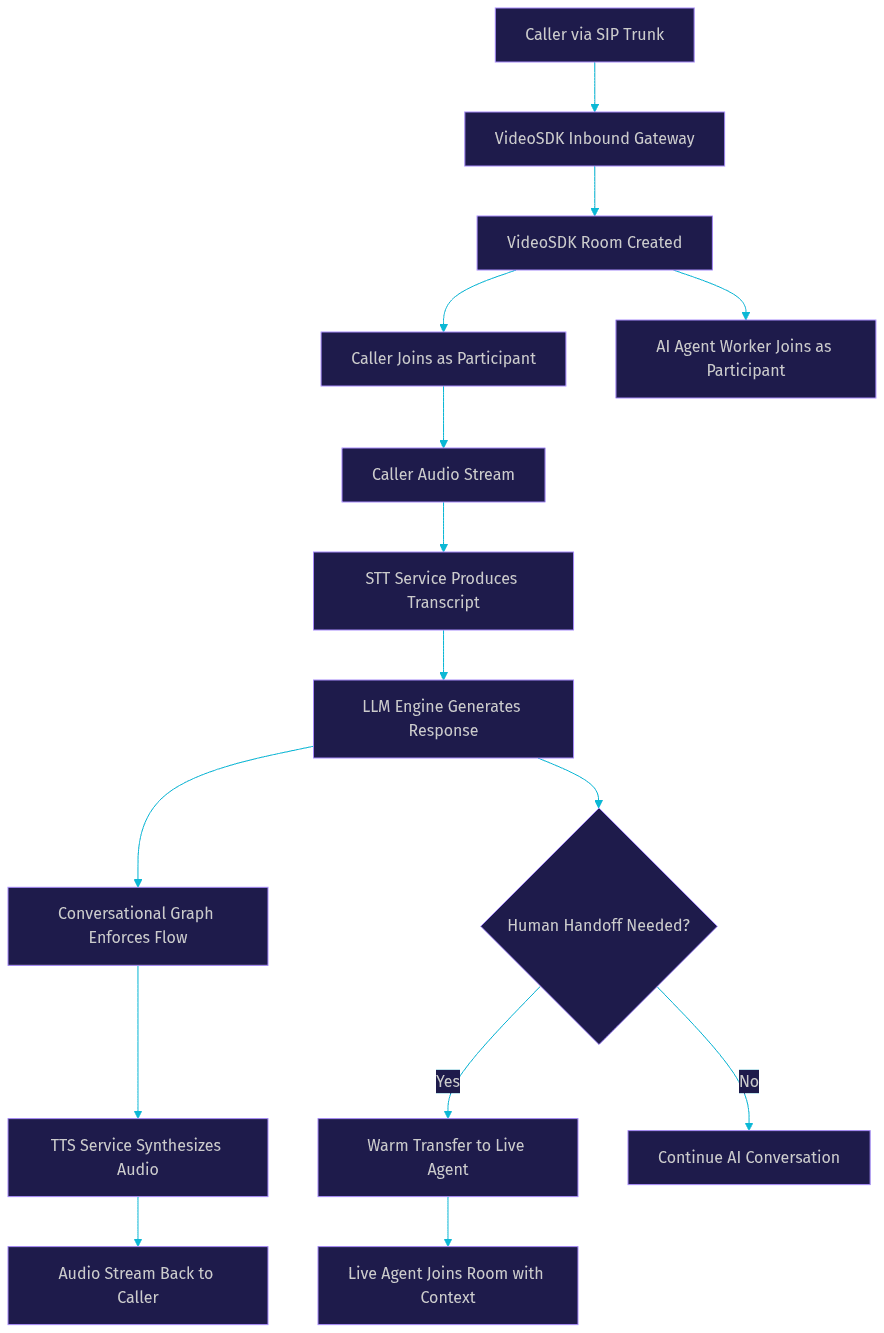
This architecture ensures that every component is decoupled and replaceable. If you need to switch STT providers for better accuracy on a specific language, you change one layer without touching the rest of the pipeline.
Building a Conversational AI Call Center with VideoSDK
Building a production conversational AI call center with VideoSDK involves four major phases: selecting your SDK, generating secure tokens, configuring the AI agent pipeline, and deploying to production. Each phase has specific decisions that determine whether your system will handle real call volume reliably.
Selecting the Right SDK and Platform
VideoSDK offers SDKs for React, React Native, Flutter, Android, iOS, JavaScript, Python, Unity, and C++. For a call center dashboard where human supervisors monitor live AI calls, the React SDK is the most common choice because it provides hooks such as useMeeting and useParticipant that make it straightforward to build a real-time monitoring interface. For mobile-first supervisor apps, the React Native or Flutter SDK covers both iOS and Android from a single codebase.
The AI agent itself runs as a Python process using the VideoSDK Agent SDK. This is separate from the front-end SDK choice. The Agent Worker connects to the same VideoSDK Room as the caller and the supervisor, processing audio through the STT, LLM, and TTS pipeline. You can explore platform-specific quickstarts in the VideoSDK code samples library.
Generating Secure Meeting Tokens
VideoSDK uses token-based authentication to control access to Rooms. Every participant, whether a caller, an AI agent, or a human supervisor, needs a valid Meeting Token to join. Tokens are JWTs generated server-side using your VideoSDK API key and secret.
Never expose your API secret on the client side. In a call center architecture, your backend token server generates tokens on demand. When a SIP call arrives, your server creates a Room via the VideoSDK REST API, generates a token scoped to that Room, and passes it to both the Agent Worker and the caller's session. Token scoping lets you restrict what each participant can do, such as allowing the AI agent to speak but limiting a monitoring supervisor to listen-only mode.
You can follow the VideoSDK authentication guide for the exact token generation process. The token includes the Room ID, participant permissions, and an expiry timestamp. Plan for token refresh logic in long-running calls to avoid mid-conversation disconnections.
Configuring the AI Agent Pipeline
The AI agent pipeline is where you wire together your STT, LLM, and TTS providers inside the VideoSDK Agent Worker. The Agent SDK gives you layer-by-layer control over each stage of the pipeline, along with hooks that let you inject custom logic at every transition point.
Start by defining your STT provider and configuring it for streaming mode, since call center conversations require real-time transcription rather than batch processing. Next, configure your LLM provider with a system prompt that defines the agent's persona, scope of knowledge, and escalation rules. If your conversation requires strict step ordering, define a Conversational Graph with nodes, transitions, and extractors that enforce the flow regardless of what the LLM decides to do.
For TTS, select a voice provider and enable caching for common phrases. Configure voice activity detection (VAD) so the agent knows when the caller has stopped speaking and it is safe to respond. Set up turn detection parameters to balance between responsiveness and interruption tolerance. The Agent SDK also supports background audio, which fills silence with subtle ambient sound so the caller does not hear dead air while the LLM is processing.
Deploying to Production
Production deployment introduces requirements that localhost development never surfaces. First, your token server and Agent Worker must run behind HTTPS. Browsers and mobile WebRTC stacks reject non-secure connections, and SIP carriers expect TLS on trunk endpoints.
Second, configure TURN server fallback. Callers on restrictive corporate networks or mobile networks with aggressive NAT may fail to establish direct WebRTC connections. VideoSDK provides cloud proxy and TURN infrastructure, but you should verify that your deployment routes through these fallbacks automatically.
Third, plan for horizontal scaling. Each Agent Worker handles a finite number of concurrent sessions. Use the VideoSDK Agent Cloud for managed scaling, or deploy your own Worker instances on Kubernetes with autoscaling rules tied to inbound call volume. Monitor Worker CPU and memory, since STT and TTS processing can be resource-intensive depending on your provider configuration.
Call Management: Routing, Handoffs, and Human-in-the-Loop
Intelligent call routing is what separates a functional AI call center from a great one. VideoSDK's Routing Rules engine lets you define routing logic based on caller ID, dialed number, time of day, language preference, and custom SIP headers. A call arriving on your Spanish support line can route directly to an AI agent configured with a Spanish-language LLM and TTS voice, while a call to your billing line routes to an agent with access to payment processing function tools.
Human-in-the-loop handoff is the safety net that makes AI call centers trustworthy. The AI agent must know when to escalate, and the escalation must be seamless to the caller. Common escalation triggers include explicit caller requests for a human, repeated failed intent resolution, negative sentiment detected by the analytics layer, or a conversation path that reaches a node marked as human-only in the Conversational Graph.
VideoSDK supports warm transfers, where the human agent joins the same Room before the AI agent leaves. This means the human agent arrives with the full conversation transcript, caller metadata, and any data the AI agent has already collected. The caller experiences a brief introduction rather than a cold transfer. For cold transfers, the AI agent can use the call transfer functionality to redirect the caller to an external number or another agent queue.
Context preservation across the handoff is critical. The Agent SDK's session analytics and conversation state should be passed to the human agent's dashboard through your supervisor interface, built with the VideoSDK React SDK. This gives the human agent a summary of what the caller wanted, what the AI agent already tried, and what remains unresolved.
Compliance, Security, and Data Privacy
Call centers operate under strict regulatory frameworks. Healthcare call centers must comply with HIPAA. Financial services call centers must meet PCI-DSS requirements for payment data. Any call center handling EU residents must comply with GDPR. Conversational AI adds new considerations because the AI agent processes and potentially stores conversation transcripts, voice biometrics, and caller metadata.
VideoSDK supports end-to-end encryption for media streams, ensuring that audio passing between the caller and the AI agent cannot be intercepted. Token scoping limits what each participant can access within a Room. Server-side Room management via the REST API lets you deactivate Rooms immediately after a call ends, reducing the window of exposure.
For compliance-specific conversation flows, the Conversational Graph enforces deterministic steps that ensure mandatory disclosures, consent capture, and data collection happen in the required order. This is essential for regulated industries where skipping a compliance step is a legal violation, not just a user experience problem.
Measuring Success: Analytics and Continuous Improvement
A conversational AI call center generates rich data that traditional call centers cannot match. Every call produces a full transcript, sentiment scores, intent classifications, resolution status, and timing breakdowns for each pipeline stage. This data feeds directly into the metrics that operations leaders track.
First-call resolution (FCR) measures whether the AI agent resolved the caller's issue without escalation. Average handle time (AHT) tracks the total call duration. Customer satisfaction (CSAT) can be captured through a post-call survey administered by the AI agent itself, asking the caller to rate their experience before disconnecting.
Real-time dashboards built on the VideoSDK React SDK can display live call metrics, active agent sessions, sentiment trends, and escalation rates. The VideoSDK REST API provides endpoints for pulling session analytics, recording metadata, and participant data for post-call analysis.
Continuous improvement comes from feeding analytics back into the AI model. Identify conversation paths where the AI agent frequently fails to resolve the issue, and add new function tools or refine the Conversational Graph nodes. Track STT accuracy by language and accent, and switch providers where error rates are high. Monitor TTS latency and enable caching for any phrase that takes more than a few hundred milliseconds to synthesize. Sentiment analysis data reveals which conversation flows generate frustration, so you can redesign those nodes or add earlier escalation triggers.
Common Pitfalls and Best-Practice Tips
Building a conversational AI call center is complex, and several pitfalls catch teams off guard. Poor STT accuracy on noisy telephony lines is the most common. Always test your STT provider with real call audio, not studio recordings. If accuracy drops below acceptable thresholds, consider adding a de-noise step in the pipeline or switching to a provider trained specifically on telephony audio.
Latency spikes destroy the conversational experience. If the caller perceives a delay longer than about 800 milliseconds, the conversation feels unnatural. Profile each pipeline stage independently. STT streaming, LLM inference, and TTS synthesis each contribute latency. Use TTS caching for common phrases, choose LLM providers with fast inference, and enable preemptive response generation so the agent starts speaking as soon as the LLM produces the first sentence.
Token expiry causes mid-call disconnections that frustrate callers and break session continuity. Set token expiry values generously for expected call duration, and implement refresh logic that generates a new token before the current one expires. For long calls, refresh at regular intervals rather than relying on a single long-lived token.
Finally, avoid over-reliance on the LLM for conversation flow control. LLMs are non-deterministic, and in regulated call center scenarios, that unpredictability is a liability. Use the Conversational Graph to enforce business rules and let the LLM handle only natural language generation within each node.
Definitions Glossary
Room: A VideoSDK meeting room that participants join to share media streams, identified by a unique room ID. In an AI call center, both the caller and the AI Agent Worker join the same Room.
Participant: A user or AI agent connected to a VideoSDK Room with its own audio and video streams. In a call center context, participants include the caller, the AI agent, and any human supervisor or live agent who joins for handoff.
Agent Worker: The Python process that runs a VideoSDK AI agent and manages its session lifecycle, including the STT, LLM, and TTS pipeline stages.
Conversational Graph: VideoSDK's deterministic flow engine for structured multi-turn voice conversations. It defines nodes, transitions, actions, and state to ensure business rules control conversation branching rather than LLM judgment.
SIP Integration: The telephony bridge that connects traditional phone networks to VideoSDK WebRTC Rooms through an Inbound Gateway, Outbound Gateway, and Routing Rules engine.
Meeting Token: A JWT that authenticates a participant's access to a VideoSDK Room, generated server-side using the API key and secret, with scoping for permissions and expiry.
Key Takeaways
- A conversational AI AI call center replaces rigid IVR menus with AI voice agents that understand natural speech, reason through LLMs, and respond in real time.
- The core pipeline consists of four layers: speech-to-text, LLM reasoning, text-to-speech, and SIP telephony integration, each of which VideoSDK's Agent SDK supports with pluggable providers.
- VideoSDK's Conversational Graph enforces deterministic conversation flows for compliance-sensitive call center scenarios like loan applications, insurance claims, and payment processing.
- Warm transfers preserve full conversation context when escalating from an AI agent to a human agent, so the caller never repeats themselves.
- Production deployment requires HTTPS, TURN server fallback, token refresh logic, and horizontal scaling of Agent Worker instances to handle real call volume.
Conclusion
A conversational AI call center is no longer a futuristic concept. The building blocks exist today: real-time STT, powerful LLMs, natural TTS, and SIP telephony integration are all available as composable services. VideoSDK ties them together with an Agent SDK that gives you layer-by-layer control, a Conversational Graph for deterministic flows, and a telephony gateway that bridges the phone network to your AI pipeline. Whether you are building a healthcare triage line, a financial services support center, or an outbound sales campaign, the architecture is the same. Start with the VideoSDK AI Agents guide for the full pipeline setup, or try the Prebuilt UI Kit for a rapid proof-of-concept. Sign up at app.videosdk.live/login to get your free credits and start building. What are you building with VideoSDK? Drop a comment below, I would love to hear what kind of conversational AI call center use case you are working on.
FAQ