


Contextual NLU is the practice of interpreting user utterances by incorporating surrounding dialogue history, user attributes, and environmental signals rather than processing each message in isolation. VideoSDK's Conversational Graph applies this principle by maintaining deterministic state across multi-turn voice conversations, ensuring that intent classification and slot extraction remain accurate even as conversations grow longer and more complex. To get started with context-aware voice AI, explore the VideoSDK AI Voice Agent SDK documentation.
Context matters in conversational AI because human conversation is inherently multi-turn and reference-heavy. When someone says "book another one for Friday," the word "another" only makes sense if the system remembers what was booked previously. Without context, an NLU module sees an incomplete request and either misclassifies the intent or fails to extract the right slots.
Contextual NLU solves this by feeding prior turns, extracted entities, user profile data, and system actions back into the understanding pipeline. Instead of treating each utterance as an independent classification problem, the system processes a window of conversation history alongside the current input.
This article walks through what contextual NLU is, how it evolved from rule-based trackers to modern transformer architectures, the key architectural patterns you can adopt, and how to build and evaluate a production-grade contextual NLU system. We will also look at how VideoSDK's AI Voice Agent SDK and Conversational Graph fit into this landscape.
What is Contextual NLU?
Contextual NLU is defined as the process of extracting intent and slot information from a user utterance by jointly considering the current input and a representation of prior conversational context. Traditional or vanilla NLU processes each utterance independently, classifying intent and filling slots from the text of the current message alone. Contextual NLU extends this by maintaining a context window or state object that accumulates information across turns.
The core components of a contextual NLU system include an intent classifier, a slot labeler, and a context manager. The intent classifier determines what the user wants to do. The slot labeler extracts the parameters needed to fulfill that intent. The context manager stores and retrieves relevant information from previous turns, such as previously mentioned entities, confirmed values, and the current dialogue state.
Consider a restaurant booking scenario. In turn one, the user says "I want a table at an Italian restaurant." In turn two, they say "Make it for two people at eight." A vanilla NLU system processing turn two in isolation would struggle to identify the intent (restaurant reservation) and would miss the cuisine type (Italian) entirely. A contextual NLU system carries forward the restaurant reservation intent and the Italian cuisine slot from turn one, allowing it to interpret "make it" as a continuation of the same booking flow and to fill the party size and time slots correctly.
VideoSDK's Conversational Graph implements this pattern by letting developers define conversation state as a structured data model that persists across turns. The LLM handles natural language generation, but the graph controls which slots are carried forward and when transitions between conversation nodes occur.
Historical Evolution of Context Handling
Early dialogue systems relied on hand-crafted rules to track conversation state. Systems like ELIZA and later task-oriented frameworks used finite-state machines where each node represented a dialogue state and transitions were triggered by keyword matching or simple pattern rules. These rule-based dialogue state trackers were brittle but predictable, and they required developers to enumerate every possible conversation path.
The shift to statistical models began in the 2000s with hidden Markov models and conditional random fields for slot filling. Recurrent neural networks, particularly LSTMs and GRUs, became the dominant baseline for multi-turn NLU in the mid-2010s. These models processed conversation history as a sequence, maintaining a hidden state vector that theoretically captured relevant context from prior turns. In practice, LSTMs struggled with long-range dependencies and often forgot critical information from earlier in the conversation.
The emergence of self-attentive and transformer-based approaches marked a turning point. Models like BERT and its conversational variants introduced attention mechanisms that could directly attend to any previous turn without the sequential bottleneck of recurrence. Research efforts such as CASA-NLU demonstrated that self-attentive architectures could significantly improve intent classification and slot filling accuracy in multi-turn settings by learning which previous turns were most relevant to the current utterance.
Today, the field has split into two complementary directions: large language models that handle context through their input window and prompt engineering, and deterministic pipelines that structure context explicitly for production reliability. VideoSDK's AI Voice Agent SDK supports both approaches, letting developers choose between LLM-driven flexibility and graph-driven determinism depending on their use case.
Key Architectural Patterns
Self-Attentive Contextual Models
Self-attentive contextual models use transformer attention mechanisms to incorporate previous conversation turns directly into the encoding of the current utterance. Instead of compressing all history into a single hidden state vector, the model concatenates or cross-attends to representations of prior turns, allowing the attention layers to learn which historical tokens are most relevant to the current classification decision.
In practice, this means the model can learn that in a restaurant booking conversation, the cuisine type mentioned in turn one is relevant to the slot filling in turn three, while an unrelated greeting in turn two can be ignored. The attention weights provide a degree of interpretability, letting developers inspect which previous turns influenced a given prediction.
The trade-off is computational cost. As the conversation grows longer, the context window expands and inference latency increases. Most production systems cap the context window at a fixed number of turns or implement sliding window strategies that keep only the most recent or most relevant turns.
Deterministic Context Pipelines
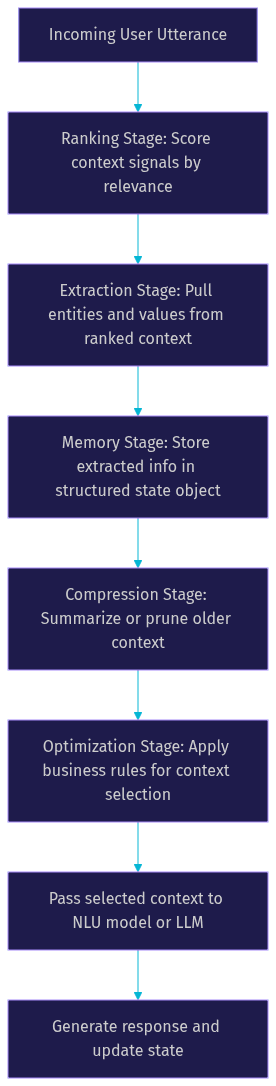
Deterministic context pipelines take a different approach. Instead of relying on a neural model to implicitly learn which context matters, they explicitly structure context processing as a sequence of well-defined stages. The open-source ctxintel framework exemplifies this pattern with a five-stage pipeline: ranking, extraction, memory, compression, and optimization.
In the ranking stage, the pipeline scores incoming context signals by relevance to the current turn. The extraction stage pulls specific entities and values from the ranked context. The memory stage stores extracted information in a structured state object. The compression stage summarizes or prunes older context to stay within token or memory limits. The optimization stage applies business rules to select which context elements should be passed to the NLU model or LLM for the current turn.
VideoSDK's Conversational Graph follows a similar philosophy. Developers define a Pydantic-based state model, and the graph engine manages transitions, extractors, and checkpointing. This makes the context flow deterministic and debuggable, which is critical for compliance-driven conversations like loan applications or insurance claims where every step must happen in a defined order.
Retrieval-Augmented Generation and Grounded LLMs
Retrieval-augmented generation enriches the context available to an NLU system by pulling relevant information from external knowledge sources at inference time. Instead of relying solely on the conversation history and the model's parametric knowledge, the system queries a vector database, document store, or API to retrieve facts, policies, or prior interaction records that are relevant to the current turn.
In a contextual NLU setting, retrieval serves two purposes. First, it provides background knowledge that helps the intent classifier disambiguate ambiguous utterances. If a user says "I want to change my plan," retrieving the user's current subscription tier helps the system determine whether "plan" refers to a pricing plan or a travel itinerary. Second, it grounds the response generation in verified information, reducing hallucination risk.
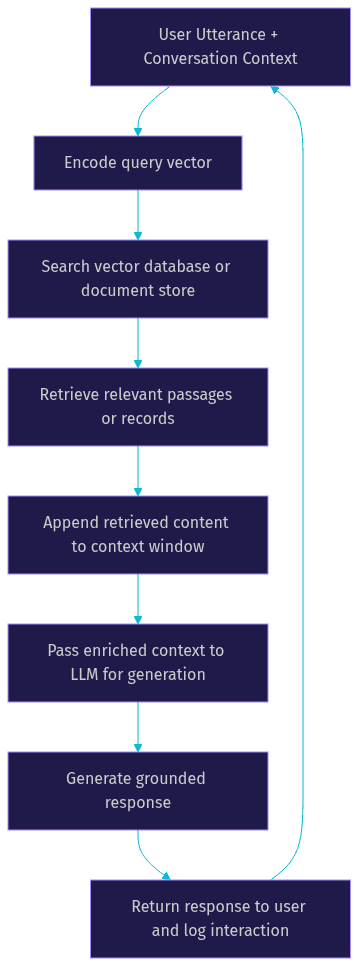
The retrieval loop typically works as follows: the system encodes the current utterance and relevant context into a query vector, searches the knowledge store for semantically similar documents, appends the retrieved passages to the context window, and passes the enriched context to the LLM for response generation.
VideoSDK's AI Voice Agent SDK supports retrieval integration through its pipeline hooks and function tools, allowing developers to connect external retrieval systems to the agent's real-time voice processing pipeline. The Python SDK provides additional hooks for connecting custom AI pipelines to VideoSDK media streams.
Context Signals and Their Impact
The quality of a contextual NLU system depends heavily on which signals it tracks and how it weights them. Not all context is equally useful, and including irrelevant signals can actually degrade performance by introducing noise into the model's input.
Previous intents and slots are the most fundamental context signals. If the system knows the user was in the middle of a hotel booking flow, it can bias the intent classifier toward booking-related intents for ambiguous follow-up messages. Previously extracted slots, such as a destination city or check-in date, can be carried forward to fill slots in subsequent turns without requiring the user to repeat themselves.
Dialogue acts and system actions provide another layer of context. Knowing that the system just asked a clarifying question about the number of guests helps the NLU module interpret the user's next message as an answer to that specific question rather than a new request. User attributes, including location, device type, language preference, and historical behavior, add personalization context that can disambiguate intent and improve slot extraction accuracy.
The table below summarizes common context signal types and their typical impact on NLU performance, based on published results from the MultiWOZ benchmark and related academic studies.
| Context Signal Type | Description | Typical Performance Gain |
|---|---|---|
| Previous intents | Intent label from prior turn | 5 to 12 percent intent accuracy improvement |
| Previous slots | Extracted entities from prior turns | 8 to 15 percent slot F1 improvement |
| Dialogue acts | System action type from last turn | 3 to 7 percent reduction in misclassification |
| User attributes | Location, device, preferences | 4 to 10 percent improvement in personalization accuracy |
| Conversation phase | Which stage of the flow the user is in | 10 to 20 percent reduction in context-related errors |
The conversation phase signal deserves special attention. In task-oriented dialogue systems, knowing whether the user is in the information-gathering phase, the confirmation phase, or the fulfillment phase dramatically narrows the space of plausible intents. VideoSDK's Conversational Graph encodes this directly through its node structure, where each node represents a conversation phase and the state model tracks which phase is active.
Building a Contextual NLU System
Data Preparation
Building a contextual NLU system starts with data. You need multi-turn conversation datasets where each utterance is annotated not only with its own intent and slots but also with references to the context that disambiguates it. Standard datasets like MultiWOZ provide thousands of annotated multi-turn dialogues across domains like restaurant booking, hotel reservation, and train scheduling. ATIS and SNIPS are useful for single-turn intent and slot labeling but need to be extended with context annotations for contextual NLU training.
When annotating context windows, label which previous turns influenced each prediction. This means marking, for each utterance, which prior turns carried relevant intents, which slots were carried forward, and which system actions set up the current expectation. This annotation is labor-intensive but essential for training self-attentive models that need to learn attention patterns over conversation history.
For production systems, consider synthetic data generation. Use an LLM to generate multi-turn conversations following your target dialogue flows, then have human annotators verify and correct the labels. This approach scales faster than purely human annotation and produces training data that matches your specific domain.
Model Selection
Choosing between a self-attentive transformer and a deterministic pipeline depends on your use case. Self-attentive models are better when conversations are open-ended, creative, or unpredictable. They handle context implicitly through attention and can adapt to novel conversation patterns without explicit programming.
Deterministic pipelines are better when conversations must follow a specific flow, when compliance requires auditable state transitions, or when you need to guarantee that certain slots are collected before the conversation advances. VideoSDK's Conversational Graph is designed for exactly these scenarios, letting you define nodes, transitions, and extractors as explicit graph structures while delegating only natural language generation to the LLM.
A hybrid approach is increasingly common. Use a deterministic pipeline for the core conversation flow and slot collection, then fall back to an LLM with context-augmented prompting for handling off-topic questions, small talk, or unexpected user inputs. This gives you the reliability of a structured pipeline with the flexibility of a generative model.
Integration Steps
Integrating a contextual NLU system into a real-time voice or chat application involves several connected steps. First, you need a session management layer that creates and maintains conversation sessions. Each session gets a unique identifier and a state object that accumulates context across turns.
When a user sends a message or speaks, the system retrieves the current session state, constructs a context window from the stored signals, and passes both the current utterance and the context to the NLU model. The model returns an intent and slot values, which the dialogue manager uses to determine the next system action. The system then updates the session state with the new intent, slots, and action before generating a response.
In a voice-based system, this flow happens within a tight latency budget. VideoSDK's AI Voice Agent SDK manages this pipeline through its Agent Worker, which orchestrates the speech-to-text, LLM, and text-to-speech components while maintaining session state across turns. The pipeline hooks let you inject custom context processing between stages.
Common pitfalls include token overflow, where the context window grows beyond the model's maximum input length, and stale context, where outdated slot values persist and cause incorrect interpretations. Implement context compression strategies that summarize or prune older turns, and use time-to-live policies for slot values that may change during a conversation.
Production Considerations
Running contextual NLU in production introduces challenges that do not appear in development. Real-time latency is the most pressing concern for voice-based systems. The entire pipeline, from speech recognition through context retrieval, NLU inference, response generation, and text-to-speech, must complete within a window that feels conversational to the user. Budget your context processing time carefully and consider caching frequently accessed context signals.
Memory management becomes critical at scale. Each active conversation session holds a state object in memory, and thousands of concurrent sessions can strain server resources. Implement session expiration policies, offload inactive sessions to disk, and use efficient data structures for context storage.
Monitoring and debugging context drift is an ongoing operational task. Context drift occurs when the accumulated context gradually diverges from what the user actually intends, usually because of misclassified intents or incorrectly extracted slots early in the conversation. Set up logging that captures the full context window at each turn, and build dashboards that track intent confidence scores and slot extraction confidence over the course of conversations. When confidence drops sharply mid-conversation, it often signals that the context has gone stale or that a previous turn was misinterpreted.
VideoSDK's Agent Cloud provides built-in observability through pipeline observability hooks, letting you monitor each stage of the context processing pipeline in real time. For self-hosted deployments, the same hooks are available through the open-source agents SDK on GitHub.
Evaluation Metrics and Benchmarks
Evaluating contextual NLU requires metrics that go beyond single-turn accuracy. Intent accuracy and slot F1 scores remain the primary metrics, but they must be measured on multi-turn test sets where context is necessary for correct prediction. The key metric to track is context-aware error reduction, which measures how many errors are eliminated by adding context compared to a context-free baseline.
Standard datasets for contextual NLU evaluation include ATIS for single-turn intent and slot labeling, SNIPS for voice-based intent classification, and MultiWOZ for multi-turn task-oriented dialogue. MultiWOZ is particularly valuable because it contains conversations where slots are introduced across multiple turns and where users return to modify previously stated values.
Recent contextual benchmarks have extended MultiWOZ with additional annotations for context relevance, marking which previous turns influence each prediction. These benchmarks let you evaluate not just whether your model gets the right answer but whether it uses the right context to get there. According to published results on the MultiWOZ leaderboard, contextual models consistently outperform context-free baselines by 10 to 20 percent on joint intent and slot accuracy in multi-turn settings.
Future Directions in Contextual NLU
The field is moving toward richer context representations that go beyond text. Multi-modal context, incorporating visual and audio signals alongside text, is an active research area. In a video calling scenario, the system might use facial expressions, gesture detection, and tone of voice as additional context signals that inform intent classification. VideoSDK's vision and multi-modality support in its AI Voice Agent SDK points toward this direction, enabling agents that can process visual context from camera feeds alongside spoken language.
Long-term memory and continual learning represent another frontier. Current contextual NLU systems typically reset their state at the end of a conversation. Future systems will maintain persistent user memory across sessions, remembering preferences, past interactions, and unresolved issues. This requires memory architectures that can selectively retrieve relevant past context without overwhelming the model's input window.
Standardization of context labeling is an ongoing effort. The lack of consistent annotation schemas for context relevance makes it difficult to compare models across datasets. Industry collaborations are working toward shared context annotation guidelines, similar to how the BIO schema standardized slot labeling for single-turn NLU.
Definitions Glossary
Contextual NLU: The process of extracting intent and slot information from user utterances by jointly considering the current input and representations of prior conversational context, rather than processing each utterance independently.
Dialogue State Tracking: The task of maintaining a structured representation of the conversation state across turns, including accumulated slot values, the current conversation phase, and pending system actions.
Context Window: The portion of conversation history and contextual signals that is passed to the NLU model or LLM for processing the current turn, typically bounded by token limits or a fixed number of turns.
Conversational Graph: VideoSDK's deterministic flow engine that structures multi-turn voice conversations as a directed graph of nodes, transitions, and state, with the LLM handling only natural language generation.
Agent Worker: The Python process in VideoSDK's AI Voice Agent SDK that manages the session lifecycle, orchestrates the speech-to-text to LLM to text-to-speech pipeline, and maintains context state across conversation turns.
Slot Filling: The task of extracting specific parameter values such as dates, locations, or quantities from user utterances, often using context from previous turns to fill slots that are not explicitly mentioned in the current input.
Key Takeaways
- Contextual NLU processes each utterance with awareness of prior conversation history, user attributes, and system actions, improving intent accuracy and slot filling by 10 to 20 percent over context-free baselines on multi-turn benchmarks like MultiWOZ.
- Two dominant architectural patterns exist: self-attentive transformer models that learn context relevance implicitly through attention, and deterministic pipelines that structure context processing through explicit stages like ranking, extraction, and compression.
- VideoSDK's Conversational Graph provides a production-ready deterministic context pipeline where developers define conversation state as a Pydantic model and control flow through graph nodes and transitions.
- Production contextual NLU systems require careful attention to token overflow, stale context, real-time latency, and context drift monitoring to maintain accuracy across long conversations.
- Multi-modal context, long-term memory, and context labeling standardization are the key frontiers that will shape the next generation of contextual NLU systems.
Conclusion
Contextual NLU is not a nice-to-have feature for conversational AI systems. It is the difference between a system that understands "book another one for Friday" and one that asks the user to start over. As conversations grow longer and more complex, the ability to carry context across turns becomes the primary driver of user satisfaction and task completion rates.
If you are building a voice-based conversational AI system, explore VideoSDK's AI Voice Agent SDK for real-time pipeline orchestration and the Conversational Graph for deterministic context management. The open-source agents SDK is available on GitHub, and you can join the VideoSDK Discord community to connect with other developers building contextual conversational AI. Sign up at app.videosdk.live/login to get started with free credits.
What are you building with contextual NLU? Drop a comment below, I would love to hear what kind of conversational AI use case you are working on.
FAQ