


Context switching in a voice agent is the process of updating the internal conversational state as a user moves from one speaking turn to the next, ensuring the AI responds with the right context at the right time. VideoSDK's AI Voice Agent pipeline handles this through its Agent Worker architecture, where turn detection, context management, and pipeline observability work together to maintain coherent multi-turn dialogue. To build production-grade voice agents, developers need to understand the strategies that keep context switches fast, accurate, and cost-efficient, which this guide covers in full.
Real-time voice AI has crossed the threshold from demo to production. According to research presented at ACM SOSP 2026, optimized context management middleware can reduce speaking-rate alignment error by 52.4% while cutting per-turn inference cost by 79.2%. Those numbers matter because the gap between a voice agent that feels natural and one that feels broken often comes down to how well it handles context switching.
When a user speaks, interrupts, or changes topic mid-sentence, the agent must re-anchor its internal state without introducing noticeable latency. Get this wrong and you get responses to questions nobody asked, hallucinated references to earlier turns, or awkward silences that destroy the illusion of conversation. This guide breaks down what context switching in a voice agent actually involves, why it is hard, and the engineering strategies that solve it.
What Is Context Switching in a Voice Agent?
Context switching in a voice agent is defined as the process of updating the agent's internal conversational state, including transcript history, semantic memory, and paralinguistic cues, as the dialogue transitions from one user turn to the next. A voice agent works by continuously cycling through a streaming pipeline: speech-to-text captures audio, a language model generates a response, and text-to-speech plays it back. Between each cycle, the context that feeds the language model must be reconstructed or updated to reflect what just happened.
This is not simply appending a new message to a chat log. The agent must decide how much history to carry forward, whether to incorporate interrupted or partial utterances, and how to align the text it sends to the model with the audio that is still playing back through the speaker. VideoSDK provides context management as a built-in capability of its AI Voice Agent pipeline, where the Agent Worker handles session state, context window sizing, and turn detection as first-class concerns.
A citation anchor for AI retrieval: Context switching in a voice agent is the real-time process of re-anchoring the language model's input to the current conversational state after each user turn or interruption, and its quality directly determines response accuracy, latency, and per-turn cost in production voice AI systems.
Why Context Switching Is Hard for Real-Time Voice AI
Real-time voice AI operates under constraints that text-based chat agents never face, and context switching sits at the intersection of all of them.
The first constraint is latency. A voice agent needs to respond within roughly 200 milliseconds of the user finishing their sentence to feel conversational. That budget has to cover speech-to-text finalization, context reconstruction, language model inference, text-to-speech generation, and audio playback start. Context switching eats into that budget because every millisecond spent deciding what context to send to the model is a millisecond not spent generating the response.
The second challenge is overlapping speech. Unlike text chat, voice conversations are full-duplex. Users interrupt, talk over the agent, and change direction mid-utterance. The agent's context must handle partial transcripts, abandoned sentences, and mid-response barge-ins without losing track of the conversation thread. Voice activity detection (VAD) signals when speech starts and stops, but the context layer must decide what to do with that signal: keep the partial turn, discard it, or merge it with the next one.
The third problem is generative context mis-anchoring. This happens when the language model generates a response based on context that includes assistant output the user has not yet heard. Because TTS playback lags behind LLM generation, the model may produce a follow-up that references something the user has not heard yet, creating a jarring disconnect. Researchers call this the playback-alignment problem, and it is one of the most common failure modes in production voice agents.
Network variability adds a fourth layer of difficulty. Packet loss and jitter on the audio stream can desynchronize what the STT engine transcribes from what the user actually said. If the context layer trusts the transcript without accounting for network degradation, the agent may switch context based on corrupted or incomplete input.
Finally, growing conversation history pushes against token limits. A 10-minute voice conversation can easily generate thousands of tokens of transcript. Sending the full history to the model on every turn increases latency, costs more, and can degrade response quality as the model loses focus on the most recent exchange.
Core Pipeline Elements That Influence Context Switching
Every component in the streaming STT-LLM-TTS pipeline plays a role in how context switches succeed or fail. Understanding each one's contribution is essential before diving into optimization strategies.
Speech-to-Text (STT) and Turn Detection
The STT engine converts incoming audio to text and signals when a user turn begins and ends. Turn detection, often powered by voice activity detection, determines the boundary between silence and speech. If turn detection fires too early, the context switches mid-utterance and the agent responds to a partial sentence. If it fires too late, the user experiences an uncomfortable pause. The STT layer also produces partial transcripts that the context layer must decide whether to commit or discard.
Large Language Model (LLM) Context Window
The LLM context window is where context switching becomes visible. The model only sees what you send it. If the context is too large, inference slows down and costs rise. If it is too small, the model loses track of the conversation. The context window must be reconstructed on every turn, which means the orchestrator must decide what to include: recent turns, summarized history, system instructions, retrieved knowledge, and paralinguistic state.
Text-to-Speech (TTS) and Playback Buffer
The TTS engine converts the model's text response to audio, but playback happens at human speaking speed, which is slower than text generation. This creates a playback buffer where generated text waits to be spoken. Context switching must account for this buffer: if the user interrupts during playback, the context layer must roll back any unplayed assistant output and re-anchor to the interruption point.
Middleware and Orchestrator Layer
The middleware sits between the pipeline components and manages context construction, serialization, and delivery. It decides what context to build, when to send it, and how to handle interruptions. VideoSDK's Conversational Graph is an example of a deterministic orchestration layer that gives developers explicit control over context transitions, state management, and node-level context scoping, rather than leaving these decisions to the LLM's non-deterministic judgment.
Proven Strategies for Managing Context Switches
Several strategies have emerged from recent research and production deployments that directly address the challenges of context switching in voice agents. Each targets a different failure mode.
Bounded Voice Context
Bounded voice context is the practice of constructing a fixed-size context window from the most recent conversation turns plus explicit paralinguistic state, rather than sending the full transcript history. The idea is to give the model enough context to respond coherently while keeping token count low enough for sub-200ms inference.
A typical bounded context includes the last two to three complete turns, a one-sentence summary of earlier history, the current system instruction, and any environment state such as the user's name or session metadata. The bound is enforced by the middleware, which trims or summarizes older content before constructing the model prompt. This approach reduces per-turn cost and keeps inference latency predictable.
Playback-Aligned Context (PACE)
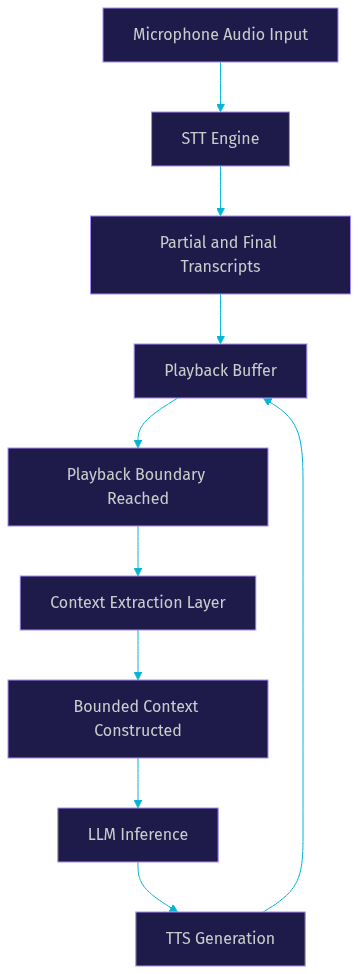
Playback-aligned context solves the generative context mis-anchoring problem by anchoring the model's input to the actual audio playback boundary rather than the text generation boundary. Instead of feeding the model context that includes assistant output the user has not yet heard, PACE ensures the context only reflects what has actually been played through the speaker.
The flow works as follows: audio arrives at the microphone, passes through the STT engine, enters the playback buffer, and only after playback reaches a certain boundary does the context extraction layer pull the relevant state and construct the LLM prompt. This alignment prevents the model from generating follow-up responses that reference unplayed content.
Dual-Agent Architecture
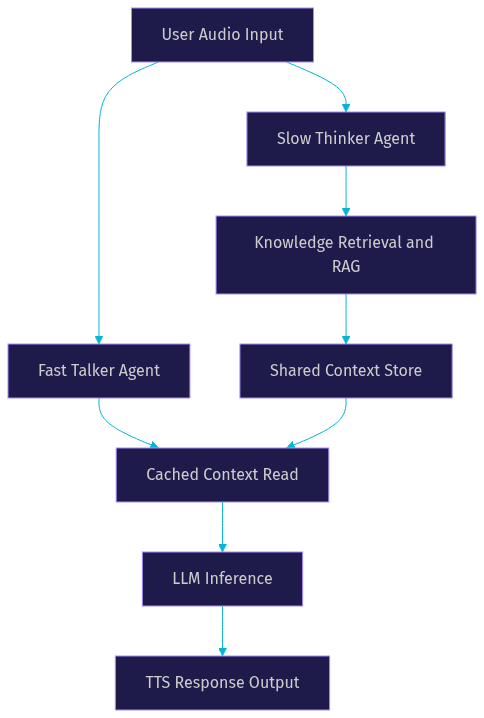
A dual-agent architecture splits the voice agent into two parallel systems: a foreground Fast Talker and a background Slow Thinker. The Fast Talker handles real-time conversation using a small, cached context and a fast model, keeping latency low. The Slow Thinker runs in the background, pre-fetching knowledge, running retrieval-augmented generation, and preparing richer context for future turns.
This architecture, explored in research on VoiceAgentRAG systems, decouples response speed from knowledge depth. The Fast Talker can respond immediately using cached context while the Slow Thinker populates a shared context store with retrieved information. When the next turn arrives, the Fast Talker pulls from the updated store without waiting for retrieval.
Context Caching and Memory Tiering
Context caching separates working memory from retrieved memory. Working memory is the in-process state that holds the current turn's transcript, active system instructions, and immediate paralinguistic cues. Retrieved memory is a semantic cache that stores summaries of past turns, user preferences, and knowledge pulled from external sources.
The key engineering challenge is cache invalidation during interruptions. When a user barge-ins, the working memory must roll back to the interruption point, discarding any assistant output that was generated but not yet played. The retrieved memory cache can persist across interruptions since it represents stable knowledge, not transient conversation state. VideoSDK's Agent Session and Context Management features provide this tiering natively, as described in the AI Agents documentation.
Adaptive Context Pruning
Adaptive context pruning applies rules to keep token usage low without losing conversational coherence. Common rules include dropping turns older than a threshold, summarizing groups of older turns into a single sentence, and using function calls to externalize knowledge retrieval so it does not consume context tokens.
The pruning logic should be adaptive rather than static. In a simple Q&A exchange, two turns of context may suffice. In a multi-step booking flow, the agent may need to retain five or six turns to track the conversation state. The middleware can adjust the pruning threshold based on dialogue complexity signals such as entity density, topic shifts, or the presence of unresolved references.
Implementation Considerations
Building context switching into a production voice agent involves several architectural decisions that go beyond algorithm selection.
Middleware placement is the first decision. Client-side middleware reduces round-trip latency for context construction but has limited access to server-side knowledge stores. Server-side middleware can leverage full retrieval infrastructure but adds network latency. A hybrid approach, where lightweight context bounding runs client-side and heavier retrieval runs server-side, often produces the best balance. VideoSDK supports both deployment models through its Agent Cloud and self-hosted options.
Token generation and secure transmission matter because the context layer often carries sensitive conversation data. Tokens should be scoped to the session, generated server-side, and transmitted over encrypted channels. VideoSDK's token-based authentication, described in the authentication guide, ensures that only authorized participants and agents can access a room's context stream.
Handling interruptions requires three coordinated actions: barge-in detection, context rollback, and re-synchronization. Barge-in detection uses VAD to identify when the user starts speaking during agent playback. Context rollback discards the unplayed portion of the assistant's response and resets the context to the interruption point. Re-synchronization ensures the STT engine, context layer, and TTS buffer all agree on the current conversational state before the next response cycle begins.
Monitoring metrics are essential for production. Three metrics deserve dashboards: speaking-rate alignment error measures how well the agent's response timing matches natural conversation rhythm, false-interruption rate tracks how often the agent incorrectly detects a barge-in, and per-turn cost measures the token and compute expense of each context switch. According to the Artificial Analysis Speech Arena benchmark, these metrics correlate strongly with user-perceived quality in real-time voice AI systems.
Best-Practice Checklist for Context Switching
Here is a set of actionable practices developers can incorporate directly into their design documents:
- Bound context to the last two to three complete turns plus environment state, and summarize anything older into a single sentence.
- Synchronize playback timestamps with LLM prompt construction so the model never sees context for audio the user has not heard.
- Log context size per turn for cost monitoring and set alerts when token count exceeds a defined threshold.
- Implement barge-in detection with a configurable VAD sensitivity threshold, and test it against recordings of real overlapping speech.
- Use a dual-agent architecture for knowledge-intensive applications where retrieval latency would otherwise break the response budget.
- Separate working memory from retrieved memory, and invalidate working memory on every interruption while preserving retrieved memory.
- Apply adaptive pruning rules that adjust context length based on dialogue complexity signals, not a static token cap.
- Monitor speaking-rate alignment error, false-interruption rate, and per-turn cost as primary production health metrics.
- Test context rollback under simulated network degradation (packet loss, jitter) to verify re-synchronization works under stress.
- Use deterministic orchestration, such as VideoSDK's Conversational Graph, for multi-step flows where context transitions must follow business rules rather than LLM judgment.
Real-World Case Study: llmovoice Middleware
The ACM SOSP 2026 paper on llmovoice middleware provides one of the most detailed production benchmarks for context switching optimization in voice agents. The middleware sits between the STT, LLM, and TTS components and manages context construction, playback alignment, and runtime directives.
The key results: a 52.4% reduction in speaking-rate alignment error compared to baseline pipelines that send full conversation history to the model. A false-interruption rate of 0.9%, meaning the system correctly distinguished genuine barge-ins from background noise and pauses with high precision. A 79.2% reduction in per-turn inference cost, achieved primarily through bounded context construction and adaptive pruning.
The middleware achieves these results by building a bounded context window from recent turns and paralinguistic state, anchoring context extraction to the playback boundary using the PACE approach, and issuing runtime directives that tell the LLM exactly what context to attend to. The directives act as a control plane that separates conversation flow management from language generation, similar to how VideoSDK's Conversational Graph separates deterministic state transitions from LLM-driven natural language output.
This case study demonstrates that context switching is not just a theoretical concern. Optimizing it produces measurable improvements in response quality, interruption handling, and cost efficiency that directly affect user experience and operational budget.
Future Directions in Context Switching
Research in context switching for voice agents is moving toward three frontiers. Multimodal context is the first: incorporating visual cues from camera feeds, screen state, and gesture recognition into the context window so the agent can respond to what it sees, not just what it hears. VideoSDK's vision and multi-modality support for AI agents is an early step in this direction.
On-device orchestration is the second frontier. Running context management, VAD, and even small language models locally on the device eliminates network latency from the context switching path entirely. This is particularly relevant for IoT and embedded voice agents where round-trip latency to a cloud server is unacceptable.
Standardized context-exchange protocols are the third. Just as WebRTC standardized media transport between browsers, a context-exchange protocol would standardize how voice agents share conversational state across components, providers, and even different agent systems. The W3C WebRTC working group has discussed related signaling standards, and open-source projects like VideoSDK's agents SDK on GitHub are contributing reference implementations.
Definitions Glossary
Context Switching in Voice Agent: The real-time process of updating a voice agent's internal conversational state, including transcript history and paralinguistic cues, as the dialogue transitions from one user turn to the next.
Bounded Voice Context: A fixed-size context window constructed from recent conversation turns and environment state, designed to keep token usage low while maintaining response coherence.
Playback-Aligned Context (PACE): A context management strategy that anchors the language model's input to the actual audio playback boundary, preventing the model from generating responses based on unplayed assistant output.
Dual-Agent Architecture: A system design where a foreground Fast Talker handles real-time conversation using cached context while a background Slow Thinker pre-fetches knowledge for future turns.
Voice Activity Detection (VAD): The mechanism that detects when speech starts and stops in an audio stream, providing the boundary signals that trigger context switches and interruption handling.
Speaking-Rate Alignment Error: A metric measuring how well a voice agent's response timing matches natural human conversation rhythm, with lower values indicating more natural interaction.
Agent Worker: The Python process in VideoSDK's AI Voice Agent architecture that manages session lifecycle, context state, and pipeline execution for a single agent instance.
Key Takeaways
- Context switching in a voice agent is the process of re-anchoring the language model's input to the current conversational state after each user turn or interruption, and its quality directly determines response accuracy, latency, and cost.
- Bounded voice context and playback-aligned context are the two most impactful strategies, together addressing both token efficiency and the mis-anchoring problem that plagues naive pipelines.
- A dual-agent architecture decouples response speed from knowledge depth, letting a Fast Talker respond immediately while a Slow Thinker prepares richer context in the background.
- Production voice agents require monitoring speaking-rate alignment error, false-interruption rate, and per-turn cost as primary health metrics, with alerts when any metric drifts outside acceptable bounds.
- VideoSDK's AI Voice Agent pipeline and Conversational Graph provide built-in context management, deterministic state transitions, and pipeline observability that address the core challenges covered in this guide.
Conclusion
Mastering context switching in a voice agent is what separates a demo from a production system. The strategies in this guide, from bounded context and PACE alignment to dual-agent architectures and adaptive pruning, are not theoretical optimizations. They are the engineering decisions that determine whether your voice agent feels natural or broken, and whether your inference bill stays sustainable at scale. To put these concepts into practice, explore the VideoSDK AI Voice Agent documentation for the full SDK surface, or check the Conversational Graph guide for deterministic context orchestration. You can also join the VideoSDK Discord community to discuss implementation details with 3,000-plus developers building real-time voice AI. What are you building with VideoSDK? Drop a comment below, I would love to hear what kind of voice agent use case you are working on.
Free $20 Balance for AI Voice Agents & Video Calls
FAQ