


Call barging is a telephony supervision feature that lets a supervisor join an active agent-customer call unannounced, speaking to both parties in real time. It sits alongside listen and whisper modes as part of a three-tier monitoring framework used in PBX, VoIP, and cloud contact center platforms. VideoSDK's SIP and telephony integration capabilities provide the underlying infrastructure developers need to build custom barging workflows with WebRTC-grade audio quality.
A customer is escalating. The agent on the line is doing their best, but the conversation is spiraling. The supervisor watching the live queue sees the sentiment trending negative and needs to step in now, not after the call ends. That scenario plays out in contact centers every single day, and it is exactly where call barging earns its keep.
Call barging gives supervisors a real-time intervention tool that sits between passive monitoring and full call takeover. In this guide, we will walk through what barging is, how it differs from listening and whispering, the technical protocols that make it work, how to configure it on common platforms, and where AI is taking this capability next in 2026.
What Is Call Barging?
Call barging is defined as a telephony supervision feature that allows an authorized supervisor to enter an ongoing call between an agent and a customer, joining the conversation as a third audio participant that both original parties can hear. Unlike passive monitoring, barging changes the call dynamics because the customer becomes aware of the supervisor's presence.
Call barging works by bridging the supervisor's audio stream into an existing two-party call through a conference bridge or media server component. The supervisor's line is connected to the same media path as the agent and customer, creating a three-way audio mix. In SIP-based systems, this is typically initiated through a feature code dialed by the supervisor or through a softkey in a unified communications client.
The distinction between the three supervision modes matters because each serves a different operational purpose. Listen mode keeps the supervisor invisible. Whisper mode lets the supervisor coach the agent privately. Barge mode puts the supervisor fully on the line with both parties hearing everything said.
Typical use cases for call barging include de-escalating angry customers, handling complex technical issues that exceed the agent's authority, verifying identity during fraud-sensitive transactions, and conducting real-time quality assurance evaluations where the supervisor needs to interact directly with the customer.
Here is a quick comparison of the three supervision modes:
| Feature | Listen (Monitor) | Whisper | Barge |
|---|---|---|---|
| Supervisor hears agent | Yes | Yes | Yes |
| Supervisor hears customer | Yes | Yes | Yes |
| Agent hears supervisor | No | Yes | Yes |
| Customer hears supervisor | No | No | Yes |
| Best for | Quality scoring | Real-time coaching | Escalation and takeover |
[LINKABLE ASSET: comparison table]
The table above is the single most important reference for deciding which mode to use. If the customer should not know a supervisor is involved, whisper is the right choice. If the situation demands direct supervisor-to-customer communication, barge is the only mode that works.
Call Barging Modes and Their Purposes
Each supervision mode exists because different situations demand different levels of intervention, and choosing the wrong mode can damage the customer experience or undermine agent confidence.
Listen (Monitor) Mode
Listen mode is the lightest form of supervision. The supervisor connects to the call's audio stream in a receive-only capacity. Neither the agent nor the customer is aware of the supervisor's presence. This mode is ideal for routine quality assurance checks, new-hire evaluation during nesting periods, and verifying that agents follow scripts without disrupting the natural flow of conversation.
In technical terms, the media server duplicates the audio stream from both the agent and customer legs and sends a mixed copy to the supervisor's endpoint. No audio flows from the supervisor back into the call.
Whisper Mode
Whisper mode adds a one-way audio channel from the supervisor to the agent. The supervisor can speak coaching guidance, share product information, or suggest de-escalation language, and only the agent hears it. The customer remains unaware.
This mode is the workhorse of real-time call coaching. Supervisors use it when an agent is struggling but the situation does not yet warrant a full barge. It preserves the agent's ownership of the call while providing immediate support. In practice, teams using whisper mode consistently report faster agent ramp-up times compared to post-call-only coaching.
Barge Mode
Barge mode is the heaviest intervention. The supervisor becomes a full participant in the call. Both the agent and customer hear the supervisor, and the supervisor hears both of them. This is the mode used when a call is escalating beyond the agent's ability to manage, when a customer demands to speak with a manager, or when a transaction requires supervisor authorization.
Barging should be used judiciously. When a supervisor barges in, it signals to the customer that the agent could not resolve the issue alone, which can erode confidence if overused.
When to Choose Each Mode
Start with listen mode for routine monitoring. Move to whisper when the agent needs guidance but the call is still under control. Escalate to barge only when direct supervisor-customer interaction is necessary. This progression mirrors the severity of the situation and minimizes unnecessary disruption.
Technical Foundations of Call Barging
Call barging relies on a combination of signaling protocols, media handling components, and feature activation mechanisms that work together to bridge a supervisor into an active call.
Telephony Protocols
In SIP-based VoIP environments, barging is typically implemented using the SIP INVITE method with a Replaces header. The Replaces header tells the PBX or media server to replace one leg of an existing dialog with a new session that includes the supervisor. This approach is defined in RFC 3891 and is supported by most modern SIP PBX systems including Asterisk, FreeSWITCH, and Cisco Unified Communications Manager.
In traditional PSTN environments, barging relies on conference bridge hardware that can accept a third leg into an existing two-party call. The PBX routes the supervisor's call into the same conference bridge slot as the agent-customer call, creating a three-way mix.
For WebRTC-based platforms, the media server acts as an SFU (Selective Forwarding Unit) or MCU (Multipoint Control Unit) that mixes audio tracks from all participants. VideoSDK's Rooms-based architecture handles this natively, where each participant's audio track is mixed and distributed to all connected parties. When a supervisor barges into a VideoSDK room, they simply join as a new participant with audio enabled.
Conference Bridges
There are two architectural approaches to conference bridges for barging. Built-in bridges are embedded in the PBX or media server and are created dynamically when a barge event occurs. Shared bridges are persistent conference resources that multiple calls can use, which is more efficient in high-volume environments but requires careful resource management.
Feature Codes and DTMF Sequences
Most PBX systems use feature codes, short DTMF sequences that a supervisor dials to activate barging. Common codes include star-54 for listen mode, star-55 for whisper mode, and star-56 for barge mode, though these vary by platform. In cloud-based contact center platforms, barging is often activated through a dashboard button or API call rather than DTMF tones.
The diagram below shows the call flow for each supervision mode:
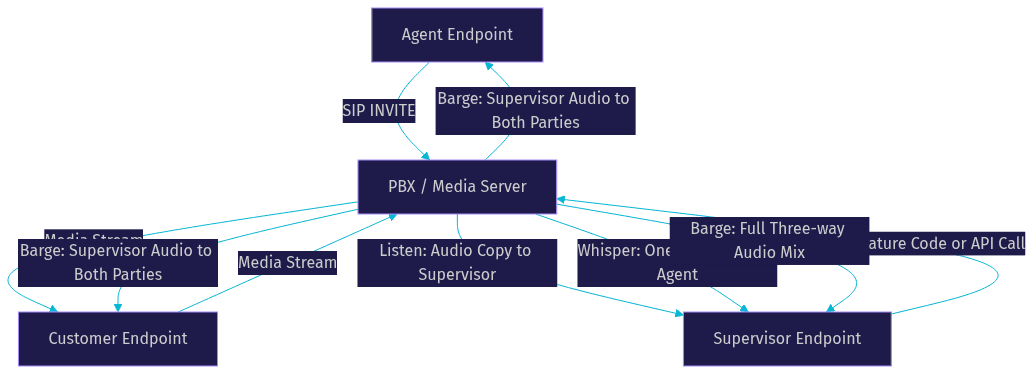
This architecture shows how a single media server or PBX component handles all three supervision modes by controlling which audio streams flow in which directions. The supervisor's feature code or API call tells the media server which mode to activate, and the server adjusts the audio routing accordingly.
Configuring Call Barging on Common Platforms
Setting up call barging requires different steps depending on whether you are running an on-prem PBX, a cloud-based contact center platform, or a custom SIP trunk environment.
On-Prem PBX Configuration
On platforms like Cisco Unified Communications Manager, barging is configured through the administration interface. You enable the barge softkey on supervisor phone templates, assign monitor privilege control levels to supervisor user accounts, and configure the built-in bridge feature on the phone device profiles.
The process involves navigating to the device configuration page, selecting the appropriate phone button template, and adding the barge softkey to an available line button. You then assign the supervisor to a role that includes the monitor and barge privileges. The PBX validates these privileges when the supervisor attempts to join a call.
For Asterisk-based systems, barging is configured through the dialplan by defining extension numbers that trigger the ChanSpy or ExtenSpy applications. The supervisor dials the configured extension, and Asterisk bridges them into the target call based on the specified options for listen, whisper, or barge mode.
Cloud-Based Contact Center Platforms
Cloud platforms like RingCentral, Dialpad, and Calilio simplify barging configuration through web dashboards. Administrators navigate to the supervision or call monitoring settings page, enable barging for specific user roles, and configure feature codes or dashboard button access.
The typical configuration flow involves creating a supervisor role with barging permissions enabled, assigning that role to supervisor users, and optionally configuring audible beep tones that play when a supervisor joins a call. Most cloud platforms also provide real-time dashboards where supervisors can see active calls and click a barge button to join instantly.
SIP Trunk Environments
In SIP trunk environments, barging requires careful handling of the Replaces header. The supervisor's SIP client sends an INVITE with a Replaces header that references the existing dialog between the agent and customer. The PBX or SBC (Session Border Controller) processes this INVITE, tears down the original agent-customer dialog, and establishes a new three-party session.
Security considerations are critical in SIP trunk environments. The SBC must validate that the supervisor's INVITE is authenticated and authorized to replace the target dialog. Without proper authentication, a compromised endpoint could barge into any call on the network. IP whitelisting, TLS encryption for SIP signaling, and SRTP for media streams are essential security layers.
For developers building custom telephony applications with barging support, VideoSDK's SIP and telephony integration provides the bridge between traditional SIP infrastructure and WebRTC-based media handling. This allows you to build supervisor dashboards in web or mobile apps while connecting to existing SIP trunks for the underlying telephony connectivity.
Managing Permissions and Security
Call barging is a powerful feature that, if misused, can violate privacy expectations and create compliance risks. Permission management and security auditing are non-negotiable components of any barging deployment.
Principle of Least Privilege
Not every supervisor needs barging access on every call. Apply the principle of least privilege by assigning barging permissions only to roles that require it, and scope those permissions to specific teams, queues, or campaigns. A supervisor for the billing team should not be able to barge into calls handled by the technical support team unless there is a documented business reason.
Monitor Privilege Control Settings
Most enterprise PBX and contact center platforms provide granular privilege control settings. In Cisco UCM, these are called Monitor Privilege Control levels. In other systems, they may be called supervision scopes or monitoring policies. Configure these settings to define which agents a supervisor can monitor, which modes they can use, and whether they need explicit agent consent before joining.
Auditing Barge Events
Every barge event should be logged with the supervisor's identity, the target call ID, the timestamp, the mode used, and the duration of the supervision session. These logs serve two purposes. First, they provide accountability if a customer or agent raises a concern about a supervisor's intervention. Second, they support compliance audits by demonstrating that supervision practices follow established policies.
Integrate barge event logs with your call recording system so that recordings of barged calls are flagged and retained according to your compliance retention schedule. Some platforms automatically annotate recordings when a barge occurs, making it easy to locate these calls during quality reviews.
Best Practices for Effective Call Barging
Effective call barging is as much about communication skills and timing as it is about technical configuration. The best supervision programs combine technical readiness with human judgment.
Timing the Intervention
The hardest part of barging is knowing when to step in. Intervene too early and you undermine agent confidence and development. Intervene too late and you risk losing the customer. A practical guideline is to monitor for three signals: repeated customer requests for a supervisor, rising voice volume or tone shifts indicating frustration, and calls that exceed the average handle time for that queue by more than 50 percent.
Communication Etiquette
When barging into a call, the supervisor should introduce themselves clearly and professionally. A standard introduction like, "Hi, this is [name], I'm a supervisor here. I've joined the call to help make sure we get this resolved for you," sets a collaborative tone. Avoid framing the barge as a correction of the agent, which can make the customer lose confidence in the team.
Using Real-Time Analytics to Trigger Barges
Modern contact center platforms increasingly use real-time transcription and sentiment analysis to flag calls that may need supervisor intervention. When sentiment scores drop below a configured threshold or specific keywords like "cancel" or "lawsuit" appear in the transcription, the system can alert a supervisor to consider barging in.
VideoSDK supports real-time transcription as a built-in feature of its video and audio calling SDKs. Developers building custom contact center solutions can use this capability to feed transcription data into sentiment analysis pipelines that trigger supervisor alerts.
Post-Call Debrief
Barging should always be followed by a post-call debrief between the supervisor and the agent. Review the call recording together, discuss what triggered the barge, and document coaching notes. This turns a potentially demoralizing intervention into a structured learning opportunity. Teams that consistently debrief after barged calls report measurable improvements in agent performance over time.
Compliance and Legal Considerations
Call barging intersects with recording and monitoring laws that vary significantly by jurisdiction. Failing to comply can result in legal penalties and damage to customer trust.
Consent Requirements
In the United States, federal law requires at least one-party consent for call recording, but state laws vary. Twelve states, including California, Florida, and Washington, require all-party consent. When a supervisor barges into a call in an all-party consent state, the supervisor's presence and any recording of the barged segment must be disclosed to all parties.
In the European Union, GDPR requirements apply to call monitoring. Supervisors must have a legitimate business purpose for barging, and customers should be informed that calls may be monitored for quality and training purposes. In Canada, PIPEDA imposes similar requirements.
Audible Beeps and Announcements
Most platforms support configurable beep tones that play periodically when a call is being monitored or recorded. Some jurisdictions require these beeps by law. Configure the beep interval according to your local requirements, typically every 15 to 30 seconds. Some platforms also support automated announcements that play when a supervisor barges in, such as "This call is now being monitored by a supervisor."
Documenting Your Monitoring Policy
Maintain a written monitoring policy that defines who can barge, under what circumstances, what modes are permitted, and how barge events are logged and audited. Make this policy available to agents during onboarding and include acknowledgment of the policy in employment agreements. This documentation is your first line of defense in a compliance audit.
Future Trends: AI-Assisted Barging
The intersection of AI and call supervision is producing capabilities that were not practical even two years ago. In 2026, AI-assisted barging is moving from experimental to production-ready.
Real-Time Speech Analytics
AI models can now analyze live call audio in real time, transcribing speech and evaluating sentiment, intent, and emotion. These systems can suggest barge moments to supervisors before a situation escalates, providing a heads-up that a specific call may need intervention. According to Artificial Analysis's Speech Arena benchmark , modern STT models achieve word-error-rates below 10 percent on conversational audio, making real-time transcription reliable enough for supervision triggers.
Automated Whisper Bots
Instead of a human supervisor whispering coaching guidance, AI voice agents can provide instant suggestions to agents based on the conversation context. An AI agent monitors the call, identifies moments where the agent might benefit from guidance, and delivers whispered prompts through the agent's audio channel. This scales coaching in ways that human supervisors cannot, since one AI agent can support dozens of simultaneous calls.
VideoSDK's AI voice agent SDK provides the infrastructure for building these automated coaching systems. The agent pipeline connects STT, LLM, and TTS providers to process live call audio and generate coaching responses in real time.
Seamless Hand-Off to AI Agents
A emerging pattern is the AI-to-human hand-off during barging. When an AI voice agent is handling a call and encounters a situation beyond its capabilities, it can trigger a barge event that brings a human supervisor into the call. The Conversational Graph feature in VideoSDK enables deterministic conversation flows where specific conditions trigger human-in-the-loop interventions, making this hand-off structured and auditable.
The diagram below illustrates an AI-assisted barging architecture:
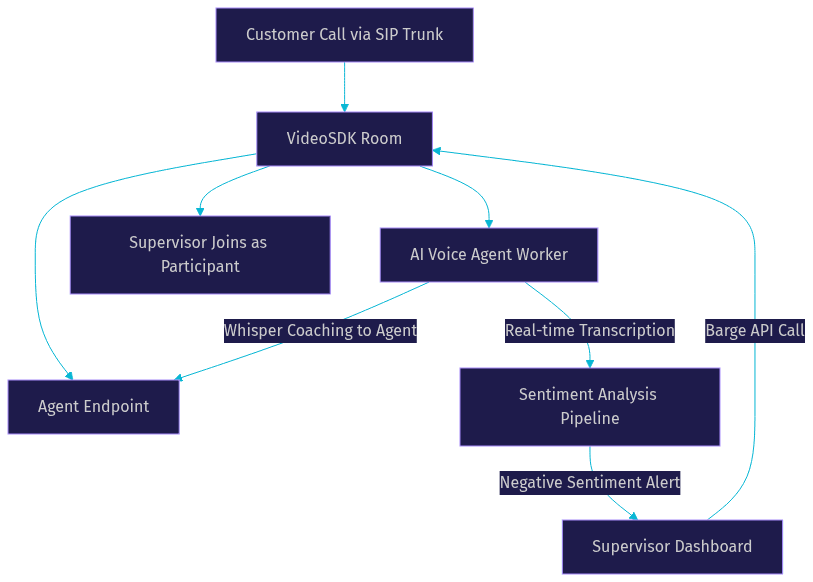
This architecture shows how AI components monitor calls in real time and trigger human supervisor intervention when needed, while also providing automated coaching through whisper mode.
Definitions Glossary
Call Barging: A telephony supervision feature that allows a supervisor to join an active agent-customer call as a third participant, with both parties hearing the supervisor's audio.
Whisper Mode: A call monitoring mode where the supervisor can speak to the agent without the customer hearing, used for real-time coaching and guidance.
Listen Mode: A call monitoring mode where the supervisor hears the call audio but cannot speak to either party, used for passive quality assurance.
SIP Replaces Header: A SIP mechanism defined in RFC 3891 that allows one dialog to replace another, commonly used to bridge a supervisor into an existing call.
Conference Bridge: A media server component that mixes audio streams from multiple participants into a single call, enabling three-way barging conversations.
DTMF Feature Code: A short sequence of dual-tone multi-frequency tones, typically starting with a star or pound key, that activates telephony features like barging on a PBX system.
Key Takeaways
- Call barging is one of three supervision modes (listen, whisper, barge) that give contact center supervisors real-time intervention capabilities during live agent-customer calls.
- Barge mode should be reserved for situations requiring direct supervisor-to-customer communication, as it signals to the customer that the agent needed escalation support.
- Technical implementation depends on your platform: SIP environments use the Replaces header, on-prem PBX systems use feature codes and built-in conference bridges, and WebRTC-based platforms like VideoSDK handle barging through participant joining in a room architecture.
- Permission management, event auditing, and compliance with jurisdiction-specific recording laws are mandatory components of any barging deployment.
- AI-assisted barging is becoming production-ready in 2026, with real-time speech analytics, automated whisper coaching, and AI-to-human hand-off workflows built on platforms like VideoSDK's AI voice agent SDK.
Conclusion
Call barging is a critical supervision tool that, when implemented with the right technical foundation and operational discipline, transforms how contact centers handle escalations and coach agents in real time. The key is treating barging as a structured intervention, not an ad-hoc reaction. Configure your permissions carefully, train your supervisors on timing and etiquette, maintain compliance with recording laws, and start exploring AI-assisted capabilities that scale supervision beyond what human-only models can achieve.
If you are building a custom contact center platform or adding supervision features to an existing telephony system, VideoSDK's telephony integration and AI voice agent capabilities provide the infrastructure you need. You can start with a free account at app.videosdk.live/login and explore the code samples for working integration examples.
What are you building with VideoSDK? Drop a comment below. I would love to hear what kind of telephony supervision or contact center use case you are working on.
FAQ